The Learning Mechanism, Traced By Hand
- Time
- ~128 min
- Sections
- 14
- Code cells
- 46
- Labs
- 6
- Figures
- 10
Before you start
You become the optimiser. With a network of just nine numbers and four training examples, you compute
the forward pass, the loss, every gradient and one parameter update, all by hand. Then PyTorch reproduces
your arithmetic exactly. After this lesson, loss.backward() is no longer magic: it is five steps you have done yourself.
- Goal
Trace every step from input to updated parameter, computing each number yourself.
- Outcome
You can answer the day's competency question — what happens between giving data to a neural network and the model improving? — and defend every step of your answer with arithmetic you performed. When
loss.backward()appears in Lesson 1.3, you will know exactly what it did, because you will have done it first.- You will be able to
- explain neuron, weights, bias, activation, layer and parameter, precisely;
- count the parameters in a network from its shape alone;
- compute a forward pass by hand and verify it in code;
- explain why a non-linearity is structurally necessary, not a stylistic choice;
- explain loss as a differentiable signal of wrongness;
- interpret a gradient as a local slope, and say what its sign and magnitude mean;
- read a computational graph and explain what it stores;
- perform backpropagation by hand as credit assignment through that graph;
- execute one parameter update and predict its effect on the loss;
- explain what the learning rate controls and what happens at both extremes.
Setup — imports, versions and device detection used by the notebook (1 cells)
NumPy only for the first eleven sections. PyTorch appears once, in Section 12, purely as a referee.
# numpy>=2.0 matplotlib>=3.8 torch>=2.4import numpy as npimport matplotlib.pyplot as pltnp.set_printoptions(precision=4, suppress=True)SEED = 42print("numpy", np.__version__)try: import torch dev = "cuda" if torch.cuda.is_available() else ("mps" if torch.backends.mps.is_available() else "cpu") print(f"torch {torch.__version__} -> device: {dev}")except ImportError: print("torch not installed — install it before Section 12: pip install torch")numpy 2.3.5 torch 2.14.0 -> device: mps
Anatomy of a neuron and a network
Strip away the vocabulary and a neuron does two things in sequence.
First it computes a weighted sum of its inputs and adds a bias:
You have seen this before. It is a linear model. If you stopped here, a neuron would be exactly the logistic regression that failed in Lesson 1.1.
Second, it passes that sum through an activation function:
That second step is the entire difference, and Section 4 shows why removing it destroys the network.
The vocabulary, precisely:
| Term | What it actually is |
|---|---|
| Weight \(w\) | A learned number scaling one input. How much this input matters to this neuron. |
| Bias \(b\) | A learned number added regardless of input. Shifts the threshold at which the neuron activates. |
| Pre-activation \(z\) | The weighted sum before the activation. Sometimes called the logit at the output layer. |
| Activation \(a\) | The neuron's output after \(f\). This is what the next layer receives. |
| Layer | A group of neurons applied to the same input, computed together as one matrix multiply. |
| Parameter | Any number the model learns — every weight and every bias. |
| Hyperparameter | Any number you choose — learning rate, layer widths, number of epochs. |
The last distinction matters more than it looks. Parameters are found by gradient descent. Hyperparameters are found by you, by experiment, and getting them wrong is the most common reason a training run fails. That is Module 3.
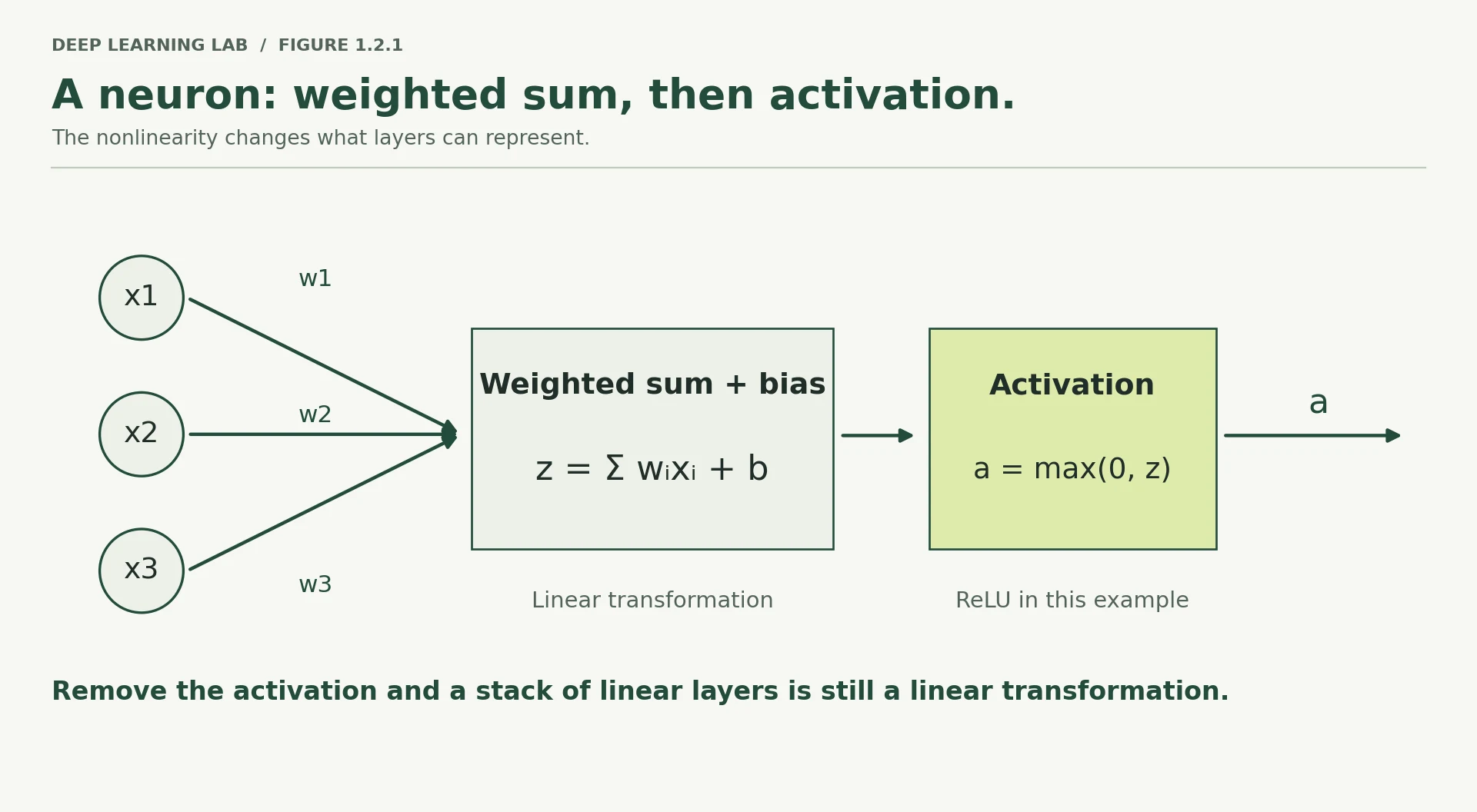
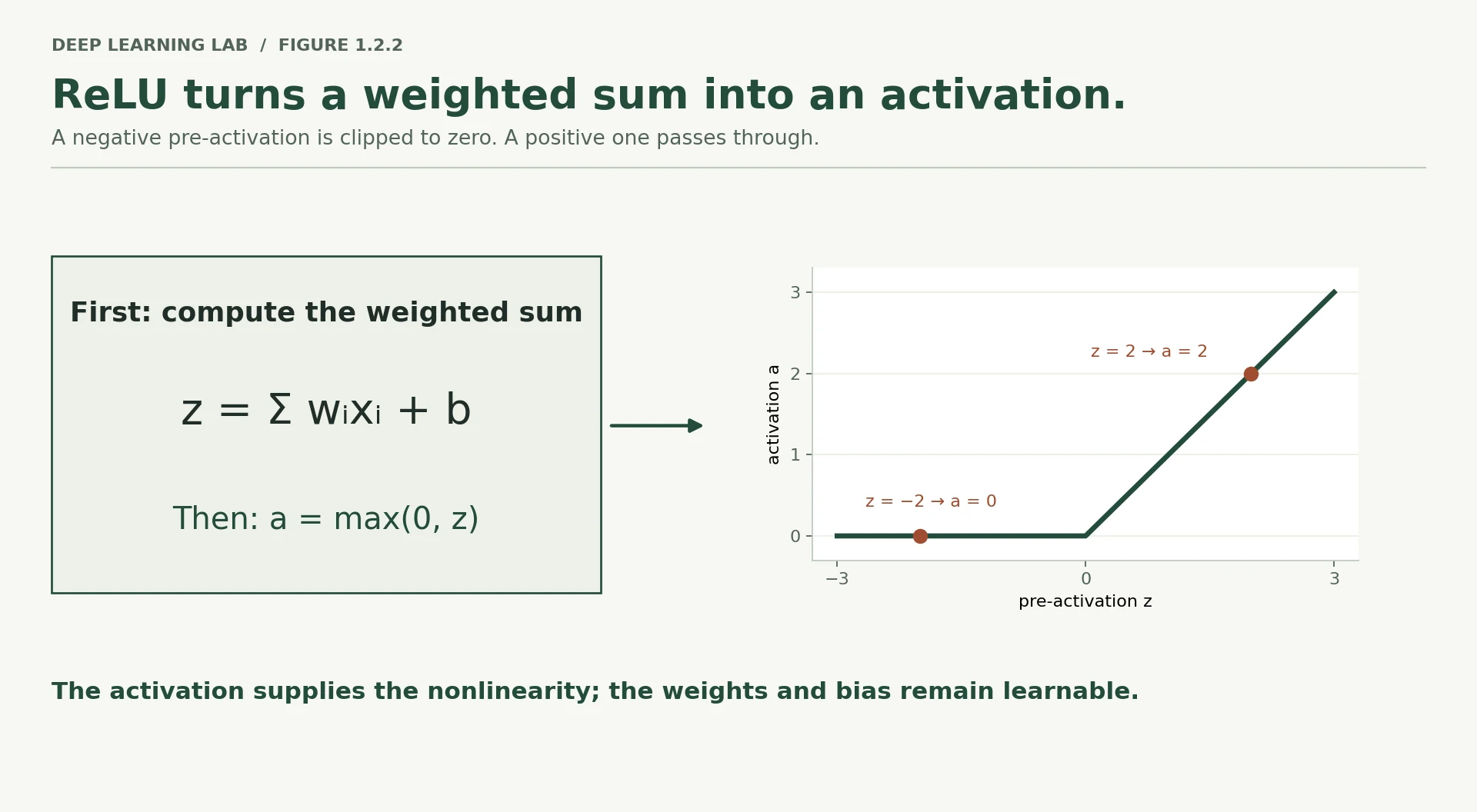
-
What would a neuron with no bias be unable to represent?
Without a bias, \(z = w_1x_1 + w_2x_2\) is always 0 when the input is 0, so the neuron's switching line \(z=0\) must pass through the origin. It can rotate the line but never shift it. It cannot represent "fire only when \(x_1 > 2\)", or produce a non-zero output for an all-zero input. The bias is the intercept, the neuron's own threshold. Try it in the playground: moving b slides the dashed line.
-
If two neurons in the same layer receive identical inputs, what makes their outputs differ?
Their weights (and biases). Each neuron has its own weight vector, so it computes a different weighted sum of the same inputs, much like two people scoring the same exam with different marking schemes. This is also why weights are initialised randomly: if two neurons started with identical weights they would receive identical gradients and stay identical forever (the symmetry problem).
-
Why is the learning rate a hyperparameter rather than a parameter? What would go wrong if we learned it by gradient descent the same way we learn weights?
A parameter describes the function the model computes. The learning rate describes how training moves through parameter space; it is not part of the model at all. If you learned it by naive gradient descent on the training loss, you would chase whatever makes the next step look best, which is unstable (it tends to grow until training diverges) and ignores what we actually care about: good results on validation data. So we choose it by experiment (Module 3's LR range test), or let an optimiser like Adam adapt the effective step per parameter around a learning rate we still set. (Research on "hypergradients" does learn learning rates, but carefully and on a different signal.)
Which of these is a hyperparameter rather than a parameter?
Parameters (every weight and bias) are found by gradient descent. Hyperparameters such as the learning rate, layer widths and epochs are chosen by you, by experiment. \(z\) is a computed value, not something learned or chosen.
What would a neuron with no bias be unable to do?
The bias is added regardless of the input, so it moves the point at which the neuron switches on. Without it, every decision boundary must pass through the origin.
Describe the two steps every neuron performs, and say which step makes it more than logistic regression.
- Step 1: a weighted sum of the inputs plus a bias, \(z = w \cdot x + b\) (a linear model).
- Step 2: an activation function, \(a = f(z)\).
- The non-linear activation is what makes a network more than a single linear model.
Counting parameters
Here is the network we will use for the rest of this lesson. It is deliberately the smallest thing that is still genuinely a neural network.
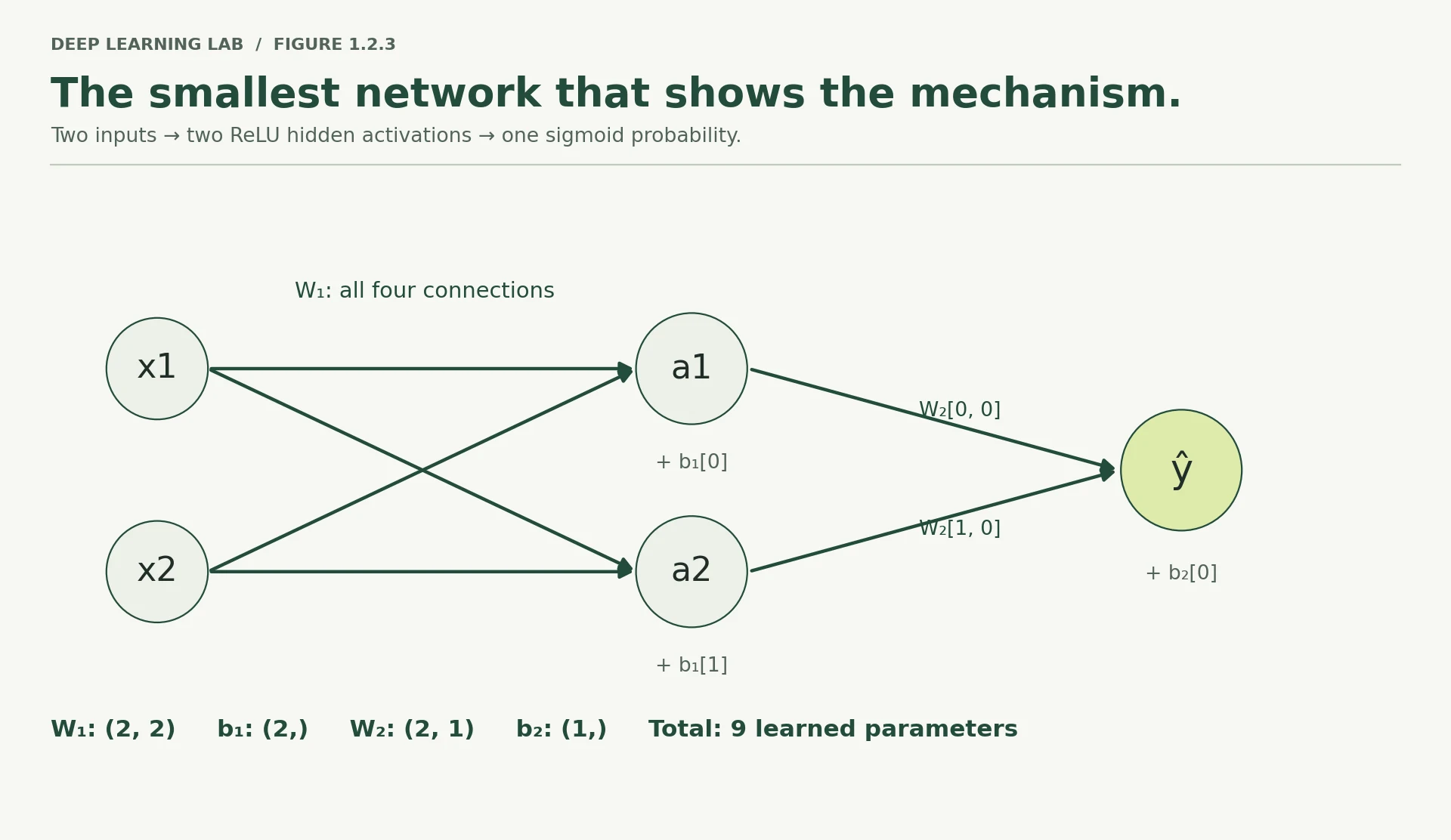
Two inputs, two hidden neurons, one output. Let us count what it has to learn.
Every layer of shape (inputs → outputs) contributes inputs × outputs weights plus outputs biases.
- Input to hidden: \(2 \times 2 = 4\) weights, plus 2 biases = 6
- Hidden to output: \(2 \times 1 = 2\) weights, plus 1 bias = 3
- Total: 9 parameters.
Nine numbers. That is the entire model. Everything in this lesson is about how those nine numbers change.
For contrast, the spiral network in Lesson 1.1 had 4,417, and a modern language model has somewhere between a billion and a trillion. The arithmetic below is identical in all three cases. Only the count changes.
((2*64) + 64) + ((64*64)+64) + ((64*1)+1)4417
def count_params(layer_sizes): """Count and print the parameters of a fully connected network. Every layer that maps ``n_in`` inputs to ``n_out`` outputs holds ``n_in × n_out`` weights (one per connection) plus ``n_out`` biases (one per output neuron). The function prints one row per layer and a total. Args: layer_sizes: Layer widths from input to output, e.g. ``[2, 2, 1]`` for two inputs, a hidden layer of two neurons and one output. Returns: The total number of trainable parameters (weights + biases). Example: >>> count_params([2, 2, 1]) # prints a table 9 """ total = 0 print(f"{'layer':<18}{'weights':>10}{'biases':>9}{'subtotal':>11}") print("-" * 48) for i in range(len(layer_sizes) - 1): n_in, n_out = layer_sizes[i], layer_sizes[i + 1] w, b = n_in * n_out, n_out total += w + b print(f"{f'{n_in} -> {n_out}':<18}{w:>10,}{b:>9,}{w + b:>11,}") print("-" * 48) print(f"{'TOTAL':<18}{'':>10}{'':>9}{total:>11,}") return totalCounts the parameters of a fully connected network from its layer widths and prints a table, one row per layer.
- 1
A network with widths
[a, b, c]has two layers of connections: a→b and b→c. - 2
Every input connects to every output (
n_in × n_outweights), and each output neuron has one bias.
print("Our network:")count_params([2, 2, 1])Our network: layer weights biases subtotal ------------------------------------------------ 2 -> 2 4 2 6 2 -> 1 2 1 3 ------------------------------------------------ TOTAL 9
9
print("\nThe spiral network from Note 1.1:")count_params([2, 64, 32,16,8, 1])The spiral network from Note 1.1: layer weights biases subtotal ------------------------------------------------ 2 -> 64 128 64 192 64 -> 32 2,048 32 2,080 32 -> 16 512 16 528 16 -> 8 128 8 136 8 -> 1 8 1 9 ------------------------------------------------ TOTAL 2,945
2945
A network with layers [784, 512, 256, 10] classifies 28×28 images. Roughly how many parameters does it have?
535,818. Layer by layer: \(784\times512+512 = 401{,}920\), then \(512\times256+256 = 131{,}328\), then \(256\times10+10 = 2{,}570\). The first layer dominates (75% of all parameters) because it multiplies the two largest numbers: 784 inputs × 512 units. That is typical: the widest connections, usually where raw inputs enter, hold most of the parameters.
count_params([784, 512, 256, 10])layer weights biases subtotal ------------------------------------------------ 784 -> 512 401,408 512 401,920 512 -> 256 131,072 256 131,328 256 -> 10 2,560 10 2,570 ------------------------------------------------ TOTAL 535,818
535818
-
A network with layers
[784, 512, 256, 10]classifies 28×28 images. Predict the parameter count before runningcount_params([784, 512, 256, 10]). Which single layer dominates, and why?535,818 parameters. The first layer, \(784\times512 + 512 = 401{,}920\), is about 75% of the total, because it connects the most inputs (784 pixels) to the widest layer (512 units), and a fully connected layer's cost is the product of its two sizes. That is why the first layer on raw inputs is usually the most expensive, and why architectures like convolutions (which share a small set of weights across the image) were invented.
How many parameters does a fully connected layer from 64 inputs to 32 outputs have?
Weights: \(64 \times 32 = 2{,}048\). Biases: one per output, 32. Total \(2{,}080\).
For the network [784, 512, 256, 10], which layer holds most of the parameters?
\(784 \times 512 \approx 401{,}000\) weights, far more than \(512 \times 256 \approx 131{,}000\). The widest input to the widest layer dominates.
Forward propagation, computed by hand
Now we fix actual numbers. Four training examples, two features each, binary labels. The initial weights below are not random — they are chosen so the arithmetic is easy to follow.
# Four examples, two features eachX = np.array([[ 0.5, -1.0], [ 1.5, 0.5], [-1.0, 1.0], [ 0.0, -0.5]])# Their true labelsy = np.array([[1.0], [1.0], [0.0], [0.0]])Xarray([[ 0.5, -1. ],
[ 1.5, 0.5],
[-1. , 1. ],
[ 0. , -0.5]])
yarray([[1.],
[1.],
[0.],
[0.]])
# Layer 1: 2 inputs -> 2 hidden neuronsW1 = np.array([[0.50, -0.20], # column 0 -> hidden neuron 1, column 1 -> hidden neuron 2 [0.30, 0.80]])b1 = np.array([[0.10, -0.15]])[['w11', 'w12'], ['w21', 'w22']][['w11', 'w12'], ['w21', 'w22']]
# Layer 2: 2 hidden -> 1 outputW2 = np.array([[ 0.70], [-0.40]])b2 = np.array([[0.20]])print("X shape", X.shape, "| W1 shape", W1.shape, "| W2 shape", W2.shape)print("total parameters:", W1.size + b1.size + W2.size + b2.size)X shape (4, 2) | W1 shape (2, 2) | W2 shape (2, 1) total parameters: 9
Do this by hand before running the next cell. Take the first example, \(x = [0.5, -1.0]\), and compute the pre-activation of hidden neuron 1:
Now do hidden neuron 2 yourself. Its weights are the second column of W1: \(-0.20\) and \(0.80\), with bias \(-0.10\).
You should get \(z_2 = 0.5 \times (-0.20) + (-1.0) \times 0.80 + (-0.15) = -0.10 - 0.80 - 0.15 = -1.05\).
Next, apply ReLU, which is simply \(f(z) = \max(0, z)\) — pass positives through unchanged, clamp negatives to zero. So \(a_1 = 0.05\) and \(a_2 = 0.00\).
Notice what just happened to hidden neuron 2. Its pre-activation was negative, so ReLU clamped it to exactly zero. For this example it contributes nothing at all to the prediction — and, as you will see in Section 8, no gradient will flow back to it through this example either. That is not a malfunction. It is ReLU behaving as designed, and it is why deep networks are sparser than they look.
def relu(z): """Rectified Linear Unit: ``max(0, z)``, applied element-wise. Positive values pass through unchanged and negative values become exactly 0. It is the non-linearity that stops stacked layers collapsing into one linear layer. Args: z: NumPy array of pre-activations, any shape. Returns: Array of the same shape with every negative entry replaced by 0. """ return np.maximum(0, z)def sigmoid(z): """The logistic sigmoid ``1 / (1 + e^(-z))``, applied element-wise. Squashes any real number into the interval (0, 1), so the output layer's value can be read as a probability of class 1. Args: z: NumPy array of logits (pre-activations), any shape. Returns: Array of the same shape with values strictly between 0 and 1. """ return 1.0 / (1.0 + np.exp(-z))# ---- forward pass, all four examples at once ----Z1 = X @ W1 + b1 # (4,2) @ (2,2) + (1,2) -> (4,2) broadcasting adds the bias to every rowA1 = relu(Z1) # (4,2)Z1array([[ 0.05, -1.05],
[ 1. , -0.05],
[-0.1 , 0.85],
[-0.05, -0.55]])
A1array([[0.05, 0. ],
[1. , 0. ],
[0. , 0.85],
[0. , 0. ]])
Z2 = A1 @ W2 + b2 # (4,2) @ (2,1) + (1,1) -> (4,1)A2 = sigmoid(Z2) # (4,1) final probabilitiesA2array([[0.5585],
[0.7109],
[0.4651],
[0.5498]])
print("Z1 (pre-activation, hidden layer)\n", Z1)print("\nA1 (after ReLU) — note the zeros\n", A1)print("\nZ2 (pre-activation, output)\n", Z2)print("\nA2 (predicted probability of class 1)\n", A2)print("\ny (truth)\n", y)Z1 (pre-activation, hidden layer) [[ 0.05 -1.05] [ 1. -0.05] [-0.1 0.85] [-0.05 -0.55]] A1 (after ReLU) — note the zeros [[0.05 0. ] [1. 0. ] [0. 0.85] [0. 0. ]] Z2 (pre-activation, output) [[ 0.235] [ 0.9 ] [-0.14 ] [ 0.2 ]] A2 (predicted probability of class 1) [[0.5585] [0.7109] [0.4651] [0.5498]] y (truth) [[1.] [1.] [0.] [0.]]
Check the first row against your hand calculation. Z1[0] should read [0.05, -1.05], and A1[0] should read [0.05, 0.00].
The final column is the model's opinion. Example 1 should be class 1 and the model says about 0.56 — right side of the fence, but barely. Example 4 should be class 0 and the model puts it above 0.5, which is simply wrong. Three of four correct, by something close to luck. This network knows nothing yet, which is precisely what we are about to fix.
Two details worth naming, because both will bite you later:
Why sigmoid at the output but ReLU in the hidden layer? Different jobs. The output must be a probability, so it needs squashing into \((0, 1)\). Hidden units have no such requirement — they just need to be non-linear, and ReLU is faster and better behaved during training.
Why do all four examples go through at once? Because X @ W1 is one matrix multiplication instead of four separate ones. That is the entire reason GPUs matter to deep learning: this shape of computation parallelises almost perfectly. Lesson 1.3 makes this concrete.
Two activations, two jobs
Only needs to be non-linear. ReLU is cheap to compute, and its gradient is exactly 1 wherever it is active, so gradients pass through undamped.
Must produce a probability between 0 and 1 for a binary label, so it squashes \(z\) with \(\sigma(z)=1/(1+e^{-z})\).
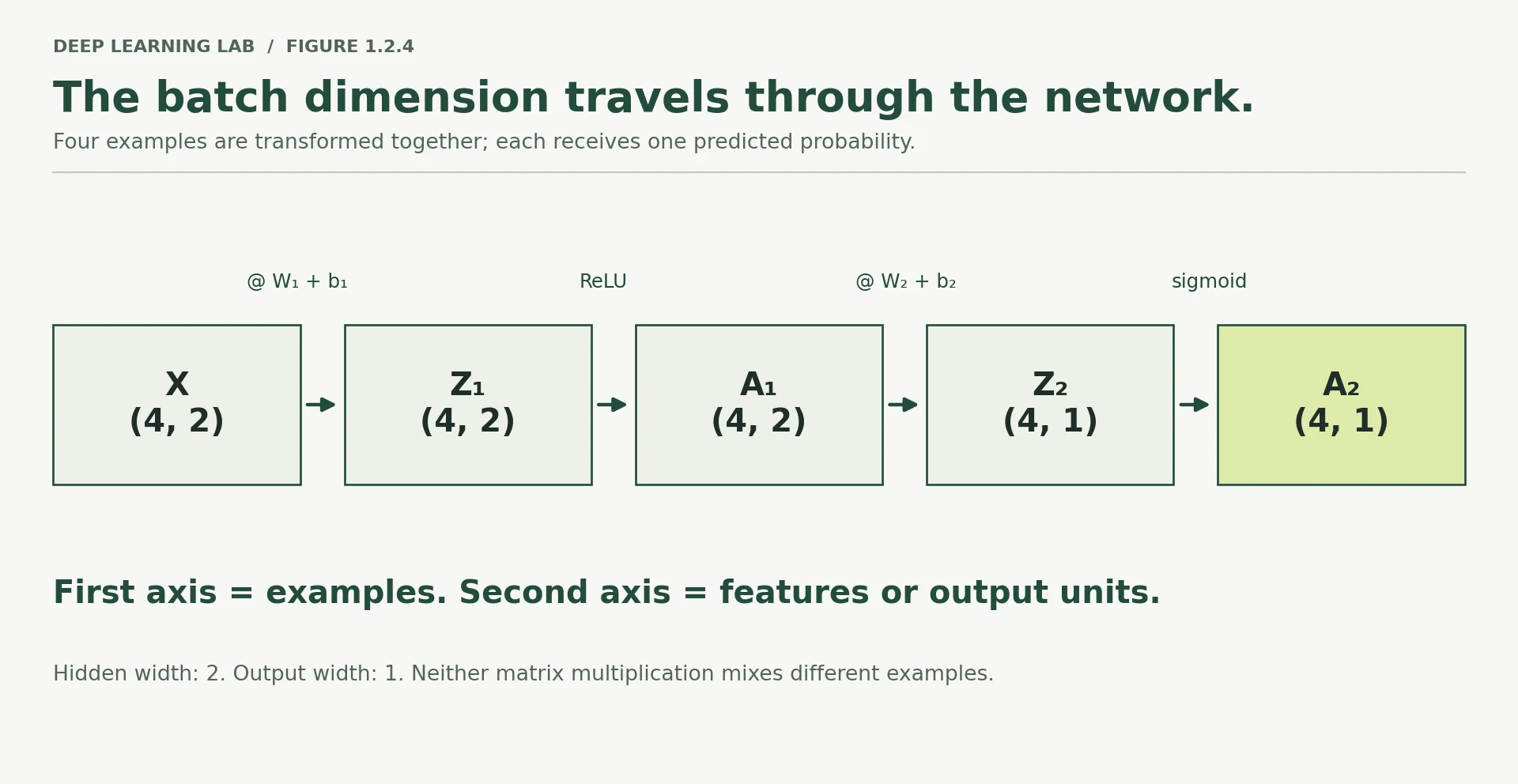
-
If you added a fifth training example, which shapes in the diagram change and which stay fixed?
Only the batch dimension changes.
Xbecomes 5×2,Z1/A1become 5×2,Z2/A2become 5×1 andybecomes 5×1. The parameters stay fixed:W1(2×2),b1(1×2),W2(2×1),b2(1×1). The model's size never depends on how many examples you feed it. -
Hidden neuron 2 output zero for example 1. For which other examples does it also output zero? Check
A1.Looking at
A1, column 2 (hidden neuron 2) is[0, 0, 0.85, 0]. It outputs zero for examples 1, 2 and 4 and is active only for example 3 (\(z=0.85\)). That is why its gradients in Section 6 are small: it only takes part in one of the four predictions. -
What would
A2look like if every weight were zero?If every weight is zero but the biases stay:
A1 = relu(b1) = [0.10, 0]for every example, then \(z_2 = 0 + b_2 = 0.2\), so every prediction is \(\sigma(0.2) = 0.5498\). If the biases are zero too, every prediction is \(\sigma(0) = 0.5\). Either way the model outputs the same value for every input; it ignores the data completely. (And with all-zero weights, gradient descent struggles to break the tie, which is another reason we initialise randomly.)
For the first example, hidden neuron 2 has \(z_2 = -1.05\). After ReLU, what does it pass to the output layer?
ReLU is \(\max(0, z)\), so a negative pre-activation becomes exactly 0. For this example the neuron contributes nothing, and (as §8 shows) receives no gradient either.
Why does the network use sigmoid at the output but ReLU in the hidden layer?
Different jobs: the output has to be squashed into a probability; hidden units just need non-linearity, and ReLU is cheaper and better behaved during training.
Why do we push all four examples through as one matrix multiply, X @ W1, instead of one at a time?
- The whole batch is one matrix multiplication with the same weights, which gives the same numbers as four separate passes.
- That shape of computation parallelises almost perfectly, which is exactly why GPUs matter for deep learning.
Why non-linearity is not optional
It is tempting to view the activation function as a detail — a tweak that helps a bit. It is not. Without it, depth is worthless, and the reason is a two-line piece of algebra.
Suppose we drop ReLU, so each layer is purely linear. Then:
Look at the right-hand side. \(W_1 W_2\) is just some matrix. \(b_1 W_2 + b_2\) is just some vector. So the whole two-layer network collapses into \(XW' + b'\) — a single linear layer. Stack fifty such layers and it still collapses to one.
That is the punchline: a network with no activation function, however deep, is exactly as expressive as logistic regression. It would fail on the spirals for precisely the reason Lesson 1.1 failed. Let us verify it numerically rather than take it on faith.
# Path A: two linear layers, no activationlinear_two_layer = (X @ W1 + b1) @ W2 + b2# Path B: collapse them algebraically into ONE layer, then apply itW_collapsed = W1 @ W2 # (2,2) @ (2,1) -> (2,1)b_collapsed = b1 @ W2 + b2 # (1,2) @ (2,1) + (1,1) -> (1,1)linear_one_layer = X @ W_collapsed + b_collapsedprint("two linear layers:\n", linear_two_layer)print("\none equivalent layer:\n", linear_one_layer)print("\nidentical?", np.allclose(linear_two_layer, linear_one_layer))print("\nWith ReLU in between (cannot be collapsed):\n", relu(X @ W1 + b1) @ W2 + b2)two linear layers: [[ 0.655] [ 0.92 ] [-0.21 ] [ 0.385]] one equivalent layer: [[ 0.655] [ 0.92 ] [-0.21 ] [ 0.385]] identical? True With ReLU in between (cannot be collapsed): [[ 0.235] [ 0.9 ] [-0.14 ] [ 0.2 ]]
Identical to floating-point precision. The depth bought nothing.
The third output is different — and it is different because ReLU zeroed some values, which is an operation no single matrix can reproduce. That small act of clipping is what makes the composition irreducible, and therefore what makes depth meaningful.
The blueprint for this course warns against turning it into a taxonomy of activation functions, so we will not tour them. What you need in 2026 is short: ReLU and its close relatives (GELU, SiLU) for hidden layers; sigmoid for a binary output; softmax for multi-class output. Modern Transformers overwhelmingly use GELU or SiLU internally, which are smoothed versions of the same idea. You will meet them again in Module 6.
-
Explain in one sentence to a colleague why stacking linear layers is pointless.
"Two linear layers multiply out to one linear layer, \((XW_1)W_2 = X(W_1W_2)\), so without an activation in between, extra depth adds parameters but no new ability."
-
ReLU is not differentiable at exactly zero. Does that break gradient descent? What do you think frameworks do about it?
No. The input is exactly 0 essentially never with real-valued data, and when it is, frameworks simply pick a value for the derivative: PyTorch uses 0 at \(z = 0\) (the gradient is
1where \(z > 0\), else0). Mathematically this is a valid subgradient, and in practice gradient descent works perfectly well with it. -
If ReLU outputs zero for a neuron on every training example, what can that neuron ever learn? (This has a name — "dying ReLU" — and it returns in Module 3.)
Nothing, from then on. Its output is 0 on every example, so its local derivative is 0 on every example: no gradient reaches its incoming weights and bias, so they never change and the neuron stays "dead". It contributes nothing and cannot recover by itself. Causes include large learning rates and bad initialisation; Module 3 (Lesson 3.3) shows how to detect and prevent it.
A 50-layer network has no activation functions. How expressive is it?
\((XW_1 + b_1)W_2 + b_2 = X(W_1W_2) + (b_1W_2 + b_2)\): linear layers compose into one linear layer, however many you stack.
Explain to a colleague, in one or two sentences, why stacking linear layers without activations is pointless.
- A linear layer followed by a linear layer is algebraically just one linear layer (\(W' = W_1W_2\), \(b' = b_1W_2 + b_2\)).
- So depth adds nothing; the non-linearity (e.g. ReLU clipping) is what makes the composition irreducible and depth meaningful.
Loss: a differentiable signal of wrongness
The model has produced its predictions. Some are correct; some are wrong.
But for the model to improve, we need a way to measure how wrong it is.
More precisely, we need that wrongness expressed as a single number that changes smoothly as the model’s parameters change.
Both parts of that requirement matter.
A single number, because gradient descent needs one quantity to minimise. It needs a clear answer to the question: “How good or bad is the model right now?”
Smoothly, because gradient descent improves the model by making tiny adjustments to its parameters. We need to know how a tiny change in a weight affects that number. If the number changes smoothly, we can calculate a slope and use it to determine which direction to move.
This is why we do not optimise accuracy directly.
Imagine changing a weight by 0.0001. The model's accuracy will probably stay exactly the same. Change the weight a little more, and eventually one prediction may cross a decision boundary. Accuracy suddenly jumps.
So accuracy can look like:
flat → flat → flat → sudden jump
There is no useful slope telling gradient descent which direction to move.
Instead, we use a loss function.
Accuracy tells us how many predictions were correct. Loss tells us how well the model's predictions matched the true answers, while providing a smooth quantity that gradient descent can optimise.
So remember:
Accuracy is something we use to evaluate and report performance. Loss is what we use to train the model.
For binary classification, one of the most common loss functions is binary cross-entropy (BCE).
At first, the formula can look intimidating. But we can understand it by looking at one prediction at a time.
If the true label is 1, the loss asks:
How much probability did the model give to class 1?
Predict 0.99 when the answer is 1, and the loss is very small.
Predict 0.01, and the loss is very large.
When the true label is 0, the same idea works in reverse.
Predict 0.01, and the loss is very small.
Predict 0.99, and the loss is very large.
The important idea is this:
The more confidently the model is wrong, the more heavily the loss punishes it.
An uncertain wrong prediction is bad.
A confident wrong prediction is much worse.
That gives gradient descent a useful, smoothly changing number to work with as it adjusts the model's parameters.
# The shape of the penaltyp = np.linspace(0.001, 0.999, 400)fig, ax = plt.subplots(figsize=(6.5, 3.4))ax.plot(p, -np.log(p), label="true label = 1", color="#3b6ea5")ax.plot(p, -np.log(1 - p), label="true label = 0", color="#d1701c")ax.set_xlabel("predicted probability of class 1"); ax.set_ylabel("loss contribution")ax.set_title("Confident and wrong is expensive"); ax.legend(); ax.set_ylim(0, 5)plt.tight_layout(); plt.show()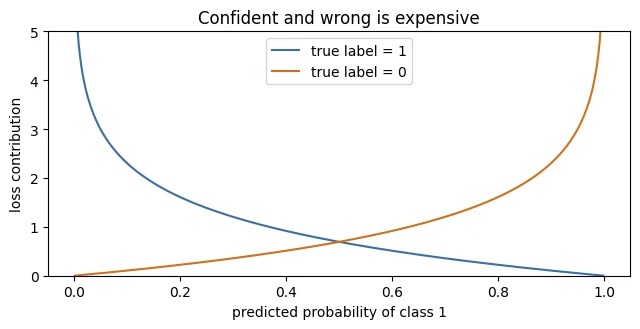
def bce(y_true, y_pred, eps=1e-12): """Mean binary cross-entropy between labels and predicted probabilities. For each example the loss is ``-[y·log(p) + (1 - y)·log(1 - p)]``: small when the model gives high probability to the true label, very large when it is confident and wrong. The result is the average over all examples. Args: y_true: Array of true labels, 0 or 1. y_pred: Array of predicted probabilities, same shape as ``y_true``. eps: Tiny margin used to clip predictions away from exactly 0 and 1, because ``log(0)`` is minus infinity. Returns: The mean loss as a single float. """ y_pred = np.clip(y_pred, eps, 1 - eps) # guard against log(0) return -np.mean(y_true * np.log(y_pred) + (1 - y_true) * np.log(1 - y_pred))yarray([[1.],
[1.],
[0.],
[0.]])
A2array([[0.5585],
[0.7109],
[0.4651],
[0.5498]])
loss = bce(y, A2)print("per-example loss:", np.round(-(y * np.log(A2) + (1 - y) * np.log(1 - A2)).ravel(), 4))print(f"mean loss: {loss:.6f}")print(f"accuracy: {((A2 > 0.5) == (y > 0.5)).mean():.2f}")per-example loss: [0.5825 0.3412 0.6256 0.7981] mean loss: 0.586856 accuracy: 0.75
The per-example losses show where the model is hurting most. Example 4 is the worst offender — the model says 0.55 for something that should be 0.
-
What is the loss if the model predicts exactly the right label with total confidence on all four examples?
Zero (in the limit). A perfect, fully confident prediction gives \(-\log(1) = 0\) for every example. In code, the clipping makes predictions at most \(1-10^{-12}\), so the loss comes out as about \(10^{-12}\): effectively 0.
-
Why do we clip predictions away from 0 and 1 inside
bce? What breaks otherwise?Because \(\log(0) = -\infty\). A prediction of exactly 0 for a positive example (or exactly 1 for a negative one) would make the loss infinite, and then the gradients and every parameter would become
inf/NaNand training would be ruined. In float arithmetic a sigmoid can round to exactly 0.0 or 1.0 for large \(|z|\), so this really happens. Clipping keeps the loss finite. (PyTorch'sBCEWithLogitsLossavoids the problem more elegantly; see Section 12.) -
Accuracy here is 0.75 and loss is 0.585. Suppose after training accuracy stays at 0.75 but loss drops to 0.40. Did the model improve?
Yes. The same number of predictions are on the right side of 0.5, but they are more confident when right and/or less confident when wrong, so the probabilities are better. That matters: well-ranked, well-calibrated probabilities are what you need for thresholds, costs and decisions (Module 4). Accuracy is too coarse to see this improvement; loss sees it.
Why do we train on loss rather than directly on accuracy?
Nudging a weight usually leaves accuracy unchanged until a prediction crosses the boundary. Loss changes smoothly, so it has a slope to follow.
After training, accuracy stays at 0.75 but the loss falls from 0.59 to 0.40. What happened?
Loss rewards probabilities closer to the true labels. Predictions can get better (and safer) without crossing the 0.5 threshold.
In two sentences, explain the different jobs of loss and accuracy.
- Loss is a single, smooth measure of how well predictions match the truth; gradient descent needs it to train.
- Accuracy counts correct predictions; it is what we report and evaluate, but it has no useful slope to train on.
Gradients as local slope
We now have one number that tells us how wrong the model is: the loss.
The next question is the heart of deep learning:
If I change one parameter by a tiny amount, does the loss go up or down, and by how much?
That is what the gradient tells us.
There is nothing mysterious about it. The gradient of the loss with respect to a parameter, such as a weight \(w\), tells us the local slope of the loss as we change that parameter while keeping everything else fixed.
Think of the parameter as a knob.
We turn the knob slightly and ask:
Did the loss get better or worse? And how strongly did it change?
The gradient gives us two important pieces of information:
-
The sign tells us the direction. A positive gradient means increasing the parameter makes the loss increase, so gradient descent moves the parameter in the opposite direction. A negative gradient means increasing the parameter decreases the loss, so gradient descent moves it upward.
-
The magnitude tells us how steep the slope is. A large gradient means a small change in that parameter produces a relatively large change in the loss. A gradient close to zero means the loss barely changes when we nudge that parameter.
So, in simple terms:
The gradient tells us which way to move a parameter and how strongly that parameter should be adjusted.
From Gradient to Gradient Descent
Now we can put the idea into an equation.
The basic gradient descent update is:
Don't let the notation make this look more complicated than it is.
- \((w)\) is the parameter we are updating.
- \((L)\) is the loss.
- \((\frac{\partial L}{\partial w})\) is the gradient: how the loss changes when we change \(w\).
- \((\eta)\) is the learning rate: how big a step we take.
The most important part is the minus sign.
We subtract the gradient because the gradient points in the direction where the loss increases. Gradient descent wants to move in the opposite direction, toward a lower loss.
For example, if:
the gradient is positive, so we decrease \(w\).
If:
the gradient is negative, so subtracting it causes \(w\) to increase.
The learning rate controls how far we move.
A large learning rate takes bigger steps. A small learning rate takes smaller steps.
So the whole process can be reduced to one simple idea:
Look at the slope, move in the opposite direction, and control the size of the step with the learning rate.
And we don't actually need calculus to understand the basic idea.
We can estimate the gradient by brute force.
Take a weight \(w\). Add a tiny amount \((\epsilon)\) to it. Recalculate the loss. Compare the new loss with the original loss.
If the loss changed a lot, the slope is steep. If it barely changed, the slope is shallow. Whether the loss went up or down tells us the direction of the slope.
This is called a finite-difference estimate.
In practice, neural networks use calculus-based methods such as backpropagation to calculate gradients efficiently across millions or even billions of parameters. But finite differences remain extremely useful: engineers use them to check that their gradient calculations are correct.
So the big picture is:
Loss tells us how wrong we are. The gradient tells us how changing each parameter affects that wrongness. Gradient descent uses the gradient to decide which direction to move and the learning rate to decide how far.
def forward_loss(W1, b1, W2, b2): """Run the full forward pass on the lesson's four examples and return the loss. Hidden layer: ``relu(X @ W1 + b1)``; output: ``sigmoid(A1 @ W2 + b2)``; then the mean binary cross-entropy against ``y``. It uses the global ``X`` and ``y`` so that it can be called with different parameter values to probe the loss surface. Args: W1: Hidden-layer weights, shape ``(2, 2)``. b1: Hidden-layer biases, shape ``(1, 2)``. W2: Output weights, shape ``(2, 1)``. b2: Output bias, shape ``(1, 1)``. Returns: The mean loss as a float. """ A1 = relu(X @ W1 + b1) A2 = sigmoid(A1 @ W2 + b2) return bce(y, A2)base = forward_loss(W1, b1, W2, b2)eps = 1e-5# Probe ONE parameter: W2[0,0], the weight from hidden neuron 1 to the outputW2_up = W2.copy(); W2_up[0, 0] += epsslope = (forward_loss(W1, b1, W2_up, b2) - base) / epsprint(f"loss now : {base:.6f}")print(f"loss after nudging W2[0,0] by 1e-5: {forward_loss(W1, b1, W2_up, b2):.6f}")print(f"estimated slope dL/dW2[0,0] : {slope:+.6f}")print()direction = "DECREASE" if slope > 0 else "INCREASE"print(f"The slope is {'positive' if slope > 0 else 'negative'}, so increasing this weight")print(f"{'increases' if slope > 0 else 'decreases'} the loss. To reduce loss we should {direction} it.")loss now : 0.586856 loss after nudging W2[0,0] by 1e-5: 0.586855 estimated slope dL/dW2[0,0] : -0.077781 The slope is negative, so increasing this weight decreases the loss. To reduce loss we should INCREASE it.
# Probe every parameter the same brute-force waydef numerical_gradients(W1, b1, W2, b2, eps=1e-5): """Estimate every gradient by brute force (finite differences). For each of the nine parameters in turn, nudge it by ``eps``, re-run the whole forward pass and measure how much the loss changed: ``(L(w + eps) - L(w)) / eps``. Slow (one extra forward pass per parameter) but independent of backpropagation, which makes it the standard way to *check* hand-written gradients. Args: W1: Hidden-layer weights, shape ``(2, 2)``. b1: Hidden-layer biases, shape ``(1, 2)``. W2: Output weights, shape ``(2, 1)``. b2: Output bias, shape ``(1, 1)``. eps: Size of the nudge. Too large measures the average slope over a wide range; too small loses precision to floating-point round-off. Returns: A dict ``{"W1": ..., "b1": ..., "W2": ..., "b2": ...}`` holding, for every parameter, an array of the same shape with its estimated gradient. """ grads = {} for name, P in [("W1", W1), ("b1", b1), ("W2", W2), ("b2", b2)]: g = np.zeros_like(P) for idx in np.ndindex(P.shape): up = P.copy(); up[idx] += eps kwargs = {"W1": W1, "b1": b1, "W2": W2, "b2": b2} kwargs[name] = up g[idx] = (forward_loss(**kwargs) - forward_loss(W1, b1, W2, b2)) / eps grads[name] = g return gradsnum_grads = numerical_gradients(W1, b1, W2, b2)for k, v in num_grads.items(): print(f"dL/d{k}\n{v}\n")dL/dW1 [[-0.1145 0.0465] [ 0.052 -0.0465]] dL/db1 [[-0.1278 -0.0465]] dL/dW2 [[-0.0778] [ 0.0988]] dL/db2 [[0.0711]]
Our brute-force experiment has now given us a gradient for every parameter.
In this small network, that means nine numbers: one gradient for each parameter. Together, they tell us how the loss responds to changing every part of the model.
You can think of the collection of gradients as a map of the local landscape:
For every parameter, which direction should we move, and how strongly does it affect the loss?
Now look at the two columns of dL/dW1.
The second column, which corresponds to the weights of hidden neuron 2, has noticeably smaller gradients than the first.
We can explain this by looking back at A1 from Section 3.
Hidden neuron 2 was activated on only one of the four examples. On the other three examples, ReLU output zero. That means neuron 2 contributed nothing to those three predictions, so changing its weights cannot affect the loss for those examples.
Hidden neuron 1, on the other hand, was active on two of the four examples, so its weights had more opportunities to influence the predictions and, therefore, the loss.
This gives us an important idea:
A neuron that contributed nothing to a prediction cannot receive blame for that prediction's error.
That is credit assignment beginning to appear directly in the numbers, even before we formally define the term.
So why not just use numerical gradients?
At this point, you might reasonably ask:
If we can calculate gradients this way, why do we need backpropagation?
The problem is the cost.
Our numerical method works by changing one parameter at a time, running the entire forward pass again, and measuring how much the loss changes.
For this tiny network, nine parameters require roughly nine additional forward passes.
That is manageable for a toy example.
But imagine a neural network with one billion parameters.
Using this method would require roughly one billion forward passes for a single training step.
That is computationally impractical.
Backpropagation solves this problem in a fundamentally more efficient way. Instead of separately probing every parameter, it uses the chain rule of calculus to calculate the gradients of all the parameters together, in roughly the computational cost of one forward pass plus one backward pass.
That efficiency is not merely a nice optimisation.
Backpropagation is one of the fundamental reasons we can train modern deep neural networks at all.
Our brute-force numerical method is therefore useful for something different: understanding what a gradient means and verifying that our backpropagation implementation is producing the right answers.
Two ways to get every gradient
Nudge each parameter, re-run the forward pass. Cost: one extra forward pass per parameter. 9 → fine. 1 billion → impossible. Use it to check gradients.
One forward pass + one backward pass gives all gradients at once, via the chain rule. The reason deep learning is feasible at all.
-
Why did we choose \(\epsilon = 10^{-5}\)? What goes wrong if it is far larger, or far smaller?
It balances two errors. Too large (say 0.5): the secant averages the slope over a wide range, so curvature makes the estimate wrong (truncation error; drag ε up in the slope probe and watch the violet line tilt away). Too small (say \(10^{-14}\)): \(L(w+\epsilon)\) and \(L(w)\) become almost identical, and subtracting two nearly equal floating-point numbers loses most of the significant digits (round-off error). Around \(10^{-5}\) to \(10^{-7}\) is the sweet spot for float64. (A central difference, \([L(w+\epsilon)-L(w-\epsilon)]/2\epsilon\), is even more accurate.)
-
Which parameter currently has the largest gradient magnitude, and what does that tell you?
b1[0], the bias of hidden neuron 1, at −0.1278 (thenW1[0,0]at −0.1145). Right now the loss is most sensitive to it: one unit of change there moves the loss the most. It makes sense: neuron 1 is active on examples 1 and 2, both of which have label 1 and are under-predicted. Raising its bias raises its output on both, pushing both predictions towards 1. -
If a gradient is exactly zero, has the parameter found its best value?
Not necessarily. A zero gradient only means the loss is locally flat in that direction. It could be a minimum, but also a maximum, a saddle point, or a flat region. A dead ReLU neuron has zero gradients on all its weights while being far from useful. A zero gradient says "a tiny nudge won't help right here", nothing more.
The gradient \(\partial L / \partial w\) for a weight is \(-0.08\). Plain gradient descent will…
The update is \(w \leftarrow w - \eta \cdot (-0.08)\), so \(w\) goes up. A negative slope means increasing \(w\) lowers the loss.
Why did hidden neuron 2's weights get smaller gradients than neuron 1's?
A neuron that contributed nothing to a prediction cannot be blamed for its error. That is credit assignment showing up in the numbers.
If numerical (brute-force) gradients work, why do we need backpropagation?
- Brute force needs roughly one extra forward pass per parameter, which is impossible for millions or billions of parameters.
- Backpropagation gets every gradient in one backward pass through the graph (and exactly, not approximately).
The computational graph
To get all nine gradients cheaply, we need to see the forward pass as what it really is: a chain of simple operations, each one recording what it did.
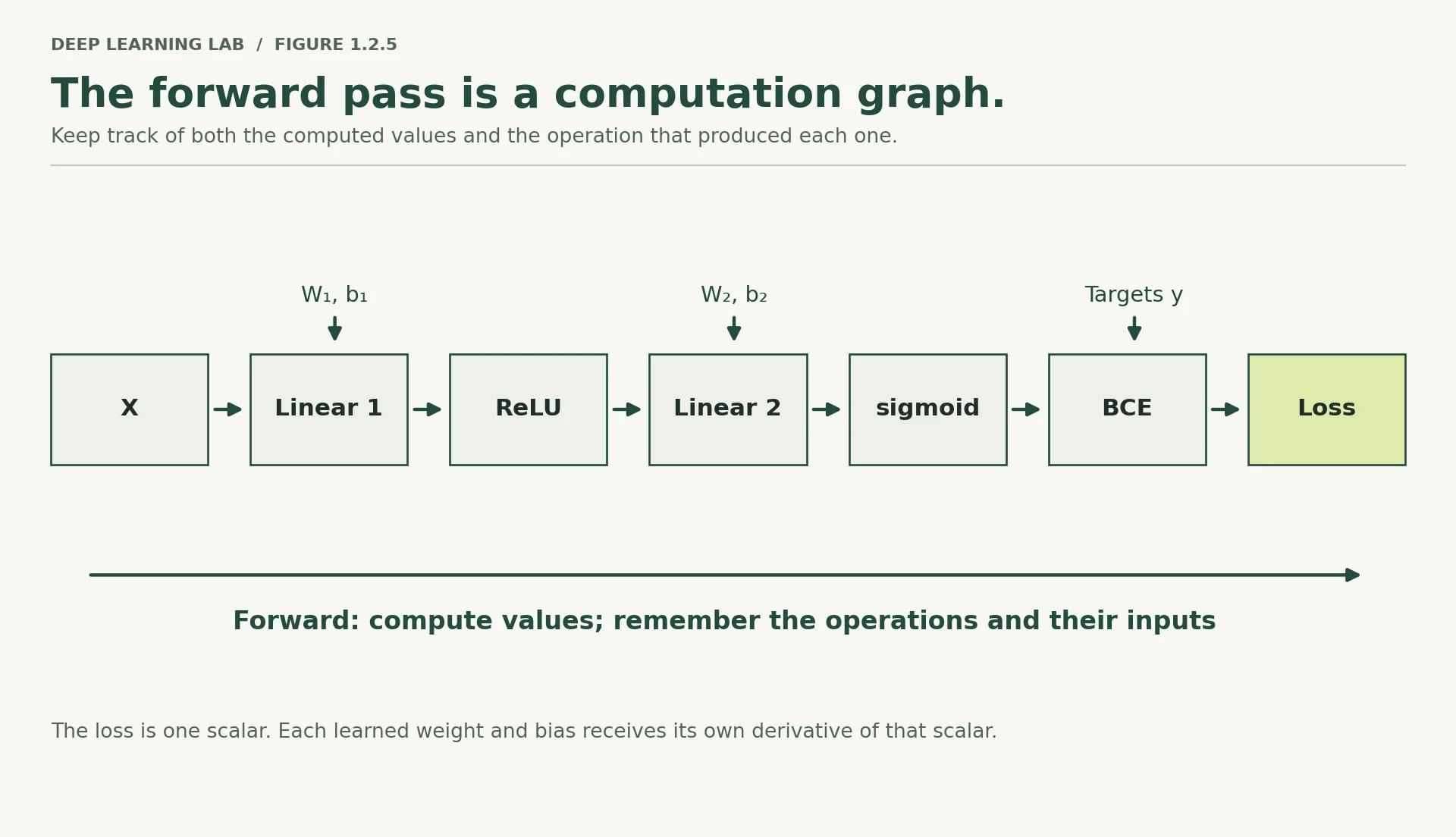
Every node is one elementary operation. Each knows two things: the inputs it received, and how to convert a gradient at its output into gradients at its inputs. That is all.
The rule linking them is the chain rule, and its plain-language version is the only version you need today:
If \(L\) depends on \(A\), and \(A\) depends on \(w\), then the sensitivity of \(L\) to \(w\) is the sensitivity of \(L\) to \(A\), multiplied by the sensitivity of \(A\) to \(w\).
Sensitivities multiply along the chain. Nothing more.
This is also why frameworks appear to "remember" your computation. When you run a forward pass in PyTorch, every operation quietly appends itself to a graph. Calling .backward() walks that graph in reverse, applying each node's local rule. It is bookkeeping, executed fast — and it is why a forward pass under torch.no_grad() uses less memory, a fact that becomes very practical in Module 4.
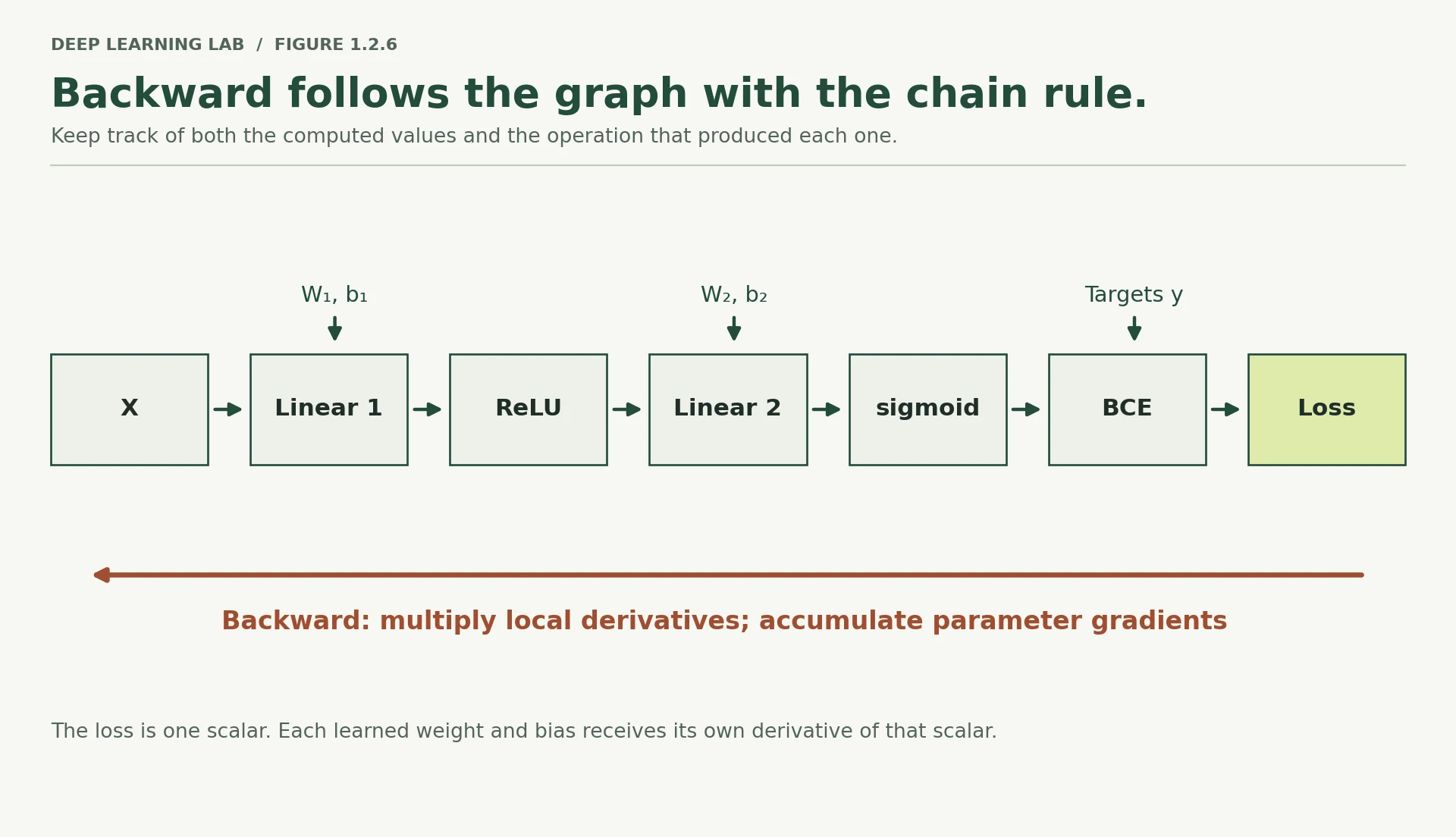
Explanation
This image illustrates the Forward Pass of a binary classification neural network in an automatic differentiation computational graph (like PyTorch or TensorFlow's autograd).
During the forward pass, the network computes output values step-by-step from left to right while simultaneously recording local operational derivatives (dashed boxes) so that backpropagation can instantly apply the chain rule during the backward pass.
Step-by-Step Breakdown of Operations & Partial Derivatives
1. First Linear Layer (matmul)
- Operation: Takes input \(X\), multiplies by weights \(W_1\), and adds bias \(b_1\):
- Partial Derivatives:
- \(\frac{\partial \text{out}}{\partial \text{in}} = W_1^T\): Describes how the layer's output changes with respect to its input \(X\) (needed to pass gradients backward to previous layers).
- \(\frac{\partial \text{out}}{\partial W_1} = X^T\): Measures sensitivity to weight updates.
- \(\frac{\partial \text{out}}{\partial b_1} = \mathbf{1}\): Measures sensitivity to bias updates.
2. First Activation (ReLU)
- Operation: Applies the Rectified Linear Unit activation function element-wise:
- Partial Derivatives:
- \(\frac{\partial \text{out}}{\partial \text{in}} = \begin{cases} 1 & \text{if } \text{in}_2 > 0 \\ 0 & \text{if } \text{in}_2 \le 0 \end{cases}\)
- Note: Activation functions do not have weights or biases, so they only need the derivative with respect to their input.
3. Second Linear Layer (matmul)
- Operation: Takes the output from ReLU (\(\text{out}_2\)) and applies \(W_2\) and \(b_2\):
- Partial Derivatives:
- \(\frac{\partial \text{out}}{\partial \text{in}} = W_2^T\)
- \(\frac{\partial \text{out}}{\partial W_2} = \text{out}_2^T\)
- \(\frac{\partial \text{out}}{\partial b_2} = \mathbf{1}\)
4. Output Activation (sigmoid)
- Operation: Maps input values to probabilities between 0 and 1:
- Partial Derivatives:
- \(\frac{\partial \text{out}}{\partial \text{in}} = \sigma(\text{in}_4)(1 - \sigma(\text{in}_4)) = \hat{y}(1 - \hat{y})\)
5. Binary Cross-Entropy Loss (BCE loss)
- Operation: Calculates scalar loss \(L\) by comparing prediction \(\hat{y}\) with true label \(y\):
- Partial Derivatives:
- \(\frac{\partial L}{\partial \text{in}} = \frac{\hat{y} - y}{\hat{y}(1 - \hat{y})}\)
Why Are These Local Derivatives Recorded During Forward Pass?
To execute backpropagation efficiently, deep learning frameworks construct a computational graph. When calling .backward():
By computing and storing these individual local partial derivatives (\(\frac{\partial \text{out}}{\partial \text{in}}\), \(\frac{\partial \text{out}}{\partial W}\), \(\frac{\partial \text{out}}{\partial b}\)) during the forward pass, the system can multiply them together sequentially in reverse without recomputing function values.
-
In the diagram, which stored values must be kept in memory during the forward pass in order for the backward pass to work? This question is the entire reason training uses far more memory than inference — Module 4 returns to it.
Every node needs the values it received during the forward pass to compute its local derivative: the input
X(for \(\partial/\partial W_1\)), the pre-activationsZ1or at least the ReLU on/off mask (for the ReLU step), the hidden activationsA1(for \(\partial/\partial W_2\)), the prediction \(\hat y\) and the label \(y\) (for the output gradient), plus the weights themselves (W2is needed to send the error back). All intermediate activations for the whole batch must stay in memory until the backward pass has used them. That is why training needs far more memory than inference, and why memory grows with batch size (Module 4, Lesson 4.3).
State the chain rule in the lesson's plain-language form.
Each node only knows its local rule. Multiplying local sensitivities along the path gives the sensitivity of the loss to any parameter.
Why does training use much more memory than inference?
Local derivatives need the stored inputs of each operation (e.g. \(X\) for \(\partial/\partial W_1\), the ReLU mask). Under torch.no_grad() nothing is recorded, so memory drops.
Backpropagation as credit assignment
Here is the sentence to remember:
Backpropagation is credit assignment through the computational graph.
The loss is one number produced by all nine parameters working together. Backpropagation works backwards from that loss, efficiently determining how much each parameter contributed to the error.
We’ll do this one step at a time. You only need two derivative facts, and both are worth understanding rather than simply looking up.
Fact 1: Sigmoid + binary cross-entropy
For a sigmoid output with binary cross-entropy loss, the gradient at the output pre-activation is remarkably simple:
In plain English:
Prediction minus truth, averaged across the examples.
The sigmoid derivative and the logarithm terms from cross-entropy cancel neatly. This is not an accident. The sigmoid + binary cross-entropy pairing is widely used in part because this combination gives us this elegant gradient.
Fact 2: ReLU
ReLU behaves like an on/off switch during backpropagation.
Its derivative is 1 when the input is positive and 0 when the input is negative.
So when we move backwards through the network, an active neuron lets the gradient pass through; an inactive neuron blocks it.
And that gives us the basic mechanism:
Start with the loss → move backwards through each operation → pass the gradient according to each operation's derivative → eventually reach every parameter.
Now, let’s walk backwards.
Deep diveWhere “prediction minus truth” comes from (optional derivation)
For one example, \(L = -[y\log\hat y + (1-y)\log(1-\hat y)]\) with \(\hat y = \sigma(z)\).
- Derivative of the loss with respect to the prediction: \(\dfrac{\partial L}{\partial \hat y} = -\dfrac{y}{\hat y} + \dfrac{1-y}{1-\hat y} = \dfrac{\hat y - y}{\hat y(1-\hat y)}\)
- Derivative of the sigmoid: \(\dfrac{\partial \hat y}{\partial z} = \hat y(1-\hat y)\)
- Chain rule, multiply them: the \(\hat y(1-\hat y)\) terms cancel, so \(\dfrac{\partial L}{\partial z} = \hat y - y\).
Averaging over \(N\) examples divides by \(N\). That clean cancellation is why sigmoid + BCE (and softmax + cross-entropy) are the standard pairing.
N = len(X)# --- step 1: gradient at the output pre-activation Z2 ---dZ2 = (A2 - y) / N # (4,1) "prediction minus truth"# --- step 2: parameters of layer 2 ---dW2 = A1.T @ dZ2 # (2,4) @ (4,1) -> (2,1)db2 = dZ2.sum(axis=0, keepdims=True) # (1,1) bias sees every example equally# --- step 3: push the gradient back to the hidden activations ---dA1 = dZ2 @ W2.T # (4,1) @ (1,2) -> (4,2)# --- step 4: back through ReLU — the on/off switch ---dZ1 = dA1 * (Z1 > 0) # zero out wherever the neuron was inactive# --- step 5: parameters of layer 1 ---dW1 = X.T @ dZ1 # (2,4) @ (4,2) -> (2,2)db1 = dZ1.sum(axis=0, keepdims=True) # (1,2)for name, g in [("dW1", dW1), ("db1", db1), ("dW2", dW2), ("db2", db2)]: print(f"{name}\n{g}\n")Exactly the chain rule, applied from the loss backwards. Each line reuses the result of the line before it, which is why backprop is cheap.
- 1
Gradient at the output pre-activation: prediction minus truth, averaged (the sigmoid+BCE cancellation).
- 2
Each output weight's gradient = the hidden activation it multiplied × the output error, summed over examples.
- 3
The bias affects every example equally, so its gradient is the sum of the output errors.
- 4
Send the error back to each hidden neuron in proportion to its outgoing weight. This is the credit-assignment step.
- 5
ReLU's derivative is 1 where the neuron was active and 0 where it was off, so the error is blocked at inactive neurons.
- 6
Same pattern as
dW2: input × error at the layer it feeds, summed over examples.
dW1
[[-0.1145  0.0465]
 [ 0.052  -0.0465]]

db1
[[-0.1278 -0.0465]]

dW2
[[-0.0778]
 [ 0.0988]]

db2
[[0.0711]]
# Do these match the brute-force gradients from Section 6?print(f"{'parameter':<12}{'max abs difference':>22}")print("-" * 34)for name, analytic in [("W1", dW1), ("b1", db1), ("W2", dW2), ("b2", db2)]: diff = np.abs(analytic - num_grads[name]).max() print(f"{name:<12}{diff:>22.3e}")print("\nAgreement to ~1e-6 is exactly what finite-difference precision allows.")print("Anything larger would mean a bug in the backward pass.")print("This check has a name — gradient checking — and it is how you verify")print("hand-written backward passes in real work.")parameter max abs difference ---------------------------------- W1 3.210e-07 b1 2.769e-07 W2 2.576e-07 b2 1.185e-06 Agreement to ~1e-6 is exactly what finite-difference precision allows. Anything larger would mean a bug in the backward pass. This check has a name — gradient checking — and it is how you verify hand-written backward passes in real work.
They agree. You now have the same nine numbers by two completely independent routes: brute-force probing, and one backward walk through the graph.
Take a moment on step 3, because it is the heart of the idea. dZ2 @ W2.T distributes the output error back to the hidden neurons in proportion to the weights connecting them. A hidden neuron wired to the output with a large weight receives a large share of the blame; one wired with a small weight receives little. That is credit assignment made arithmetic.
And step 4 is where the sparsity you noticed earlier becomes formal. Multiplying by (Z1 > 0) cuts off every path through an inactive neuron. No activity, no responsibility, no update.
-
Trace one number by hand: compute
dW2[0,0]yourself as the dot product of column 0 ofA1withdZ2. Does it match?\(dZ_2 = (\hat y - y)/4 = [-0.1104,\ -0.0723,\ 0.1163,\ 0.1375]\) and column 0 of
A1is \([0.05,\ 1.0,\ 0,\ 0]\). So\[dW_2[0,0] = 0.05(-0.1104) + 1.0(-0.0723) + 0 + 0 = -0.0055 - 0.0723 = -0.0778\]Yes, it matches. Notice that examples 3 and 4 contribute nothing: hidden neuron 1 was off for them.
-
Why does
db2sum over examples whiledW2involves a matrix multiply?A bias adds the same amount to every example's \(z\), so \(\partial z_k/\partial b = 1\) for every example \(k\), and its gradient is simply the sum of the errors. A weight's effect on example \(k\) is scaled by that example's input to it, so its gradient is a weighted sum \(\sum_k a_k \cdot dz_k\), which for all weights at once is the matrix product
A1.T @ dZ2. Both are sums over examples; the weight's version weights each example by its activation. -
Imagine a 50-layer network where each layer's local gradient is around 0.5. What has happened to the gradient by the time it reaches layer 1? (This is the vanishing gradient problem, and it explains architectural choices you will meet in Module 6.)
Multiply 50 factors of 0.5: \(0.5^{50} \approx 8.9 \times 10^{-16}\). The gradient reaching layer 1 is essentially zero, so the early layers barely learn: the vanishing gradient problem. Fixes you will meet: ReLU-family activations (derivative 1 when active), careful initialisation, normalisation layers and residual connections that give gradients a shortcut (Lesson 3.3), which are exactly what makes Transformers trainable (Module 6).
Backpropagate through the output layer
Using the numbers from §3, compute the three output-layer gradients of §8: \(dZ_2 = (\hat y - y)/N\), then
\(dW_2 = A_1^\top dZ_2\) and \(db_2\) (sum over the examples, keeping the shape (1, 1)).
For sigmoid output + binary cross-entropy, the gradient at the output pre-activation is…
Prediction minus truth, averaged over the examples. The sigmoid derivative and the log terms cancel, which is one reason this pairing is standard.
What does multiplying by the ReLU mask, dZ1 = dA1 * (Z1 > 0), accomplish?
No activity, no responsibility, no update. Only neurons that fired for an example share the blame for that example's error.
Explain backpropagation as 'credit assignment' in two sentences.
- The loss is produced by all parameters together; backprop walks the graph backwards to work out how much each one contributed to the error.
- Blame is passed back in proportion to the connecting weights (
dZ2 @ W2.T) and blocked by inactive neurons, giving every parameter its gradient in one pass.
One parameter update, by hand
We know, for each of the nine parameters, whether increasing it raises or lowers the loss. So take a small step in the direction that lowers it:
The minus sign is the whole algorithm: gradients point uphill, and we want to go down. The symbol \(\eta\) is the learning rate — how big a step to take.
Before running the cell, predict the outcome. The current loss is 0.5845. After one step with \(\eta = 0.5\), will the loss go up or down?
The loss is currently 0.5869. After one update with learning rate η = 0.5, the loss will…
It goes down, to 0.5593. Every parameter moved a small step against its own gradient, which is locally the direction of steepest decrease. (The paragraph above quotes 0.5845 as the starting loss; the computed value is 0.586856, a small typo.)
W1array([[ 0.5, -0.2],
[ 0.3, 0.8]])
dW1array([[-0.1145, 0.0465],
[ 0.052 , -0.0465]])
b1array([[ 0.1 , -0.15]])
db1array([[-0.1278, -0.0465]])
LR = 0.5W1_new = W1 - LR * dW1b1_new = b1 - LR * db1W2_new = W2 - LR * dW2b2_new = b2 - LR * db2W1_newarray([[ 0.5573, -0.2233],
[ 0.274 , 0.8233]])
b1_newarray([[ 0.1639, -0.1267]])
loss_before = forward_loss(W1, b1, W2, b2)loss_after = forward_loss(W1_new, b1_new, W2_new, b2_new)print("W2 before:", W2.ravel(), " -> after:", W2_new.ravel())print("b2 before:", b2.ravel(), " -> after:", b2_new.ravel())print()print(f"loss before update: {loss_before:.6f}")print(f"loss after update: {loss_after:.6f}")print(f"improvement: {loss_before - loss_after:+.6f}")W2 before: [ 0.7 -0.4] -> after: [ 0.7389 -0.4494] b2 before: [0.2] -> after: [0.1645] loss before update: 0.586856 loss after update: 0.559278 improvement: +0.027577
It went down. Small, unglamorous, and entirely real.
That is one training step. Everything else in deep learning is this operation repeated — with more parameters, more data, and cleverer rules for choosing \(\eta\), but the same three moves: forward, backward, update.
-
Some parameters barely moved. Which ones, and why?
Hidden neuron 2's parameters (
W1[:,1]andb1[1]) moved only about 0.023 each, because their gradients were small (±0.0465). Neuron 2 was active on just one of the four examples, so it had little responsibility for the loss.W1[1,0]also moved less thanW1[0,0], because its input values are smaller on the examples where neuron 1 fires. A parameter moves in proportion to its gradient, and its gradient reflects how much it contributed. -
Would a step of \(\eta = 5.0\) reduce the loss ten times as much? Change
LRand find out.No. Recomputed: one step with η = 5 gives loss 0.400 (better than η = 0.5's 0.559, but nowhere near "ten times" the improvement), with η = 8 it is 0.412, and with η = 50 the loss explodes to 6.9. The gradient is a straight-line approximation that is only accurate near the current point, so a bigger step travels further along a line that increasingly misdescribes the real, curved loss surface. Past a point, bigger steps overshoot and make things worse.
-
The gradient describes the slope at the current point only. Why does that make large steps risky?
Because the loss surface curves. The gradient tells you the slope here, like the view from where you stand on a hillside. A large step assumes the ground keeps sloping the same way for a long distance. If the valley floor is close, you overshoot it and land higher up the opposite side (see the learning-rate explorer in Section 11).
Why is there a minus sign in \(w \leftarrow w - \eta\, \partial L/\partial w\)?
The gradient points in the direction where the loss increases fastest; subtracting it moves downhill.
Would \(\eta = 5.0\) reduce the loss ten times more than \(\eta = 0.5\)?
The slope is only valid near the current point. Large steps leave that neighbourhood and can land higher up the other side.
Looping it: watching loss fall
One step helped a little. Now do it repeatedly. This cell is a complete training loop written in NumPy — and structurally it is the same loop you will write in PyTorch in Lesson 1.3, and the same loop that trains models with billions of parameters.
X.shape(4, 2)
def train(X, y, lr=0.5, epochs=300, seed=SEED, verbose=True): """Train the 2-2-1 network with plain gradient descent, written in NumPy. Initialises small random weights, then for every epoch runs the forward pass, computes the loss, backpropagates the gradients by hand (the five steps of Section 8) and updates every parameter with ``w -= lr * gradient``. Structurally this is the same loop PyTorch runs in Lesson 1.3. Args: X: Training inputs, shape ``(N, 2)``. y: Training labels, shape ``(N, 1)``, values 0 or 1. lr: Learning rate: the size of each update step. epochs: Number of full passes over the data (one update per epoch). seed: Seed for the random initial weights, so runs are repeatable. verbose: Print the loss and accuracy every 50 epochs. Returns: A tuple ``(history, params)``: ``history`` is the list of the loss at every epoch, and ``params`` is the final ``(W1, b1, W2, b2)``. """ rng = np.random.default_rng(seed) # Small random initialisation — Module 3 explains why the scale matters W1 = rng.normal(0, 0.5, (2, 2)); b1 = np.zeros((1, 2)) W2 = rng.normal(0, 0.5, (2, 1)); b2 = np.zeros((1, 1)) history = [] for epoch in range(epochs): # ---------- forward ---------- Z1 = X @ W1 + b1 A1 = relu(Z1) Z2 = A1 @ W2 + b2 A2 = sigmoid(Z2) loss = bce(y, A2) history.append(loss) # ---------- backward ---------- N = len(X) dZ2 = (A2 - y) / N dW2 = A1.T @ dZ2 db2 = dZ2.sum(axis=0, keepdims=True) dZ1 = (dZ2 @ W2.T) * (Z1 > 0) dW1 = X.T @ dZ1 db1 = dZ1.sum(axis=0, keepdims=True) # ---------- update ---------- W1 -= lr * dW1; b1 -= lr * db1 W2 -= lr * dW2; b2 -= lr * db2 if verbose and epoch % 50 == 0: acc = ((A2 > 0.5) == (y > 0.5)).mean() print(f"epoch {epoch:>4} loss {loss:.4f} accuracy {acc:.2f}") return history, (W1, b1, W2, b2)history, params = train(X, y)print(f"\nfinal loss: {history[-1]:.4f}")fig, ax = plt.subplots(figsize=(6.5, 3.4))ax.plot(history, color="#3b6ea5")ax.set_xlabel("epoch"); ax.set_ylabel("loss"); ax.set_title("The loss curve — your first one")plt.tight_layout(); plt.show()Structurally identical to every PyTorch training loop you will write: initialise, then repeat forward → loss → backward → update.
- 1
Small random weights (standard deviation 0.5) break the symmetry between neurons. Biases can start at zero.
- 2
Recording the loss every epoch gives the loss curve: your main diagnostic.
- 3
Steps 3 and 4 of the backward pass combined into one line.
- 4
The update: every parameter steps against its gradient.
-=modifies the array in place.
epoch    0   loss 0.6638   accuracy 0.50
epoch   50   loss 0.4811   accuracy 0.75
epoch  100   loss 0.4787   accuracy 0.75
epoch  150   loss 0.1051   accuracy 1.00
epoch  200   loss 0.0445   accuracy 1.00
epoch  250   loss 0.0268   accuracy 1.00

final loss: 0.0189
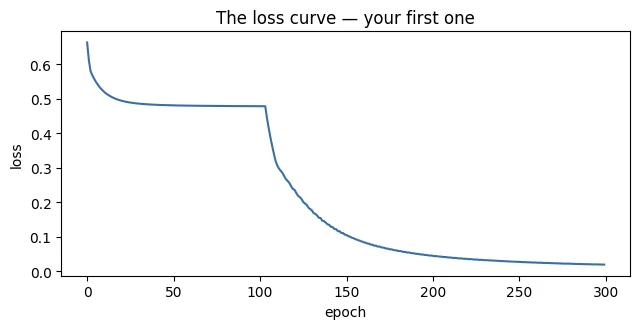
That curve is the single most-read diagnostic in deep learning, and you will spend most of Module 3 interpreting its variants. For now, note its characteristic shape: steep at first, where gradients are large and there is plenty to fix, then flattening as the model approaches a solution and the slopes shrink.
One caveat, stated now so it does not become a bad habit. This model is fitting four examples and we are measuring loss on the same four. That is training loss, not validation loss, and a model that memorises four points has demonstrated nothing about generalisation. With real data this would be malpractice. Lesson 1.3 introduces the split properly.
-
Run
train(X, y, lr=0.01). What does the curve look like, and would you know the model was fine if you only saw 300 epochs?With
lr=0.01the loss falls from 0.664 to only 0.544 after 300 epochs, a gentle, almost straight downward slope, and accuracy stays at 75%. From 300 epochs alone you could not tell whether the model was fine-but-slow or stuck. The giveaway is that the curve is still sloping down at the end: a model that has converged goes flat. Training longer (or raising the learning rate) would reveal it. -
Run
train(X, y, lr=5.0). What happens, and can you explain it in terms of Section 9's warning?With
lr=5.0the loss drops at first (its minimum is 0.44), then gets stuck at 0.477 with 75% accuracy, the same aslr=8.0. The big early steps overshoot, and one likely consequence is that a ReLU neuron is knocked into the "dead" region (always off), from which it never recovers. That is Section 9's warning made real: the gradient is only locally accurate, and a huge step can land somewhere bad from which small gradients can't escape. -
Change
seedand re-run a few times. Why does the final loss differ, and what does that imply for reporting results?Different seeds give different random initial weights, so training takes a different path and ends at a different point: final losses of 0.013, 0.011, 0.010, 0.003 and 0.013 for seeds 0, 1, 2, 3 and 7. Implication: a single run is one sample, not the truth. Report results over several seeds (mean ± spread), and fix the seed when you need a run to be reproducible. Module 4 (Lesson 4.2) is built on this.
The training loop reaches loss 0.019 on the four examples. What does that prove about generalisation?
Loss measured on the training data says nothing about unseen data. Lesson 1.3 introduces a proper split.
Name the three moves of every training step, in order, and what each one does.
- Forward: run the inputs through the network to get predictions and the loss.
- Backward: compute the gradient of the loss with respect to every parameter.
- Update: move each parameter a small step against its gradient, scaled by the learning rate.
The learning rate
The learning rate is the hyperparameter you will get wrong most often, so it deserves its own picture. Run all three regimes side by side.
fig, axes = plt.subplots(1, 3, figsize=(20, 7))settings = [(0.01, "Too small — still crawling"), (0.50, "About right"), (8.00, "Too large — unstable")]for ax, (lr, title) in zip(axes, settings): h, _ = train(X, y, lr=lr, epochs=300, verbose=False) ax.plot(h, color="#3b6ea5") ax.set_title(f"lr = {lr}\n{title}", fontsize=10) ax.set_xlabel("epoch"); ax.set_ylim(0, 1.2)axes[0].set_ylabel("loss")plt.tight_layout(); plt.show()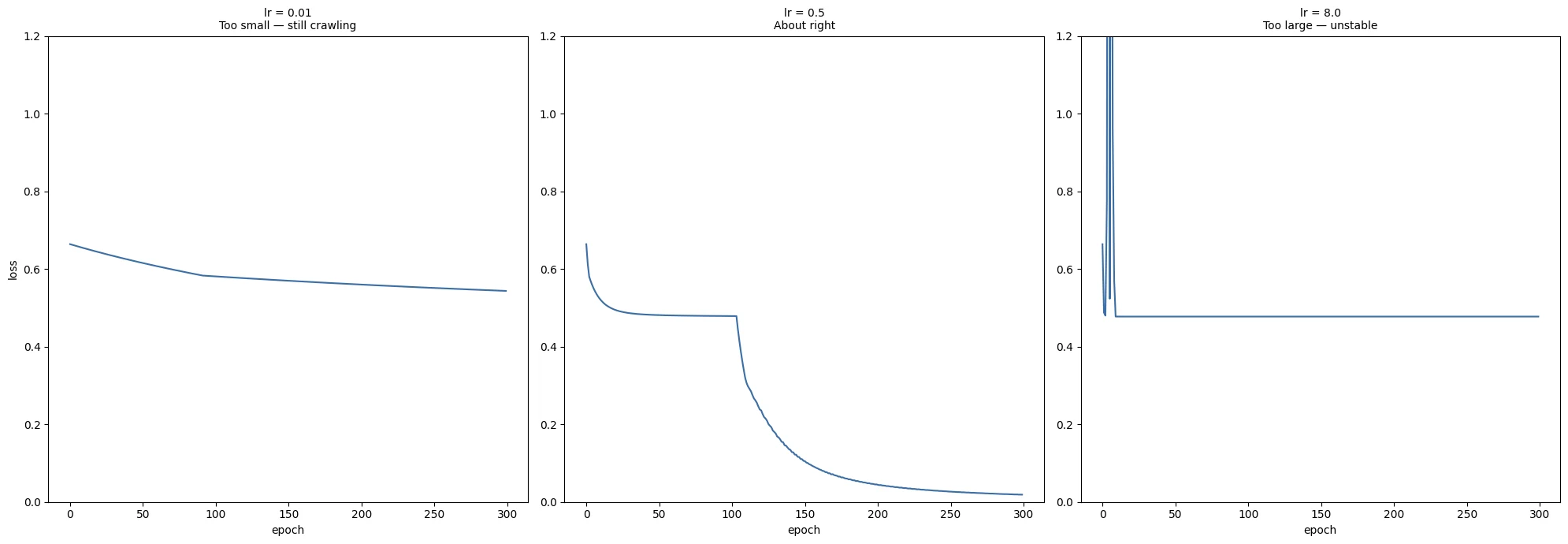
Three failure modes, three signatures you should be able to recognise on sight:
- Too small. The loss falls, but so slowly that you cannot tell whether the model is learning or stuck. This wastes far more engineering time than it should, because nothing looks broken.
- About right. Rapid early progress, then a smooth flattening.
- Too large. The step overshoots the valley and lands further up the opposite side. The loss oscillates, plateaus at a bad value, or diverges outright.
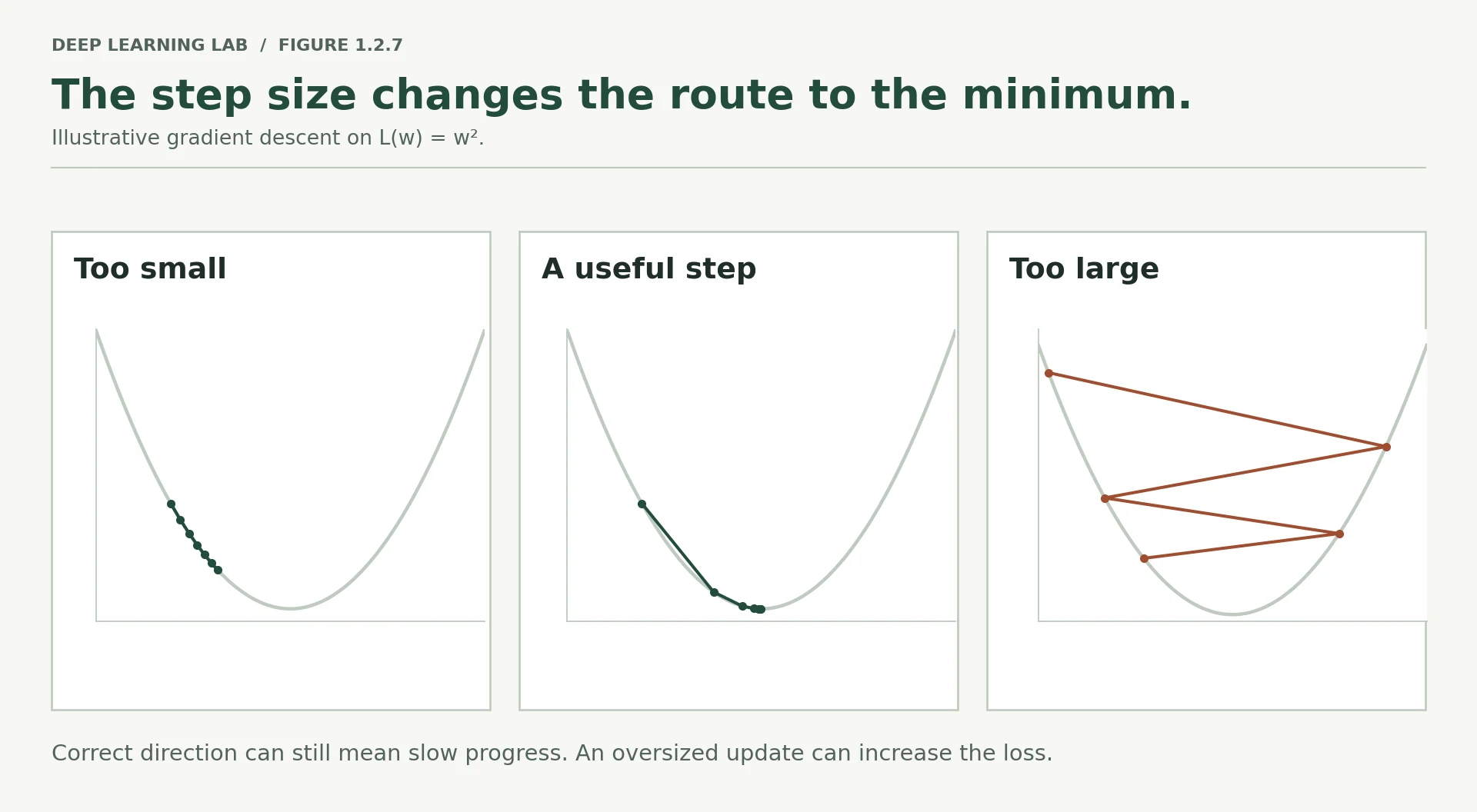
In 2026 nobody picks a single fixed learning rate and leaves it there. Optimisers such as Adam adapt the effective step size per parameter, and schedulers vary it over training — typically warming up and then decaying. You will use both in Module 3. But every one of those methods is a refinement of the trade-off in this picture, and understanding the picture is what lets you diagnose them when they misbehave.
-
Given only a loss curve, how would you distinguish "learning rate too small" from "model lacks capacity"?
Look at the end of the curve and experiment. LR too small: the loss is still decreasing steadily at the end (it hasn't flattened), and raising the LR speeds it up. Model lacks capacity: the loss flattens early at a disappointing value, and training longer or raising the LR doesn't lower it, while a bigger model does. A classic test: try to overfit a tiny subset (say 20 examples). A model with enough capacity and a working setup should drive that loss towards 0.
-
Why might a large learning rate be desirable early in training and harmful later?
Early, the parameters are far from any good solution and gradients are large and informative, so big steps make fast progress (and can hop over small bumps). Later, you're near a minimum in a narrower valley, so big steps bounce from wall to wall and never settle. Small steps let you settle into the bottom. Hence learning-rate schedules: warm up, then decay (Lesson 3.1).
-
lr=8.0did not produceNaNhere. What kind of change would make it do so?NaN appears when a number overflows to infinity and then meets another infinity or zero in an undefined way. Pushing the learning rate far higher (e.g. η = 1000), un-standardised inputs with huge values, or a deeper network where updates compound can make weights and logits enormous.
np.exp(-z)then overflows, the sigmoid rounds to exactly 0 or 1, the log of 0 gives −∞, and \(\infty - \infty\) or \(0 \times \infty\) gives NaN. After that, every update spreads NaN to every parameter.
A loss curve falls steadily but extremely slowly, and nothing looks broken. The most likely cause is…
Too small a learning rate crawls. It wastes time precisely because nothing looks wrong. Too large oscillates, plateaus high or diverges.
Which signature matches a learning rate that is too large?
Steps overshoot the valley and land further up the opposite side.
Why might a large learning rate help early in training but hurt later?
- Early on the parameters are far from a good solution and gradients are large, so big steps make fast progress.
- Near a minimum, big steps overshoot the narrow valley and bounce around it, so the step size should shrink (warm-up then decay schedules do this).
The bridge: PyTorch reproduces your arithmetic exactly
Everything above was NumPy that you could audit line by line. Now we hand the identical problem to PyTorch — same data, same initial weights, same loss — and compare its gradients with the ones you derived.
pip install torchimport torchimport torch.nn.functional as F# Same numbers, now as tensors. requires_grad=True means "track operations on this".tX = torch.tensor(X)ty = torch.tensor(y)tW1 = torch.tensor(W1, requires_grad=True)tb1 = torch.tensor(b1, requires_grad=True)tW2 = torch.tensor(W2, requires_grad=True)tb2 = torch.tensor(b2, requires_grad=True)# Forward pass — PyTorch silently records the computational graph from Section 7tZ1 = tX @ tW1 + tb1tA1 = torch.relu(tZ1)tZ2 = tA1 @ tW2 + tb2# Combines sigmoid + BCE in one numerically stable step (the cancellation from Fact 1)tloss = F.binary_cross_entropy_with_logits(tZ2, ty)print(f"PyTorch loss: {tloss.item():.6f}")print(f"Your loss: {forward_loss(W1, b1, W2, b2):.6f}")# One line replaces all of Section 8tloss.backward()Same data and weights, now as tensors. requires_grad=True tells autograd to record every operation on these tensors so it can differentiate the loss later.
- 1
Parameters are the tensors we want gradients for. The data (
tX,ty) doesn't need them. - 2
Takes the raw logit
tZ2, not a probability: sigmoid + BCE fused into one numerically stable operation. - 3
Walks the recorded graph backwards and fills
.gradfor every tensor withrequires_grad=True: all of Section 8 in one call.
PyTorch loss: 0.586856
Your loss:    0.586856
print(f"{'parameter':<12}{'your gradient':>34}{'max diff vs PyTorch':>24}")print("-" * 70)for name, mine, theirs in [("W1", dW1, tW1.grad), ("b1", db1, tb1.grad), ("W2", dW2, tW2.grad), ("b2", db2, tb2.grad)]: diff = np.abs(mine - theirs.numpy()).max() print(f"{name:<12}{str(np.round(mine.ravel(), 5)):>34}{diff:>24.2e}")print("\nIdentical. Not approximately — identical.")parameter your gradient max diff vs PyTorch ---------------------------------------------------------------------- W1 [-0.1145 0.0465 0.052 -0.0465] 0.00e+00 b1 [-0.1278 -0.0465] 0.00e+00 W2 [-0.0778 0.0988] 0.00e+00 b2 [0.0711] 0.00e+00 Identical. Not approximately — identical.
Zero difference, to the last bit.
Sit with that for a moment, because it is the point of this entire note. loss.backward() is not a magic box. It is the five-step walk you performed in Section 8, executed by code that knows the local derivative rule for every operation. When you write it in Lesson 1.3, you will know precisely which arithmetic you delegated and why it is safe to do so.
This is also what makes you able to debug training. When a loss becomes NaN in Module 3, when gradients vanish in a deep network in Module 6, when a fine-tuning run refuses to move in Module 8 — the person who has traced the mechanism once knows where to look. The person who has only ever called .backward() is guessing.
-
binary_cross_entropy_with_logitstakestZ2— the raw logit — rather than a probability. Why is that more numerically stable than applying sigmoid first?Applying the sigmoid first can round a very confident prediction to exactly 0.0 or 1.0 in floating point, and then \(\log(0) = -\infty\).
binary_cross_entropy_with_logitsnever forms the probability. It uses an algebraically equivalent formula on the logit \(z\) directly, \(\ell = \max(z,0) - zy + \log(1 + e^{-|z|})\), which never takes the log of zero or overflows an exponential. It is also slightly faster, and its gradient is exactly \(\sigma(z) - y\). -
What do you expect
tW1.gradto contain if you calltloss.backward()a second time without clearing it? (Lesson 1.3 explains whyoptimizer.zero_grad()exists.)Calling
backward()twice on the same graph raises an error, because PyTorch frees the graph's saved values after the first backward pass (unless you passretain_graph=True). If you rebuild the graph (run the forward pass again) and callbackward()again without clearing, the new gradients are added to the old ones:.gradwould hold twice the correct gradient. PyTorch accumulates gradients by design (useful for gradient accumulation, Lesson 4.3), which is why every training loop callsoptimizer.zero_grad(). -
We never wrote a backward pass for
torch.relu. Who did, and where does it live?PyTorch's developers. Every built-in operation ships with its derivative rule. For ReLU it is "pass the gradient where the input was positive, else 0" (
threshold_backward). The rules are declared in PyTorch's source (tools/autograd/derivatives.yaml) and compiled into the C++ autograd engine. When your forward pass callstorch.relu, autograd records that node, and during.backward()it calls that node's backward function. If you write a custom operation, you supply the rule yourself (torch.autograd.Function).
Your hand-computed gradients and PyTorch's differ by exactly 0. What is loss.backward() actually doing?
Autograd is bookkeeping: every operation recorded itself on the forward pass and knows its local rule. The update is a separate step (the optimizer).
Why is binary_cross_entropy_with_logits(z, y) preferred to applying sigmoid and then BCE?
Computing sigmoid first can round to exactly 0 or 1 for large logits, and then the log blows up. The fused version uses a stable formula.
Conclusion
You can now answer the day's competency question in full, and every clause is something you computed yourself.
What happens between giving data to a neural network and the model improving?
The data flows forward through alternating linear transformations and non-linear activations, each layer producing a new description of the input, until a final layer emits a prediction. That prediction is compared with the truth through a loss function chosen to be differentiable, yielding one number that measures wrongness. The chain of operations that produced that number is then walked in reverse, and at each step the chain rule converts the gradient at the output into gradients at the inputs — apportioning responsibility for the error across every parameter. Finally each parameter takes a small step against its gradient, scaled by the learning rate. Repeat.
Three things are worth carrying forward:
- Non-linearity is what makes depth mean anything. Without it, fifty layers collapse into one.
- Backpropagation is credit assignment, and it is cheap. One backward pass gets every gradient, where brute force would need one forward pass per parameter.
- The learning rate governs whether any of this works. Same gradients, same data — three completely different outcomes.
Without looking back:
-
Why can we not optimise accuracy directly?
Accuracy is piecewise constant: tiny parameter changes usually don't change it at all, so its gradient is zero almost everywhere and undefined at the jumps. Gradient descent needs a smooth, differentiable signal of how wrong the model is, and that is the loss.
-
What does
dZ1 = dA1 * (Z1 > 0)accomplish, in words?It passes the gradient through ReLU: wherever a hidden neuron was active (\(z>0\)) the gradient flows through unchanged; wherever it was off the gradient is set to zero. Inactive neurons receive no blame and no update for that example.
-
Why did hidden neuron 2 receive zero gradient in Section 6?
Because it was switched off (ReLU output 0) on three of the four examples. For those examples it contributed nothing to the prediction, so by credit assignment it receives no share of their error. Its gradients come only from example 3, which is why they were small.
-
Name the three moves of a training step in order.
Forward (compute predictions and the loss), backward (compute every gradient), update (move each parameter a small step against its gradient, scaled by the learning rate). Then repeat.
Transition to Lesson 1.3
You have done autograd's job by hand, and checked its arithmetic against your own. Now we hand it back to the library — and this time you will know exactly what you delegated.
Lesson 1.3 rebuilds all of this in PyTorch. You will meet tensors properly, including the device handling that decides whether your code runs on CPU, on Apple Silicon through MPS, or on a CUDA GPU. You will define the same network twice: once with raw tensors so the correspondence to this lesson is exact, then again as an nn.Module, which is how it is actually written in practice. You will write the canonical training loop and justify every line of it.
Then you will point it at the spirals from Lesson 1.1 and watch the decision boundary form.
And at the end, we break it deliberately — three small changes, each of which silently stops the model learning. Diagnosing them is the real test of whether this lesson landed.
Wrap-up
- A neuron = weighted sum + bias, then an activation. Parameters (weights, biases) are learned; hyperparameters (learning rate, widths, epochs) are chosen by you.
- Parameter count of a dense layer = inputs × outputs + outputs. The first layer on raw inputs usually dominates.
- Without a non-linearity, depth is worthless: stacked linear layers collapse into one. ReLU's clipping makes the composition irreducible.
- We train on a differentiable loss (binary cross-entropy), not accuracy. Confident-and-wrong predictions are punished hardest.
- A gradient is a local slope: its sign says which way to move a parameter, its size how sensitive the loss is to it.
- Backpropagation is credit assignment through the computational graph: one backward pass gets every gradient via the chain rule. Inactive ReLU neurons receive no blame.
- Training = forward → backward → update, repeated. The learning rate decides whether that crawls, converges or diverges.
loss.backward()computes exactly what you did by hand, to the last bit.
Quick check
How many parameters does a fully connected network with widths [3, 4, 2] have?
Layer 1: 3×4 + 4 = 16. Layer 2: 4×2 + 2 = 10. Total 26.
Why is an activation function between layers essential?
\((XW_1+b_1)W_2+b_2 = X(W_1W_2) + (b_1W_2+b_2)\): one linear layer, however deep.
A ReLU neuron has pre-activation \(z = -0.7\) for an example. What gradient flows back through it for that example?
ReLU's derivative is 0 for negative inputs: the switch is off, so no gradient passes and its incoming weights get no update from this example.
The gradient of the loss with respect to a weight is −0.2. Plain gradient descent will…
\(w \leftarrow w - \eta(-0.2) = w + 0.2\eta\). A negative slope means increasing the weight lowers the loss.
For sigmoid output + binary cross-entropy, the gradient at the output pre-activation for one example is…
The sigmoid's derivative cancels the log terms, leaving prediction minus truth (divided by \(N\) when averaged).
Why is backpropagation preferred to finite differences for training?
Finite differences need one extra forward pass per parameter, which is impossible for millions or billions of parameters. They are still useful for checking gradients.
Your loss curve oscillates wildly and then shoots up. The most likely culprit is…
Steps overshoot the valley and land higher on the other side, which is the too-large-learning-rate signature.
Questions and discussion
Ask about this lesson, share what you found in a lab, or help someone else. Posts are public on the course's GitHub Discussions: anyone can read them, and you need a GitHub account to post.
Opening it loads giscus from giscus.app.