Your First PyTorch Network
- Time
- ~121 min
- Sections
- 16
- Code cells
- 65
- Labs
- 5
- Figures
- 5
Before you start
Everything you did by hand in Lesson 1.2, now in idiomatic PyTorch: tensors (shape, dtype, device),
a model as an nn.Module, a numerically stable loss on logits, an optimizer, and the six-line training loop.
You train it on the spirals, read its loss curve, save and reload it, and then break it three quiet ways.
None of them raises an error; learning to spot them is the real skill.
- Goal
Express the mechanism you traced by hand in Lesson 1.2 as idiomatic PyTorch, and train a working model with it.
- Outcome
You can build a neural network, write its training loop unaided, justify every line of that loop, evaluate it honestly on held-out data, save it, reload it — and diagnose it when it silently stops learning.
- You will be able to
- create and inspect tensors, and explain shape, dtype and device;
- detect the available accelerator and write code that runs on CPU, MPS or CUDA unchanged;
- convert NumPy arrays into tensors correctly, including the dtype trap that catches everyone once;
- define a model both as raw tensors and as an
nn.Module, and say why the second is preferred; - choose an appropriate loss function and explain the logits-versus-probabilities distinction;
- explain what
optimizer.step()andoptimizer.zero_grad()do in terms of Lesson 1.2; - write a complete training loop with a validation split;
- read a training curve and say what it implies;
- save and reload model weights the way practitioners actually do it;
- recognise three common causes of silent training failure from their symptoms alone.
Setup — imports, versions and device detection used by the notebook (1 cells)
# torch>=2.4 numpy>=2.0 matplotlib>=3.8import numpy as npimport torchimport torch.nn as nnimport matplotlib.pyplot as pltSEED = 42torch.manual_seed(SEED)np.random.seed(SEED)print("torch", torch.__version__)print("numpy", np.__version__)torch 2.14.0 numpy 2.3.5
Tensors: shape, dtype, device
A tensor is an array of numbers with three properties that you will check constantly:
- shape — its dimensions;
- dtype — the numeric type of its elements;
- device — the physical hardware holding it.
If you know NumPy, the first two are familiar. The third is new, and it is the one that will throw errors at you.
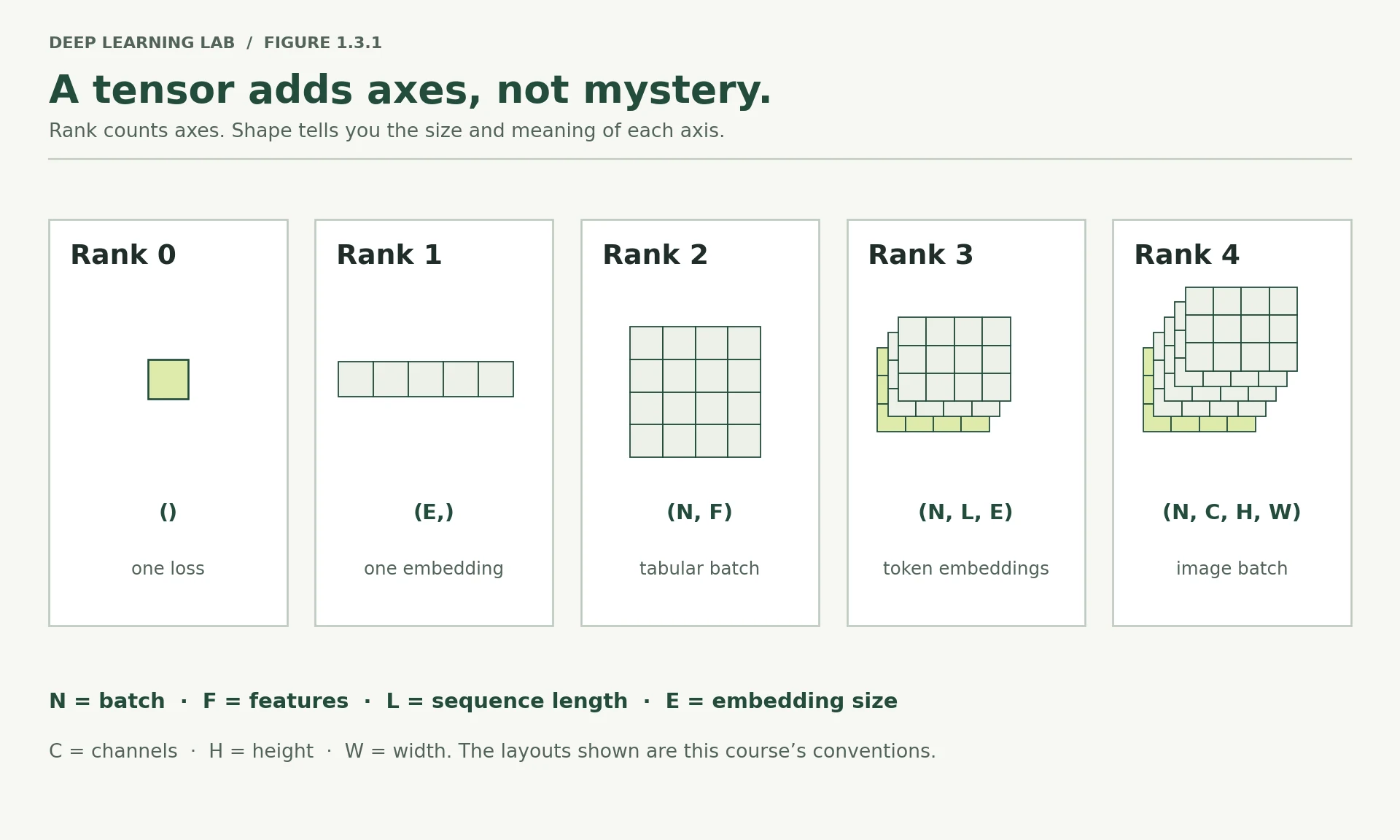
The word "tensor" sounds mathematical, but in practice it means an array with a rank:
| Rank | Name | Example in deep learning |
|---|---|---|
| 0 | scalar | a loss value |
| 1 | vector | one embedding |
| 2 | matrix | a batch of tabular rows, (batch, features) |
| 3 | 3-tensor | a batch of token sequences, (batch, tokens, features) |
| 4 | 4-tensor | a batch of images, (batch, channels, height, width) |
Almost every shape error you will ever hit comes from confusing two of these, or from losing track of which axis is the batch.
scalar = torch.tensor(3.14)vector = torch.tensor([1.0, 2.0, 3.0])matrix = torch.tensor([[1.0, 2.0], [3.0, 4.0], [5.0, 6.0]])batch_of_images = torch.zeros(8, 3, 32, 32) # 8 images, 3 colour channels, 32x32 pixelsfor name, t in [("scalar", scalar), ("vector", vector), ("matrix", matrix), ("image batch", batch_of_images)]: print(f"{name:<14} shape={str(tuple(t.shape)):<20} rank={t.dim()} dtype={t.dtype} device={t.device}")scalar shape=() rank=0 dtype=torch.float32 device=cpu vector shape=(3,) rank=1 dtype=torch.float32 device=cpu matrix shape=(3, 2) rank=2 dtype=torch.float32 device=cpu image batch shape=(8, 3, 32, 32) rank=4 dtype=torch.float32 device=cpu
Two dtype facts worth internalising now, because both will cost you time otherwise.
Deep learning runs on float32, not float64. NumPy defaults to float64; PyTorch defaults to float32. That is deliberate — half the memory, and much faster on GPUs, at precision that neural networks simply do not need. in Module 4 you will go further down to float16 and bfloat16 for mixed-precision training.
Integer labels stay integers. Class labels for multi-class problems must be int64 (PyTorch calls it long). Passing floats where a loss function expects longs produces an error message that is not especially helpful the first time you meet it.
a = torch.tensor([1.0, 2.0]) # float32 by defaultb = torch.tensor([1, 2]) # int64 by defaultc = torch.tensor(np.array([1.0, 2.0])) # inherits float64 from NumPy <-- the trapprint(f"from python floats : {a.dtype}")print(f"from python ints : {b.dtype}")print(f"from a numpy array : {c.dtype} <-- not float32!")# Two ways to fix itprint(f"\nfixed with .float() : {c.float().dtype}")print(f"fixed at creation : {torch.tensor(np.array([1.0, 2.0]), dtype=torch.float32).dtype}")from python floats : torch.float32 from python ints : torch.int64 from a numpy array : torch.float64 <-- not float32! fixed with .float() : torch.float32 fixed at creation : torch.float32
-
A batch of 16 RGB images at 64×64 pixels — what is its shape as a tensor?
(16, 3, 64, 64): batch of 16, 3 colour channels (RGB), 64 × 64 pixels, the (batch, channels, height, width) layout PyTorch uses for images. -
Why would
float64be wasteful on a GPU?It doubles memory and bandwidth for no benefit, and GPUs are built for fast float32/16 arithmetic: many consumer and datacentre GPUs run float64 at 1/2 to 1/64 of their float32 speed. Neural networks don't need 15 significant digits; the noise of training swamps them.
-
You have a
(1000, 2)tensor of features. What doest[0]return, and what shape is it?t[0]is the first row: the two features of the first example, a tensor of shape(2,). Indexing one position of an axis removes that axis.
A batch of 16 RGB images at 64×64 pixels, in PyTorch's usual layout, has which shape?
PyTorch images are (batch, channels, height, width): 16 images, 3 colour channels, 64×64.
Class labels for a multi-class loss should normally have which dtype?
nn.CrossEntropyLoss expects integer class indices as int64. Passing floats gives an unhelpful error the first time.
Name a tensor's three properties and say which one causes the most new errors for someone coming from NumPy.
- Shape (its dimensions), dtype (the element type) and device (the hardware holding it).
- Device is the new one: operations need all inputs on the same device (CPU, CUDA or MPS).
Environment detection — CUDA, MPS, CPU
A tensor lives somewhere specific: in system RAM, or in the memory of an accelerator. Operations require all their inputs on the same device, and the error you get when they are not is one you will see many times.
Three backends matter in 2026:
cuda— NVIDIA GPUs. What free Colab and Kaggle give you, and what almost all production inference runs on.mps— Apple Silicon, via Metal Performance Shaders. Fast for a laptop, and fine for most of this course. Be aware that CUDA-only libraries such asbitsandbytes,vLLMandflash-attnwill not run on it — that is why Modules 8 and 9 route those specific labs to Colab or Kaggle.cpu— always available, slower for large models, entirely adequate for everything in Module 1.
Write the detection once, at the top of every notebook, and never hard-code a device again.
Three places a tensor can live
NVIDIA GPUs: Colab, Kaggle, most servers. Everything runs here, including CUDA-only libraries (bitsandbytes, vLLM, flash-attn).
Apple Silicon GPU via Metal. Fast for a laptop and fine for most of the course; the CUDA-only libraries won't install.
Always available. Slower for big models, but perfectly adequate for Module 1's tiny networks.
def get_device(): """Pick the fastest hardware available: an NVIDIA GPU, then Apple Silicon, then the CPU. Writing this once at the top of a notebook means the same code runs unchanged on Colab or Kaggle (CUDA), on a Mac (MPS) and on any laptop (CPU). Returns: A ``torch.device``: ``cuda`` if an NVIDIA GPU is visible, else ``mps`` on Apple Silicon, else ``cpu``. """ if torch.cuda.is_available(): return torch.device("cuda") if torch.backends.mps.is_available(): return torch.device("mps") return torch.device("cpu")DEVICE = get_device()print(f"Using device: {DEVICE}")Using device: mps
if DEVICE.type == "cuda": print(f" GPU: {torch.cuda.get_device_name(0)}") print(f" VRAM: {torch.cuda.get_device_properties(0).total_memory / 1e9:.1f} GB")elif DEVICE.type == "mps": print(" Apple Silicon GPU via Metal.") print(" Note: bitsandbytes, vLLM and flash-attn are CUDA-only — use Colab/Kaggle for those labs.")else: print(" CPU only. Everything in Day 1 runs comfortably here.")Apple Silicon GPU via Metal. Note: bitsandbytes, vLLM and flash-attn are CUDA-only — use Colab/Kaggle for those labs.
# Moving a tensor between devicesx = torch.randn(3, 2)print(f"created on: {x.device}")created on: cpu
x = x.to(DEVICE)print(f"moved to: {x.device}")moved to: mps:0
# The classic error, demonstrated safelyif DEVICE.type != "cpu": y_cpu = torch.randn(3, 2) try: _ = x + y_cpu except RuntimeError as e: print(f"\nDevice mismatch error:\n {str(e)[:130]}") print("\nFix: put both on the same device with .to(DEVICE)")else: print("\n(Device-mismatch demo skipped — only one device available.)")Device mismatch error: Expected all tensors to be on the same device, but found at least two devices, mps:0 and cpu! Fix: put both on the same device with .to(DEVICE)
-
Why does
.to(DEVICE)return a tensor rather than modifying in place? What does that imply aboutx.to(DEVICE)written on a line by itself?Moving data to another device means copying it to different memory, so
.to()returns a new tensor (or the same object if it's already there) and leaves the original alone. A barex.to(DEVICE)on its own line therefore does nothing useful: the moved copy is thrown away. Writex = x.to(DEVICE). (Careful: for annn.Module,model.to(DEVICE)does move the model in place and returns it, so both styles work for models. It's tensors that bite.) -
Model parameters and input data must be on the same device. Which of the two is easier to forget?
The data. You move the model once, at the top. Data arrives fresh every batch (and labels, masks and new inference inputs too), so every new tensor must be moved. Forgetting just one gives the
Expected all tensors to be on the same deviceerror. -
Module 1 runs fine on CPU. What property of these models makes that true, and when will it stop being true?
The models and data are tiny: 4,417 parameters and 750 two-feature examples need only millions of arithmetic operations per epoch, which a CPU does in milliseconds. It stops being true with images, text and large models: millions or billions of parameters and big batches, where a GPU's parallel matrix multiplications are tens to hundreds of times faster (Modules 4 onward).
What does the line x.to(DEVICE) do when written on its own?
.to() returns a new tensor for tensors. Write x = x.to(DEVICE). (For an nn.Module, .to() moves the parameters in place.)
You add a CPU tensor to a tensor on mps:0. What happens?
Operations need all inputs on one device. Detect the device once at the top and move both the model and the data to it.
Tensor operations that matter for networks
You do not need the full tensor API. You need the handful of operations that appear inside every forward pass, and a working instinct for shapes.
A = torch.tensor([[1.0, 2.0], [3.0, 4.0], [5.0, 6.0]]) # (3, 2) — think: 3 examples, 2 featuresAtensor([[1., 2.],
[3., 4.],
[5., 6.]])
W = torch.tensor([[0.5, -0.5, 1.0], [1.5, 0.0, 2.0]]) # (2, 3) — think: 2 features in, 3 neurons outWtensor([[ 0.5000, -0.5000, 1.0000],
[ 1.5000, 0.0000, 2.0000]])
A@Wtensor([[ 3.5000, -0.5000, 5.0000],
[ 7.5000, -1.5000, 11.0000],
[11.5000, -2.5000, 17.0000]])
print("A @ W ->", tuple((A @ W).shape), " (3,2) @ (2,3) -> (3,3)")print("\nThe inner dimensions must match: (3,[2]) @ ([2],3). The outer ones survive.")A @ W -> (3, 3) (3,2) @ (2,3) -> (3,3) The inner dimensions must match: (3,[2]) @ ([2],3). The outer ones survive.
# Broadcasting: how a bias is added to every row at oncebias = torch.tensor([0.1, 0.2, 0.3]) # (3,)print("\n(A @ W) + bias ->", tuple(((A @ W) + bias).shape), " — bias is reused for all 3 rows")(A @ W) + bias -> (3, 3) — bias is reused for all 3 rows
# Reshaping — the most common source of confusiont = torch.arange(12.0)ttensor([ 0., 1., 2., 3., 4., 5., 6., 7., 8., 9., 10., 11.])
t.reshape(3, 4)tensor([[ 0., 1., 2., 3.],
[ 4., 5., 6., 7.],
[ 8., 9., 10., 11.]])
t.reshape(3, -1)tensor([[ 0., 1., 2., 3.],
[ 4., 5., 6., 7.],
[ 8., 9., 10., 11.]])
t.reshape(12, 1)tensor([[ 0.],
[ 1.],
[ 2.],
[ 3.],
[ 4.],
[ 5.],
[ 6.],
[ 7.],
[ 8.],
[ 9.],
[10.],
[11.]])
t.unsqueeze(1)tensor([[ 0.],
[ 1.],
[ 2.],
[ 3.],
[ 4.],
[ 5.],
[ 6.],
[ 7.],
[ 8.],
[ 9.],
[10.],
[11.]])
print(f"\narange(12) shape {tuple(t.shape)}")print(f"reshape(3, 4) shape {tuple(t.reshape(3, 4).shape)}")print(f"reshape(3, -1) shape {tuple(t.reshape(3, -1).shape)} (-1 means 'infer this axis')")print(f"unsqueeze(1) on (12,) -> {tuple(t.unsqueeze(1).shape)} (adds an axis of size 1)")arange(12) shape (12,) reshape(3, 4) shape (3, 4) reshape(3, -1) shape (3, 4) (-1 means 'infer this axis') unsqueeze(1) on (12,) -> (12, 1) (adds an axis of size 1)
unsqueeze deserves attention because it fixes a specific error you are about to meet. Labels naturally arrive with shape (N,), but a network with one output neuron produces (N, 1). Loss functions want these to match. unsqueeze(1) turns (N,) into (N, 1).
Here is the habit that saves the most debugging time in this entire course: print the shape whenever you are unsure. Not once you have an error — before. Experienced practitioners scatter shape prints through new model code as a matter of routine and delete them afterwards.
def shapes(**tensors): """Print the shape of several tensors at once, one per line. A debugging habit: print shapes *before* you get an error, whenever you are unsure how data flows through new model code. Args: **tensors: Any number of named tensors, e.g. ``shapes(input=x, weights=W)``. Each name is printed next to its shape. """ for name, t in tensors.items(): print(f" {name:<12} {tuple(t.shape)}")print("Inside a forward pass:")h = A @ Wshapes(input=A, weights=W, hidden=h, bias=bias, output=h + bias)Inside a forward pass: input (3, 2) weights (2, 3) hidden (3, 3) bias (3,) output (3, 3)
-
(4, 3) @ (4, 3)fails. Why, and what would you change to make it work?Matrix multiplication needs the inner dimensions to match:
(4, [3]) @ ([4], 3)pairs a length-3 row with a length-4 column, which is impossible. Transpose one side:A @ B.Tgives(4, 4)(every row of A dotted with every row of B), orA.T @ Bgives(3, 3). Which one is right depends on what the rows mean. -
What is the difference between a tensor of shape
(5,)and one of shape(5, 1)? When does it matter?(5,)is a 1-D vector;(5, 1)is a 2-D column (5 rows, 1 column). Same five numbers, different rank. It matters whenever two tensors meet:(5,) + (5, 1)broadcasts to(5, 5), and loss functions compare predictions and labels element-wise and expect identical shapes. Try it in the Broadcasting tab. -
Predict the result of broadcasting shape
(3, 1)with shape(1, 4). Then check.(3, 1)and(1, 4)broadcast to(3, 4): the column is stretched across 4 columns and the row down 3 rows, so entry \((i, j) = a_i + b_j\). It's an outer sum, a common trick for computing all pairwise combinations.
Which matrix product is valid?
The inner dimensions must match: (4, 3) @ (3, 5) → (4, 5). The outer ones survive.
Labels arrive with shape (N,) but the model outputs (N, 1). Which call fixes the labels?
unsqueeze(1) adds an axis of size 1: (N,) → (N, 1). Without it, broadcasting can silently produce an (N, N) loss.
What is the difference between a tensor of shape (5,) and one of shape (5, 1), and when does it matter?
- (5,) is a rank-1 vector; (5, 1) is a rank-2 column (5 rows, 1 column).
- It matters in element-wise operations and losses: combining (5,) with (5, 1) broadcasts to (5, 5), which gives wrong numbers without an error.
From NumPy to tensors
Now we bring back the spirals. Same generator as Lesson 1.1, same parameters — and this time we split the data properly.
Lesson 1.2 trained on four examples and measured loss on those same four, which told us nothing about generalisation. That was acceptable for tracing arithmetic. It is not acceptable now. Every model from this point forward is judged on data it has not been trained on.
def make_spirals(n_per_class=500, noise=0.04, revolutions=2.5, seed=SEED): """Generate two interleaved spiral arms, one per class (as in Lesson 1.1). Identical to Lesson 1.1's generator except that the labels are floats (0.0 / 1.0), which is what ``BCEWithLogitsLoss`` expects as a target. Args: n_per_class: Number of points generated for each of the two classes. noise: Standard deviation of the Gaussian noise added to both coordinates. revolutions: How many full turns each arm makes. seed: Seed for the random generator, so the data is identical every run. Returns: A tuple ``(X, y)``: ``X`` has shape ``(2 * n_per_class, 2)`` (float64 coordinates) and ``y`` has shape ``(2 * n_per_class,)`` (float labels). Rows are shuffled. """ rng = np.random.default_rng(seed) Xs, ys = [], [] for c in range(2): t = np.sqrt(rng.random(n_per_class)) * revolutions * 2 * np.pi r = t / (revolutions * 2 * np.pi) theta = t + c * np.pi x1 = r * np.cos(theta) + rng.normal(0, noise, n_per_class) x2 = r * np.sin(theta) + rng.normal(0, noise, n_per_class) Xs.append(np.stack([x1, x2], axis=1)) ys.append(np.full(n_per_class, float(c))) X = np.vstack(Xs) y = np.concatenate(ys) perm = rng.permutation(len(y)) return X[perm], y[perm]X_np, y_np = make_spirals()X_nparray([[-0.55116798, -0.37382426],
[ 0.1575606 , 0.99847351],
[-0.0345203 , 0.07294894],
...,
[-0.98668837, 0.02703767],
[ 0.96692115, -0.14480294],
[ 1.04025859, -0.2036717 ]], shape=(1000, 2))
y_nparray([0., 0., 0., 1., 0., 1., 1., 0., 1., 1., 1., 0., 0., 1., 0., 1., 1.,
0., 0., 1., 0., 1., 0., 0., 0., 1., 0., 0., 0., 1., 1., 0., 0., 0.,
1., 1., 1., 1., 0., 0., 0., 0., 1., 0., 1., 1., 0., 1., 1., 0., 1.,
1., 1., 1., 0., 0., 1., 1., 1., 0., 0., 0., 0., 0., 0., 0., 0., 1.,
0., 1., 1., 0., 0., 1., 0., 0., 0., 0., 1., 1., 0., 1., 0., 0., 1.,
0., 0., 0., 1., 0., 0., 0., 0., 0., 1., 1., 1., 0., 0., 0., 1., 0.,
1., 1., 1., 1., 1., 1., 0., 1., 1., 0., 1., 0., 0., 0., 1., 1., 1.,
1., 1., 1., 1., 0., 1., 0., 1., 0., 1., 1., 0., 0., 1., 0., 0., 0.,
1., 0., 1., 0., 0., 0., 0., 0., 0., 1., 0., 0., 0., 1., 1., 0., 0.,
1., 1., 1., 0., 0., 1., 0., 1., 0., 0., 1., 0., 1., 0., 0., 1., 1.,
0., 0., 0., 1., 0., 1., 0., 0., 0., 1., 0., 0., 0., 1., 1., 1., 1.,
1., 0., 1., 1., 1., 0., 1., 0., 0., 0., 0., 1., 1., 1., 0., 1., 1.,
1., 0., 1., 1., 0., 0., 0., 0., 1., 1., 0., 1., 0., 1., 1., 0., 0.,
1., 1., 1., 0., 0., 0., 1., 0., 0., 1., 0., 1., 1., 0., 0., 0., 0.,
0., 1., 0., 0., 1., 0., 1., 1., 1., 0., 1., 1., 0., 1., 1., 1., 0.,
0., 1., 0., 1., 0., 1., 1., 1., 1., 1., 0., 1., 0., 1., 1., 0., 0.,
0., 0., 0., 1., 1., 1., 1., 0., 0., 1., 0., 1., 0., 0., 1., 1., 1.,
1., 0., 0., 1., 0., 0., 1., 1., 0., 0., 1., 0., 0., 0., 1., 1., 0.,
0., 0., 1., 0., 1., 0., 1., 0., 0., 0., 1., 0., 1., 0., 1., 1., 0.,
0., 0., 0., 0., 0., 1., 1., 1., 0., 0., 1., 1., 0., 0., 0., 1., 1.,
1., 0., 0., 1., 1., 0., 1., 1., 1., 1., 0., 1., 1., 1., 1., 1., 0.,
0., 1., 1., 1., 0., 0., 1., 0., 1., 1., 0., 0., 0., 1., 1., 1., 1.,
0., 1., 1., 1., 0., 0., 1., 1., 1., 0., 0., 1., 0., 1., 1., 1., 1.,
0., 0., 1., 1., 1., 1., 0., 1., 1., 1., 0., 0., 1., 0., 0., 0., 0.,
1., 1., 1., 0., 0., 1., 0., 0., 1., 0., 1., 1., 1., 0., 1., 1., 1.,
1., 0., 1., 1., 1., 1., 0., 0., 1., 1., 0., 0., 0., 1., 0., 0., 0.,
0., 0., 1., 1., 0., 0., 1., 1., 1., 1., 1., 0., 1., 0., 1., 0., 1.,
0., 1., 1., 1., 1., 1., 1., 1., 0., 1., 0., 1., 1., 0., 1., 1., 1.,
1., 0., 1., 1., 1., 1., 0., 0., 1., 0., 1., 0., 1., 1., 0., 0., 1.,
1., 0., 0., 0., 1., 0., 1., 1., 0., 0., 0., 1., 0., 0., 0., 0., 0.,
1., 1., 1., 1., 0., 0., 0., 0., 0., 0., 1., 0., 0., 0., 0., 0., 0.,
0., 1., 1., 1., 0., 1., 0., 0., 0., 0., 1., 0., 1., 1., 1., 0., 1.,
1., 1., 1., 0., 1., 0., 1., 1., 0., 1., 1., 1., 1., 0., 0., 0., 1.,
1., 0., 0., 0., 0., 1., 1., 0., 1., 1., 0., 1., 0., 0., 0., 0., 1.,
0., 1., 0., 1., 1., 1., 1., 0., 1., 0., 0., 1., 1., 1., 0., 1., 0.,
1., 0., 0., 0., 1., 1., 1., 0., 0., 0., 0., 1., 1., 1., 0., 1., 1.,
0., 1., 1., 1., 1., 0., 0., 0., 0., 0., 0., 1., 0., 0., 1., 0., 0.,
0., 0., 0., 1., 0., 1., 1., 0., 0., 0., 0., 1., 0., 1., 0., 0., 1.,
1., 0., 1., 0., 0., 1., 0., 1., 0., 1., 0., 0., 0., 0., 1., 0., 0.,
0., 1., 1., 0., 1., 1., 0., 1., 0., 0., 0., 1., 0., 1., 0., 1., 1.,
1., 1., 0., 0., 0., 1., 1., 1., 1., 1., 0., 0., 0., 1., 1., 0., 0.,
1., 1., 0., 0., 1., 1., 1., 1., 0., 1., 0., 1., 0., 1., 0., 0., 0.,
0., 1., 0., 1., 0., 0., 0., 1., 1., 1., 0., 0., 0., 0., 0., 0., 1.,
1., 1., 0., 1., 0., 0., 0., 1., 1., 1., 0., 1., 1., 1., 1., 1., 1.,
1., 1., 0., 1., 0., 0., 0., 0., 1., 0., 1., 1., 0., 1., 1., 1., 0.,
1., 0., 0., 1., 0., 1., 1., 0., 1., 1., 0., 1., 1., 0., 1., 1., 0.,
1., 0., 1., 0., 1., 1., 1., 0., 0., 0., 0., 1., 0., 1., 0., 0., 0.,
0., 0., 0., 0., 1., 0., 0., 0., 0., 0., 0., 1., 1., 1., 1., 0., 1.,
0., 1., 1., 0., 1., 0., 1., 0., 0., 0., 1., 0., 1., 1., 1., 1., 1.,
1., 1., 1., 0., 0., 0., 1., 1., 1., 1., 0., 1., 0., 1., 0., 0., 1.,
0., 0., 0., 0., 1., 0., 1., 1., 1., 1., 0., 0., 1., 1., 1., 0., 1.,
1., 1., 0., 1., 0., 0., 1., 1., 0., 0., 1., 1., 1., 1., 1., 1., 0.,
0., 0., 0., 0., 0., 0., 1., 0., 1., 0., 1., 1., 1., 1., 0., 1., 1.,
1., 0., 1., 1., 1., 0., 0., 0., 1., 1., 1., 0., 1., 0., 0., 0., 1.,
1., 0., 1., 1., 0., 0., 0., 1., 0., 0., 1., 0., 0., 0., 0., 0., 0.,
0., 0., 1., 1., 1., 1., 0., 1., 1., 1., 1., 0., 0., 0., 0., 0., 1.,
0., 0., 1., 0., 1., 0., 1., 1., 1., 1., 0., 1., 0., 0., 0., 1., 1.,
1., 0., 1., 1., 1., 0., 1., 1., 1., 0., 1., 0., 0., 1., 1., 0., 0.,
0., 0., 0., 1., 1., 0., 1., 0., 1., 0., 0., 0., 1., 1.])
# 75/25 split. The data was already shuffled by the generator.n_train = int(0.75 * len(y_np))X_train_np, X_val_np = X_np[:n_train], X_np[n_train:]y_train_np, y_val_np = y_np[:n_train], y_np[n_train:]print(f"train: {X_train_np.shape[0]} examples validation: {X_val_np.shape[0]} examples")print(f"train class balance: {np.bincount(y_train_np.astype(int))}")print(f"validation class balance: {np.bincount(y_val_np.astype(int))}")train: 750 examples validation: 250 examples train class balance: [376 374] validation class balance: [124 126]
X_train_nparray([[-0.55116798, -0.37382426],
[ 0.1575606 , 0.99847351],
[-0.0345203 , 0.07294894],
...,
[-0.77171856, -0.36571913],
[ 0.75867528, -0.56006283],
[-0.26084541, 0.63325541]], shape=(750, 2))
DEVICEdevice(type='mps')
# NumPy -> tensor, with dtype and device handled explicitlyX_train = torch.tensor(X_train_np, dtype=torch.float32, device=DEVICE)X_val = torch.tensor(X_val_np, dtype=torch.float32, device=DEVICE)X_traintensor([[-0.5512, -0.3738],
[ 0.1576, 0.9985],
[-0.0345, 0.0729],
...,
[-0.7717, -0.3657],
[ 0.7587, -0.5601],
[-0.2608, 0.6333]], device='mps:0')
# unsqueeze(1): (N,) -> (N, 1) so labels match the model's single-neuron outputy_train = torch.tensor(y_train_np, dtype=torch.float32, device=DEVICE).unsqueeze(1)y_val = torch.tensor(y_val_np, dtype=torch.float32, device=DEVICE).unsqueeze(1)y_train_nparray([0., 0., 0., 1., 0., 1., 1., 0., 1., 1., 1., 0., 0., 1., 0., 1., 1.,
0., 0., 1., 0., 1., 0., 0., 0., 1., 0., 0., 0., 1., 1., 0., 0., 0.,
1., 1., 1., 1., 0., 0., 0., 0., 1., 0., 1., 1., 0., 1., 1., 0., 1.,
1., 1., 1., 0., 0., 1., 1., 1., 0., 0., 0., 0., 0., 0., 0., 0., 1.,
0., 1., 1., 0., 0., 1., 0., 0., 0., 0., 1., 1., 0., 1., 0., 0., 1.,
0., 0., 0., 1., 0., 0., 0., 0., 0., 1., 1., 1., 0., 0., 0., 1., 0.,
1., 1., 1., 1., 1., 1., 0., 1., 1., 0., 1., 0., 0., 0., 1., 1., 1.,
1., 1., 1., 1., 0., 1., 0., 1., 0., 1., 1., 0., 0., 1., 0., 0., 0.,
1., 0., 1., 0., 0., 0., 0., 0., 0., 1., 0., 0., 0., 1., 1., 0., 0.,
1., 1., 1., 0., 0., 1., 0., 1., 0., 0., 1., 0., 1., 0., 0., 1., 1.,
0., 0., 0., 1., 0., 1., 0., 0., 0., 1., 0., 0., 0., 1., 1., 1., 1.,
1., 0., 1., 1., 1., 0., 1., 0., 0., 0., 0., 1., 1., 1., 0., 1., 1.,
1., 0., 1., 1., 0., 0., 0., 0., 1., 1., 0., 1., 0., 1., 1., 0., 0.,
1., 1., 1., 0., 0., 0., 1., 0., 0., 1., 0., 1., 1., 0., 0., 0., 0.,
0., 1., 0., 0., 1., 0., 1., 1., 1., 0., 1., 1., 0., 1., 1., 1., 0.,
0., 1., 0., 1., 0., 1., 1., 1., 1., 1., 0., 1., 0., 1., 1., 0., 0.,
0., 0., 0., 1., 1., 1., 1., 0., 0., 1., 0., 1., 0., 0., 1., 1., 1.,
1., 0., 0., 1., 0., 0., 1., 1., 0., 0., 1., 0., 0., 0., 1., 1., 0.,
0., 0., 1., 0., 1., 0., 1., 0., 0., 0., 1., 0., 1., 0., 1., 1., 0.,
0., 0., 0., 0., 0., 1., 1., 1., 0., 0., 1., 1., 0., 0., 0., 1., 1.,
1., 0., 0., 1., 1., 0., 1., 1., 1., 1., 0., 1., 1., 1., 1., 1., 0.,
0., 1., 1., 1., 0., 0., 1., 0., 1., 1., 0., 0., 0., 1., 1., 1., 1.,
0., 1., 1., 1., 0., 0., 1., 1., 1., 0., 0., 1., 0., 1., 1., 1., 1.,
0., 0., 1., 1., 1., 1., 0., 1., 1., 1., 0., 0., 1., 0., 0., 0., 0.,
1., 1., 1., 0., 0., 1., 0., 0., 1., 0., 1., 1., 1., 0., 1., 1., 1.,
1., 0., 1., 1., 1., 1., 0., 0., 1., 1., 0., 0., 0., 1., 0., 0., 0.,
0., 0., 1., 1., 0., 0., 1., 1., 1., 1., 1., 0., 1., 0., 1., 0., 1.,
0., 1., 1., 1., 1., 1., 1., 1., 0., 1., 0., 1., 1., 0., 1., 1., 1.,
1., 0., 1., 1., 1., 1., 0., 0., 1., 0., 1., 0., 1., 1., 0., 0., 1.,
1., 0., 0., 0., 1., 0., 1., 1., 0., 0., 0., 1., 0., 0., 0., 0., 0.,
1., 1., 1., 1., 0., 0., 0., 0., 0., 0., 1., 0., 0., 0., 0., 0., 0.,
0., 1., 1., 1., 0., 1., 0., 0., 0., 0., 1., 0., 1., 1., 1., 0., 1.,
1., 1., 1., 0., 1., 0., 1., 1., 0., 1., 1., 1., 1., 0., 0., 0., 1.,
1., 0., 0., 0., 0., 1., 1., 0., 1., 1., 0., 1., 0., 0., 0., 0., 1.,
0., 1., 0., 1., 1., 1., 1., 0., 1., 0., 0., 1., 1., 1., 0., 1., 0.,
1., 0., 0., 0., 1., 1., 1., 0., 0., 0., 0., 1., 1., 1., 0., 1., 1.,
0., 1., 1., 1., 1., 0., 0., 0., 0., 0., 0., 1., 0., 0., 1., 0., 0.,
0., 0., 0., 1., 0., 1., 1., 0., 0., 0., 0., 1., 0., 1., 0., 0., 1.,
1., 0., 1., 0., 0., 1., 0., 1., 0., 1., 0., 0., 0., 0., 1., 0., 0.,
0., 1., 1., 0., 1., 1., 0., 1., 0., 0., 0., 1., 0., 1., 0., 1., 1.,
1., 1., 0., 0., 0., 1., 1., 1., 1., 1., 0., 0., 0., 1., 1., 0., 0.,
1., 1., 0., 0., 1., 1., 1., 1., 0., 1., 0., 1., 0., 1., 0., 0., 0.,
0., 1., 0., 1., 0., 0., 0., 1., 1., 1., 0., 0., 0., 0., 0., 0., 1.,
1., 1., 0., 1., 0., 0., 0., 1., 1., 1., 0., 1., 1., 1., 1., 1., 1.,
1., 1.])
y_traintensor([[0.],
[0.],
[0.],
[1.],
[0.],
[1.],
[1.],
[0.],
[1.],
[1.],
[1.],
[0.],
[0.],
[1.],
[0.],
[1.],
[1.],
[0.],
[0.],
[1.],
[0.],
[1.],
[0.],
[0.],
[0.],
[1.],
[0.],
[0.],
[0.],
[1.],
[1.],
[0.],
[0.],
[0.],
[1.],
[1.],
[1.],
[1.],
[0.],
[0.],
[0.],
[0.],
[1.],
[0.],
[1.],
[1.],
[0.],
[1.],
[1.],
[0.],
[1.],
[1.],
[1.],
[1.],
[0.],
[0.],
[1.],
[1.],
[1.],
[0.],
[0.],
[0.],
[0.],
[0.],
[0.],
[0.],
[0.],
[1.],
[0.],
[1.],
[1.],
[0.],
[0.],
[1.],
[0.],
[0.],
[0.],
[0.],
[1.],
[1.],
[0.],
[1.],
[0.],
[0.],
[1.],
[0.],
[0.],
[0.],
[1.],
[0.],
[0.],
[0.],
[0.],
[0.],
[1.],
[1.],
[1.],
[0.],
[0.],
[0.],
[1.],
[0.],
[1.],
[1.],
[1.],
[1.],
[1.],
[1.],
[0.],
[1.],
[1.],
[0.],
[1.],
[0.],
[0.],
[0.],
[1.],
[1.],
[1.],
[1.],
[1.],
[1.],
[1.],
[0.],
[1.],
[0.],
[1.],
[0.],
[1.],
[1.],
[0.],
[0.],
[1.],
[0.],
[0.],
[0.],
[1.],
[0.],
[1.],
[0.],
[0.],
[0.],
[0.],
[0.],
[0.],
[1.],
[0.],
[0.],
[0.],
[1.],
[1.],
[0.],
[0.],
[1.],
[1.],
[1.],
[0.],
[0.],
[1.],
[0.],
[1.],
[0.],
[0.],
[1.],
[0.],
[1.],
[0.],
[0.],
[1.],
[1.],
[0.],
[0.],
[0.],
[1.],
[0.],
[1.],
[0.],
[0.],
[0.],
[1.],
[0.],
[0.],
[0.],
[1.],
[1.],
[1.],
[1.],
[1.],
[0.],
[1.],
[1.],
[1.],
[0.],
[1.],
[0.],
[0.],
[0.],
[0.],
[1.],
[1.],
[1.],
[0.],
[1.],
[1.],
[1.],
[0.],
[1.],
[1.],
[0.],
[0.],
[0.],
[0.],
[1.],
[1.],
[0.],
[1.],
[0.],
[1.],
[1.],
[0.],
[0.],
[1.],
[1.],
[1.],
[0.],
[0.],
[0.],
[1.],
[0.],
[0.],
[1.],
[0.],
[1.],
[1.],
[0.],
[0.],
[0.],
[0.],
[0.],
[1.],
[0.],
[0.],
[1.],
[0.],
[1.],
[1.],
[1.],
[0.],
[1.],
[1.],
[0.],
[1.],
[1.],
[1.],
[0.],
[0.],
[1.],
[0.],
[1.],
[0.],
[1.],
[1.],
[1.],
[1.],
[1.],
[0.],
[1.],
[0.],
[1.],
[1.],
[0.],
[0.],
[0.],
[0.],
[0.],
[1.],
[1.],
[1.],
[1.],
[0.],
[0.],
[1.],
[0.],
[1.],
[0.],
[0.],
[1.],
[1.],
[1.],
[1.],
[0.],
[0.],
[1.],
[0.],
[0.],
[1.],
[1.],
[0.],
[0.],
[1.],
[0.],
[0.],
[0.],
[1.],
[1.],
[0.],
[0.],
[0.],
[1.],
[0.],
[1.],
[0.],
[1.],
[0.],
[0.],
[0.],
[1.],
[0.],
[1.],
[0.],
[1.],
[1.],
[0.],
[0.],
[0.],
[0.],
[0.],
[0.],
[1.],
[1.],
[1.],
[0.],
[0.],
[1.],
[1.],
[0.],
[0.],
[0.],
[1.],
[1.],
[1.],
[0.],
[0.],
[1.],
[1.],
[0.],
[1.],
[1.],
[1.],
[1.],
[0.],
[1.],
[1.],
[1.],
[1.],
[1.],
[0.],
[0.],
[1.],
[1.],
[1.],
[0.],
[0.],
[1.],
[0.],
[1.],
[1.],
[0.],
[0.],
[0.],
[1.],
[1.],
[1.],
[1.],
[0.],
[1.],
[1.],
[1.],
[0.],
[0.],
[1.],
[1.],
[1.],
[0.],
[0.],
[1.],
[0.],
[1.],
[1.],
[1.],
[1.],
[0.],
[0.],
[1.],
[1.],
[1.],
[1.],
[0.],
[1.],
[1.],
[1.],
[0.],
[0.],
[1.],
[0.],
[0.],
[0.],
[0.],
[1.],
[1.],
[1.],
[0.],
[0.],
[1.],
[0.],
[0.],
[1.],
[0.],
[1.],
[1.],
[1.],
[0.],
[1.],
[1.],
[1.],
[1.],
[0.],
[1.],
[1.],
[1.],
[1.],
[0.],
[0.],
[1.],
[1.],
[0.],
[0.],
[0.],
[1.],
[0.],
[0.],
[0.],
[0.],
[0.],
[1.],
[1.],
[0.],
[0.],
[1.],
[1.],
[1.],
[1.],
[1.],
[0.],
[1.],
[0.],
[1.],
[0.],
[1.],
[0.],
[1.],
[1.],
[1.],
[1.],
[1.],
[1.],
[1.],
[0.],
[1.],
[0.],
[1.],
[1.],
[0.],
[1.],
[1.],
[1.],
[1.],
[0.],
[1.],
[1.],
[1.],
[1.],
[0.],
[0.],
[1.],
[0.],
[1.],
[0.],
[1.],
[1.],
[0.],
[0.],
[1.],
[1.],
[0.],
[0.],
[0.],
[1.],
[0.],
[1.],
[1.],
[0.],
[0.],
[0.],
[1.],
[0.],
[0.],
[0.],
[0.],
[0.],
[1.],
[1.],
[1.],
[1.],
[0.],
[0.],
[0.],
[0.],
[0.],
[0.],
[1.],
[0.],
[0.],
[0.],
[0.],
[0.],
[0.],
[0.],
[1.],
[1.],
[1.],
[0.],
[1.],
[0.],
[0.],
[0.],
[0.],
[1.],
[0.],
[1.],
[1.],
[1.],
[0.],
[1.],
[1.],
[1.],
[1.],
[0.],
[1.],
[0.],
[1.],
[1.],
[0.],
[1.],
[1.],
[1.],
[1.],
[0.],
[0.],
[0.],
[1.],
[1.],
[0.],
[0.],
[0.],
[0.],
[1.],
[1.],
[0.],
[1.],
[1.],
[0.],
[1.],
[0.],
[0.],
[0.],
[0.],
[1.],
[0.],
[1.],
[0.],
[1.],
[1.],
[1.],
[1.],
[0.],
[1.],
[0.],
[0.],
[1.],
[1.],
[1.],
[0.],
[1.],
[0.],
[1.],
[0.],
[0.],
[0.],
[1.],
[1.],
[1.],
[0.],
[0.],
[0.],
[0.],
[1.],
[1.],
[1.],
[0.],
[1.],
[1.],
[0.],
[1.],
[1.],
[1.],
[1.],
[0.],
[0.],
[0.],
[0.],
[0.],
[0.],
[1.],
[0.],
[0.],
[1.],
[0.],
[0.],
[0.],
[0.],
[0.],
[1.],
[0.],
[1.],
[1.],
[0.],
[0.],
[0.],
[0.],
[1.],
[0.],
[1.],
[0.],
[0.],
[1.],
[1.],
[0.],
[1.],
[0.],
[0.],
[1.],
[0.],
[1.],
[0.],
[1.],
[0.],
[0.],
[0.],
[0.],
[1.],
[0.],
[0.],
[0.],
[1.],
[1.],
[0.],
[1.],
[1.],
[0.],
[1.],
[0.],
[0.],
[0.],
[1.],
[0.],
[1.],
[0.],
[1.],
[1.],
[1.],
[1.],
[0.],
[0.],
[0.],
[1.],
[1.],
[1.],
[1.],
[1.],
[0.],
[0.],
[0.],
[1.],
[1.],
[0.],
[0.],
[1.],
[1.],
[0.],
[0.],
[1.],
[1.],
[1.],
[1.],
[0.],
[1.],
[0.],
[1.],
[0.],
[1.],
[0.],
[0.],
[0.],
[0.],
[1.],
[0.],
[1.],
[0.],
[0.],
[0.],
[1.],
[1.],
[1.],
[0.],
[0.],
[0.],
[0.],
[0.],
[0.],
[1.],
[1.],
[1.],
[0.],
[1.],
[0.],
[0.],
[0.],
[1.],
[1.],
[1.],
[0.],
[1.],
[1.],
[1.],
[1.],
[1.],
[1.],
[1.],
[1.]], device='mps:0')
shapes(X_train=X_train, y_train=y_train, X_val=X_val, y_val=y_val)print(f"\ndtype: {X_train.dtype} device: {X_train.device}")X_train (750, 2) y_train (750, 1) X_val (250, 2) y_val (250, 1) dtype: torch.float32 device: mps:0
-
Our generator shuffled before we split. What would go wrong if it had not?
The generator appends all class-0 points, then all class-1 points. Unshuffled, the first 750 rows (training) would be 500 class-0 + 250 class-1, and the validation set would be 250 class-1 points only. The model would train on a skewed mix and be evaluated on one class, so validation accuracy would measure almost nothing useful.
-
We did not scale these features. Why is that acceptable here but not for the churn data in Lesson 1.1?
Both spiral features are already on the same small scale (roughly −1 to 1, centred near 0), so no feature dominates the gradient. The churn features ranged from 0–72 (tenure) to 0–8,672 (TotalCharges), wildly different scales, which distorts gradient descent (Lesson 1.1's scaling demo).
-
Why does the validation set need a similar class balance to the training set?
So both sets represent the same problem. If validation were 90% one class, a model that always predicts that class would score 90% and look excellent while learning nothing, and metrics couldn't be compared with training. Stratified splitting (Module 2) keeps the proportions equal automatically.
Why do we convert the NumPy arrays with dtype=torch.float32 explicitly?
torch.tensor(np_array) keeps NumPy's float64. The model's weights are float32, so mixing them causes errors or wasted memory.
Why must the validation set be data the model never trains on?
Lesson 1.2 measured loss on its own four training points. From here on every model is judged on held-out data.
The model, twice: raw tensors, then nn.Module
We build the same network twice. The first version maps one-to-one onto Lesson 1.2 so you can see nothing has changed. The second is how it is actually written.
# ---------- Version A: raw tensors, exactly as in Lesson 1.2 ----------torch.manual_seed(SEED)<torch._C.Generator at 0x1175f2190>
# Note the pattern: scale FIRST, then request gradients. Writing# torch.randn(...) * 0.5 with requires_grad=True inside randn# produces a non-leaf tensor whose .grad never fills — a subtle, silent bug.W1_raw = (torch.randn(2, 16, device=DEVICE) * 0.5).requires_grad_(True)b1_raw = torch.zeros(16, device=DEVICE, requires_grad=True)W2_raw = (torch.randn(16, 1, device=DEVICE) * 0.5).requires_grad_(True)b2_raw = torch.zeros(1, device=DEVICE, requires_grad=True)W1_rawtensor([[ 0.8782, -0.1269, -0.4964, -0.3257, -0.2414, -0.0986, 0.2472, 0.1346,
0.7797, 0.4799, -0.5255, -0.2904, -0.6248, -0.6433, 0.4345, -0.7603],
[-0.1099, 0.3897, -0.3704, 0.2355, 0.6244, 0.8717, -0.5768, -0.2135,
-0.1956, -0.2208, -0.3210, 0.2310, -0.6062, 0.0773, 0.4305, -0.1093]],
device='mps:0', requires_grad=True)
def forward_raw(x): """Forward pass of the raw-tensor network (Version A): one hidden ReLU layer. Computes ``relu(x @ W1_raw + b1_raw) @ W2_raw + b2_raw`` using the loose global parameter tensors, exactly the arithmetic of Lesson 1.2, now in PyTorch. Args: x: Input batch of shape ``(N, 2)``, on the same device as the parameters. Returns: Raw logits of shape ``(N, 1)``. No sigmoid is applied: the loss function does that internally, in a numerically stable way. """ h = torch.relu(x @ W1_raw + b1_raw) return h @ W2_raw + b2_raw # raw logits — no sigmoid here, see Section 6out = forward_raw(X_train[:5])print("Version A output shape:", tuple(out.shape))print(out.detach().cpu().numpy().ravel().round(4))Version A output shape: (5, 1) [0.8759 0.3242 0.0515 0.8957 0.1547]
That works, and it is recognisably the code from Lesson 1.2. But it does not scale. Every parameter is a loose variable you must remember to create, initialise, move to the right device, pass to the optimiser and save. For a 60-layer model that is unmanageable.
nn.Module is PyTorch's answer. You declare layers as attributes; the class tracks every parameter inside them automatically.
# ---------- Version B: nn.Module, how it is actually written ----------class SpiralNet(nn.Module): """A three-layer fully connected network for the two-spirals problem. Architecture: ``in_features → hidden → hidden → 1``, with ReLU after each hidden layer. The output is a single logit per example (a raw score, not a probability). With the defaults it has 4,417 trainable parameters. """ def __init__(self, in_features=2, hidden=64): """Create and register the layers. Assigning ``nn.Linear`` layers as attributes registers their weights and biases, so ``model.parameters()``, ``model.to(device)`` and ``model.state_dict()`` find them. Args: in_features: Number of input features per example (2 for the spirals). hidden: Width of each of the two hidden layers. """ super().__init__() # always call this first self.layer1 = nn.Linear(in_features, hidden) # weights + bias, initialised for you self.layer2 = nn.Linear(hidden, hidden) self.layer3 = nn.Linear(hidden, 1) self.act = nn.ReLU() def forward(self, x): """Run a batch through the network. Args: x: Input tensor of shape ``(N, in_features)``. Returns: Logits of shape ``(N, 1)``. Apply ``torch.sigmoid`` only when you want to read probabilities. """ x = self.act(self.layer1(x)) x = self.act(self.layer2(x)) return self.layer3(x) # logits, not probabilitiestorch.manual_seed(SEED)model = SpiralNet().to(DEVICE)print(model)n_params = sum(p.numel() for p in model.parameters())print(f"\ntrainable parameters: {n_params:,}")print("\nparameters PyTorch is tracking for you:")for name, p in model.named_parameters(): print(f" {name:<16} {tuple(p.shape)}")Two methods: __init__ declares the layers (and so the parameters), forward says how data flows through them.
- 1
Sets up PyTorch's bookkeeping. Must come before any layer is assigned.
- 2
Assigning a layer as an attribute registers it: its weight and bias become part of
model.parameters(). - 3
ReLU has no parameters; registering it is just tidy.
torch.relu(x)inforwardwould work too. - 4
Linear → ReLU: one hidden layer.
- 5
No sigmoid: return logits and let
BCEWithLogitsLosshandle it stably. - 6
Moves every registered parameter to the device in one call.
SpiralNet(
  (layer1): Linear(in_features=2, out_features=64, bias=True)
  (layer2): Linear(in_features=64, out_features=64, bias=True)
  (layer3): Linear(in_features=64, out_features=1, bias=True)
  (act): ReLU()
)

trainable parameters: 4,417

parameters PyTorch is tracking for you:
  layer1.weight    (64, 2)
  layer1.bias      (64,)
  layer2.weight    (64, 64)
  layer2.bias      (64,)
  layer3.weight    (1, 64)
  layer3.bias      (1,)
Three things nn.Module did without being asked: it created and sensibly initialised every weight, registered them so model.parameters() finds them all, and made .to(DEVICE) move the entire model in one call.
Note also that we call model(x), never model.forward(x). The first triggers PyTorch's internal machinery around the forward pass; calling forward directly bypasses it and will eventually break something subtle. Use model(x).
Version A vs Version B
You create, initialise, move, pass to the optimiser and save every parameter by hand. Fine for 4 tensors; unmanageable for 400.
Declare layers as attributes. model.parameters(), .to(device), .state_dict(), .train()/.eval() all work on the whole tree automatically.
-
nn.Linear(2, 64)holds how many parameters? Verify against the printout.\(2 \times 64 = 128\) weights plus 64 biases = 192. The printout agrees:
layer1.weight (64, 2)has 128 entries andlayer1.bias (64,)has 64. (PyTorch stores the weight as (out, in).) -
What breaks if you forget
super().__init__()?The parent's
__init__creates the internal registries (_parameters,_modules, …) that track layers. Without it, the very firstself.layer1 = nn.Linear(...)fails withAttributeError: cannot assign module before Module.__init__() call. Parameters couldn't be registered, so.parameters(),.to()and saving wouldn't work. -
Version B has three layers where Lesson 1.2 had two. Why might the spirals need the extra depth?
The boundary must wind through 2.5 turns. Each extra layer composes the previous layer's features, so bends can be built on top of bends; depth multiplies the number of straight pieces available far more efficiently than width alone. Lesson 1.2's network (2 hidden units, 4 points) only needed one simple split; the spirals need a much more intricate function.
Why call model(x) rather than model.forward(x)?
Calling the module triggers the surrounding machinery. Calling .forward() directly can break subtle things later.
How many parameters does nn.Linear(2, 64) hold?
\(2 \times 64 = 128\) weights plus 64 biases = 192.
What does nn.Module do for you that the raw-tensor version made you do by hand?
- It creates and initialises every weight, and registers them so
model.parameters()finds them all (for the optimizer and for saving). - One
.to(DEVICE)moves the whole model; with raw tensors every parameter is a loose variable you must create, move, pass and save yourself.
Loss functions in PyTorch
Our model outputs logits — raw unbounded numbers, no sigmoid applied. That was deliberate, and the reason is numerical.
Lesson 1.2 computed a probability with sigmoid, then took its logarithm inside binary cross-entropy. When a prediction is very confident the probability approaches 0 or 1, and log(0) is negative infinity. In float32 that happens sooner than you would like.
BCEWithLogitsLoss performs both steps in one fused, numerically stable operation. It is the recommended choice, and mixing it up with BCELoss is a genuinely common bug.
| You have | Use | Note |
|---|---|---|
| Binary, raw logits | nn.BCEWithLogitsLoss |
preferred |
| Binary, probabilities | nn.BCELoss |
avoid unless you must |
| Multi-class, raw logits | nn.CrossEntropyLoss |
applies softmax internally |
| Regression | nn.MSELoss / nn.L1Loss |
nn.CrossEntropyLoss deserves a flag: it also expects logits, not softmax outputs. Applying softmax before it is one of the most frequent errors in beginner PyTorch code, and it degrades training quietly rather than crashing.
loss_fn = nn.BCEWithLogitsLoss()with torch.no_grad(): # no gradients needed just to inspect logits = model(X_train) loss = loss_fn(logits, y_train) probs = torch.sigmoid(logits) # convert only when you want to read them acc = ((probs > 0.5).float() == y_train).float().mean()print(f"untrained loss: {loss.item():.4f}")print(f"untrained accuracy: {acc.item():.4f}")print(f"\nrandom-guess loss would be about {np.log(2):.4f} (= -log 0.5)")print("An untrained binary model should start near there. Much higher means something is wrong.")untrained loss: 0.6990 untrained accuracy: 0.5000 random-guess loss would be about 0.6931 (= -log 0.5) An untrained binary model should start near there. Much higher means something is wrong.
That last line is a real diagnostic. Before training anything, check the initial loss against what random guessing would produce. If a binary classifier starts at 4.0 instead of 0.69, you have a bug — usually mismatched shapes, wrong loss function, or a label encoding error — and finding it now costs minutes rather than hours.
-
For a 10-class problem, what initial
CrossEntropyLosswould random guessing produce?\(-\log(1/10) = \ln 10 \approx\) 2.303. A model that spreads probability evenly over 10 classes assigns 0.1 to the correct one.
-
Why does
torch.no_grad()matter here? What does it save?It tells autograd not to build the computational graph for these operations: no saved intermediate activations and no gradient bookkeeping. That saves memory and time, and prevents accidental gradient computation when you only want to measure. For inference on large data it's essential.
-
If you accidentally used
BCELosson raw logits, what would go wrong?BCELossexpects probabilities in [0, 1]. Logits can be any real number, and current PyTorch raisesRuntimeError: all elements of input should be between 0 and 1as soon as one is outside that range. If all your logits happened to fall inside [0, 1], it would silently compute a meaningless loss (treating a logit of 0.3 as a probability of 30%).
The initial-loss sanity check, computed
§6 says an untrained binary classifier should start near \(-\log 0.5\). Write bce(y, p) (clip p away from 0 and 1) and
uniform_ce(n_classes), the cross-entropy of a model that gives every class the same probability.
Your model outputs raw logits for a binary task. Which loss is right?
It fuses sigmoid and BCE in a numerically stable way. BCELoss expects probabilities.
An untrained binary classifier starts at loss 4.2. What does that suggest?
Check the initial loss against random guessing before training. Far above it usually means mismatched shapes, the wrong loss or a label-encoding error.
Explain why the model outputs logits instead of probabilities.
- Computing a probability with sigmoid and then its log can hit \(\log(0)\) for confident predictions in float32.
BCEWithLogitsLoss(andCrossEntropyLossfor many classes) takes logits and does both steps in one stable operation.
Optimizers: what .step() replaces
In Lesson 1.2 you wrote the update yourself:
W1 -= lr * dW1
b1 -= lr * db1
W2 -= lr * dW2
b2 -= lr * db2
An optimizer does exactly that, for every parameter, in one call. You hand it the parameters at construction, and afterwards optimizer.step() applies the rule.
Two you need today:
- SGD — literally the loop above. Optionally with momentum, which carries a fraction of the previous step forward and helps push through flat regions.
- Adam — maintains a running estimate of each parameter's typical gradient magnitude and scales its step accordingly. Parameters with consistently small gradients get larger steps.
Adam is the sane default in 2026 and we use it here. Module 3 covers AdamW, schedules, and when SGD is still the better choice.
optimizer = torch.optim.Adam(model.parameters(), lr=0.01)print(optimizer)Adam (
Parameter Group 0
amsgrad: False
betas: (0.9, 0.999)
capturable: False
decoupled_weight_decay: False
differentiable: False
eps: 1e-08
foreach: None
fused: None
lr: 0.01
maximize: False
weight_decay: 0
)
# Proof that this is Lesson 1.2's update rule, just automateddemo = nn.Linear(2, 1)demo_opt = torch.optim.SGD(demo.parameters(), lr=0.1)before = demo.weight.detach().clone()demo(torch.randn(4, 2)).sum().backward() # produce some gradientsgrad = demo.weight.grad.clone()demo_opt.step()after = demo.weight.detach().clone()print("\nweight before :", before.numpy().round(4))print("gradient :", grad.numpy().round(4))print("weight after step :", after.numpy().round(4))print("before - 0.1*grad :", (before - 0.1 * grad).numpy().round(4), " <- identical")weight before : [[-0.6636 -0.4848]] gradient : [[ 1.2507 -0.8362]] weight after step : [[-0.7887 -0.4012]] before - 0.1*grad : [[-0.7887 -0.4012]] <- identical
optimizer.step() is w -= lr * w.grad, applied to everything at once. No more than that.
Which brings us to its partner, optimizer.zero_grad(). PyTorch accumulates gradients into .grad rather than overwriting them. Call .backward() twice without clearing and you get the sum of both, which is almost never what you want. Section 13 shows precisely how this failure looks when it happens by accident.
-
Why might accumulating gradients ever be useful? (Hint: what if a batch does not fit in memory? Module 4.)
Gradient accumulation. If a batch of 256 doesn't fit in memory, run 8 micro-batches of 32, call
backward()after each without zeroing so the gradients add up, then callstep()once and zero. The result approximates a 256-batch update. Lesson 4.3 does exactly this, on purpose. -
What does
model.parameters()hand to the optimizer — copies, or references?References to the model's actual parameter tensors. That's how
optimizer.step()can modify the model: it updates those same tensors in place. If it held copies, stepping would change nothing. -
If you construct the optimizer before moving the model to a device, what could go wrong?
In current PyTorch,
model.to(device)moves parameters in place, so an optimizer built beforehand usually still points at the right tensors. But any optimizer state created or loaded before the move (e.g. Adam's buffers from a checkpoint) stays on the old device, and code that replaces parameter tensors breaks the link. PyTorch's documentation recommends moving the model first; that order is never wrong.
What does optimizer.step() do for plain SGD?
The lesson proves it: the weight after step() equals before - 0.1 * grad.
Why does optimizer.zero_grad() exist?
Call backward() twice without clearing and you get the sum of both. Accumulation is occasionally useful on purpose, when a batch does not fit in memory.
The training loop, line by line
Here is the canonical PyTorch training loop. Every model you train for the rest of this course — including the fine-tuning in Module 8 — is this loop, or a library wrapping this loop.
for epoch in range(epochs):
    model.train()                       # 1
    optimizer.zero_grad()               # 2
    logits = model(X_train)             # 3
    loss = loss_fn(logits, y_train)     # 4
    loss.backward()                     # 5
    optimizer.step()                    # 6
Line by line, with the Lesson 1.2 equivalent:
model.train()— sets training mode. Matters for dropout and batch normalisation, which behave differently during evaluation. Our model has neither, but the habit prevents a nasty bug later.optimizer.zero_grad()— clears.gradon every parameter. Without it, this step's gradients are added to the last step's.model(X)— the forward pass. Sections 3 to 5 of Lesson 1.2, and it silently builds the computational graph from Section 7.loss_fn(...)— one number measuring wrongness. Lesson 1.2, Section 5.loss.backward()— walks the graph in reverse and fills.grad. Lesson 1.2, Section 8, in one line.optimizer.step()— applies the update rule. Lesson 1.2, Section 9.
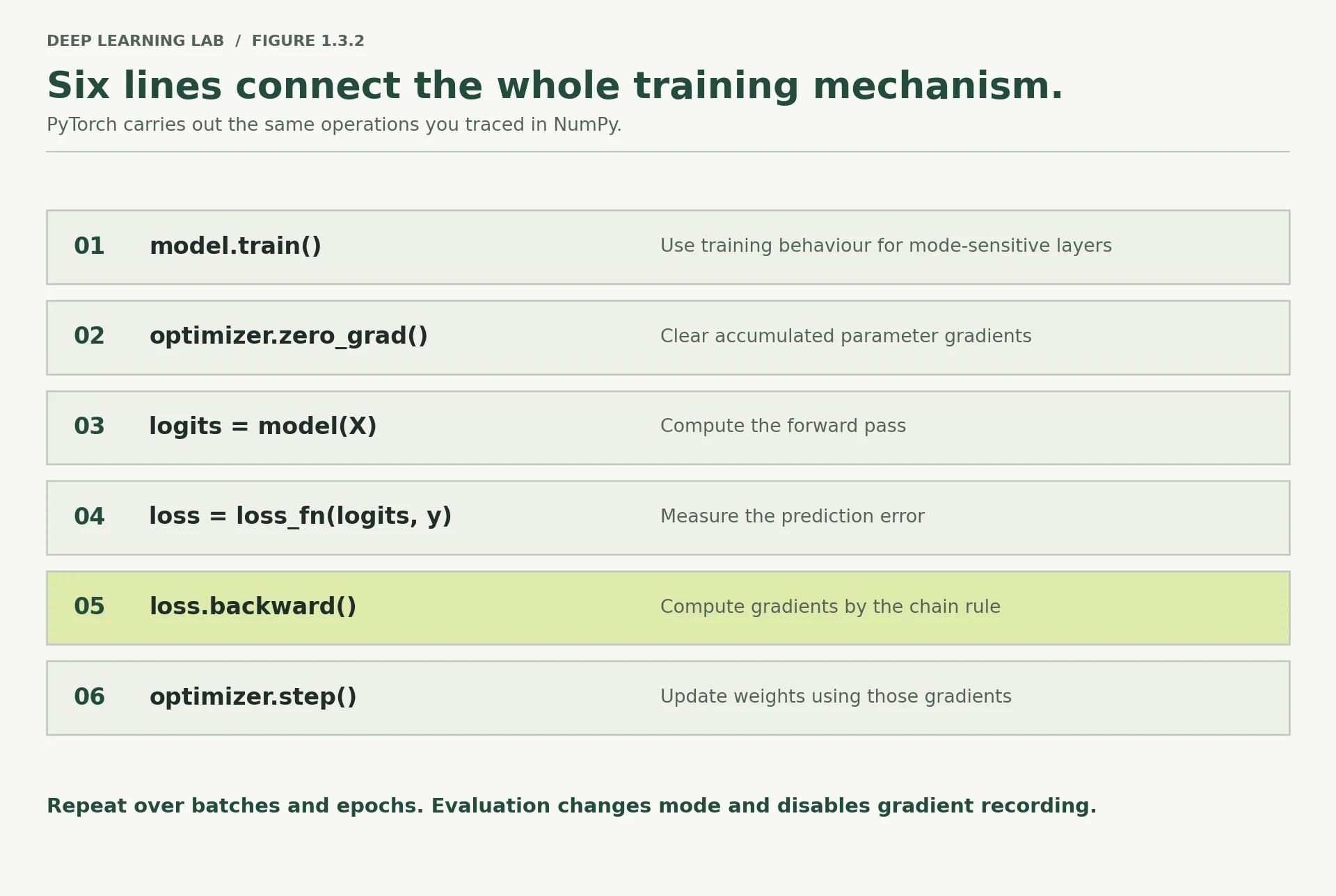
We add validation. The evaluation block is wrapped in torch.no_grad() because we are only measuring, not learning — which skips graph construction and saves both time and memory.
def train_model(model, optimizer, loss_fn, X_tr, y_tr, X_va, y_va, epochs=1500, log_every=50): """Full-batch training loop with validation after every epoch. Each epoch runs the six canonical lines (``train()``, ``zero_grad()``, forward, loss, ``backward()``, ``step()``) on the whole training set, then measures loss and accuracy on the validation set under ``eval()`` and ``torch.no_grad()``. Args: model: The ``nn.Module`` to train (already on the right device). optimizer: An optimizer built from ``model.parameters()``. loss_fn: Loss function taking ``(logits, targets)``, e.g. ``BCEWithLogitsLoss``. X_tr: Training inputs, shape ``(N_train, F)``. y_tr: Training labels, shape ``(N_train, 1)``, float 0/1. X_va: Validation inputs, shape ``(N_val, F)``. y_va: Validation labels, shape ``(N_val, 1)``. epochs: Number of passes over the training data (one update per epoch here). log_every: Print progress every this many epochs (and on the last epoch). Returns: A dict with three lists, one value per epoch: ``"train_loss"``, ``"val_loss"`` and ``"val_acc"``, ready to plot. """ history = {"train_loss": [], "val_loss": [], "val_acc": []} for epoch in range(epochs): # ---------- train ---------- model.train() optimizer.zero_grad() logits = model(X_tr) loss = loss_fn(logits, y_tr) loss.backward() optimizer.step() # ---------- evaluate ---------- model.eval() with torch.no_grad(): val_logits = model(X_va) val_loss = loss_fn(val_logits, y_va) val_acc = ((torch.sigmoid(val_logits) > 0.5).float() == y_va).float().mean() history["train_loss"].append(loss.item()) history["val_loss"].append(val_loss.item()) history["val_acc"].append(val_acc.item()) if epoch % log_every == 0 or epoch == epochs - 1: print(f"epoch {epoch:>5} train loss {loss.item():.4f} " f"val loss {val_loss.item():.4f} val acc {val_acc.item():.4f}") return historySix training lines, then an evaluation block that measures without learning. The history dictionary is what you plot.
- 1
Training mode (matters for dropout / batch norm).
- 2
Clear the gradients from the previous epoch.
- 3
Backprop: fill
.gradfor every parameter. - 4
Update every parameter using its
.grad. - 5
Evaluation mode, then measure on data the model never trains on.
- 6
No graph, no gradients: cheaper, and guarantees validation can't affect the weights.
- 7
.item()turns a one-element tensor into a plain Python float, which keeps no graph and uses no GPU memory.
-
What happens if you put
optimizer.zero_grad()afterloss.backward()instead of before?You would erase the gradients you just computed:
backward()fills.grad, thenzero_grad()wipes it, thenstep()sees zero gradients. Nothing learns (Adam may drift a little on its momentum, then stall). Order matters: clear, compute, use. -
Why must
optimizer.step()come afterloss.backward()and not before?step()uses whatever is in.gradright now. Called beforebackward(), it would apply last iteration's gradients (or nothing on the first iteration), so every update is one step stale and computed for different parameter values. The gradient must be computed for the current parameters before you step. -
We evaluate every epoch. On a large dataset, why might that be a poor choice?
Evaluating means a full forward pass over the validation set. With millions of examples that can cost as much as a chunk of training, every single epoch. Real pipelines evaluate every N steps, on a fixed validation subset, or once per (long) epoch, and log metrics to a tracker (Lesson 4.2).
Which order is correct for one training step?
Clear old gradients, compute predictions and loss, fill .grad, then update. (model.train() goes first each epoch.)
Write the six lines of the training loop from memory, and say what each does in a few words.
model.train()(training mode);optimizer.zero_grad()(clear old gradients);out = model(X)(forward, builds the graph);loss = loss_fn(out, y)(one number);loss.backward()(fill.grad);optimizer.step()(update the parameters).
Training on the spirals
Everything is assembled. Point it at the data.
torch.manual_seed(SEED)model = SpiralNet(hidden=64).to(DEVICE)optimizer = torch.optim.Adam(model.parameters(), lr=0.01)loss_fn = nn.BCEWithLogitsLoss()import timet0 = time.time()history = train_model(model, optimizer, loss_fn, X_train, y_train, X_val, y_val, epochs=500)print(f"\ntrained in {time.time() - t0:.1f}s on {DEVICE}")epoch 0 train loss 0.6990 val loss 0.6778 val acc 0.6200 epoch 50 train loss 0.4954 val loss 0.5086 val acc 0.6840 epoch 100 train loss 0.3089 val loss 0.3571 val acc 0.8120 epoch 150 train loss 0.1965 val loss 0.2494 val acc 0.8640 epoch 200 train loss 0.1214 val loss 0.1700 val acc 0.9320 epoch 250 train loss 0.0869 val loss 0.1324 val acc 0.9640 epoch 300 train loss 0.0659 val loss 0.1129 val acc 0.9680 epoch 350 train loss 0.0528 val loss 0.0989 val acc 0.9720 epoch 400 train loss 0.0432 val loss 0.0933 val acc 0.9720 epoch 450 train loss 0.0375 val loss 0.0917 val acc 0.9760 epoch 499 train loss 0.0313 val loss 0.0868 val acc 0.9760 trained in 0.8s on mps
history.keys()dict_keys(['train_loss', 'val_loss', 'val_acc'])
def plot_boundary_torch(model, X_np, y_np, title, ax=None): """Shade the decision regions of a PyTorch model over the 2-D input plane. Builds a 300 × 300 grid covering the data, runs the model on every grid point (in evaluation mode, without gradients), and colours each region by whether the predicted probability is above 0.5. The data points are drawn on top. Args: model: A trained ``nn.Module`` with 2 inputs and 1 output logit. X_np: NumPy array ``(N, 2)`` of points to draw. y_np: NumPy array ``(N,)`` of their labels. title: Plot title. ax: Matplotlib axes to draw on; a new figure is created when omitted. Returns: The matplotlib axes. """ if ax is None: _, ax = plt.subplots(figsize=(5.5, 5.5)) pad = 0.15 g1 = np.linspace(X_np[:, 0].min() - pad, X_np[:, 0].max() + pad, 300) g2 = np.linspace(X_np[:, 1].min() - pad, X_np[:, 1].max() + pad, 300) G1, G2 = np.meshgrid(g1, g2) grid = torch.tensor(np.column_stack([G1.ravel(), G2.ravel()]), dtype=torch.float32, device=DEVICE) model.eval() with torch.no_grad(): Z = (torch.sigmoid(model(grid)) > 0.5).float().cpu().numpy().reshape(G1.shape) ax.contourf(G1, G2, Z, alpha=0.25, levels=1, colors=["#3b6ea5", "#d1701c"]) ax.scatter(X_np[y_np == 0, 0], X_np[y_np == 0, 1], s=6, c="#3b6ea5") ax.scatter(X_np[y_np == 1, 0], X_np[y_np == 1, 1], s=6, c="#d1701c") ax.set_title(title); ax.set_aspect("equal"); ax.set_xlabel("x1"); ax.set_ylabel("x2") return axplot_boundary_torch(model, X_val_np, y_val_np, f"Your network — validation accuracy {history['val_acc'][-1]:.3f}")plt.tight_layout(); plt.show()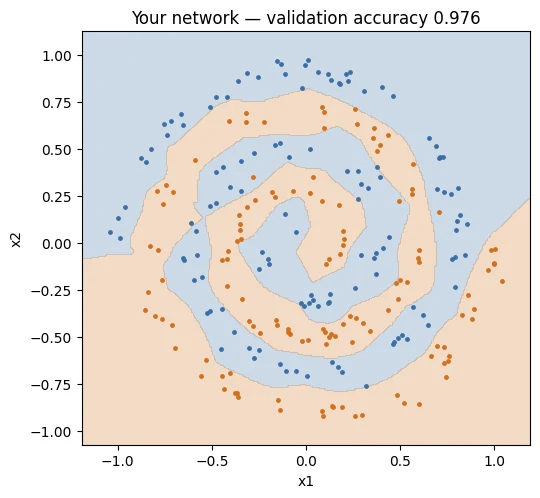
Compare that with the flat straight seam from Lesson 1.1, Section 3. Same data, same 1,000 points, same two input features — and a boundary that follows the spiral arms outward.
Nothing was told to this model about radius or angle. It found a usable representation in its hidden layers, exactly as argued in Lesson 1.1, using the mechanism you traced in Lesson 1.2, driven by the six lines in Section 8.
-
Look at the boundary in the outer regions where there is no data. Is the model's confidence there justified?
No. There is no data there, so nothing constrained the model. The network (piecewise linear) simply extends its last trends, making confident predictions from pure extrapolation. Those regions are out of distribution; high confidence there is unearned, which is the calibration problem the lesson mentions.
-
Reduce
hiddento 4 and retrain. Where does the boundary break down first?Accuracy falls to roughly 70–77%. With 4 units per layer the boundary can only make a few straight-edged bends, so it first loses the tightly wound centre, where the arms alternate fastest (in our runs the centre was only ~54% correct while the outer arm stayed ~80–90%). Try it in the Spiral Lab above.
-
How would this picture change with
noise=0.15in the generator?The arms overlap, so the ideal boundary becomes fuzzy: some points genuinely lie in the other class's territory. The learned boundary gets rougher as it chases noisy points, validation accuracy drops (the best achievable accuracy is lower), and the gap between training and validation loss grows: the first sign of overfitting.
The trained network draws a curved boundary following the spiral arms. What did it learn that logistic regression could not?
Nothing was told to the model about radius or angle. The hidden layers found a usable description, as argued in Lesson 1.1.
Reading the loss curve
The loss curve is your primary instrument, and Module 3 is largely devoted to reading it. Start building the habit now.
fig, axes = plt.subplots(1, 2, figsize=(11, 3.6))axes[0].plot(history["train_loss"], label="train", color="#3b6ea5")axes[0].plot(history["val_loss"], label="validation", color="#d1701c")axes[0].set_xlabel("epoch"); axes[0].set_ylabel("loss")axes[0].set_title("Loss"); axes[0].legend()axes[1].plot(history["val_acc"], color="#4a7c59")axes[1].set_xlabel("epoch"); axes[1].set_ylabel("accuracy")axes[1].set_title("Validation accuracy"); axes[1].set_ylim(0.4, 1.02)plt.tight_layout(); plt.show()print(f"final train loss: {history['train_loss'][-1]:.4f}")print(f"final val loss: {history['val_loss'][-1]:.4f}")print(f"final val acc: {history['val_acc'][-1]:.4f}")print(f"gap (val - train):{history['val_loss'][-1] - history['train_loss'][-1]:+.4f}")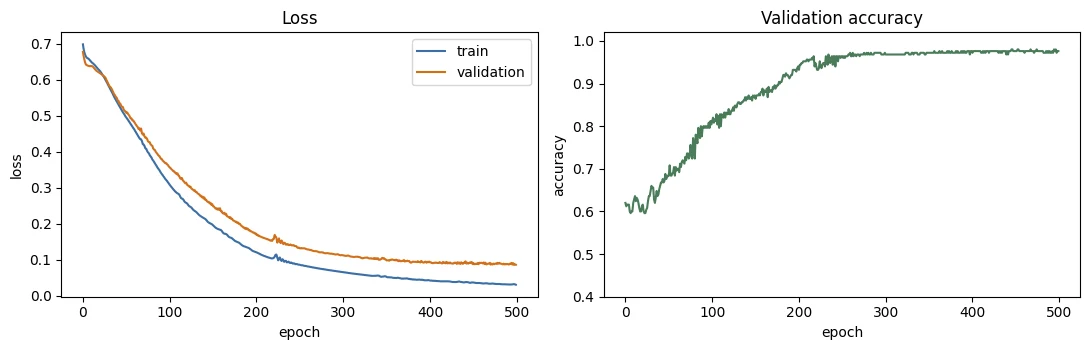
final train loss: 0.0313
final val loss:   0.0868
final val acc:    0.9760
gap (val - train):+0.0555
What to look at, in order:
Do both curves fall? Yes — the model is learning something that transfers to unseen data.
Do they stay close? Roughly. A small gap is normal and expected. A validation curve that turns upward while training loss keeps falling is overfitting, and it is the single most important pattern to recognise.
Has it flattened? Largely, which suggests more epochs would add little at this learning rate.
Three shapes to commit to memory now, because you will meet all of them in Module 3:
| Pattern | Diagnosis |
|---|---|
| Both fall, stay close | Healthy |
| Train falls, validation rises | Overfitting |
| Neither falls | Underfitting, bad learning rate, or a bug |
-
Our validation loss is not rising. With 1,000 points and 4,600 parameters, why might overfitting be milder than you expect?
The data is clean and dense: 1,000 points with little noise (0.04) tracing a smooth, learnable pattern, and validation comes from exactly the same distribution. There's little noise to memorise, so fitting the training set well mostly means learning the true spiral. (The question says 4,600 parameters; the model has 4,417.)
-
Suppose validation loss bottoms out at epoch 400 then climbs. Which weights would you want to keep? (That is early stopping — Module 3.)
The weights from epoch 400, the validation minimum. Save a checkpoint whenever validation loss improves and restore the best one at the end: that's early stopping (Lesson 3.2).
-
Why plot loss and accuracy separately rather than assuming they move together?
Because they measure different things. Accuracy only counts which side of 0.5 each prediction is on; loss also measures confidence. Validation loss can rise (a few confident mistakes getting more confident) while accuracy holds steady or even improves. Watching both tells you whether the model is becoming right or just becoming sure.
Training loss keeps falling while validation loss turns upward. Diagnosis?
The model is fitting training-specific noise that does not transfer. It is the single most important curve pattern to recognise.
Neither the training nor the validation loss falls. Which is not a likely cause?
Flat curves mean nothing is being learned: underfitting, a bad learning rate or a bug.
Describe the three loss-curve shapes the lesson asks you to memorise and what each means.
- Both curves fall and stay close: healthy.
- Training falls while validation rises: overfitting.
- Neither falls: underfitting, a bad learning rate or a bug.
Prediction
A trained model is only useful if you can put new data through it. Three habits make inference correct: evaluation mode, no gradients, and an explicit conversion from logits to probabilities.
def predict(model, X_numpy, threshold=0.5): """Run inference on raw NumPy input and return probabilities and hard labels. Applies the three habits of correct inference: ``model.eval()``, no gradient tracking, and an explicit conversion from logits to probabilities with a sigmoid. Args: model: A trained binary classifier returning one logit per example. X_numpy: NumPy array ``(N, F)`` of inputs. threshold: Probability above which an example is labelled 1. Returns: A tuple ``(probs, labels)``: ``probs`` is a float array ``(N,)`` of probabilities of class 1, ``labels`` an int array ``(N,)`` of 0/1 predictions. """ model.eval() # evaluation mode x = torch.tensor(X_numpy, dtype=torch.float32, device=DEVICE) with torch.no_grad(): # no graph, no gradients probs = torch.sigmoid(model(x)) # logits -> probabilities probs = probs.cpu().numpy().ravel() # back to NumPy for downstream use return probs, (probs > threshold).astype(int)Evaluation mode → tensor on the right device → no-grad forward → logits to probabilities → back to NumPy.
- 1
Convert logits to probabilities only now, at read-out time.
- 2
NumPy can't read GPU memory, so move to the CPU first;
.ravel()flattens(N, 1)to(N,).
new_points = np.array([[0.0, 0.0], # dead centre, genuinely ambiguous [0.9, 0.1], # far out on one arm [-0.9, -0.1], # far out on the other [0.4, 0.4]]) # somewhere in the middlenew_pointsarray([[ 0. , 0. ],
[ 0.9, 0.1],
[-0.9, -0.1],
[ 0.4, 0.4]])
probs, preds = predict(model, new_points)probsarray([6.3141376e-01, 9.6920478e-05, 9.9248451e-01, 7.9895484e-01],
dtype=float32)
predsarray([1, 0, 1, 1])
print(f"{'point':<16}{'P(class 1)':>12}{'predicted':>12}")print("-" * 40)for pt, p, pr in zip(new_points, probs, preds): print(f"{str(pt):<16}{p:>12.4f}{pr:>12d}")point P(class 1) predicted ---------------------------------------- [0. 0.] 0.6314 1 [0.9 0.1] 0.0001 0 [-0.9 -0.1] 0.9925 1 [0.4 0.4] 0.7990 1
Look at the first row against the second and third. Far out on either arm the model is emphatic — probabilities of essentially 0 and 1. At the origin, where both arms begin and the true answer is genuinely ambiguous, it hedges at around 0.64. The confidence tracks the difficulty, which is what you want.
It is only a partial success, though: 0.64 still leans one way on a point that deserves a coin flip. Models are frequently more confident than they have earned, especially away from the training data. Whether a model's stated probability reflects its actual reliability is called calibration, and it is a topic Module 9 takes seriously.
-
Why
model.eval()when this model has no dropout or batch norm?Habit and safety. Today it changes nothing, but the moment someone adds dropout or batch normalisation, inference without
eval()becomes random (dropout) or statistically wrong (batch norm). Calling it always costs nothing and makes the code correct for any architecture. It also documents intent. -
What would happen if you forgot
torch.no_grad()during a large inference run?Autograd would record every operation and keep all intermediate activations in memory for a backward pass that never comes. On a large run, memory climbs until you hit an out-of-memory error, and everything is slower. Also, outputs would carry
requires_grad=True, so.numpy()fails until you.detach(). -
The threshold is 0.5. When would a different threshold be the right engineering choice?
Whenever the two kinds of mistake have different costs or classes are imbalanced: medical screening or fraud detection (lower threshold, catch more positives at the price of false alarms), or a call centre that can only phone the top 5% (pick the threshold that selects that many). The threshold is a business decision, made on validation data, not a law (Lesson 4.1 §10).
At the origin, where both arms start, the model predicts 0.64. What does that illustrate?
A genuinely ambiguous point deserves about 0.5. Whether stated probabilities match reliability is calibration, covered in Module 9.
Which three habits make inference correct?
Evaluation mode (for dropout/batch norm), no graph building, and applying sigmoid/softmax yourself because the model outputs logits.
Saving and loading weights
Save the state dict — a dictionary of parameter tensors — not the model object. Saving the object pickles your class definition along with it, which breaks as soon as you refactor. Every serious codebase saves state dicts.
Two ways to save, one right answer
Pickles the whole object, including a reference to your class's code location. Rename a file or refactor a class and loading breaks.
Saves just {parameter name → tensor}. Rebuild the architecture from code, then load_state_dict. Robust, portable, the industry standard.
model.state_dict()OrderedDict([('layer1.weight',
tensor([[ 0.7171, 0.4779],
[-0.8008, 2.0215],
[-0.2930, -0.0553],
[-0.4128, 2.1209],
[ 0.9160, -0.8431],
[ 0.8623, 0.0927],
[ 1.5785, 0.2075],
[ 0.6077, -0.5908],
[ 0.5451, 0.1045],
[-0.3301, 0.1802],
[-1.0012, 0.3609],
[-0.4492, 1.1207],
[-2.6466, 1.2875],
[-0.1997, -0.4252],
[-0.0924, -1.1153],
[ 1.4064, -1.3284],
[ 2.1535, 2.6646],
[-0.0054, 1.8055],
[ 0.6589, 0.6759],
[ 0.2203, -1.1298],
[ 0.1972, -0.9236],
[ 0.2119, 0.5436],
[ 1.3428, -0.8965],
[ 0.9523, 1.2062],
[ 0.6635, -1.3823],
[-0.8925, -0.9767],
[-0.5555, 0.8359],
[ 0.2037, 0.2929],
[ 0.7723, -0.5275],
[ 1.8837, -1.2769],
[-0.3820, -1.0680],
[ 0.2180, -0.2435],
[ 0.3106, -0.6310],
[ 1.7823, -1.0402],
[-1.3422, -1.5108],
[ 1.3911, 0.2455],
[ 0.7957, -1.3021],
[-0.8291, -1.3382],
[-1.2424, 0.6453],
[ 0.2634, 0.8532],
[-1.6656, -0.9512],
[ 1.3033, -1.3023],
[ 0.6860, -0.6599],
[ 1.3940, -1.1009],
[-0.2939, 0.3554],
[ 1.1248, -0.8951],
[ 0.2160, 1.3898],
[-0.7996, -1.2922],
[ 1.1374, 0.1807],
[-0.7258, -2.1485],
[-0.2318, 0.2689],
[-0.0933, -0.5133],
[-0.6138, -1.2995],
[-2.6591, -0.5185],
[-1.5458, -1.8101],
[ 2.9341, 1.0885],
[-0.4494, -1.2426],
[-1.3483, 0.4978],
[-0.2847, -0.7648],
[-1.2783, 0.6351],
[-0.1356, -0.8066],
[ 0.0783, -1.3393],
[-1.2729, -1.4322],
[-0.1584, -0.9593]], device='mps:0')),
('layer1.bias',
tensor([ 1.3362, -0.6989, 1.4563, -1.0295, -0.8436, 0.6771, -0.9916, -0.5698,
-0.5869, -0.7030, 0.5615, -0.9081, -0.4135, -0.5803, 0.7792, -0.5828,
-0.9307, 0.4777, 0.8501, 1.0449, 1.0973, -0.6475, -0.2294, -0.9917,
-0.5701, -0.8849, 1.2224, -0.5190, 0.8620, 0.7403, -0.0665, -0.3823,
0.8797, -0.2869, -0.4825, -1.0172, 0.7091, 0.1414, -0.9743, 0.8864,
-0.7442, -0.9794, -0.6412, -0.5500, 1.0808, -0.4423, -0.9591, 0.1361,
-0.8423, -0.7110, 1.4231, -0.6657, -0.5308, 0.4835, -0.5352, -1.1806,
-0.0793, 0.7602, 0.5694, -0.7760, -0.5770, -0.6157, -0.4580, -0.6835],
device='mps:0')),
('layer2.weight',
tensor([[-0.1810, 0.8799, -0.2965, ..., 1.8611, 0.6404, -2.1675],
[ 0.0072, -1.9672, 0.0156, ..., -0.7831, 0.3574, 1.6123],
[-0.2419, 0.1369, 0.1933, ..., 1.5065, 0.1249, -1.0844],
...,
[-0.1607, -1.5085, 0.0885, ..., -1.3784, 0.4399, 1.8735],
[-0.3344, -0.5640, -0.2304, ..., 1.2083, 0.2975, 1.5259],
[ 0.0629, 0.1202, 0.2386, ..., -0.1463, -0.9793, 0.0106]],
device='mps:0')),
('layer2.bias',
tensor([-0.2465, 0.0675, 0.0466, 0.0381, 0.0382, -0.3144, 0.0241, -0.0869,
-0.0484, 0.1751, -0.4681, -0.0664, -0.2115, -0.0311, -0.3105, 0.0687,
-0.1144, 0.3060, -0.0788, -0.0455, 0.1360, -0.1641, -0.0831, 0.2519,
-0.1223, 0.0080, -0.1067, -0.0889, -0.0525, 0.3409, -0.0083, -0.1533,
-0.3245, -0.1086, -0.1912, 0.1674, -0.3342, -0.1327, -0.0224, -0.4043,
-0.0418, 0.0809, -0.3664, -0.2307, -0.1000, -0.1747, -0.1041, -0.3054,
-0.1610, -0.1291, -0.1284, 0.3716, 0.0499, 0.0592, 0.3098, -0.0828,
0.3742, -0.0125, -0.1876, -0.2314, -0.1593, 0.0821, -0.3044, 0.1217],
device='mps:0')),
('layer3.weight',
tensor([[-1.8167, 2.1534, -0.7565, -1.9252, 2.4985, 1.6918, -0.0651, -0.8380,
-1.0942, -1.5835, -1.7440, 0.0093, 2.4064, -1.1622, 1.5678, -0.9049,
-1.3321, 0.9511, 0.0542, -0.0441, -1.0838, -0.0382, -0.0368, 1.1390,
0.0132, -0.0329, -0.0660, -0.0364, 0.0334, 1.2740, -1.2128, 0.0155,
1.6525, -2.9488, -1.9191, -1.6101, -2.0755, 1.2409, -0.0134, -1.6062,
0.0254, -1.1402, -2.4957, -0.0447, 0.0504, 1.6266, 0.0307, 1.5793,
-0.0805, 0.0357, 0.0212, 0.6518, -0.0819, -0.0330, 2.6337, 0.0310,
0.8519, 0.0339, -0.0545, -1.6599, -0.0249, 1.9613, 2.0669, -1.3974]],
device='mps:0')),
('layer3.bias', tensor([0.2644], device='mps:0'))])
from pathlib import PathPath("checkpoints").mkdir(exist_ok=True)CKPT = "checkpoints/spiral_net.pt"# What a state dict actually containsprint("state_dict contents:")for k, v in model.state_dict().items(): print(f" {k:<16} {tuple(v.shape)}")torch.save(model.state_dict(), CKPT)print(f"\nsaved to {CKPT} ({Path(CKPT).stat().st_size / 1024:.1f} KB)")state_dict contents: layer1.weight (64, 2) layer1.bias (64,) layer2.weight (64, 64) layer2.bias (64,) layer3.weight (1, 64) layer3.bias (1,) saved to checkpoints/spiral_net.pt (20.2 KB)
# Reloading: build the architecture first, then pour the weights inreloaded = SpiralNet(hidden=64).to(DEVICE)reloadedSpiralNet( (layer1): Linear(in_features=2, out_features=64, bias=True) (layer2): Linear(in_features=64, out_features=64, bias=True) (layer3): Linear(in_features=64, out_features=1, bias=True) (act): ReLU() )
reloaded.load_state_dict(torch.load(CKPT, map_location=DEVICE))<All keys matched successfully>
reloaded.eval()SpiralNet( (layer1): Linear(in_features=2, out_features=64, bias=True) (layer2): Linear(in_features=64, out_features=64, bias=True) (layer3): Linear(in_features=64, out_features=1, bias=True) (act): ReLU() )
p_orig, _ = predict(model, X_val_np)p_new, _ = predict(reloaded, X_val_np)print(f"predictions identical: {np.allclose(p_orig, p_new)}")predictions identical: True
# A fuller checkpoint — what you actually want for resuming an interrupted runcheckpoint = { "epoch": 500, "model_state_dict": model.state_dict(), "optimizer_state_dict": optimizer.state_dict(), # Adam carries state worth preserving "val_acc": history["val_acc"][-1], "config": {"hidden": 64, "lr": 0.01, "seed": SEED},}torch.save(checkpoint, "checkpoints/spiral_full.pt")print("full checkpoint saved with keys:", list(checkpoint.keys()))Everything needed to continue training exactly where you stopped, and to know later what produced these weights.
- 1
Adam's moment estimates and step count. Without them a resumed run restarts the optimizer cold.
- 2
Hyperparameters travel with the weights, so the file describes itself.
full checkpoint saved with keys: ['epoch', 'model_state_dict', 'optimizer_state_dict', 'val_acc', 'config']
CKPT'checkpoints/spiral_net.pt'
checkpoint['val_acc']0.9760000109672546
That config entry is a small habit with a large payoff. Three weeks from now, a bare .pt file tells you nothing about the learning rate or seed that produced it. Storing the configuration alongside the weights makes a checkpoint self-describing — and it is exactly the reproducibility practice Module 4 formalises.
map_location=DEVICE matters too: it lets a checkpoint saved on a Colab GPU load on your Mac, or the reverse. Without it, loading a CUDA checkpoint on a CPU-only machine fails.
-
Why save the optimizer state? What would resuming without it lose?
Adam's state holds each parameter's running averages (first and second moments) and the step count. Resuming without it restarts the optimizer cold: the moments reset, bias correction starts over, the effective step sizes change, and the loss often jumps. The resumed run is no longer a faithful continuation of the original.
-
What must you already know in order to load a state dict successfully?
You need the architecture: the model class code and the hyperparameters that determine its shapes (e.g.
hidden=64). The state dict holds only names and tensors; the names and shapes must match the model you build exactly, or loading fails with missing or unexpected keys or size mismatches. -
Where in a git repository should model checkpoints live — and should they be committed?
Not in git history. Checkpoints are large binary files that change on every run, so they bloat the repository forever. Keep them in a
checkpoints/folder listed in.gitignore, and store the important ones in artifact storage (a model registry, Git LFS/DVC, a cloud bucket or the Hugging Face Hub). Commit the code, the config and a small results file instead (Lesson 2.4).
What should you save to disk to reload a model later?
Pickling the object ties the file to your class definition and breaks when you refactor. To load a state_dict you rebuild the architecture, then pour the weights in.
Why store the optimizer state and a config dictionary in a checkpoint, not just the weights?
- The optimizer state (e.g. Adam's running averages) lets an interrupted run resume exactly where it stopped.
- The config (learning rate, seed, sizes) makes the file self-describing, so you know weeks later what produced it;
map_locationlets it load on another device.
Deliberate breakage: three changes that stop learning
This is the real test of the day. Each cell below introduces exactly one bug. None of them raises an exception — the code runs, produces numbers, and looks entirely plausible.
That is what makes them dangerous, and learning to recognise their signatures is worth more than any amount of theory.
Try to predict the symptom before running each cell.
Bug 2 removes every activation from the 4,417-parameter SpiralNet and trains it as usual. Its validation accuracy will be about…
About 0.61, the same as logistic regression's 0.592 in Lesson 1.1: three stacked linear layers collapse into one. The loss curve looks perfectly healthy while it happens.
# ---------- BUG 1: forgetting optimizer.zero_grad() ----------torch.manual_seed(SEED)m1 = SpiralNet(hidden=64).to(DEVICE)opt1 = torch.optim.Adam(m1.parameters(), lr=0.01)hist1 = []for epoch in range(600): m1.train() # opt1.zero_grad() <-- REMOVED loss = loss_fn(m1(X_train), y_train) loss.backward() opt1.step() hist1.append(loss.item())with torch.no_grad(): acc1 = ((torch.sigmoid(m1(X_val)) > 0.5).float() == y_val).float().mean().item()print(f"BUG 1 — no zero_grad() final loss {hist1[-1]:.4f} val acc {acc1:.4f}")BUG 1 — no zero_grad() final loss 0.8181 val acc 0.5560
# ---------- BUG 2: no activation function (the Lesson 1.2 Section 4 collapse) ----------class LinearOnlyNet(nn.Module): """Bug 2: the same three layers as ``SpiralNet`` but with no activation functions. Because nothing non-linear sits between the layers, the whole network collapses into a single linear layer and can only draw a straight decision boundary. It is deliberately broken, to show a failure that raises no error. """ def __init__(self, hidden=64): """Create the three linear layers (no activation is registered). Args: hidden: Width of the two hidden layers. """ super().__init__() self.layer1 = nn.Linear(2, hidden) self.layer2 = nn.Linear(hidden, hidden) self.layer3 = nn.Linear(hidden, 1) def forward(self, x): """Apply the three linear layers back to back, with no ReLU in between. Args: x: Input tensor of shape ``(N, 2)``. Returns: Logits of shape ``(N, 1)``, a purely linear function of ``x``. """ x = self.layer1(x) # no ReLU x = self.layer2(x) # no ReLU return self.layer3(x)torch.manual_seed(SEED)m2 = LinearOnlyNet().to(DEVICE)opt2 = torch.optim.Adam(m2.parameters(), lr=0.01)hist2 = []for epoch in range(600): m2.train(); opt2.zero_grad() loss = loss_fn(m2(X_train), y_train) loss.backward(); opt2.step() hist2.append(loss.item())with torch.no_grad(): acc2 = ((torch.sigmoid(m2(X_val)) > 0.5).float() == y_val).float().mean().item()print(f"BUG 2 — no activation final loss {hist2[-1]:.4f} val acc {acc2:.4f}")print(f" parameters: {sum(p.numel() for p in m2.parameters()):,} — and all of them wasted")BUG 2 — no activation final loss 0.6627 val acc 0.6120
parameters: 4,417 — and all of them wasted
# ---------- BUG 3: learning rate far too high ----------torch.manual_seed(SEED)m3 = SpiralNet(hidden=64).to(DEVICE)opt3 = torch.optim.Adam(m3.parameters(), lr=5.0) # 500x too largehist3 = []for epoch in range(600): m3.train(); opt3.zero_grad() loss = loss_fn(m3(X_train), y_train) loss.backward(); opt3.step() hist3.append(loss.item())with torch.no_grad(): acc3 = ((torch.sigmoid(m3(X_val)) > 0.5).float() == y_val).float().mean().item()print(f"BUG 3 — lr = 5.0 final loss {hist3[-1]:.4f} val acc {acc3:.4f}")BUG 3 — lr = 5.0 final loss 0.6547 val acc 0.5520
# All three failures against the working modeltorch.manual_seed(SEED)m_ok = SpiralNet(hidden=64).to(DEVICE)opt_ok = torch.optim.Adam(m_ok.parameters(), lr=0.01)hist_ok = []for epoch in range(600): m_ok.train(); opt_ok.zero_grad() l = loss_fn(m_ok(X_train), y_train) l.backward(); opt_ok.step() hist_ok.append(l.item())fig, axes = plt.subplots(1, 4, figsize=(15, 3.2), sharey=True)for ax, (h, title) in zip(axes, [ (hist_ok, "Working\n(reference)"), (hist1, "BUG 1\nno zero_grad()"), (hist2, "BUG 2\nno activation"), (hist3, "BUG 3\nlr = 5.0")]): ax.plot(h, color="#3b6ea5") ax.set_title(title, fontsize=10); ax.set_xlabel("epoch")axes[0].set_ylabel("training loss"); axes[0].set_ylim(0, 1.2)plt.tight_layout(); plt.show()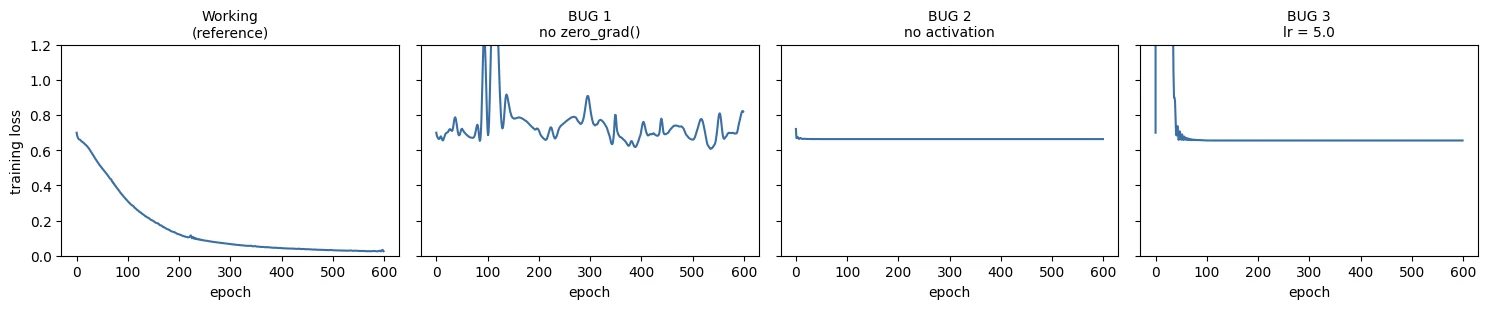
Read the four curves side by side, because the shapes are the diagnostic.
Bug 1 — no zero_grad(). Gradients accumulate across every epoch, so the effective step keeps growing. The loss is erratic and the model underperforms, but it may not fail outright — which is exactly why this one survives into production code. Signature: unstable training that no learning-rate change quite fixes.
Bug 2 — no activation. The loss falls smoothly and settles at a respectable-looking value. Everything appears healthy. Now compare the accuracy with Lesson 1.1, Section 3: logistic regression scored 0.592 on this data, and this 4,417-parameter network scores about 0.61. That is not a coincidence — Lesson 1.2, Section 4 predicted it exactly. Three stacked linear layers collapse into one, so this is logistic regression in an expensive costume. Signature: a smooth, healthy-looking curve that plateaus far below what the task should allow.
Bug 3 — learning rate 500× too large. Every step overshoots. The loss spikes, thrashes, and never settles. Signature: violent oscillation, visible immediately.
Bug 3 is the easy one — it announces itself. Bugs 1 and 2 are the dangerous ones, because a model that quietly performs at 60% when it should reach 95% will pass code review, ship, and underperform in production without anyone noticing.
This is the professional lesson of Module 1: your model running without errors tells you nothing about whether it is learning. Module 3 builds the full diagnostic toolkit.
Deep diveWhy bug 1 misbehaves even with Adam
Without zero_grad(), .grad after step \(t\) holds \(g_1 + g_2 + \dots + g_t\), the sum of every gradient so far.
Early gradients (computed for weights that no longer exist) keep steering every later update, like momentum that never decays.
Adam divides by a running scale, so the steps don't simply explode, but their direction is dominated by stale history: the model circles and
oscillates instead of settling. The training-loop widget in Section 8 shows the same effect with plain SGD.
-
Introduce a fourth bug on your own and predict its signature before running it. Some suggestions: pass
y_trainwithoutunsqueeze(1)and watch what broadcasting does; swapBCEWithLogitsLossforBCELosson raw logits; setlr=1e-6; returntorch.sigmoid(...)fromforwardwhile keepingBCEWithLogitsLoss.Predicted signatures, as checked in current PyTorch:
- Labels without
unsqueeze(1):BCEWithLogitsLossraisesValueError(sizes must match), a loud, lucky bug. WithMSELossit would silently broadcast to(750, 750). BCELosson raw logits:RuntimeErrorfor inputs outside [0, 1], also loud.lr=1e-6: a flat line near 0.69 that looks like underfitting; accuracy stays near 50%. Signature: nothing happens, and nothing is flagged.sigmoidinforward+BCEWithLogitsLoss: a double sigmoid. The effective probability is squeezed into (0.5, 0.73), so the loss can never fall below ~0.31 (positives) / 0.69 (negatives). Worse, validation thresholdssigmoid(output) > 0.5, which is always true, so every point is predicted class 1. Signature: loss stuck around 0.5, accuracy frozen at the class-1 rate.
- Labels without
Which bug produces a smooth, healthy-looking loss curve that plateaus far too low in accuracy?
With no activations the stacked linear layers collapse into logistic regression (~0.61 on the spirals). Nothing looks broken, which is why it is dangerous.
What is the professional lesson of the three bugs?
None of the bugs raised an exception. Recognising their signatures in the curves is the start of engineering judgement.
Pick one of the three bugs and describe its signature on the loss curve and why it happens.
- No
zero_grad(): gradients accumulate so effective steps grow; erratic, unstable training that no learning-rate change quite fixes. - No activation: smooth, healthy-looking curve that plateaus at logistic-regression accuracy, because linear layers collapse into one.
- Learning rate too large: every step overshoots; violent oscillation, visible immediately.
End-of-module competency check
Work through these without scrolling back. If any is shaky, revisit that section; Module 2 builds directly on all of it.
-
Conceptual. Why did logistic regression fail on the spirals, and why was that not a bug?
Its decision boundary is a single straight line (\(w_1x_1+w_2x_2+b=0\)), and no straight line separates two interleaved spirals. The code, data and optimiser all worked; the task was outside what the model class can express.
-
Conceptual. What is the difference between a learned parameter and an engineered feature?
A learned parameter is a number inside the model set by training (a weight or bias). An engineered feature is an input description whose formula a person wrote (like radius or angle). In a network, the early layers' parameters effectively become learned features.
-
Conceptual. Explain backpropagation in one sentence, using the word "credit".
Backpropagation is credit assignment through the computational graph: it walks backwards from the loss using the chain rule to work out how much each parameter contributed to the error.
-
Conceptual. Why does stacking linear layers without activations gain you nothing?
Because a composition of linear maps is itself linear: \((XW_1+b_1)W_2+b_2 = X(W_1W_2)+(b_1W_2+b_2)\). Any depth collapses to one linear layer, which is logistic regression in an expensive costume (Bug 2 scored 61%, like logistic regression's 59%).
-
Conceptual. Name one situation in 2026 where gradient boosting is the better choice than a neural network.
A medium-sized, curated tabular problem such as churn or credit risk with thousands to hundreds of thousands of rows, meaningful columns, a deadline and a need for explanations. Boosting is usually as accurate or better, faster, needs no scaling and has fewer knobs.
-
Mechanical. Write the six lines of the training loop from memory, in order.
model.train() optimizer.zero_grad() logits = model(X) loss = loss_fn(logits, y) loss.backward() optimizer.step() -
Mechanical. What does
optimizer.zero_grad()do, and what happens without it?It resets every parameter's
.gradto zero (orNone). Without it, PyTorch adds each new gradient to the old ones, so updates follow the sum of all past gradients: training becomes erratic and underperforms without ever raising an error (Bug 1). -
Mechanical. Why do we output logits rather than probabilities from
forward?Because
BCEWithLogitsLoss/CrossEntropyLosscombine the sigmoid/softmax with the log in one numerically stable operation that never computes \(\log(0)\). Applytorch.sigmoidonly when you want to read probabilities (inference, metrics). -
Mechanical. What are the three properties of a tensor you should always be able to state?
Shape (its dimensions, and which axis is the batch), dtype (e.g.
float32for data and weights,int64/longfor class labels), and device (cpu,cudaormps). -
Mechanical. A binary classifier starts training at loss 4.2. What does that tell you before you look at anything else?
Something is wrong. A random binary guess scores \(\ln 2 \approx 0.69\), so 4.2 means the model is confidently wrong from the start. Check label encoding (e.g. labels 0/255, or ±1), shapes (broadcasting), the loss function (probabilities vs logits), and the input scaling.
-
Practical. Retrain
SpiralNetwithhidden=4. What is the highest validation accuracy you can reach, and what does that tell you about capacity?In our tests, around 68–77% depending on the seed (vs ~97% with 64 units). It fails first in the tightly wound centre (about 54% there) while the outer arm stays fairly accurate. With 4 units per layer the network can only make a few straight-edged bends, too few for 2.5 turns: that is under-capacity (underfitting), and no amount of training fixes it.
-
Practical. Take the model to 5,000 epochs. Does validation loss start rising? What would you do about it?
Typically yes, eventually. Training loss keeps shrinking while validation loss bottoms out and slowly climbs as the model grows over-confident and fits the noise. Keep the checkpoint with the lowest validation loss (early stopping), and/or add regularisation (weight decay, dropout, a smaller model), as covered in Lesson 3.2.
-
Practical. Regenerate the spirals with
noise=0.20and retrain. How does the boundary change, and does the loss curve tell you the data got harder?The arms blur into each other, so the boundary becomes rougher and the best possible accuracy drops (some points genuinely sit on the wrong arm). The curves show it: both losses flatten at a higher value and the train/validation gap widens as the network tries to fit the noise. A higher loss floor with healthy-looking curves is the signature of a harder (noisier) task, not a bug.
A binary classifier starts training at loss 4.2. Before looking at anything else, what do you suspect?
Random guessing gives about 0.69. Starting at 4.2 means something is wrong before training even begins.
Conclusion
You began Module 1 with a linear model failing at a task you could solve by eye. You end it having built the thing that solves it, from the arithmetic upward.
Along the way, three ideas that the rest of the course rests on:
Representation learning is the shift. Not that deep learning is stronger — gradient boosting beat a network on churn in Lesson 1.1 — but that the transformation from raw input to useful description became something learned rather than written. That matters most where writing it is hopeless.
The mechanism is not magic. You computed a forward pass, a loss, a full backward pass and a parameter update by hand, then watched PyTorch reproduce your gradients exactly. loss.backward() is now a function whose output you could have produced yourself.
Running is not learning. Three bugs, no exceptions raised, plausible-looking output, and a model that had quietly stopped working. Recognising that gap is the beginning of engineering judgement rather than tutorial-following.
The loop you wrote in Section 8 is not a toy. It is the same loop, structurally, that trains the models you will fine-tune in Module 8 and serve in Module 9. What changes between here and there is scale, data handling, and the tooling wrapped around it — never the six lines at the centre.
One habit to start today. Open a file called experiments.md and record, for every run you make from now on: what you tried, why, what happened, what you learned, what you would change. Four lines. Module 10 asks for this as a deliverable, and the people who start in Module 1 are visibly ahead by Module 5.
Transition to Module 2
Today's model was handed 750 examples as a single tensor and trained on all of them at once. That works because the spirals are tiny. It stops working almost immediately — a dataset that does not fit in memory cannot be one tensor, and even when it fits, updating once per epoch is a slow way to learn.
Module 2 fixes this properly. You will meet Dataset and DataLoader, PyTorch's abstractions for feeding data in mini-batches, and the training loop grows an inner loop over batches. You will spend serious time on tensor shapes and shape debugging, because that is where most PyTorch time is genuinely lost. And you will build an MLP for a realistic tabular classification problem, with proper preprocessing.
Module 2 also introduces the engineering practices that carry through the rest of the course: virtual environments, dependency pinning, project structure, and Git. Your work starts becoming a repository rather than a notebook.
Next: Module 2 — PyTorch: Building Neural Networks
Wrap-up
- A tensor has three properties you must always know: shape, dtype (
float32data,longclass labels) and device (cpu / cuda / mps). Everything that meets must be on the same device. - Detect the device once (
get_device()), move the model once and move every data tensor you create. - Write models as
nn.Module: layers declared in__init__are registered automatically; callmodel(x), nevermodel.forward(x). - Return logits and use
BCEWithLogitsLoss/CrossEntropyLoss. Check the initial loss against \(\ln K\) before training. - The loop:
train()→zero_grad()→ forward → loss →backward()→step(). Evaluate witheval()+no_grad()on held-out data. - Save state dicts (plus optimizer state and config) and load with
map_location. - Running is not learning. A missing
zero_grad(), a missing activation or a wild learning rate raise no errors; only the curves and held-out accuracy reveal them.
Quick check
torch.tensor(np.array([1.0, 2.0])) has which dtype?
It inherits NumPy's float64. Specify dtype=torch.float32 or call .float().
What does x.to(DEVICE) on a line by itself do to the tensor x?
For tensors, .to() returns a new tensor; write x = x.to(DEVICE).
Your binary classifier's forward returns raw scores. Which loss should you use?
It fuses sigmoid + BCE in one numerically stable step and expects logits.
You forget optimizer.zero_grad(). What happens?
PyTorch adds new gradients to .grad. No error, just quietly broken training.
A 3-layer network with no activation functions will perform about as well as…
Stacked linear layers collapse into one linear layer. Bug 2 scored ~61%, like logistic regression's ~59%.
Why wrap validation in torch.no_grad()?
Measuring doesn't need gradients, so don't pay for the graph.
Which should you save to disk for a model you'll reload later?
State dicts are robust to refactoring; rebuild the architecture in code and load the weights into it.
Questions and discussion
Ask about this lesson, share what you found in a lab, or help someone else. Posts are public on the course's GitHub Discussions: anyone can read them, and you need a GitHub account to post.
Opening it loads giscus from giscus.app.