Dataset and DataLoader: Feeding the Model
- Time
- ~100 min
- Sections
- 8
- Code cells
- 62
- Labs
- 3
- Figures
- 4
Before you start
How a table or a folder of files becomes the batches a network trains on. You measure why mini-batches matter even when
memory doesn't, split before preprocessing so nothing leaks, encode a real mixed-type table, write your own Dataset
(in memory and lazily from disk), configure a DataLoader deliberately, and inspect one batch before training.
- Goal
Understand how data moves from a raw dataset into a PyTorch training loop.
The important idea is that the model should not have to worry about where the data came from or how it is stored. We build a small data pipeline that prepares examples and delivers them to the model in batches.
Think of the pipeline like this:
raw data ↓ clean and split the data ↓ convert it into numbers the model can use ↓ Dataset → gives one example at a time ↓ DataLoader → groups examples into batches ↓ training loop → gives batches to the model- Outcome
By the end of this lesson, you should be able to:
- create a
Datasetfor data already in memory; - create a
Datasetthat reads examples from files on disk; - use a
DataLoaderto create batches; - understand what
batch_size,shuffle,drop_last, andnum_workersactually do; - check a batch before training so that data-shape and dtype mistakes are caught early.
- create a
- You will be able to
- explain why training with mini-batches can be more useful than putting the entire dataset through the model at once;
- split a dataset before fitting preprocessing steps, so information from validation/test data does not leak into training;
- convert a table containing numbers and categories into a
float32matrix that a neural network can consume; - check the proportion of positive and negative labels before interpreting accuracy;
- implement the two methods that make up the basic PyTorch
Datasetinterface:__len__and__getitem__; - understand lazy loading, where examples are read only when they are requested instead of loading the whole dataset into RAM;
- configure a
DataLoaderdeliberately; - make data loading reproducible when randomness is involved;
- inspect one batch before starting a training run.
- Runtime
Section Approximate time Download and load the data (first run only) 20–60 s Section 1 — the full-batch vs mini-batch measurement ~90 s Section 5 — writing 1,797 PNG files ~5 s Everything else under 10 s combined Total execution is roughly 3 minutes on a first run, under 90 seconds thereafter. All of it runs on CPU.
How to read this lesson
This lesson answers one question:
How does a dataset stored as raw files or tables become the batches that a neural network trains on?
There are three objects to keep separate in your head:
1. Dataset
"Give me one example."
2. DataLoader
"Give me many examples grouped into a batch."
3. Training loop
"Give this batch to the model, calculate the loss, calculate gradients, and update the model."
A large part of this lesson is simply learning those three responsibilities and why keeping them separate makes a training pipeline easier to build and debug.
Getting the data
The loader below checks for a local copy first, then downloads from UCI. The UCI archive serves this dataset as a zip containing another zip, which is why the extraction has two steps.
If you are on Kaggle, internet access is off by default — switch it on in the right-hand sidebar under Settings → Internet, or attach the dataset directly. On Colab the download works as-is.
BANK_URL = "https://archive.ics.uci.edu/static/public/222/bank+marketing.zip"BANK_CSV = DATA_DIR / "bank-full.csv"def download_bank_marketing(csv_path: Path = BANK_CSV, url: str = BANK_URL) -> Path: """Download UCI Bank Marketing once and return the path to ``bank-full.csv``. If the CSV already exists locally it is reused. Otherwise the UCI archive is downloaded; it contains a *second* zip (``bank.zip``) holding the CSV, so the function extracts twice and then deletes both zip files. Args: csv_path: Where the CSV should live (the cache location). url: Address of the UCI zip archive. Returns: The path to the extracted ``bank-full.csv``. Raises: RuntimeError: If the download fails. The message explains how to fetch the file manually and where to put it. """ if csv_path.exists(): print(f"Using cached copy at {csv_path}") return csv_path outer_zip = csv_path.parent / "bank+marketing.zip" print(f"Downloading from {url} ...") try: urllib.request.urlretrieve(url, outer_zip) except Exception as exc: raise RuntimeError( f"Download failed ({exc}).\n" f"Manual fallback: open {url} in a browser, extract bank.zip from it, " f"extract bank-full.csv from that, and place it at {csv_path.resolve()}" ) from exc with zipfile.ZipFile(outer_zip) as z: z.extract("bank.zip", csv_path.parent) # the archive nests a second zip inner_zip = csv_path.parent / "bank.zip" with zipfile.ZipFile(inner_zip) as z: z.extract("bank-full.csv", csv_path.parent) outer_zip.unlink() inner_zip.unlink() print(f"Saved to {csv_path} ({csv_path.stat().st_size / 1e6:.1f} MB)") return csv_patht0 = time.time()path = download_bank_marketing()Downloading from https://archive.ics.uci.edu/static/public/222/bank+marketing.zip ... Saved to data/bank-full.csv (4.6 MB)
bank = pd.read_csv(path, sep=";") # UCI uses semicolons, not commasprint(f"Loaded in {time.time() - t0:.1f}s -> {bank.shape[0]:,} rows x {bank.shape[1]} columns")bank.head()Loaded in 53.5s -> 45,211 rows x 17 columns
| age | job | marital | education | default | balance | housing | loan | contact | day | month | duration | campaign | pdays | previous | poutcome | y | |
|---|---|---|---|---|---|---|---|---|---|---|---|---|---|---|---|---|---|
| 0 | 58 | management | married | tertiary | no | 2143 | yes | no | unknown | 5 | may | 261 | 1 | -1 | 0 | unknown | no |
| 1 | 44 | technician | single | secondary | no | 29 | yes | no | unknown | 5 | may | 151 | 1 | -1 | 0 | unknown | no |
| 2 | 33 | entrepreneur | married | secondary | no | 2 | yes | yes | unknown | 5 | may | 76 | 1 | -1 | 0 | unknown | no |
| 3 | 47 | blue-collar | married | unknown | no | 1506 | yes | no | unknown | 5 | may | 92 | 1 | -1 | 0 | unknown | no |
| 4 | 33 | unknown | single | unknown | no | 1 | no | no | unknown | 5 | may | 198 | 1 | -1 | 0 | unknown | no |
print("Column types:")print(bank.dtypes.to_string())print(f"\nMissing values: {bank.isna().sum().sum()}")print(f"\nTarget distribution:")print(bank["y"].value_counts())print()print(bank["y"].value_counts(normalize=True).round(4)*100)Column types: age int64 job object marital object education object default object balance int64 housing object loan object contact object day int64 month object duration int64 campaign int64 pdays int64 previous int64 poutcome object y object Missing values: 0 Target distribution: y no 39922 yes 5289 Name: count, dtype: int64 y no 88.3 yes 11.7 Name: proportion, dtype: float64
One column has to go before we start
The column duration records how long the marketing call lasted.
The problem is not that duration is inaccurate. The problem is when this information becomes available.
We are trying to answer:
"Will this client subscribe?"
But the call duration is only known after the call has already happened. A prediction system that is supposed to decide what to do before or during the call would not have that information available at prediction time.
This is called target leakage.
Target leakage happens when information that would not be available at prediction time is allowed into the model as an input. It can make a model look much better during evaluation than it would be in the real world.
So we remove duration.
A useful habit is:
For every feature, ask: "Would I know this value at the exact moment I need to make the prediction?"
If the answer is no, do not use it as an input.
# Quick evidence of how strong the leak is, before we drop it.subscribed = bank["y"] == "yes"print(f"mean call duration, subscribed : {bank.loc[subscribed, 'duration'].mean():.0f}s")print(f"mean call duration, not subscribed : {bank.loc[~subscribed, 'duration'].mean():.0f}s")print(f"ratio : " f"{bank.loc[subscribed, 'duration'].mean() / bank.loc[~subscribed, 'duration'].mean():.1f}x")bank = bank.drop(columns=["duration"])print(f"\nDropped. Remaining shape: {bank.shape}")mean call duration, subscribed : 537s mean call duration, not subscribed : 221s ratio : 2.4x Dropped. Remaining shape: (45211, 16)
The problem above is a specific type of data leakage called target leakage.
Leakage means that information from outside the information that should legitimately be available to the model has found its way into the training process.
For now, remember one simple rule:
A feature is only valid if its value would be available when the prediction is made.
Later we will look at other forms of leakage. For this lesson, the important lesson is to think about the timeline of the prediction, not just whether a column looks useful.
Setup — imports, versions and device detection used by the notebook (6 cells)
# Pinned for reproducibility. Uncomment to install in a fresh environment (Colab / Kaggle).# !pip install -q torch==2.14.0 numpy==2.4.4 pandas==3.0.2 scikit-learn==1.8.0 matplotlib==3.10.8 pillow==12.1.1import osimport sysimport timeimport zipfileimport urllib.requestfrom pathlib import Pathimport numpy as npimport pandas as pdimport torchimport torch.nn as nnimport matplotlib.pyplot as pltfrom torch.utils.data import Dataset, DataLoader, TensorDatasetprint(f"python : {sys.version.split()[0]}")print(f"torch : {torch.__version__}")print(f"numpy : {np.__version__}")print(f"pandas : {pd.__version__}")import sklearnprint(f"scikit-learn : {sklearn.__version__}")python : 3.13.9 torch : 2.14.0 numpy : 2.3.5 pandas : 2.3.3 scikit-learn : 1.7.2 scikit-learn : 1.8.0
def get_device() -> torch.device: """Return the best available device: CUDA, then Apple MPS, then CPU. Returns: A ``torch.device`` for the fastest backend available on this machine. """ if torch.cuda.is_available(): return torch.device("cuda") if torch.backends.mps.is_available() and torch.backends.mps.is_built(): return torch.device("mps") return torch.device("cpu")DEVICE = get_device()DEVICEdevice(type='mps')
SEED = 42torch.manual_seed(SEED)np.random.seed(SEED)print(f"Device: {DEVICE}")print("Note 2.2 is a data-pipeline note. Nothing here needs a GPU;")print("the timings in Section 1 are reported for whatever device you have.")Device: mps Note 2.2 is a data-pipeline note. Nothing here needs a GPU; the timings in Section 1 are reported for whatever device you have.
DATA_DIR = Path("data")DATA_DIR.mkdir(exist_ok=True)Where full-batch stops working
Three jobs, three objects
"Give me one example." Knows how many examples exist (__len__) and how to produce example i (__getitem__).
"Give me many examples, grouped into a batch." Decides the order (shuffle), the batch size and how to stack examples.
"Give this batch to the model, compute the loss and gradients, update." Knows nothing about files or order.
Module 1 trained the network using the whole training dataset at once. This is called full-batch gradient descent.
Suppose we have 36,168 training examples.
With full-batch training:
36,168 examples
      ↓
    model
      ↓
    loss
      ↓
gradient
      ↓
update parameters once
One complete pass through the training data produces one parameter update.
With mini-batch training, we divide the training data into smaller groups. For example, with batch_size=256:
36,168 examples
      ↓
  ┌───────┐
  │ batch │ 256 examples → update
  ├───────┤
  │ batch │ 256 examples → update
  ├───────┤
  │ batch │ 256 examples → update
  ├───────┤
  │  ...  │
  └───────┘
Now the model makes many parameter updates during one pass through the dataset.
A common explanation says:
"We use mini-batches because the whole dataset might not fit in GPU memory."
That is true for large datasets, especially images, but it is not the main reason in this experiment. This Bank Marketing dataset is small enough to fit comfortably in memory.
So this section asks a more useful question:
What does mini-batching give us when memory is not the problem?
The answer is mainly more parameter updates per epoch.
The next cells measure that difference.
from sklearn.model_selection import train_test_split# --- Minimal encoding, purely to enable the timing experiment. Section 3 does this properly. ---_df = bank.copy()_y = (_df.pop("y") == "yes").astype(np.int64).values_cat_cols = [c for c in _df.columns if str(_df[c].dtype) in ("object", "str", "category")]_X = pd.get_dummies(_df, columns=_cat_cols).astype(np.float32).values_Xtr, _Xva, _ytr, _yva = train_test_split( _X, _y, test_size=0.2, stratify=_y, random_state=SEED)_mu, _sd = _Xtr.mean(axis=0), _Xtr.std(axis=0) + 1e-8_Xtr, _Xva = (_Xtr - _mu) / _sd, (_Xva - _mu) / _sdXtr_t = torch.from_numpy(_Xtr)ytr_t = torch.from_numpy(_ytr).float().unsqueeze(1)Xva_t = torch.from_numpy(_Xva)n_features = Xtr_t.shape[1]mem_mb = Xtr_t.element_size() * Xtr_t.nelement() / 1e6print(f"Training matrix : {tuple(Xtr_t.shape)} ({n_features} features after one-hot encoding)")print(f"Memory occupied : {mem_mb:.1f} MB")print(f"So 'it does not fit in memory' is not the argument here.")Training matrix : (36168, 50) (50 features after one-hot encoding) Memory occupied : 7.2 MB So 'it does not fit in memory' is not the argument here.
Experiment A: full-batch training
We first train a small neural network using all training examples in one batch.
The important sequence inside the loop is:
1. clear old gradients
2. run the model on the data
3. calculate the loss
4. calculate gradients with backpropagation
5. update the parameters
Because the entire dataset is used at once, this sequence happens once per epoch.
from sklearn.metrics import roc_auc_scoreEPOCHS = 20BATCH_SIZE = 256def fresh_model() -> nn.Module: """Build the small comparison network with identical initial weights every time. Re-seeding PyTorch before creating the layers guarantees that the full-batch and mini-batch runs start from exactly the same weights, so any difference between them comes from how they were trained, not from luck. Returns: ``nn.Sequential(Linear(n_features, 64), ReLU(), Linear(64, 1))``: one hidden layer, one output logit. """ torch.manual_seed(SEED) return nn.Sequential(nn.Linear(n_features, 64), nn.ReLU(), nn.Linear(64, 1))loss_fn = nn.BCEWithLogitsLoss()# ---------- Run A: full batch ----------model_full = fresh_model()opt_full = torch.optim.Adam(model_full.parameters(), lr=1e-3)t0 = time.time()full_updates = 0for epoch in range(EPOCHS): opt_full.zero_grad() loss = loss_fn(model_full(Xtr_t), ytr_t) loss.backward() opt_full.step() full_updates += 1full_time = time.time() - t0with torch.no_grad(): p_full = torch.sigmoid(model_full(Xva_t)).numpy().ravel()auc_full = roc_auc_score(_yva, p_full)print(f"FULL BATCH : {full_updates:5,} parameter updates | " f"{full_time:6.2f}s | final train loss {loss.item():.4f} | val ROC-AUC {auc_full:.4f}")The whole training set goes through the model at once, so each epoch produces exactly one parameter update.
- 1
Resets the seed before building the model, so both runs start from identical weights and the comparison is fair.
- 2
All 36,168 rows in one forward pass.
- 3
One update per epoch: 20 in total.
FULL BATCH : 20 parameter updates | 0.07s | final train loss 0.5129 | val ROC-AUC 0.6238
Experiment B: mini-batch training
Now we use batch_size=256.
The DataLoader divides the training set into batches. For every batch, we perform the same five-step training sequence:
batch → model → loss → gradients → parameter update
Because there are many batches in one epoch, the model updates its parameters many times per epoch.
Same model, same initial weights, same 20 epochs over the same data, but with batch_size=256 instead of the whole set. Compared with full-batch training, the mini-batch run will…
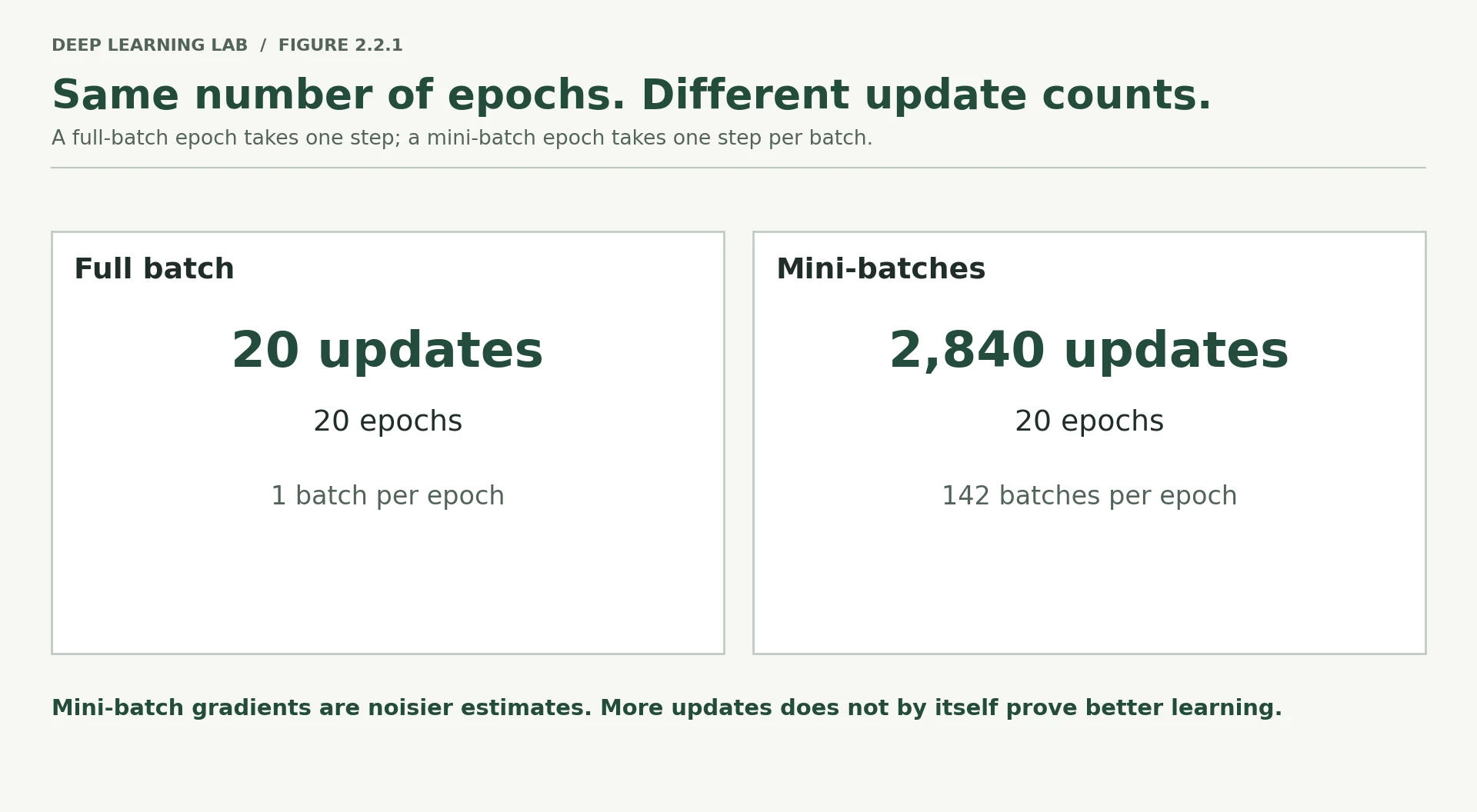
Slower and much better: 2,840 updates instead of 20, about 16× the wall-clock time, and validation ROC-AUC 0.788 vs 0.624. Both runs did the same arithmetic on the same rows; the mini-batch run simply turned it into 142× more parameter updates.
# ---------- Run B: mini batch ----------train_ds = TensorDataset(Xtr_t, ytr_t)train_dl = DataLoader(train_ds, batch_size=BATCH_SIZE, shuffle=True)model_mini = fresh_model()opt_mini = torch.optim.Adam(model_mini.parameters(), lr=1e-3)t0 = time.time()mini_updates = 0for epoch in range(EPOCHS): for xb, yb in train_dl: opt_mini.zero_grad() loss = loss_fn(model_mini(xb), yb) loss.backward() opt_mini.step() mini_updates += 1mini_time = time.time() - t0with torch.no_grad(): p_mini = torch.sigmoid(model_mini(Xva_t)).numpy().ravel()auc_mini = roc_auc_score(_yva, p_mini)print(f"MINI BATCH : {mini_updates:5,} parameter updates | " f"{mini_time:6.2f}s | final batch loss {loss.item():.4f} | val ROC-AUC {auc_mini:.4f}")print()print(f"Same architecture, same initialisation, same {EPOCHS} passes over the same data.")print(f"Mini-batching did {mini_updates / full_updates:.0f}x more updates, " f"took {mini_time / full_time:.1f}x longer, " f"and reached {auc_mini - auc_full:+.3f} ROC-AUC.")The same five steps, now inside an inner loop over batches of 256, so one epoch produces about 142 updates.
- 1
The DataLoader cuts the dataset into shuffled batches of 256.
- 2
The inner loop: one iteration per batch.
- 3
Counts every update: 2,840 after 20 epochs.
MINI BATCH : 2,840 parameter updates |   1.17s | final batch loss 0.3035 | val ROC-AUC 0.7878

Same architecture, same initialisation, same 20 passes over the same data.
Mini-batching did 142x more updates, took 15.7x longer, and reached +0.164 ROC-AUC.
What the measurement actually says
First, an important definition:
An epoch = one complete pass through the training dataset.
With full-batch training, the entire dataset is processed once and then the model is updated once.
So:
1 epoch → 1 update
20 epochs → 20 updates
With batch_size=256, the training set is divided into about 142 batches:
1 epoch → about 142 updates
20 epochs → about 2,840 updates
So both approaches have seen the same training examples after 20 epochs, but the model has been given many more opportunities to change its parameters when using mini-batches.
That is the key idea:
Mini-batching is not only a memory-saving technique. It also controls how often the model updates its parameters.
Memory still becomes very important for large datasets. An entire dataset of images can be far too large to place on a GPU at once. But for this small tabular dataset, memory is not the limiting factor.
Gradient agreement is the average cosine similarity between a mini-batch gradient and the full gradient: 1.0 means identical direction. Smaller batches give noisier (lower) agreement, but many more steps.
def batch_memory_mb(n, *dims, bytes_per=4): """Memory, in megabytes, of one float tensor with shape ``(n, *dims)``. Multiplies all dimensions to get the number of elements, then by the bytes per element. Activations, gradients and optimizer state are *not* included. Args: n: Number of examples (the batch axis). *dims: The remaining dimensions, e.g. ``50`` for 50 features or ``3, 224, 224`` for RGB images. bytes_per: Bytes per number: 4 for float32, 2 for float16/bfloat16. Returns: The size in megabytes (1 MB = 1,000,000 bytes). """ total = n for d in dims: total *= d return total * bytes_per / 1e6print("Memory for ONE full batch, float32, activations excluded:\n")rows = [ ("Bank Marketing (this note)", batch_memory_mb(36_169, 50)), ("MNIST, 60k at 28x28x1", batch_memory_mb(60_000, 1, 28, 28)), ("CIFAR-10, 50k at 32x32x3", batch_memory_mb(50_000, 3, 32, 32)), ("ImageNet-scale, 1.2M at 224x224x3", batch_memory_mb(1_200_000, 3, 224, 224)),]for name, mb in rows: unit = f"{mb:,.0f} MB" if mb < 1000 else f"{mb / 1000:,.1f} GB" print(f" {name:<38} {unit:>12}")print("\nA free Colab T4 has 15 GB of VRAM, and the parameters, gradients, optimizer")print("state and intermediate activations all have to fit alongside the data.")print("Day 4 works through that budget properly.")Memory for ONE full batch, float32, activations excluded: Bank Marketing (this note) 7 MB MNIST, 60k at 28x28x1 188 MB CIFAR-10, 50k at 32x32x3 614 MB ImageNet-scale, 1.2M at 224x224x3 722.5 GB A free Colab T4 has 15 GB of VRAM, and the parameters, gradients, optimizer state and intermediate activations all have to fit alongside the data. Day 4 works through that budget properly.
The third effect: gradient noise
There is another difference between full-batch and mini-batch training.
A gradient tells the optimizer which direction the model's parameters should move to reduce the loss.
With full-batch training, the gradient is calculated using every training example. It is therefore the exact average gradient for that dataset.
With mini-batch training, the gradient is calculated using only a small sample of the data. It is therefore an estimate of the full gradient.
For example:
Full batch:
all examples → exact average gradient

Mini-batch:
256 examples → approximate gradient
Because different mini-batches contain different examples, their gradients are slightly different. This variation is called gradient noise.
"Noise" does not necessarily mean "bad."
It means that the optimizer does not take exactly the same direction it would have taken using the entire dataset. That variation can sometimes help optimization explore the loss surface rather than following one perfectly deterministic path.
The next experiment measures how closely several mini-batch gradients point in the same direction as the exact full-batch gradient.
probe = fresh_model()probe_loss = nn.BCEWithLogitsLoss()# The exact gradient, over every training row.probe.zero_grad()probe_loss(probe(Xtr_t), ytr_t).backward()true_grad = torch.cat([p.grad.flatten().clone() for p in probe.parameters()])# Sixteen independent mini-batch estimates of that same gradient.cosines, norms = [], []g = torch.Generator().manual_seed(SEED)for _ in range(16): idx = torch.randint(0, Xtr_t.shape[0], (BATCH_SIZE,), generator=g) probe.zero_grad() probe_loss(probe(Xtr_t[idx]), ytr_t[idx]).backward() est = torch.cat([p.grad.flatten().clone() for p in probe.parameters()]) cosines.append(torch.nn.functional.cosine_similarity(est, true_grad, dim=0).item()) norms.append(est.norm().item())print(f"Exact gradient norm : {true_grad.norm().item():.4f}")print(f"Mini-batch gradient norm (mean): {np.mean(norms):.4f}")print()print(f"Cosine similarity to the exact gradient, over 16 mini-batches:")print(f" mean {np.mean(cosines):.3f} | min {np.min(cosines):.3f} | max {np.max(cosines):.3f}")print()print("Well above zero: each mini-batch points broadly the right way.")print("Well below one: each one is wrong in its own direction. That is the noise.")Exact gradient norm : 0.7696 Mini-batch gradient norm (mean): 0.7539 Cosine similarity to the exact gradient, over 16 mini-batches: mean 0.988 | min 0.978 | max 0.993 Well above zero: each mini-batch points broadly the right way. Well below one: each one is wrong in its own direction. That is the noise.
-
Mini-batching took several times longer in wall-clock terms for the same twenty epochs. Where did that time go, given that both runs did the same total amount of arithmetic on the same data?
Into per-batch overhead, not arithmetic. The mini-batch run executes the Python training loop 2,840 times instead of 20: each iteration pays for DataLoader indexing and collation (stacking 256 rows into a tensor), building an autograd graph, launching many small operations and an optimiser step. Small matrix multiplications also use the CPU's vector units less efficiently than one large one. Same FLOPs, far more bookkeeping.
-
If you doubled
batch_sizefrom 256 to 512 and kept everything else fixed, predict what happens to: updates per epoch, gradient noise, wall-clock time per epoch, and final ROC-AUC. Which of the four are you confident about?- Updates per epoch: halve (124 → 62 on the main split; 142 → 71 in Section 1). Certain.
- Gradient noise: falls, since the spread of a mini-batch average shrinks roughly like \(1/\sqrt{B}\), so about 0.71× as noisy. Confident.
- Wall-clock per epoch: usually drops, because fewer loop iterations means less overhead. Likely, but hardware-dependent.
- Final ROC-AUC after 20 epochs: probably slightly lower (half as many updates at the same learning rate), but it could go either way. Least confident. This is exactly the kind of prediction to test rather than argue about.
-
At what dataset size would full-batch training stop being possible on a 15 GB GPU for this 50-feature tabular problem? Does that number surprise you?
Rough budget per row: 50 input floats, plus the hidden layer's 64 pre-activations and 64 activations (kept for backward), the output, and similar-sized gradients during the backward pass. That's about 1–1.5 KB per row in float32. 15 GB ÷ ~1.2 KB ≈ 12 million rows (the parameters themselves are tiny: 3,329 numbers). So for narrow tabular data, full-batch training remains possible far beyond this dataset's 45,211 rows. The surprise is that memory isn't what makes mini-batches worthwhile here; update count and speed of learning are.
Bank Marketing fits in memory (7 MB). What did mini-batching still buy in the experiment?
Same data, same 20 epochs, but 142× more updates. Here mini-batching is about how often the model gets to change, not memory.
Each mini-batch gradient had cosine similarity about 0.98 with the exact gradient. What does that mean?
Well above zero, well below one: a useful but noisy estimate of the full gradient.
Give the two reasons to use mini-batches, and say which one mattered for this dataset.
- Memory: large datasets (especially images) cannot be processed as one batch on a GPU.
- More parameter updates per epoch (with a noisy but useful gradient estimate); for the 7 MB Bank Marketing table this was the reason that mattered.
Splitting before you touch anything
The order of operations in a data pipeline matters because it determines whether your validation and test results are trustworthy.
The rule is:
Split the data first. Then learn preprocessing rules using the training split only.
Suppose we want to standardise a feature.
Standardisation means:
new value = (old value - mean) / standard deviation
If we calculate the mean and standard deviation using all the data, the calculation includes the validation and test examples.
That means information from the held-out data has influenced the numbers used to prepare the training data.
The model has not directly seen the validation labels, but the preprocessing step has still used information from the validation data.
That is a form of data leakage.
The safe sequence is:
1. Split the data
        ↓
2. Calculate preprocessing values from TRAIN only
        ↓
3. Transform TRAIN using those values
        ↓
4. Transform VALIDATION using the SAME values
        ↓
5. Transform TEST using the SAME values
For example:
X_tr, X_va = split(X)

scaler.fit(X_tr)

X_tr = scaler.transform(X_tr)
X_va = scaler.transform(X_va)
Notice that we do not call scaler.fit() on X_va.
The validation set is supposed to behave like unseen data.
Leaky pipeline vs correct pipeline
scaler.fit(X) on all rows → split. Validation and test rows helped choose the mean and scale, so the held-out data is no longer truly unseen.
Split → scaler.fit(X_tr) → transform train, validation and test with that same fitted scaler. The held-out sets play the role of future data.
from sklearn.preprocessing import StandardScalery_all = (bank["y"] == "yes").astype(np.int64).valuesX_all = bank.drop(columns=["y"])# Split into train / validation / test. 70 / 15 / 15, stratified on the target# so all three splits carry the same 11.7% positive rate.X_tr, X_tmp, y_tr, y_tmp = train_test_split( X_all, y_all, test_size=0.30, stratify=y_all, random_state=SEED)X_va, X_te, y_va, y_te = train_test_split( X_tmp, y_tmp, test_size=0.50, stratify=y_tmp, random_state=SEED)for name, X_, y_ in [("train", X_tr, y_tr), ("val", X_va, y_va), ("test", X_te, y_te)]: print(f"{name:<6} {X_.shape[0]:>6,} rows | positive rate {y_.mean():.4f}")print(f"\nTotal: {len(y_tr) + len(y_va) + len(y_te):,} (of {len(y_all):,})")train 31,647 rows | positive rate 0.1170 val 6,782 rows | positive rate 0.1171 test 6,782 rows | positive rate 0.1169 Total: 45,211 (of 45,211)
stratify=y_all tells train_test_split to preserve approximately the same class proportions in each split.
Our target has two classes:
yes → client subscribed
no  → client did not subscribe
If the complete dataset contains about 11.7% yes and 88.3% no, stratification aims to keep roughly that same proportion in the training, validation, and test sets.
This is useful because a random split without stratification can accidentally produce slightly different class balances.
Important distinction:
Stratification controls class proportions. It does not solve every possible problem with how a dataset should be split.
For example, if the same person appears many times, or if rows from the same patient belong together, we may need a group-based split instead. We will return to that idea later.
numeric_cols = [c for c in X_all.columns if X_all[c].dtype.kind in "iuf"]print("Numeric columns:", numeric_cols)correct_scaler = StandardScaler().fit(X_tr[numeric_cols]) # train onlyleaked_scaler = StandardScaler().fit(X_all[numeric_cols]) # everythingcomparison = pd.DataFrame({ "correct_mean": correct_scaler.mean_, "leaked_mean": leaked_scaler.mean_, "correct_scale": correct_scaler.scale_, "leaked_scale": leaked_scaler.scale_,}, index=numeric_cols)comparison["mean_shift_pct"] = ( 100 * (comparison.leaked_mean - comparison.correct_mean).abs() / comparison.correct_mean.abs().clip(lower=1e-9))print()print(comparison.round(3).to_string())Numeric columns: ['age', 'balance', 'day', 'campaign', 'pdays', 'previous']
correct_mean leaked_mean correct_scale leaked_scale mean_shift_pct
age 40.883 40.936 10.622 10.619 0.130
balance 1363.590 1362.272 3070.187 3044.732 0.097
day 15.807 15.806 8.331 8.322 0.002
campaign 2.760 2.764 3.105 3.098 0.138
pdays 39.869 40.198 99.673 100.128 0.824
previous 0.585 0.580 2.491 2.303 0.765
The difference between the correctly calculated scaling statistics and the leaked statistics is small here.
That is actually an important lesson.
Data leakage does not have to produce an obviously ridiculous result. It can make a validation score look only slightly better while still making the evaluation method incorrect.
A code review should care about whether the pipeline is logically correct, not only whether the mistake changes today's number by a lot.
The safe pattern is always:
X_tr, X_va = split(X)          # split first
scaler.fit(X_tr)               # learn preprocessing from train only
X_tr = scaler.transform(X_tr)  # transform train
X_va = scaler.transform(X_va)  # transform validation with same scaler
Do not fit a second scaler on validation or test data.
-
Why might a tiny amount of leakage have almost no practical effect on this particular dataset, yet still be unacceptable in a production pipeline?
With 31,647 training rows, the other 30% of rows come from the same distribution and barely move the mean and standard deviation (under 1%, as the table shows), so today's score hardly changes. It's still unacceptable because (a) the pipeline is what you ship and reuse, and on smaller data, time-ordered data, or target-based encodings the same mistake can inflate results a lot; (b) it breaks the guarantee that validation/test measure performance on unseen data; and (c) in production you can never fit on the future, so a pipeline that does so in evaluation isn't the one you'll run.
-
If several rows belong to the same patient, why might putting some rows in training and other rows in validation make the validation score overly optimistic?
Rows from the same patient share hidden, patient-specific patterns (their physiology, their measuring device, their history). With some rows in training and others in validation, the model can score well by recognising the patient rather than learning something that generalises to new patients. Validation then overstates real performance. The fix is a group split (
GroupShuffleSplit/GroupKFoldon patient ID), so each patient lives entirely on one side. Lesson 4.1 measures exactly this with calendar days.
Which pipeline order is correct?
Preprocessing rules are learned from training data only. Fitting on all data (or on validation itself) leaks held-out information.
The leaked scaler changed the statistics by only ~0.1%. Is it still a problem?
Leakage does not have to produce an absurd result. Code review should check that the pipeline is logically correct.
Why would a random row split over-estimate performance when several rows belong to the same patient?
- Rows from the same patient are strongly related, so the model can recognise the patient in validation from training rows (memorising, not generalising).
- Validation then measures performance on "partly seen" people; a group-based split (all of a patient's rows on one side) is needed.
Encoding a real table
A neural network ultimately needs numbers.
For this lesson, we want to give the model a matrix shaped like:
(N, F)
where:
N= number of examples;F= number of input features.
For example:
(36,168, 50)
means:
- 36,168 training examples;
- 50 numerical input features for each example.
The Bank Marketing dataset contains both numeric and categorical columns, so we cannot simply pass the original table directly to a neural network.
We need to decide how each type of column should become numbers.
categorical_cols = [c for c in X_all.columns if c not in numeric_cols]print(f"Numeric ({len(numeric_cols)}): {numeric_cols}")print(f"Categorical ({len(categorical_cols)}): {categorical_cols}")print()for c in categorical_cols: vals = X_all[c].unique() shown = ", ".join(map(str, vals[:5])) + (" ..." if len(vals) > 5 else "") print(f" {c:<12} {len(vals):>2} levels: {shown}")Numeric (6): ['age', 'balance', 'day', 'campaign', 'pdays', 'previous'] Categorical (9): ['job', 'marital', 'education', 'default', 'housing', 'loan', 'contact', 'month', 'poutcome'] job 12 levels: management, technician, entrepreneur, blue-collar, unknown ... marital 3 levels: married, single, divorced education 4 levels: tertiary, secondary, unknown, primary default 2 levels: no, yes housing 2 levels: yes, no loan 2 levels: no, yes contact 3 levels: unknown, cellular, telephone month 12 levels: may, jun, jul, aug, oct ... poutcome 4 levels: unknown, failure, other, success
Why not just number the categories?
Suppose the job column contains:
admin.
blue-collar
management
retired
student
A tempting solution is:
admin.       → 0
blue-collar  → 1
management   → 2
retired      → 3
student      → 4
The problem is that these numbers create a fake meaning.
The model sees 4 and 3 as numbers, so it can learn that 4 is larger than 3, and that the distance from 0 to 4 is four times the distance from 0 to 1.
But there is no natural numerical distance between job categories.
student is not "twice as much job" as management.
For nominal categories—categories that are names rather than ordered quantities—we therefore usually use one-hot encoding.
One-hot encoding creates one indicator column for each category:
job=admin.       job=blue-collar  job=management  ...
     1                  0               0
     0                  1               0
     0                  0               1
Each row has a 1 for its category and 0 for the others.
This gives the model category membership without inventing an ordering.
demo = pd.DataFrame({"job": ["admin.", "blue-collar", "management", "retired", "student"]})ordinal = demo.copy()ordinal["job_code"] = pd.factorize(demo["job"])[0]print("Ordinal encoding — invents an ordering:")print(ordinal.to_string(index=False))print("\n It now claims |admin. - student| = 4 and |admin. - blue-collar| = 1.")print(" Neither statement means anything.")onehot = pd.get_dummies(demo, columns=["job"]).astype(int)print("\nOne-hot encoding — every category equidistant from every other:")print(onehot.to_string(index=False))Ordinal encoding — invents an ordering:
job job_code
admin. 0
blue-collar 1
management 2
retired 3
student 4
It now claims |admin. - student| = 4 and |admin. - blue-collar| = 1.
Neither statement means anything.
One-hot encoding — every category equidistant from every other:
job_admin. job_blue-collar job_management job_retired job_student
1 0 0 0 0
0 1 0 0 0
0 0 1 0 0
0 0 0 1 0
0 0 0 0 1
One-hot encoding is a good default for the relatively small categorical columns in this dataset.
The trade-off is that one categorical column can become several numerical columns. Nine categorical columns therefore expand the input matrix from the original table to roughly 44 indicator columns.
For a much larger number of categories, another approach is a learned embedding.
An embedding gives each category a small trainable vector instead of creating a separate 0/1 column for every category. Language models use the same general idea when they turn token IDs into vectors.
For this lesson, one-hot encoding is simpler and completely adequate.
One subtle exception is month. Months have a natural order and also form a cycle: December is next to January. Treating them as ordinary categories loses that structure. We keep one-hot encoding here for simplicity, but it is a useful feature-engineering idea to revisit later.
The full encoding pipeline
The goal is to turn the mixed table into:
a clean float32 matrix
        ↓
that the neural network can accept directly
def encode_features( X_train: pd.DataFrame, X_others: dict, numeric: list, categorical: list,): """One-hot encode categoricals and standardise numerics, using TRAIN statistics only. The training split defines the final column list (after one-hot encoding) and fits the scaler. Every other split is then forced into exactly those columns and transformed with that same scaler, so no statistic ever comes from held-out data. Args: X_train: Training rows as a DataFrame with the original columns. X_others: ``{name: DataFrame}`` for the other splits, e.g. ``{"val": X_va, "test": X_te}``. numeric: Names of the numeric columns to standardise. categorical: Names of the categorical columns to one-hot encode. Returns: A tuple ``(encoded_train, encoded_others, feature_names)``: a float32 array ``(N_train, F)``, a dict of float32 arrays with the same ``F`` columns, and the list of ``F`` column names. """ # One-hot on the union of columns so every split ends up with identical columns, # then reindex the others against the training columns. A category that appears # only in validation becomes an all-zero column rather than a new one. train_ohe = pd.get_dummies(X_train, columns=categorical) feature_names = list(train_ohe.columns) scaler = StandardScaler().fit(train_ohe[numeric]) def finish(df_ohe): """Align one one-hot-encoded split with the training columns and scale it. Categories never seen in training are dropped, and training categories missing from this split become all-zero columns, so every split has identical columns in identical order. Numeric columns are then transformed with the training scaler. Args: df_ohe: A split after ``pd.get_dummies``. Returns: A float32 NumPy array with the training feature columns. """ df_ohe = df_ohe.reindex(columns=feature_names, fill_value=0) df_ohe = df_ohe.astype(np.float32) df_ohe[numeric] = scaler.transform(df_ohe[numeric]).astype(np.float32) return df_ohe.values.astype(np.float32) out_train = finish(train_ohe) out_others = { name: finish(pd.get_dummies(df, columns=categorical)) for name, df in X_others.items() } return out_train, out_others, feature_namesTurns the mixed table into a float32 matrix. Every statistic (the column list and the scaler) comes from the training split, then gets applied unchanged to validation and test.
- 1
One-hot encode the training split; its columns define the feature set.
- 2
Fit the scaler on training rows only.
- 3
Force validation/test to have exactly the training columns: an unseen category's column is dropped, a missing one becomes zeros.
- 4
Transform (never fit) with the training scaler.
Xtr_enc, others, feature_names = encode_features( X_tr, {"val": X_va, "test": X_te}, numeric_cols, categorical_cols)X_tr| age | job | marital | education | default | balance | housing | loan | contact | day | month | campaign | pdays | previous | poutcome | |
|---|---|---|---|---|---|---|---|---|---|---|---|---|---|---|---|
| 13382 | 31 | services | married | secondary | no | 1 | yes | no | cellular | 9 | jul | 1 | -1 | 0 | unknown |
| 32641 | 35 | services | married | secondary | no | 195 | yes | no | cellular | 17 | apr | 1 | -1 | 0 | unknown |
| 3991 | 24 | blue-collar | single | secondary | no | 77 | yes | no | unknown | 16 | may | 2 | -1 | 0 | unknown |
| 8068 | 35 | blue-collar | married | secondary | no | 80 | yes | yes | unknown | 2 | jun | 2 | -1 | 0 | unknown |
| 27484 | 37 | services | single | secondary | no | 105 | no | yes | cellular | 21 | nov | 2 | 157 | 4 | failure |
| ... | ... | ... | ... | ... | ... | ... | ... | ... | ... | ... | ... | ... | ... | ... | ... |
| 16952 | 45 | blue-collar | married | secondary | no | 79 | yes | no | cellular | 25 | jul | 1 | -1 | 0 | unknown |
| 6317 | 30 | blue-collar | married | secondary | no | 1196 | no | no | unknown | 27 | may | 1 | -1 | 0 | unknown |
| 34781 | 27 | management | single | tertiary | no | 2559 | yes | no | cellular | 6 | may | 1 | -1 | 0 | unknown |
| 13679 | 32 | housemaid | married | primary | no | 0 | yes | no | cellular | 9 | jul | 1 | -1 | 0 | unknown |
| 3184 | 40 | services | married | secondary | no | 581 | yes | no | unknown | 15 | may | 3 | -1 | 0 | unknown |
Xva_enc, Xte_enc = others["val"], others["test"]Xva_enc.shape(6782, 50)
print(f"train {Xtr_enc.shape} dtype {Xtr_enc.dtype}")print(f"val {Xva_enc.shape}")print(f"test {Xte_enc.shape}")print(f"\n{len(numeric_cols)} numeric + {len(categorical_cols)} categorical " f"-> {Xtr_enc.shape[1]} columns")print(f"\nFirst 12 feature names: {feature_names[:12]}")train (31647, 50) dtype float32 val (6782, 50) test (6782, 50) 6 numeric + 9 categorical -> 50 columns First 12 feature names: ['age', 'balance', 'day', 'campaign', 'pdays', 'previous', 'job_admin.', 'job_blue-collar', 'job_entrepreneur', 'job_housemaid', 'job_management', 'job_retired']
# Verify the contract before going any further.assert Xtr_enc.dtype == np.float32, "network inputs must be float32"assert Xtr_enc.shape[1] == Xva_enc.shape[1] == Xte_enc.shape[1], "splits must agree on width"assert not np.isnan(Xtr_enc).any(), "no NaNs"assert np.isfinite(Xtr_enc).all(), "no infinities"train_numeric_means = Xtr_enc[:, [feature_names.index(c) for c in numeric_cols]].mean(axis=0)print("Standardised numeric columns, training-set means (should be ~0):")print(" ", train_numeric_means.round(6))val_numeric_means = Xva_enc[:, [feature_names.index(c) for c in numeric_cols]].mean(axis=0)print("\nSame columns on validation (NOT exactly 0 — and that is correct):")print(" ", val_numeric_means.round(4))print("\nIf validation means were exactly zero, the scaler had seen validation data.")Standardised numeric columns, training-set means (should be ~0): [-0. 0. 0. 0. -0. -0.] Same columns on validation (NOT exactly 0 — and that is correct): [-0. 0.0101 0.0103 0.0088 0.0108 -0.0108] If validation means were exactly zero, the scaler had seen validation data.
That final check is useful because the validation data should not have been used to learn its own scaling statistics.
If the validation features have exactly zero mean and unit standard deviation because you fitted a scaler directly on the validation set, that is a warning sign.
The validation set should be transformed using the scaler learned from training data.
Check the class balance before looking at accuracy
Before evaluating a classifier, always ask:
How common is the positive class?
Here, "positive" means the client subscribed to the term deposit.
If only 11.7% of examples are positive, then 88.3% are negative.
A model that simply predicts:
"no" for everyone
would already achieve 88.3% accuracy.
That does not mean the model has learned anything useful.
This is why class balance should be understood before interpreting accuracy.
pos_rate = y_tr.mean()majority_accuracy = 1 - pos_rateprint(f"Positive class rate : {pos_rate:.4f} ({pos_rate * 100:.1f}%)")print(f"Negative class rate : {majority_accuracy:.4f} ({majority_accuracy * 100:.1f}%)")print()print(f"A model that outputs 'no' for every single client scores " f"{majority_accuracy * 100:.1f}% accuracy")print(f"and is worth nothing, because it identifies zero of the " f"{y_tr.sum():,} clients who would subscribe.")fig, ax = plt.subplots(figsize=(7, 3))ax.barh(["no (majority)", "yes (minority)"], [1 - pos_rate, pos_rate], color=["#94a3b8", "#f59e0b"])ax.axvline(0.5, color="#64748b", linestyle=":", linewidth=1)ax.set_xlim(0, 1)ax.set_xlabel("proportion of training set")ax.set_title(f"Class balance: {pos_rate * 100:.1f}% positive")for i, v in enumerate([1 - pos_rate, pos_rate]): ax.text(v + 0.015, i, f"{v * 100:.1f}%", va="center", fontsize=10)ax.spines[["top", "right"]].set_visible(False)plt.tight_layout()plt.show()Positive class rate : 0.1170 (11.7%) Negative class rate : 0.8830 (88.3%) A model that outputs 'no' for every single client scores 88.3% accuracy and is worth nothing, because it identifies zero of the 3,702 clients who would subscribe.
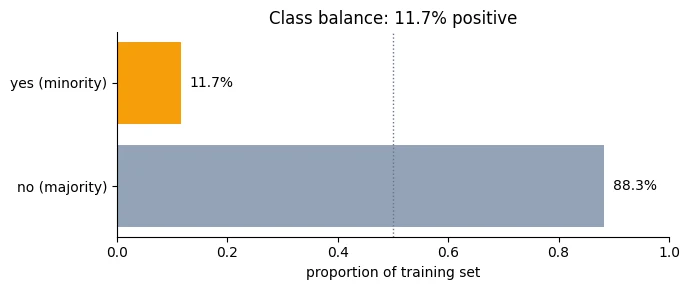
Accuracy is misleading for this dataset because the negative class is much more common than the positive class.
Two metrics used here are more informative:
- ROC-AUC: measures how well the model ranks positive examples above negative examples. A useful way to think about it is: if we randomly choose one subscriber and one non-subscriber, how often does the model give the subscriber the higher score?
- Average precision (PR-AUC): focuses on precision and recall for the positive class. This is useful when the positive class is relatively rare.
A useful fact about average precision is that its baseline depends on the positive-class rate. Here, that baseline is around 0.117 rather than 0.5.
We will use these metrics later rather than treating accuracy as the headline result.
-
What should happen if a category appears in the test set but never appeared in training?
The pipeline must neither crash nor invent a new column. Standard behaviour: encode the unseen category as all zeros in that column group (what
encode_featuresdoes viareindex(..., fill_value=0), orOneHotEncoder(handle_unknown="ignore")), or map rare/unseen values to an explicit"other"category. In production, also count how often unseen categories arrive: a rising rate is a sign of distribution shift. -
Why might one-hot encoding with all category columns be easier to reason about in a neural-network pipeline than removing the first category column?
With all columns kept, every category has its own weight in the first layer, which is easy to read, and an unseen category (all zeros) is distinct from every known one. With
drop_first=True, the dropped baseline category is also all zeros, so baseline and unknown become indistinguishable. The usual reason to drop a column, the "dummy-variable trap" (perfect collinearity with the intercept), matters for unregularised linear regression, not for a neural network trained with gradient descent, so keeping every column costs nothing.
Why not encode job as 0, 1, 2, …?
The model would treat 'student' as larger than 'management' and distances as meaningful. One-hot gives membership without a false ordering.
Only 11.7% of clients subscribe. A model that always predicts 'no' scores what accuracy, and what is it worth?
It identifies none of the 3,702 subscribers. Use ranking metrics such as ROC-AUC and average precision (baseline ≈ 0.117) instead.
Name one alternative to one-hot encoding for a column with thousands of categories, and why it helps.
- A learned embedding: each category gets a small trainable vector.
- It avoids thousands of mostly-zero indicator columns and can learn which categories are similar (the same idea language models use for tokens).
The Dataset protocol
A PyTorch Dataset is simply an object that knows how to answer two questions:
len(dataset)How many examples are available?
and:
dataset[i]Give me example number
i.
In a custom PyTorch dataset, these are normally implemented as:
def __len__(self):
    return number_of_examples

def __getitem__(self, i):
    return one_example
This is called a protocol: a small set of methods that an object agrees to provide so that other PyTorch components know how to use it.
The important point is that PyTorch does not care where the example comes from.
It could come from:
- a tensor already in RAM;
- a CSV file;
- an image on disk;
- an audio file;
- a database;
- an API;
- or another source.
As long as the dataset can answer "how many examples?" and "give me example i", it can be used as a PyTorch Dataset.
Put the feature matrix into a PyTorch tensor
Xtr_enc is a NumPy array containing the encoded training features.
torch.from_numpy(...) creates a PyTorch tensor that uses the same underlying data when possible.
We do this because PyTorch models and training operations work with PyTorch tensors.
Xtr_encarray([[-0.930461 , -0.4438132 , -0.8170392 , ..., 0. ,
0. , 1. ],
[-0.55387133, -0.3806249 , 0.14323561, ..., 0. ,
0. , 1. ],
[-1.5894929 , -0.419059 , 0.02320126, ..., 0. ,
0. , 1. ],
...,
[-1.3070506 , 0.38936085, -1.1771423 , ..., 0. ,
0. , 1. ],
[-0.83631355, -0.4441389 , -0.8170392 , ..., 0. ,
0. , 1. ],
[-0.08313424, -0.25489965, -0.09683309, ..., 0. ,
0. , 1. ]], shape=(31647, 50), dtype=float32)
Xtr_t = torch.from_numpy(Xtr_enc)ytr_t = torch.from_numpy(y_tr).float().unsqueeze(1) # (N, 1) to match a 1-logit outputXva_t = torch.from_numpy(Xva_enc)yva_t = torch.from_numpy(y_va).float().unsqueeze(1)Xte_t = torch.from_numpy(Xte_enc)yte_t = torch.from_numpy(y_te).float().unsqueeze(1)ytr_ttensor([[0.],
[0.],
[0.],
...,
[0.],
[0.],
[0.]])
Create a simple Dataset
TensorDataset is PyTorch's ready-made dataset for tensors.
Here it receives:
Xtr_t → training features
ytr_t → training labels
For index i, it returns:
(Xtr_t[i], ytr_t[i])So it already implements the __len__ and __getitem__ behaviour we need.
train_ds = TensorDataset(Xtr_t, ytr_t)val_ds = TensorDataset(Xva_t, yva_t)test_ds = TensorDataset(Xte_t, yte_t)print(f"len(train_ds) = {len(train_ds):,}")len(train_ds) = 31,647
len(val_ds)6782
train_ds[52](tensor([ 1.1408, -0.4441, -0.0968, 0.7214, -0.4100, -0.2348, 0.0000, 0.0000,
0.0000, 0.0000, 0.0000, 0.0000, 0.0000, 0.0000, 0.0000, 1.0000,
0.0000, 0.0000, 1.0000, 0.0000, 0.0000, 0.0000, 1.0000, 0.0000,
0.0000, 1.0000, 0.0000, 0.0000, 1.0000, 0.0000, 1.0000, 1.0000,
0.0000, 0.0000, 0.0000, 0.0000, 0.0000, 0.0000, 0.0000, 1.0000,
0.0000, 0.0000, 0.0000, 0.0000, 0.0000, 0.0000, 0.0000, 0.0000,
0.0000, 1.0000]),
tensor([0.]))
x0, y0 = train_ds[0:]print(f"\ntrain_ds[0] returns a tuple of {len((x0, y0))}:")train_ds[0] returns a tuple of 2:
x0tensor([-0.9305, -0.4438, -0.8170, -0.5668, -0.4100, -0.2348, 0.0000, 0.0000,
0.0000, 0.0000, 0.0000, 0.0000, 0.0000, 1.0000, 0.0000, 0.0000,
0.0000, 0.0000, 0.0000, 1.0000, 0.0000, 0.0000, 1.0000, 0.0000,
0.0000, 1.0000, 0.0000, 0.0000, 1.0000, 1.0000, 0.0000, 1.0000,
0.0000, 0.0000, 0.0000, 0.0000, 0.0000, 0.0000, 0.0000, 1.0000,
0.0000, 0.0000, 0.0000, 0.0000, 0.0000, 0.0000, 0.0000, 0.0000,
0.0000, 1.0000])
y0tensor([0.])
print(f" features : shape {tuple(x0.shape)}, dtype {x0.dtype}")print(f" label : shape {tuple(y0.shape)}, dtype {y0.dtype}, value {y0.item()}")print("\nNote: __getitem__ returns ONE example, with no batch axis.")print("Adding the batch axis is the DataLoader's job, not yours.")features : shape (50,), dtype torch.float32 label : shape (1,), dtype torch.float32, value 0.0 Note: __getitem__ returns ONE example, with no batch axis. Adding the batch axis is the DataLoader's job, not yours.
for i in train_ds: print(i)This separation explains the job of each object.
Dataset answers:
"What is example number
i?"
DataLoader answers:
"Which examples should I request, and how should I group them into batches?"
For example:
Dataset
  ↓
example 0
example 1
example 2
...
example 36,167

DataLoader
  ↓
batch 1: examples 0–255
batch 2: examples 256–511
...
Because these responsibilities are separate, you can use the same Dataset with different batch sizes:
DataLoader(train_ds, batch_size=32)
DataLoader(train_ds, batch_size=256)
DataLoader(train_ds, batch_size=1024)
The dataset does not need to change.
Writing one yourself
TensorDataset is convenient when your data is already stored in tensors.
You write your own Dataset when you need the dataset to do something while producing an example.
Common reasons include:
- reading an image from disk;
- applying an augmentation;
- normalising an example;
- reading an audio file;
- returning several pieces of information;
- performing a transformation that you do not want to calculate for the entire dataset ahead of time.
The key idea is:
__getitem__is where you define how one example is obtained and prepared.
A custom Dataset
Here we write the same idea ourselves.
The class stores the features and labels, then defines:
__len__→ number of examples;__getitem__(i)→ feature and label for examplei.
Writing it ourselves gives us a place to add extra behaviour, such as noise or transformations.
class BankMarketingDataset(Dataset): """A PyTorch ``Dataset`` over the pre-encoded Bank Marketing arrays. Holds features and labels as tensors and returns one ``(x, y)`` pair per index. Optionally adds Gaussian noise to each example as it is requested, a simple form of data augmentation meant for the training split only. """ def __init__(self, features: np.ndarray, labels: np.ndarray, noise_std: float = 0.0): """Store the features and labels as float32 tensors. Args: features: Encoded feature matrix of shape ``(N, F)``. labels: Array of ``N`` labels, 0 or 1. Stored as float with shape ``(N, 1)`` to match a one-logit model and ``BCEWithLogitsLoss``. noise_std: Standard deviation of the noise added in ``__getitem__``; 0 disables augmentation. Raises: AssertionError: If ``features`` and ``labels`` have different lengths. """ assert len(features) == len(labels), "features and labels must align" self.features = torch.from_numpy(np.asarray(features, dtype=np.float32)) self.labels = torch.from_numpy(np.asarray(labels, dtype=np.float32)).unsqueeze(1) self.noise_std = noise_std def __len__(self) -> int: """Return the number of examples (the DataLoader uses this to plan its batches).""" return self.features.shape[0] def __getitem__(self, idx: int): """Return example ``idx`` as a ``(features, label)`` pair. Args: idx: Position of the example, from 0 to ``len(self) - 1``. Returns: ``x`` of shape ``(F,)`` (with fresh noise added if ``noise_std > 0``) and ``y`` of shape ``(1,)``. There is no batch axis: the DataLoader adds it. """ x = self.features[idx] if self.noise_std > 0: x = x + torch.randn_like(x) * self.noise_std # augmentation, train only return x, self.labels[idx]The two-method protocol, plus a hook for per-example augmentation.
- 1
Labels become float
(N, 1)once, here, matching a one-logit model andBCEWithLogitsLoss. - 2
How many examples: the DataLoader uses it to plan batches.
- 3
Augmentation runs inside
__getitem__, so each epoch sees a fresh random version.
custom_ds = BankMarketingDataset(Xtr_enc, y_tr)print(f"len : {len(custom_ds):,}")x0, y0 = custom_ds[0]print(f"example 0 : x {tuple(x0.shape)} {x0.dtype}, y {tuple(y0.shape)} {y0.item()}")len : 31,647 example 0 : x (50,) torch.float32, y (1,) 0.0
noisy_ds = BankMarketingDataset(Xtr_enc, y_tr, noise_std=0.1)a, _ = noisy_ds[0]b, _ = noisy_ds[0]print(f"\nWith noise_std=0.1, the SAME index returns different values each call:")print(f" first call, first 4 features: {a[:4].numpy().round(3)}")print(f" second call, first 4 features: {b[:4].numpy().round(3)}")print("\nThis is how augmentation works: __getitem__ is called fresh every epoch.")With noise_std=0.1, the SAME index returns different values each call: first call, first 4 features: [-0.916 -0.472 -0.815 -0.657] second call, first 4 features: [-0.851 -0.386 -0.83 -0.702] This is how augmentation works: __getitem__ is called fresh every epoch.
-
__getitem__returns a tuple(x, y)in this example, but PyTorch does not require that exact format. If a model needs an image, a text caption, and a label, you could return something like(image, caption, label). The training loop would then unpack those three values.Exactly.
__getitem__can return any structure: a tuple, a dict such as{"image": ..., "caption": ..., "label": ...}or a small dataclass. The DataLoader's defaultcollate_fnbatches each field: tensors are stacked, numbers become a tensor, strings become a list. When fields have variable size (captions of different lengths), you write a customcollate_fnthat pads them, a pattern you'll use constantly with text in Modules 6–7. -
A training dataset can intentionally produce slightly different versions of an example—for example, by adding random noise or shifting an image. This can help the model generalise. A validation dataset should normally return a stable version of the same example so that its score can be compared fairly from one evaluation to the next.
Right, and the reason is measurement. If validation examples changed on every evaluation, a change in the validation score could come from the examples changing rather than the model improving, which would make model selection and early stopping unreliable. Training is where randomness helps: it shows the model many variations of each example so it learns what doesn't change (the digit, not its exact position).
What must a custom PyTorch Dataset implement?
'How many examples?' and 'give me example i'. That protocol is all a DataLoader needs.
Whose job is it to add the batch axis?
__getitem__ returns one example with no batch axis. The DataLoader groups and stacks examples into batches.
Why does a noisy training Dataset return a different tensor for the same index on each call, and why should validation not do that?
__getitem__runs fresh every time, so random transforms (augmentation) create a new version of the example each epoch, which helps generalisation.- Validation must be deterministic so that changes in its score come from the model, not from the data changing between evaluations.
A Dataset that reads from disk
So far, the examples have already been stored in RAM.
That is convenient, but real datasets can be much larger than available memory.
Imagine a dataset containing:
1,000,000 images
It may be wasteful or impossible to load every image into RAM before training.
Instead, we can store the files on disk and have the Dataset read an image only when that image is requested.
This is called lazy loading.
Dataset created
     ↓
store file paths
     ↓
training asks for example 153
     ↓
read image 153 from disk
     ↓
return image
The image does not have to remain in memory as part of the entire dataset.
We will demonstrate this using scikit-learn's small load_digits dataset. The examples are written as PNG files first so that we can practise the same pattern used by much larger image datasets.
The folder structure uses one directory per class, which is also the convention expected by torchvision.datasets.ImageFolder.
Eager vs lazy datasets
Load everything once into a tensor. Fast indexing, simple code. Only works while the data fits in RAM (e.g. the 7 MB Bank table).
Store only file paths; read each example inside __getitem__ when asked. Memory stays tiny, so a million images work fine. Reading costs time, which is where num_workers can help.
Everything so far had the data in RAM already, which makes Dataset look like a formality. The
protocol earns its keep when the data does not fit — 100,000 images, a directory of audio files,
a set of documents too large to hold at once.
To make this concrete rather than hypothetical, we will write scikit-learn's load_digits out as
individual PNG files in a folder tree, then read them back one at a time. The dataset is small
enough to run anywhere and the pattern is identical to what you would use for a million images.
The folder layout below — one directory per class — is the near-universal convention, and it is
what torchvision.datasets.ImageFolder expects.
from sklearn.datasets import load_digitsfrom PIL import ImageDIGITS_ROOT = DATA_DIR / "digits_png"digits = load_digits()digits['images']array([[[ 0., 0., 5., ..., 1., 0., 0.],
[ 0., 0., 13., ..., 15., 5., 0.],
[ 0., 3., 15., ..., 11., 8., 0.],
...,
[ 0., 4., 11., ..., 12., 7., 0.],
[ 0., 2., 14., ..., 12., 0., 0.],
[ 0., 0., 6., ..., 0., 0., 0.]],
[[ 0., 0., 0., ..., 5., 0., 0.],
[ 0., 0., 0., ..., 9., 0., 0.],
[ 0., 0., 3., ..., 6., 0., 0.],
...,
[ 0., 0., 1., ..., 6., 0., 0.],
[ 0., 0., 1., ..., 6., 0., 0.],
[ 0., 0., 0., ..., 10., 0., 0.]],
[[ 0., 0., 0., ..., 12., 0., 0.],
[ 0., 0., 3., ..., 14., 0., 0.],
[ 0., 0., 8., ..., 16., 0., 0.],
...,
[ 0., 9., 16., ..., 0., 0., 0.],
[ 0., 3., 13., ..., 11., 5., 0.],
[ 0., 0., 0., ..., 16., 9., 0.]],
...,
[[ 0., 0., 1., ..., 1., 0., 0.],
[ 0., 0., 13., ..., 2., 1., 0.],
[ 0., 0., 16., ..., 16., 5., 0.],
...,
[ 0., 0., 16., ..., 15., 0., 0.],
[ 0., 0., 15., ..., 16., 0., 0.],
[ 0., 0., 2., ..., 6., 0., 0.]],
[[ 0., 0., 2., ..., 0., 0., 0.],
[ 0., 0., 14., ..., 15., 1., 0.],
[ 0., 4., 16., ..., 16., 7., 0.],
...,
[ 0., 0., 0., ..., 16., 2., 0.],
[ 0., 0., 4., ..., 16., 2., 0.],
[ 0., 0., 5., ..., 12., 0., 0.]],
[[ 0., 0., 10., ..., 1., 0., 0.],
[ 0., 2., 16., ..., 1., 0., 0.],
[ 0., 0., 15., ..., 15., 0., 0.],
...,
[ 0., 4., 16., ..., 16., 6., 0.],
[ 0., 8., 16., ..., 16., 8., 0.],
[ 0., 1., 8., ..., 12., 1., 0.]]], shape=(1797, 8, 8))
def export_digits_to_png(root: Path = DIGITS_ROOT, seed: int = SEED) -> Path: """Write scikit-learn's 8×8 digits to disk as one PNG per image. Creates the folder-per-class layout ``root/{train,val}/{digit}/NNNN.png`` that ``torchvision.datasets.ImageFolder`` also expects, with a random 80/20 train/validation split. Pixel values 0–16 are rescaled to 0–255. If PNGs already exist under ``root`` nothing is written. Args: root: Destination folder. seed: Seed for the random train/validation assignment. Returns: The ``root`` path. """ if root.exists() and any(root.rglob("*.png")): print(f"Already exported at {root}") return root digits = load_digits() n = len(digits.images) rng = np.random.default_rng(seed) order = rng.permutation(n) cut = int(0.8 * n) for split in ("train", "val"): for cls in range(10): (root / split / str(cls)).mkdir(parents=True, exist_ok=True) for position, idx in enumerate(order): split = "train" if position < cut else "val" # load_digits stores 0-16 greyscale; PNG wants 0-255 uint8. arr = (digits.images[idx] / 16.0 * 255).astype(np.uint8) label = digits.target[idx] Image.fromarray(arr, mode="L").save(root / split / str(label) / f"{idx:04d}.png") return roott0 = time.time()export_digits_to_png()n_files = len(list(DIGITS_ROOT.rglob("*.png")))print(f"{n_files:,} PNG files written in {time.time() - t0:.1f}s")print(f"\nLayout:")print(f" {DIGITS_ROOT}/")print(f" train/0/*.png train/1/*.png ... train/9/*.png")print(f" val/0/*.png val/1/*.png ... val/9/*.png")print(f"\ntrain files: {len(list((DIGITS_ROOT / 'train').rglob('*.png'))):,}")print(f"val files : {len(list((DIGITS_ROOT / 'val').rglob('*.png'))):,}")Already exported at data/digits_png
1,800 PNG files written in 0.0s
Layout:
data/digits_png/
train/0/*.png train/1/*.png ... train/9/*.png
val/0/*.png val/1/*.png ... val/9/*.png
train files: 1,440
val files : 360
A Dataset that reads image files
This custom dataset does not store all image pixels in one large tensor.
Instead, it stores the locations of the image files. When __getitem__(i) is called, it opens the corresponding file, converts it into a tensor, and returns the image and its label.
That is the basic pattern behind many real-world image datasets.
class DigitImageFolder(Dataset): """A lazily loaded image ``Dataset``: only file paths live in memory, never pixels. The directory is scanned once at construction; each call to ``__getitem__`` opens a single PNG, converts it to a tensor and applies an optional transform. This is the same pattern used for datasets far too large to fit in RAM. Attributes: root: The folder that holds one subfolder per class. transform: Optional function applied to each image tensor. samples: List of ``(path, label)`` pairs, one per image. """ def __init__(self, root: Path, transform=None): """Scan ``root`` once and record every image's path and label. Args: root: Folder containing one subfolder per class, named ``"0"`` … ``"9"``. transform: Optional function taking and returning an image tensor ``(1, H, W)``, e.g. a normalisation or a random shift. Raises: RuntimeError: If no PNG files are found under ``root``. """ self.root = Path(root) self.transform = transform # Scan the directory ONCE, at construction, and keep only paths + labels. self.samples: list[tuple[Path, int]] = [] for class_dir in sorted(self.root.iterdir()): if not class_dir.is_dir(): continue label = int(class_dir.name) for png in sorted(class_dir.glob("*.png")): self.samples.append((png, label)) if not self.samples: raise RuntimeError(f"No PNG files found under {self.root}") def __len__(self) -> int: """Return the number of images found when the folder was scanned.""" return len(self.samples) def __getitem__(self, idx: int): """Read image ``idx`` from disk and return it with its label. Args: idx: Position in ``self.samples``. Returns: A tuple ``(x, label)``: ``x`` is a float32 tensor ``(1, H, W)`` with values in [0, 1] (before any transform); ``label`` is a plain Python ``int`` that the DataLoader will collate into a tensor. """ path, label = self.samples[idx] with Image.open(path) as img: # the disk read happens HERE arr = np.array(img, dtype=np.float32) / 255.0 x = torch.from_numpy(arr).unsqueeze(0) # (H, W) -> (C=1, H, W) if self.transform is not None: x = self.transform(x) return x, labelStores only (path, label) pairs; pixels are read from disk inside __getitem__, one example at a time.
- 1
One folder per class; the folder name is the label.
- 2
The disk read happens here, only when an example is requested.
- 3
Add the channel axis:
(H, W)→(1, H, W), PyTorch's channels-first layout.
digit_train = DigitImageFolder(DIGITS_ROOT / "train")digit_val = DigitImageFolder(DIGITS_ROOT / "val")print(f"train: {len(digit_train):,} images | val: {len(digit_val):,} images")x0, y0 = digit_train[0]print(f"\ndigit_train[0]:")print(f" x shape {tuple(x0.shape)} dtype {x0.dtype} range [{x0.min():.2f}, {x0.max():.2f}]")print(f" y = {y0} (a plain Python int, not a tensor — the DataLoader will collate it)")import sys as _syspaths_bytes = _sys.getsizeof(digit_train.samples)print(f"\nMemory held by the Dataset object: roughly {paths_bytes / 1024:.1f} KB of paths.")print("The pixels are read from disk on demand and discarded after each batch.")train: 1,437 images | val: 360 images digit_train[0]: x shape (1, 8, 8) dtype torch.float32 range [0.00, 0.94] y = 0 (a plain Python int, not a tensor — the DataLoader will collate it) Memory held by the Dataset object: roughly 12.4 KB of paths. The pixels are read from disk on demand and discarded after each batch.
# Confirm the labels actually match the images.fig, axes = plt.subplots(2, 8, figsize=(11, 3))for ax, i in zip(axes.ravel(), range(16)): img, lab = digit_train[i] ax.imshow(img.squeeze(0).numpy(), cmap="gray_r") ax.set_title(str(lab), fontsize=10) ax.axis("off")fig.suptitle("Read back from PNG files on disk — label above each image", y=1.02)plt.tight_layout()plt.show()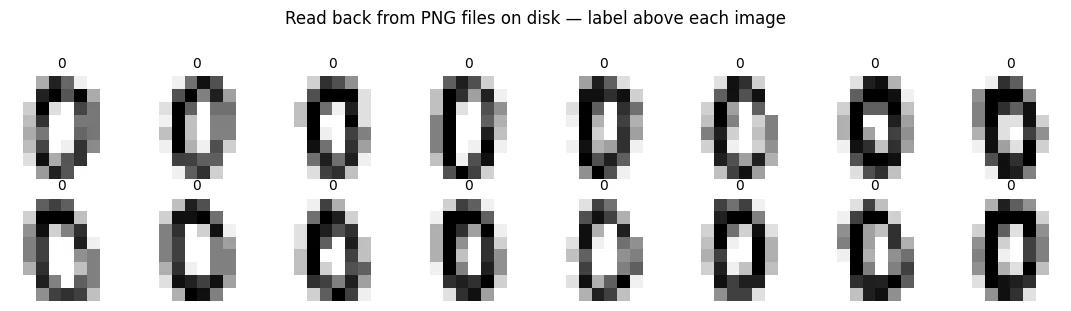
Transforms belong in __getitem__
A transform is simply a function that changes an example before it is returned.
For example:
image
  ↓
resize
  ↓
normalise
  ↓
randomly shift
  ↓
return image
Putting the transform inside __getitem__ means it is applied whenever that example is requested.
This matters for random augmentation.
Suppose example 0 is randomly shifted:
first request → shift left
second request → shift right
third request → no shift
The underlying image file has not changed. We are creating different training versions of the same example.
That is useful for training augmentation.
For validation, we normally avoid random transformations because we want evaluation to be stable.
Define the transformations
The functions below are small building blocks:
normalise(...)changes the numerical scale of an image;random_shift(...)moves the image by a random number of pixels;compose(...)applies several transformations in sequence.
Because these transformations are called from __getitem__, they are applied when an example is requested.
def normalise(mean: float, std: float): """Build a transform that standardises pixel values: ``(x - mean) / std``. Deterministic, so it is safe for training and validation alike. Compute ``mean`` and ``std`` from the training split only. Args: mean: Mean pixel value of the training images. std: Standard deviation of the training pixel values. Returns: A function that takes an image tensor and returns its normalised copy. """ def apply(x: torch.Tensor) -> torch.Tensor: """Standardise one image tensor. Args: x: Image tensor of any shape. Returns: ``(x - mean) / std``, same shape as ``x``. """ return (x - mean) / std return applydef random_shift(max_pixels: int = 1): """Build a random translation transform (training only). Each call moves the image by a random number of pixels (between ``-max_pixels`` and ``+max_pixels``) vertically and horizontally, so every epoch sees a slightly different version of each digit. Uses ``torch.roll``, so pixels pushed off one edge wrap round to the opposite edge. Args: max_pixels: Largest shift in each direction. Returns: A function that takes an image tensor ``(C, H, W)`` and returns a shifted copy. """ def apply(x: torch.Tensor) -> torch.Tensor: """Shift one image by a freshly drawn random offset. Args: x: Image tensor of shape ``(C, H, W)``. Returns: The shifted image, same shape. """ dy = int(torch.randint(-max_pixels, max_pixels + 1, (1,)).item()) dx = int(torch.randint(-max_pixels, max_pixels + 1, (1,)).item()) return torch.roll(x, shifts=(dy, dx), dims=(1, 2)) return applydef compose(*fns): """Chain several transforms into one, applied left to right. Args: *fns: Transform functions, each taking and returning a tensor. Returns: A single function that applies ``fns[0]``, then ``fns[1]``, and so on. Example: >>> t = compose(random_shift(1), normalise(mean, std)) """ def apply(x): """Apply every transform in order. Args: x: The input tensor. Returns: The tensor after all transforms. """ for fn in fns: x = fn(x) return x return apply# Compute normalisation statistics from the TRAINING split only — the same rule as Section 2.sample = torch.stack([digit_train[i][0] for i in range(len(digit_train))])sampletensor([[[[0.0000, 0.0000, 0.3098, ..., 0.0588, 0.0000, 0.0000],
[0.0000, 0.0000, 0.8118, ..., 0.9373, 0.3098, 0.0000],
[0.0000, 0.1843, 0.9373, ..., 0.6863, 0.4980, 0.0000],
...,
[0.0000, 0.2471, 0.6863, ..., 0.7490, 0.4353, 0.0000],
[0.0000, 0.1216, 0.8745, ..., 0.7490, 0.0000, 0.0000],
[0.0000, 0.0000, 0.3725, ..., 0.0000, 0.0000, 0.0000]]],
[[[0.0000, 0.0000, 0.0588, ..., 0.6863, 0.0000, 0.0000],
[0.0000, 0.0000, 0.6863, ..., 0.8745, 0.3725, 0.0000],
[0.0000, 0.1216, 1.0000, ..., 0.5608, 0.5608, 0.0000],
...,
[0.0000, 0.0588, 1.0000, ..., 0.6863, 0.1843, 0.0000],
[0.0000, 0.0000, 0.7490, ..., 0.6235, 0.0000, 0.0000],
[0.0000, 0.0000, 0.0588, ..., 0.1843, 0.0000, 0.0000]]],
[[[0.0000, 0.0000, 0.1843, ..., 0.4353, 0.0000, 0.0000],
[0.0000, 0.0000, 0.6863, ..., 1.0000, 0.1216, 0.0000],
[0.0000, 0.2471, 1.0000, ..., 0.8745, 0.1216, 0.0000],
...,
[0.0000, 0.0000, 0.9373, ..., 0.8118, 0.3725, 0.0000],
[0.0000, 0.0000, 0.5608, ..., 0.8745, 0.0588, 0.0000],
[0.0000, 0.0000, 0.1216, ..., 0.2471, 0.0000, 0.0000]]],
...,
[[[0.0000, 0.0000, 0.2471, ..., 0.3725, 0.0000, 0.0000],
[0.0000, 0.3098, 1.0000, ..., 1.0000, 0.0000, 0.0000],
[0.0000, 0.3098, 1.0000, ..., 1.0000, 0.1843, 0.0000],
...,
[0.0000, 0.0000, 0.0000, ..., 1.0000, 0.4980, 0.0000],
[0.0000, 0.0000, 0.0588, ..., 1.0000, 0.3725, 0.0000],
[0.0000, 0.0000, 0.2471, ..., 0.5608, 0.0000, 0.0000]]],
[[[0.0000, 0.0000, 0.2471, ..., 0.3725, 0.0000, 0.0000],
[0.0000, 0.0588, 1.0000, ..., 1.0000, 0.1843, 0.0000],
[0.0000, 0.2471, 1.0000, ..., 1.0000, 0.2471, 0.0000],
...,
[0.0000, 0.0000, 0.0000, ..., 0.9373, 0.3098, 0.0000],
[0.0000, 0.0000, 0.3098, ..., 1.0000, 0.2471, 0.0000],
[0.0000, 0.0000, 0.1216, ..., 0.5608, 0.0000, 0.0000]]],
[[[0.0000, 0.0000, 0.1216, ..., 0.0000, 0.0000, 0.0000],
[0.0000, 0.0000, 0.8745, ..., 0.9373, 0.0588, 0.0000],
[0.0000, 0.2471, 1.0000, ..., 1.0000, 0.4353, 0.0000],
...,
[0.0000, 0.0000, 0.0000, ..., 1.0000, 0.1216, 0.0000],
[0.0000, 0.0000, 0.2471, ..., 1.0000, 0.1216, 0.0000],
[0.0000, 0.0000, 0.3098, ..., 0.7490, 0.0000, 0.0000]]]])
px_mean, px_std = sample.mean().item(), sample.std().item()print(f"Training pixel mean {px_mean:.4f}, std {px_std:.4f}")Training pixel mean 0.3043, std 0.3757
digit_train_aug = DigitImageFolder( DIGITS_ROOT / "train", transform=compose(random_shift(1), normalise(px_mean, px_std)),)digit_train_aug<__main__.DigitImageFolder at 0x3256ccf50>
digit_val_norm = DigitImageFolder( DIGITS_ROOT / "val", transform=normalise(px_mean, px_std), # no random shift on validation)digit_val_norm<__main__.DigitImageFolder at 0x324353a80>
a, _ = digit_train_aug[0]atensor([[[-0.8099, -0.8099, -0.8099, 1.3508, 1.6848, 0.8498, 1.6848,
0.0147],
[-0.8099, -0.8099, -0.3193, 1.6848, -0.4863, -0.8099, 1.0168,
0.5157],
[-0.8099, -0.8099, -0.1523, 1.1838, -0.8099, -0.8099, 0.5157,
0.5157],
[-0.8099, -0.8099, 0.0147, 0.5157, -0.8099, -0.8099, 0.6827,
0.5157],
[-0.8099, -0.8099, -0.1523, 1.0168, -0.8099, -0.6533, 1.1838,
0.3487],
[-0.8099, -0.8099, -0.4863, 1.5178, 0.0147, 0.8498, 1.1838,
-0.8099],
[-0.8099, -0.8099, -0.8099, 0.1817, 1.3508, 0.8498, -0.8099,
-0.8099],
[-0.8099, -0.8099, -0.8099, 0.0147, 1.3508, 0.6827, -0.6533,
-0.8099]]])
b, _ = digit_train_aug[0]btensor([[[-0.8099, -0.8099, -0.8099, 0.0147, 1.3508, 0.6827, -0.6533,
-0.8099],
[-0.8099, -0.8099, -0.8099, 1.3508, 1.6848, 0.8498, 1.6848,
0.0147],
[-0.8099, -0.8099, -0.3193, 1.6848, -0.4863, -0.8099, 1.0168,
0.5157],
[-0.8099, -0.8099, -0.1523, 1.1838, -0.8099, -0.8099, 0.5157,
0.5157],
[-0.8099, -0.8099, 0.0147, 0.5157, -0.8099, -0.8099, 0.6827,
0.5157],
[-0.8099, -0.8099, -0.1523, 1.0168, -0.8099, -0.6533, 1.1838,
0.3487],
[-0.8099, -0.8099, -0.4863, 1.5178, 0.0147, 0.8498, 1.1838,
-0.8099],
[-0.8099, -0.8099, -0.8099, 0.1817, 1.3508, 0.8498, -0.8099,
-0.8099]]])
print(f"\nSame index, two calls, augmented dataset — identical? " f"{torch.equal(a, b)} (expected False)")Same index, two calls, augmented dataset — identical? False (expected False)
c, _ = digit_val_norm[0]d, _ = digit_val_norm[0]print(f"Same index, two calls, validation dataset — identical? " f"{torch.equal(c, d)} (expected True)")Same index, two calls, validation dataset — identical? True (expected True)
The output demonstrates an important rule:
Random transforms belong in training; validation transforms should be deterministic.
If validation randomly changes every time it is evaluated, then a change in validation performance could be caused by the model—or simply by the validation images being different.
That makes the metric harder to interpret.
Training is different. Random augmentation deliberately gives the model slightly different versions of training examples so that it learns features that generalise beyond one exact presentation.
-
DigitImageFolderscans the directory once at construction and stores paths. What breaks if you instead callglobinside__getitem__, and roughly how much slower would an epoch get?Two things break. Speed: every call rescans the directory, so one epoch performs about \(N\) scans of \(N\) files, i.e. \(O(N^2)\) file-system work. For 1,437 images that's roughly two million directory entries per epoch instead of 1,437 reads, easily hundreds of times slower, and it gets quadratically worse with larger datasets. Correctness:
globdoesn't guarantee an order, so indeximight point to different files on different calls, giving non-reproducible (even inconsistent) examples, and__len__would need its own scan. Scan once, store the list, index into it. -
The normalisation statistics were computed by loading every training image into one tensor — which defeats the purpose of lazy loading. How would you compute mean and standard deviation for a dataset genuinely too large to hold in memory?
Stream through the data once and keep running sums: count, the sum of pixel values and the sum of squared pixel values, batch by batch through a DataLoader. Then mean = sum/count and std = √(sumsq/count − mean²). For better numerical stability use Welford's algorithm. In practice people often estimate the statistics from a random sample of a few thousand training images, which is accurate to several decimal places (that is where ImageNet's familiar
mean=[0.485, 0.456, 0.406]comes from).
What does the lazy-loading DigitImageFolder keep in memory?
About 12 KB of paths. The same pattern scales to a million images that could never fit in RAM.
Where do random augmentations belong?
Random shifts give the model varied training views. Validation must be stable to be comparable over time.
DataLoader mechanics
A Dataset gives us individual examples.
A DataLoader turns those examples into batches that the training loop can consume.
For example, if we have 36,169 examples and choose:
batch_size=256the loader repeatedly gives us something like:
batch 1 → 256 examples
batch 2 → 256 examples
batch 3 → 256 examples
...
final batch → fewer than 256 examples
The important DataLoader settings in this lesson are:
batch_size— how many examples are in each batch;shuffle— whether the order of examples is randomly changed;drop_last— whether to discard a final incomplete batch;num_workers— how many separate worker processes prepare batches.
DataLoader takes a Dataset and produces batches. Its arguments are worth setting deliberately,
because three of the defaults are wrong for at least one of your two loaders.
Create a DataLoader
Here:
batch_size=256means the loader tries to return 256 examples at a time.
shuffle=Truemeans the order of training examples is randomly changed when a new iteration over the loader begins.
The result is a sequence of batches that the training loop can consume directly.
train_ds[0](tensor([-0.9305, -0.4438, -0.8170, -0.5668, -0.4100, -0.2348, 0.0000, 0.0000,
0.0000, 0.0000, 0.0000, 0.0000, 0.0000, 1.0000, 0.0000, 0.0000,
0.0000, 0.0000, 0.0000, 1.0000, 0.0000, 0.0000, 1.0000, 0.0000,
0.0000, 1.0000, 0.0000, 0.0000, 1.0000, 1.0000, 0.0000, 1.0000,
0.0000, 0.0000, 0.0000, 0.0000, 0.0000, 0.0000, 0.0000, 1.0000,
0.0000, 0.0000, 0.0000, 0.0000, 0.0000, 0.0000, 0.0000, 0.0000,
0.0000, 1.0000]),
tensor([0.]))
loader = DataLoader(train_ds, batch_size=256, shuffle=True)len(loader)124
len(train_ds)31647
print(f"Dataset examples : {len(train_ds):,}")print(f"Batches per epoch: {len(loader):,}")print(f"Check: ceil({len(train_ds):,} / 256) = " f"{-(-len(train_ds) // 256):,}")for i, (xb, yb) in enumerate(loader): if i < 2 or i >= len(loader) - 1: print(f" batch {i:>3}: x {tuple(xb.shape)} y {tuple(yb.shape)}") elif i == 2: print(" ...")Dataset examples : 31,647 Batches per epoch: 124 Check: ceil(31,647 / 256) = 124 batch 0: x (256, 50) y (256, 1) batch 1: x (256, 50) y (256, 1) ... batch 123: x (159, 50) y (159, 1)
The final batch is smaller because 36,169 is not exactly divisible by 256.
The loader therefore produces:
141 full batches × 256
+ 1 smaller final batch
Usually, a smaller final batch is completely fine.
drop_last=True tells the DataLoader to throw that final incomplete batch away.
That can be useful during training in some situations, but it is dangerous during validation or testing because it means some examples are never evaluated.
shuffle, and why it matters
A batch is the group of examples used to calculate one gradient update.
If the dataset is ordered in some meaningful way, consecutive examples may be very similar.
For example:
batch 1 → mostly old campaign records
batch 2 → mostly old campaign records
batch 3 → mostly old campaign records
...
The gradients from these batches may repeatedly push the model in a similar direction.
Shuffling mixes the examples so that each batch is more representative of the overall training data.
We will first inspect the raw Bank Marketing file to see why this matters here.
raw = pd.read_csv(BANK_CSV, sep=";")chunk = len(raw) // 6print("The raw file, read in order, split into six consecutive chunks:\n")print(f" {'chunk':<7}{'commonest month':>17}{'mean pdays':>13}{'positive rate':>16}")for i in range(6): part = raw.iloc[i * chunk:(i + 1) * chunk] print(f" {i:<7}{part['month'].mode()[0]:>17}{part['pdays'].mean():>13.1f}" f"{(part['y'] == 'yes').mean():>16.3f}")first_rate = (raw.iloc[:chunk]['y'] == 'yes').mean()last_rate = (raw.iloc[5 * chunk:]['y'] == 'yes').mean()print(f"\nPositive rate rises from {first_rate:.3f} to {last_rate:.3f} " f"across the file — a factor of {last_rate / first_rate:.0f}.")The raw file, read in order, split into six consecutive chunks: chunk commonest month mean pdays positive rate 0 may -1.0 0.031 1 jun -1.0 0.052 2 aug -1.0 0.062 3 nov 39.0 0.058 4 may 99.8 0.136 5 may 105.5 0.363 Positive rate rises from 0.031 to 0.363 across the file — a factor of 12.
The raw file shows distribution drift: the characteristics of the data change as we move through the file.
In particular, the positive rate changes substantially.
If we trained directly on this ordered data without shuffling, the model could spend early updates seeing mostly negative examples and later updates seeing many more positive examples.
That means the sequence of gradient updates would be influenced by the order in which the data happened to be stored.
Shuffling breaks that dependence on the original file order.
ordered = DataLoader(train_ds, batch_size=256, shuffle=False)shuffled = DataLoader(train_ds, batch_size=256, shuffle=True)def positive_rates(dl, n=6): """Positive-label rate of each of the first ``n`` batches a loader produces. Used to compare shuffled and unshuffled loaders: without shuffling, batches follow storage order and can have very different class mixes. Args: dl: A DataLoader yielding ``(x, y)`` batches with 0/1 labels. n: How many batches to inspect. Returns: A list of ``n`` floats, the mean label of each batch. """ rates = [] for i, (_, yb) in enumerate(dl): if i >= n: break rates.append(yb.mean().item()) return ratesprint("Positive rate in the first 6 batches of train_ds")print(f" shuffle=False : {[f'{r:.3f}' for r in positive_rates(ordered)]}")print(f" shuffle=True : {[f'{r:.3f}' for r in positive_rates(shuffled)]}")print(f"\n overall training positive rate: {y_tr.mean():.3f}")print("\nBarely any difference. The drift has vanished.")Positive rate in the first 6 batches of train_ds shuffle=False : ['0.090', '0.148', '0.094', '0.164', '0.121', '0.129'] shuffle=True : ['0.102', '0.129', '0.113', '0.113', '0.094', '0.094'] overall training positive rate: 0.117 Barely any difference. The drift has vanished.
The comparison on train_ds looks less dramatic because train_test_split already shuffled the rows before we created the dataset.
So in this particular pipeline:
raw ordered data
      ↓
train_test_split(shuffles)
      ↓
training dataset is already mixed
      ↓
shuffle=False looks harmless
But that is an accidental property of this pipeline.
If we changed the way the split was created, or loaded images from a directory where all examples of one class came first, the original ordering problem could return.
So we should not make our loader configuration depend on an earlier implementation detail.
Use the simple rule:
Training:
shuffle=TrueValidation/test:
shuffle=False
The rule is:
Use
shuffle=Truefor training andshuffle=Falsefor validation and test.
For training, shuffling prevents consecutive gradient updates from being unnecessarily correlated with the original ordering of the data.
For validation and test, a fixed order makes evaluation deterministic and makes it easier to match each prediction with the correct label when collecting results.
The important distinction is:
- training benefits from randomness in the order of examples;
- evaluation should be stable so that changes in the metric reflect changes in the model rather than changes in the evaluation order.
tiny = TensorDataset(torch.randn(10, 4), torch.randn(10, 1))keep = DataLoader(tiny, batch_size=4, drop_last=False)drop = DataLoader(tiny, batch_size=4, drop_last=True)print("10 examples, batch_size=4")print(f" drop_last=False -> {len(keep)} batches:", [tuple(x.shape) for x, _ in keep])print(f" drop_last=True -> {len(drop)} batches:", [tuple(x.shape) for x, _ in drop])print()print("Use drop_last=True on TRAINING when a short final batch would cause trouble:")print(" - BatchNorm computes statistics per batch and misbehaves on very small ones")print(" - a batch of size 1 makes BatchNorm error outright")print("Never use it on VALIDATION: you would silently discard held-out examples")print("and your metric would be computed on less data than you think.")10 examples, batch_size=4 drop_last=False -> 3 batches: [(4, 4), (4, 4), (2, 4)] drop_last=True -> 2 batches: [(4, 4), (4, 4)] Use drop_last=True on TRAINING when a short final batch would cause trouble: - BatchNorm computes statistics per batch and misbehaves on very small ones - a batch of size 1 makes BatchNorm error outright Never use it on VALIDATION: you would silently discard held-out examples and your metric would be computed on less data than you think.
num_workers, honestly
num_workers controls how many separate worker processes PyTorch can use to prepare batches.
With:
num_workers=0the main Python process loads the data itself.
With:
num_workers=4four worker processes can prepare data independently.
This can help when getting an example is expensive—for example, when an image must be read from disk and decoded.
It can hurt when the data is already in memory. In that case, creating processes and moving data between processes can cost more time than the actual indexing operation saves.
So do not assume that a larger num_workers is automatically faster. Measure it on your own pipeline.
The platform matters too. Linux, macOS, Windows, and notebook environments handle worker processes differently. In notebooks, num_workers=0 is often the simplest and most reliable choice, especially when the custom Dataset class is defined directly inside the notebook.
Later, when the dataset code lives in an importable Python module, using worker processes becomes easier.
def time_one_epoch(dataset, num_workers: int, batch_size: int = 256) -> float: """Seconds needed just to iterate over a dataset once, with no training. Measures the cost of loading and batching alone, to decide whether extra worker processes are worth it for this particular dataset. Args: dataset: Any PyTorch ``Dataset``. num_workers: Number of worker processes the DataLoader uses (0 = main process). batch_size: Examples per batch. Returns: Wall-clock seconds for one full pass. """ dl = DataLoader(dataset, batch_size=batch_size, shuffle=True, num_workers=num_workers) t0 = time.time() for xb, yb in dl: _ = xb.shape # simulate consuming the batch without training return time.time() - t0print(f"Iterating {len(train_ds):,} in-memory tabular rows, batch_size=256:")print(f" num_workers=0 : {time_one_epoch(train_ds, 0):.3f}s")print(f"\nIterating {len(digit_train):,} PNG files from disk, batch_size=64:")print(f" num_workers=0 : {time_one_epoch(digit_train, 0, batch_size=64):.3f}s")print("\nMeasure on your own hardware before raising num_workers. The default of 0")print("is a reasonable answer far more often than tutorials suggest.")Iterating 31,647 in-memory tabular rows, batch_size=256: num_workers=0 : 0.070s Iterating 1,437 PNG files from disk, batch_size=64: num_workers=0 : 0.185s Measure on your own hardware before raising num_workers. The default of 0 is a reasonable answer far more often than tutorials suggest. num_workers=0 : 0.082s Measure on your own hardware before raising num_workers. The default of 0 is a reasonable answer far more often than tutorials suggest.
Making the loader reproducible
shuffle=True means that the order of training examples is random.
That is useful for training, but it creates a problem when we want to compare two runs.
If run A happens to receive one random order and run B receives another, some difference between the results may come from the order of the data rather than from a change we intentionally made.
A random seed gives the random-number generators a repeatable starting point.
So, when we use the same seed and the same pipeline, we can reproduce the same shuffle order more reliably.
Reproducibility does not mean every machine will always produce bit-for-bit identical results, but it removes a major source of unnecessary randomness.
Seed the random-number generators
This function sets the seeds used by Python components in this pipeline.
The purpose is simple: when we intentionally keep the code, data, and seed the same, we want the random choices to be repeatable as much as practical.
def seed_everything(seed: int = SEED) -> None: """Seed every random-number generator that affects a training run. Sets Python's hash seed, NumPy, PyTorch (CPU) and, when present, every CUDA device, so shuffling, initialisation and augmentation repeat exactly for the same code, data and seed. Args: seed: The seed value to use everywhere. """ os.environ["PYTHONHASHSEED"] = str(seed) np.random.seed(seed) torch.manual_seed(seed) if torch.cuda.is_available(): torch.cuda.manual_seed_all(seed)def first_batch_labels(seed: int) -> list: """Re-seed, build a fresh shuffled loader and return its first batch's labels. Demonstrates reproducibility: the same seed gives the same shuffle order, and a different seed gives a different one. Args: seed: Seed passed to ``seed_everything`` before the loader is built. Returns: The eight labels of the first batch, as a list of ints. """ seed_everything(seed) dl = DataLoader(train_ds, batch_size=8, shuffle=True) _, yb = next(iter(dl)) return yb.squeeze(1).int().tolist()print("Same seed, two runs:")print(" ", first_batch_labels(42))print(" ", first_batch_labels(42))print("\nDifferent seed:")print(" ", first_batch_labels(7))Same seed, two runs: [0, 0, 1, 0, 1, 0, 0, 0] [0, 0, 1, 0, 1, 0, 0, 0] Different seed: [0, 0, 0, 1, 0, 0, 0, 0] [0, 0, 1, 0, 1, 0, 0, 0] [0, 0, 1, 0, 1, 0, 0, 0] Different seed: [0, 0, 0, 1, 0, 0, 0, 0]
When num_workers > 0, there is more randomness to control.
Each worker is a separate process and can have its own random-number generator state.
If the dataset performs random augmentation, we want the workers to have different but reproducible random streams.
Two tools help:
worker_init_fn— runs when a worker starts and can initialise that worker's random seed;generator— supplies the random-number generator used by theDataLoader, including its shuffling.
The important idea is not to memorise the code yet. Remember the principle:
If multiple workers are generating random data, seed the workers deliberately so that their randomness is independent and reproducible.
Predict the DataLoader's batches
Write batch_sizes(n, batch_size, drop_last) returning the list of batch sizes a DataLoader produces for n examples.
For the validation DataLoader you should normally use…
Evaluation should be deterministic and must see every example. drop_last=True would silently skip some.
31,647 training rows with batch_size=256 and drop_last=False give how many batches per epoch?
ceil(31,647 / 256) = 124; the last batch has 159 rows.
Should you always raise num_workers to speed up training? Explain with the lesson's measurement.
- No. Workers help when producing an example is expensive (reading and decoding files from disk).
- For data already in memory, starting processes and moving data between them can cost more than it saves; measure on your own pipeline (0 is often right, especially in notebooks).
Inspecting one batch before you train
A surprisingly large number of training problems are actually data-pipeline problems.
The model may be perfectly correct, but the data could have:
- the wrong shape;
- the wrong dtype;
- missing values;
- infinite values;
- incorrectly shaped labels;
- unexpected label values;
- incorrect scaling.
The fastest way to catch many of these problems is to inspect one batch before training.
Think of the batch as a contract between the data pipeline and the model.
For this project, we expect that contract to say:
x → 2D float32 tensor: (batch_size, number_of_features)
y → 2D float32 tensor: (batch_size, 1)
The following function checks that contract before we spend time training.
BATCH_SIZE = 256seed_everything(SEED)train_loader = DataLoader(train_ds, batch_size=BATCH_SIZE, shuffle=True, drop_last=False)val_loader = DataLoader(val_ds, batch_size=1024, shuffle=False)test_loader = DataLoader(test_ds, batch_size=1024, shuffle=False)print(f"train : {len(train_ds):>6,} examples in {len(train_loader):>3} batches of {BATCH_SIZE}")print(f"val : {len(val_ds):>6,} examples in {len(val_loader):>3} batches of 1024")print(f"test : {len(test_ds):>6,} examples in {len(test_loader):>3} batches of 1024")train : 31,647 examples in 124 batches of 256 val : 6,782 examples in 7 batches of 1024 test : 6,782 examples in 7 batches of 1024
Check one batch against the model's expectations
next(iter(loader)) means:
- create an iterator over the loader;
- take the first batch from it.
We then inspect that batch and use assert statements to make sure it matches the contract expected by the model.
def inspect_batch(loader: DataLoader, name: str, expected_features: int) -> None: """Pull one batch from a loader, print what it contains and check the model's contract. Prints the shapes, dtypes and devices of the features and labels, the feature range and mean, the distinct label values and the share of positives. Then it asserts everything training depends on: features ``(N, F)`` float32 with the expected ``F``, labels ``(N, 1)`` float32 with only 0/1 values, and no NaN or infinity. Args: loader: The DataLoader to check. name: Label used in the printout, e.g. ``"train"``. expected_features: The number of feature columns the model expects. Raises: AssertionError: With a descriptive message for the first broken requirement. """ xb, yb = next(iter(loader)) print(f"--- {name} ---") print(f" x : shape {tuple(xb.shape)!s:<14} dtype {xb.dtype} device {xb.device}") print(f" y : shape {tuple(yb.shape)!s:<14} dtype {yb.dtype} device {yb.device}") print(f" x range : [{xb.min():.3f}, {xb.max():.3f}] mean {xb.mean():.4f}") print(f" y values : {sorted(set(yb.flatten().tolist()))}") print(f" positives : {int(yb.sum())} / {yb.numel()} ({yb.mean() * 100:.1f}%)") assert xb.ndim == 2, f"expected (N, F), got {tuple(xb.shape)}" assert xb.shape[1] == expected_features, ( f"expected {expected_features} features, got {xb.shape[1]}") assert xb.dtype == torch.float32, f"features must be float32, got {xb.dtype}" assert yb.shape == (xb.shape[0], 1), ( f"labels must be (N, 1) to match a 1-logit output, got {tuple(yb.shape)}") assert yb.dtype == torch.float32, "BCEWithLogitsLoss needs float targets" assert torch.isfinite(xb).all(), "features contain NaN or inf" assert set(yb.flatten().tolist()) <= {0.0, 1.0}, "labels must be 0 or 1" print(" all assertions passed\n")n_feat = Xtr_enc.shape[1]inspect_batch(train_loader, "train", n_feat)inspect_batch(val_loader, "val", n_feat)inspect_batch(test_loader, "test", n_feat)Pull one batch, print what it contains and assert every property the model and loss depend on. Run it before every training run.
- 1
Create an iterator over the loader and take its first batch.
- 2
One label per example, shaped
(N, 1). This catches the silent broadcast of Lesson 2.1. - 3
No NaN or infinity anywhere in the features.
--- train ---
  x : shape (256, 50)      dtype torch.float32  device cpu
  y : shape (256, 1)       dtype torch.float32  device cpu
  x range   : [-2.060, 16.665]   mean 0.1800
  y values  : [0.0, 1.0]
  positives : 32 / 256  (12.5%)
  all assertions passed

--- val ---
  x : shape (1024, 50)     dtype torch.float32  device cpu
  y : shape (1024, 1)      dtype torch.float32  device cpu
  x range   : [-1.966, 16.825]   mean 0.1814
  y values  : [0.0, 1.0]
  positives : 112 / 1024  (10.9%)
  all assertions passed

--- test ---
  x : shape (1024, 50)     dtype torch.float32  device cpu
  y : shape (1024, 1)      dtype torch.float32  device cpu
  x range   : [-2.060, 10.605]   mean 0.1799
  y values  : [0.0, 1.0]
  positives : 117 / 1024  (11.4%)
  all assertions passed
Every assertion checks one requirement that the next stage of the pipeline depends on.
For example:
assert xb.ndim == 2means:
"Features must be a matrix: one row per example and one column per feature."
assert xb.dtype == torch.float32means:
"The model expects the feature values in this floating-point format."
assert yb.shape == (xb.shape[0], 1)means:
"There must be exactly one target value for every example, and the target must have the shape expected by our one-output model."
assert torch.isfinite(xb).all()means:
"There must be no
NaNor infinite values."
These checks are cheap. If one fails, it is much easier to fix the pipeline now than after a long training run.
A last look at the actual numbers
Before training the model, we also inspect the values themselves.
A tensor having the correct shape does not guarantee that the values are sensible. Looking at ranges, averages, sparsity, and class balance helps us catch problems that shape checks cannot.
xb, yb = next(iter(train_loader))fig, axes = plt.subplots(1, 3, figsize=(14, 3.6))# Distribution of standardised numeric features.num_idx = [feature_names.index(c) for c in numeric_cols]axes[0].boxplot([xb[:, i].numpy() for i in num_idx], tick_labels=numeric_cols, vert=True)axes[0].axhline(0, color="#64748b", linestyle=":", linewidth=1)axes[0].set_title("Standardised numeric features, one batch")axes[0].tick_params(axis="x", rotation=45)# How sparse is the one-hot block?onehot_idx = [i for i in range(len(feature_names)) if i not in num_idx]sparsity = (xb[:, onehot_idx] == 0).float().mean().item()axes[1].bar(["zero", "non-zero"], [sparsity, 1 - sparsity], color=["#94a3b8", "#3b82f6"])axes[1].set_ylim(0, 1)axes[1].set_title(f"One-hot block: {sparsity * 100:.0f}% zeros")axes[1].set_ylabel("proportion of entries")# Class balance in this batch versus overall.axes[2].bar(["this batch", "training set"], [yb.mean().item(), y_tr.mean()], color=["#f59e0b", "#94a3b8"])axes[2].axhline(y_tr.mean(), color="#64748b", linestyle=":", linewidth=1)axes[2].set_ylim(0, 0.25)axes[2].set_title("Positive rate")for ax in axes: ax.spines[["top", "right"]].set_visible(False)plt.tight_layout()plt.show()print(f"Batch positive rate {yb.mean():.4f} vs training set {y_tr.mean():.4f}")print(f"One-hot block is {sparsity * 100:.0f}% zeros — expected, since each")print(f"categorical column contributes exactly one 1 across its indicator columns.")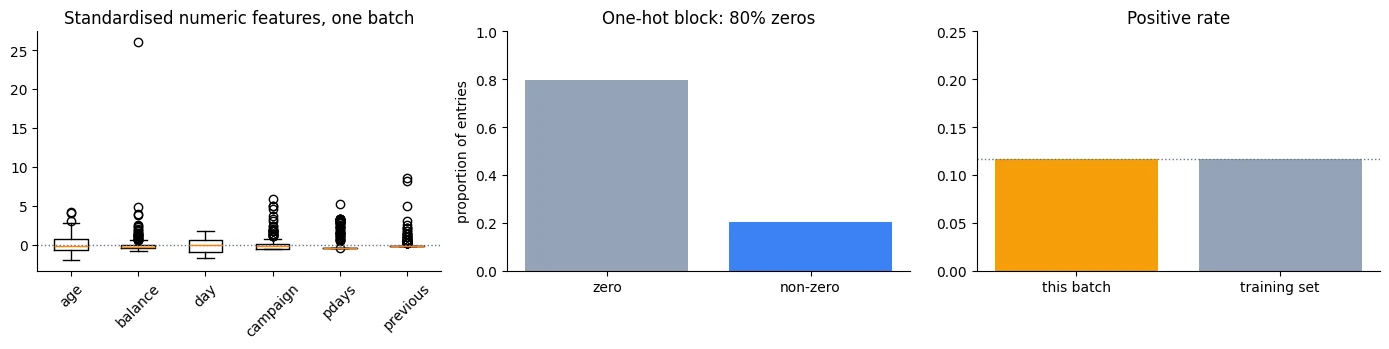
Batch positive rate 0.1172 vs training set 0.1170
One-hot block is 80% zeros — expected, since each
categorical column contributes exactly one 1 across its indicator columns.
Saving the processed splits
The next note needs the processed training, validation, and test arrays.
Saving them to an .npz file means we do not have to download and preprocess the Bank Marketing dataset again every time Lesson 2.3 starts.
This is simply a convenience and a speed improvement.
The important thing is that we save the already processed splits, not a new split each time. That keeps the experiments consistent.
PROCESSED = DATA_DIR / "bank_processed.npz"np.savez_compressed( PROCESSED, X_train=Xtr_enc, y_train=y_tr, X_val=Xva_enc, y_val=y_va, X_test=Xte_enc, y_test=y_te, feature_names=np.array(feature_names, dtype=object),)size_mb = PROCESSED.stat().st_size / 1e6print(f"Saved {PROCESSED} ({size_mb:.1f} MB)")check = np.load(PROCESSED, allow_pickle=True)print(f"\nContents:")for key in check.files: print(f" {key:<14} {check[key].shape} {check[key].dtype}")Saved data/bank_processed.npz (0.6 MB) Contents: X_train (31647, 50) float32 y_train (31647,) int64 X_val (6782, 50) float32 y_val (6782,) int64 X_test (6782, 50) float32 y_test (6782,) int64 feature_names (50,) object
-
The project uses labels shaped
(N, 1). Another perfectly valid design is(N,). Either can work if the model output and loss calculation use the same convention. The important engineering lesson is consistency: choose one shape and use it everywhere.Yes, consistency is the whole point. Pick the convention once, where the labels first become tensors (here in the Dataset:
unsqueeze(1)→(N, 1)), and make the model's output match it. Then enforce it:inspect_batchassertsyb.shape == (N, 1)before any training happens. The bugs of Lesson 2.1 come from mixing the conventions, not from choosing either one. -
One-hot encoded data contains many zeros. For a rare category such as
job=student, most examples have a zero in that category's input column. That means the corresponding input feature is active only for the examples where the category is present. The first-layer weights connected to that feature therefore receive useful input-driven gradient contributions mainly from those examples.Correct. The gradient for a first-layer weight is (input value × error signal), summed over the batch. For the
job=studentcolumn the input is 0 for most rows, so only the few student rows move that weight. Rare categories learn slowly and noisily and are easy to overfit. Common remedies: group very rare categories into"other", use weight decay, gather more data, or (for high-cardinality columns) use a learned embedding that lets similar categories share information.
Why inspect one batch with assertions before training?
Check the contract (shapes, dtype, finite values, label set, scaling) before spending time training.
List four things the batch contract should check for this project.
- x is (batch, 50) float32; y is (batch, 1) float32 (matching the one-logit model).
- No NaN or infinite values; labels only in {0, 1}; sensible value ranges and a positive rate close to the training set's.
Conclusion
The complete data pipeline now looks like this:
raw data
   ↓
split into train / validation / test
   ↓
fit preprocessing using TRAIN only
   ↓
transform all splits using the training rules
   ↓
Dataset
   ↓
DataLoader
   ↓
batches
   ↓
training loop
   ↓
model
The key ideas are:
- Mini-batching: divide the training data into smaller groups so the model can update its parameters many times during one epoch.
- Split first: validation and test data must remain unseen when preprocessing rules are learned.
- Encoding: categorical values must be converted into numerical representations that do not invent false relationships.
- Dataset: answers two questions—"how many examples are there?" and "give me example
i." - Lazy loading: a dataset can read examples from disk only when they are needed.
- Transforms: training can use random augmentation; validation and test should normally use deterministic transformations.
- DataLoader: groups individual examples into batches and controls ordering and batch construction.
shuffle=Truefor training: prevents the training process from depending on the original ordering of examples.shuffle=Falsefor validation/test: keeps evaluation stable and predictable.drop_last: can discard an incomplete training batch, but should not be used casually for evaluation.num_workers: can speed up expensive data loading, but more workers are not automatically better.- Inspect the first batch: verify shapes, dtypes, values, and labels before spending time training.
One final habit is especially valuable:
Before training a model, inspect one batch and verify that it is exactly what the model expects.
If the data entering the model is wrong, a better neural network will not fix the problem.
Transition to Lesson 2.3
At this point, the data pipeline is ready.
We have:
correctly split data
      ↓
correctly encoded features
      ↓
Dataset
      ↓
DataLoader
      ↓
validated batches
What we do not have yet is the neural network that will learn from those batches.
Lesson 2.3 will build that model and train it using these exact loaders.
It will introduce:
nn.Modulefor defining neural networks;- forward passes through the network;
- how tensor shapes change from layer to layer;
- the choice between one output value (one logit) and two output values;
- a proper training loop;
model.train()andmodel.eval();torch.no_grad()during validation;- validation metrics and baseline comparisons.
The goal is not to assume that a neural network must beat every other model. The goal is to train it correctly and then measure what it actually achieves.
Wrap-up
- Dataset gives one example (
__len__,__getitem__); DataLoader groups examples into batches; the training loop only consumes batches. - Mini-batches matter even when data fits in memory: many more updates per epoch, each with a slightly noisy gradient (here 142× more updates and ROC-AUC 0.79 vs 0.62).
- Split first, then fit preprocessing on training data only, then transform every split with that same fitted object. Stratify to keep class rates equal.
- Ask of every feature: would I know this at prediction time? If not (like call
duration), it's target leakage. - One-hot encode nominal categories; ordinal codes invent order and distance. Align validation/test columns to the training columns.
- With 11.7% positives, 88.3% accuracy is worthless: report ROC-AUC and average precision (baseline 0.117).
- Lazy datasets store paths and read in
__getitem__; random augmentation belongs to training only. shuffle=Truefor training,Falsefor evaluation;drop_lastonly for training; measure before raisingnum_workers; seed for reproducibility.- Inspect one batch before training: shapes, dtypes, value ranges and label values.
Quick check
A training set of 31,647 rows with batch_size=256 gives how many batches per epoch (drop_last=False)?
ceil(31,647 / 256) = 124: 123 full batches plus one of 159.
Why did mini-batch training reach a much higher ROC-AUC than full-batch training after 20 epochs?
Both saw every row 20 times; mini-batching turned that into 2,840 updates instead of 20.
Which order is correct?
Statistics must come from training data only, then be applied unchanged to validation and test.
What must a custom PyTorch Dataset implement?
How many examples, and how to return example i. Batching is the DataLoader's job.
For the validation DataLoader you should use…
Stable order and every held-out example evaluated.
Why is one-hot encoding preferred to numbering categories 0, 1, 2 … for job?
One-hot keeps every category equally far from every other.
Questions and discussion
Ask about this lesson, share what you found in a lab, or help someone else. Posts are public on the course's GitHub Discussions: anyone can read them, and you need a GitHub account to post.
Opening it loads giscus from giscus.app.