Optimizers and the Learning Rate
- Time
- ~83 min
- Sections
- 9
- Code cells
- 26
- Labs
- 4
- Figures
- 5
Before you start
optimizer.step(), opened up. Plain SGD is literally p -= lr * p.grad; momentum adds a velocity that cancels zig-zags;
Adam keeps two running averages per weight and normalises every step, which is why its good learning rate (about 1e-3)
looks nothing like SGD's; AdamW decouples weight decay and is exactly Adam when the decay is 0. Then the experiments: optimizers
compared fairly, six learning rates and the curve each one leaves behind (including a collapse that looks perfectly calm), an
LR range test that finds a good range in one run, and schedules. The verdict: the learning rate matters far more than the
optimizer or the schedule.
- Learning goal
in Module 2, you wrote a training loop containing:
optimizer.zero_grad()
loss = loss_fn(model(xb), yb)
loss.backward()
optimizer.step()
The first three lines tell PyTorch how to calculate the gradient. The last line tells PyTorch how to use that gradient to change the model's parameters.
In this lesson we open up that last line.
The two main questions are:
- Which optimizer should we use?
- How large should each parameter update be?
The second question is controlled mainly by the learning rate.
By the end of this lesson, you should be able to look at a training curve and make a reasonable diagnosis:
curve is barely moving
        ↓
learning rate may be too small

curve improves quickly then bounces
        ↓
learning rate may be slightly too large

curve explodes or collapses
        ↓
learning rate may be far too large
The goal is not to memorise optimizer names. The goal is to understand what the optimizer and learning rate are doing to the model's parameters.
- You will be able to
- explain what one parameter update means for SGD, momentum, Adam, and AdamW;
- understand why the same numerical learning rate can behave very differently with different optimizers;
- understand what Adam stores internally and why that costs memory;
- understand what weight decay is and why AdamW separates it from Adam's adaptive update;
- compare optimizers fairly;
- recognise the main learning-rate failure patterns;
- use an LR range test to find a useful starting range;
- understand when a learning-rate schedule is useful and when it adds unnecessary complexity.
The mental model for this lesson
A neural network has parameters:
weights and biases
       ↓
parameters
       ↓
gradient tells us which direction to move
       ↓
optimizer decides how to turn that gradient into an update
       ↓
learning rate controls the scale of that update
       ↓
new parameters
So:
Gradient = direction of improvement.
Optimizer = rule for turning gradients into updates.
Learning rate = main control over the size of those updates.
Load the data
The code downloads the Bank Marketing dataset once and stores it locally.
pd.read_csv(...) turns the CSV file into a pandas DataFrame.
The important output to notice is the shape:
(rows, columns)
Each row represents one marketing example. Each column represents one feature or the target.
# --- data ------------------------------------------------------------------# Downloads once (~1 MB) and caches locally. No auth key needed.DATA_DIR = "data"os.makedirs(DATA_DIR, exist_ok=True)CSV = os.path.join(DATA_DIR, "bank-full.csv")if not os.path.exists(CSV): url = "https://archive.ics.uci.edu/static/public/222/bank+marketing.zip" print("downloading Bank Marketing ...") raw = urllib.request.urlopen(url, timeout=120).read() outer = zipfile.ZipFile(io.BytesIO(raw)) inner = zipfile.ZipFile(io.BytesIO(outer.read("bank.zip"))) with open(CSV, "wb") as f: f.write(inner.read("bank-full.csv")) print("saved to", CSV)df = pd.read_csv(CSV, sep=";")print("raw shape:", df.shape)df.head(3)raw shape: (45211, 17)
| age | job | marital | education | default | balance | housing | loan | contact | day | month | duration | campaign | pdays | previous | poutcome | y | |
|---|---|---|---|---|---|---|---|---|---|---|---|---|---|---|---|---|---|
| 0 | 58 | management | married | tertiary | no | 2143 | yes | no | unknown | 5 | may | 261 | 1 | -1 | 0 | unknown | no |
| 1 | 44 | technician | single | secondary | no | 29 | yes | no | unknown | 5 | may | 151 | 1 | -1 | 0 | unknown | no |
| 2 | 33 | entrepreneur | married | secondary | no | 2 | yes | yes | unknown | 5 | may | 76 | 1 | -1 | 0 | unknown | no |
Preprocess the data
The preprocessing is intentionally the same as Module 2.
The target is converted from:
"yes" / "no"
into:
1 / 0
Numerical features are standardised.
Categorical features are one-hot encoded.
Most importantly, the preprocessing object is fit only on the training split and then used to transform validation data.
That prevents validation information from influencing the preprocessing rules.
# --- preprocessing: identical to Module 2, Lesson 2.3 ---------------------------y_all = (df["y"] == "yes").astype(np.float32).valuesX_all = df.drop(columns=["y", "duration"]) # duration dropped: post-outcome leakagey_allarray([0., 0., 0., ..., 1., 0., 0.], shape=(45211,), dtype=float32)
num_cols = X_all.select_dtypes(include="number").columns.tolist()cat_cols = [c for c in X_all.columns if c not in num_cols]X_tr_raw, X_va_raw, y_tr, y_va = train_test_split( X_all, y_all, test_size=0.2, random_state=SEED, stratify=y_all)pre = ColumnTransformer([ ("num", StandardScaler(), num_cols), ("cat", OneHotEncoder(handle_unknown="ignore", sparse_output=False), cat_cols),])A_tr = pre.fit_transform(X_tr_raw).astype(np.float32) # fit on TRAIN onlyA_va = pre.transform(X_va_raw).astype(np.float32)N_FEATURES = A_tr.shape[1]print(f"numeric columns {len(num_cols)} {num_cols}")print(f"categorical columns {len(cat_cols)}")print(f"train / val rows {A_tr.shape[0]} / {A_va.shape[0]}")print(f"feature dimension {N_FEATURES}")print(f"positive rate train {y_tr.mean():.4f} val {y_va.mean():.4f}")print(f"majority-class acc {max(y_va.mean(), 1 - y_va.mean()):.4f}")X_tr = torch.tensor(A_tr); Y_tr = torch.tensor(y_tr).unsqueeze(1)X_va = torch.tensor(A_va); Y_va = torch.tensor(y_va).unsqueeze(1)numeric columns 6 ['age', 'balance', 'day', 'campaign', 'pdays', 'previous'] categorical columns 9 train / val rows 36168 / 9043 feature dimension 50 positive rate train 0.1170 val 0.1170 majority-class acc 0.8830
A note on reproducibility
The numbers in this notebook should be close to the Module 2 results, but they do not have to match every decimal place.
A train/validation split depends on randomness. A different split means a slightly different validation set, which can produce a slightly different AUC.
So when we say the Module 2 reference is around 0.79–0.80 ROC-AUC, we are describing the approximate performance range rather than claiming that one exact decimal value is universal.
This matters because optimization experiments should not be treated as exact physical constants.
A useful principle is:
One run gives you an observation. Repeated runs tell you how stable that observation is.
Lesson 3.2 will investigate this more carefully.
# --- the baseline model and a reusable training function -------------------# 50 -> 64 -> 32 -> 1, exactly the Module 2 architecture.def make_model(n_features=N_FEATURES, seed=SEED): """Build the lesson's baseline MLP (50 → 64 → 32 → 1) with reproducible initial weights. Seeds PyTorch immediately before creating the layers, so every call with the same seed starts from exactly the same weights. That is what lets experiments compare optimizers and learning rates rather than lucky initialisations. Args: n_features: Number of input features (50 after preprocessing). seed: Seed for the weight initialisation. Returns: An ``nn.Sequential`` that outputs one raw logit per row. """ torch.manual_seed(seed) return nn.Sequential( nn.Linear(n_features, 64), nn.ReLU(), nn.Linear(64, 32), nn.ReLU(), nn.Linear(32, 1), )_m = make_model()print("architecture:", " -> ".join(str(l.out_features) for l in _m if isinstance(l, nn.Linear)))print("parameters: ", sum(p.numel() for p in _m.parameters()))loss_fn = nn.BCEWithLogitsLoss()architecture: 64 -> 32 -> 1 parameters: 5377
def train(optimizer_name, lr, epochs=15, batch_size=256, seed=SEED, weight_decay=0.0, scheduler=None, momentum=0.9, verbose=False): """Train the baseline MLP with one optimizer configuration and record every epoch. The data, architecture, batch order and initial weights are fixed by ``seed``, so only the optimizer, learning rate and schedule differ between calls. After each epoch the model is evaluated on the whole validation set. Args: optimizer_name: ``"sgd"``, ``"momentum"``, ``"adam"`` or ``"adamw"``. lr: Learning rate (the starting rate when a schedule is used). epochs: Number of passes over the training data. batch_size: Rows per mini-batch. seed: Seed for the initial weights and the batch order. weight_decay: Decoupled weight decay; used only by ``"adamw"``. scheduler: ``None`` (constant), ``"step"`` (×0.1 every 5 epochs) or ``"cosine"`` (cosine annealing to 0 over ``epochs``); stepped once per epoch. momentum: Momentum coefficient for ``"momentum"``. verbose: Print one line per epoch. Returns: A dict with ``"history"`` (one dict per epoch: ``epoch``, ``train_loss``, ``val_loss``, ``val_auc`` and ``lr``, the rate *after* the scheduler step), ``"seconds"`` (wall-clock training time) and ``"model"`` (the trained model). Raises: ValueError: If ``optimizer_name`` is not one of the four above. """ model = make_model(seed=seed) g = torch.Generator().manual_seed(seed) if optimizer_name == "sgd": opt = torch.optim.SGD(model.parameters(), lr=lr) elif optimizer_name == "momentum": opt = torch.optim.SGD(model.parameters(), lr=lr, momentum=momentum) elif optimizer_name == "adam": opt = torch.optim.Adam(model.parameters(), lr=lr) elif optimizer_name == "adamw": opt = torch.optim.AdamW(model.parameters(), lr=lr, weight_decay=weight_decay) else: raise ValueError(optimizer_name) sched = None if scheduler == "step": sched = torch.optim.lr_scheduler.StepLR(opt, step_size=5, gamma=0.1) elif scheduler == "cosine": sched = torch.optim.lr_scheduler.CosineAnnealingLR(opt, T_max=epochs) loader = torch.utils.data.DataLoader( torch.utils.data.TensorDataset(X_tr, Y_tr), batch_size=batch_size, shuffle=True, generator=g) hist = [] t0 = time.time() for ep in range(1, epochs + 1): model.train() running, n = 0.0, 0 for xb, yb in loader: opt.zero_grad() loss = loss_fn(model(xb), yb) loss.backward() opt.step() running += loss.item() * len(xb); n += len(xb) if sched is not None: sched.step() model.eval() with torch.no_grad(): logits = model(X_va) val_loss = loss_fn(logits, Y_va).item() probs = torch.sigmoid(logits).numpy().ravel() auc = roc_auc_score(y_va, probs) if np.isfinite(probs).all() else float("nan") hist.append(dict(epoch=ep, train_loss=running / n, val_loss=val_loss, val_auc=auc, lr=opt.param_groups[0]["lr"])) if verbose: print(f" ep{ep:3d} train {running/n:.4f} val {val_loss:.4f} auc {auc:.4f}") return dict(history=hist, seconds=time.time() - t0, model=model)print("\ntraining helper ready.")Everything except the optimizer, learning rate and schedule is fixed, so each experiment changes one thing.
- 1
Same seed, same starting weights for every run.
- 2
A private random generator for the DataLoader: every run sees the batches in the same order.
- 3
Momentum is SGD with one extra argument;
momentum=0.9unless the caller says otherwise. - 4
Once per epoch, after the batches: the schedules here count epochs, not batches.
- 5
A diverged run produces NaN probabilities; record NaN instead of crashing the sweep.
- 6
Read after
sched.step(), so each row holds the rate the next epoch will use: the drops in the schedule plot appear one epoch early.
training helper ready.
Setup — imports, versions and device detection used by the notebook (1 cells)
Everything in this notebook is intentionally small enough to run on a CPU.
The purpose is not to train a large model. The purpose is to see optimization behaviour clearly.
A GPU is therefore not required.
The notebook also fixes the random seed so that the experiments are as reproducible as possible. A seed does not guarantee identical results on every machine, but it removes a major source of unnecessary randomness.
The setup imports the libraries used throughout the notebook and fixes the random seeds.
The device is detected first, but then the notebook deliberately forces CPU execution so that timing comparisons are more consistent across machines.
The seed is used for:
- model initialisation;
- NumPy randomness;
- DataLoader shuffling.
This means that when we intentionally change one experimental variable, we are less likely to be measuring an unrelated random difference.
# Pinned versions this notebook was built and executed against.# torch 2.14.0 | scikit-learn 1.8.0 | numpy 2.4.4 | pandas 3.0.2 | matplotlib 3.10.8import sys, time, io, zipfile, urllib.request, osimport numpy as npimport pandas as pdimport torchimport torch.nn as nnimport matplotlib.pyplot as pltfrom sklearn.model_selection import train_test_splitfrom sklearn.preprocessing import StandardScaler, OneHotEncoderfrom sklearn.compose import ColumnTransformerfrom sklearn.linear_model import LogisticRegressionfrom sklearn.metrics import roc_auc_score# --- environment detection -------------------------------------------------if torch.cuda.is_available(): DEVICE = torch.device("cuda")elif torch.backends.mps.is_available(): DEVICE = torch.device("mps")else: DEVICE = torch.device("cpu")print(f"python {sys.version.split()[0]}")print(f"torch {torch.__version__}")print(f"device {DEVICE}")print(f"threads {torch.get_num_threads()}")# Everything in this notebook is small enough that CPU is fine.# We stay on CPU deliberately so timings are comparable across machines.DEVICE = torch.device("cpu")print(f"using {DEVICE} (forced, for comparable timings)")SEED = 42torch.manual_seed(SEED)np.random.seed(SEED)python 3.13.9 torch 2.14.0 device mps threads 5 using cpu (forced, for comparable timings)
The line you trusted
In Module 2, the training loop contained:
optimizer.zero_grad()
loss = loss_fn(model(xb), yb)
loss.backward()
optimizer.step()
Let's separate the jobs:
1. zero_grad()
PyTorch stores gradients inside each parameter's .grad attribute.
Before calculating a new gradient, we normally clear the old one.
2. loss.backward()
Backpropagation calculates how the loss changes with respect to each parameter.
In simplified notation:
loss
  ↓
how much should each parameter change?
  ↓
gradient for each parameter
For a parameter p, PyTorch stores this result in:
p.grad3. optimizer.step()
This is the part we are studying today.
The optimizer takes the gradients and decides how to change the parameters.
For plain stochastic gradient descent (SGD), the rule is:
where:
p= the current parameter;L= the loss;∇p L= the gradient of the loss with respect top;η(eta) = the learning rate.
Why do we subtract the gradient?
Because the gradient points in the direction in which the loss increases fastest. Moving in the opposite direction therefore tends to reduce the loss.
For example, if:
gradient = +0.01
learning rate = 0.1
then:
parameter change = -0.1 × 0.01
                 = -0.001
So the parameter moves down by 0.001.
This is the simplest optimizer possible.
The experiment below replaces optimizer.step() with this arithmetic so we can verify that PyTorch's SGD is doing exactly what the equation says.
# Take one real batch and one real model, and step it two ways.xb, yb = X_tr[:256], Y_tr[:256]LR = 0.1# --- way 1: torch's SGD ---m1 = make_model()opt1 = torch.optim.SGD(m1.parameters(), lr=LR)opt1.zero_grad()loss_fn(m1(xb), yb).backward()opt1.step()# --- way 2: the arithmetic, by hand ---m2 = make_model() # same seed => same starting weightsm2.zero_grad()loss_fn(m2(xb), yb).backward()with torch.no_grad(): for p in m2.parameters(): p -= LR * p.grad # <-- the whole of SGD# --- compare ---diffs = [ (a - b).abs().max().item() for a, b in zip(m1.parameters(), m2.parameters()) ]print("max |torch_SGD - hand_written| per tensor:", [f"{d:.2e}" for d in diffs])print("largest difference anywhere:", f"{max(diffs):.2e}")max |torch_SGD - hand_written| per tensor: ['7.45e-09', '0.00e+00', '7.45e-09', '3.73e-09', '1.16e-10', '0.00e+00'] largest difference anywhere: 7.45e-09
diffs[7.450580596923828e-09, 0.0, 7.450580596923828e-09, 3.725290298461914e-09, 1.1641532182693481e-10, 0.0]
The two implementations agree up to tiny floating-point rounding differences.
That gives us a precise interpretation of the learning rate.
The learning rate is not just a vague "speed" setting. It is the factor that scales the gradient when SGD turns a gradient into a parameter update.
For example:
gradient ≈ 0.01
learning rate = 0.1

update ≈ 0.1 × 0.01
       = 0.001
The actual update therefore depends on both the learning rate and the size of the gradient.
This explains why a learning rate that works on one problem may be terrible on another.
The four update rules (Other optimers) in this lesson can be thought of as modifications of the same basic idea:
SGD
→ use the raw gradient

Momentum
→ smooth the gradient using recent history

Adam
→ smooth the gradient AND scale it according to each parameter's typical gradient size

AdamW
→ do Adam's adaptive update, while applying weight decay separately
So the training loop stays almost the same. What changes is the rule used by optimizer.step().
-
Suppose every input feature in the dataset were multiplied by
2. Would the same learning rate necessarily behave the same way?Probably not. Changing the scale of the inputs changes the scale of the activations and, consequently, the scale of the gradients, so preprocessing affects optimisation. This is one reason
StandardScaleris not merely cosmetic: putting numeric features on comparable scales makes the problem easier for a gradient-based optimizer to navigate.For the first layer you can be precise. Each weight's gradient is proportional to the input it multiplies, so for the same error signal, doubling the inputs doubles those gradients, and SGD's step doubles with them. Each weight change also moves the layer's output twice as much (its input is doubled), so the same
lrchanges the first layer's output about four times as much. Adam divides the gradient's scale back out, so its step size barely changes; the effect on the output is about twice as large.The model is learning in parameter space, but the scale of the inputs influences the shape and scale of the gradients that guide that learning.
With plain SGD, \(\eta = 0.01\) and a gradient of \(0.1\) for parameter \(p\), what does optimizer.step() do?
\(p \leftarrow p - \eta \nabla_p L = p - 0.01 \times 0.1\). The update depends on both the learning rate and the gradient's size.
If every input feature were multiplied by 2, would the same learning rate behave the same way?
Preprocessing affects optimisation. This is one reason standardising features is not merely cosmetic.
Watching SGD zig-zag, and giving it momentum
It is easier to understand an optimizer on a simple surface than inside a 5,377-parameter neural network.
Imagine a long, narrow valley:
        steep
          ↕
       \     /
        \   /
         \_/
          →
       shallow
The bottom of the valley contains the minimum.
The important detail is that the surface is:
- very steep in one direction;
- much flatter in another direction.
This can happen when different parameters have very different scales.
What does the gradient do?
The gradient points in the direction of steepest increase.
Gradient descent moves in the opposite direction, so it always tries to move downhill.
The problem is that in a narrow valley, the downhill direction can point strongly across the valley rather than along the valley floor.
So the optimizer can do this:
left wall → right wall → left wall → right wall
while making only slow progress toward the actual minimum.
This is the zig-zag problem.
Momentum is designed to reduce that behaviour.
# A 2-D quadratic bowl, stretched 20:1. f(x, y) = 0.05*x^2 + y^2def f(p): """The stretched bowl ``f(x, y) = 0.05·x² + y²``: 20 times steeper along ``y`` than ``x``. Args: p: A point ``(x, y)`` as a sequence or NumPy array. Returns: The function's value at ``p``; the minimum is 0 at the origin. """ return 0.05 * p[0]**2 + 1.0 * p[1]**2def grad(p): """The exact gradient of ``f``: ``(0.1·x, 2·y)``. Args: p: A point ``(x, y)`` as a NumPy array. Returns: A NumPy array with the partial derivatives along ``x`` and ``y``. """ return np.array([0.10 * p[0], 2.0 * p[1]])def descend(lr, beta=0.0, steps=40, start=(-9.0, 2.5)): """Run gradient descent on ``f``, with optional classical momentum, and record the path. Uses PyTorch's momentum rule: ``v ← β·v + g``, then ``p ← p − lr·v``. With ``beta=0`` this is plain gradient descent. Args: lr: Learning rate. beta: Momentum coefficient β; 0 turns momentum off. steps: Number of update steps. start: Starting point ``(x, y)``. Returns: A NumPy array of shape ``(steps + 1, 2)`` with every point visited, starting point included. """ p = np.array(start, dtype=float) v = np.zeros(2) path = [p.copy()] for _ in range(steps): g = grad(p) v = beta * v + g # velocity: a running blend of past gradients p = p - lr * v path.append(p.copy()) return np.array(path)The same loop as PyTorch's SGD, on a 2-D function you can draw.
- 1
The velocity: this step's gradient plus a fraction β of the previous velocity. With β = 0 it is just the gradient.
- 2
Step against the velocity. This is exactly
torch.optim.SGD(momentum=beta).
path_sgd = descend(lr=0.85, beta=0.0)path_mom = descend(lr=0.85, beta=0.30)print(f"after 40 steps, plain SGD : x={path_sgd[-1][0]:+.4f} y={path_sgd[-1][1]:+.4f} loss={f(path_sgd[-1]):.5f}")print(f"after 40 steps, momentum 0.30: x={path_mom[-1][0]:+.4f} y={path_mom[-1][1]:+.4f} loss={f(path_mom[-1]):.5f}")print()print(f"per-step multiplier in the steep y direction: {1-0.85*2:+.2f}")print(" negative => the sign of y flips every step => visible zig-zag")after 40 steps, plain SGD : x=-0.2577 y=+0.0000 loss=0.00332 after 40 steps, momentum 0.30: x=-0.0377 y=-0.0000 loss=0.00007 per-step multiplier in the steep y direction: -0.70 negative => the sign of y flips every step => visible zig-zag
xs = np.linspace(-10, 10, 300); ys = np.linspace(-3, 3, 300)XX, YY = np.meshgrid(xs, ys); ZZ = 0.05 * XX**2 + YY**2fig, axes = plt.subplots(1, 2, figsize=(13, 4.2), sharex=True, sharey=True)for ax, path, title in [(axes[0], path_sgd, "plain SGD (lr=0.85)"), (axes[1], path_mom, "momentum 0.30 (lr=0.85)")]: ax.contour(XX, YY, ZZ, levels=np.logspace(-2, 1.6, 18), colors="0.75", linewidths=0.8) ax.plot(path[:, 0], path[:, 1], "o-", ms=3.2, lw=1.3, color="#c1440e") ax.plot(*path[0], "s", ms=8, color="black", label="start") ax.plot(0, 0, "*", ms=15, color="#1b6ca8", label="minimum") ax.set_title(title); ax.set_xlabel("x (shallow direction)") ax.legend(loc="upper right", fontsize=8)axes[0].set_ylabel("y (steep direction)")plt.suptitle("The same learning rate, with and without momentum", y=1.01)plt.tight_layout(); plt.show()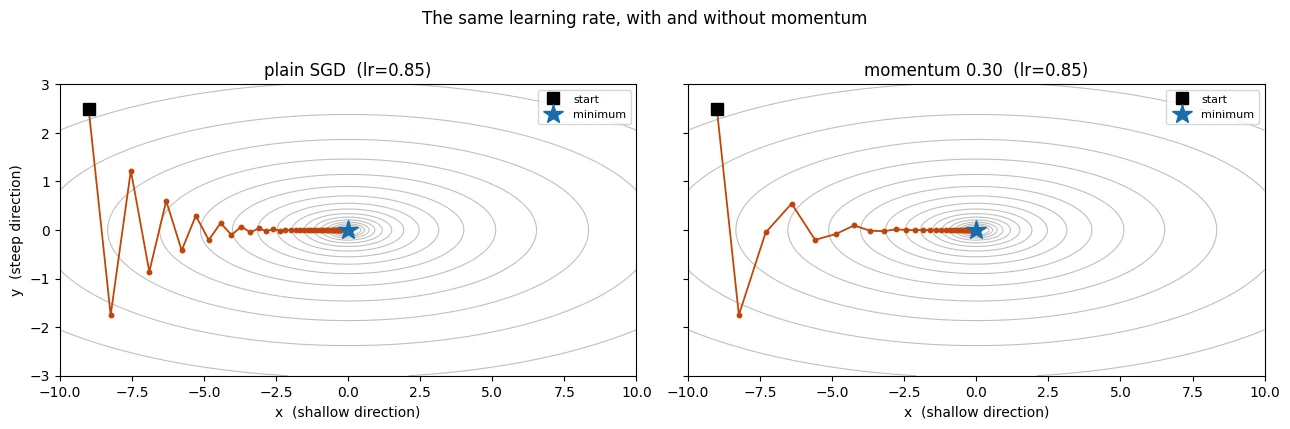
The left panel shows the problem with plain SGD.
The optimizer repeatedly crosses the valley in the steep y direction while making much slower progress along the shallow x direction.
Momentum adds memory.
Instead of using only the current gradient, it keeps a velocity that contains information from recent gradients:
and then updates the parameter using that velocity:
Here:
v= accumulated direction of recent gradients;β= how much of the previous velocity we keep;η= learning rate.
Why does this reduce zig-zagging?
In the steep direction, the gradient may keep changing sign:
step 1 → right
step 2 → left
step 3 → right
step 4 → left
Those opposing directions partially cancel inside the velocity.
Along the shallow direction, the gradient may keep pointing in roughly the same direction:
→ → → → →
Those contributions accumulate.
So momentum has a useful intuition:
It reduces movement that keeps changing direction and reinforces movement that remains consistently useful.
This is why momentum is sometimes described as a kind of smoothing or low-pass filtering of the gradient.
With β = 0.9, the optimizer keeps a large amount of the previous velocity. A rough intuition is that it incorporates information from around the previous 1/(1-β) = 10 steps, although this is not a literal ten-step window.
Why the demonstration uses beta=0.30
The demonstration deliberately uses a smaller momentum value than the common 0.9.
The learning rate in this toy example is already large enough to be close to the stability boundary.
The multiplier in the steep direction is:
1 - learning_rate × 2
= 1 - 0.85 × 2
= -0.70
The negative sign means the parameter changes sides on each step. The magnitude 0.70 means the oscillation is still large.
Momentum can make the effective update larger because it accumulates gradients.
So:
Learning rate and momentum are not independent knobs.
Increasing momentum can make an otherwise stable learning rate unstable.
This does not mean beta=0.9 is bad. It means the learning rate and momentum need to be considered together.
A practical intuition is:
more momentum
    ↓
more accumulated movement
    ↓
you may need a smaller learning rate
Deep diveWhat β = 0.9 actually does in this valley
Run the notebook's descend(lr=0.85, beta=0.9) and it does not diverge. It ends 40 steps later with loss 0.168, fifty times
worse than plain SGD's 0.0033, because the path rings: the velocity keeps overshooting, and each swing shrinks by only
\(\sqrt{\beta} \approx 0.95\) per step. On a bowl like this one, momentum actually makes larger learning rates stable: plain SGD
diverges once \(\text{lr} \cdot h > 2\) (\(h\) is the curvature, 2 in the steep direction, so lr > 1), while with momentum the limit is
\(\text{lr} \cdot h < 2(1 + \beta)\). At lr = 1.05, SGD explodes and momentum 0.3 converges.
The practical rule "more momentum, smaller learning rate" still holds, for a different reason. Along a direction where the gradients
agree, the velocity builds up to \(g / (1 - \beta)\), so the effective step is \(\text{lr} / (1 - \beta)\): ten times lr at β = 0.9.
Real loss surfaces are not fixed bowls, and that larger effective step is what destabilises training. Tune the two together.
In a long, narrow valley, plain SGD zig-zags. What does momentum do about it?
\(v \leftarrow \beta v + \nabla L\), \(p \leftarrow p - \eta v\). It damps oscillation across the valley and speeds progress along it.
What is the risk of raising momentum without touching the learning rate?
Learning rate and momentum are not independent knobs. Consider them together.
Explain in two sentences why momentum helps in a narrow valley.
- In the steep direction the gradient keeps flipping sign, so those contributions cancel in the velocity and the zig-zag shrinks.
- Along the shallow valley floor the gradient keeps pointing the same way, so it accumulates and the optimiser speeds up where progress is needed.
Adam: adapting the step for each parameter
Momentum remembers recent gradients.
Adam goes one step further: it also keeps track of the typical size of the gradients for each parameter.
Why is that useful?
Different parameters in the same neural network can receive gradients with very different magnitudes.
For example, imagine two input features:
age
job=student
age is a dense numerical feature. Many examples contain a meaningful age value.
job=student is a one-hot feature. It is 1 only for examples belonging to that category and 0 otherwise.
The corresponding weights can therefore experience very different gradient patterns.
One global learning rate may not be ideal for both.
Adam keeps two pieces of information
For every parameter, Adam maintains:
1. First moment (m)
A running average of the gradient.
This is closely related to momentum.
2. Second moment (v)
A running average of the squared gradient.
Because the gradient is squared, v tells us roughly how large the gradient has typically been, without positive and negative values cancelling each other.
Adam then uses approximately:
as the direction and scale of the adaptive update.
The important intuition is:
If a parameter normally receives very large gradients, Adam scales its update down. If it receives small gradients, Adam scales its update up.
The global learning rate then controls the overall size of these already-normalised updates.
That is why Adam's learning rate behaves differently from plain SGD's learning rate.
# Train briefly with Adam, then open the optimizer's state and look inside.m = make_model()opt = torch.optim.Adam(m.parameters(), lr=1e-3)loader = torch.utils.data.DataLoader( torch.utils.data.TensorDataset(X_tr, Y_tr), batch_size=256, shuffle=True, generator=torch.Generator().manual_seed(SEED))m.train()for i, (xb, yb) in enumerate(loader): opt.zero_grad(); loss_fn(m(xb), yb).backward(); opt.step() if i == 199: break # 200 steps is plenty to populate the buffersfirst_layer_w = list(m.parameters())[0] # shape (64, 50)state = opt.state[first_layer_w]print("Adam keeps these per parameter tensor:", list(state.keys()))print("step count:", int(state["step"]))print("exp_avg (m, 1st moment) shape:", tuple(state["exp_avg"].shape))print("exp_avg_sq (v, 2nd moment) shape:", tuple(state["exp_avg_sq"].shape))print()print("So Adam stores 2 extra floats per parameter.")n_params = sum(p.numel() for p in m.parameters())print(f"model parameters {n_params:,}")print(f"Adam optimizer state {2*n_params:,} floats ({2*n_params*4/1024:.1f} KB at fp32)")- 1
Never triggers: 36,168 rows ÷ 256 is 142 batches, so the loop ends after one epoch. That is why the step count prints 142, not 200.
- 2
The optimizer keeps its state in a dict keyed by the parameter tensor itself.
Adam keeps these per parameter tensor: ['step', 'exp_avg', 'exp_avg_sq']
step count: 142
exp_avg    (m, 1st moment) shape: (64, 50)
exp_avg_sq (v, 2nd moment) shape: (64, 50)

So Adam stores 2 extra floats per parameter.
model parameters      5,377
Adam optimizer state  10,754 floats  (42.0 KB at fp32)
Adam's memory cost
Adam stores two extra values for every trainable parameter:
parameter
   ↓
first-moment value (m)
second-moment value (v)
So if the model has N parameters, Adam needs roughly:
N parameter values
+ N first-moment values
+ N second-moment values
That is about 3× the parameter storage before considering gradients and other training memory.
For a 5,377-parameter model, this is tiny.
For a multi-billion-parameter model, it becomes significant.
This is one reason memory-efficient fine-tuning methods such as LoRA become important for large models.
The key lesson for this lesson is simply:
Adam is more adaptive, but that adaptiveness has a memory cost.
# How much does each parameter actually move, per step, under each rule?sq = state["exp_avg_sq"]typical_grad = sq.sqrt() # RMS gradient magnitude, per parameterprint("RMS gradient magnitude across the 3,200 weights of layer 1:")print(f" min {typical_grad.min().item():.3e}")print(f" median {typical_grad.median().item():.3e}")print(f" max {typical_grad.max().item():.3e}")print(f" ratio max/min: {(typical_grad.max()/typical_grad.min()).item():,.0f}x")print()print("Under SGD, step size is proportional to the gradient, so those")print("parameters move at wildly different rates with one global lr.")print()print("Under Adam, the step is m/(sqrt(v)+eps), which is ~O(1) regardless,")print("then scaled by lr. So lr sets the step size DIRECTLY in weight units.")print()print("Consequence: Adam's lr is roughly 'how far should any weight move per step',")print("which is a small number (1e-3). SGD's lr must compensate for gradient")print("magnitude, so it is typically 10-100x larger. Section 6 measures this.")RMS gradient magnitude across the 3,200 weights of layer 1: min 7.017e-07 median 2.103e-04 max 3.669e-03 ratio max/min: 5,229x Under SGD, step size is proportional to the gradient, so those parameters move at wildly different rates with one global lr. Under Adam, the step is m/(sqrt(v)+eps), which is ~O(1) regardless, then scaled by lr. So lr sets the step size DIRECTLY in weight units. Consequence: Adam's lr is roughly 'how far should any weight move per step', which is a small number (1e-3). SGD's lr must compensate for gradient magnitude, so it is typically 10-100x larger. Section 6 measures this.
Deep diveThose RMS values are about 2.7 times too small
The cell reads exp_avg_sq directly, and that buffer is not bias-corrected. After 142 steps with \(\beta_2 = 0.999\) it holds only
\(1 - 0.999^{142} \approx 13\%\) of the running mean of \(g^2\), so its square root is about \(\sqrt{0.13} \approx 0.36\) of the true RMS gradient.
Adam's own update divides by the corrected \(\hat v\), so the optimizer is not affected. The cell's point survives too: every weight is
scaled by the same factor, so the 5,229× spread between the largest and smallest gradient is real.
The experiment shows that different parameters can have very different typical gradient magnitudes.
This is exactly the situation Adam was designed to handle.
Under plain SGD:
update = learning_rate × raw_gradient
So if one parameter has a gradient 100 times larger than another, its update will also tend to be much larger.
Adam normalises the gradient using its running estimate of gradient magnitude:
adaptive update ≈ m / (sqrt(v) + eps)
So the learning rate now acts more directly as a control over the size of the parameter movement.
This is why the useful numerical learning rates are often very different:
SGD on this problem → much larger lr
Adam on this problem → much smaller lr
Do not interpret that as a universal conversion such as "Adam is always exactly 100× smaller."
The numbers depend on the problem and the optimizer state.
What is eps?
Adam divides by:
sqrt(v) + eps
eps is a very small number, commonly 1e-8.
Its job is to prevent division by zero or by an extremely tiny number.
If a parameter has received zero gradient for many steps, v can be zero. Without eps, the denominator could be zero and the update would be undefined.
So eps is mainly a numerical-stability safeguard.
One momentum step and one Adam step
Implement the two update rules from §2 and §3 for a NumPy array of parameters. Adam uses bias-corrected moments \(\hat m = m/(1-\beta_1^t)\) and \(\hat v = v/(1-\beta_2^t)\).
What extra information does Adam keep for each parameter?
The step is roughly \(m / (\sqrt{v} + \epsilon)\): large typical gradients are scaled down, small ones scaled up.
A model has 5,377 parameters. How many extra numbers does Adam store?
Two moment estimates per parameter. For billion-parameter models this memory cost becomes significant.
Why can one global learning rate suit Adam across parameters whose gradients differ by 5,000×, when it cannot for SGD?
- SGD's step is proportional to each gradient, so parameters with tiny gradients barely move while others move a lot.
- Adam divides by each parameter's running gradient magnitude (\(\sqrt{v}\)), so steps are normalised and the learning rate controls movement more directly.
AdamW and weight decay
Weight decay is a regularisation technique.
Its basic idea is:
Unless the data gives the model a reason to keep a weight large, gently encourage that weight to become smaller.
Why?
Very large weights can contribute to overly complex solutions. Regularisation can encourage simpler parameter values and can sometimes improve generalisation.
The important question in this section is not whether regularisation is useful. Lesson 3.2 will study that.
The question here is:
How should weight decay be combined with Adam's adaptive update?
L2 regularisation
A traditional approach is to add an L2 penalty to the loss:
The derivative of that extra term is:
So the total gradient becomes:
With ordinary SGD, this behaves like directly shrinking the weights.
With Adam, however, the extra λp term becomes part of the gradient that Adam subsequently rescales using sqrt(v).
That means the regularisation is no longer applied uniformly.
AdamW
AdamW separates the two operations.
Conceptually:
Adam update
     +
direct weight decay
The update is:
The weight-decay term bypasses Adam's adaptive scaling.
That is what decoupled weight decay means.
The experiment below compares these two behaviours directly.
def one_step(kind, wd, lr=1e-3, warmup=50): """Train a fresh baseline model for a few steps with Adam + L2 or with AdamW. Despite its name it runs ``warmup`` optimizer steps (50 by default), enough for Adam's running averages to fill, and returns the resulting weights so the two ways of applying weight decay can be compared. Args: kind: ``"adam_l2"`` for ``Adam(weight_decay=wd)``, which adds ``wd·p`` to the gradient; anything else uses ``AdamW(weight_decay=wd)``, which decays the weights directly. wd: Weight-decay coefficient λ. lr: Learning rate. warmup: Number of optimizer steps to take. Returns: Every parameter of the model flattened into one 1-D tensor. """ m = make_model() if kind == "adam_l2": opt = torch.optim.Adam(m.parameters(), lr=lr, weight_decay=wd) # L2-in-gradient else: opt = torch.optim.AdamW(m.parameters(), lr=lr, weight_decay=wd) # decoupled ld = torch.utils.data.DataLoader( torch.utils.data.TensorDataset(X_tr, Y_tr), batch_size=256, shuffle=True, generator=torch.Generator().manual_seed(SEED)) m.train() for i, (xb, yb) in enumerate(ld): opt.zero_grad(); loss_fn(m(xb), yb).backward(); opt.step() if i == warmup - 1: break return torch.cat([p.detach().flatten() for p in m.parameters()])w_none = one_step("adamw", 0.0)w_l2 = one_step("adam_l2", 0.1)w_decup = one_step("adamw", 0.1)print("First, the thing that trips everyone up:")print(f" Adam(wd=0) vs AdamW(wd=0) identical? " f"{torch.allclose(one_step('adam_l2', 0.0), w_none, atol=1e-7)}")print(" -> With weight_decay=0, AdamW IS Adam. The difference only appears when wd > 0.")print()print("Now with wd=0.1, after 50 steps:")print(f" ||w|| no decay {w_none.norm():.4f}")print(f" ||w|| Adam + L2 {w_l2.norm():.4f} (shrunk by {100*(1-w_l2.norm()/w_none.norm()):.3f}%)")print(f" ||w|| AdamW decoupled {w_decup.norm():.4f} (shrunk by {100*(1-w_decup.norm()/w_none.norm()):.3f}%)")print()print(f" max |Adam+L2 - AdamW| per weight: {(w_l2 - w_decup).abs().max():.3e}")print(" -> Same lambda, different resulting weights. They are not the same algorithm.")First, the thing that trips everyone up: Adam(wd=0) vs AdamW(wd=0) identical? True -> With weight_decay=0, AdamW IS Adam. The difference only appears when wd > 0. Now with wd=0.1, after 50 steps: ||w|| no decay 6.1960 ||w|| Adam + L2 3.2881 (shrunk by 46.932%) ||w|| AdamW decoupled 6.1693 (shrunk by 0.431%) max |Adam+L2 - AdamW| per weight: 1.017e-01 -> Same lambda, different resulting weights. They are not the same algorithm.
The experiment shows why putting the L2 penalty inside Adam's gradient is not equivalent to decoupled weight decay.
With L2-in-the-gradient, the decay term λp becomes part of the gradient and is then affected by Adam's adaptive denominator.
That means the effective regularisation can depend on the parameter's gradient history.
AdamW instead applies:
Adam's adaptive update
+
direct shrinkage of the parameter
so the decay term does not pass through the sqrt(v) scaling.
Two important details
AdamW with weight_decay=0 behaves like Adam.
So simply changing:
torch.optim.Adam(...)to:
torch.optim.AdamW(..., weight_decay=0)does not meaningfully introduce weight decay.
When weight decay is non-zero, switching optimizers changes the meaning of the regularisation setting.
Therefore, if you switch from Adam to AdamW and the result changes, the first hyperparameters to reconsider are the learning rate and weight decay rather than assuming the optimizer itself is inherently worse.
For this curriculum, the practical rule is:
Use AdamW when you want Adam-style adaptive optimisation with decoupled weight decay. It is the default in essentially every modern training stack — Hugging Face Trainer, the reference implementations of every recent open-weight model, most vision pipelines.
AdamW(..., weight_decay=0) compared with Adam(...):
The difference only appears when weight decay is greater than 0. Switching the class alone adds no decay.
What does 'decoupled' weight decay mean?
With L2 inside the gradient, Adam rescales the penalty per parameter, so regularisation is no longer uniform. AdamW keeps it separate.
Four optimizers, one model, one plot
Now we compare:
- plain SGD;
- SGD with momentum;
- Adam;
- AdamW.
Everything else is held constant:
same architecture
same seed
same data
same batch size
same number of epochs
same learning rate
This is useful because changing several things at once would make it impossible to know what caused a difference.
However, there is an important trap:
Holding the learning rate equal does not necessarily make the comparison fair.
Different optimizers interpret and transform the gradient differently.
The first comparison intentionally uses the same 1e-3 learning rate so that we can see this effect.
1e-30.001
All four optimizers train the same model for 15 epochs at the same learning rate, 1e-3. Which ends with the best validation AUC?
Adam and AdamW, tied at 0.7939, then momentum (0.7379) and plain SGD (0.6525). The tie is exact because AdamW with
weight_decay=0 is Adam. The gap to SGD mostly says that 1e-3 is a good rate for Adam and a far-too-small one for SGD, as the next
experiment shows.
results = {}for name in ["sgd", "momentum", "adam", "adamw"]: results[name] = train(name, lr=1e-3, epochs=15) h = results[name]["history"] print(f"{name:9s} final val loss {h[-1]['val_loss']:.4f} " f"final val AUC {h[-1]['val_auc']:.4f} " f"epoch-1 AUC {h[0]['val_auc']:.4f} " f"{results[name]['seconds']:.1f}s")sgd final val loss 0.4208 final val AUC 0.6525 epoch-1 AUC 0.4451 1.0s momentum final val loss 0.3263 final val AUC 0.7379 epoch-1 AUC 0.6080 1.0s adam final val loss 0.2873 final val AUC 0.7939 epoch-1 AUC 0.7666 1.2s adamw final val loss 0.2873 final val AUC 0.7939 epoch-1 AUC 0.7666 1.2s
fig, axes = plt.subplots(1, 2, figsize=(15, 6))colors = {"sgd": "#8c8c8c", "momentum": "#1b6ca8", "adam": "#c1440e", "adamw": "#2e7d32"}for name, r in results.items(): h = r["history"] eps = [x["epoch"] for x in h] axes[0].plot(eps, [x["train_loss"] for x in h], label=name, color=colors[name], lw=1.8) axes[1].plot(eps, [x["val_auc"] for x in h], label=name, color=colors[name], lw=1.8)axes[1].axhline(0.7717, ls="--", c="k", lw=1, label="logistic regression")axes[0].set_xlabel("epoch"); axes[0].set_ylabel("training loss"); axes[0].set_title("Training loss, lr=1e-3")axes[1].set_xlabel("epoch"); axes[1].set_ylabel("validation ROC-AUC"); axes[1].set_title("Validation AUC, lr=1e-3")for a in axes: a.legend(fontsize=9); a.grid(alpha=0.3)plt.tight_layout(); plt.show()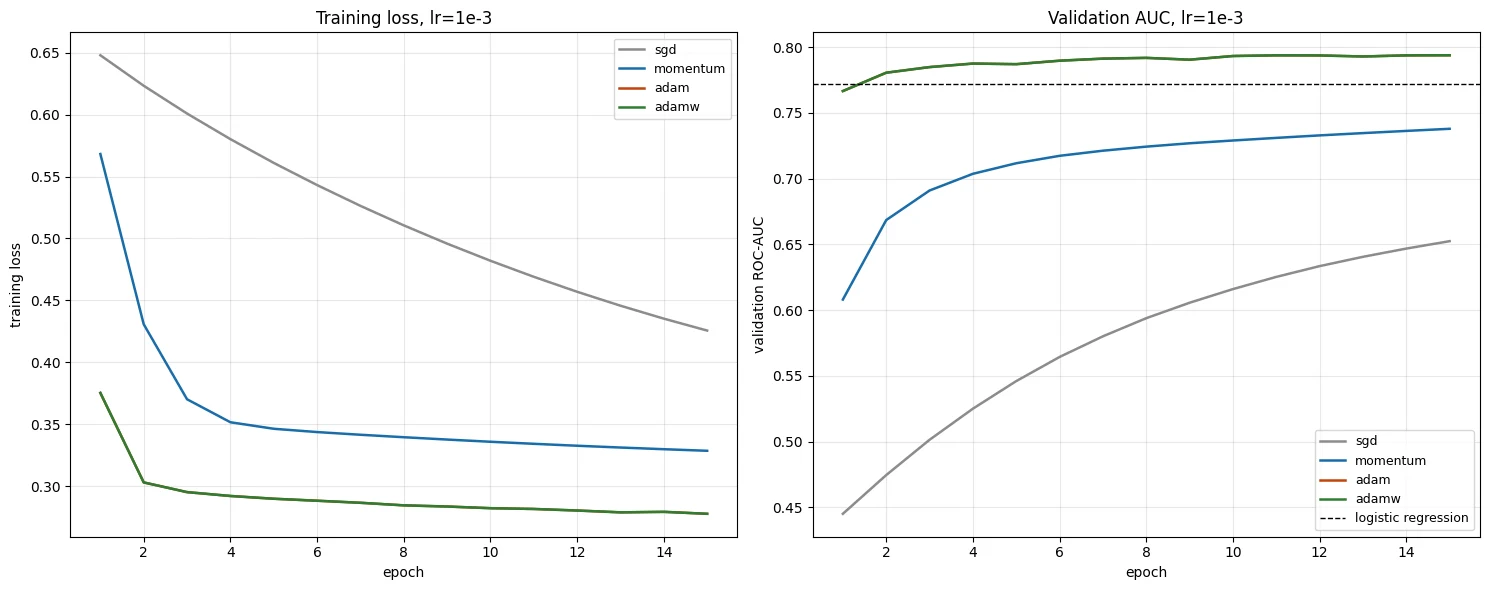
Read the first comparison carefully.
At lr=1e-3, Adam and AdamW perform much better than the SGD variants in this experiment.
But it would be incorrect to conclude:
"Adam is better than SGD."
Why?
Because the learning rate was shared.
1e-3 is a reasonable default for Adam, but it is not necessarily a good learning rate for plain SGD on this problem.
So the experiment really asks:
What happens when different optimizers are forced to use the same numerical learning rate?
That is a valid experiment, but it is not a complete optimizer comparison.
Also notice that Adam and AdamW are identical here because:
AdamW + weight_decay=0
        =
Adam
So now we give each optimizer its own reasonable learning-rate range and compare them again.
This is a more informative comparison because each optimizer gets an opportunity to operate in a useful regime.
# Give each optimizer a learning rate suited to it, then compare again.fair = { "sgd": [1e-2, 1e-1, 5e-1], "momentum": [1e-3, 1e-2, 1e-1], "adamw": [1e-4, 1e-3, 1e-2],}best = {}print("sweeping each optimizer over its own plausible lr range:\n")for name, lrs in fair.items(): runs = [] for lr in lrs: r = train(name, lr=lr, epochs=15) auc = r["history"][-1]["val_auc"] runs.append((lr, auc, r)) print(f" {name:9s} lr={lr:<7} final val AUC {auc:.4f}") lr_star, auc_star, r_star = max(runs, key=lambda t: t[1]) best[name] = dict(lr=lr_star, auc=auc_star, run=r_star) print(f" -> best for {name}: lr={lr_star} AUC={auc_star:.4f}\n")sweeping each optimizer over its own plausible lr range: sgd lr=0.01 final val AUC 0.7386 sgd lr=0.1 final val AUC 0.7864 sgd lr=0.5 final val AUC 0.7898 -> best for sgd: lr=0.5 AUC=0.7898 momentum lr=0.001 final val AUC 0.7379 momentum lr=0.01 final val AUC 0.7866 momentum lr=0.1 final val AUC 0.7966 -> best for momentum: lr=0.1 AUC=0.7966 adamw lr=0.0001 final val AUC 0.7798 adamw lr=0.001 final val AUC 0.7939 adamw lr=0.01 final val AUC 0.7922 -> best for adamw: lr=0.001 AUC=0.7939
print("Each optimizer at ITS OWN best learning rate:")print(f"{'optimizer':<10} {'best lr':>9} {'final val AUC':>15} {'seconds':>9}")print("-" * 46)for name, b in best.items(): print(f"{name:<10} {b['lr']:>9} {b['auc']:>15.4f} {b['run']['seconds']:>9.1f}")spread = max(b["auc"] for b in best.values()) - min(b["auc"] for b in best.values())print(f"\nspread between best and worst optimizer: {spread:.4f} AUC")print(f"spread between best and worst lr for adamw alone: " f"{max(a for _, a, _ in [(l, train('adamw', lr=l, epochs=15)['history'][-1]['val_auc'], None) for l in [1e-4, 1e-3, 1e-2]]) - min(a for _, a, _ in [(l, train('adamw', lr=l, epochs=15)['history'][-1]['val_auc'], None) for l in [1e-4, 1e-3, 1e-2]]):.4f} AUC")Each optimizer at ITS OWN best learning rate: optimizer best lr final val AUC seconds ---------------------------------------------- sgd 0.5 0.7898 1.0 momentum 0.1 0.7966 1.1 adamw 0.001 0.7939 1.1 spread between best and worst optimizer: 0.0068 AUC spread between best and worst lr for adamw alone: 0.0140 AUC
Once each optimizer is given a learning rate that works reasonably well for it, the differences become much smaller.
That changes the interpretation of the first experiment.
The first plot mostly showed:
optimizer + learning rate combination
rather than optimizer quality by itself.
The practical lesson is:
An optimizer cannot be evaluated independently of its hyperparameters.
For this particular problem, AdamW's practical advantage is its robustness to the initial learning-rate choice. Its adaptive scaling often puts it into a useful range without as much manual tuning.
That does not mean SGD is intrinsically incapable of performing well. With a suitable learning rate, it can become competitive on this problem.
This is an important experimental-design lesson:
If you compare two methods, give each method a reasonable opportunity to work.
A method that was badly tuned should not be used as evidence that the underlying method is bad.
If you ever read a paper or a blog post claiming architecture A beats architecture B, the first question is whether both were tuned with equal effort.
Adam/AdamW is better by default. It reaches a good result without you having to find the right learning rate first, because its adaptive scaling absorbs most of the problem-specific magnitude. That robustness is worth real money in engineering time, and it is why AdamW is the 2026 default. But on a well-conditioned problem with a tuned learning rate, the gap narrows sharply.
At a shared lr = 1e-3, SGD reaches 0.65 AUC and Adam 0.79. Tuned separately, both reach about 0.79. What did the first result mainly show?
An optimizer cannot be judged apart from its hyperparameters. AdamW's real advantage here is robustness to the initial learning-rate choice.
What is the experimental-design lesson from comparing optimizers, and how does it apply to claims like 'architecture A beats B'?
- Give every method a fair chance: tune each one's key hyperparameters (here, its own learning rate) before comparing.
- A badly tuned method is not evidence the method is bad; for any published comparison, first ask whether both sides were tuned with equal effort.
Five learning rates, five signatures
Now we keep the optimizer fixed and change only the learning rate.
This is one of the most useful experiments you can do when learning optimisation because the learning rate leaves recognizable patterns in the training curves.
We test:
1e-5
1e-4
1e-3
1e-2
1e-1
0.5
These values differ by factors of 10, so we can see what happens when the learning rate moves from extremely small to extremely large.
The important idea is:
The learning rate controls how far the parameters move in response to the gradients.
If the step is too small, learning is painfully slow.
If it is reasonable, the model learns efficiently.
If it is too large, the optimizer can overshoot good regions.
If it is extremely large, training can become unstable or the network can collapse.
The goal is to learn the visual fingerprints of these cases.
lr_grid = [1e-5, 1e-4, 1e-3, 1e-2, 1e-1, 0.5]lr_runs = {}for lr in lr_grid: lr_runs[lr] = train("adamw", lr=lr, epochs=15) h = lr_runs[lr]["history"] print(f"lr={lr:<8} ep1 train {h[0]['train_loss']:.4f} ep15 train {h[-1]['train_loss']:.4f} " f"final val AUC {h[-1]['val_auc']:.4f} best val AUC {max(x['val_auc'] for x in h):.4f}")lr=1e-05 ep1 train 0.6555 ep15 train 0.4464 final val AUC 0.6908 best val AUC 0.6908 lr=0.0001 ep1 train 0.6026 ep15 train 0.2969 final val AUC 0.7798 best val AUC 0.7798 lr=0.001 ep1 train 0.3753 ep15 train 0.2778 final val AUC 0.7939 best val AUC 0.7939 lr=0.01 ep1 train 0.3190 ep15 train 0.2715 final val AUC 0.7922 best val AUC 0.7962 lr=0.1 ep1 train 0.3237 ep15 train 0.2939 final val AUC 0.7850 best val AUC 0.7864 lr=0.5 ep1 train 1.0491 ep15 train 0.3621 final val AUC 0.5000 best val AUC 0.5157
fig, axes = plt.subplots(1, 2, figsize=(17, 8))#cmap = plt.cm.viridis(np.linspace(0, 0.92, len(lr_grid)))cmap = plt.cm.tab10(np.linspace(0, 1, len(lr_grid)))for c, lr in zip(cmap, lr_grid): h = lr_runs[lr]["history"] eps = [x["epoch"] for x in h] axes[0].plot(eps, [x["train_loss"] for x in h], color=c, lw=1.9, label=f"lr={lr}") axes[1].plot(eps, [x["val_loss"] for x in h], color=c, lw=1.9, label=f"lr={lr}")axes[0].set_yscale("log")axes[0].set_xlabel("epoch"); axes[0].set_ylabel("training loss (log scale)"); axes[0].set_title("Training loss")base_rate = y_tr.mean()axes[1].axhline(-(base_rate*np.log(base_rate) + (1-base_rate)*np.log(1-base_rate)), ls=":", c="r", lw=1.2, label="constant base-rate prediction")axes[1].set_xlabel("epoch"); axes[1].set_ylabel("validation Loss"); axes[1].set_title("Validation Loss")for a in axes: a.legend(fontsize=8, ncol=2); a.grid(alpha=0.3)plt.suptitle("AdamW, six learning rates, everything else identical", y=1.02)plt.tight_layout(); plt.show()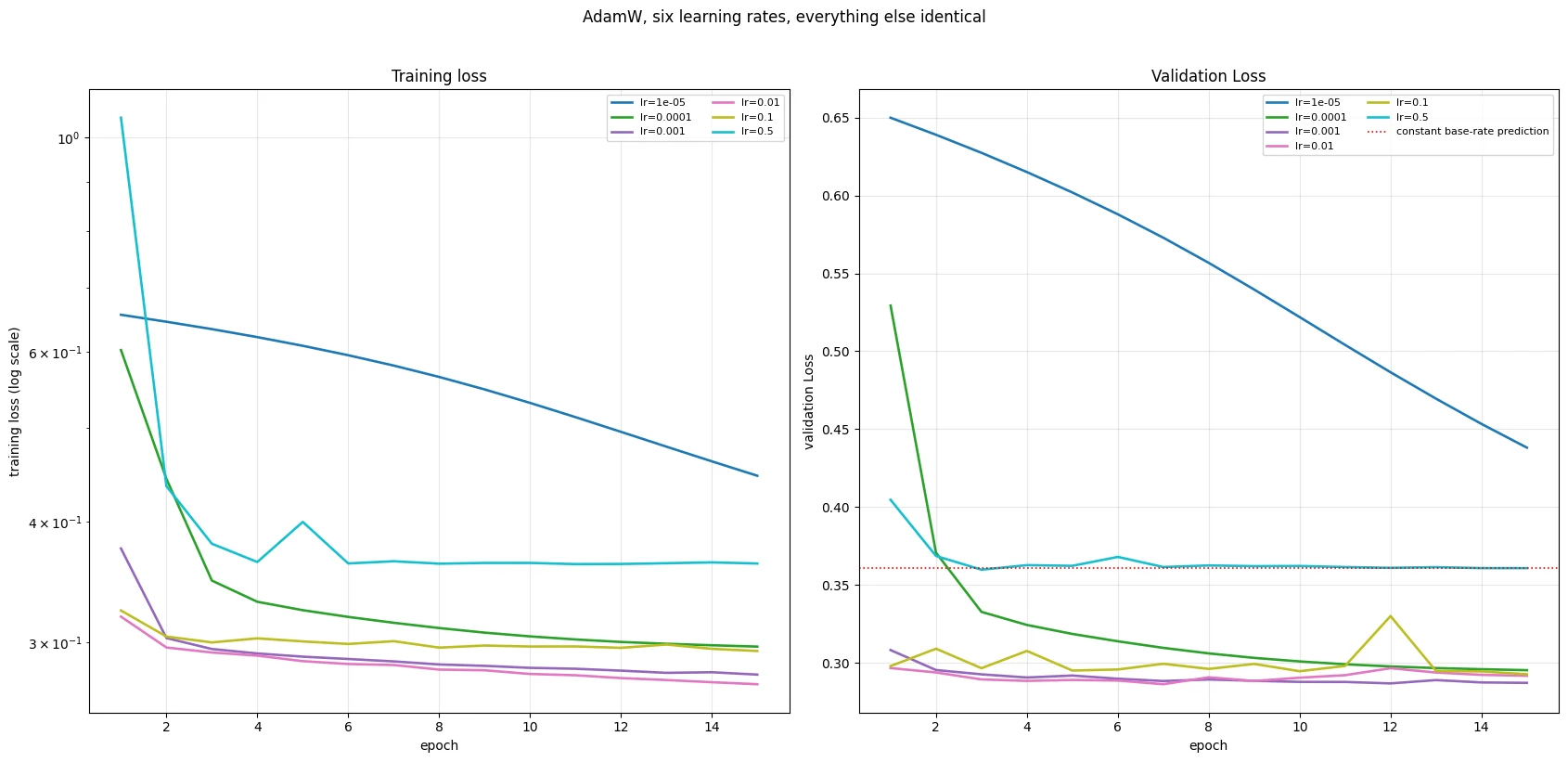
Here are the five learning-rate patterns.
1. Far too small — lr=1e-5
The loss decreases smoothly, but very slowly.
Nothing looks obviously broken.
That is precisely the problem: the run is wasting compute because the model has not had enough movement to reach a good solution.
Diagnosis: the curve is still improving substantially when training ends.
2. Slightly too small — lr=1e-4
The behaviour is similar, but the model gets further.
It is learning, but it may still need more epochs than necessary.
The difference from the previous case is mostly quantitative.
3. About right — lr=1e-3
The loss drops quickly and then flattens.
The model reaches a useful region with time left in the training run.
This is the pattern we generally want.
4. Slightly too large — lr=1e-2
The model still learns, but the curve becomes noisier.
The optimizer can move past the best region and then move back again.
A common symptom is:
best validation epoch
      ↓
good performance

later epochs
      ↓
slightly worse performance
A learning-rate schedule can sometimes help here by reducing the step size later in training.
5. Far too large — lr=0.5
The model can enter a collapsed state.
In this experiment, the validation AUC falls to approximately 0.5, which is the level expected from random ranking.
The important warning is:
A flat loss curve does not automatically mean successful convergence.
A model can be stable because it has reached a useful minimum, or because it has become stuck in a useless solution.
Always examine a meaningful evaluation metric alongside the loss.
There is also a middle region between "works" and "completely collapses" where the model learns something but performs poorly. That region is often harder to diagnose because nothing looks catastrophically broken.
# The lr=0.5 run: loss looks calm, model is dead.h_dead = lr_runs[0.5]["history"]print("lr=0.5 — 'looks stable, is dead'")print(f"{'epoch':>6} {'train loss':>12} {'val loss':>10} {'val AUC':>9}")for x in h_dead: print(f"{x['epoch']:>6} {x['train_loss']:>12.4f} {x['val_loss']:>10.4f} {x['val_auc']:>9.4f}")m_dead = lr_runs[0.5]["model"]m_dead.eval()with torch.no_grad(): p = torch.sigmoid(m_dead(X_va)).numpy().ravel()print(f"\npredicted probabilities: min {p.min():.6f} max {p.max():.6f} " f"std {p.std():.2e} unique(4dp) {len(np.unique(p.round(4)))}")print("-> the model outputs (essentially) the same number for every row.")print(f" base rate in the training data: {y_tr.mean():.4f}")with torch.no_grad(): act1 = m_dead[1](m_dead[0](X_tr[:2000]))dead_frac = (act1.max(0).values == 0).float().mean().item()print(f"\nfraction of layer-1 ReLU units that are dead (never fire on 2000 rows): {dead_frac:.1%}")print("-> Note 3.3 explains why a too-large step kills ReLU units permanently.")- 1
Look at the predictions themselves, not just the loss.
- 2
A unit is dead if its largest output over 2,000 rows is 0: it never fires, so it passes no gradient and cannot recover.
lr=0.5 — 'looks stable, is dead'
 epoch   train loss   val loss   val AUC
     1       1.0491     0.4047    0.5099
     2       0.4355     0.3687    0.4980
     3       0.3796     0.3599    0.5157
     4       0.3634     0.3628    0.5148
     5       0.3999     0.3624    0.5000
     6       0.3621     0.3681    0.5000
     7       0.3640     0.3616    0.5000
     8       0.3619     0.3626    0.5000
     9       0.3626     0.3622    0.5002
    10       0.3626     0.3623    0.5000
    11       0.3616     0.3616    0.5000
    12       0.3617     0.3611    0.5000
    13       0.3623     0.3615    0.5000
    14       0.3630     0.3609    0.5000
    15       0.3621     0.3609    0.5000

predicted probabilities: min 0.116210  max 0.116210  std 7.45e-09  unique(4dp) 1
-> the model outputs (essentially) the same number for every row.
   base rate in the training data: 0.1170

fraction of layer-1 ReLU units that are dead (never fire on 2000 rows): 95.3%
-> Note 3.3 explains why a too-large step kills ReLU units permanently.
The lr=0.5 model has effectively learned the simplest possible prediction: the base rate.
The base rate is the proportion of positive examples in the training data.
If approximately 11.7% of training examples are positive, the model can minimise its binary cross-entropy loss surprisingly well by predicting approximately 0.117 for every example.
That gives:
example 1 → 0.117
example 2 → 0.117
example 3 → 0.117
...
The model is no longer using the input features to distinguish examples.
This explains the combination:
stable loss
+
AUC ≈ 0.5
+
almost identical predictions
=
model collapse to a constant prediction
This is a valuable diagnostic pattern that will appear again later in the curriculum.
The broader lesson is:
Never interpret a training curve using loss alone. Always check whether the model is actually making useful, varying predictions.
-
Suppose the loss is steadily falling from
0.69to0.42after 50 epochs and is still falling. Is the learning rate too small, or is it fine and the model just needs more epochs? How would you decide?The key question is not simply whether the loss is still decreasing. Ask:
How quickly is it decreasing, and what is happening to the validation metric?
If the curve is still improving meaningfully and smoothly, more epochs may be enough. If the loss has been decreasing extremely slowly from the very beginning, increasing the learning rate may make training more efficient. So decide from the shape of the curve and the validation behaviour, not from the final loss value alone.
Two quick experiments settle it. Rerun with the learning rate 3× and 10× higher for a few epochs: if the loss falls much faster and stays stable, the rate was too small. Or run an LR range test (Section 7): if 1e-3-ish sits far to the left of the steep part of the curve, the rate was too small. If this is the Bank Marketing data, also compare with the base-rate loss, 0.3609: a loss of 0.42 is still worse than predicting 11.7% for everyone, so the model has a long way to go either way.
The lr = 0.5 run has a flat loss of about 0.36 for ten epochs and validation AUC 0.50. What happened?
Predicting the base rate minimises BCE surprisingly well while ignoring the inputs. A flat loss is not proof of success.
Loss falls smoothly but very slowly and is still dropping when training ends. Most likely?
Nothing looks broken, which is why too-small learning rates waste so much compute.
Why must you never judge a training run from its loss curve alone?
- A flat or low loss can mean a useful minimum or a useless collapsed state (e.g. predicting the base rate for everyone).
- Always check a meaningful validation metric and whether predictions actually vary with the input.
Finding a learning rate in one run
In the previous section, we tried several learning rates separately.
That is called a learning-rate sweep or grid search.
It works, but it requires multiple training runs.
For a small example, that is cheap.
For a large model, one complete training run could take hours or days.
The LR range test tries to get useful information from a single run.
The idea
Start with an extremely small learning rate.
Then increase it after every batch:
very small
   ↓
small
   ↓
useful
   ↓
too large
   ↓
unstable
While doing this, record the loss.
The resulting curve gives us a picture of how the model reacts as the learning rate changes.
Typical pattern:
learning rate very small
→ loss barely changes

learning rate enters useful range
→ loss falls quickly

learning rate becomes too large
→ loss stops improving and eventually rises
The test is therefore not another training strategy. It is a diagnostic experiment for choosing a starting learning-rate range.
def lr_range_test(lr_min=1e-7, lr_max=10.0, n_steps=300, batch_size=256, seed=SEED, beta=0.92): """Run an LR range test: one short run with an exponentially increasing learning rate. Before every batch the learning rate is set to ``lr_min · gammaᵏ``, rising from ``lr_min`` to ``lr_max`` over ``n_steps`` batches (AdamW, fresh model). The batch loss is recorded raw and exponentially smoothed with bias correction. Args: lr_min: Learning rate for the first batch. lr_max: Learning rate approached at the last batch. n_steps: Number of batches (and learning rates) to try. batch_size: Rows per batch. seed: Seed for the initial weights and the batch order. beta: Smoothing factor for the loss; closer to 1 is smoother. Returns: A tuple ``(lrs, smooth, raw)`` of NumPy arrays: the learning rate used at each batch, the smoothed loss and the raw batch loss. """ model = make_model(seed=seed) opt = torch.optim.AdamW(model.parameters(), lr=lr_min) g = torch.Generator().manual_seed(seed) loader = torch.utils.data.DataLoader( torch.utils.data.TensorDataset(X_tr, Y_tr), batch_size=batch_size, shuffle=True, generator=g) gamma = (lr_max / lr_min) ** (1 / n_steps) lrs, raw, smooth = [], [], [] avg = 0.0 step = 0 model.train() while step < n_steps: for xb, yb in loader: if step >= n_steps: break for grp in opt.param_groups: grp["lr"] = lr_min * (gamma ** step) opt.zero_grad() loss = loss_fn(model(xb), yb) loss.backward() opt.step() l = loss.item() avg = beta * avg + (1 - beta) * l # exponential smoothing lrs.append(opt.param_groups[0]["lr"]) raw.append(l) smooth.append(avg / (1 - beta ** (step + 1))) # bias correction step += 1 return np.array(lrs), np.array(smooth), np.array(raw)lrs, smooth, raw = lr_range_test()print(f"ran {len(lrs)} batches, lr from {lrs[0]:.1e} to {lrs[-1]:.1e}")print(f"minimum smoothed loss {smooth.min():.4f} at lr={lrs[int(np.argmin(smooth))]:.2e}")One short run in which the learning rate grows exponentially, batch by batch, from 1e-7 to 10.
- 1
The constant factor per batch that turns lr_min into lr_max in n_steps multiplications: equal spacing on a log axis.
- 2
Set the rate by hand before every step. Changing
param_groupsis also how schedulers work under the hood. - 3
Exponential smoothing of the noisy batch loss.
- 4
Bias correction, the same trick Adam uses:
avgstarts at 0, so early values are divided up to their true scale.
ran 300 batches, lr from 1.0e-07 to 9.4e+00
minimum smoothed loss 0.3046 at lr=1.45e-01
The smoothed loss is lowest at lr ≈ 0.145. What learning rate would you actually train with?
Well below the minimum. By the time the loss bottoms out, the rate is already close to where training breaks down, and the range test's rate is changing every batch. The two usual read-outs are the steepest-descent point (1.4e-3 here) and minimum ÷ 10 (1.45e-2). The six full runs of Section 6 put the best rates at 1e-3 and 1e-2: the same range.
# Steepest-descent point: where the smoothed loss is falling fastest (in log-lr).grad_ = np.gradient(smooth, np.log10(lrs))i_min = int(np.argmin(smooth))lr_min_loss = lrs[i_min]# The steepest-descent point must be searched BEFORE the loss minimum.# Searching the whole curve finds the post-minimum blow-up instead.lr_steep = lrs[int(np.argmin(grad_[:i_min]))] if i_min > 1 else lr_min_lossplt.figure(figsize=(8.5, 4.4))plt.plot(lrs, smooth, lw=2, color="#c1440e", label="smoothed loss")plt.plot(lrs, raw, lw=0.6, color="0.75", alpha=0.7, zorder=0, label="raw batch loss")plt.axvline(lr_steep, ls="--", c="#1b6ca8", lw=1.6, label=f"steepest descent: {lr_steep:.1e}")plt.axvline(lr_min_loss, ls=":", c="#2e7d32", lw=1.6, label=f"minimum loss: {lr_min_loss:.1e}")plt.xscale("log"); plt.xlabel("learning rate (log scale)"); plt.ylabel("loss")plt.title("LR range test — one run, whole landscape")plt.ylim(0, min(1.2, float(np.nanpercentile(smooth, 99)) * 1.4))plt.legend(fontsize=9); plt.grid(alpha=0.3)plt.tight_layout(); plt.show()print(f"steepest-descent lr : {lr_steep:.2e}")print(f"minimum-loss lr : {lr_min_loss:.2e}")print(f"rule of thumb (min-loss / 10): {lr_min_loss/10:.2e}")print(f"\nSection 6's grid search said the best lr was around 1e-3 to 1e-2.")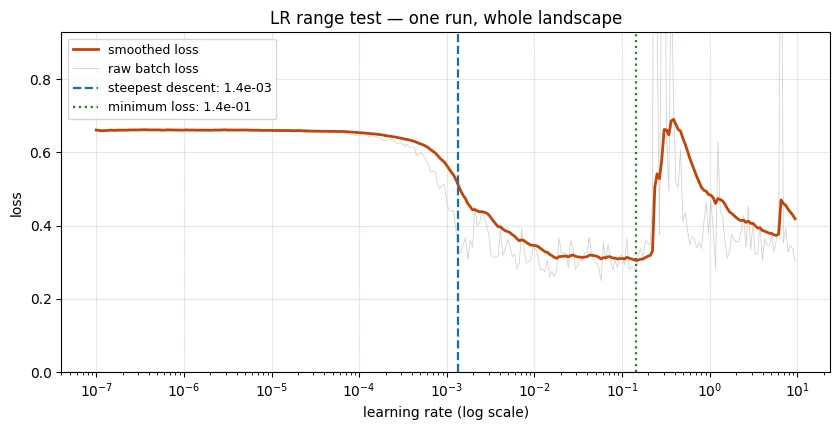
steepest-descent lr : 1.36e-03
minimum-loss lr     : 1.45e-01
rule of thumb (min-loss / 10): 1.45e-02

Section 6's grid search said the best lr was around 1e-3 to 1e-2.
The usual idea is to choose a learning rate somewhat below the point where the range test reaches its minimum loss.
A common heuristic is:
recommended lr ≈ minimum-loss lr / 10
The reason is that the minimum of the short range-test curve may already be close to the point where training becomes unstable. Choosing a somewhat smaller value provides a safety margin for a full training run.
One important implementation detail
The code searches for the steepest decrease before the loss minimum.
Why?
After the minimum, the loss starts increasing.
The steepest part of that increase can produce a large gradient too, but it is pointing in the wrong direction for our purpose. A naive search over the entire curve could therefore identify the instability region instead of the useful region.
Do not treat the range test as an oracle
The LR range test tells us about learning-rate behaviour during this particular short experiment.
It does not guarantee the perfect learning rate for the full training run.
The weights are changing throughout the test, and the learning rate itself is changing every batch.
So the loss at a particular learning rate is not equivalent to running a complete training job at that learning rate.
Instead, use the curve to answer:
"What range of learning rates appears promising?"
Then confirm that range with a normal training run.
A second limitation is smoothing. The raw batch loss is noisy, so the test smooths it. Too little smoothing leaves the curve noisy; too much smoothing can move the apparent transition point.
Treat the result as a starting point, not a final answer.
An LR range test's smoothed loss is lowest at lr ≈ 0.15. A sensible first learning rate is about…
The minimum of a short ramping test is already close to instability, so back off by roughly 10× and confirm with a normal run.
What is the LR range test?
It is a diagnostic, not a training strategy. The weights change during the test, so treat the result as a starting point.
Learning-rate schedules
A learning-rate schedule changes the learning rate during training.
Why would we want that?
Early in training, the model is usually far from a useful solution. Larger steps can help it move through parameter space quickly.
Later, once it is near a good solution, smaller steps can help it settle rather than repeatedly jumping around.
So the basic idea is:
early training
→ larger learning rate
→ cover ground quickly

later training
→ smaller learning rate
→ make finer adjustments
This is called learning-rate decay or a learning-rate schedule.
Three common patterns are:
Step decay
Multiply the learning rate by a fixed factor every few epochs.
Example:
start: 0.01
epoch 5: 0.001
epoch 10: 0.0001
It is simple and easy to inspect.
Cosine annealing
Reduce the learning rate smoothly according to a cosine-shaped curve.
Instead of sudden jumps, the learning rate gradually decreases.
Warmup followed by decay
Start with a very small learning rate, gradually increase it for the first part of training, and then reduce it.
Warmup is particularly common in Transformer training, where large early updates can destabilise a freshly initialised model.
We test schedules starting from lr=1e-2, which the previous experiment identified as somewhat too large for a constant learning rate.
sched_runs = {}for tag, kw in [("constant", dict(scheduler=None)), ("step x0.1/5", dict(scheduler="step")), ("cosine", dict(scheduler="cosine"))]: r = train("adamw", lr=1e-2, epochs=15, **kw) sched_runs[tag] = r h = r["history"] print(f"{tag:14s} final val loss {h[-1]['val_loss']:.4f} " f"final val AUC {h[-1]['val_auc']:.4f} best val AUC {max(x['val_auc'] for x in h):.4f}")constant final val loss 0.2919 final val AUC 0.7922 best val AUC 0.7962 step x0.1/5 final val loss 0.2855 final val AUC 0.7970 best val AUC 0.7976 cosine final val loss 0.2882 final val AUC 0.7960 best val AUC 0.7968
fig, axes = plt.subplots(1, 3, figsize=(15, 5.0))cols = {"constant": "#8c8c8c", "step x0.1/5": "#1b6ca8", "cosine": "#c1440e"}for tag, r in sched_runs.items(): h = r["history"]; eps = [x["epoch"] for x in h] axes[0].plot(eps, [x["lr"] for x in h], lw=1.9, color=cols[tag], label=tag) axes[1].plot(eps, [x["train_loss"] for x in h], lw=1.9, color=cols[tag], label=tag) axes[2].plot(eps, [x["val_loss"] for x in h], lw=1.9, color=cols[tag], label=tag)axes[0].set_yscale("log"); axes[0].set_title("learning rate"); axes[0].set_ylabel("lr (log)")axes[1].set_title("training loss"); axes[1].set_ylabel("loss")axes[2].set_title("validation loss"); axes[2].set_ylabel("loss")for a in axes: a.set_xlabel("epoch"); a.legend(fontsize=8); a.grid(alpha=0.3)plt.suptitle("AdamW at lr=1e-2 with three schedules", y=1.02)plt.tight_layout(); plt.show()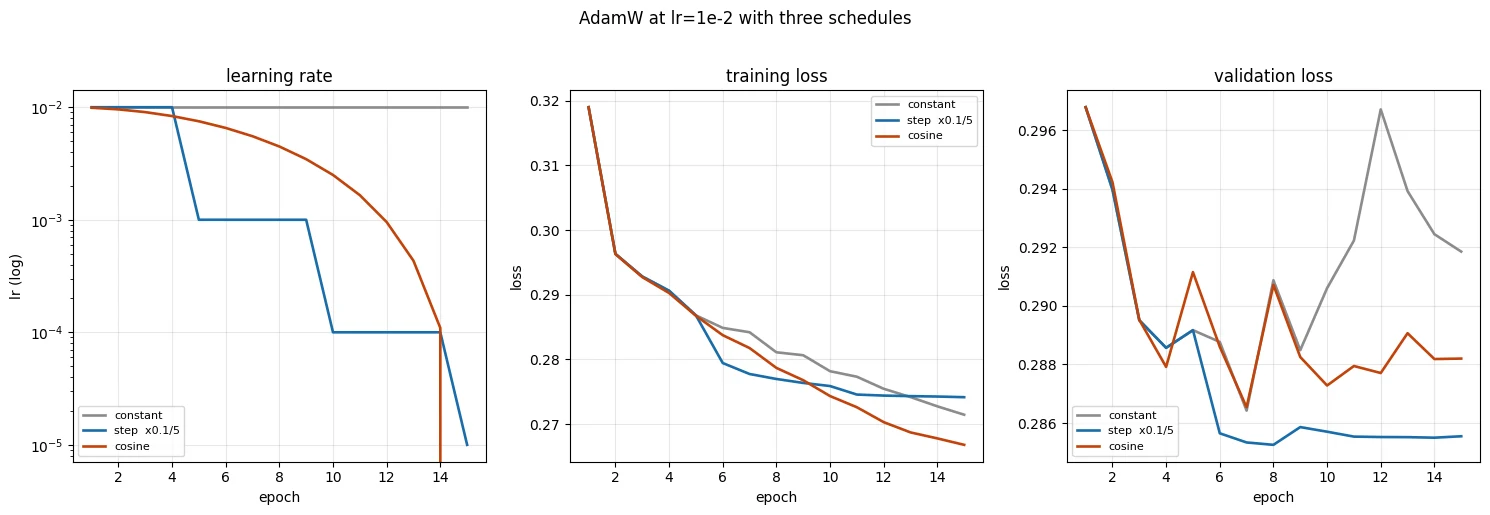
Read the schedule experiment in two stages.
First: inspect the learning-rate curve
The learning-rate panel tells us whether the scheduler actually performed the requested changes.
For example:
step decay
→ sudden drops

cosine
→ smooth decrease
Second: inspect the validation performance
The important distinction is between:
- final performance — performance at the last epoch;
- best performance — the best validation score reached at any epoch.
A schedule can improve the final epoch without improving the best epoch.
That can happen when a constant learning rate reaches a good region but keeps bouncing around it. A schedule reduces the learning rate, so the model settles there.
Whether that matters depends on how your training pipeline chooses the model to keep.
If you save the best validation checkpoint, the schedule may add little value in this particular short experiment.
If your pipeline always uses the final checkpoint, reducing the learning rate can make a meaningful difference.
When schedules become more valuable
Schedules tend to become more useful when:
- training runs for many epochs;
- you must use the final checkpoint;
- the model benefits from warmup, as in many Transformer setups;
- training is expensive enough that unstable late-stage updates waste significant compute.
The general engineering lesson is:
Do not add a technique simply because it exists. Add it when the problem you have actually requires it.
A schedule improved the final-epoch AUC but not the best-epoch AUC. When does that matter?
Decay helps the model settle instead of bouncing around a good region. If you already keep the best checkpoint, the gain may be small.
Why is warm-up common when training Transformers?
Start small, ramp up, then decay.
What actually moved the needle
Let's assemble everything into one table and draw the conclusions that survive scrutiny.
The purpose of the table is not to produce a universal ranking of optimizers.
It is to answer a narrower question:
On this dataset, architecture, preprocessing pipeline, batch size, seed, and training budget, how much did each optimization decision change the final validation AUC?
Remember that these are measurements from this particular experimental setup.
Small differences should not be treated as universal truths, especially because these experiments use a single seed.
rows = []rows.append(("Day 2 reference (Adam 1e-3, 15 ep)", results["adam"]["history"][-1]["val_auc"]))rows.append(("logistic regression baseline", 0.7717))rows.append(("majority-class (AUC by definition)", 0.5000))rows.append(("--- optimizer, shared lr=1e-3 ---", None))for n in ["sgd", "momentum", "adam", "adamw"]: rows.append((f" {n}", results[n]["history"][-1]["val_auc"]))rows.append(("--- optimizer, each at its own best lr ---", None))for n, b in best.items(): rows.append((f" {n} (lr={b['lr']})", b["auc"]))rows.append(("--- learning rate, AdamW ---", None))for lr in lr_grid: rows.append((f" lr={lr}", lr_runs[lr]["history"][-1]["val_auc"]))rows.append(("--- schedule, AdamW lr=1e-2 ---", None))for tag, r in sched_runs.items(): rows.append((f" {tag}", r["history"][-1]["val_auc"]))print(f"{'configuration':<44}{'final val AUC':>14}")print("=" * 58)for name, v in rows: print(f"{name:<44}{'':>14}" if v is None else f"{name:<44}{v:>14.4f}")configuration final val AUC ========================================================== Day 2 reference (Adam 1e-3, 15 ep) 0.7939 logistic regression baseline 0.7717 majority-class (AUC by definition) 0.5000 --- optimizer, shared lr=1e-3 --- sgd 0.6525 momentum 0.7379 adam 0.7939 adamw 0.7939 --- optimizer, each at its own best lr --- sgd (lr=0.5) 0.7898 momentum (lr=0.1) 0.7966 adamw (lr=0.001) 0.7939 --- learning rate, AdamW --- lr=1e-05 0.6908 lr=0.0001 0.7798 lr=0.001 0.7939 lr=0.01 0.7922 lr=0.1 0.7850 lr=0.5 0.5000 --- schedule, AdamW lr=1e-2 --- constant 0.7922 step x0.1/5 0.7970 cosine 0.7960
# Which choice had the largest effect?opt_spread = max(b["auc"] for b in best.values()) - min(b["auc"] for b in best.values())opt_spread_f = max(results[n]["history"][-1]["val_auc"] for n in results) - \ min(results[n]["history"][-1]["val_auc"] for n in results)lr_spread = max(lr_runs[l]["history"][-1]["val_auc"] for l in lr_grid) - \ min(lr_runs[l]["history"][-1]["val_auc"] for l in lr_grid)sch_spread = max(r["history"][-1]["val_auc"] for r in sched_runs.values()) - \ min(r["history"][-1]["val_auc"] for r in sched_runs.values())print("Effect size of each decision (range of final val AUC):")print(f" choice of learning rate (AdamW, {min(lr_grid):.0e}..{max(lr_grid):g}) {lr_spread:.4f}")print(f" choice of optimizer at a SHARED lr=1e-3 {opt_spread_f:.4f}")print(f" choice of optimizer, each optimally tuned {opt_spread:.4f}")print(f" choice of schedule {sch_spread:.4f}")Effect size of each decision (range of final val AUC): choice of learning rate (AdamW, 1e-05..0.5) 0.2939 choice of optimizer at a SHARED lr=1e-3 0.1414 choice of optimizer, each optimally tuned 0.0068 choice of schedule 0.0048
What to take away
1. Learning rate has a large effect
Across the tested range, changing the learning rate produced large changes in validation performance.
This makes learning rate one of the first things to investigate when a training run behaves badly.
2. Optimizer choice and learning rate are connected
At one shared learning rate, the optimizers looked very different.
When each optimizer was given a learning rate suited to it, the gap became much smaller.
So do not ask only:
"Which optimizer is best?"
Ask:
"Which optimizer and learning-rate combination works well for this problem?"
For this curriculum, AdamW is the practical default because its adaptive updates often make it easier to get into a useful regime without extensive learning-rate tuning.
3. Schedules are usually a refinement
The schedule experiments show how reducing the learning rate later can help a model settle.
But the benefit in this short experiment is relatively small.
That does not make schedules useless. It means their value depends on the training setup.
4. AdamW separates weight decay
AdamW combines Adam-style adaptive updates with decoupled weight decay.
If:
weight_decay=0then AdamW behaves like Adam.
If weight decay is non-zero, AdamW applies that shrinkage separately from the adaptive gradient calculation.
5. A flat loss does not prove successful convergence
The lr=0.5 experiment is the important warning.
The loss becomes stable, but the model has collapsed to almost the same prediction for every example and the AUC is around chance level.
So:
Always interpret the loss together with a meaningful evaluation metric and, when useful, inspect the predictions themselves.
One limitation of this notebook
Most experiments here use a single seed.
If two configurations differ by only a very small amount of AUC, that difference may be caused by randomness rather than a real advantage.
Lesson 3.2 will examine this issue more carefully.
So for now, treat small gaps as tentative rather than established.
Transition to Lesson 3.2
You can now make a network learn efficiently.
The next question is different:
What prevents the model from learning the training data too specifically?
That is the subject of regularisation and generalisation.
Bank Marketing is not ideal for demonstrating severe overfitting because the training set is large relative to this small network.
Lesson 3.2 therefore moves to a smaller dataset where the model can memorise the training examples much more easily, making dropout, weight decay, and early stopping easier to observe.
Which decision changed validation AUC the most in this lesson's experiments?
Learning rate spanned about 0.29 AUC; tuned optimizers only about 0.007; schedules about 0.005. Investigate the learning rate first.
Summarise what 'moved the needle' in this lesson, in order, and what that means for your next training run.
- The learning rate had by far the largest effect; optimizer choice mattered a lot only at a shared, untuned learning rate; schedules were a small refinement here.
- So start with AdamW, find a good learning rate (e.g. range test, then confirm), and add schedules when the setup needs them (long runs, final checkpoint, warm-up).
Wrap-up
- For plain SGD,
optimizer.step()isp -= lr * p.grad: the learning rate scales the gradient, so the right lr depends on the size of the gradients (and the scale of the inputs). - Momentum keeps a velocity that cancels back-and-forth steps and builds speed along consistent directions. Its effective step is about lr / (1 − β), so tune lr and β together.
- Adam keeps two running averages per parameter (2 extra floats each) and normalises every step, so its lr is roughly "how far each weight moves": about 1e-3.
- AdamW applies weight decay directly to the weights, outside Adam's normalisation. With
weight_decay=0it is exactly Adam; with decay, Adam + L2 and AdamW are different algorithms. - Compare optimizers at their own tuned learning rates. At a shared lr the comparison mostly measures the lr.
- Learning rate had by far the largest effect here: too small crawls, too large bounces, far too large can collapse to the base rate with a calm-looking loss of 0.3609. Always check AUC and the predictions.
- An LR range test finds a good range in one short run: take the steepest-descent point or the minimum ÷ 10, then confirm with a normal run.
- Schedules are a refinement: they matter for long runs, final-checkpoint pipelines and Transformer warmup, and add little when you keep the best checkpoint of a short run.
Quick check
For plain SGD, what does optimizer.step() do to each parameter p?
The notebook reproduces torch's SGD with exactly this line, to within 7e-9.
How many extra numbers does Adam store for a model with 5,377 parameters?
Two per parameter: the running average of the gradient (exp_avg) and of its square (exp_avg_sq).
AdamW(..., weight_decay=0) compared with Adam(...):
The only difference is how weight decay is applied; with none, the updates are the same (the notebook checks it).
At a shared lr = 1e-3, SGD reaches 0.65 AUC and Adam 0.79. Tuned separately, they reach 0.79 and 0.79. What does the first result mainly show?
An optimizer cannot be judged apart from its learning rate. Give each one a rate that suits it.
The lr = 0.5 run shows a flat loss of 0.361 for ten epochs and AUC 0.500. What happened?
0.361 is the entropy of an 11.7%-positive label, the loss of a constant prediction. 95% of the first-layer ReLUs were dead.
An LR range test's smoothed loss is lowest at lr ≈ 0.15. A sensible first learning rate is about:
Stay well below the minimum, which is already near the unstable region; the steepest-descent point is another good choice.
Which decision changed validation AUC the most in this lesson's experiments?
A range of 0.29 AUC across learning rates, against 0.007 for tuned optimizers and 0.005 for schedules.
Questions and discussion
Ask about this lesson, share what you found in a lab, or help someone else. Posts are public on the course's GitHub Discussions: anyone can read them, and you need a GitHub account to post.
Opening it loads giscus from giscus.app.