Preparing Inputs for a Transformer
Classroom material
- Time
- ~27 min
- Sections
- 8
- Code cells
- 13
- Figures
- 3
Before you start
How does raw text become the input tensors a Transformer learns from?
- You will be able to
- compare character, word and subword tokenisation, with their trade-offs measured;
- explain and implement the core of byte-pair encoding (BPE);
- convert text to token IDs and embeddings;
- explain what a context window is and how tokenisation affects how much text fits in it;
- build input and target batches for next-token prediction.
In Lesson 6.1 we watched a complete Transformer turn a line of Shakespeare into predictions. But we skipped over the very first step: how does a line of text become the tensor of numbers that the model actually receives?
That step deserves its own note, because the decisions made here shape everything downstream. How you split text into tokens decides how large the vocabulary is, how long every sequence becomes, and how much text the model can read at once. How you cut a long text into training examples decides what the model learns to predict. Get these wrong and no amount of architecture will save you; get them right and the rest of the pipeline becomes straightforward.
In this lesson we take Tiny Shakespeare from a raw text file to batches of training examples, ready for the model we will build in Lesson 6.5. Along the way, we compare three ways of tokenising text, including byte-pair encoding, the method used by nearly every modern language model, which we build from scratch.
Key question: How does raw text become the input tensors a Transformer learns from?
Prerequisites
read Lesson 6.1. Lesson 5.3 covered tokenisation, vocabularies and embedding layers for words; this lesson builds on it.
Setup — imports, versions and device detection used by the notebook (1 cells)
Run this cell first. Everything in this lesson runs in a few seconds, apart from training the BPE tokeniser, which takes a little longer.
Environment and results. The saved outputs record one CPU reference run; random seeds reduce variation but do not guarantee identical numbers across computers. Read the comparisons as evidence from that run. Training times depend on your hardware.
If packages are missing, install them into your notebook environment, then restart the kernel and run from the beginning:
%pip install torch==2.14.1 numpy==2.5.4 pandas==3.0.6 matplotlib==3.11.2 scikit-learn==1.9.1 scipy==1.18.1
import os, re, collections, urllib.requestimport numpy as npimport torchimport torch.nn as nnimport matplotlib.pyplot as plttorch.manual_seed(0)print("PyTorch", torch.__version__)PyTorch 2.14.1+cu130
The Big Picture: From Raw Text to Transformer Inputs
Here is the full journey, from a text file to what a Transformer receives in training:
- Split the data into a training part and a validation part.
- Tokenise: cut the text into tokens and build a vocabulary.
- Encode: replace every token with its ID, giving one long sequence of integers.
- Cut into windows: take chunks of fixed length, the context window, from that long sequence.
- Make targets: for each window, the target is the same window shifted one token to the left, because the model's job is to predict the next token.
- Batch: stack many windows into a tensor of shape
(batch, context).
The embedding layers then turn that integer tensor into vectors inside the model. Let's start with step 1. For text that tells a continuous story, like a play, we split by position rather than at random: the first 90% of the file for training and the last 10% for validation. A random split would scatter neighbouring lines across both sets, so the model would be validated on text it had effectively seen, just shifted by a few characters.
PATH = "data/shakespeare/input.txt"os.makedirs("data/shakespeare", exist_ok=True)if not os.path.exists(PATH): urllib.request.urlretrieve("https://raw.githubusercontent.com/karpathy/char-rnn/master/data/tinyshakespeare/input.txt", PATH)text = open(PATH, encoding="utf-8").read()n = int(0.9 * len(text))train_text, val_text = text[:n], text[n:] # first 90% for training, last 10% for validationprint("total characters:", len(text), "| training:", len(train_text), "| validation:", len(val_text))print(repr(val_text[:80]))total characters: 1115394 | training: 1003854 | validation: 111540 '?\n\nGREMIO:\nGood morrow, neighbour Baptista.\n\nBAPTISTA:\nGood morrow, neighbour Gr'
Of the 1,115,394 characters, 1,003,854 go to training and 111,540 to validation. The validation text begins in the middle of a scene from The Taming of the Shrew.
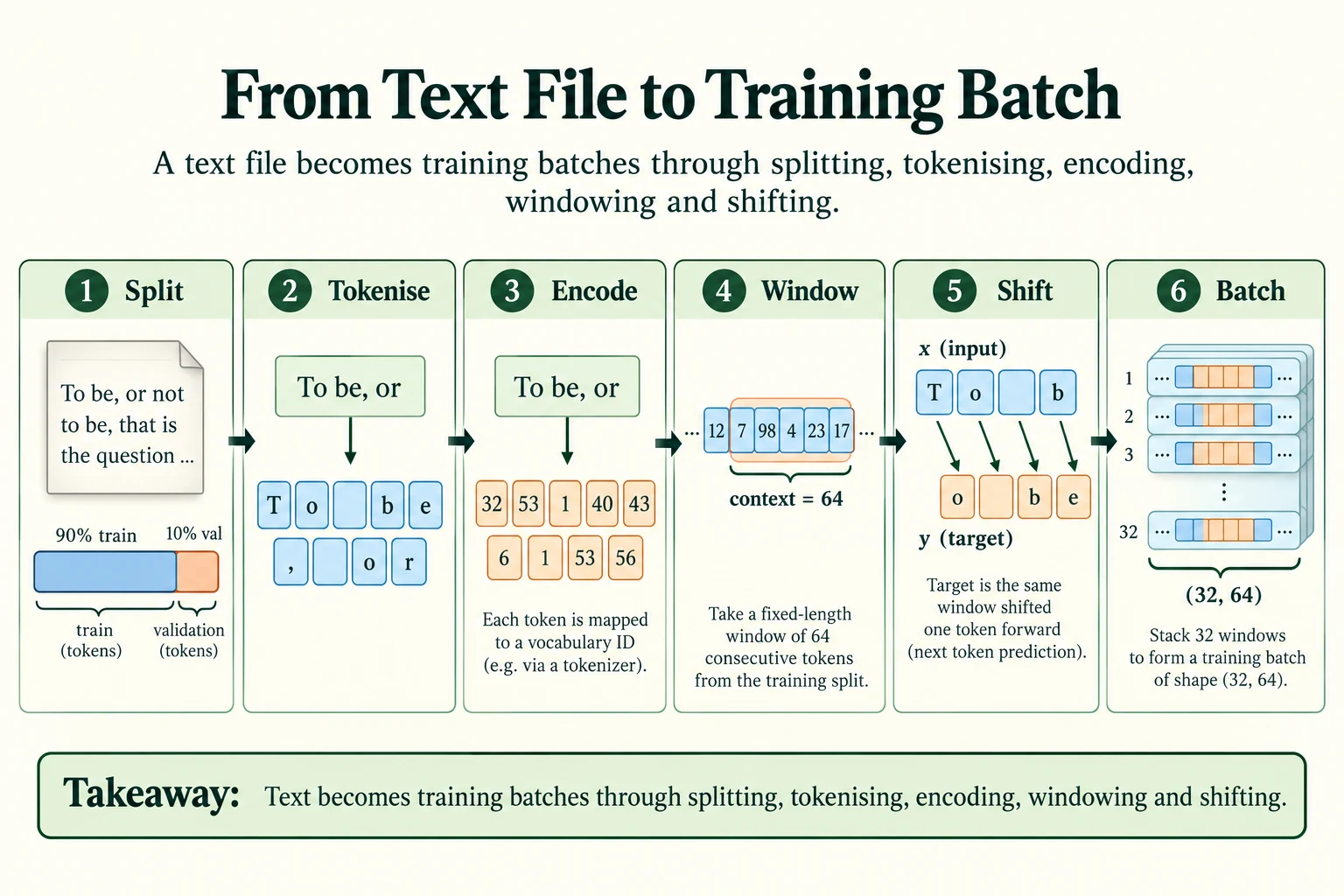
Figure 6.2.1. Split the data without crossing the boundary, tokenise and encode, then sample windows. For next-token learning y is x shifted one position forward in the source stream. The real batch shape is (32, 64); the short example is illustrative.
Why split continuous text before sampling training windows?
It prevents overlapping windows from crossing the train-validation boundary.
Tokenisation and Subword Tokenisation
There is no single correct way to cut text into tokens. Let's compare three, and measure what each costs.
2.1 Characters
The simplest choice treats every character as a token.
chars = sorted(set(train_text))stoi = {c: i for i, c in enumerate(chars)}itos = {i: c for c, i in stoi.items()}def encode_chars(s): """Map known characters to integer IDs using the fitted character vocabulary. Arguments: s: Text string to encode or split. """ return [stoi[c] for c in s]def decode_chars(ids): """Reconstruct text from character-vocabulary IDs. Arguments: ids: Integer token IDs, usually shaped (batch, tokens). """ return "".join(itos[i] for i in ids)sample = "To be, or not to be"print("vocabulary size:", len(chars))print("encoded:", encode_chars(sample))print("decoded back:", repr(decode_chars(encode_chars(sample))))print("characters in validation text missing from the vocabulary:", len(set(val_text) - set(chars)))vocabulary size: 65 encoded: [32, 53, 1, 40, 43, 6, 1, 53, 56, 1, 52, 53, 58, 1, 58, 53, 1, 40, 43] decoded back: 'To be, or not to be' characters in validation text missing from the vocabulary: 0
The training text uses 65 distinct characters, and "To be, or not to be" becomes 19 IDs, which decode back perfectly. Character tokenisation has two great strengths: the vocabulary is tiny, and every validation character is covered in this dataset. Every character in the validation text is already in the vocabulary (0 missing).
Its weakness is length. One token per character makes every sequence as long as possible, and the model must learn from scratch that t, h, e in a row form a common word.
2.2 Words
The opposite choice treats every word as a token. Here we split text into words, single punctuation marks and single whitespace characters, so that spaces and newlines are kept and the text could be rebuilt exactly.
def split_words(s): """Split into words, individual punctuation marks and whitespace, preserving reconstructable text. Arguments: s: Text string to encode or split. """ return re.findall(r"\w+|[^\w\s]|\s", s) # words, single punctuation marks, single spaces/newlinesprint(split_words(sample))train_words = split_words(train_text)word_counts = collections.Counter(train_words)val_words = split_words(val_text)oov = sum(w not in word_counts for w in val_words) / len(val_words)print("distinct word-level tokens in training text:", len(word_counts))print("tokens in training text:", len(train_words))print(f"share of validation tokens never seen in training: {oov:.1%}")print("examples:", [w for w in val_words if w not in word_counts][:8])['To', ' ', 'be', ',', ' ', 'or', ' ', 'not', ' ', 'to', ' ', 'be'] distinct word-level tokens in training text: 12571 tokens in training text: 424883 share of validation tokens never seen in training: 2.6% examples: ['affability', 'Cunning', 'sciences', 'Licio', 'Saving', 'petitioners', 'Baccare', 'Rheims']
The training text now becomes 424,883 tokens, less than half as many as with characters. But the vocabulary explodes to 12,571 distinct tokens, and 2.6% of the validation tokens never appeared in training at all: words like "affability", "petitioners" and the name "Licio". A word-level model has no way to read such words; they would all become one <unk> token. (The share is fairly low only because spaces and punctuation, which are never unknown, count as tokens too.)
2.3 Subwords: byte-pair encoding
Is there a middle path, with a modest vocabulary, shorter sequences than characters, and no unknown tokens? Yes: subword tokenisation, where common words become single tokens but rare words are spelled out from smaller pieces. The most widely used method is byte-pair encoding (BPE). Its training algorithm is surprisingly simple:
- Start with every word split into single characters.
- Count every pair of adjacent pieces across the whole training text.
- Merge the most frequent pair into a new, single piece, everywhere it occurs.
- Repeat steps 2 and 3 for a chosen number of merges.
The list of merges, in order, is the tokeniser. To tokenise new text, you start from characters and apply the same merges in the same order. Let's train one with 200 merges.
def count_pairs(vocab): """Count adjacent token pairs, weighting each word by its corpus frequency. Arguments: vocab: Word-piece tuples mapped to corpus frequencies. """ pairs = collections.Counter() for word, freq in vocab.items(): for a, b in zip(word, word[1:]): pairs[(a, b)] += freq return pairsdef apply_merge(word, pair): """Merge non-overlapping occurrences of one adjacent pair in a token sequence. Arguments: word: Vocabulary word, or tuple of BPE pieces in the merge helpers. pair: The adjacent token pair to merge. """ out, i = [], 0 while i < len(word): if i < len(word) - 1 and (word[i], word[i + 1]) == pair: out.append(word[i] + word[i + 1]); i += 2 else: out.append(word[i]); i += 1 return tuple(out)vocab = {tuple(w): c for w, c in word_counts.items()} # every word starts as a tuple of characterstotal = lambda v: sum(len(w) * c for w, c in v.items())merges, history = [], [(0, total(vocab))]for step in range(200): best = count_pairs(vocab).most_common(1)[0][0] # the most frequent adjacent pair vocab = {apply_merge(w, best): c for w, c in vocab.items()} merges.append(best) if (step + 1) % 25 == 0: history.append((step + 1, total(vocab)))print("first 15 merges:", ["".join(m) for m in merges[:15]])for k, t in history[::2]: print(f"after {k:>3} merges: {t:,} tokens")first 15 merges: ['th', 'ou', 'er', 'in', 'an', 'the', 'or', 'is', 'en', 'ar', 'at', 'on', 'st', 'll', 'me'] after 0 merges: 1,003,854 tokens after 50 merges: 778,195 tokens after 100 merges: 715,298 tokens after 150 merges: 678,747 tokens after 200 merges: 654,024 tokens
The first merge joins t and h into th, the most common pair of characters in the text. Then come ou, er, in and an; the 6th merge combines th and e into the whole word the. Each merge shortens the text: the training text needs 1,003,854 tokens with no merges, 778,195 after 50 merges, 715,298 after 100 and 654,024 after 200. The first merges help the most, because they capture the most frequent pairs.
Now let's use the trained merges to tokenise some phrases.
def encode_bpe_word(word, cache={}): """Apply the learned BPE merges in order to a word and cache its pieces. Arguments: word: Vocabulary word, or tuple of BPE pieces in the merge helpers. cache: Dictionary memoising a word's pieces for the current learned merges. """ if word not in cache: pieces = tuple(word) for pair in merges: pieces = apply_merge(pieces, pair) cache[word] = pieces return cache[word]def encode_bpe(s): """Split text and concatenate each piece's BPE encoding. Arguments: s: Text string to encode or split. """ return [p for w in split_words(s) for p in encode_bpe_word(w)]for s in ["To be, or not to be", "the king", "Thou art a villain", "Zounds"]: print(f"{s!r:<24} ->", encode_bpe(s))'To be, or not to be' -> ['To', ' ', 'be', ',', ' ', 'or', ' ', 'not', ' ', 'to', ' ', 'be'] 'the king' -> ['the', ' ', 'king'] 'Thou art a villain' -> ['Th', 'ou', ' ', 'art', ' ', 'a', ' ', 'v', 'ill', 'ain'] 'Zounds' -> ['Z', 'ou', 'nd', 's']
Common words such as "To", "be", "not", "the" and "king" have become single tokens. "Villain" is split into v, ill, ain: the tokeniser has not merged the whole word, but it reuses common pieces. And "Zounds", an old oath that the merges never formed into a word, is spelled from Z, ou, nd, s. An unseen word made from known characters can fall back to those characters. Our character-based vocabulary cannot encode a genuinely new character without an unknown-token or byte fallback.
Here are the three schemes side by side:
bpe_vocab = sorted(set(chars) | {"".join(m) for m in merges})train_bpe = encode_bpe(train_text); val_bpe = encode_bpe(val_text)print("BPE vocabulary size:", len(bpe_vocab))print("validation pieces not in the BPE vocabulary:", sum(p not in set(bpe_vocab) for p in val_bpe))rows = [("character", len(chars), len(train_text), len(val_text), 0.0), ("word", len(word_counts), len(train_words), len(val_words), oov), ("BPE, 200 merges", len(bpe_vocab), len(train_bpe), len(val_bpe), 0.0)]print(f"\n{'scheme':<16} {'vocab':>7} {'train tokens':>13} {'chars/token':>12} {'unknown on val':>15}")for name, v, tt, vt, u in rows: print(f"{name:<16} {v:>7,} {tt:>13,} {len(train_text) / tt:>12.2f} {u:>15.1%}")BPE vocabulary size: 265 validation pieces not in the BPE vocabulary: 0 scheme vocab train tokens chars/token unknown on val character 65 1,003,854 1.00 0.0% word 12,571 424,883 2.36 2.6% BPE, 200 merges 265 654,024 1.53 0.0%
BPE with 200 merges sits between the extremes. Its vocabulary of 265 tokens is only four times the character vocabulary, it needs 654,024 training tokens instead of 1,003,854 (each token covers 1.53 characters on average), and it has no unknown tokens. Real language models use the same algorithm with tens of thousands of merges, usually working on bytes rather than characters so that any text in any language can be encoded. The plot shows the trade-off: as the vocabulary grows, sequences get shorter.
ks = [h[0] for h in history]; ts = [h[1] for h in history]fig, ax = plt.subplots(figsize=(6.5, 3.8))ax.plot([len(chars) + k for k in ks], ts, marker="o", label="BPE (vocabulary grows with each merge)")ax.scatter([len(chars)], [len(train_text)], color="tab:orange", zorder=3, s=60, label="characters")ax.scatter([len(word_counts)], [len(train_words)], color="tab:red", zorder=3, s=60, label="whole words")ax.set_xscale("log"); ax.set_xlabel("vocabulary size (log scale)"); ax.set_ylabel("tokens needed for the training text")ax.yaxis.set_major_formatter(plt.FuncFormatter(lambda v, _: f"{v / 1000:.0f}k"))ax.set_title("Bigger vocabularies give shorter sequences"); ax.grid(alpha=0.3); ax.legend(fontsize=8)plt.tight_layout(); plt.show()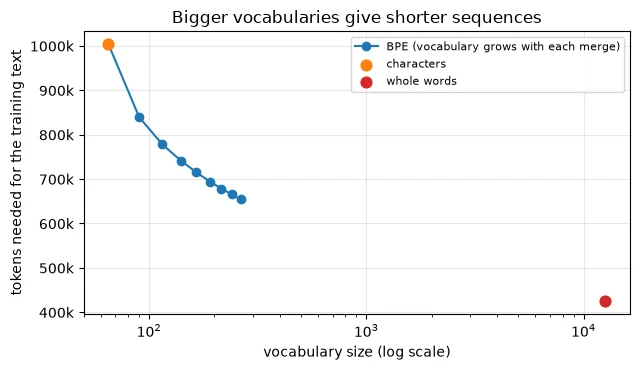
For the rest of this module we use characters. With 65 tokens the output head stays tiny, every pattern the model learns is visible letter by letter, and our small model can learn spelling as well as style. Keep the trade-off in mind, though: in Module 7, the pretrained models you load all come with their own subword tokenisers.
Common mistake: using a model with a different tokeniser from the one it was trained with. Token ID 300 means one piece of text to one tokeniser and something completely different to another. A model and its tokeniser are a pair; always load them together.
Key terms
- Character / word / subword tokenisation: splitting text into single characters, whole words, or pieces in between.
- Byte-pair encoding (BPE): a subword method that repeatedly merges the most frequent adjacent pair of pieces.
- Merge: one BPE step, joining a pair of pieces into a new piece; the ordered list of merges defines the tokeniser.
- Out-of-vocabulary (OOV): a token that never appeared in the training vocabulary.
-
Why can a BPE tokeniser always encode a word it has never seen, while a word-level tokeniser cannot?
A BPE tokeniser starts every word from single characters and only then applies merges, so any word made of known characters can be encoded, at worst one character at a time. A word-level tokeniser only knows whole words it saw in training, so a new word has no entry at all.
Can this character-based BPE encode an unseen character automatically?
No; fallback is limited to known characters unless another policy is provided.
Token IDs and Embedding Layers
With a tokeniser chosen, the whole text becomes one long sequence of integer IDs. Inside the model, an embedding layer turns each ID into a vector of d_model numbers, exactly as in Lesson 5.3.
train_ids = torch.tensor(encode_chars(train_text), dtype=torch.long)val_ids = torch.tensor(encode_chars(val_text), dtype=torch.long)print("train_ids:", tuple(train_ids.shape), train_ids.dtype, "| val_ids:", tuple(val_ids.shape))D_MODEL = 64tok_emb = nn.Embedding(len(chars), D_MODEL)x = tok_emb(train_ids[:10])print("first 10 IDs:", train_ids[:10].tolist(), "-> embeddings:", tuple(x.shape))for name, v in [("character", len(chars)), ("BPE, 200 merges", len(bpe_vocab)), ("word", len(word_counts))]: print(f"embedding table for {name:<16} {v:>6,} x {D_MODEL} = {v * D_MODEL:>9,} parameters")train_ids: (1003854,) torch.int64 | val_ids: (111540,) first 10 IDs: [18, 47, 56, 57, 58, 1, 15, 47, 58, 47] -> embeddings: (10, 64) embedding table for character 65 x 64 = 4,160 parameters embedding table for BPE, 200 merges 265 x 64 = 16,960 parameters embedding table for word 12,571 x 64 = 804,544 parameters
The training text is now one tensor of 1,003,854 integers (int64, which PyTorch calls torch.long, the type embedding layers require). The first 10 IDs become a (10, 64) tensor of vectors.
The choice of tokeniser also sets the size of the embedding table, and of the output head, which needs one score per vocabulary entry. With d_model = 64, the character vocabulary needs a table of only 4,160 parameters; BPE with 200 merges needs 16,960; the word vocabulary would need 804,544, several times more than the entire model we built in Lesson 6.1. For large models with vocabularies of tens of thousands, the embedding table and output head are a significant share of all parameters.
-
If we switched our model from characters to the 12,571-word vocabulary, which two parts of the model would grow, and why?
The token embedding table and the output head. Both have one row (or one output) per vocabulary entry, so going from 65 to 12,571 entries would multiply their size by almost 200. With
d_model = 64, the embedding table alone would grow from 4,160 to 804,544 parameters.
Which model components grow with vocabulary size?
The token embedding table and vocabulary output head.
Context Windows and Sequence Length
A Transformer reads a fixed maximum number of tokens at once: its context window (also called context length or block size). Anything outside the window is invisible to the model when it makes a prediction. We use a context of 64 tokens.
How much text fits in 64 tokens depends on the tokeniser:
CONTEXT = 64print(f"a context of {CONTEXT} tokens holds about:")for name, _, tt, _, _ in rows: print(f" {name:<16} {CONTEXT * len(train_text) / tt:6.0f} characters of Shakespeare")print("\nwhat 64 characters look like:")print(train_text[1000:1000 + CONTEXT])a context of 64 tokens holds about: character 64 characters of Shakespeare word 151 characters of Shakespeare BPE, 200 merges 98 characters of Shakespeare what 64 characters look like: Second Citizen: Would you proceed especially against Caius Marci
With characters, 64 tokens hold 64 characters, about one line of verse: "Second Citizen:" plus the start of the next line. With BPE (200 merges), the same 64 tokens hold about 98 characters, and with words, about 151. This is a major practical reason to use subword tokenisers: the same context window, and the same computational cost, covers more text.
Why not simply use a huge context? Because attention compares every token with every other token in the window, so its cost grows with the square of the context length. You will measure this in Lesson 6.3. Choosing a context length is a trade-off between how much the model can see and how much each training step costs.
The context window also fixes the size of the position embedding table: one learned vector for each position from 0 to 63. Adding it to the token embedding gives each token a different vector depending on where it sits:
pos_emb = nn.Embedding(CONTEXT, D_MODEL)ids = torch.tensor(encode_chars("to be or not to be"))h = tok_emb(ids) + pos_emb(torch.arange(len(ids))) # (18, 64)print("input with positions:", tuple(h.shape))first_to, second_to = 0, 13 # 't' of the first and second "to"print("same token 't' -> token embeddings equal?", torch.equal(tok_emb(ids)[first_to], tok_emb(ids)[second_to]))cos = nn.functional.cosine_similarity(h[first_to], h[second_to], dim=0).item()print(f"after adding positions, cosine of the two 't' vectors: {cos:.3f}")print("position-embedding parameters:", pos_emb.weight.numel())input with positions: (18, 64) same token 't' -> token embeddings equal? True after adding positions, cosine of the two 't' vectors: 0.628 position-embedding parameters: 4096
In "to be or not to be", the two t characters (positions 0 and 13) have identical token embeddings (True), but after adding their position embeddings, their vectors have a cosine similarity of only 0.628. The model can now tell them apart. The position table costs 4,096 parameters (64 positions × 64 numbers). Lesson 6.3 explains why attention needs this information.
Key terms
- Context window: the maximum number of tokens the model can read at once.
- Position embedding: a learned vector for each position in the context window, added to the token embedding.
-
Our model's context is 64 characters. What happens to information that appeared 100 characters earlier when it predicts the next character?
It is invisible. The model only receives the 64 most recent characters, so anything earlier cannot influence the prediction at all, however important it was.
What does a 64-token context limit?
How many recent input tokens this model receives for a prediction.
Constructing Transformer Inputs with PyTorch
Now we can build training examples. A decoder-only language model learns one task: predict the next token. So every training example is a pair:
- x, the input: a window of 64 consecutive token IDs from the text;
- y, the target: the same window shifted one position to the left, so that
y[t]is the token that followsx[t].
To make a batch, we pick random starting points in the training text and cut a window at each.
def get_batch(data, batch_size, context, generator): """Sample input windows and their one-position-shifted targets; return two integer tensors. Arguments: data: One-dimensional integer corpus tensor. batch_size: Number of windows sampled per batch. context: Maximum input-window length in tokens. generator: Seeded generator for sampling. """ starts = torch.randint(0, len(data) - context - 1, (batch_size,), generator=generator) x = torch.stack([data[s:s + context] for s in starts]) # inputs y = torch.stack([data[s + 1:s + context + 1] for s in starts]) # targets: shifted one to the left return x, yg = torch.Generator().manual_seed(0)xb, yb = get_batch(train_ids, batch_size=32, context=CONTEXT, generator=g)print("x:", tuple(xb.shape), "| y:", tuple(yb.shape))print("x[0] as text:", repr(decode_chars(xb[0].tolist())))print("y[0] as text:", repr(decode_chars(yb[0].tolist())))print("possible starting points in the training text:", len(train_ids) - CONTEXT - 1)print("next-token predictions in one batch:", xb.numel())x: (32, 64) | y: (32, 64) x[0] as text: 't, for his purpose in the coronation.\nI have not sounded him, no' y[0] as text: ', for his purpose in the coronation.\nI have not sounded him, nor' possible starting points in the training text: 1003789 next-token predictions in one batch: 2048
The batch has x and y of shape (32, 64). Reading the first example as text shows the shift clearly: x[0] starts with 't, for his purpose' and ends with 'no', while y[0] starts one character later, ', for his purpose', and ends with 'nor'. There are 1,003,789 possible starting points in the training text, and sampling is with replacement: repeated windows are possible and become increasingly likely over many training steps.
A single window holds 64 training examples, not one. Because of the causal mask, the prediction at position t can only use x[0] to x[t], so each position is a separate next-character question with its own amount of context:
print(f"{'position':>8} {'model has seen':<14} {'must predict':<12}")for t in range(8): seen = decode_chars(xb[0, :t + 1].tolist()) print(f"{t:>8} {seen!r:<14} {decode_chars([yb[0, t].item()])!r:<12}")position model has seen must predict
0 't' ','
1 't,' ' '
2 't, ' 'f'
3 't, f' 'o'
4 't, fo' 'r'
5 't, for' ' '
6 't, for ' 'h'
7 't, for h' 'i'
At position 0, the model has seen only 't' and must predict ','. At position 7 it has seen 't, for h' and must predict 'i'. And so on, up to position 63, where it has the full window. One forward pass answers all 64 questions at once, and in a batch of 32 windows that is 2,048 predictions, each contributing to the loss. This is the parallel training that Lesson 6.1 promised; we use it in Lesson 6.6.
Finally, because the starting points are random, we draw them from a seeded torch.Generator so that results can be reproduced:
g1, g2 = torch.Generator().manual_seed(0), torch.Generator().manual_seed(0)a, _ = get_batch(train_ids, 4, CONTEXT, g1); b, _ = get_batch(train_ids, 4, CONTEXT, g2)print("same seed gives the same batch:", torch.equal(a, b))same seed gives the same batch: True
The same seed gives exactly the same batch (True). In Lesson 6.6, this lets us compare different training settings on identical sequences of batches.
Common mistake: shifting the targets the wrong way, or not at all. If
yequalsx, the model learns to copy its input, which the causal mask makes trivially easy: the loss falls to almost zero and the model learns nothing useful. If your language model's loss looks too good to be true, check the shift first.
-
In a batch of shape
(32, 64), how many next-token predictions contribute to the loss?32 × 64 = 2,048. Every position in every window is a separate next-token prediction.
How should next-token targets align with inputs?
Target at position t is the token following input at t.
Putting It All Together
To turn Tiny Shakespeare into Transformer inputs, we split it by position into 1,003,854 training and 111,540 validation characters. We compared three tokenisers:
| Scheme | Vocabulary | Training tokens | Characters per token | Unknown on validation |
|---|---|---|---|---|
| Characters | 65 | 1,003,854 | 1.00 | 0.0% |
| Words | 12,571 | 424,883 | 2.36 | 2.6% |
| BPE, 200 merges | 265 | 654,024 | 1.53 | 0.0% |
BPE shortens sequences with a small vocabulary and no unknown tokens on this validation text, by repeatedly merging the most frequent adjacent pair. For our small model we chose characters.
The encoded text is one long tensor of IDs. We cut 64-token context windows from it at random positions, and make each target by shifting the window one token to the left. A batch of shape (32, 64) therefore contains 2,048 next-token predictions. Inside the model, token embeddings and position embeddings turn each ID into a 64-number vector that also knows where it sits.
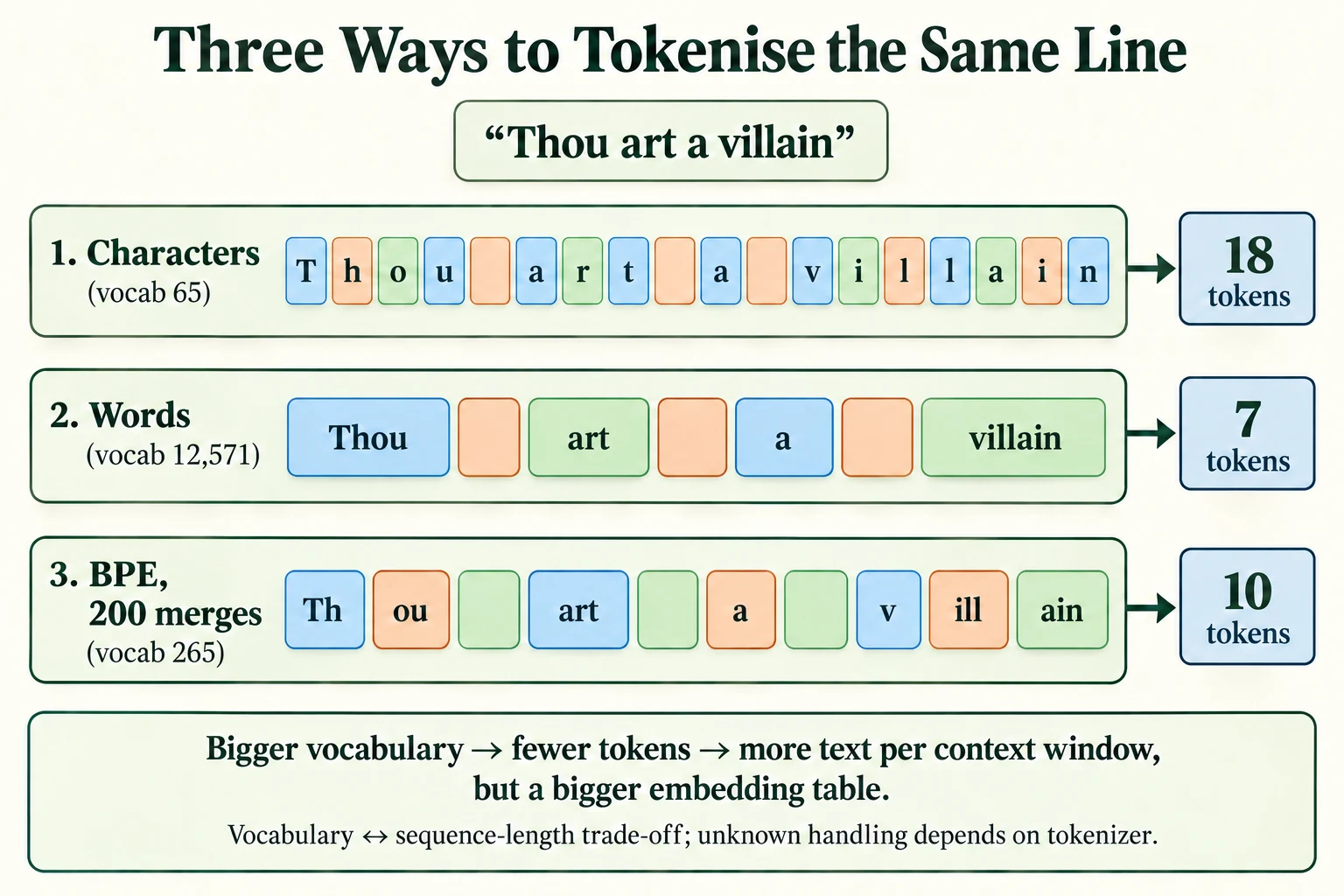
Figure 6.2.2. This line has 18 characters including its three spaces. The lesson’s word tokenizer preserves spaces, and the illustrated BPE segmentation has 10 tokens. Vocabulary size and sequence length trade off; unknown handling depends on the tokenizer.
Summary
- For continuous text, split training and validation data by position, not at random.
- Character tokenisation has a tiny vocabulary and no unknown tokens but long sequences. Word tokenisation gives short sequences but a huge vocabulary and unknown words. Subword tokenisation (BPE) balances the two.
- BPE learns an ordered list of merges by repeatedly joining the most frequent adjacent pair; 200 merges cut our training text from 1,003,854 to 654,024 tokens with a 265-token vocabulary.
- A model and its tokeniser must always be used together.
- The vocabulary size sets the size of the embedding table and the output head.
- The context window is how many tokens the model sees at once; tokenisation decides how much text that is (64, 98 or 151 characters here).
- Training pairs are windows
xwith targetsyshifted one token left; every position is a prediction, so a(32, 64)batch gives 2,048 of them.
Glossary
| Term | Meaning |
|---|---|
| Tokenisation | Cutting text into tokens. |
| Character / word / subword tokens | Tokens that are single characters, whole words, or pieces in between. |
| Byte-pair encoding (BPE) | A subword tokeniser built by repeatedly merging the most frequent adjacent pair. |
| Merge | One BPE step joining two pieces into one. |
| Vocabulary | The set of tokens a tokeniser can produce, each with an ID. |
| Out-of-vocabulary (OOV) | A token not in the vocabulary. |
| Token ID | A token's number in the vocabulary. |
| Embedding table | The learnable lookup table from token IDs to vectors. |
| Context window | The maximum number of tokens a model reads at once. |
| Position embedding | A learned vector per position, added to token embeddings. |
| Input / target (x / y) | A window of tokens, and the same window shifted one token left. |
| Next-token prediction | The task of predicting each token from the tokens before it. |
| Batch | A stack of training examples processed together. |
Wrap-up
Quick check
Why split continuous text before sampling training windows?
It prevents overlapping windows from crossing the train-validation boundary.
Which model components grow with vocabulary size?
The token embedding table and vocabulary output head.
How should next-token targets align with inputs?
Target at position t is the token following input at t.
Questions and discussion
Ask about this lesson, share what you found in a lab, or help someone else. Posts are public on the course's GitHub Discussions: anyone can read them, and you need a GitHub account to post.
Opening it loads giscus from giscus.app.