Understanding Representation Learning
Classroom material
- Time
- ~35 min
- Sections
- 8
- Code cells
- 13
- Figures
- 7
Before you start
What changes when a network learns its own features instead of being given them?
- You will be able to
- explain what a representation is and why raw data needs one;
- describe a network as an encoder that builds a representation and a head that uses it;
- compare handcrafted features, raw inputs and learned representations on the same task, with measured results;
- explain why a good representation makes later tasks easier, especially when labelled data is scarce.
Up to now, almost every model you have built started from data that was already in a convenient shape: a table where each column was a meaningful measurement such as age, income or number of purchases. Someone had already decided what to measure. The model's job was only to combine those measurements into a prediction.
Most of the data in the world does not arrive like that. A photograph arrives as hundreds of thousands of brightness values. A sentence arrives as a string of characters. A recording arrives as air-pressure readings sampled thousands of times a second. None of these raw numbers is meaningful on its own. A single pixel tells you almost nothing about whether a photo shows a shoe or a shirt.
This lesson is about the idea that makes Deep Learning work on data like this: instead of a person deciding which measurements matter, the network learns its own measurements from the raw data. Those learned measurements are called a representation, and the process is called representation learning. Every other note in Module 5, from CNNs to text embeddings to CLIP, is a variation on this one idea.
Key question: What changes when a network learns its own features instead of being given them?
Prerequisites
you should be comfortable with building and training a small nn.Module in PyTorch, splitting data into training and validation sets, and fitting a logistic-regression classifier with scikit-learn. Nothing else is assumed.
Setup — imports, versions and device detection used by the notebook (1 cells)
Run the cell below first. It imports the libraries used throughout this lesson and fixes the random seeds, to make repeated runs more consistent; small numerical differences across computers are normal. It also checks whether a GPU is available. Everything in this lesson runs comfortably on a CPU.
Environment and results. The saved outputs record one CPU reference run; random seeds reduce variation but do not guarantee identical numbers across computers. Read the comparisons as evidence from that run. Training times depend on your hardware.
If packages are missing, install them into your notebook environment, then restart the kernel and run from the beginning:
%pip install torch==2.14.1 numpy==2.5.4 pandas==3.0.6 matplotlib==3.11.2 scikit-learn==1.9.1 scipy==1.18.1
import os, gzip, urllib.requestimport numpy as npimport torchimport torch.nn as nnimport matplotlib.pyplot as plttorch.manual_seed(0)np.random.seed(0)device = "cuda" if torch.cuda.is_available() else "cpu"print("PyTorch", torch.__version__, "| device:", device)PyTorch 2.14.1+cu130 | device: cpu
What Is Representation Learning?
Let's start with a question that sounds almost too simple: what does a computer actually receive when you give it a photo?
We will use Fashion-MNIST throughout this module. It is a collection of small greyscale photos of clothing items, each labelled with one of ten categories such as Trouser, Sneaker or Bag. It was created as a slightly harder replacement for the famous handwritten-digit dataset MNIST, and it is small enough to train on a laptop in minutes. In this lesson we only need its 60,000 training images.
The cell below downloads the training images and labels (only the first time you run it) and loads them into NumPy arrays.
DATA_DIR = "data/fashion"BASE_URL = "https://raw.githubusercontent.com/zalandoresearch/fashion-mnist/master/data/fashion/"FILES = ["train-images-idx3-ubyte.gz", "train-labels-idx1-ubyte.gz"]os.makedirs(DATA_DIR, exist_ok=True)for f in FILES: path = os.path.join(DATA_DIR, f) if not os.path.exists(path): urllib.request.urlretrieve(BASE_URL + f, path)def read_idx(path, offset): """Read a cached gzip-compressed IDX array, skipping its binary header. Arguments: path: Path of the cached gzip file. offset: Bytes to skip before reading array values. """ with gzip.open(path) as fh: return np.frombuffer(fh.read(), dtype=np.uint8, offset=offset)for f in FILES: print(f"{f}: {os.path.getsize(os.path.join(DATA_DIR, f)) / 1024:,.0f} KB")images = read_idx(os.path.join(DATA_DIR, FILES[0]), 16).reshape(-1, 28, 28)labels = read_idx(os.path.join(DATA_DIR, FILES[1]), 8)CLASSES = ["T-shirt/top", "Trouser", "Pullover", "Dress", "Coat", "Sandal", "Shirt", "Sneaker", "Bag", "Ankle boot"]print("images:", images.shape, images.dtype)print("labels:", labels.shape, "| classes:", len(CLASSES))train-images-idx3-ubyte.gz: 25,803 KB train-labels-idx1-ubyte.gz: 29 KB images: (60000, 28, 28) uint8 labels: (60000,) | classes: 10
The output tells us that images has shape (60000, 28, 28): sixty thousand images, each a grid of 28 rows by 28 columns. The dtype is uint8, which means each entry is a whole number from 0 to 255. There are 60,000 labels, one per image, covering the 10 classes.
Now let's look inside a single image. The first image in the dataset is an ankle boot. Here is a small window of it, rows 8 to 15 and columns 8 to 19, printed exactly as the computer stores it:
img = images[0]print("Label:", CLASSES[labels[0]])print("Smallest value:", img.min(), "| largest value:", img.max())print(img[8:16, 8:20])Label: Ankle boot Smallest value: 0 | largest value: 255 [[ 0 1 1 1 0 200 232 232 233 229 223 223] [ 0 0 0 0 0 183 225 216 223 228 235 227] [ 0 0 0 0 0 193 228 218 213 198 180 212] [ 0 1 3 0 12 219 220 212 218 192 169 227] [ 0 0 6 0 99 244 222 220 218 203 198 221] [ 0 4 0 0 55 236 228 230 228 240 232 213] [ 0 0 0 0 237 226 217 223 222 219 222 221] [ 0 62 145 204 228 207 213 221 218 208 211 218]]
Each number is the brightness of one pixel (short for picture element, one tiny square of the image): 0 is black, 255 is white. That is all the computer has. There is no "boot" anywhere in these numbers, no "heel", no "laces". There are only 784 brightness values (28 × 28) arranged in a grid.
To make this concrete, the figure below shows the whole image as we see it on the left, and the window inside the orange box as the computer sees it on the right.
fig, axes = plt.subplots(1, 2, figsize=(8, 4))axes[0].imshow(img, cmap="gray")axes[0].set_title("What we see")axes[0].add_patch(plt.Rectangle((7.5, 7.5), 12, 8, fill=False, edgecolor="orange", lw=2))axes[1].imshow(img[8:16, 8:20], cmap="gray", vmin=0, vmax=255)for (r, c), v in np.ndenumerate(img[8:16, 8:20]): axes[1].text(c, r, int(v), ha="center", va="center", fontsize=7, color="white" if v < 128 else "black")axes[1].set_title("What the computer sees\n(the orange box, as numbers)")for ax in axes: ax.axis("off")plt.tight_layout(); plt.show()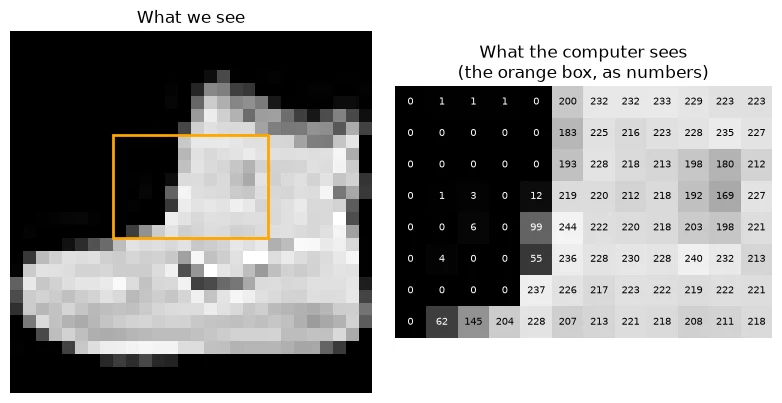
You can recognise the boot instantly. But notice what your brain did: it ignored individual brightness values and picked out edges, shapes and parts, then combined them into "boot". Those are not in the data. They are a description you built from the data.
Text has exactly the same problem. A sentence reaches the computer as a sequence of characters, and each character is stored as a number (its Unicode code point, a standard numbering of every character in every writing system):
sentence = "This film was surprisingly good."print(list(sentence)[:10])print([ord(ch) for ch in sentence][:10])print("characters:", len(sentence))['T', 'h', 'i', 's', ' ', 'f', 'i', 'l', 'm', ' '] [84, 104, 105, 115, 32, 102, 105, 108, 109, 32] characters: 32
The sentence has 32 characters, and the capital T is stored as 84. Nothing in the number 84 says "this word is positive about a film". Meaning is not in the raw symbols; it has to be built from them.
This is the core problem representation learning solves. We can now define the key term properly.
Key terms
- Raw data: data in the form it was recorded: pixels, characters, audio samples. Individually, these values carry little meaning.
- Feature: a single number that describes something useful about an example, such as "how tall is the object in this image?"
- Representation: the full list of features used to describe an example. Think of it as the description the model works from. A representation is usually a vector (a list of numbers), so you will also hear it called a feature vector, and for text and other discrete things, an embedding.
- Representation learning: training a model so that it discovers useful features from raw data by itself, instead of a person designing them.
A helpful way to picture this: imagine describing a stranger to a friend so they can spot them in a crowd. Listing the colour of every square centimetre of their clothing would be accurate but useless. "Tall, red jacket, curly hair, carrying a guitar" is far shorter and far more useful. A good representation is like that second description: compact, and focused on what matters for the task.
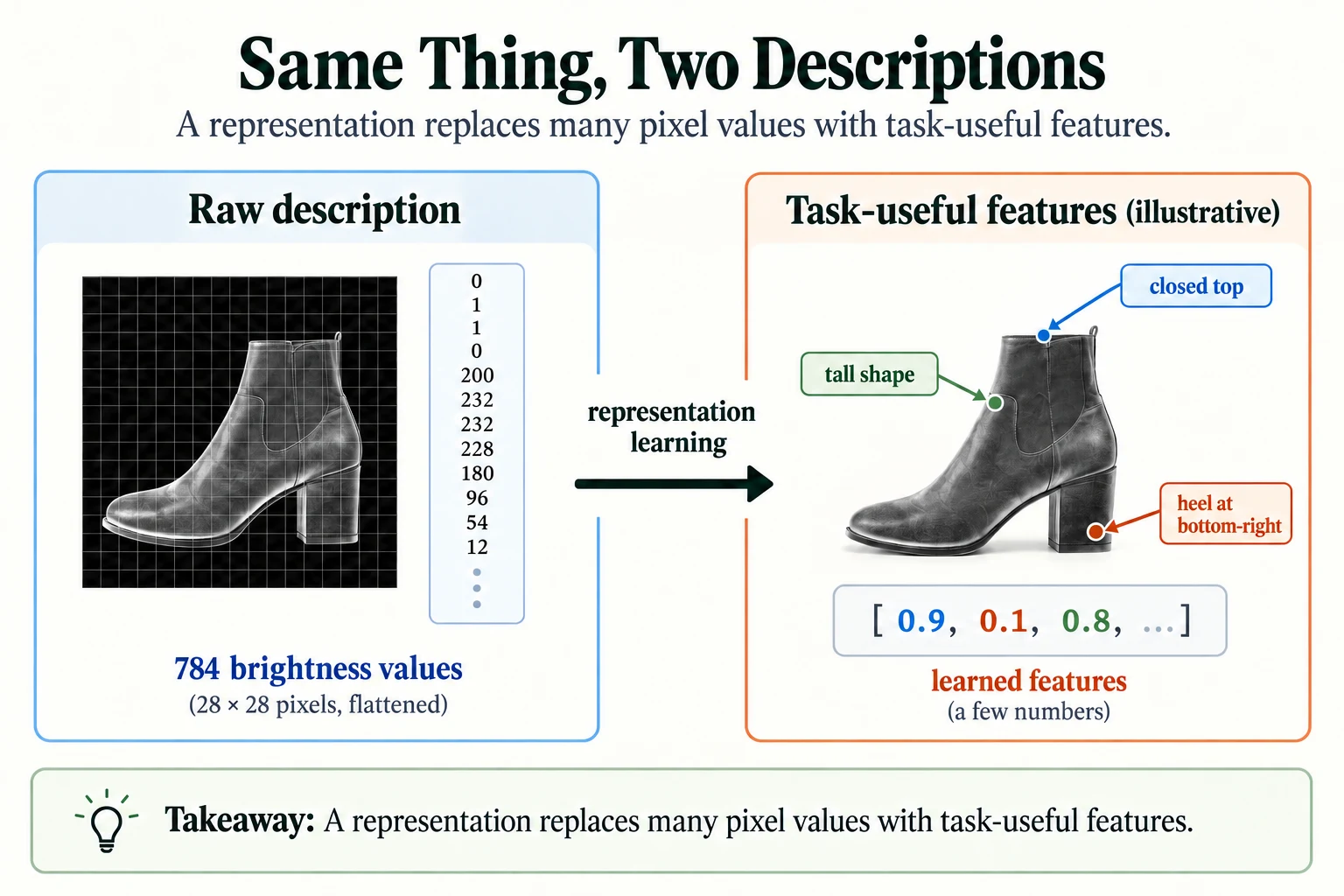
Figure 5.1.1. The boot is described first by pixel intensities, then by task-useful features. The named properties are an intuition; learned coordinates need not have individual human-readable meanings or fewer dimensions.
-
A colour photo is 1,000 pixels wide and 1,000 pixels tall, with three numbers (red, green, blue) per pixel. How many raw numbers does the computer receive, and why would feeding them directly to a simple model be difficult?
1,000 × 1,000 × 3 = 3 million numbers. Each number on its own says almost nothing about what is in the photo, and a simple model would have to work out from scratch how millions of numbers relate to one another. It would need enormous amounts of data and would be easily confused by changes such as lighting or position. A representation compresses this into a much smaller set of meaningful features.
What does a representation describe?
An example in features useful for a task.
The Big Picture: From Raw Data to Learned Representations
Now that we know what the problem is, let's see the overall shape of the solution before we look at any details.
Every deep-learning model in this module can be read as two parts working one after the other:
- An encoder takes raw data and turns it into a representation. In a neural network, the encoder is simply the early layers. Each layer transforms the numbers it receives into a new set of numbers, and the output of the last encoder layer is the representation.
- A head takes the representation and turns it into the final answer: a class, a score, a next word. The head is usually small, often a single linear layer, because if the representation is good, the final step should be easy.
Both parts are trained together with the same loss and the same backpropagation you already know. Nobody tells the encoder which features to build. It builds whatever features make the head's job easiest, because those are the features that reduce the loss.
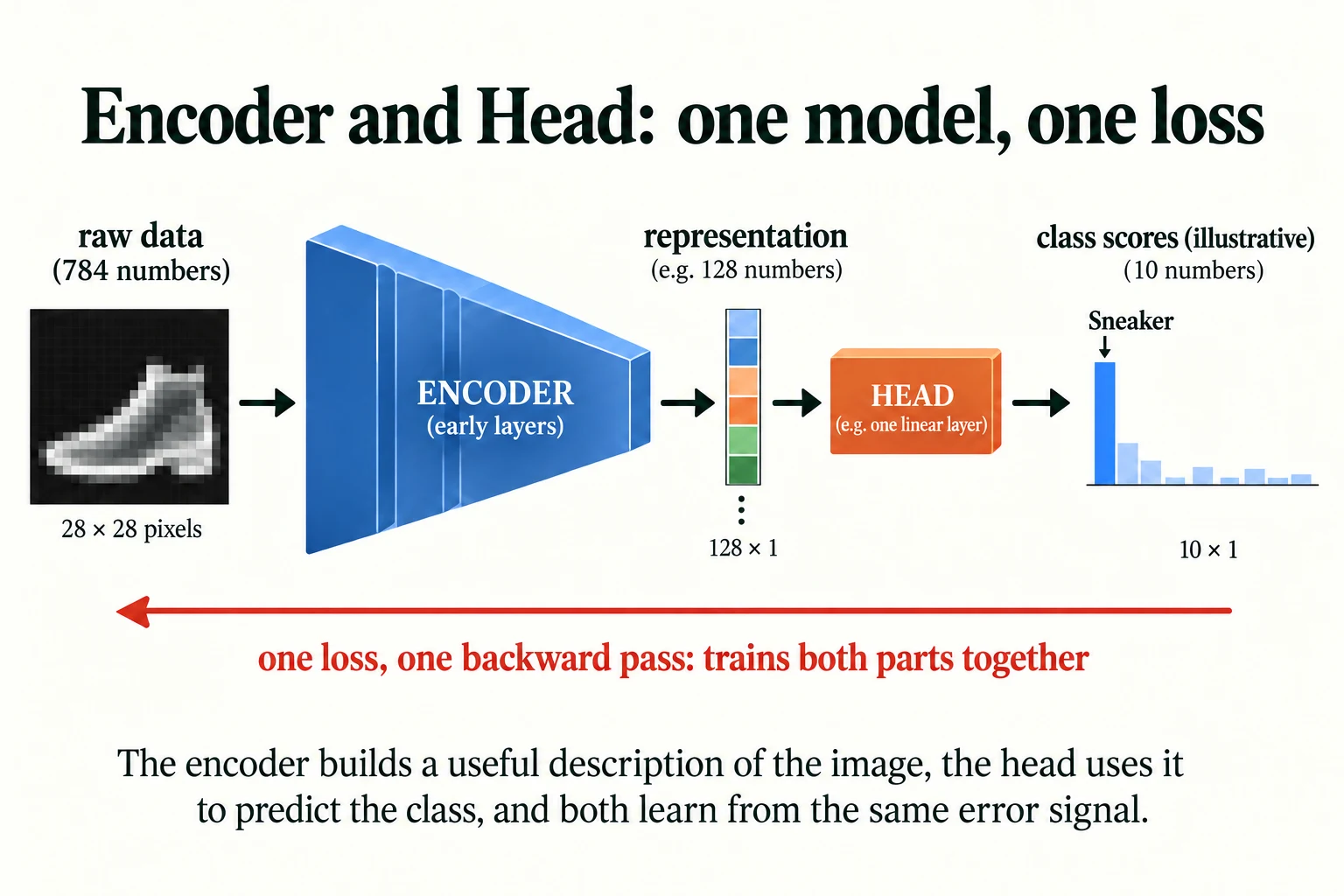
Figure 5.1.2. The encoder builds a representation and the head uses it. In joint supervised training, one loss sends gradients through both parts. The displayed class bars are illustrative; a linear head produces logits before softmax.
This split is worth remembering because it explains a lot of what comes later in the course:
- CNNs (Lesson 5.2) are encoders designed for images.
- Embedding layers (Lesson 5.3) are encoders for words and other symbols.
- Pretrained models (Module 7) are encoders that someone else has already trained on enormous datasets, which you can reuse with your own head.
- Fine-tuning (Module 8) is the process of adjusting a pretrained encoder for your task.
In the rest of this lesson, we will build all three kinds of description for Fashion-MNIST: features a person designs by hand, the raw pixels themselves, and features a network learns. Then we will compare them fairly.
Key terms
- Encoder: the part of a network that turns raw input into a representation.
- Head: the final part of a network that turns a representation into the output the task needs.
- Downstream task: any task that uses a representation as its input, such as classification, search or clustering.
-
In the encoder–head picture, why does the head usually need only a single linear layer?
Because the encoder has already done the hard work. If the representation separates the classes well, a straight-line decision boundary (a linear layer) is enough to read off the answer. If the head needs to be large and complicated, that is often a sign the representation is not good enough.
Why split a network into an encoder and a head?
The encoder builds features and the head maps them to task outputs.
Feature Engineering vs. Representation Learning: A Shift, Not an Elimination
Before deep learning became practical, the standard way to handle images was feature engineering: an expert studied the problem and wrote code to compute features they believed would be useful. You have done this in classical machine learning: creating ratios, flags and aggregates from raw columns. Let's try it for clothing images, so we have something concrete to compare against.
3.1 Setting up a fair comparison
To compare different representations fairly, we need to use the data carefully. We split the 60,000 training images into three non-overlapping groups, each with a different job:
X = images.astype(np.float32) / 255.0y = labels.astype(np.int64)rep_idx = np.arange(0, 40000) # used to LEARN a representationprobe_idx = np.arange(40000, 50000) # labelled examples for downstream classifiersval_idx = np.arange(50000, 60000) # held out for measuring accuracyprint(len(rep_idx), len(probe_idx), len(val_idx))40000 10000 10000
- 40,000 images (
rep_idx) are used only to train a network so it can learn a representation. - 10,000 images (
probe_idx) are used to train the downstream classifier on top of each representation. - 10,000 images (
val_idx) are never trained on. Every accuracy in this lesson is measured on them.
Keeping these groups separate means that no representation gets an unfair peek at the images it is judged on.
3.2 Designing features by hand
If you had to tell clothing items apart using only a few numbers, what would you measure? A sensible person might say: how much of the image is filled in, how tall and how wide the object is, whether it is taller than it is wide, whether the top or bottom half is heavier, and whether there is a dark gap down the middle (as there is between trouser legs). The function below computes exactly those seven features.
def handcrafted_features(X): """Compute the seven explicitly designed image measurements described above. Arguments: X: Image/input tensor for the experiment. """ ink = X.mean(axis=(1, 2)) # how much of the image is "on" on = X > 0.2 height = on.any(axis=2).sum(axis=1) # rows containing the object width = on.any(axis=1).sum(axis=1) # columns containing the object aspect = height / np.maximum(width, 1) top_minus_bottom = X[:, :14].mean(axis=(1, 2)) - X[:, 14:].mean(axis=(1, 2)) left_minus_right = X[:, :, :14].mean(axis=(1, 2)) - X[:, :, 14:].mean(axis=(1, 2)) centre_gap = X[:, 14:, 12:16].mean(axis=(1, 2)) # e.g. the gap between trouser legs return np.stack([ink, height, width, aspect, top_minus_bottom, left_minus_right, centre_gap], axis=1)H = handcrafted_features(X)names = ["ink", "height", "width", "aspect", "top-bottom", "left-right", "centre gap"]print("handcrafted shape:", H.shape)for c in [1, 7, 8]: row = H[y == c].mean(axis=0) print(f"{CLASSES[c]:<11}", " ".join(f"{n}={v:.2f}" for n, v in zip(names, row)))handcrafted shape: (60000, 7) Trouser ink=0.22 height=27.90 width=11.62 aspect=2.46 top-bottom=0.06 left-right=-0.01 centre gap=0.37 Sneaker ink=0.17 height=12.80 width=27.39 aspect=0.47 top-bottom=-0.11 left-right=-0.09 centre gap=0.26 Bag ink=0.35 height=23.17 width=25.44 aspect=0.96 top-bottom=-0.20 left-right=-0.02 centre gap=0.56
Each image is now described by just 7 numbers instead of 784. The printed averages show that some of these features genuinely carry information. Trousers are tall and narrow: on average 27.90 pixels tall but only 11.62 wide, an aspect ratio of 2.46. Sneakers are the reverse: 12.80 tall, 27.39 wide, an aspect ratio of 0.47. A person's intuition has produced real signal.
But look at the "centre gap" feature, which was meant to pick out the dark space between trouser legs. Sneakers score lower (0.26) than trousers (0.37). The idea was reasonable, yet in the data it does not behave the way its designer expected. This is the typical story of feature engineering: some features work, some don't, and you only find out by measuring.
3.3 Measuring how useful a representation is
To compare representations, we give each one to the same simple classifier: a logistic regression, with the features standardised first (rescaled to mean 0 and standard deviation 1, so that no feature dominates just because its numbers are larger). This is called a linear probe. Because the classifier is deliberately simple, any difference in accuracy comes from the representation, not from a cleverer classifier.
from sklearn.linear_model import LogisticRegressionfrom sklearn.preprocessing import StandardScalerfrom sklearn.pipeline import make_pipelinedef linear_probe(F_train, y_train, F_val, y_val): """Fit a standardised logistic regression on fixed features and evaluate held-out examples. Arguments: F_train: Fixed representation rows used to fit the probe. y_train: Training class labels. F_val: Held-out representation rows. y_val: Held-out class labels. """ clf = make_pipeline(StandardScaler(), LogisticRegression(max_iter=3000)) clf.fit(F_train, y_train) return clf.score(F_val, y_val)R = X.reshape(len(X), -1) # raw pixels: 784 numbers per imageacc_hand = linear_probe(H[probe_idx], y[probe_idx], H[val_idx], y[val_idx])acc_raw = linear_probe(R[probe_idx], y[probe_idx], R[val_idx], y[val_idx])print(f"handcrafted (7 features): {acc_hand:.3f}")print(f"raw pixels (784 features): {acc_raw:.3f}")handcrafted (7 features): 0.694 raw pixels (784 features): 0.803
With seven handcrafted features, the classifier reaches 0.694 validation accuracy. With all 784 raw pixels, it reaches 0.803. Random guessing among 10 balanced classes would give about 0.1, so both are far better than chance, but the raw pixels beat the handcrafted features.
That may surprise you. Shouldn't the expert's carefully chosen features win? Not necessarily. Seven numbers throw away most of the information in the image, and the expert can only encode the patterns they think of. The raw pixels keep everything. Fashion-MNIST images are also centred and similarly sized, so a given pixel position tends to mean roughly the same thing across images, which helps a linear model on raw pixels more than it would on real-world photos.
3.4 Letting a network learn the features
Now we try the third option. We train a small network, a multilayer perceptron (MLP, the stack of fully connected layers you built in Module 2), on the 40,000 representation-learning images. It has one hidden layer of 128 units. We split it explicitly into an encoder and a head, exactly as in Section 2.
class MLP(nn.Module): """Flattened-image MLP with a learned hidden representation and a classification head.""" def __init__(self): """Create the components of this model; the forward computation is traced in the lesson.""" super().__init__() self.encoder = nn.Sequential(nn.Flatten(), nn.Linear(784, 128), nn.ReLU()) self.head = nn.Linear(128, 10) def forward(self, x): """Flattened-image MLP with a learned hidden representation and a classification head. Arguments: x: Floating-point tensor; image models use (B, C, H, W), token-vector models use (B, T, D). """ return self.head(self.encoder(x))torch.manual_seed(0)model = MLP()Xt = torch.tensor(X[rep_idx]); yt = torch.tensor(y[rep_idx])opt = torch.optim.Adam(model.parameters(), lr=1e-3)loss_fn = nn.CrossEntropyLoss()for epoch in range(3): perm = torch.randperm(len(Xt)) total, batches = 0.0, 0 for i in range(0, len(Xt), 128): b = perm[i:i + 128] opt.zero_grad() loss = loss_fn(model(Xt[b]), yt[b]) loss.backward() opt.step() total += loss.item(); batches += 1 print(f"epoch {epoch + 1}: average training loss {total / batches:.3f}")epoch 1: average training loss 0.654 epoch 2: average training loss 0.446 epoch 3: average training loss 0.404
The average training loss falls each epoch, so the network is learning as expected.
The interesting part comes next. After training, we throw away the head, keep the encoder, and use its 128 outputs as a new representation of every image. Then we give that representation to exactly the same linear probe as before.
with torch.no_grad(): L = model.encoder(torch.tensor(X)).numpy() # learned representation: 128 numbers per imageprint("learned representation shape:", L.shape)acc_learned = linear_probe(L[probe_idx], y[probe_idx], L[val_idx], y[val_idx])print(f"handcrafted (7): {acc_hand:.3f}")print(f"raw pixels (784): {acc_raw:.3f}")print(f"learned (128): {acc_learned:.3f}")learned representation shape: (60000, 128) handcrafted (7): 0.694 raw pixels (784): 0.803 learned (128): 0.868
The ranking is now clear:
| Representation | Numbers per image | Validation accuracy |
|---|---|---|
| Handcrafted features | 7 | 0.694 |
| Raw pixels | 784 | 0.803 |
| Learned by the MLP encoder | 128 | 0.868 |
The learned representation uses about a sixth as many numbers as the raw pixels, yet the same simple classifier does better with it. The network has found features that make the classes easier to separate with a straight line, which is exactly what a good representation should do.
Be precise about why the learned features won, because this is easy to overstate. The encoder had something the other two did not: it was trained on 40,000 additional labelled images. Representation learning does not create information from nothing. It moves the work of finding good features from a person to the training process, and that process needs data.
3.5 Why "a shift, not an elimination"
It is tempting to say that deep learning makes feature engineering obsolete. It does not. Look back at what we still decided in this section:
- We converted pixel values from 0–255 to 0–1 by dividing by 255.
- We chose a network with one hidden layer of 128 units and a ReLU activation.
- We decided how to split the data so the comparison was fair.
In later notes, these human decisions become even more important: CNNs build in the assumption that nearby pixels belong together, and tokenisers decide how text is chopped into pieces before any learning happens. The accurate statement is that deep learning shifts much of the representation-building into the model, while people still design the conditions under which it is learned.
Common mistake: concluding that learned features are "better" in general. They were better here, on this task, given 40,000 extra labelled examples. With very little data, or when an expert knows exactly what matters (for example, a physics formula), carefully designed features can still win. You saw a similar lesson in the gradient-boosting vs. neural-network comparison in Module 4.
-
The MLP encoder was trained on 40,000 labelled images, but the linear probe on top of it used only the 10,000 probe images. Why would it be wrong to train the encoder on the 10,000 validation images as well?
The validation images are supposed to be unseen, so that the accuracy we measure on them tells us how the method performs on new data. If the encoder had trained on them, it could have learned features tuned to those specific images, and the validation accuracy would be optimistic. This is data leakage: information from the evaluation set leaking into training.
Why keep representation-learning images separate from validation images?
Validation must measure performance on examples unseen during fitting.
How Networks Build Hierarchical Representations
We now know that a learned representation can beat raw pixels. The natural next question is: what did the network actually learn? Opening the box also leads us to one of the most important ideas in deep learning, the idea of a hierarchy of features.
4.1 Looking inside one layer
Each of the 128 hidden units in our encoder computes a weighted sum of all 784 pixels and then applies ReLU (which outputs the sum if it is positive and 0 otherwise). So a unit "switches on", meaning it outputs a value above zero, when an image matches the pattern in its weights.
We can investigate each unit in two ways: look at its weights directly, and find the images that switch it on most strongly. The cell below records every unit's output for every validation image and summarises what each unit responds to.
with torch.no_grad(): acts = model.encoder(torch.tensor(X[val_idx])).numpy() # (10000, 128): each unit's output per imagedead = (acts.max(axis=0) == 0).sum()print(f"hidden units: {acts.shape[1]} | units that never switch on for any validation image: {dead}")def unit_summary(k, top=50): """Find the most activating validation images and summarise their class concentration. Arguments: k: Number of neighbours, or unit index in unit_summary. top: Number of highest-activation images used in the unit summary. """ order = np.argsort(-acts[:, k])[:top] # the 50 images that switch unit k on the most top_labels = y[val_idx][order] counts = np.bincount(top_labels, minlength=10) return order, counts.argmax(), counts.max() / topunits = [k for k in np.argsort(-acts.mean(axis=0))[:8]] # the 8 most active unitsfor k in units: _, c, share = unit_summary(k) print(f"unit {k:>3}: most of its top-50 images are '{CLASSES[c]}' ({share:.0%})")live = [k for k in range(acts.shape[1]) if acts[:, k].max() > 0]shares = np.array([unit_summary(k)[2] for k in live])print(f"across all {len(live)} live units, the median top-50 share of one class is {np.median(shares):.0%}")print(f"units whose top-50 images are at least 90% one class: {(shares >= 0.9).sum()}")hidden units: 128 | units that never switch on for any validation image: 14 unit 45: most of its top-50 images are 'Pullover' (46%) unit 19: most of its top-50 images are 'Coat' (52%) unit 124: most of its top-50 images are 'T-shirt/top' (82%) unit 82: most of its top-50 images are 'T-shirt/top' (68%) unit 42: most of its top-50 images are 'Pullover' (60%) unit 125: most of its top-50 images are 'Bag' (98%) unit 78: most of its top-50 images are 'Coat' (54%) unit 16: most of its top-50 images are 'T-shirt/top' (48%) across all 114 live units, the median top-50 share of one class is 78% units whose top-50 images are at least 90% one class: 36
A few things stand out.
First, 14 of the 128 units never switch on for any validation image. These units are inactive on this validation sample: their pre-activation is non-positive for every example we checked, so ReLU outputs 0. This alone does not prove they are dead for every possible input. This is a known side effect of ReLU, and it means our encoder is really using 114 units, not 128.
Second, many units have become detectors for particular kinds of clothing, even though nobody told them to. Unit 125 is the clearest: 98% of the 50 images that switch it on most are bags. Across all 114 live units, the typical (median) unit has 78% of its top-50 images from a single class, and 36 units reach at least 90%.
Third, the eight units we printed are the eight with the highest average output, and they are less specialised than typical (46% to 82%). That makes sense: units that switch on strongly for many images tend to respond to anything large and bright, such as tops, pullovers and coats, rather than to one class.
The figure below shows these eight units. The top row shows each unit's 784 weights arranged back into a 28×28 grid: red pixels push the unit on, blue pixels push it off. The bottom row is the average of the 50 images that switch that unit on most.
W = model.encoder[1].weight.detach().numpy() # (128, 784): one row of 784 weights per hidden unitfig, axes = plt.subplots(2, 8, figsize=(13, 3.8))for j, k in enumerate(units): order, c, share = unit_summary(k) w = W[k].reshape(28, 28); m = np.abs(w).max() axes[0, j].imshow(w, cmap="RdBu_r", vmin=-m, vmax=m) axes[0, j].set_title(f"unit {k} weights", fontsize=8) axes[1, j].imshow(X[val_idx][order].mean(axis=0), cmap="gray") axes[1, j].set_title(f"top-50: {share:.0%} {CLASSES[c]}", fontsize=7)for ax in axes.flat: ax.axis("off")plt.suptitle("Top row: a unit's weights (red +, blue -). Bottom row: average of the 50 images that switch it on most.")plt.tight_layout(); plt.show()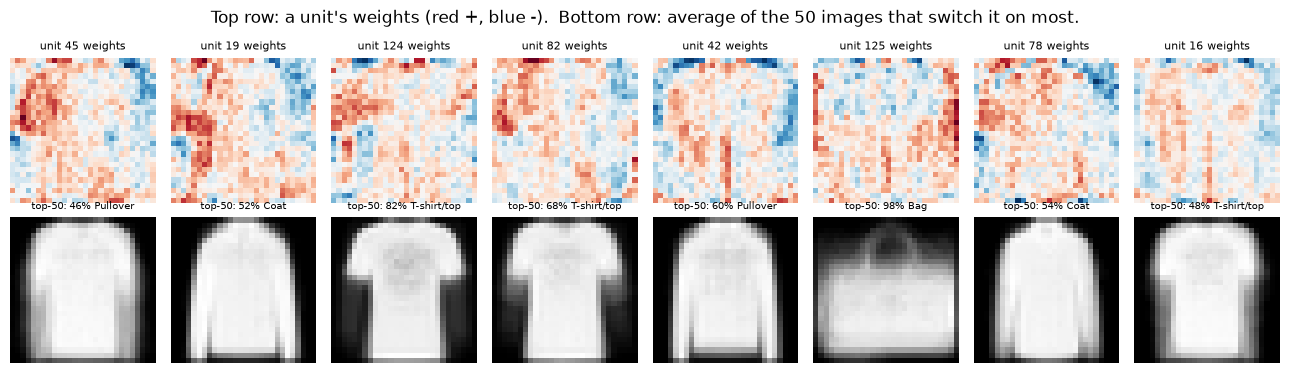
The weight maps are noisy, but the averaged images make the pattern clear: each unit has become tuned to a whole-garment outline, such as a long-sleeved shape, a T-shirt shape or a bag with a handle.
4.2 How deeper networks build a hierarchy
Our encoder has only one layer, so each unit has to go straight from individual pixels to something like "bag-shaped". That is a big leap, and it is why the weight maps look like blurry whole-object templates. A template like that is fragile: shift the bag a few pixels to the left and the template no longer lines up.
Deeper networks avoid this by building understanding in stages, each stage reusing the features from the stage before:
- Early layers detect simple, local patterns: edges (places where brightness changes sharply) and small spots.
- Middle layers combine edges into textures and parts: a curve, a corner, a strap, a sole.
- Later layers combine parts into whole objects: "boot" is a sole, plus a tall shaft, plus a heel.
This layered structure is called a hierarchical representation. It is powerful because simple features can be reused: the same edge detector helps recognise a boot, a bag and a dress, so the network does not need to learn a separate template for every object in every position. Language works the same way: characters combine into words, words into phrases, phrases into meaning.
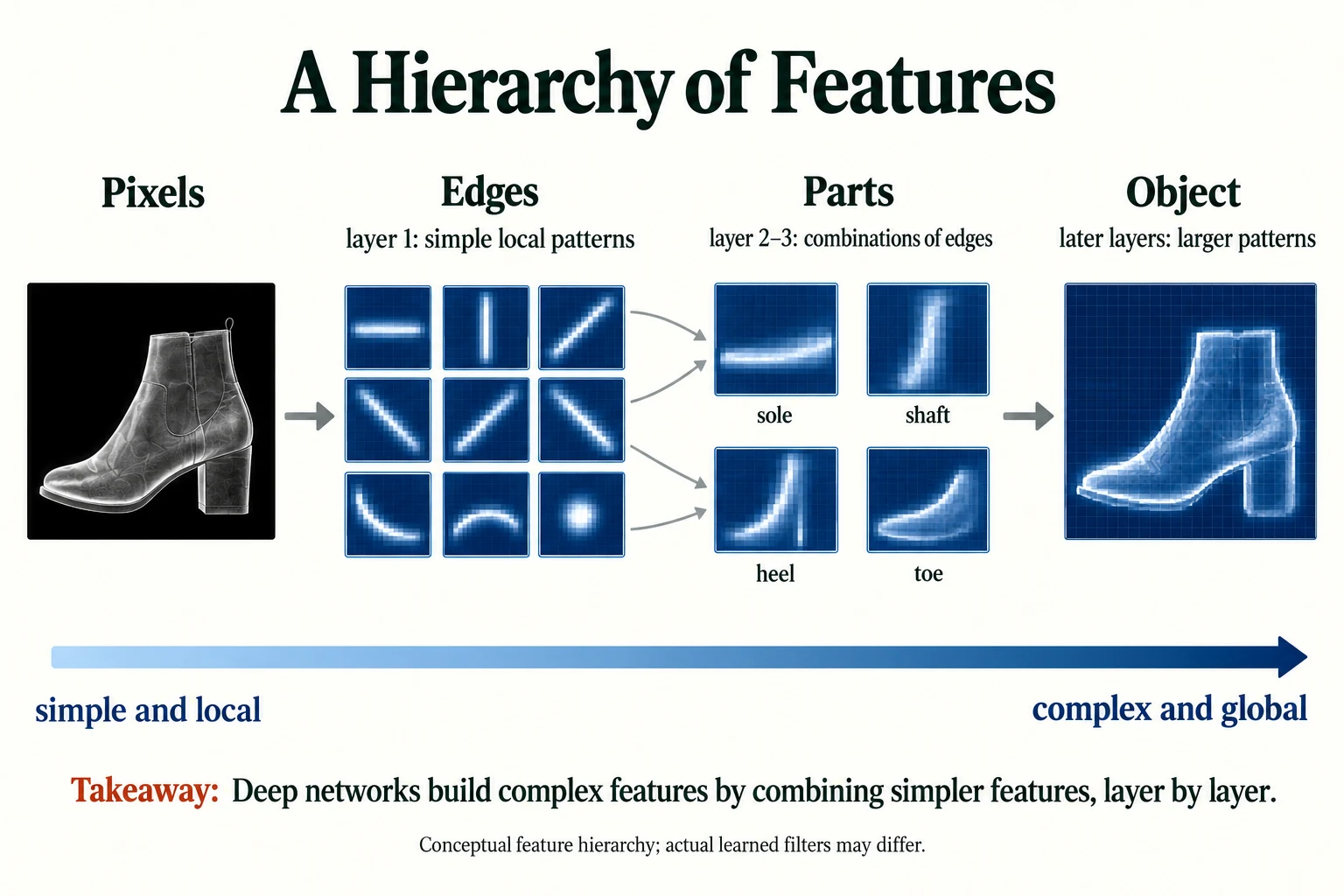
Figure 5.1.3. A conceptual hierarchy from local edges to larger combinations. These are explanatory illustrations, not measured filters from the notebook experiment.
You will see this hierarchy directly in Lesson 5.2, where a convolutional network learns edge detectors in its first layer without being told to.
Key terms
- Hidden unit (neuron): one output of a hidden layer; a weighted sum of its inputs passed through an activation function.
- Dead unit: a ReLU unit whose output is 0 for every input, so it never contributes or learns.
- Hierarchical representation: a representation built in stages, where each layer combines the simpler features of the layer before it.
-
Our one-layer encoder learned whole-garment templates. Give one reason why a template like this might fail if the same bag appeared slightly smaller or shifted to one side of the image.
The template lines up with particular pixel positions. If the bag is smaller or shifted, its outline falls on different pixels, so the weighted sum changes and the unit may not switch on. A hierarchical network that detects edges and parts wherever they appear is much less sensitive to this.
How does a hierarchy reuse features?
Later layers combine earlier features into more complex patterns.
Why Representation Quality Matters for Downstream Tasks
So far we have compared representations when the downstream classifier had plenty of labelled data: 10,000 examples. In real projects, labelled data is often the scarcest resource. Labels cost money, time and expert attention. So the most practical question about a representation is: how much labelled data does it save you?
To find out, we repeat the linear-probe experiment while giving the classifier fewer and fewer labelled examples: 20, 100, 500, 2,000 and 10,000. With very small samples the result depends heavily on which images happen to be chosen, so for every size below 10,000 we draw 5 different random samples and average the results. We also record the gap between the best and worst of the 5 draws, to see how noisy each estimate is.
sizes = [20, 100, 500, 2000, 10000]repeats = 5 # small samples are noisy, so we average 5 random drawsrng = np.random.default_rng(0)results = {"handcrafted": [], "raw pixels": [], "learned": []}spread = {k: [] for k in results}for n in sizes: draws = [probe_idx] if n == len(probe_idx) else [rng.choice(probe_idx, n, replace=False) for _ in range(repeats)] for name, F in [("handcrafted", H), ("raw pixels", R), ("learned", L)]: accs = [linear_probe(F[s], y[s], F[val_idx], y[val_idx]) for s in draws] results[name].append(np.mean(accs)); spread[name].append(np.max(accs) - np.min(accs))print("labelled examples:", sizes)for name in results: print(f"{name:<12} mean acc:", " ".join(f"{a:.3f}" for a in results[name]))for name in results: print(f"{name:<12} max-min: ", " ".join(f"{a:.3f}" for a in spread[name]))labelled examples: [20, 100, 500, 2000, 10000] handcrafted mean acc: 0.404 0.608 0.663 0.687 0.694 raw pixels mean acc: 0.414 0.692 0.772 0.794 0.803 learned mean acc: 0.562 0.794 0.830 0.855 0.868 handcrafted max-min: 0.199 0.039 0.028 0.009 0.000 raw pixels max-min: 0.192 0.061 0.014 0.007 0.000 learned max-min: 0.161 0.040 0.005 0.010 0.000
Read the table row by row, then column by column.
- With only 20 labelled examples (about two per class), the learned representation reaches 0.562, against 0.414 for raw pixels and 0.404 for handcrafted features. But look at the spread row: the 5 draws differ by up to 0.161 to 0.199. With so few examples, a single lucky or unlucky draw moves the result a lot, which is exactly why we averaged.
- With 100 labelled examples, the learned representation reaches 0.794. Raw pixels need 2,000 labelled examples to reach the same accuracy (0.794). In other words, on this task the learned representation does the job with about one twentieth of the downstream labels, after the encoder used its separate 40,000 labelled examples.
- With 10,000 examples, the handcrafted features level off at 0.694. Adding more labels hardly helps, because seven numbers simply cannot describe the differences between a shirt and a pullover. The representation, not the amount of data, has become the limit.
The plot shows the same results. The grey dashed line is chance level.
plt.figure(figsize=(6, 4))for name, accs in results.items(): plt.plot(sizes, accs, marker="o", label=name)plt.xscale("log"); plt.xlabel("labelled examples given to the downstream classifier")plt.axhline(0.1, color="grey", ls="--", lw=1, label="chance (10 classes)")plt.ylabel("validation accuracy"); plt.ylim(0, 1); plt.grid(alpha=0.3); plt.legend()plt.title("Same classifier, different representations"); plt.tight_layout(); plt.show()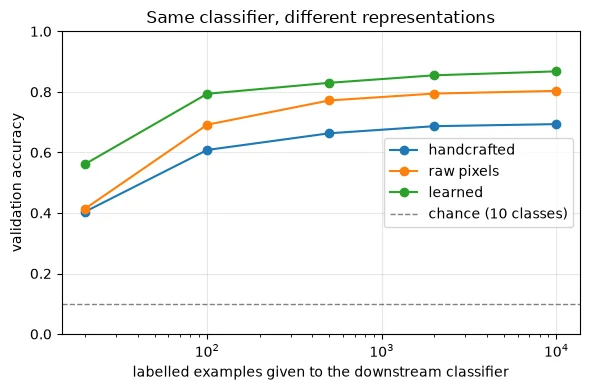
This is the practical heart of representation learning. A good representation:
- reaches higher accuracy with the same simple classifier;
- needs far fewer labels to get there;
- can be reused: we trained the encoder once, and could now attach many different heads to it for different tasks.
The third point is the foundation of modern AI engineering. In Module 7 you will use encoders that were trained on billions of examples, and attach your own small head, which is the same experiment as this one at a vastly larger scale.
Common mistake: trusting a single small-sample result. With 20 labelled examples, the accuracy of one draw varied by close to 0.2 depending on which images were picked. Whenever your training set is small, repeat the experiment with different samples and report the average and the spread.
-
The handcrafted curve is almost flat between 2,000 and 10,000 labelled examples. What does that tell you about where its errors are coming from?
The errors are no longer caused by a lack of labelled examples; they are caused by the representation itself. Seven numbers cannot capture the differences between some classes (for example, shirt vs. pullover), so no amount of extra labels lets the classifier separate them. The representation has become the bottleneck.
An encoder helps a probe with only 100 labels. What must we still report?
The data and labels used earlier to train the encoder.
Putting It All Together
Let's reassemble the whole picture.
Raw data such as pixels and characters is plentiful but individually meaningless. To make predictions from it, a model needs a representation: a compact description that captures what matters for the task. There are three ways to get one, and we measured all three on the same 10,000 validation images using the same linear probe:
| Representation | How it was obtained | Numbers per image | Accuracy with 100 labels | Accuracy with 10,000 labels |
|---|---|---|---|---|
| Handcrafted | a person designed 7 features | 7 | 0.608 | 0.694 |
| Raw pixels | no processing | 784 | 0.692 | 0.803 |
| Learned | an MLP encoder trained on 40,000 other labelled images | 128 | 0.794 | 0.868 |
A network learns its representation by being split into an encoder and a head that are trained together. The encoder discovers whatever features make the head's job easiest. Inside, its units became detectors: one responded almost only to bags. A deeper network would build these detectors in a hierarchy, from edges to parts to objects, so that simple features can be reused.
The pay-off is data efficiency and reuse: the learned representation matched, with 100 labels, what raw pixels needed 2,000 labels to achieve. The cost is that learning the representation needed data of its own, plus human decisions about architecture, preprocessing and data splits. That is why we say deep learning shifts feature engineering rather than eliminating it.
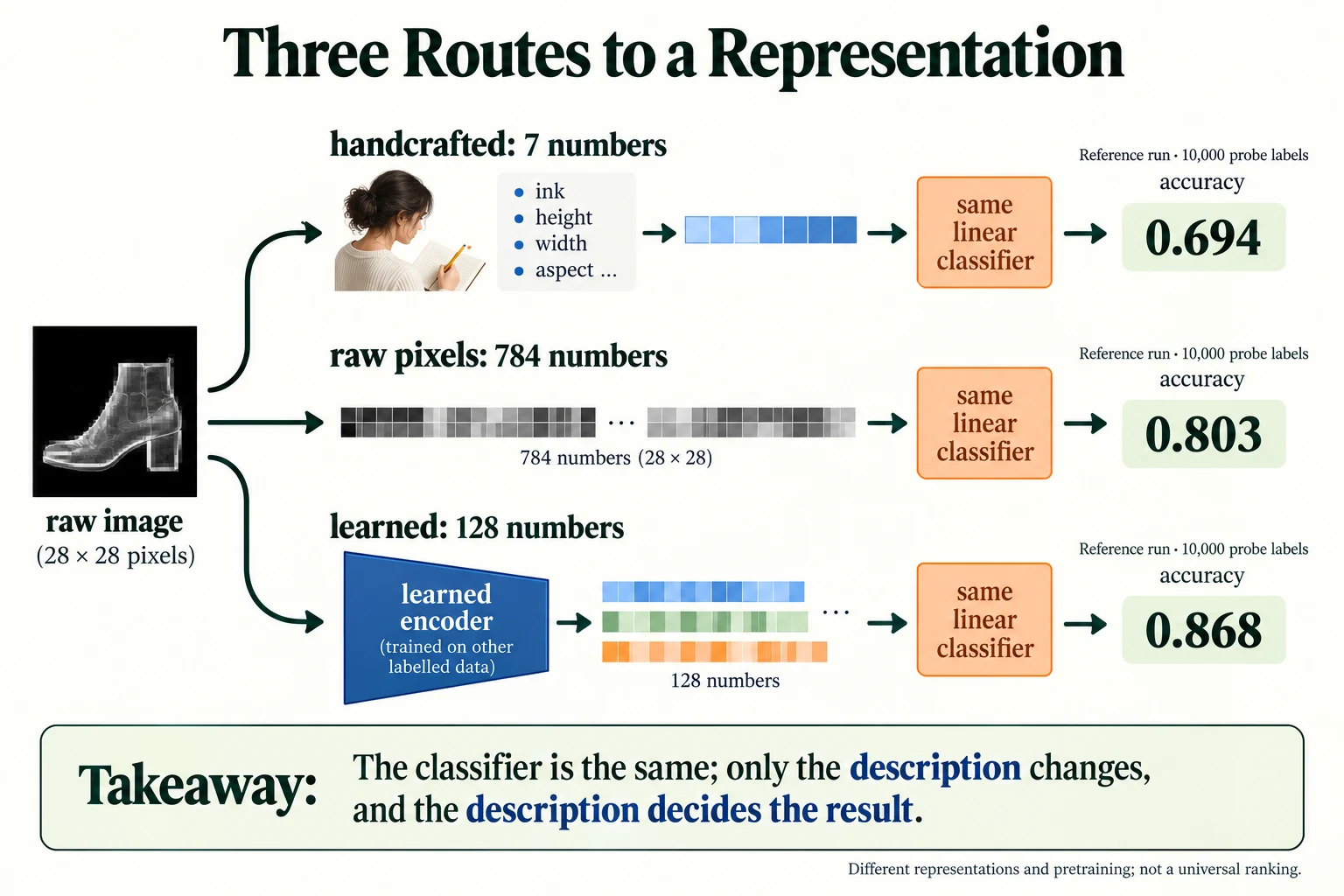
Figure 5.1.4. The reference run compares representations with the same kind of linear probe and 10,000 probe labels. The learned encoder had prior labelled training, so these results do not isolate representation choice at an equal total data budget.
Summary
- Raw data such as pixels and characters arrives as many numbers that mean little individually. A Fashion-MNIST image is 784 brightness values from 0 to 255.
- A representation is the description a model works from; representation learning means the model discovers that description itself.
- Networks can be read as an encoder (builds the representation) and a head (uses it), trained together by one loss.
- On the same linear probe with 10,000 labels, handcrafted features scored 0.694, raw pixels 0.803 and a learned 128-number representation 0.868.
- Learned features won here because the encoder learned from 40,000 additional labelled images. Representation learning moves feature-building into training; it does not remove the need for data or human design choices.
- Units inside a trained encoder become detectors for meaningful patterns. Deeper networks organise these detectors hierarchically, from edges to parts to objects.
- Good representations are data-efficient: with 100 labels, the learned representation matched what raw pixels needed 2,000 labels to reach.
- Small-sample results are noisy; repeat them and report the spread.
Glossary
| Term | Meaning |
|---|---|
| Raw data | Data in the form it was recorded: pixels, characters, audio samples. |
| Pixel | One tiny square of an image, stored as a brightness number (0–255 here). |
| Feature | A single number describing something useful about an example. |
| Representation | The list of features a model uses to describe an example; also called a feature vector. |
| Embedding | A learned representation, usually for discrete things such as words. |
| Representation learning | Training a model so that it discovers useful features from raw data. |
| Feature engineering | Designing features by hand, using human knowledge of the problem. |
| Encoder | The part of a network that turns raw input into a representation. |
| Head | The final part of a network that turns a representation into the task's output. |
| Downstream task | A task that uses a representation as its input. |
| Linear probe | A simple linear classifier trained on top of a fixed representation to measure how useful it is. |
| Standardise | Rescale each feature to mean 0 and standard deviation 1. |
| Hidden unit | One output of a hidden layer. |
| Dead unit | A ReLU unit that outputs 0 for every input. |
| Hierarchical representation | Features built in stages, each combining simpler features from the stage before. |
| Data efficiency | How few labelled examples a method needs to reach a given accuracy. |
Wrap-up
Quick check
What does a representation describe?
An example in features useful for a task.
Why keep representation-learning images separate from validation images?
Validation must measure performance on examples unseen during fitting.
An encoder helps a probe with only 100 labels. What must we still report?
The data and labels used earlier to train the encoder.
Questions and discussion
Ask about this lesson, share what you found in a lab, or help someone else. Posts are public on the course's GitHub Discussions: anyone can read them, and you need a GitHub account to post.
Opening it loads giscus from giscus.app.