Experiments You Can Reproduce
- Time
- ~74 min
- Sections
- 11
- Code cells
- 30
- Labs
- 1
- Figures
- 2
Before you start
If you report a number today, can anybody get it again tomorrow? You separate three meanings of reproducible (repeatable, portable, robust), seed every generator a run touches and give the DataLoader its own, drive every run from one settings dictionary saved as YAML and fingerprinted with a hash, make each result record its own provenance (data fingerprint, commit, software versions), and build a checkpoint that resumes a run without changing a single weight. Then the number that matters most: changing only the seed moves test AUC by 0.001, changing only the split moves it by 0.013. Records answer five fixed questions, and MLflow stores them without making them true.
- Goal
be able to hand somebody a results file and have them reproduce your number exactly — or tell you precisely why they cannot.
The shape of the work:
settings (a recipe) ↓ training run ────────────► result: the score │ + │ the record: seed, settings, data, code, versions ↓ checkpoint (so it can be resumed)- Outcome
by the end of this lesson you should be able to:
- say which of three different things somebody means by "reproducible";
- seed every random number generator a run touches, and name what seeds cannot control;
- drive a run from a settings file rather than by editing code;
- save a checkpoint that resumes a run without changing a single number;
- record what produced a result: settings, data, code version, software versions;
- measure how much two runs differ when nothing changed, which is the number you need before you can claim any improvement.
- You will be able to
- explain what a random number generator is seeded for, and why seeding once at the top of a notebook is not enough;
- write a training function whose settings all come from one dictionary;
- turn that dictionary into a short text file and load it back;
- compute a hash of the settings, and say what it is for;
- explain what an optimizer keeps between steps, and why a checkpoint without it cannot resume;
- measure seed noise and split noise separately, and say which is larger;
- write an experiment record that answers five fixed questions;
- log the same runs into MLflow, and say what a tracking tool does and does not give you.
- Runtime
Section Approximate time Downloading the data (first run only) 20–60 s Sections 1–3 under 10 s Section 4 — one 30-epoch run ~10 s Section 7 — four runs for the checkpoint tests ~35 s Section 8 — ten runs ~90 s Sections 9–11 ~20 s About three minutes in total after the download. Everything is on CPU on purpose: bit-for-bit repeatability is easiest to show there, and every reader gets the same numbers.
How to read this lesson
This lesson answers one question:
If I report a number today, can anybody get that same number again tomorrow?
in Module 3 you ran experiments and read the scores. Nothing recorded how those scores were produced. If somebody asked you next month to rerun one of them, you would be guessing at the settings.
A result nobody can reproduce is a story, not a measurement. This lesson turns the Module 3 training loop into something that leaves a trail: it takes its settings from a recipe you can read, it writes down what produced each number, it can stop in the middle and continue without changing anything, and it says how much two runs differ when nothing at all has changed.
Everything is built in the notebook. Nothing is imported from a file you cannot see.
Setup — imports, versions and device detection used by the notebook (2 cells)
# pip install torch==2.14.0 scikit-learn==1.8.0 numpy==2.4.4 pandas==3.0.2 \# matplotlib==3.10.8 pyyaml==6.0.3 mlflow==3.16.0import copyimport hashlibimport ioimport jsonimport osimport platformimport randomimport shutilimport subprocessimport timeimport urllib.requestimport uuidimport zipfilefrom datetime import datetime, timezoneimport numpy as npimport pandas as pdimport torchimport torch.nn as nnimport yamlpd.set_option("display.width", 150)pd.set_option("display.max_columns", 25)print("torch ", torch.__version__)print("numpy ", np.__version__)print("pandas ", pd.__version__)print("pyyaml ", yaml.__version__)torch 2.14.0+cpu numpy 2.4.4 pandas 3.0.2 pyyaml 6.0.3
if torch.cuda.is_available(): DEVICE, ACCELERATOR = torch.device("cuda"), torch.cuda.get_device_name(0)elif torch.backends.mps.is_available(): DEVICE, ACCELERATOR = torch.device("mps"), "Apple Silicon GPU (MPS)"else: DEVICE, ACCELERATOR = torch.device("cpu"), "none"# This lesson runs on CPU even when a GPU is present. GPU maths can differ slightly from# run to run, and this lesson is about getting *identical* numbers, so CPU is the honest# place to demonstrate it.RUN_DEVICE = "cpu"print(f"accelerator found : {ACCELERATOR}")print(f"this note runs on : {RUN_DEVICE}")accelerator found : none this note runs on : cpu
Three different meanings of "reproducible"
People use one word for three different things. Keep them apart, because each one fails for its own reasons.
Level 1 — repeatable. Same code, same data, same machine, same software. Run it twice, get identical numbers, to the last decimal. If this fails, something in your run is out of your control and nothing built on it can be trusted.
Level 2 — portable. Same code and data, a different machine or a different software version. Numbers that are close, but usually not identical to the last decimal. Level 2 is not about forcing them to match; it is about recording enough that the difference can be explained.
Level 3 — robust. Same method, different random choices: another seed, another split of the rows. The numbers move. The question is whether your conclusion survives the movement. A finding that only holds for one seed is not a finding.
You have already met Level 3 without the name. Module 2 and Lesson 3.1 report a best validation AUC of 0.7965. That came from a split with 80% training and 20% validation, trained with the Adam optimizer. Lesson 3.4 used a different arrangement: 80% training, 10% validation, 10% test, with AdamW. Same model, same data, same learning rate. Section 4 below will show 0.7871.
Neither number is wrong. They were measured on different rows. A score means nothing without the recipe that produced it, and this lesson is about writing the recipe down.
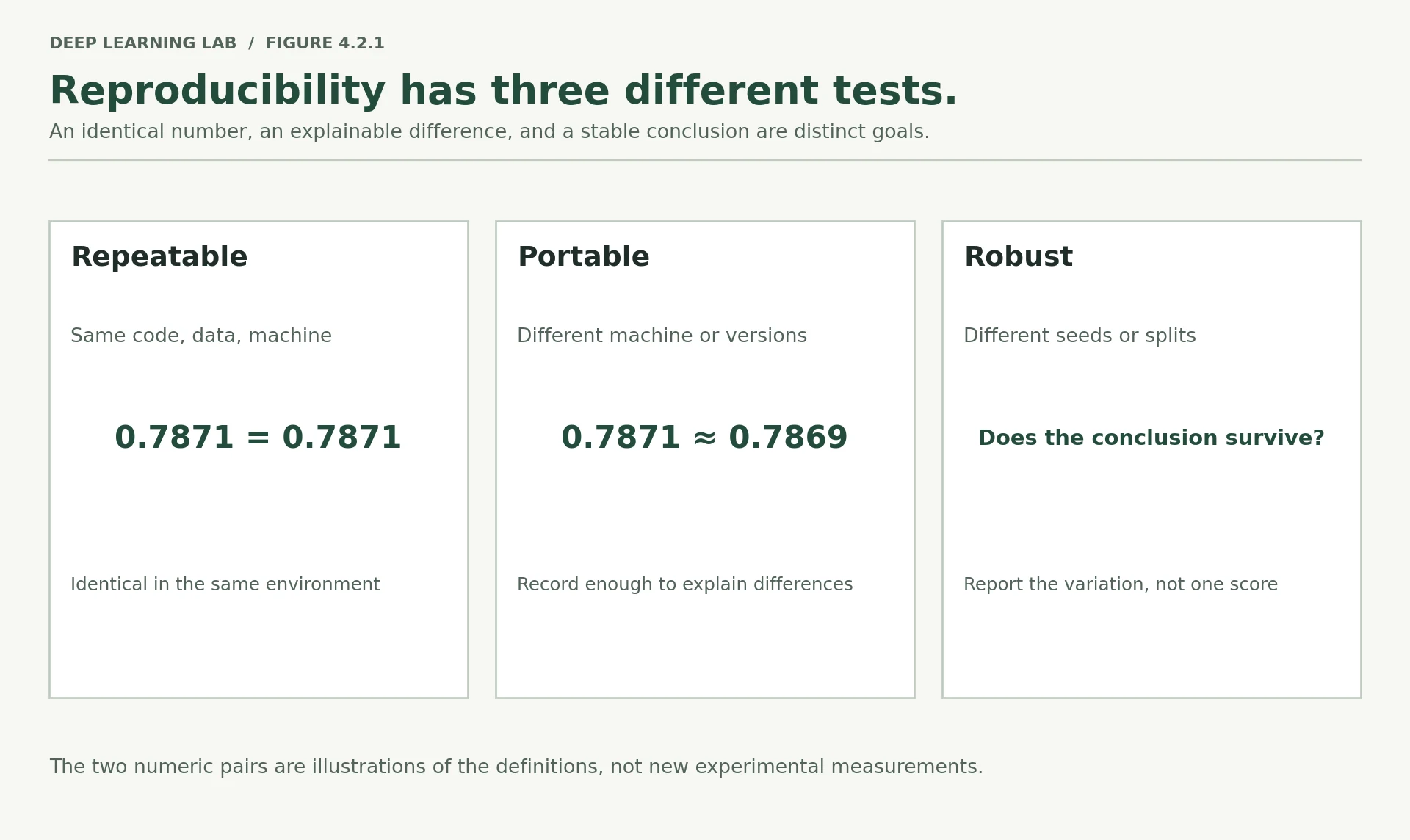
Each level fails for its own reasons, and each needs its own test.
-
A colleague reruns your code and gets 0.7869 where you got 0.7871. Which level is this, and what would you check first?
Most likely Level 2, portable: the same code on another machine or another software version gives a close but not identical number. Check the recorded environment first (PyTorch, NumPy and scikit-learn versions, CPU or GPU, thread count), then the data fingerprint and settings fingerprint. If all of those match and it is the same machine, it is a Level 1 failure: some random choice is not seeded, or the data or code changed without being recorded.
-
Which of the three levels does a noise floor measure?
Level 3, robust. A noise floor measures how much the score moves under different random choices (seeds, splits), which is exactly the yardstick for deciding whether a conclusion survives them.
A colleague reruns your code on their laptop with a newer PyTorch and gets 0.7869 where you got 0.7871. Which level is this?
Different machine or software: close but not identical. Check the recorded environment (versions, threads, hardware) first.
Which level asks whether your conclusion survives a new seed or a new split?
A finding that only holds for one seed is not a finding. The noise floor measures exactly this.
Describe the three levels of 'reproducible' in one line each.
- Repeatable: same code, data, machine and software give identical numbers.
- Portable: a different machine or version gives close numbers, with the difference recorded and explainable.
- Robust: different seeds or splits move the numbers, but the conclusion still holds.
Seeds, and what they cannot fix
A training run makes several random choices:
- the starting values of the weights;
- the order the training rows are visited in;
- which units dropout switches off, if you use dropout;
- sometimes which rows go into which part of the split.
Those choices come from a random number generator, which is not really random. It is a machine that produces a fixed sequence of numbers that merely look random. Tell it where in the sequence to start — that is the seed — and it produces the same numbers every time.
The awkward part is that Python, NumPy and PyTorch each keep their own generator. Seeding one does not seed the others. So we write one function that seeds all of them.
Two lines in it need a word of explanation:
torch.use_deterministic_algorithms(True, warn_only=True)asks PyTorch to prefer operations that give the same answer every time. Some fast GPU operations do not.warn_only=Truemeans that if no repeatable version of an operation exists, PyTorch warns instead of stopping.os.environ.setdefault("CUBLAS_WORKSPACE_CONFIG", ":4096:8")is a setting some NVIDIA maths routines need before they will behave repeatably. It does nothing on CPU, and it is harmless to set anyway.
def seed_everything(seed=42, deterministic=True): """Seed every random number generator this project touches, and ask for repeatable maths. Seeds Python's ``random``, NumPy and PyTorch (every GPU too, when present). With ``deterministic=True`` it also sets the cuBLAS workspace variable, asks PyTorch for deterministic algorithms (warning where none exist) and turns off cuDNN's benchmark mode. Thread scheduling, hardware and library versions are not controlled. Args: seed: The seed for every generator. deterministic: Also request deterministic algorithms. Returns: The seed, for convenience. """ random.seed(seed) # Python's own generator np.random.seed(seed) # NumPy's torch.manual_seed(seed) # PyTorch's, on CPU if torch.cuda.is_available(): torch.cuda.manual_seed_all(seed) # PyTorch's, on every GPU if deterministic: os.environ.setdefault("CUBLAS_WORKSPACE_CONFIG", ":4096:8") torch.use_deterministic_algorithms(True, warn_only=True) torch.backends.cudnn.benchmark = False return seedseed_everything(42)print("first three random numbers after seeding with 42:", torch.rand(3).tolist())seed_everything(42)print("seeded with 42 again :", torch.rand(3).tolist())seed_everything(7)print("seeded with 7 :", torch.rand(3).tolist())- 1
Python, NumPy and PyTorch each keep their own generator; each needs its own seed.
- 2
Prefer repeatable implementations; warn (rather than stop) when an operation has none.
- 3
Stops cuDNN from timing several algorithms and picking the fastest, which can differ between runs.
first three random numbers after seeding with 42: [0.8822692632675171, 0.9150039553642273, 0.38286375999450684]
seeded with 42 again                            : [0.8822692632675171, 0.9150039553642273, 0.38286375999450684]
seeded with 7                                   : [0.5349225401878357, 0.19880318641662598, 0.6592116951942444]
Same seed, same numbers. Different seed, different numbers. That is the whole mechanism.
Now the bug that makes notebooks unreproducible. It is not that people forget to seed. It is that they seed once, at the top, and then run cells more than once.
seed_everything(42)print("first call after seeding :", torch.rand(3).tolist())print("second call, no re-seed :", torch.rand(3).tolist())print("third call, no re-seed :", torch.rand(3).tolist())first call after seeding : [0.8822692632675171, 0.9150039553642273, 0.38286375999450684] second call, no re-seed : [0.9593056440353394, 0.3904482126235962, 0.600895345211029] third call, no re-seed : [0.2565724849700928, 0.7936413288116455, 0.9407714605331421]
Each call continues further along the sequence. So the numbers a cell gets depend on everything that ran before it. Run a cell twice, add a cell above it, run the notebook out of order, and every later result changes.
The fix is the rule the training function in Section 4 follows: seed at the start of every run, not once per notebook.
There is a second half to the fix. The DataLoader shuffles the training rows each epoch, and by default it draws from the same shared PyTorch generator. So the row order also depends on everything that ran before. You can give a DataLoader its own private generator, and then its shuffling depends on nothing else at all.
small_dataset = torch.utils.data.TensorDataset(torch.arange(10).float().unsqueeze(1))def first_batch(generator=None): """Return the first shuffled batch of the ten-row demo dataset. Args: generator: A ``torch.Generator`` for the DataLoader's shuffling, or ``None`` to use PyTorch's shared global generator. Returns: A list with the five values in the first batch. """ loader = torch.utils.data.DataLoader(small_dataset, batch_size=5, shuffle=True, generator=generator) return next(iter(loader))[0].ravel().tolist()torch.manual_seed(0)print("shared generator, first call :", first_batch())print("shared generator, second call:", first_batch())print("private generator, first call :", first_batch(torch.Generator().manual_seed(0)))print("private generator, second call:", first_batch(torch.Generator().manual_seed(0)))shared generator, first call : [6.0, 7.0, 1.0, 4.0, 2.0] shared generator, second call: [2.0, 4.0, 7.0, 0.0, 8.0] private generator, first call : [3.0, 7.0, 5.0, 2.0, 0.0] private generator, second call: [3.0, 7.0, 5.0, 2.0, 0.0]
With the shared generator the two calls differ. With a private generator seeded to 0 they are identical, no matter what else has run. Every DataLoader from here on gets its own.
What seeds cannot control
- The number of threads, and the hardware. Maths libraries split work across CPU cores and add the pieces up in whatever order they finish. Adding floating-point numbers in a different order can change the last few digits.
- Library versions. A new PyTorch release can change how an operation is computed.
- Some GPU operations, which are fast precisely because they do not guarantee an order.
- Anything outside the process: a data file that changed, a download that returned a new version.
None of these can be seeded away. They are Level 2 problems, and the answer is to record them, which Section 6 does.
-
Why does giving the DataLoader its own generator make a run more repeatable than one seed at the top of the notebook?
Because a private generator's state depends only on its own seed. The shared generator's state depends on every random number drawn before it: re-running a cell, adding a cell above, a library that draws random numbers, a model built in a different order. Any of those shifts the sequence and changes the row order. The private generator gives the same order no matter what else has run.
-
You restart the kernel and run everything top to bottom, twice. Will the second and third
torch.rand(3)calls above agree between the two passes? Why?Yes. After a restart, running top to bottom executes exactly the same sequence of random draws from the same seed, so both passes print the same second and third triples (0.9593… and 0.2565…). The numbers are reproducible given the same order of execution; the problem only appears when cells are run out of order, twice, or with new cells in between.
Why is one seed_everything(42) at the top of a notebook not enough?
Seed at the start of every run, and give the DataLoader its own generator so the row order depends on nothing else.
Which of these can a seed not fix?
Those are Level 2 differences: record them, don't try to seed them away.
Setting up the data
This is Lesson 4.1's work, compressed into three cells so this notebook stands on its own. If a step here is unfamiliar, 4.1 explains each one at length.
What the three cells do:
- download
bank-full.csvif it is not already here, and dropduration; - cut the rows into training, validation and test, keeping the share of yes answers the same in each part (stratified);
- fit the scaler and one-hot encoder on the training rows only, then transform all three parts with that same fitted object.
BANK_URL = "https://archive.ics.uci.edu/static/public/222/bank+marketing.zip"BANK_CSV = "data/bank-full.csv"def load_bank_marketing(path=BANK_CSV): """Download Bank Marketing if needed and return its inputs and label. ``duration`` is dropped because a call's length is only known after the call. Args: path: Where the CSV is (or will be) stored. Returns: A tuple ``(X, y)``: the 15-column input DataFrame and a float32 label array (1 = subscribed). Raises: urllib.error.URLError: If the file is missing and UCI cannot be reached. """ if not os.path.exists(path): raw_bytes = urllib.request.urlopen(BANK_URL, timeout=120).read() outer = zipfile.ZipFile(io.BytesIO(raw_bytes)) inner = zipfile.ZipFile(io.BytesIO(outer.read("bank.zip"))) os.makedirs(os.path.dirname(path), exist_ok=True) with open(path, "wb") as f: f.write(inner.read("bank-full.csv")) df = pd.read_csv(path, sep=";") y = (df["y"] == "yes").astype(np.float32).to_numpy() X = df.drop(columns=["y", "duration"]) # duration is known only after the call return X, yX, y = load_bank_marketing()print("inputs:", X.shape, "| labels:", y.shape, "| share who said yes:", round(float(y.mean()), 4))inputs: (45211, 15) | labels: (45211,) | share who said yes: 0.117
from sklearn.model_selection import train_test_splitdef make_split(y, policy="stratified", fractions=(0.8, 0.1, 0.1), seed=42): """Split row numbers into training, validation and test sets. Args: y: Labels, one per row. policy: ``"stratified"`` (keep the class balance), ``"random"`` or ``"chronological"`` (file order, the deployment check from Lesson 4.1). fractions: Shares for training, validation and test. seed: Seed for the random rules. Returns: A dict ``{"train", "val", "test"}`` of NumPy arrays of row numbers. """ f_train, f_val, f_test = fractions rows = np.arange(len(y)) test_share_of_rest = f_test / (f_val + f_test) if policy == "chronological": # the deployment check from Lesson 4.1 a, b = int(round(f_train * len(y))), int(round((f_train + f_val) * len(y))) return {"train": rows[:a], "val": rows[a:b], "test": rows[b:]} stratify_on = y if policy == "stratified" else None train, rest = train_test_split(rows, train_size=f_train, random_state=seed, stratify=stratify_on) stratify_rest = y[rest] if policy == "stratified" else None val, test = train_test_split(rest, test_size=test_share_of_rest, random_state=seed, stratify=stratify_rest) return {"train": train, "val": val, "test": test}split = make_split(y, "stratified", seed=42)for part, rows in split.items(): print(f"{part:<6} {len(rows):>6} rows | share who said yes {y[rows].mean():.4f}")train 36168 rows | share who said yes 0.1170 val 4521 rows | share who said yes 0.1170 test 4522 rows | share who said yes 0.1170
from sklearn.compose import ColumnTransformerfrom sklearn.preprocessing import OneHotEncoder, StandardScalerdef build_preprocessor(X): """Build an unfitted preprocessor that scales numeric columns and one-hot encodes the rest. Args: X: The input table; used only to find which columns are numeric. Returns: An unfitted ``ColumnTransformer`` (unseen categories become all zeros). """ numeric = X.select_dtypes(include="number").columns.tolist() categorical = [c for c in X.columns if c not in numeric] return ColumnTransformer([ ("scale_numbers", StandardScaler(), numeric), ("one_hot_categories", OneHotEncoder(handle_unknown="ignore", sparse_output=False), categorical), ])def prepare_arrays(X, y, split): """Fit the preprocessor on the training rows and transform every part of the split. Args: X: The input table. y: The labels. split: A dict of row numbers from ``make_split``. Returns: A tuple ``(inputs, labels, preprocessor)``: dicts of float32 input arrays and label arrays keyed by part, and the fitted preprocessor. """ pre = build_preprocessor(X).fit(X.iloc[split["train"]]) inputs = {part: pre.transform(X.iloc[rows]).astype(np.float32) for part, rows in split.items()} labels = {part: y[rows] for part, rows in split.items()} return inputs, labels, preinputs, labels, preprocessor = prepare_arrays(X, y, split)print("model inputs per row:", inputs["train"].shape[1])print({part: array.shape for part, array in inputs.items()})model inputs per row: 50
{'train': (36168, 50), 'val': (4521, 50), 'test': (4522, 50)}
Why fit the scaler and encoder on the training rows only, even when compressing Lesson 4.1 into three cells?
The same rule as Lesson 4.1: fit on training, transform everything with that fitted object.
One function that runs an experiment
Module 3 wrote a training loop in a cell and edited it whenever something needed changing. That works once. It stops working when you want twenty runs that differ in one setting, because now you cannot tell which version of the cell produced which number.
The fix is a function whose every setting arrives in one dictionary. Then the settings are the experiment, and they can be saved, compared and hashed.
Build it in pieces first, then assemble.
The model
Three linear layers with ReLU between them, exactly the Module 2 and Module 3 model. nn.Sequential just runs the layers in order.
Note the torch.manual_seed at the top: the starting weights are random, so the model has to be built at a known point in the sequence for the run to be repeatable.
def build_model(settings, n_inputs): """Build the Module 3 network from settings, with reproducible starting weights. Seeds PyTorch first, then stacks ``Linear → ReLU`` (plus ``Dropout`` when requested) for each hidden width and ends with one output logit. Args: settings: Needs ``seed``, ``hidden`` (widths) and ``dropout``. n_inputs: Number of input features (50 after preprocessing). Returns: An ``nn.Sequential`` producing one logit per row. """ torch.manual_seed(settings["seed"]) layers, previous = [], n_inputs for width in settings["hidden"]: layers += [nn.Linear(previous, width), nn.ReLU()] if settings["dropout"] > 0: layers.append(nn.Dropout(settings["dropout"])) previous = width layers.append(nn.Linear(previous, 1)) return nn.Sequential(*layers)demo_model = build_model({"seed": 42, "hidden": (64, 32), "dropout": 0.0}, 50)print(demo_model)print("parameters:", sum(p.numel() for p in demo_model.parameters()))Sequential( (0): Linear(in_features=50, out_features=64, bias=True) (1): ReLU() (2): Linear(in_features=64, out_features=32, bias=True) (3): ReLU() (4): Linear(in_features=32, out_features=1, bias=True) ) parameters: 5377
Scoring
After each epoch we want to know how the model is doing. torch.no_grad() says "do not keep the information needed for a backward pass here", which makes scoring faster and uses less memory, since we are not going to train on it.
torch.sigmoid turns the model's raw output into a number between 0 and 1, so it can be read as a probability.
from sklearn.metrics import accuracy_score, average_precision_score, roc_auc_scoredef score(model, X_tensor, y_array, loss_function): """Score a model on one part of the data, without gradients and in evaluation mode. Args: model: The model to score. X_tensor: Inputs as a float tensor. y_array: Labels as a NumPy array. loss_function: The loss used in training (so the loss is comparable). Returns: A tuple ``(probabilities, scores)``: the predicted probabilities and a dict with ``loss``, ``auc``, ``pr_auc`` and ``accuracy`` (at 0.5). """ model.eval() # switch off dropout etc. with torch.no_grad(): logits = model(X_tensor).float() probabilities = torch.sigmoid(logits).numpy().ravel() return probabilities, { "loss": loss_function(logits, torch.tensor(y_array).unsqueeze(1)).item(), "auc": float(roc_auc_score(y_array, probabilities)), "pr_auc": float(average_precision_score(y_array, probabilities)), "accuracy": float(accuracy_score(y_array, probabilities > 0.5)), }The settings
One dictionary holds every choice. Anything you pass in replaces the matching entry; anything you leave out keeps the value below. So an experiment is described by what it changes, which is usually one or two things.
BASELINE = dict( name="baseline", # what to call this run's files split="stratified", # which splitting rule (Lesson 4.1) split_seed=42, # which rows land where seed=42, # starting weights and row order hidden=(64, 32), # layer widths dropout=0.0, lr=1e-3, # learning rate weight_decay=0.0, batch_size=256, epochs=30, pos_weight=None, # makes the rare class count for more (Lesson 4.1 section 10) checkpoint_every=0, # 0 means never save mid-run resume=False, # continue from a saved checkpoint? stop_after=None, # pretend the machine died after this epoch)print(json.dumps({k: str(v) for k, v in BASELINE.items()}, indent=2)){
"name": "baseline",
"split": "stratified",
"split_seed": "42",
"seed": "42",
"hidden": "(64, 32)",
"dropout": "0.0",
"lr": "0.001",
"weight_decay": "0.0",
"batch_size": "256",
"epochs": "30",
"pos_weight": "None",
"checkpoint_every": "0",
"resume": "False",
"stop_after": "None"
}
The function itself
Now the whole thing. Walking through what it does, in order:
- seed everything, so the run starts from a known point;
- split the rows and prepare the arrays, using the rules from Lesson 4.1;
- build the model and the optimizer. AdamW is the optimizer from Module 3; it keeps two running averages per weight, which will matter in Section 7;
BCEWithLogitsLossis the loss for a yes/no problem. It expects raw outputs, not probabilities, and applies the sigmoid itself, which is more numerically stable;- DataLoader with its own generator, so the row order is under our control;
- for each epoch, walk the training rows in batches: clear the old gradients, run the batch forward, measure the loss, run backward, let the optimizer update the weights;
- after each epoch, score the validation rows and remember the epoch if it is the best so far.
copy.deepcopytakes a full copy of the weights, so later training does not overwrite the best ones; - at the end, restore the best epoch's weights and score the test rows once. Choosing the epoch on validation and reporting on test is the point of having three parts;
- return a dictionary with the history, the scores, and the artifacts we might want afterwards.
def run_experiment(settings, quiet=False, results_dir="results", checkpoint_dir="checkpoints"): """Train once, following ``settings``, and return everything about the run. Seeds everything, splits and prepares the data, trains with AdamW and a private row-order generator, scores validation after every epoch and keeps the best epoch's weights, optionally saves checkpoints, stops early, or resumes from a checkpoint. The best epoch is then scored once on test, and the result is written to ``results_dir/<name>.json``. Args: settings: Overrides for ``BASELINE`` (``name``, ``split``, ``split_seed``, ``seed``, ``hidden``, ``dropout``, ``lr``, ``weight_decay``, ``batch_size``, ``epochs``, ``pos_weight``, ``checkpoint_every``, ``resume``, ``stop_after``). quiet: Do not print the one-line summary. results_dir: Folder for the JSON result. checkpoint_dir: Folder for checkpoints. Returns: A dict with the full ``settings``, the provenance ``run`` record, per-epoch ``history``, ``best_epoch``, ``best_val_auc``, ``val_at_best``, ``test`` scores (with the share of positives and the average prediction), ``seconds``, ``interrupted`` and in-memory ``artifacts`` (model, preprocessor, split, final weights, test probabilities). Raises: TypeError: If a setting has the wrong type, e.g. a learning rate loaded as text. """ settings = {**BASELINE, **settings} settings["hidden"] = list(settings["hidden"]) seed_everything(settings["seed"]) split = make_split(y, settings["split"], seed=settings["split_seed"]) inputs, labels, pre = prepare_arrays(X, y, split) X_train = torch.tensor(inputs["train"]) y_train = torch.tensor(labels["train"]).unsqueeze(1) X_val, X_test = torch.tensor(inputs["val"]), torch.tensor(inputs["test"]) model = build_model(settings, X_train.shape[1]) optimizer = torch.optim.AdamW(model.parameters(), lr=settings["lr"], weight_decay=settings["weight_decay"]) weight = None if settings["pos_weight"] is None else torch.tensor([float(settings["pos_weight"])]) loss_function = nn.BCEWithLogitsLoss(pos_weight=weight) generator = torch.Generator().manual_seed(settings["seed"]) loader = torch.utils.data.DataLoader(torch.utils.data.TensorDataset(X_train, y_train), batch_size=settings["batch_size"], shuffle=True, generator=generator) history, best, start_epoch = [], {"auc": -1.0, "epoch": 0, "weights": None}, 1 checkpoint_path = os.path.join(checkpoint_dir, f"{settings['name']}.pt") if settings["resume"] and os.path.exists(checkpoint_path): start_epoch, history, best = load_checkpoint(checkpoint_path, model, optimizer, generator) if not quiet: print(f"[{settings['name']}] resumed at epoch {start_epoch}") started = time.time() interrupted = False for epoch in range(start_epoch, settings["epochs"] + 1): model.train() running_loss, seen = 0.0, 0 for batch_x, batch_y in loader: optimizer.zero_grad() # forget last batch's gradients loss = loss_function(model(batch_x), batch_y) loss.backward() # work out each weight's blame optimizer.step() # nudge the weights running_loss += loss.item() * len(batch_x) seen += len(batch_x) _, train_scores = score(model, X_train, labels["train"], loss_function) _, val_scores = score(model, X_val, labels["val"], loss_function) history.append({"epoch": epoch, "train_loss": running_loss / seen, "val_loss": val_scores["loss"], "train_auc": train_scores["auc"], "val_auc": val_scores["auc"], "val_accuracy": val_scores["accuracy"]}) if val_scores["auc"] > best["auc"]: best = {"auc": val_scores["auc"], "epoch": epoch, "weights": copy.deepcopy(model.state_dict())} if settings["checkpoint_every"] and epoch % settings["checkpoint_every"] == 0: save_checkpoint(checkpoint_path, model, optimizer, generator, epoch, history, best) if settings["stop_after"] is not None and epoch >= settings["stop_after"]: interrupted = True # pretend the machine died here break final_weights = copy.deepcopy(model.state_dict()) model.load_state_dict(best["weights"]) # go back to the best epoch val_probabilities, val_scores = score(model, X_val, labels["val"], loss_function) test_probabilities, test_scores = score(model, X_test, labels["test"], loss_function) result = { "settings": settings, "run": run_record(settings, X, y, model), "history": history, "best_epoch": best["epoch"], "best_val_auc": best["auc"], "val_at_best": val_scores, "test": {**test_scores, "share_who_said_yes": float(labels["test"].mean()), "average_prediction": float(test_probabilities.mean())}, "seconds": time.time() - started, "interrupted": interrupted, } os.makedirs(results_dir, exist_ok=True) with open(os.path.join(results_dir, f"{settings['name']}.json"), "w") as f: json.dump(result, f, indent=2, default=str) if not quiet: print(f"[{settings['name']}] {result['seconds']:.1f}s | best epoch {best['epoch']} | " f"val AUC {best['auc']:.4f} | test AUC {test_scores['auc']:.4f}" f"{' | INTERRUPTED' if interrupted else ''}") result["artifacts"] = {"model": model, "preprocessor": pre, "split": split, "final_weights": final_weights, "test_probabilities": test_probabilities} return resultEverything the run depends on arrives in settings, and everything it produced leaves in result and a JSON file.
- 1
Start from the baseline and override only what the caller passes: an experiment is described by what it changes.
- 2
Seed at the start of every run, not once per notebook.
- 3
The DataLoader's private generator: row order depends on nothing else.
- 4
Resuming restores the model, optimizer, generators and bookkeeping, then continues from the next epoch.
- 5
A deliberate crash, used to test that resuming changes nothing.
- 6
Chosen on validation, then scored once on test.
- 7
default=strturns anything JSON cannot store natively (NumPy integers, paths, other objects) into text instead of failing.
The function refers to three helpers we have not written yet: run_record, save_checkpoint and load_checkpoint. Sections 6 and 7 build them. Python only looks them up when the function runs, so we define them now, in their simplest form, and replace them properly later.
def run_record(settings, X, y, model): """Placeholder. Section 6 replaces this with the real thing.""" return {}def save_checkpoint(path, model, optimizer, generator, epoch, history, best): """Placeholder. Section 7 replaces this.""" passdef load_checkpoint(path, model, optimizer, generator): """Placeholder. Section 7 replaces this.""" return 1, [], {"auc": -1.0, "epoch": 0, "weights": None}reference = run_experiment({"name": "reference"})print()print("epoch validation AUC")for row in reference["history"][15:20]: print(f" {row['epoch']:>2} {row['val_auc']:.4f}")[reference] 8.5s | best epoch 18 | val AUC 0.7871 | test AUC 0.8016 epoch validation AUC 16 0.7845 17 0.7846 18 0.7871 19 0.7849 20 0.7837
Best epoch 18, validation AUC 0.7871. That is Lesson 3.4's number reproduced exactly: same rows, same model, same settings.
The test AUC printed beside it is new. It is the first test-set number for Bank Marketing in this course, because Module 3 only ever looked at validation. The difference matters: the validation score helped choose the epoch, so it is slightly flattered. The test score chose nothing, so it is the one to report.
And the comparison from Section 1 is now concrete: Module 2's 0.7965 came from a different split and a different optimizer. This is 0.7871. Same model, different recipe, different number.
-
The function scores the test rows once, after restoring the best epoch. What would go wrong if it picked the best epoch by test AUC instead?
The test set would become a second validation set. The reported test AUC would be the best of 30 noisy measurements on those rows, so it would be optimistic, and there would be no untouched data left to give an honest estimate. Selecting on validation and reporting on test is what keeps the test number unbiased.
-
Why is
copy.deepcopyneeded when saving the best weights, rather than just keeping a reference tomodel.state_dict()?state_dict()returns references to the model's live tensors, not copies. Training keeps updating those tensors in place, so a stored reference would always show the latest weights, and "restoring the best epoch" would restore nothing.copy.deepcopymakes an independent snapshot (Lesson 2.3 measured the same trap).
Why put every setting of an experiment into one dictionary?
Editing a cell for twenty runs makes it impossible to know which version produced which number.
The run picks the best epoch on validation and then scores test once. What would go wrong if it picked the epoch by test AUC?
Validation helps choose, so it is slightly optimistic. Test chooses nothing, so it is the number to report.
Settings as a recipe you can read
The settings are now a Python dictionary. That is already better than editing a cell, but a dictionary lives inside the notebook. To share an experiment, or to rerun one next year, the settings need to be a file.
YAML is a plain-text format for exactly this. It is readable by a person, it can be loaded by a machine, and because it is text, git can show you what changed between two versions of it.
yaml.safe_dump writes a dictionary to text. sort_keys=False keeps our order rather than alphabetising.
os.makedirs("configs", exist_ok=True)settings_for_file = {k: (list(v) if isinstance(v, tuple) else v) for k, v in BASELINE.items()}with open("configs/baseline.yaml", "w") as f: yaml.safe_dump(settings_for_file, f, sort_keys=False)print(open("configs/baseline.yaml").read())name: baseline split: stratified split_seed: 42 seed: 42 hidden: - 64 - 32 dropout: 0.0 lr: 0.001 weight_decay: 0.0 batch_size: 256 epochs: 30 pos_weight: null checkpoint_every: 0 resume: false stop_after: null
A fingerprint for the settings
Twenty runs produce twenty settings files, many of them nearly identical. Comparing them by eye is slow and error-prone. A hash solves this.
A hash function takes any text and returns a short string of letters and numbers. The same text always gives the same string. Different text almost always gives a different one. So the hash is a fingerprint: if two runs carry the same fingerprint, they used the same settings.
json.dumps(..., sort_keys=True) turns the dictionary into text with the keys in a fixed order, so that writing the same settings in a different order still gives the same fingerprint. [:12] keeps the first twelve characters, which is short enough to read and long enough to be unique here.
def settings_hash(settings): """A short fingerprint of the settings that decide the result. Ignores ``name``, ``resume``, ``stop_after`` and ``checkpoint_every`` (how a run was executed, not what it computed) and hashes the rest with sorted keys, so key order does not matter. Args: settings: A settings dictionary. Returns: The first 12 hexadecimal characters of a SHA-256 hash. """ ignore = {"name", "resume", "stop_after", "checkpoint_every"} # how it was run, not what was run to_hash = {k: v for k, v in settings.items() if k not in ignore} as_text = json.dumps(to_hash, sort_keys=True, default=str) return hashlib.sha256(as_text.encode()).hexdigest()[:12]print("hello ->", hashlib.sha256(b"hello").hexdigest()[:12])print("hello! ->", hashlib.sha256(b"hello!").hexdigest()[:12])print()reordered = dict(reversed(list(settings_for_file.items())))print("baseline settings :", settings_hash(settings_for_file))print("same settings, keys in reverse :", settings_hash(reordered))print("same settings, different run name :", settings_hash({**settings_for_file, "name": "anything"}))print("learning rate changed to 0.0003 :", settings_hash({**settings_for_file, "lr": 0.0003}))- 1
How the run was executed, not what was computed.
- 2
Sorting the keys makes the text, and so the hash, independent of dictionary order.
- 3
Twelve hex characters: 48 bits, far more than enough to tell a few thousand runs apart.
hello      -> 2cf24dba5fb0
hello!     -> ce06092fb948

baseline settings                 : 175eba29a158
same settings, keys in reverse    : 175eba29a158
same settings, different run name : 175eba29a158
learning rate changed to 0.0003   : 0585c21371f6
Changing one character of the input changes the fingerprint completely. Reordering the keys does not, and neither does renaming the run — because the name says how this execution was labelled, not what was computed. The learning rate does change it, because that changes the result.
One trap worth meeting now
YAML has a rule that catches nearly everybody who writes learning rates in scientific notation.
print("written as 3e-4 ->", repr(yaml.safe_load("lr: 3e-4")["lr"]))print("written as 3.0e-4 ->", repr(yaml.safe_load("lr: 3.0e-4")["lr"]))print("written as 0.0003 ->", repr(yaml.safe_load("lr: 0.0003")["lr"]))written as 3e-4 -> '3e-4' written as 3.0e-4 -> 0.0003 written as 0.0003 -> 0.0003
3e-4 comes back as the text '3e-4', not the number 0.0003, because the YAML version PyYAML follows requires a decimal point in scientific notation. Watch what happens if that text reaches the optimizer.
try: run_experiment({"name": "broken_lr", "lr": yaml.safe_load("lr: 3e-4")["lr"]})except TypeError as error: print("the optimizer refused it:", error)the optimizer refused it: '<=' not supported between instances of 'float' and 'str'
That is the good outcome: it fails immediately and loudly. The bad outcome is code that stores or compares the value silently and leaves you wondering why two runs differ. Write 3.0e-4 or 0.0003.
-
Why does the fingerprint deliberately ignore
name,resume,stop_afterandcheckpoint_every?Because they describe how this execution was run or labelled, not what was computed. The same hyperparameters, data and seeds produce the same result whatever the run is called, however often it saves a checkpoint, and whether it was resumed (an exact resume gives identical weights, as Section 7 shows). Including them would give identical experiments different fingerprints and make them impossible to group. (
stop_afterdoes change what finishes; the record'sinterruptedflag captures that separately.) -
Two runs have the same settings fingerprint but different scores. Name three things that could explain it. (Section 6 records all three.)
The three things Section 6 records: the data changed (a re-downloaded or edited file, visible in the data fingerprint); the code changed (a different commit, or uncommitted edits); the software or hardware changed (library versions, CPU against GPU, thread count). A fourth possibility is a non-deterministic operation, which is why the lesson runs on CPU with deterministic algorithms on.
A settings fingerprint
Write settings_hash as §5 describes: ignore the keys that do not change the result, serialise with sorted keys, hash with SHA-256
and keep the first 12 characters.
What does yaml.safe_load('lr: 3e-4')['lr'] return?
PyYAML's YAML version needs a decimal point in scientific notation. Write 3.0e-4 or 0.0003.
Why does the settings fingerprint ignore name and resume?
Same computation should mean the same fingerprint, so only result-deciding settings are hashed (with keys sorted).
What a run should record about itself
A score on its own cannot be checked. To make it checkable, each run records the things somebody would need to get it again:
- a run id — a name for this particular execution;
- the settings fingerprint from Section 5 — what was run;
- a data fingerprint — which exact rows and labels were used;
- the code version — which commit of your repository produced it;
- the software versions — the Level 2 details from Section 2.
A fingerprint for the data
The settings fingerprint says what you asked for. It says nothing about the data, which can change without anybody noticing: a file gets re-downloaded, a colleague fixes a column, a row is appended.
So we hash the data too. pd.util.hash_pandas_object turns every row into a number; we hash those numbers, the column names, and the labels.
def data_fingerprint(X, y): """A short hash of the exact rows, columns and labels a run saw. Args: X: The input table (values, index and column names are hashed). y: The labels. Returns: The first 12 hexadecimal characters of a SHA-256 hash; one changed value changes it. """ hasher = hashlib.sha256() hasher.update(pd.util.hash_pandas_object(X, index=True).to_numpy().tobytes()) hasher.update(",".join(map(str, X.columns)).encode()) hasher.update(np.asarray(y).tobytes()) return hasher.hexdigest()[:12]print("our data :", data_fingerprint(X, y))print("the same data again :", data_fingerprint(X, y))print("with one label flipped :", data_fingerprint(X, np.concatenate([[1 - y[0]], y[1:]])))print("with one column dropped :", data_fingerprint(X.drop(columns="age"), y))- 1
One 64-bit hash per row (values and index), fed into SHA-256 as raw bytes.
- 2
Column names too, so a renamed or dropped column changes the fingerprint.
our data                    : ae4909e99a00
the same data again         : ae4909e99a00
with one label flipped      : 6e3fe36d9cc2
with one column dropped     : 4fae1970b4a5
One flipped label out of 45,211 changes the fingerprint. That is what you want: it is a smoke alarm, not a summary.
Which version of the code
If your project is in git, the commit id says exactly which code ran. Two things are worth recording: the commit, and whether the working folder had uncommitted changes at the time. A run from a folder with uncommitted changes came from code that exists nowhere except that machine, at that moment.
subprocess.run runs a command as if you had typed it in a terminal and hands back its output.
def git_state(folder="."): """Which commit produced this run, and did the folder have uncommitted changes? Args: folder: A folder inside the git repository. Returns: A dict with ``commit`` (short hash) and ``uncommitted_changes`` (bool), or both ``None`` plus a ``note`` when the folder is not a git repository or git is missing. """ try: commit = subprocess.run(["git", "rev-parse", "--short", "HEAD"], cwd=folder, capture_output=True, text=True, check=True).stdout.strip() changes = subprocess.run(["git", "status", "--porcelain"], cwd=folder, capture_output=True, text=True, check=True).stdout.strip() return {"commit": commit, "uncommitted_changes": changes != ""} except (OSError, subprocess.CalledProcessError): return {"commit": None, "uncommitted_changes": None, "note": "not inside a git repository"}print("this notebook's folder:", git_state())this notebook's folder: {'commit': None, 'uncommitted_changes': None, 'note': 'not inside a git repository'}
This folder is probably not a git repository, and the function says so rather than inventing a value. To see it work, here is a small repository created, committed to, and then edited.
scratch = "scratch_repo"shutil.rmtree(scratch, ignore_errors=True)os.makedirs(scratch)def git(*args): """Run a git command inside the scratch repository. Args: *args: The git subcommand and its arguments. Returns: The ``subprocess.CompletedProcess`` with captured output; failures do not raise. """ return subprocess.run(["git", *args], cwd=scratch, capture_output=True, text=True)git("init", "-q")git("config", "user.email", "you@example.com")git("config", "user.name", "Learner")with open(f"{scratch}/settings.yaml", "w") as f: f.write("lr: 0.001\n")git("add", ".")git("commit", "-q", "-m", "first settings")print("straight after committing:", git_state(scratch))with open(f"{scratch}/settings.yaml", "w") as f: f.write("lr: 0.01\n")print("after editing the file :", git_state(scratch))shutil.rmtree(scratch)straight after committing: {'commit': 'e4e5adb', 'uncommitted_changes': False}
after editing the file : {'commit': 'e4e5adb', 'uncommitted_changes': True}
The software versions, and the whole record
Now put it together and replace the placeholder from Section 4.
def environment_info(): """The software and hardware details that explain small differences between machines. Returns: A dict with the Python version, platform, PyTorch, NumPy, pandas and scikit-learn versions, the device used and the number of CPU threads. """ import sklearn return {"python": platform.python_version(), "platform": platform.platform(), "torch": torch.__version__, "numpy": np.__version__, "pandas": pd.__version__, "sklearn": sklearn.__version__, "device": RUN_DEVICE, "cpu_threads": torch.get_num_threads()}def run_record(settings, X, y, model): """Everything a stranger would need to judge or reproduce a result. Args: settings: The run's full settings. X: The input table the run used. y: The labels the run used. model: The trained model (for its parameter count). Returns: A dict with a unique ``run_id``, ``started_at`` (UTC), ``settings_hash``, ``data_fingerprint``, ``git`` state, ``environment`` and ``n_parameters``. """ return { "run_id": f"{settings['name']}-{uuid.uuid4().hex[:8]}", "started_at": datetime.now(timezone.utc).isoformat(timespec="seconds"), "settings_hash": settings_hash(settings), "data_fingerprint": data_fingerprint(X, y), "git": git_state(), "environment": environment_info(), "n_parameters": sum(p.numel() for p in model.parameters()), }reference = run_experiment({"name": "reference"})print()print(json.dumps(reference["run"], indent=2))[reference] 7.9s | best epoch 18 | val AUC 0.7871 | test AUC 0.8016
{
"run_id": "reference-019891cd",
"started_at": "2026-09-24T17:43:26+00:00",
"settings_hash": "175eba29a158",
"data_fingerprint": "ae4909e99a00",
"git": {
"commit": null,
"uncommitted_changes": null,
"note": "not inside a git repository"
},
"environment": {
"python": "3.12.3",
"platform": "Linux-6.18.44-fc-v40-x86_64-with-glibc2.39",
"torch": "2.14.0+cpu",
"numpy": "2.4.4",
"pandas": "3.0.2",
"sklearn": "1.8.0",
"device": "cpu",
"cpu_threads": 1
},
"n_parameters": 5377
}
Every future run now carries this block, because run_experiment calls run_record at the end.
One more thing worth pinning: the versions for the whole project, in a file that can be installed later.
import importlib.metadata as metadataimport sklearnimport matplotlibpins = {"torch": torch.__version__.split("+")[0], "scikit-learn": sklearn.__version__, "numpy": np.__version__, "pandas": pd.__version__, "matplotlib": matplotlib.__version__, "pyyaml": yaml.__version__}with open("requirements-day4.txt", "w") as f: f.write("\n".join(f"{name}=={version}" for name, version in pins.items()) + "\n")print(open("requirements-day4.txt").read())torch==2.14.0 scikit-learn==1.8.0 numpy==2.4.4 pandas==3.0.2 matplotlib==3.10.8 pyyaml==6.0.3
-
Two runs share a settings fingerprint but have different data fingerprints. What happened, and which result do you trust?
The data changed between the two runs while the recipe stayed the same: a re-downloaded file, a fixed column, appended rows. Trust neither result blindly. Find out which data is the version you intend to use (ideally the one you can fetch again and fingerprint identically), rerun anything you need on that data, and compare results only when their data fingerprints match.
-
Why record the number of CPU threads?
Because parallel maths adds numbers in whatever order threads finish, and floating-point addition depends on order, so a different thread count can change the last few digits. Recording it explains small Level 2 differences (this run used one thread) and also explains timing differences between machines.
Two runs share a settings fingerprint but have different data fingerprints. What happened?
One flipped label changes the data fingerprint: it is a smoke alarm, not a summary.
List what every run should record about itself so someone can get its number again.
- A run id; the settings fingerprint (what was run); a data fingerprint (exact rows, columns, labels).
- The code version (commit, and whether there were uncommitted changes) and the software/environment versions (for Level 2 differences).
Checkpoints that truly resume
Long runs get interrupted. A Colab session times out, a laptop sleeps, a shared machine takes your job away. A checkpoint is a saved copy of the run so you can continue instead of starting over.
The usual mistake is to save only the weights. That is enough to use the model. It is not enough to continue training it, and the reason is the optimizer.
AdamW does not just subtract the gradient from each weight. For every weight it keeps two running averages: one of recent gradients, one of recent squared gradients. Those decide how big each weight's next step is. Look at them.
tiny_model = nn.Linear(4, 1)tiny_optimizer = torch.optim.AdamW(tiny_model.parameters(), lr=1e-3)print("before any step, the optimizer knows:", dict(tiny_optimizer.state))tiny_loss = tiny_model(torch.randn(8, 4)).mean()tiny_loss.backward()tiny_optimizer.step()for parameter, stored in tiny_optimizer.state.items(): print("after one step it keeps, per parameter:", {key: (tuple(value.shape) if torch.is_tensor(value) else value) for key, value in stored.items()}) breakbefore any step, the optimizer knows: {}
after one step it keeps, per parameter: {'step': (), 'exp_avg': (1, 4), 'exp_avg_sq': (1, 4)}
exp_avg and exp_avg_sq are those two running averages, and they are the same shape as the weights. Throw them away mid-run and the optimizer starts again from nothing, taking the wrong-sized steps until it rebuilds them.
So a checkpoint that can resume must hold:
- the weights;
- the optimizer state, those running averages and the step count;
- the row-order generator, so the next epoch visits rows in the order it would have;
- the global random generators, for anything else that draws random numbers;
- the bookkeeping: history so far, best score, best weights.
What a resumable checkpoint holds, and what breaks without each piece
1. The weights
The model itself. Without them there is nothing to resume, only a model you could use but not continue training faithfully.
2. The optimizer state
AdamW's two running averages per weight and the step count. Without them the next steps have the wrong size until the averages rebuild; with a schedule you may see a jump in the loss.
3. The DataLoader's generator
The row order for the next epoch. Without it the resumed run visits rows in a different order, so it can see examples it has just seen.
4. The global random generators
Python, NumPy and torch states, for dropout and anything else that draws random numbers.
5. The bookkeeping
History so far, the best score and the best weights. Without them early stopping forgets what it was comparing against.
def save_checkpoint(path, model, optimizer, generator, epoch, history, best): """Save everything the next epoch depends on, so the run can resume exactly. Args: path: File to write. model: The model (its ``state_dict``). optimizer: The optimizer, whose running averages and step count are saved. generator: The DataLoader's row-order generator. epoch: The epoch just completed. history: Per-epoch records so far. best: The best score, epoch and weights so far. """ os.makedirs(os.path.dirname(path) or ".", exist_ok=True) torch.save({"epoch": epoch, "model": model.state_dict(), "optimizer": optimizer.state_dict(), "generator": generator.get_state(), "torch_rng": torch.get_rng_state(), "numpy_rng": np.random.get_state(), "python_rng": random.getstate(), "history": history, "best": best}, path)def load_checkpoint(path, model, optimizer, generator): """Put a saved run back exactly as it was. Restores the model, optimizer, row-order generator and the global PyTorch, NumPy and Python generators. Uses ``weights_only=False``: only load files you made or trust. Args: path: Checkpoint written by ``save_checkpoint``. model: A model with the same architecture, loaded in place. optimizer: An optimizer over that model, loaded in place. generator: The DataLoader's generator, restored in place. Returns: A tuple ``(next_epoch, history, best)``. """ saved = torch.load(path, weights_only=False) model.load_state_dict(saved["model"]) optimizer.load_state_dict(saved["optimizer"]) generator.set_state(saved["generator"]) torch.set_rng_state(saved["torch_rng"]) np.random.set_state(saved["numpy_rng"]) random.setstate(saved["python_rng"]) return saved["epoch"] + 1, saved["history"], copy.deepcopy(saved["best"])print("both helpers defined")- 1
AdamW's running averages and step count: the part a weights-only save forgets.
- 2
The DataLoader's row-order generator, exactly where it was.
- 3
Needed because generator states are not plain tensors. Only for files you made or trust.
- 4
Resume at the next epoch, with the history and best-so-far exactly as they were.
both helpers defined
One argument deserves a warning. torch.load(path, weights_only=False) is needed here because the random generator states are not plain tensors. That setting lets the file rebuild arbitrary Python objects, which means a malicious file could run code on your machine. So: only load full checkpoints that you made or trust. For weights downloaded from the internet, keep the safe default, weights_only=True.
The test
Three runs. One straight through, 30 epochs. One that saves a checkpoint every epoch and "dies" after epoch 12. Then a third that resumes from that checkpoint and finishes.
If the checkpoint is complete, the finished weights of the third run should be identical, number for number, to the first.
The third run resumes from the epoch-12 checkpoint with only the weights (a fresh AdamW and a fresh DataLoader). Its final test AUC, against 0.8016 for the uninterrupted run, is…
0.7991, and the weights differ. The full checkpoint reproduced the uninterrupted run exactly, to every decimal; the weights-only one produced a quietly different model.
shutil.rmtree("checkpoints", ignore_errors=True)full_run = run_experiment({"name": "resume_full"})interrupted_run = run_experiment({"name": "resume_test", "checkpoint_every": 1, "stop_after": 12})resumed_run = run_experiment({"name": "resume_test", "resume": True})identical = all(torch.equal(full_run["artifacts"]["final_weights"][key], resumed_run["artifacts"]["final_weights"][key]) for key in full_run["artifacts"]["final_weights"])print()print(f"epochs completed before the crash : {len(interrupted_run['history'])}")print(f"final weights identical : {identical}")print(f"best epoch full {full_run['best_epoch']} resumed {resumed_run['best_epoch']}")print(f"test AUC full {full_run['test']['auc']:.6f} resumed {resumed_run['test']['auc']:.6f}")[resume_full] 7.7s | best epoch 18 | val AUC 0.7871 | test AUC 0.8016 [resume_test] 3.2s | best epoch 11 | val AUC 0.7848 | test AUC 0.8019 | INTERRUPTED [resume_test] resumed at epoch 13 [resume_test] 4.4s | best epoch 18 | val AUC 0.7871 | test AUC 0.8016 epochs completed before the crash : 12 final weights identical : True best epoch full 18 resumed 18 test AUC full 0.801607 resumed 0.801607
Identical, to every decimal place.
Now the weights-only version, to see what it costs. We take the same epoch-12 checkpoint and replace two things with fresh ones: the optimizer state and the row-order generator. That is exactly what you get when somebody saves model.state_dict() alone and builds a new optimizer and DataLoader when they restart.
saved = torch.load("checkpoints/resume_test.pt", weights_only=False)print("this checkpoint was written after epoch:", saved["epoch"])fresh_model = build_model({**BASELINE}, 50)saved["optimizer"] = torch.optim.AdamW(fresh_model.parameters(), lr=1e-3).state_dict() # averages lostsaved["generator"] = torch.Generator().manual_seed(42).get_state() # order restartstorch.save(saved, "checkpoints/weights_only.pt")weights_only_run = run_experiment({"name": "weights_only", "resume": True})same = all(torch.equal(full_run["artifacts"]["final_weights"][key], weights_only_run["artifacts"]["final_weights"][key]) for key in full_run["artifacts"]["final_weights"])print()print(f"final weights identical to the full run : {same}")print(f"best val AUC full {full_run['best_val_auc']:.4f} weights-only {weights_only_run['best_val_auc']:.4f}")print(f"test AUC full {full_run['test']['auc']:.4f} weights-only {weights_only_run['test']['auc']:.4f}")this checkpoint was written after epoch: 12 [weights_only] resumed at epoch 13 [weights_only] 4.7s | best epoch 18 | val AUC 0.7866 | test AUC 0.7991 final weights identical to the full run : False best val AUC full 0.7871 weights-only 0.7866 test AUC full 0.8016 weights-only 0.7991
A different model, quietly. Validation AUC 0.7866 instead of 0.7871, test AUC 0.7991 instead of 0.8016. Nothing crashed, nothing warned.
On a 30-epoch run the damage is small. On a long run with a learning-rate schedule, restarting the optimizer's averages part-way causes a visible jump in the loss, and restarting the row order makes the model see examples it has just seen.
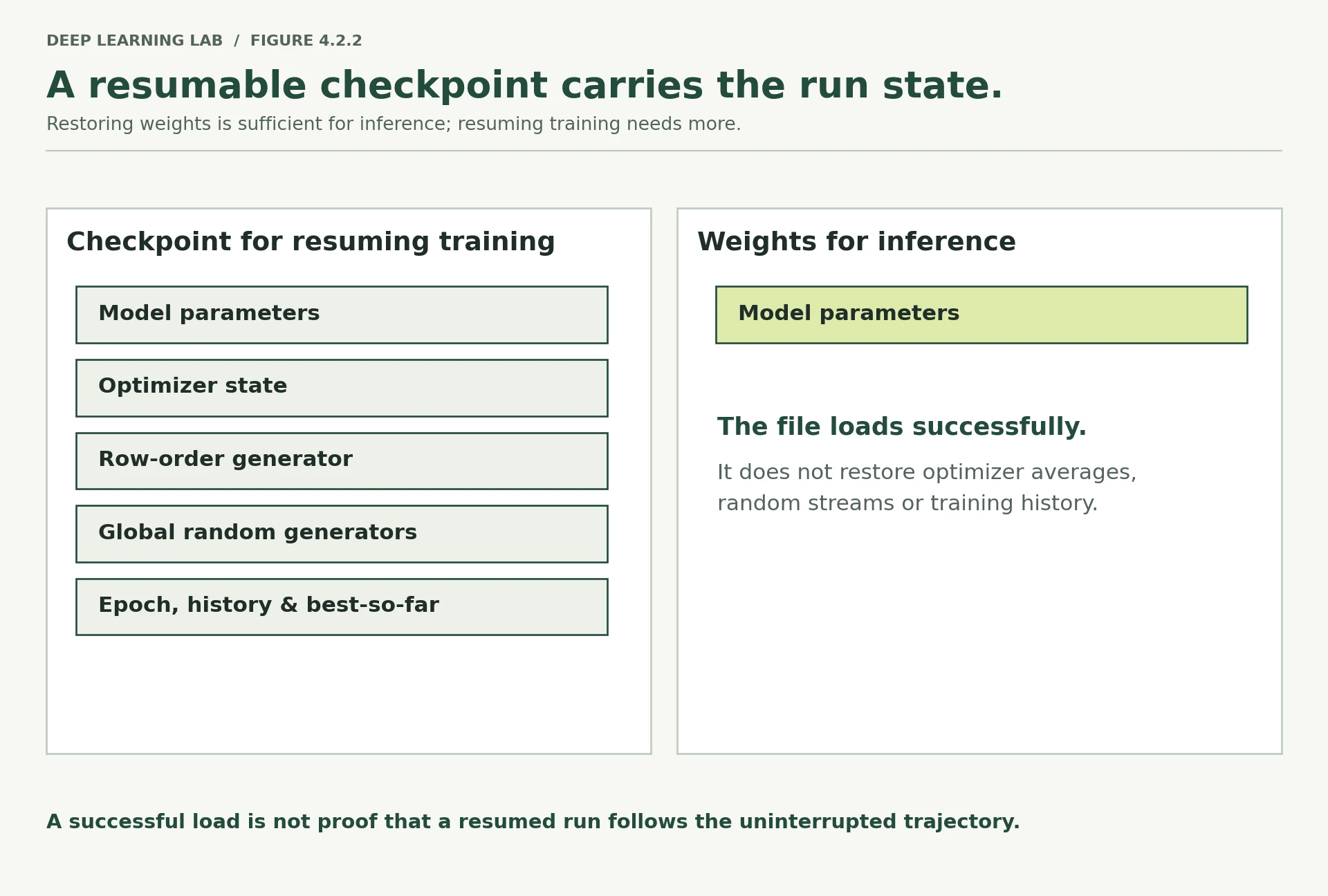
The lesson's measurement: the full checkpoint reproduced every weight; the weights-only restart finished at test AUC 0.7991 instead of 0.8016, with no warning.
-
List the five things a resumable checkpoint stores, and say what goes wrong if each is missing.
- Weights: without them there is nothing to resume.
- Optimizer state (AdamW's two running averages and step count): without it the next steps are the wrong size while the averages rebuild; the loss jumps and training follows a different path.
- Row-order generator: without it the next epochs visit rows in a different order, repeating or skipping examples relative to the uninterrupted run.
- Global generators: without them any other random draw (dropout masks, augmentation) comes out different.
- Bookkeeping (history, best score and best weights): without it early stopping and "restore the best epoch" forget everything before the crash, and you may end up keeping a worse model.
-
Why is
weights_only=Truethe safer default for a file you downloaded?weights_only=Trueonly rebuilds tensors and simple containers. A full load unpickles arbitrary Python objects, and a pickle can be written to call any function while it loads, so a malicious.ptfile from the internet could run code on your machine. Use the full load only for files you created or trust.
A resumed run must reproduce the uninterrupted one exactly. Which save is enough?
Weights-only resuming ran fine but produced a quietly different model (val 0.7866 vs 0.7871).
Why is torch.load(..., weights_only=True) the safer default for downloaded files?
Only load full checkpoints you made or trust.
Why does throwing away AdamW's state change the rest of a resumed run?
- AdamW keeps two running averages per weight (
exp_avg,exp_avg_sq) that decide each weight's step size. - Without them it restarts from nothing and takes wrongly sized steps until it rebuilds them; with a schedule this can show as a visible jump in the loss.
How much do two runs differ when nothing changed?
This is the most useful measurement in the note, and the one people skip.
Before you can say "this change improved the model by 0.005", you have to know how much the score moves when you change nothing that matters. If it moves by 0.01 on its own, your 0.005 is nothing.
Two different things can wobble, and it is worth separating them:
- seed noise — same rows, different starting weights and row order;
- split noise — same seed, different rows in training, validation and test.
Five runs of each. This takes about a minute and a half.
Five runs changing only the seed, five changing only the split. Which moves test AUC more?
The split: a standard deviation of 0.0130 against 0.0010 for the seed. Almost all the uncertainty is in which rows you tested on.
Lock in a guess, run ten experiments, and land within 1.5 points of the real best-minus-worst gap.
for value in range(5): run_experiment({"name": f"noise_seed{value}", "seed": value}, quiet=True) run_experiment({"name": f"noise_split{value}", "split_seed": value}, quiet=True)rows = []for value in range(5): for kind in ("seed", "split"): with open(f"results/noise_{kind}{value}.json") as f: saved_result = json.load(f) rows.append({"name": saved_result["settings"]["name"], "varies": kind, "seed": saved_result["settings"]["seed"], "split_seed": saved_result["settings"]["split_seed"], "best_epoch": saved_result["best_epoch"], "val_auc": saved_result["best_val_auc"], "test_auc": saved_result["test"]["auc"], "settings_hash": saved_result["run"]["settings_hash"], "data": saved_result["run"]["data_fingerprint"]})noise = pd.DataFrame(rows)print(noise.round(4).to_string(index=False))print()print(noise.groupby("varies")[["val_auc", "test_auc"]].agg(["mean", "std"]).round(4).to_string()) name varies seed split_seed best_epoch val_auc test_auc settings_hash data
noise_seed0 seed 0 42 17 0.7853 0.8042 833b7bcd8923 ae4909e99a00
noise_split0 split 42 0 22 0.8118 0.7776 13381b2b509f ae4909e99a00
noise_seed1 seed 1 42 21 0.7899 0.8047 91f50051d9d3 ae4909e99a00
noise_split1 split 42 1 18 0.7815 0.8098 086b696f29f9 ae4909e99a00
noise_seed2 seed 2 42 18 0.7888 0.8031 05fef60116ca ae4909e99a00
noise_split2 split 42 2 8 0.8030 0.7850 5212cf0c316b ae4909e99a00
noise_seed3 seed 3 42 17 0.7863 0.8055 f30399426058 ae4909e99a00
noise_split3 split 42 3 22 0.7894 0.7795 ca61cd8aaeae ae4909e99a00
noise_seed4 seed 4 42 10 0.7856 0.8053 8dc0a9c4d0f4 ae4909e99a00
noise_split4 split 42 4 9 0.7882 0.7906 9221e82929ef ae4909e99a00
val_auc test_auc
mean std mean std
varies
seed 0.7872 0.0020 0.8045 0.001
split 0.7948 0.0123 0.7885 0.013
The two are not the same size.
Changing the seed moves test AUC by a standard deviation of 0.0010. Changing the split moves it by 0.0130 — about thirteen times as much. Validation AUC tells the same story: 0.0020 against 0.0123.
Standard deviation here just means "the typical distance from the average". So with a different split you should expect the score to land about 0.013 away from where it landed this time, in either direction, for no reason at all.
Three things follow.
Almost all the uncertainty comes from which rows you tested on, not from the starting weights. Rerunning with three seeds and averaging is nearly free reassurance that barely touches the number that actually moves.
The average validation AUC (0.7948) is higher than the average test AUC (0.7885). That is expected, not a bug. The best epoch was chosen by validation score, so validation is the best of 30 tries and carries that luck. Test chose nothing. Lesson 4.4 compares models on test only, for exactly this reason.
The best epoch itself is noisy. Look down that column: it ranges from 8 to 22 across the ten runs. The epoch that happened to be best is not a finding.
Finally, notice the last two columns. Every run has the same data fingerprint, because the file did not change. Every run has a different settings fingerprint, because seed and split seed are part of the settings.
The ten runs from the cell above. Averaging three seeds shrinks the smaller of the two wobbles.
Deep diveWhat these standard deviations can and cannot tell you
Five runs give only a rough estimate of a spread: with five values, the true standard deviation could easily be half or double the measured one. The ratio is still convincing here, because the two sets do not overlap at all (every seed run scored between 0.8031 and 0.8055, the split runs from 0.7776 to 0.8098). Before relying on the exact figure 0.013, run more splits; before comparing two models, compare them on the same splits, which removes most of the split noise from the difference (Lesson 4.4).
-
Which of the two kinds of noise would shrink if you had ten times more data? Which might not?
Split noise shrinks with more data: larger validation and test sets make each AUC a more precise measurement (its sampling error falls roughly with the square root of the number of rows). Seed noise may not: it comes from the optimisation itself (starting weights, row order), and more data does not remove it, although it may reduce it a little.
-
If two models are compared on the same splits, which part of this noise cancels out? (Lesson 4.4 depends on the answer.)
The split noise that both models share. On the same rows, both models find the same customers easy and the same ones hard, so that part of the variation cancels in the difference between them. What remains is mostly seed noise plus how differently the two models react to the particular rows, which is far smaller. That is why Lesson 4.4 compares models split by split.
Changing only the seed moved test AUC by SD 0.001; changing only the split, 0.013. What follows?
Three seeds is cheap reassurance that barely touches the number that actually moves. Comparing models on the same splits cancels much of the split noise.
The best epoch ranged from 8 to 22 across ten runs that changed nothing important. What does that mean?
Validation's best-of-30 also carries luck, which is why average validation AUC (0.795) sat above test (0.789).
If two models are compared on the same splits, which part of the noise cancels out, and why does that matter?
- Split noise is largely shared: both models see the same easy or hard test rows, so the difference between them moves much less than each score does.
- Paired comparisons on the same splits (Lesson 4.4) can therefore detect smaller real differences than comparing two independent scores.
The experiment record
The numbers are saved. What is not saved is the thinking: why you ran it, what you concluded, what you would do next. Six months later that is the part you will wish you had.
Lesson 3.4 introduced this habit with five questions. Here they become a fixed format, so records can be skimmed and compared:
- What did I try? — filled in automatically: which settings differ from the baseline.
- Why? — your reason, written before you look at the result.
- What happened? — filled in automatically from the result.
- What did I learn? — your conclusion.
- What would I change next? — the next experiment, so the record is also a plan.
The function refuses to write a record without a reason and a lesson, because a record without them is just the numbers again.
def experiment_record(result, why, learned, next_change, results_dir="results"): """Write a five-question Markdown record next to a run's JSON result. Questions 1 and 3 (what changed from ``BASELINE``, what happened) are generated from the result; the reason, the lesson and the next step must come from you. Args: result: A result dict from ``run_experiment``. why: Why you ran it, written before looking at the result. learned: What you concluded. next_change: The next experiment this suggests. results_dir: Folder for the Markdown file. Returns: The path of the written record, ``results_dir/<name>.md``. Raises: ValueError: If ``why`` or ``learned`` is empty. """ if not why or not learned: raise ValueError("a record needs both a reason and a lesson") settings, run, test = result["settings"], result["run"], result["test"] ignore = {"name", "resume", "stop_after", "checkpoint_every"} changed = {k: v for k, v in settings.items() if k not in ignore and BASELINE.get(k) != v and not (isinstance(v, list) and list(BASELINE.get(k, [])) == v)} what_happened = (f"best validation AUC {result['best_val_auc']:.4f} at epoch {result['best_epoch']}; " f"test AUC {test['auc']:.4f}, test PR-AUC {test['pr_auc']:.4f} " f"(share who said yes {test['share_who_said_yes']:.3f}, " f"average prediction {test['average_prediction']:.3f}); " f"{result['seconds']:.1f} seconds") text = f"""### Experiment: {settings['name']}run `{run.get('run_id', '?')}` · settings `{run.get('settings_hash', '?')}` · data `{run.get('data_fingerprint', '?')}` · commit `{run.get('git', {}).get('commit') or 'none'}` · torch {run.get('environment', {}).get('torch', '?')}**1. What did I try?** Changed from the baseline: `{changed or 'nothing'}`**2. Why?** {why}**3. What happened?** {what_happened}**4. What did I learn?** {learned}**5. What would I change next?** {next_change}Full history: `{results_dir}/{settings['name']}.json`""" os.makedirs(results_dir, exist_ok=True) path = os.path.join(results_dir, f"{settings['name']}.md") with open(path, "w") as f: f.write(text) return pathpath = experiment_record( weights_only_run, why="Resuming from a weights-only checkpoint should reproduce the uninterrupted run.", learned=("It does not. The optimizer's running averages and the row order restarted at epoch 13, " "and the final weights differ from the uninterrupted run."), next_change="Add the learning-rate schedule's state to the checkpoint once a schedule is in use.")print(open(path).read())### Experiment: weights_only run `weights_only-1e51ebdd` · settings `175eba29a158` · data `ae4909e99a00` · commit `none` · torch 2.14.0+cpu **1. What did I try?** Changed from the baseline: `nothing` **2. Why?** Resuming from a weights-only checkpoint should reproduce the uninterrupted run. **3. What happened?** best validation AUC 0.7866 at epoch 18; test AUC 0.7991, test PR-AUC 0.4629 (share who said yes 0.117, average prediction 0.118); 4.7 seconds **4. What did I learn?** It does not. The optimizer's running averages and the row order restarted at epoch 13, and the final weights differ from the uninterrupted run. **5. What would I change next?** Add the learning-rate schedule's state to the checkpoint once a schedule is in use. Full history: `results/weights_only.json`
try: experiment_record(reference, why="", learned="", next_change="")except ValueError as error: print("refused:", error)refused: a record needs both a reason and a lesson
Why does the record function refuse to write without a reason and a lesson?
What did I try, why, what happened, what did I learn, what next? Two of the five come from your thinking, written at the time.
The same runs in MLflow
What you have built — a run function, JSON results, Markdown records, fingerprints — is a complete tracking system, and you understand every part of it.
In a team, people usually use a ready-made tool instead of a folder of files, because it adds a searchable database, a web page for comparing runs, and a shared server everybody writes to. MLflow is a widely used open-source one. Here it runs on your own machine, storing everything in a single SQLite database file, with no account and no server to set up.
The run function does not change. A small function copies a saved result into MLflow.
The vocabulary MLflow uses:
- parameters — the settings, recorded once per run;
- metrics — numbers that can change as the run progresses, recorded with a
step(our epoch); - tags — short labels for searching, which is where the fingerprints go;
- artifacts — files attached to the run, such as our JSON and Markdown.
import loggingimport mlflowlogging.getLogger("mlflow").setLevel(logging.ERROR)mlflow.set_tracking_uri("sqlite:///mlflow.db")mlflow.set_experiment("day4-bank-marketing")def log_to_mlflow(path): """Copy one saved result file into the active MLflow experiment as a new run. Settings become parameters (as text), fingerprints and the torch version become tags, per-epoch losses and AUC become metrics with the epoch as step, and the JSON file is attached as an artifact. Args: path: A JSON result written by ``run_experiment``. """ with open(path) as f: saved_result = json.load(f) settings, run = saved_result["settings"], saved_result["run"] with mlflow.start_run(run_name=settings["name"]): mlflow.log_params({key: str(value) for key, value in settings.items()}) mlflow.set_tags({"settings_hash": run["settings_hash"], "data_fingerprint": run["data_fingerprint"], "torch": run["environment"]["torch"]}) for row in saved_result["history"]: mlflow.log_metrics({"train_loss": row["train_loss"], "val_loss": row["val_loss"], "val_auc": row["val_auc"]}, step=row["epoch"]) mlflow.log_metrics({"best_val_auc": saved_result["best_val_auc"], "test_auc": saved_result["test"]["auc"], "best_epoch": saved_result["best_epoch"]}) mlflow.log_artifact(path)for file_name in sorted(f for f in os.listdir("results") if f.startswith("noise_") and f.endswith(".json")): log_to_mlflow(os.path.join("results", file_name))runs = mlflow.search_runs(experiment_names=["day4-bank-marketing"], order_by=["metrics.test_auc DESC"])print(runs[["tags.mlflow.runName", "metrics.best_val_auc", "metrics.test_auc", "metrics.best_epoch", "tags.settings_hash"]].round(4).to_string(index=False))tags.mlflow.runName metrics.best_val_auc metrics.test_auc metrics.best_epoch tags.settings_hash
noise_split1 0.7815 0.8098 18.0 086b696f29f9
noise_seed3 0.7863 0.8055 17.0 f30399426058
noise_seed4 0.7856 0.8053 10.0 8dc0a9c4d0f4
noise_seed1 0.7899 0.8047 21.0 91f50051d9d3
noise_seed0 0.7853 0.8042 17.0 833b7bcd8923
noise_seed2 0.7888 0.8031 18.0 05fef60116ca
noise_split4 0.7882 0.7906 9.0 9221e82929ef
noise_split2 0.8030 0.7850 8.0 5212cf0c316b
noise_split3 0.7894 0.7795 22.0 ca61cd8aaeae
noise_split0 0.8118 0.7776 22.0 13381b2b509f
To browse the same runs in a web page, run this in a terminal from this folder and open the address it prints:
mlflow ui --backend-store-uri sqlite:///mlflow.db
What MLflow added: searching and sorting across runs, per-epoch curves you can lay on top of each other, and files kept with each run.
What it did not add: any of the discipline. The fingerprints, the commit, the reason and the lesson all still come from your own code and habits. A tracking tool will happily store a run from a folder full of uncommitted changes and tell you nothing is wrong.
-
MLflow stored the settings as text. What kind of comparison does that make awkward, and how would you fix it?
Numeric comparisons. As text,
"0.001"and"0.0003"sort alphabetically, you cannot filter forlr < 0.001, and a plot of a metric against a parameter treats every value as a separate category. MLflow always stores parameters as strings, so log the numeric settings you want to compare as metrics as well (mlflow.log_metric("lr", 0.001)), or convert them back withpd.to_numericaftersearch_runs. -
Name one thing your JSON-and-Markdown records give you that the MLflow logging above does not.
The reasoning: why the run was made, what was learned and what comes next, which MLflow never saw. Also: the full environment block and git state (only a few fingerprints were copied as tags), plain-text files that
git diffcan compare and that work without any server, and a writer that refuses to create a record without a reason and a lesson.
What does a tracking tool such as MLflow add?
It will happily store a run from a folder full of uncommitted changes. Fingerprints, commits and reasons still come from your habits.
Lab: reproduce a run from its record
The test of everything in this lesson: take a result file, and get its number again using nothing but the file.
with open("results/noise_split3.json") as f: old_result = json.load(f)settings_from_file = {**old_result["settings"], "name": "noise_split3_reproduced"}new_result = run_experiment(settings_from_file, quiet=True)checks = { "same settings fingerprint": new_result["run"]["settings_hash"] == old_result["run"]["settings_hash"], "same data fingerprint": new_result["run"]["data_fingerprint"] == old_result["run"]["data_fingerprint"], "same software versions": {k: v for k, v in new_result["run"]["environment"].items() if k != "platform"} == {k: v for k, v in old_result["run"]["environment"].items() if k != "platform"}, "identical epoch-by-epoch history": new_result["history"] == old_result["history"], "identical test AUC": new_result["test"]["auc"] == old_result["test"]["auc"],}for label, passed in checks.items(): print(f" {label:<34} {passed}")print(f"\n recorded test AUC {old_result['test']['auc']:.6f}")print(f" reproduced test AUC {new_result['test']['auc']:.6f}")same settings fingerprint True same data fingerprint True same software versions True identical epoch-by-epoch history True identical test AUC True recorded test AUC 0.779473 reproduced test AUC 0.779473
All five pass, so that is a Level 1 reproduction from a file.
If you run this on a different machine, the first two checks should still pass, because settings and data are yours to control. The last two may not, if the software versions or the thread count differ — and the recorded environment block tells you exactly where to look. That is a Level 2 outcome, handled properly: not identical, and explained.
-
Write a settings file
configs/pos_weight.yamlthat setspos_weight: 7.5(roughly the ratio of no answers to yes answers) and a newname.with open("configs/pos_weight.yaml", "w") as f: yaml.safe_dump({"name": "pos_weight_7_5", "pos_weight": 7.5}, f)Only what differs from
BASELINEgoes in the file:run_experimentfills in the rest.7.5has a decimal point, so YAML reads it as a number. -
Before running it, write down what you expect to happen to test AUC and to the average prediction. Lesson 4.1 Section 10 has the answer.
Test AUC: about the same, within the seed noise of about 0.001–0.005, because weighting the positive class barely changes the ranking. Average prediction: much higher, well above the true 0.117, because every probability is pushed upwards. Lesson 2.3 measured exactly this for the same network: mean predicted probability 0.108 → 0.362, ROC-AUC 0.797 → 0.799. Expect accuracy at 0.5 to fall and recall at 0.5 to rise.
-
Load the file with
yaml.safe_loadand pass it torun_experiment.settings = yaml.safe_load(open("configs/pos_weight.yaml")) result = run_experiment(settings)The printed line gives the best epoch, validation and test AUC;
result["test"]["average_prediction"]is the number to compare with your prediction. -
Write the record with
experiment_record, filling in all five questions.experiment_record( result, why="pos_weight=7.5 should raise the probabilities without changing the ranking.", learned="Test AUC moved by less than the seed noise; the average prediction rose far above 0.117.", next_change="Keep the unweighted model and choose the call threshold from capacity.")The record shows
Changed from the baseline: {'pos_weight': 7.5}, so the one difference is visible at a glance. -
Log it to MLflow with
log_to_mlflowand compare it withreference.log_to_mlflow("results/pos_weight_7_5.json") log_to_mlflow("results/reference.json") runs = mlflow.search_runs(experiment_names=["day4-bank-marketing"]) runs[runs["tags.mlflow.runName"].isin(["reference", "pos_weight_7_5"])]Or open
mlflow uiand select both runs to overlay their validation curves. Check that they share a data fingerprint and differ in their settings fingerprint, as they should.
# Scratch space for the lab.# with open("configs/pos_weight.yaml", "w") as f:# yaml.safe_dump({"name": "pos_weight_7_5", "pos_weight": 7.5}, f)# settings = yaml.safe_load(open("configs/pos_weight.yaml"))# result = run_experiment(settings)# experiment_record(result, why="...", learned="...", next_change="...")print("results so far:", len([f for f in os.listdir("results") if f.endswith(".json")]), "JSON files,", len([f for f in os.listdir("results") if f.endswith(".md")]), "records")results so far: 15 JSON files, 2 records
What to take away
"Reproducible" means three things. Repeatable, to the last decimal. Portable, meaning close and explained. Robust, meaning the conclusion survives new seeds and splits. Test each one on purpose.
Seed at the start of every run, and give the DataLoader its own generator. One seed at the top of a notebook is not a repeatable run.
Settings belong in a file, identified by a fingerprint. And write 0.0003, not 3e-4.
A checkpoint without the optimizer state is a weights file. The full checkpoint reproduced the uninterrupted run exactly. The weights-only one did not, and said nothing.
Every result carries its own provenance: settings fingerprint, data fingerprint, commit and whether the folder was clean, and the software versions.
Measure the noise before interpreting any difference. Here the seed moves test AUC by 0.0010 and the split moves it by 0.0130. Anything smaller than that is not a result.
Records answer five fixed questions, two of which only you can answer. A tracking tool stores them. It does not make them true.
Transition to Lesson 4.3
Every run in this lesson was small on purpose, so it could be repeated to the last decimal on any machine. Real models are not small, and the first wall people hit is memory: a message saying the GPU has run out of it.
Lesson 4.3 is about where that memory goes. How many bytes a model takes, why training needs about four times what the model itself does, why batch size is a memory decision as much as a training one, what fp16 and bf16 actually are, and what to do, in order, when the machine says it has run out.
A reproduction on another machine passes the settings and data fingerprint checks but not the identical-history check. What should you conclude?
Settings and data are yours to control; software and hardware differences are explained by the environment block.
Wrap-up
- "Reproducible" means three things: repeatable (identical on the same setup), portable (close and explained elsewhere) and robust (the conclusion survives new seeds and splits).
- Seed at the start of every run and give each DataLoader its own generator. Threads, hardware, library versions and some GPU operations cannot be seeded: record them.
- Put every setting in one dictionary, save it as YAML, and fingerprint it. Write
0.0003or3.0e-4, never3e-4. - Each result records its provenance: settings hash, data fingerprint, commit and uncommitted changes, software versions.
- A resumable checkpoint holds weights, optimizer state, generators and bookkeeping. Weights alone resume a different run, silently.
- Measure noise before interpreting a difference: here the split moves test AUC thirteen times as much as the seed. Compare models on the same splits.
- Records answer five fixed questions, two of which only you can answer. A tracking tool stores records; it does not make them true.
Quick check
Same code, data, machine and software, run twice: identical numbers. Which level of reproducibility is that?
Portable is another machine or version (close, explained); robust is other seeds and splits (the conclusion survives).
Why is one seed_everything(42) at the top of a notebook not enough?
Seed at the start of every run, and give the DataLoader its own generator.
What does yaml.safe_load("lr: 3e-4")["lr"] return?
PyYAML's float rule needs a decimal point; write 3.0e-4 or 0.0003.
A resumed run must reproduce the uninterrupted one exactly. Which save is enough?
The weights-only restart finished at test AUC 0.7991 instead of 0.8016, with no warning.
Changing only the seed moved test AUC by a standard deviation of 0.001; changing only the split, 0.013. What follows?
Seed averaging barely touches the number that actually moves.
Two runs share a settings fingerprint but have different data fingerprints. What happened?
Same recipe, different ingredients: results are only comparable on identical data.
What does a tracking tool such as MLflow add?
It will happily store a run from a folder full of uncommitted changes.
Questions and discussion
Ask about this lesson, share what you found in a lab, or help someone else. Posts are public on the course's GitHub Discussions: anyone can read them, and you need a GitHub account to post.
Opening it loads giscus from giscus.app.