Tensors and the Shape Contract
- Time
- ~149 min
- Sections
- 8
- Code cells
- 129
- Labs
- 5
- Figures
- 2
Before you start
Every tensor carries a three-part contract: shape, dtype and device. Nearly every PyTorch error you will ever see breaks one of those three clauses. This lesson teaches you to read shapes like sentences, reshape without lying, broadcast on purpose, see a layer as a matrix multiply, and above all to fear the bugs that don't raise errors.
- Goal
Stop treating tensors as "arrays that PyTorch happens to use" and start treating a tensor's
shape,dtypeanddeviceas a three-part contract that every layer, every loss function and every batch either honours or violates.- Outcome
By the end of this lesson you can look at a shape error, name the cause before you read the traceback, and fix it without guessing. You will also have met the class of bug that produces no error at all — the silent broadcast — and know how to detect it.
- You will be able to
- create tensors, convert to and from NumPy, and explain why deep learning runs in
float32; - read a shape as a sentence: which axis is the batch, which is the feature, which is the channel;
- reshape safely, and explain when
viewfails andreshapedoes not; - state the broadcasting rules and use them deliberately for per-feature standardisation;
- recognise the
(N,)vs(N, 1)broadcast bug that inflates a loss without raising an error; - reproduce
nn.Linearby hand with a matrix multiply and verify the result matches; - explain why classification labels must be
longforCrossEntropyLoss; - detect and resolve device mismatches across
cpu,cudaandmps; - debug five broken cells by predicting the failure before running them.
- create tensors, convert to and from NumPy, and explain why deep learning runs in
Estimated runtime: every cell in this lesson completes in under two seconds. Total execution time is well under one minute; the time you spend here should be thinking time, not waiting time.
Setup — imports, versions and device detection used by the notebook (2 cells)
Run this first. It pins the versions this lesson was written against and reports which compute device you have. Everything in Lesson 2.1 runs comfortably on CPU — the device detection matters because Section 6 demonstrates a device-mismatch error, and the code needs to know what hardware is actually present.
# Pinned for reproducibility. Uncomment to install in a fresh environment (Colab / Kaggle).# !pip install -q torch==2.14.0 numpy==2.4.4 matplotlib==3.10.8import sysimport numpy as npimport torchprint(f"Python : {sys.version.split()[0]}")print(f"torch : {torch.__version__}")print(f"numpy : {np.__version__}")Python : 3.13.9 torch : 2.14.0 numpy : 2.3.5
def get_device() -> torch.device: """Return the best available device: CUDA, then Apple MPS, then CPU. MPS is used only if PyTorch was built with it *and* the hardware supports it. Detect the device once and pass it everywhere, instead of hard-coding ``"cuda"``. Returns: A ``torch.device`` for the fastest backend on this machine. """ if torch.cuda.is_available(): return torch.device("cuda") if torch.backends.mps.is_available() and torch.backends.mps.is_built(): return torch.device("mps") return torch.device("cpu")DEVICE = get_device()print(f"Selected device: {DEVICE}")if DEVICE.type == "cuda": print(f" GPU : {torch.cuda.get_device_name(0)}") print(f" VRAM : {torch.cuda.get_device_properties(0).total_memory / 1e9:.1f} GB")elif DEVICE.type == "mps": print(" Apple Silicon GPU via Metal Performance Shaders")else: print(" Running on CPU. Every cell in this note is sized for that.")# One seed, set once, used everywhere in this lesson.SEED = 42torch.manual_seed(SEED)np.random.seed(SEED)Selected device: mps Apple Silicon GPU via Metal Performance Shaders
The one object everything else is made of
In Lesson 1.3 you called torch.tensor(...) and moved on, because the goal then was to see a
network train. Now the tensor itself is the subject.
A tensor is a block of numbers in memory plus some metadata describing how to interpret that block. The three pieces of metadata that will govern the rest of this course are:
| Attribute | Question it answers | Typical failure when wrong |
|---|---|---|
shape |
How is the block arranged into axes? | RuntimeError: mat1 and mat2 shapes cannot be multiplied |
dtype |
What kind of number is each element? | RuntimeError: expected scalar type Long but found Float |
device |
Which processor's memory holds it? | RuntimeError: Expected all tensors to be on the same device |
Almost every error you will hit for the next nine modules is one of those three. Learning to interrogate a tensor is therefore not housekeeping — it is the debugging skill.
The contract, and what breaks it
How the numbers are arranged into axes. Broken → mat1 and mat2 shapes cannot be multiplied, or, worse, a silent broadcast.
What kind of number each element is. Broken → expected scalar type Long but found Float.
Whose memory holds it: CPU, CUDA or MPS. Broken → Expected all tensors to be on the same device.
def describe(name: str, t: torch.Tensor) -> None: """Print a tensor's three-part contract (shape, dtype, device) on one line. Also prints ``ndim`` (the number of axes) and ``numel`` (the total number of elements). Call it whenever you are unsure what a tensor is: it is faster than reasoning about it. Args: name: Label printed in front of the description. t: The tensor to describe. """ print(f"{name:<12} shape={tuple(t.shape)!s:<16} dtype={str(t.dtype):<16} " f"device={str(t.device):<6} ndim={t.ndim} numel={t.numel()}")scalar = torch.tensor(3.14)vector = torch.tensor([1.0, 2.0, 3.0])matrix = torch.tensor([[1.0, 2.0], [3.0, 4.0], [5.0, 6.0]])cube = torch.zeros(2, 3, 4)A one-line inspector for the three-part contract. Call it whenever you are unsure what a tensor is: it's faster than reasoning.
- 1
!s:<16formats the shape as a string, left-aligned in 16 characters, so rows line up. - 2
ndim= number of axes (rank);numel= total number of elements (the product of the shape).
scalartensor(3.1400)
vectortensor([1., 2., 3.])
matrixtensor([[1., 2.],
[3., 4.],
[5., 6.]])
cubetensor([[[0., 0., 0., 0.],
[0., 0., 0., 0.],
[0., 0., 0., 0.]],
[[0., 0., 0., 0.],
[0., 0., 0., 0.],
[0., 0., 0., 0.]]])
describe("scalar", scalar)describe("vector", vector)describe("matrix", matrix)describe("cube", cube)scalar shape=() dtype=torch.float32 device=cpu ndim=0 numel=1 vector shape=(3,) dtype=torch.float32 device=cpu ndim=1 numel=3 matrix shape=(3, 2) dtype=torch.float32 device=cpu ndim=2 numel=6 cube shape=(2, 3, 4) dtype=torch.float32 device=cpu ndim=3 numel=24
Notice that the scalar has shape=() — an empty tuple, zero axes. That is not a quirk. Your loss
value is a zero-dimensional tensor, and loss.backward() only works on one. When you eventually
see grad can be implicitly created only for scalar outputs, this is the reason: something you
expected to be a single number still had axes attached.
The construction helpers you will actually reach for:
np.zeros([2,3])array([[0., 0., 0.],
[0., 0., 0.]])
torch.zeros(2, 3)tensor([[0., 0., 0.],
[0., 0., 0.]])
print("zeros(2,3):\n", torch.zeros(2, 3))print("\nones(2,3):\n", torch.ones(2, 3))print("\narange(6):", torch.arange(6))print("\nlinspace(0,1,5):", torch.linspace(0, 1, 5))print("\nrandn(2,3) — standard normal, the default for weight init experiments:\n", torch.randn(2, 3))print("\nrand(2,3) — uniform on [0,1):\n", torch.rand(2, 3))print("\neye(3) — identity, useful for sanity-checking matmuls:\n", torch.eye(3))# Shape-matching constructors: 'give me zeros shaped like this other thing'.template = torch.randn(3, 4)print("\nzeros_like(template).shape:", tuple(torch.zeros_like(template).shape))zeros(2,3):
tensor([[0., 0., 0.],
        [0., 0., 0.]])
ones(2,3):
tensor([[1., 1., 1.],
[1., 1., 1.]])
arange(6): tensor([0, 1, 2, 3, 4, 5])
linspace(0,1,5): tensor([0.0000, 0.2500, 0.5000, 0.7500, 1.0000])
randn(2,3) — standard normal, the default for weight init experiments:
tensor([[ 0.3367, 0.1288, 0.2345],
[ 0.2303, -1.1229, -0.1863]])
rand(2,3) — uniform on [0,1):
tensor([[0.8694, 0.5677, 0.7411],
[0.4294, 0.8854, 0.5739]])
eye(3) — identity, useful for sanity-checking matmuls:
tensor([[1., 0., 0.],
[0., 1., 0.],
[0., 0., 1.]])
zeros_like(template).shape: (3, 4)
Crossing the NumPy border
Your data will arrive from pandas or scikit-learn as NumPy arrays. The bridge runs both ways, and one direction has a sharp edge.
arr = np.array([[1.0, 2.0], [3.0, 4.0]], dtype=np.float32)arrarray([[1., 2.],
[3., 4.]], dtype=float32)
# from_numpy SHARES memory with the array. Cheap, but mutations propagate.shared = torch.from_numpy(arr)sharedtensor([[1., 2.],
[3., 4.]])
arr[0, 0] = 99.0arrarray([[99., 2.],
[ 3., 4.]], dtype=float32)
sharedtensor([[99., 2.],
[ 3., 4.]])
print("after mutating the numpy array, the tensor sees it:\n", shared)after mutating the numpy array, the tensor sees it:
tensor([[99., 2.],
[ 3., 4.]])
# torch.tensor(...) COPIES. Safer default when you are unsure.arr2 = np.array([[1.0, 2.0], [3.0, 4.0]], dtype=np.float32)arr2array([[1., 2.],
[3., 4.]], dtype=float32)
copied = torch.tensor(arr2)copiedtensor([[1., 2.],
[3., 4.]])
arr2[0, 0] = 99.0arr2array([[99., 2.],
[ 3., 4.]], dtype=float32)
copiedtensor([[1., 2.],
[3., 4.]])
print("\nafter mutating, the copy is unaffected:\n", copied)
after mutating, the copy is unaffected:
tensor([[1., 2.],
        [3., 4.]])
# Going back to numpy. .numpy() also shares memory, and fails on a tensor# that requires grad — you must .detach() first.t = torch.randn(2, 2, requires_grad=True)ttensor([[-0.3514, -0.7906],
[-0.0915, 0.2352]], requires_grad=True)
t.numpy()--------------------------------------------------------------------------- RuntimeError Traceback (most recent call last) Cell In[23], line 1 ----> 1 t.numpy() RuntimeError: Can't call numpy() on Tensor that requires grad. Use tensor.detach().numpy() instead.
t.detach().numpy()array([[-0.35144043, -0.7906431 ],
[-0.09150922, 0.23517996]], dtype=float32)
try: t.numpy()except RuntimeError as e: print("\nExpected error:", str(e)[:80])print("Correct:", t.detach().numpy().shape)Expected error: Can't call numpy() on Tensor that requires grad. Use tensor.detach().numpy() ins Correct: (2, 2)
Why float32 and not float64
NumPy defaults to float64. PyTorch defaults to float32, and this mismatch is the single most
common surprise when converting a pandas DataFrame.
np_default = np.array([1.0, 2.0, 3.0]) # float64torch_default = torch.tensor([1.0, 2.0, 3.0]) # float32np_defaultarray([1., 2., 3.])
torch_defaulttensor([1., 2., 3.])
print("numpy default dtype:", np_default.dtype)print("torch default dtype:", torch_default.dtype)numpy default dtype: float64 torch default dtype: torch.float32
converted = torch.from_numpy(np_default)print("\nfrom_numpy on a float64 array gives:", converted.dtype)from_numpy on a float64 array gives: torch.float64
converted = torch.tensor(np_default, dtype=torch.float32)convertedtensor([1., 2., 3.])
# A float32 layer refuses a float64 input.import torch.nn as nnlayer = nn.Linear(3, 2)layerLinear(in_features=3, out_features=2, bias=True)
layer(converted)tensor([-2.1636, 1.5137], grad_fn=<ViewBackward0>)
try: layer(converted)except RuntimeError as e: print("\nExpected error:", str(e)[:110])print("\nFixed:", layer(converted.float()).shape)Fixed: torch.Size([2])
Deep learning runs in float32 because halving the bits per number halves memory traffic and
roughly doubles arithmetic throughput, and the extra precision of float64 buys nothing: gradient
descent is a noisy, approximate procedure whose errors dwarf the difference between the seventh
and sixteenth significant digit. Module 4 pushes this further, to float16 and bfloat16.
The practical rule, which will save you an hour at some point this week:
Cast to
float32at the boundary where NumPy becomes PyTorch, not later.X.astype(np.float32)on the DataFrame side, once, and the problem never recurs.
-
torch.tensor(3.14)hasndim=0andtorch.tensor([3.14])hasndim=1. Both hold one number. Which one can you call.backward()on, and why does the distinction exist?In current PyTorch both work: calling
.backward()with no argument needs a tensor with exactly one element (numel() == 1), so shape()or(1,)is fine. The rule exists because the gradient of a many-element output isn't one set of numbers: it's a whole Jacobian. PyTorch computes vector-Jacobian products, and it will only assume the vector is1when there is a single output number. For anything bigger you must passgradient=yourself, and you getgrad can be implicitly created only for scalar outputs. Losses reduce to a 0-D tensor (mean or sum) precisely so thatbackward()has one number to start from. -
from_numpyshares memory andtorch.tensorcopies. Name a situation where the sharing is a feature, and one where it is a bug waiting to happen.Feature: a huge array, such as a memory-mapped dataset or a preprocessed feature matrix, can be exposed to PyTorch with zero copying: no extra memory and no conversion time. Bug waiting to happen: the NumPy array is modified afterwards (an in-place normalisation, an augmentation step, a buffer reused for the next batch), and the tensor you already stored for training silently changes too. If you don't own the array's lifetime, copy.
loss.backward() complains grad can be implicitly created only for scalar outputs. What is wrong?
backward() needs a zero-dimensional tensor: shape (). Something you expected to be one number still has axes attached (for example, a loss you forgot to average).
You build a tensor with torch.from_numpy(arr) and then change arr[0, 0]. What happens to the tensor?
from_numpy shares memory (cheap, but mutations propagate). torch.tensor(arr) copies.
Where should you cast to float32 when data goes from pandas/NumPy into PyTorch, and why there?
- At the boundary where NumPy becomes PyTorch (e.g.
X.astype(np.float32)once), not later in the pipeline. - NumPy defaults to float64 and a float32 layer rejects or mis-handles it; casting once at the boundary means the problem never recurs.
Reading a shape like a sentence
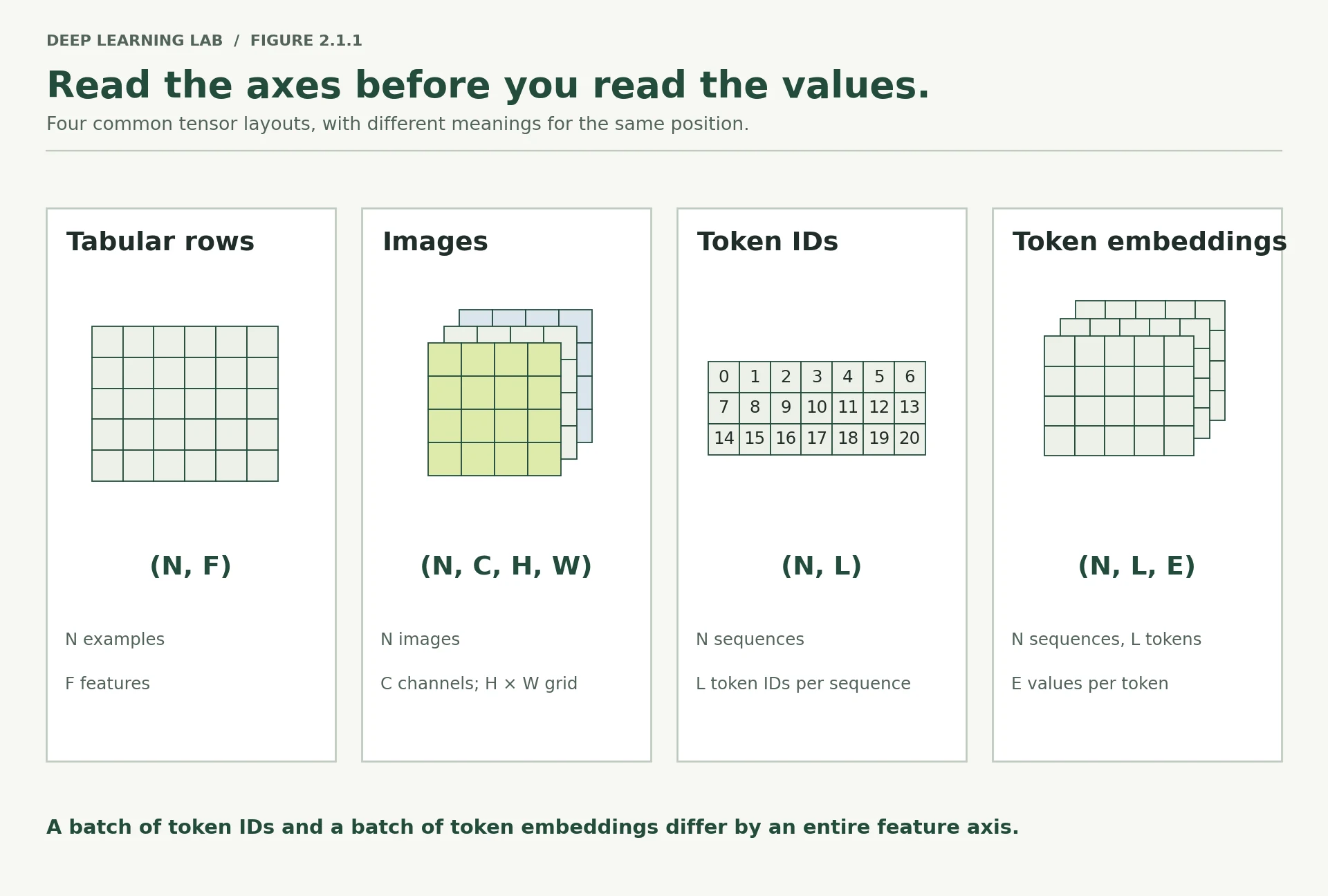
A shape is not a list of numbers. It is a sentence describing how your data is laid out, and the convention is stable enough across the whole field that you can read an unfamiliar codebase from its shapes alone.
The universal rule: axis 0 is the batch. Whatever else changes, the first number is how many independent examples are stacked together. Every layer in PyTorch assumes this without asking.
| Data type | Shape convention | Read it as |
|---|---|---|
| Tabular | (N, F) |
N rows, F features per row |
| Image | (N, C, H, W) |
N images, C channels, H high, W wide |
| Token IDs | (N, L) |
N sequences, L tokens each |
| Token embeddings | (N, L, E) |
N sequences, L tokens, E numbers per token |
Note that PyTorch puts channels before spatial dimensions — (N, C, H, W), not the
(N, H, W, C) you may have seen in TensorFlow or in a raw PIL image. This single difference
causes a large fraction of first-week image bugs. Module 10 revisits it when we cross frameworks.
N, F = 8, 5 # 8 rows, 5 tabular featurestabular = torch.randn(N, F)images = torch.randn(4, 3, 32, 32) # 4 RGB images, 32x32tokens = torch.randint(0, 1000, (2, 10)) # 2 sequences of 10 token idsembeds = torch.randn(2, 10, 64) # same, each token -> 64 numbersprint(images[0][0])tensor([[-0.5992, 0.4771, 0.7262, ..., 0.6368, 0.2176, -0.0467],
[ 1.6192, 1.4506, 0.2695, ..., 2.0265, 0.9812, -0.6401],
[-0.8057, -0.2076, -0.9319, ..., 0.4598, 0.2618, -0.7599],
...,
[ 1.1862, -1.2203, 0.2910, ..., -2.5380, -0.0334, -1.7017],
[ 0.3712, 1.5118, -0.8915, ..., -0.0406, 0.6467, -2.0813],
[-0.9167, -0.7794, -0.4175, ..., 3.4456, 0.3673, -0.3919]])
describe("tabular", tabular)describe("images", images)describe("tokens", tokens)describe("embeds", embeds)print()print("How many examples in the image batch? ->", images.shape[0])print("How many channels per image? ->", images.shape[1])print("Pixels per image (H*W) ->", images.shape[2] * images.shape[3])print("Numbers in the whole image batch ->", images.numel())tabular shape=(8, 5) dtype=torch.float32 device=cpu ndim=2 numel=40 images shape=(4, 3, 32, 32) dtype=torch.float32 device=cpu ndim=4 numel=12288 tokens shape=(2, 10) dtype=torch.int64 device=cpu ndim=2 numel=20 embeds shape=(2, 10, 64) dtype=torch.float32 device=cpu ndim=3 numel=1280 How many examples in the image batch? -> 4 How many channels per image? -> 3 Pixels per image (H*W) -> 1024 Numbers in the whole image batch -> 12288
Indexing preserves or drops axes, and it matters
The difference between an index and a slice is the difference between losing an axis and keeping
it. This is the origin of a very large share of (N,) vs (N, 1) confusion.
batch = torch.randn(8, 5)batchtensor([[-0.2514, 1.6124, 0.0593, -0.2723, -0.1372],
[ 0.7022, 1.5885, 1.0206, -1.0839, 1.0406],
[-1.2676, 1.3164, 0.0458, -0.1287, -2.0694],
[ 0.4159, 0.6327, 1.3299, -0.2185, -1.3713],
[-0.8273, 0.9662, -0.5898, -0.8523, -0.1236],
[-1.2720, -1.0702, 0.0196, 0.4001, -0.2221],
[ 0.1648, -0.2799, 0.7053, 0.4979, 1.1845],
[ 0.4461, -0.2101, 0.4610, -0.4705, 2.3401]])
describe("batch", batch)batch shape=(8, 5) dtype=torch.float32 device=cpu ndim=2 numel=40
batch[0]tensor([-0.2514, 1.6124, 0.0593, -0.2723, -0.1372])
describe("batch[0]", batch[0]) # integer index -> axis 0 disappearsbatch[0] shape=(5,) dtype=torch.float32 device=cpu ndim=1 numel=5
batch[0:1]tensor([[-0.2514, 1.6124, 0.0593, -0.2723, -0.1372]])
describe("batch[0:1]", batch[0:1]) # slice -> axis 0 survives with length 1batch[0:1] shape=(1, 5) dtype=torch.float32 device=cpu ndim=2 numel=5
batch[:, 2]tensor([ 0.0593, 1.0206, 0.0458, 1.3299, -0.5898, 0.0196, 0.7053, 0.4610])
describe("batch[:, 2]", batch[:, 2]) # one feature, as a flat vectorbatch[:, 2] shape=(8,) dtype=torch.float32 device=cpu ndim=1 numel=8
batch[:, 2:3]tensor([[ 0.0593],
[ 1.0206],
[ 0.0458],
[ 1.3299],
[-0.5898],
[ 0.0196],
[ 0.7053],
[ 0.4610]])
describe("batch[:, 2:3]", batch[:, 2:3]) # one feature, as a columnbatch[:, 2:3] shape=(8, 1) dtype=torch.float32 device=cpu ndim=2 numel=8
print()print("A single example fed to a model must still look like a batch of one.")print("batch[0].shape =", tuple(batch[0].shape), " <- a model will reject or misread this")print("batch[0:1].shape =", tuple(batch[0:1].shape), " <- correct: batch of 1")A single example fed to a model must still look like a batch of one. batch[0].shape = (5,) <- a model will reject or misread this batch[0:1].shape = (1, 5) <- correct: batch of 1
batchtensor([[-0.2514, 1.6124, 0.0593, -0.2723, -0.1372],
[ 0.7022, 1.5885, 1.0206, -1.0839, 1.0406],
[-1.2676, 1.3164, 0.0458, -0.1287, -2.0694],
[ 0.4159, 0.6327, 1.3299, -0.2185, -1.3713],
[-0.8273, 0.9662, -0.5898, -0.8523, -0.1236],
[-1.2720, -1.0702, 0.0196, 0.4001, -0.2221],
[ 0.1648, -0.2799, 0.7053, 0.4979, 1.1845],
[ 0.4461, -0.2101, 0.4610, -0.4705, 2.3401]])
batch.shapetorch.Size([8, 5])
batch[0]tensor([-0.2514, 1.6124, 0.0593, -0.2723, -0.1372])
batch[0].shapetorch.Size([5])
batch[0:1]tensor([[-0.2514, 1.6124, 0.0593, -0.2723, -0.1372]])
batch[0:1].shapetorch.Size([1, 5])
When you deploy a model and pass it one customer record, this is the bug you will hit. The model
was trained on (N, F); you hand it (F,); nn.Linear happens to accept it and returns
something plausible-looking. Section 4 shows what happens next.
Index or slice? Watch the axis
batch[0] → (5,)An integer index removes axis 0. Feed this to a model and there is no batch axis any more.
batch[0:1] → (1, 5)A slice keeps the axis (length 1): a correct batch of one. Or use x.unsqueeze(0).
-
Given
imageswith shape(4, 3, 32, 32), what doesimages[1, 0]return, and what shape is it? Predict before you run it.images[1, 0]selects the second image and its first channel, removing both axes: a single32 × 32greyscale plane, shape(32, 32). -
Your model's output has shape
(32, 1)and your labels have shape(32,). Which one should change, and does the answer depend on the loss function you chose?Pick one convention and make them identical. Either unsqueeze the labels to
(32, 1)(what Lesson 2.3 does) or squeeze the predictions to(32,). It matters which loss you use only in how you find out:BCEWithLogitsLossraises aValueErroron the mismatch, whileMSELosssilently broadcasts to(32, 32). (ForCrossEntropyLossthe rule is different again: outputs(N, C), targets(N,).)
batch has shape (8, 5). What is the shape of batch[0], and of batch[0:1]?
An integer index removes the axis; a slice keeps it with length 1. A single example for a model must look like batch[0:1]: a batch of one.
An image batch loaded from PIL/matplotlib has shape (N, H, W, C). What does PyTorch expect?
PyTorch puts channels before the spatial dimensions. This difference causes many first-week image bugs.
Read the shape (32, 10, 64) aloud as a sentence for a batch of token embeddings.
- 32 sequences (axis 0 is always the batch), each 10 tokens long, with 64 numbers (the embedding) per token.
- The convention (N, L, E) lets you read unfamiliar code from its shapes.
Reshaping without lying to yourself
Reshaping does not move data. It rewrites the metadata that says how to walk through the block of memory. That is why it is nearly free — and why it occasionally refuses.
The number of elements must be conserved: a (4, 3, 32, 32) tensor has 12,288 elements, so it can
become (4, 3072) or (12, 1024) or (12288,), but never (4, 3000).
x = torch.arange(24)xtensor([ 0, 1, 2, 3, 4, 5, 6, 7, 8, 9, 10, 11, 12, 13, 14, 15, 16, 17,
18, 19, 20, 21, 22, 23])
describe("x", x)x shape=(24,) dtype=torch.int64 device=cpu ndim=1 numel=24
x.view(4, 6)tensor([[ 0, 1, 2, 3, 4, 5],
[ 6, 7, 8, 9, 10, 11],
[12, 13, 14, 15, 16, 17],
[18, 19, 20, 21, 22, 23]])
describe("x.view(4, 6)", x.view(4, 6))describe("x.view(2, 3, 4)", x.view(2, 3, 4))describe("x.view(4, -1)", x.view(4, -1)) # -1 means 'infer this axis'describe("x.view(-1, 8)", x.view(-1, 8))x.view(4, 6) shape=(4, 6) dtype=torch.int64 device=cpu ndim=2 numel=24 x.view(2, 3, 4) shape=(2, 3, 4) dtype=torch.int64 device=cpu ndim=3 numel=24 x.view(4, -1) shape=(4, 6) dtype=torch.int64 device=cpu ndim=2 numel=24 x.view(-1, 8) shape=(3, 8) dtype=torch.int64 device=cpu ndim=2 numel=24
x.view(5, 5)--------------------------------------------------------------------------- RuntimeError Traceback (most recent call last) Cell In[62], line 1 ----> 1 x.view(5, 5) RuntimeError: shape '[5, 5]' is invalid for input of size 24
# Conservation is enforced.try: x.view(5, 5)except RuntimeError as e: print("\nExpected error:", str(e)[:70])Expected error: shape '[5, 5]' is invalid for input of size 24
Where view fails and reshape succeeds
A tensor is contiguous when its elements sit in memory in the same order you would read them by
walking the axes left to right. Operations like .t() and .permute() do not move data — they
just relabel the axes — so the result is a view onto memory that is no longer in reading order.
view requires contiguity, because it only rewrites strides. reshape will silently copy if it
has to. That copy is the entire difference, and it is why reshape is the safer default.
torch.arange(12)tensor([ 0, 1, 2, 3, 4, 5, 6, 7, 8, 9, 10, 11])
x = torch.arange(12).reshape(3, 4)xtensor([[ 0, 1, 2, 3],
[ 4, 5, 6, 7],
[ 8, 9, 10, 11]])
x.view(12)tensor([ 0, 1, 2, 3, 4, 5, 6, 7, 8, 9, 10, 11])
xt = x.t() # transpose: a view, no data movedxttensor([[ 0, 4, 8],
[ 1, 5, 9],
[ 2, 6, 10],
[ 3, 7, 11]])
print("x contiguous? ", x.is_contiguous())print("x.t() contiguous? ", xt.is_contiguous())x contiguous? True x.t() contiguous? False
xt.view(12)--------------------------------------------------------------------------- RuntimeError Traceback (most recent call last) Cell In[70], line 1 ----> 1 xt.view(12) RuntimeError: view size is not compatible with input tensor's size and stride (at least one dimension spans across two contiguous subspaces). Use .reshape(...) instead.
xt.reshape(12)tensor([ 0, 4, 8, 1, 5, 9, 2, 6, 10, 3, 7, 11])
try: xt.view(12)except RuntimeError as e: print("\nview on a non-contiguous tensor fails:") print(" ", str(e)[:95], "...")view on a non-contiguous tensor fails: view size is not compatible with input tensor's size and stride (at least one dimension spans a ...
print("\nreshape handles it by copying:", xt.reshape(12))print("or make it explicit: ", xt.contiguous().view(12))reshape handles it by copying: tensor([ 0, 4, 8, 1, 5, 9, 2, 6, 10, 3, 7, 11]) or make it explicit: tensor([ 0, 4, 8, 1, 5, 9, 2, 6, 10, 3, 7, 11])
Adding and removing length-1 axes
unsqueeze inserts an axis of length 1 at a position; squeeze removes axes of length 1. You
will use these constantly to reconcile a model output with a loss function's expectations.
v = torch.tensor([1.0, 2.0, 3.0])vtensor([1., 2., 3.])
describe("v", v)v shape=(3,) dtype=torch.float32 device=cpu ndim=1 numel=3
v.unsqueeze(0)tensor([[1., 2., 3.]])
describe("v.unsqueeze(0)", v.unsqueeze(0)) # (3,) -> (1, 3): a batch of one rowv.unsqueeze(0) shape=(1, 3) dtype=torch.float32 device=cpu ndim=2 numel=3
v.unsqueeze(1)tensor([[1.],
[2.],
[3.]])
describe("v.unsqueeze(1)", v.unsqueeze(1)) # (3,) -> (3, 1): a columnv.unsqueeze(1) shape=(3, 1) dtype=torch.float32 device=cpu ndim=2 numel=3
col = v.unsqueeze(1)describe("col.squeeze(1)", col.squeeze(1)) # back to (3,)col.squeeze(1) shape=(3,) dtype=torch.float32 device=cpu ndim=1 numel=3
# squeeze() with no argument removes EVERY length-1 axis. Convenient and dangerous:# if your batch size happens to be 1, it silently removes the batch axis too.risky = torch.randn(1, 1, 5)print()describe("risky", risky)describe("risky.squeeze()", risky.squeeze()) # lost both axesdescribe("risky.squeeze(1)", risky.squeeze(1)) # only the one you meantrisky shape=(1, 1, 5) dtype=torch.float32 device=cpu ndim=3 numel=5 risky.squeeze() shape=(5,) dtype=torch.float32 device=cpu ndim=1 numel=5 risky.squeeze(1) shape=(1, 5) dtype=torch.float32 device=cpu ndim=2 numel=5
That last pair is a real production bug. A batch of one — the last incomplete batch of an epoch,
or a single request in a deployed service — turns squeeze() into something that removes the
batch axis. Always name the axis: squeeze(1), never bare squeeze().
Reordering axes: permute and transpose
img = torch.randn(4, 32, 32, 3) # what PIL / matplotlib hand you: (N, H, W, C)describe("as loaded (N,H,W,C)", img)imgas loaded (N,H,W,C) shape=(4, 32, 32, 3) dtype=torch.float32 device=cpu ndim=4 numel=12288
tensor([[[[-1.1421,  0.4946,  2.1283],
          [-0.0648, -1.2929,  0.8945],
          [ 0.6557, -0.1357, -0.4208],
          ...,
          [-0.7476,  0.3930, -2.1820],
          [ 0.2457,  0.6763, -0.2301],
          [-0.1118,  1.3171, -1.7199]],

         [[ 1.1735,  1.5073, -1.3217],
          [ 0.2432, -0.9750,  0.0355],
          [ 0.4600,  0.5497,  2.2624],
          ...,
          [ 0.0354, -0.5816, -0.1224],
          [ 0.8810, -1.0891, -0.5495],
          [ 1.2374, -1.3882,  0.2245]],

         [[-0.6972, -1.0185,  0.8052],
          [-0.3137, -1.6625,  0.9508],
          [-0.3532, -2.7029, -0.6655],
          ...,
          [-0.0577,  0.4384, -0.1732],
          [ 1.4584, -0.8294, -0.1922],
          [-0.4082,  1.1487, -1.9976]],

         ...,

         [[ 0.3614, -0.4734, -1.5011],
          [ 1.7683, -0.7381, -2.0535],
          [-2.1331,  1.7796, -0.4305],
          ...,
          [ 0.7945,  0.5995,  3.6199],
          [-1.3311,  0.4711, -0.4444],
          [ 2.6325, -0.9324, -0.0130]],

         [[ 0.7385, -0.5175, -0.6931],
          [-0.4573, -0.5778, -0.0090],
          [-0.6366, -0.8230, -0.3296],
          ...,
          [-1.9237, -0.3312,  0.7418],
          [ 0.1576, -1.2471, -0.4622],
          [ 0.7428, -0.5087, -0.9606]],

         [[ 0.8351,  1.5808, -0.7018],
          [ 0.1420, -0.7683,  0.1450],
          [ 0.6872,  0.0364,  0.3949],
          ...,
          [ 0.7442,  0.9471,  0.0953],
          [-0.6288, -0.3980,  0.6048],
          [-0.6563,  0.7662,  0.8147]]],


        [[[ 1.0847, -0.3323,  0.8652],
          [-0.4366, -1.7858, -0.6776],
          [ 0.9548,  0.9658,  2.0528],
          ...,
          [ 0.0948, -1.5834, -0.5545],
          [-0.6439,  0.3796,  1.3544],
          [-0.0558, -0.0303, -0.3057]],

         [[ 0.7038, -0.9112, -0.8818],
          [-1.0801, -0.5996, -0.4236],
          [ 0.4826,  0.1856, -2.0669],
          ...,
          [-0.0111,  1.1874,  0.5083],
          [-1.1678,  0.1133, -0.7348],
          [-0.2474, -1.0286, -1.0791]],

         [[-0.5904,  0.1808,  0.2643],
          [-0.2765,  0.7515, -1.2337],
          [-1.5664,  0.3024, -0.7474],
          ...,
          [ 0.8874, -2.9870,  1.3757],
          [-0.2378,  0.6894, -0.2131],
          [-0.2155,  1.4510, -0.3396]],

         ...,

         [[ 1.9046, -0.4459, -0.0479],
          [-0.6775, -0.6654,  1.7236],
          [ 1.1241, -0.3001, -2.3361],
          ...,
          [ 0.7083,  0.0282,  0.0771],
          [ 0.1604, -0.1382, -0.6287],
          [ 0.1411,  0.3722, -1.4492]],

         [[-0.2794,  0.2333, -2.2177],
          [ 0.2020, -0.8551,  0.5458],
          [ 0.5192,  0.0707,  1.1957],
          ...,
          [-2.2004,  1.1380, -0.5957],
          [ 0.4060,  0.1500,  0.9141],
          [ 0.1901,  1.4765,  0.9625]],

         [[ 0.1007, -0.3669, -0.0926],
          [-0.9710,  0.0157, -1.3339],
          [-1.2233, -0.2529,  1.7596],
          ...,
          [ 0.7314,  1.2969,  0.6782],
          [-0.1856,  0.9823,  0.1501],
          [-0.2921, -0.2715,  0.9645]]],


        [[[ 1.3044,  0.5494,  1.5885],
          [-1.5004,  0.6089,  0.7825],
          [ 1.0150,  0.2002,  0.9052],
          ...,
          [ 0.4772,  0.9291,  0.3765],
          [ 0.9489,  0.2082,  0.3290],
          [ 1.8957,  0.1439, -0.1748]],

         [[-1.2524, -0.2611,  0.3586],
          [ 0.9192, -1.2662,  0.8369],
          [-0.8633, -1.5713,  0.6032],
          ...,
          [ 0.1008,  1.2366, -0.5095],
          [ 0.8979, -0.1002, -0.6861],
          [ 0.6014,  1.4179,  1.2474]],

         [[-2.1377,  0.0582,  0.5919],
          [ 0.1436,  0.4916, -0.8076],
          [ 1.1369, -0.1228,  0.7119],
          ...,
          [-1.6211, -0.3438,  0.2732],
          [-2.4121, -0.5388,  0.0212],
          [ 1.2858, -1.4390,  2.0600]],

         ...,

         [[ 1.9277, -0.5401, -0.9588],
          [ 0.5172,  0.3033, -1.6812],
          [-0.1459,  0.3301, -0.0846],
          ...,
          [-0.7585, -0.5541, -0.2132],
          [-1.6994,  0.4999, -0.0401],
          [ 0.6356,  0.0199, -1.1042]],

         [[ 0.3191, -0.8169, -1.2242],
          [-0.4863,  0.6533, -0.2275],
          [ 1.4043,  1.1028, -0.4034],
          ...,
          [ 1.9534, -0.0897, -0.2682],
          [ 1.7184, -1.2688, -0.4690],
          [ 0.3459, -0.4943, -1.9885]],

         [[-1.6172, -1.2403, -0.7361],
          [-1.8263,  0.1656,  0.3523],
          [-0.9624, -0.1847, -1.4096],
          ...,
          [-1.1205, -0.0853,  1.0019],
          [-2.2006, -0.0748,  1.2822],
          [-1.5532,  0.9279, -0.0816]]],


        [[[ 1.0741, -2.3951, -0.6207],
          [-2.6471,  0.1359, -0.3601],
          [ 1.3529, -0.6621,  0.2867],
          ...,
          [-0.1297, -0.5977, -0.1978],
          [ 0.7285,  0.8318,  2.5615],
          [-0.8428,  0.0429, -0.6642]],

         [[-0.4723,  0.3352, -0.6122],
          [ 1.5560,  0.6210,  0.4261],
          [-0.5067, -0.6826, -0.0547],
          ...,
          [-1.2703, -0.2950, -0.3661],
          [ 0.0137, -3.3887,  0.2065],
          [-0.3640, -1.4680, -0.3323]],

         [[-0.9485,  0.2327, -0.2559],
          [-0.1063,  0.8942,  0.5391],
          [ 0.1739, -0.7287,  1.3703],
          ...,
          [ 0.0547,  0.0621, -0.0716],
          [-1.5986, -0.4158, -0.2251],
          [ 1.9993,  0.4425, -0.5526]],

         ...,

         [[-0.9082, -1.3839,  2.1395],
          [ 0.2926, -1.3028, -0.4313],
          [ 0.3070,  0.3033, -0.7269],
          ...,
          [-0.3787, -0.2334, -0.9083],
          [-1.7286, -0.2230,  2.7608],
          [-0.0632, -1.3062, -0.5456]],

         [[-1.4498, -1.5986, -1.0672],
          [-0.0837,  1.5920,  0.3196],
          [-1.1883, -0.4964,  0.0598],
          ...,
          [ 2.4774,  0.0117,  0.1064],
          [ 0.7203,  0.4196,  0.8922],
          [-0.5730,  0.6822, -0.5836]],

         [[-2.3609,  1.5625,  1.5550],
          [-0.7238, -1.5045,  0.0231],
          [ 0.1391, -1.3797,  0.2711],
          ...,
          [ 1.0764, -1.3338, -0.4830],
          [ 0.2958,  0.6615,  1.0380],
          [ 0.7540, -0.8288, -2.5328]]]])
torch_layout = img.permute(0, 3, 1, 2) # -> (N, C, H, W)describe("permuted (N,C,H,W)", torch_layout)torch_layoutpermuted (N,C,H,W) shape=(4, 3, 32, 32) dtype=torch.float32 device=cpu ndim=4 numel=12288
tensor([[[[-1.1421, -0.0648,  0.6557,  ..., -0.7476,  0.2457, -0.1118],
          [ 1.1735,  0.2432,  0.4600,  ...,  0.0354,  0.8810,  1.2374],
          [-0.6972, -0.3137, -0.3532,  ..., -0.0577,  1.4584, -0.4082],
          ...,
          [ 0.3614,  1.7683, -2.1331,  ...,  0.7945, -1.3311,  2.6325],
          [ 0.7385, -0.4573, -0.6366,  ..., -1.9237,  0.1576,  0.7428],
          [ 0.8351,  0.1420,  0.6872,  ...,  0.7442, -0.6288, -0.6563]],

         [[ 0.4946, -1.2929, -0.1357,  ...,  0.3930,  0.6763,  1.3171],
          [ 1.5073, -0.9750,  0.5497,  ..., -0.5816, -1.0891, -1.3882],
          [-1.0185, -1.6625, -2.7029,  ...,  0.4384, -0.8294,  1.1487],
          ...,
          [-0.4734, -0.7381,  1.7796,  ...,  0.5995,  0.4711, -0.9324],
          [-0.5175, -0.5778, -0.8230,  ..., -0.3312, -1.2471, -0.5087],
          [ 1.5808, -0.7683,  0.0364,  ...,  0.9471, -0.3980,  0.7662]],

         [[ 2.1283,  0.8945, -0.4208,  ..., -2.1820, -0.2301, -1.7199],
          [-1.3217,  0.0355,  2.2624,  ..., -0.1224, -0.5495,  0.2245],
          [ 0.8052,  0.9508, -0.6655,  ..., -0.1732, -0.1922, -1.9976],
          ...,
          [-1.5011, -2.0535, -0.4305,  ...,  3.6199, -0.4444, -0.0130],
          [-0.6931, -0.0090, -0.3296,  ...,  0.7418, -0.4622, -0.9606],
          [-0.7018,  0.1450,  0.3949,  ...,  0.0953,  0.6048,  0.8147]]],


        [[[ 1.0847, -0.4366,  0.9548,  ...,  0.0948, -0.6439, -0.0558],
          [ 0.7038, -1.0801,  0.4826,  ..., -0.0111, -1.1678, -0.2474],
          [-0.5904, -0.2765, -1.5664,  ...,  0.8874, -0.2378, -0.2155],
          ...,
          [ 1.9046, -0.6775,  1.1241,  ...,  0.7083,  0.1604,  0.1411],
          [-0.2794,  0.2020,  0.5192,  ..., -2.2004,  0.4060,  0.1901],
          [ 0.1007, -0.9710, -1.2233,  ...,  0.7314, -0.1856, -0.2921]],

         [[-0.3323, -1.7858,  0.9658,  ..., -1.5834,  0.3796, -0.0303],
          [-0.9112, -0.5996,  0.1856,  ...,  1.1874,  0.1133, -1.0286],
          [ 0.1808,  0.7515,  0.3024,  ..., -2.9870,  0.6894,  1.4510],
          ...,
          [-0.4459, -0.6654, -0.3001,  ...,  0.0282, -0.1382,  0.3722],
          [ 0.2333, -0.8551,  0.0707,  ...,  1.1380,  0.1500,  1.4765],
          [-0.3669,  0.0157, -0.2529,  ...,  1.2969,  0.9823, -0.2715]],

         [[ 0.8652, -0.6776,  2.0528,  ..., -0.5545,  1.3544, -0.3057],
          [-0.8818, -0.4236, -2.0669,  ...,  0.5083, -0.7348, -1.0791],
          [ 0.2643, -1.2337, -0.7474,  ...,  1.3757, -0.2131, -0.3396],
          ...,
          [-0.0479,  1.7236, -2.3361,  ...,  0.0771, -0.6287, -1.4492],
          [-2.2177,  0.5458,  1.1957,  ..., -0.5957,  0.9141,  0.9625],
          [-0.0926, -1.3339,  1.7596,  ...,  0.6782,  0.1501,  0.9645]]],


        [[[ 1.3044, -1.5004,  1.0150,  ...,  0.4772,  0.9489,  1.8957],
          [-1.2524,  0.9192, -0.8633,  ...,  0.1008,  0.8979,  0.6014],
          [-2.1377,  0.1436,  1.1369,  ..., -1.6211, -2.4121,  1.2858],
          ...,
          [ 1.9277,  0.5172, -0.1459,  ..., -0.7585, -1.6994,  0.6356],
          [ 0.3191, -0.4863,  1.4043,  ...,  1.9534,  1.7184,  0.3459],
          [-1.6172, -1.8263, -0.9624,  ..., -1.1205, -2.2006, -1.5532]],

         [[ 0.5494,  0.6089,  0.2002,  ...,  0.9291,  0.2082,  0.1439],
          [-0.2611, -1.2662, -1.5713,  ...,  1.2366, -0.1002,  1.4179],
          [ 0.0582,  0.4916, -0.1228,  ..., -0.3438, -0.5388, -1.4390],
          ...,
          [-0.5401,  0.3033,  0.3301,  ..., -0.5541,  0.4999,  0.0199],
          [-0.8169,  0.6533,  1.1028,  ..., -0.0897, -1.2688, -0.4943],
          [-1.2403,  0.1656, -0.1847,  ..., -0.0853, -0.0748,  0.9279]],

         [[ 1.5885,  0.7825,  0.9052,  ...,  0.3765,  0.3290, -0.1748],
          [ 0.3586,  0.8369,  0.6032,  ..., -0.5095, -0.6861,  1.2474],
          [ 0.5919, -0.8076,  0.7119,  ...,  0.2732,  0.0212,  2.0600],
          ...,
          [-0.9588, -1.6812, -0.0846,  ..., -0.2132, -0.0401, -1.1042],
          [-1.2242, -0.2275, -0.4034,  ..., -0.2682, -0.4690, -1.9885],
          [-0.7361,  0.3523, -1.4096,  ...,  1.0019,  1.2822, -0.0816]]],


        [[[ 1.0741, -2.6471,  1.3529,  ..., -0.1297,  0.7285, -0.8428],
          [-0.4723,  1.5560, -0.5067,  ..., -1.2703,  0.0137, -0.3640],
          [-0.9485, -0.1063,  0.1739,  ...,  0.0547, -1.5986,  1.9993],
          ...,
          [-0.9082,  0.2926,  0.3070,  ..., -0.3787, -1.7286, -0.0632],
          [-1.4498, -0.0837, -1.1883,  ...,  2.4774,  0.7203, -0.5730],
          [-2.3609, -0.7238,  0.1391,  ...,  1.0764,  0.2958,  0.7540]],

         [[-2.3951,  0.1359, -0.6621,  ..., -0.5977,  0.8318,  0.0429],
          [ 0.3352,  0.6210, -0.6826,  ..., -0.2950, -3.3887, -1.4680],
          [ 0.2327,  0.8942, -0.7287,  ...,  0.0621, -0.4158,  0.4425],
          ...,
          [-1.3839, -1.3028,  0.3033,  ..., -0.2334, -0.2230, -1.3062],
          [-1.5986,  1.5920, -0.4964,  ...,  0.0117,  0.4196,  0.6822],
          [ 1.5625, -1.5045, -1.3797,  ..., -1.3338,  0.6615, -0.8288]],

         [[-0.6207, -0.3601,  0.2867,  ..., -0.1978,  2.5615, -0.6642],
          [-0.6122,  0.4261, -0.0547,  ..., -0.3661,  0.2065, -0.3323],
          [-0.2559,  0.5391,  1.3703,  ..., -0.0716, -0.2251, -0.5526],
          ...,
          [ 2.1395, -0.4313, -0.7269,  ..., -0.9083,  2.7608, -0.5456],
          [-1.0672,  0.3196,  0.0598,  ...,  0.1064,  0.8922, -0.5836],
          [ 1.5550,  0.0231,  0.2711,  ..., -0.4830,  1.0380, -2.5328]]]])
print("contiguous after permute?", torch_layout.is_contiguous())contiguous after permute? False
# transpose swaps exactly two axes; permute reorders all of them.seq = torch.randn(2, 10, 64) # (N, L, E)describe("seq", seq)seqseq shape=(2, 10, 64) dtype=torch.float32 device=cpu ndim=3 numel=1280
tensor([[[-2.5744e-01,  8.3295e-04,  2.0257e-01,  ..., -2.6973e-01,
          -4.1540e-01,  4.1612e-01],
         [ 1.6719e+00,  9.3445e-01,  9.3036e-01,  ..., -3.7335e-01,
           2.9129e-01, -1.4553e+00],
         [ 6.7020e-01,  2.0534e-01, -4.4031e-01,  ...,  9.1655e-01,
          -1.0710e+00, -9.0602e-01],
         ...,
         [ 1.4881e-01, -1.0629e+00, -3.5009e-01,  ...,  1.4352e+00,
          -1.1908e+00,  7.3657e-01],
         [ 2.5693e+00,  3.2579e-01, -1.2760e-01,  ..., -2.6638e-01,
          -9.7265e-01,  1.1840e+00],
         [ 4.5051e-01, -2.4164e+00, -1.3880e-01,  ..., -1.5625e+00,
           1.6677e+00,  2.3402e+00]],

        [[ 9.5596e-01,  3.6468e-01,  4.1431e-01,  ..., -3.4242e-01,
           2.0233e-01, -1.7589e+00],
         [ 5.5581e-01, -7.1602e-01, -1.5441e+00,  ..., -6.4152e-01,
          -5.7506e-02,  1.3140e+00],
         [-1.1513e-01,  1.4627e-01,  1.8633e+00,  ...,  7.4607e-01,
           1.4400e+00,  1.6266e+00],
         ...,
         [-1.3137e+00,  7.5883e-02,  1.5082e+00,  ..., -7.0180e-01,
          -1.7468e+00,  2.0861e+00],
         [-5.2964e-01,  1.1322e-02, -7.6960e-01,  ..., -1.3436e+00,
           3.3995e-01,  1.3885e-01],
         [ 5.2937e-02,  1.0773e-01,  1.2909e+00,  ..., -3.0001e-02,
           9.7417e-01, -1.1895e+00]]])
describe("seq.transpose(1, 2)", seq.transpose(1, 2)) # (N, E, L)seq.transpose(1, 2) shape=(2, 64, 10) dtype=torch.float32 device=cpu ndim=3 numel=1280
permute names the new order of all axes; transpose swaps a specific pair. Neither moves
data, so both leave you non-contiguous — call .contiguous() if a later view complains.
-
x.view(4, -1)andx.reshape(4, -1)return the same values here. Under what circumstance do they differ in cost, and how would you detect that in your own code?They differ when the tensor is non-contiguous (after
.t(),.permute(), some slicing).viewthen raises, whilereshapequietly copies the data: extra memory and an O(n) pass, sometimes inside a hot training loop. To detect it, checkx.is_contiguous()before reshaping, or compare storage pointers:y = x.reshape(4, -1); same = (y.data_ptr() == x.data_ptr()). If they differ, a copy happened. -
You load a batch of images and get shape
(16, 224, 224, 3). Write the one-line fix. Now explain what your model would have computed if you had passed it unfixed and PyTorch had not raised an error.images = images.permute(0, 3, 1, 2)(then.contiguous()if something later needs it). Unfixed, if nothing had raised, the model would treat the 32 image rows as 32 channels and slide its filters over a (width × colour) plane, mixing spatial position with colour. It would still produce numbers and even train, but it would be learning from a scrambled image. That is the danger of a shape bug that runs.
Why can x.t().view(-1) fail while x.t().reshape(-1) works?
.t() and .permute() relabel axes without moving data, so memory is no longer in reading order. view cannot express that; reshape silently copies.
Why is bare squeeze() a production bug waiting to happen?
The last partial batch, or a single request in production, can have batch size 1. Name the axis: squeeze(1).
A (4, 3, 32, 32) tensor: which of these reshapes is impossible, (4, 3072), (12, 1024) or (4, 3000), and what rule decides it?
- (4, 3000) is impossible; the other two are fine.
- Reshaping must conserve the number of elements: 4 × 3 × 32 × 32 = 12,288 = 4 × 3072 = 12 × 1024, but 4 × 3000 = 12,000.
Broadcasting, and the bug it hides
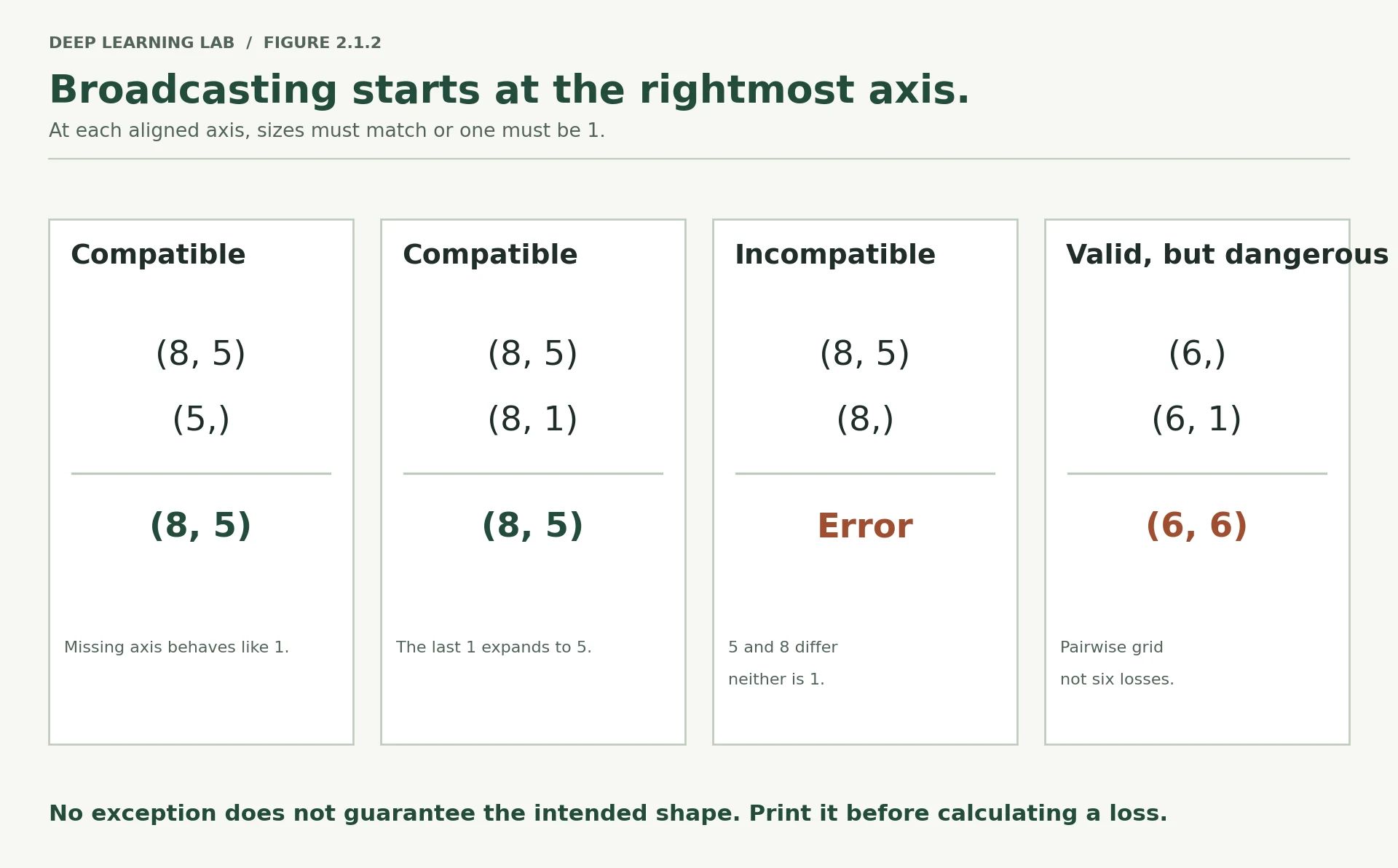
Broadcasting lets PyTorch combine tensors of different shapes by virtually stretching length-1 axes. It is what makes per-feature standardisation a one-liner. It is also the mechanism behind the worst category of deep learning bug: the one that runs.
The rule. Align shapes from the right. For each axis pair, they are compatible if they are equal, or if one of them is 1. A missing axis on the left counts as 1.
   (8, 5)        (8, 5)        (8, 5)         (8, 5)
   (   5)   OK   (8, 1)   OK   (1, 5)   OK    (   8)   FAILS
-> (8, 5)     -> (8, 5)     -> (8, 5)         5 vs 8, neither is 1
batch = torch.arange(40, dtype=torch.float32).reshape(8, 5)batchtensor([[ 0., 1., 2., 3., 4.],
[ 5., 6., 7., 8., 9.],
[10., 11., 12., 13., 14.],
[15., 16., 17., 18., 19.],
[20., 21., 22., 23., 24.],
[25., 26., 27., 28., 29.],
[30., 31., 32., 33., 34.],
[35., 36., 37., 38., 39.]])
per_feature = torch.tensor([0., 10., 100., 1000., 10000.]) # (5,)per_featuretensor([ 0., 10., 100., 1000., 10000.])
print("(8,5) + (5,) ->", tuple((batch + per_feature).shape), " broadcast across rows")(8,5) + (5,) -> (8, 5) broadcast across rows
batch + per_featuretensor([[0.0000e+00, 1.1000e+01, 1.0200e+02, 1.0030e+03, 1.0004e+04],
[5.0000e+00, 1.6000e+01, 1.0700e+02, 1.0080e+03, 1.0009e+04],
[1.0000e+01, 2.1000e+01, 1.1200e+02, 1.0130e+03, 1.0014e+04],
[1.5000e+01, 2.6000e+01, 1.1700e+02, 1.0180e+03, 1.0019e+04],
[2.0000e+01, 3.1000e+01, 1.2200e+02, 1.0230e+03, 1.0024e+04],
[2.5000e+01, 3.6000e+01, 1.2700e+02, 1.0280e+03, 1.0029e+04],
[3.0000e+01, 4.1000e+01, 1.3200e+02, 1.0330e+03, 1.0034e+04],
[3.5000e+01, 4.6000e+01, 1.3700e+02, 1.0380e+03, 1.0039e+04]])
per_row = torch.arange(8, dtype=torch.float32).unsqueeze(1) # (8,1)print("(8,5) + (8,1) ->", tuple((batch + per_row).shape), " broadcast across columns")bad = torch.arange(8, dtype=torch.float32) # (8,)try: batch + badexcept RuntimeError as e: print("\n(8,5) + (8,) -> error, which is exactly what you want:") print(" ", str(e)[:100])(8,5) + (8,1) -> (8, 5) broadcast across columns (8,5) + (8,) -> error, which is exactly what you want: The size of tensor a (5) must match the size of tensor b (8) at non-singleton dimension 1
Using it on purpose: per-feature standardisation
This is the operation you will perform on every tabular dataset for the rest of the course, and broadcasting is what makes it two lines instead of a loop.
X = torch.randn(200, 4) * torch.tensor([1.0, 50.0, 0.01, 300.0]) + torch.tensor([0., 100., 5., -20.])print("Before standardisation")print(" mean per feature:", X.mean(dim=0).numpy().round(3))print(" std per feature:", X.std(dim=0).numpy().round(3))mu = X.mean(dim=0) # (4,) -- collapse the batch axissd = X.std(dim=0) # (4,)X_std = (X - mu) / sd # (200,4) - (4,) broadcasts across all 200 rowsprint("\nAfter standardisation")print(" mean per feature:", X_std.mean(dim=0).numpy().round(6))print(" std per feature:", X_std.std(dim=0).numpy().round(6))Compute one mean and one standard deviation per feature, then use broadcasting to apply them to every row at once.
- 1
dim=0collapses the batch axis, leaving one number per feature: shape(4,). - 2
(200, 4) - (4,): the per-feature vector is stretched across all 200 rows.
Before standardisation
  mean per feature: [  0.178 104.835   5.001 -30.663]
  std  per feature: [1.05200e+00 5.04490e+01 1.00000e-02 2.74218e+02]

After standardisation
  mean per feature: [ 0.0e+00 -0.0e+00  2.3e-05 -0.0e+00]
  std  per feature: [1. 1. 1. 1.]
Note dim=0. Reducing along axis 0 collapses the batch and leaves one statistic per feature —
which is what standardisation means. Reducing along dim=1 would collapse the features and give
one statistic per row, which is meaningless here. Getting this backwards produces a tensor of
plausible shape and no error.
The silent broadcast
Here is the bug. Your model outputs (N,) and your labels are (N, 1) — or the reverse. Neither
shape is wrong on its own. Together they broadcast to (N, N), and the loss function dutifully
averages over an N x N matrix of every prediction compared against every label.
import torch.nn.functional as Fnimport warningstargets = torch.tensor([[1.0], [3.0], [5.0], [7.0], [9.0], [11.0]]) # (6, 1)preds = targets.squeeze(1) + 0.05 * torch.randn(6) # (6,) -- nearly perfectdescribe("preds", preds)describe("targets", targets)correct = Fn.mse_loss(preds, targets.squeeze(1))with warnings.catch_warnings(): warnings.simplefilter("ignore") broadcast = Fn.mse_loss(preds, targets)print(f"\nShape of (preds - targets): {tuple((preds - targets).shape)} <- the tell")print(f"Correct loss : {correct.item():.6f}")print(f"Broadcast loss : {broadcast.item():.6f}")print(f"Ratio : {broadcast.item() / correct.item():.0f}x too large")preds shape=(6,) dtype=torch.float32 device=cpu ndim=1 numel=6 targets shape=(6, 1) dtype=torch.float32 device=cpu ndim=2 numel=6 Shape of (preds - targets): (6, 6) <- the tell Correct loss : 0.001768 Broadcast loss : 23.243324 Ratio : 13147x too large
The predictions sit within about 0.05 of the targets. The correct loss is roughly 0.0018. The broadcast loss is over 23 — four orders of magnitude larger — and your training run will look like a model that refuses to learn, when in fact it learned fine and you measured it wrong.
PyTorch does emit a UserWarning here, which we suppressed to show the number. In a real run that
warning scrolls past in the first epoch and is never seen again. Do not rely on it.
And do not assume the guard is uniform. As of torch 2.14 the binary cross-entropy losses were hardened to raise on a shape mismatch, while the regression losses still broadcast with only a warning. Run the cell below to see where the line currently sits on your version — the answer is a property of the release you installed, not a law.
The defence is an assertion, written once, at the top of your training loop:
def check_loss_shapes(preds: torch.Tensor, targets: torch.Tensor) -> None: """Fail loudly if predictions and targets do not have identical shapes. Mismatched shapes such as ``(N, 1)`` and ``(N,)`` silently broadcast to ``(N, N)`` in some loss functions. Calling this just before computing the loss turns that silent bug into an immediate, readable error on the first step. Args: preds: Model output tensor. targets: Target tensor that will be compared with ``preds``. Raises: ValueError: If the shapes differ. The message states both shapes and what they would broadcast to. """ if preds.shape != targets.shape: raise ValueError( f"Shape mismatch: preds {tuple(preds.shape)} vs targets {tuple(targets.shape)}. " f"These will broadcast to {tuple(torch.broadcast_shapes(preds.shape, targets.shape))}." )try: check_loss_shapes(preds, targets)except ValueError as e: print("Caught before it cost you an afternoon:\n ", e)check_loss_shapes(preds, targets.squeeze(1))print("\nMatching shapes pass silently.")A guard that fails loudly on the first training step instead of letting a broadcast corrupt the loss for fifty epochs.
- 1
Compare shapes exactly; don't rely on each loss function's own checks.
- 2
Reports what the mismatch would have become, e.g.
(6, 6), which makes the error message self-explanatory.
Caught before it cost you an afternoon:
  Shape mismatch: preds (6,) vs targets (6, 1). These will broadcast to (6, 6).

Matching shapes pass silently.
# Which losses protect you, and which do not? Check, do not assume.import warningsp = torch.randn(6, 1)t_reg = torch.randn(6)t_bin = torch.randint(0, 2, (6,)).float()losses = [ ("MSELoss", nn.MSELoss(), t_reg), ("L1Loss", nn.L1Loss(), t_reg), ("SmoothL1Loss", nn.SmoothL1Loss(), t_reg), ("BCEWithLogitsLoss", nn.BCEWithLogitsLoss(), t_bin),]print(f"Feeding preds {tuple(p.shape)} against targets of shape (6,)\n")for name, fn, target in losses: try: with warnings.catch_warnings(record=True) as caught: warnings.simplefilter("always") value = fn(p, target) flag = "warned" if caught else "SILENT" print(f" {name:<20} ran, loss={value.item():8.4f} ({flag})") except (ValueError, RuntimeError) as e: print(f" {name:<20} raised {type(e).__name__} <- protected")Feeding preds (6, 1) against targets of shape (6,) MSELoss ran, loss= 3.3967 (warned) L1Loss ran, loss= 1.5244 (warned) SmoothL1Loss ran, loss= 1.0952 (warned) BCEWithLogitsLoss raised ValueError <- protected
The regression losses run. The binary loss refuses. There is no principle behind that split — it
is the accumulated history of which bug reports got acted on. Which is the argument for
check_loss_shapes: your own assertion behaves the same way on every loss and every version.
-
nn.MSELosson a batch of 256 with a model that outputs(256, 1)and targets of shape(256,). What matrix does the loss actually average over, and how many entries does it have? Roughly what fraction of those entries compare a prediction to its own target?It averages a (256, 256) matrix: 65,536 entries. Only the diagonal, 256 of them, compares a prediction with its own target: 1/256 ≈ 0.4%. The other 99.6% compare each prediction with some other customer's target, so the model is effectively trained to predict the batch average.
-
You standardise using
X.mean(dim=1, keepdim=True)by mistake. The code runs. Describe, in terms of what each row now represents, what your model is being asked to learn.Each row is now centred on its own average across features, so the model sees how each feature deviates from that row's mean of age, income, balance and so on, numbers in unrelated units. Two customers whose features are proportionally similar become indistinguishable, and the absolute information (who is older, who is richer) is destroyed. The model is asked to learn from a within-row pattern of incomparable quantities. No error, plausible shapes, meaningless inputs.
Standardise per feature, and refuse a broadcast
NumPy broadcasts exactly like PyTorch. Complete standardise (one mean and spread per column) and safe_mse, which must raise
a ValueError when the shapes differ instead of silently comparing every prediction with every target.
Predictions of shape (256, 1) and targets of shape (256,) go into nn.MSELoss. What does it average over?
Broadcasting aligns from the right: (256, 1) and (256,) → (256, 256). Only 256 of the 65,536 entries compare a prediction with its own target. It runs with only a warning.
Which pair of shapes is not broadcastable?
Aligned from the right, 5 and 8 differ and neither is 1. (8, 5) + (8,) raises an error, which is exactly what you want.
Why does the lesson call broadcasting the mechanism behind 'the worst category of bug', and what is the defence?
- Shape mismatches such as (N,) against (N, 1) can broadcast silently into an (N, N) computation: the code runs, the number looks plausible, and you optimise or measure the wrong thing.
- Defence: assert that predictions and targets have equal shapes before every loss (e.g.
check_loss_shapes), and treat broadcasting warnings as errors.
Matrix multiplication is the layer
In Lesson 1.2 you multiplied nine parameters by hand. nn.Linear is that operation at scale, and
nothing more. Proving this to yourself removes the last of the magic from the phrase "dense layer".
The shape rule for A @ B: the inner dimensions must match, and the outer ones survive.
(N, in) @ (in, out) -> (N, out)
     ^______^  must match
  ^                ^  these survive
A = torch.randn(8, 5)B = torch.randn(5, 3)Atensor([[ 8.8873e-01, 5.1824e-01, 4.7037e-01, -7.1866e-01, 1.2050e+00],
[-1.3539e-01, -2.8148e-01, -3.0537e-01, -1.9027e+00, -3.0323e-01],
[ 3.7933e-01, 1.5163e-01, 4.0593e-01, -4.0637e-01, 7.4333e-05],
[ 8.6651e-01, -5.2250e-01, 9.1628e-01, -1.9131e-01, 2.3943e+00],
[-2.7164e-01, -1.3006e+00, 6.2479e-01, 1.5261e+00, -3.8543e-01],
[-5.5999e-01, 2.9853e-01, 2.5498e-01, 1.9409e+00, -1.1855e-01],
[ 4.2360e-01, -4.4879e-01, 8.2307e-01, 8.9556e-01, -7.8797e-01],
[-1.1197e-01, -1.0768e-01, 5.4267e-01, 1.6382e+00, -4.6443e-01]])
A.shapetorch.Size([8, 5])
Btensor([[-1.0112, 0.0038, 1.3225],
[ 0.2166, -0.7708, 1.3247],
[ 0.2447, 0.6156, -0.9525],
[-0.0114, 1.0010, -0.4248],
[ 0.9434, 1.2993, -0.1211]])
B.shapetorch.Size([5, 3])
A@Btensor([[ 0.4737, 0.7398, 1.5732],
[-0.2632, -2.2702, 0.5839],
[-0.2467, -0.2722, 0.4885],
[ 1.4959, 3.8897, -0.6277],
[-0.2352, 2.4129, -3.2789],
[ 0.5593, 1.7137, -1.3982],
[-1.0778, 0.7269, -1.1033],
[-0.2341, 1.4531, -1.4473]])
(A@B).shapetorch.Size([8, 3])
print("A @ B ->", tuple((A @ B).shape))try: B @ Aexcept RuntimeError as e: print("\nB @ A fails, as it must:", str(e)[:80])# Element-wise multiply is a completely different operation. Do not confuse * with @.C_ = torch.randn(8, 5)print("\nA * C_ (element-wise) ->", tuple((A * C_).shape))print("A @ B (matrix) ->", tuple((A @ B).shape))A @ B -> (8, 3) B @ A fails, as it must: mat1 and mat2 shapes cannot be multiplied (5x3 and 8x5) A * C_ (element-wise) -> (8, 5) A @ B (matrix) -> (8, 3)
Rebuilding nn.Linear by hand
PyTorch stores a linear layer's weight with shape (out_features, in_features) — transposed
relative to the multiply. That ordering is a memory-layout decision, and it is why you see
x @ W.T rather than x @ W.
import torch.nn as nntorch.manual_seed(SEED)layer = nn.Linear(in_features=5, out_features=3)describe("layer.weight", layer.weight)describe("layer.bias", layer.bias)x = torch.randn(8, 5)official = layer(x)manual = x @ layer.weight.T + layer.bias # (8,5) @ (5,3) -> (8,3), then + (3,) broadcastsdescribe("official", official)describe("manual", manual)print("\nMax absolute difference:", (official - manual).abs().max().item())print("Identical within float32 tolerance:", torch.allclose(official, manual, atol=1e-6))Proof that a dense layer is exactly x @ W.T + b.
- 1
The weight is stored as
(out, in) = (3, 5), which is why the formula transposes it. - 2
(8, 5) @ (5, 3) → (8, 3), then the bias(3,)broadcasts across the 8 rows.
layer.weight shape=(3, 5)           dtype=torch.float32    device=cpu    ndim=2  numel=15
layer.bias   shape=(3,)             dtype=torch.float32    device=cpu    ndim=1  numel=3
official     shape=(8, 3)           dtype=torch.float32    device=cpu    ndim=2  numel=24
manual       shape=(8, 3)           dtype=torch.float32    device=cpu    ndim=2  numel=24

Max absolute difference: 0.0
Identical within float32 tolerance: True
Zero difference, or near enough that only floating-point ordering separates them. nn.Linear is
x @ W.T + b. Everything else the class provides — parameter registration, device movement,
gradient tracking — is bookkeeping around that one line.
This is worth pausing on, because it collapses the whole of Section 5 into a single sentence you
can carry: a layer is a matrix multiply that reshapes the last axis from in_features to
out_features, and leaves every other axis untouched.
That last clause matters more than it looks:
# nn.Linear operates on the LAST axis only. Every leading axis is treated as batch.proj = nn.Linear(64, 16)flat = torch.randn(32, 64) # (N, E) tabular-styleseq = torch.randn(4, 10, 64) # (N, L, E) transformer-styledeep = torch.randn(2, 3, 5, 64) # arbitrary leading axesdescribe("flat -> ", proj(flat))describe("seq -> ", proj(seq))describe("deep -> ", proj(deep))print("\nThe layer never asked how many leading axes there were.")print("This is exactly why the same nn.Linear works inside a Transformer on Day 6.")flat -> shape=(32, 16) dtype=torch.float32 device=cpu ndim=2 numel=512 seq -> shape=(4, 10, 16) dtype=torch.float32 device=cpu ndim=3 numel=640 deep -> shape=(2, 3, 5, 16) dtype=torch.float32 device=cpu ndim=4 numel=480 The layer never asked how many leading axes there were. This is exactly why the same nn.Linear works inside a Transformer on Day 6.
Counting parameters
Parameter count is the first number anyone asks about a model. It is fully determined by the shapes.
model = nn.Sequential( nn.Linear(50, 64), nn.ReLU(), nn.Linear(64, 32), nn.ReLU(), nn.Linear(32, 1),)modelSequential( (0): Linear(in_features=50, out_features=64, bias=True) (1): ReLU() (2): Linear(in_features=64, out_features=32, bias=True) (3): ReLU() (4): Linear(in_features=32, out_features=1, bias=True) )
for name in model.named_parameters(): print(name)('0.weight', Parameter containing:
tensor([[ 0.0892, 0.0073, -0.0671, ..., -0.0099, -0.1299, 0.0071],
[ 0.0324, -0.1357, 0.1189, ..., 0.0115, -0.0887, 0.0649],
[ 0.0100, -0.0226, -0.1007, ..., 0.0394, -0.1231, 0.0736],
...,
[ 0.0380, -0.0977, 0.1284, ..., -0.0007, -0.0181, -0.0549],
[ 0.0909, -0.0255, 0.0121, ..., 0.1296, -0.0726, 0.0070],
[ 0.0473, 0.0400, -0.0785, ..., -0.1253, -0.0798, 0.0679]],
requires_grad=True))
('0.bias', Parameter containing:
tensor([-0.0780, 0.0134, 0.0214, 0.0297, -0.0721, 0.0049, 0.0980, 0.0733,
0.0270, -0.1125, 0.0665, -0.0563, 0.0990, 0.0587, -0.0260, 0.0547,
-0.0588, 0.0244, -0.0071, 0.0022, 0.0498, 0.1377, -0.0624, 0.1381,
-0.0260, 0.1345, 0.0318, 0.0115, -0.0473, -0.0745, -0.1391, -0.0772,
-0.0127, 0.1190, 0.0765, 0.0247, -0.1369, 0.0996, 0.0974, -0.0636,
0.0573, -0.1178, -0.0715, -0.0427, -0.1282, -0.0086, 0.0290, 0.0412,
0.1323, 0.0817, -0.1294, -0.0444, 0.0792, -0.1357, -0.0087, 0.0535,
-0.0948, 0.1213, -0.0932, -0.1037, -0.1074, -0.0248, 0.0472, 0.0407],
requires_grad=True))
('2.weight', Parameter containing:
tensor([[-0.0618, 0.1093, -0.0670, ..., 0.0986, -0.0281, -0.1104],
[ 0.0666, -0.0102, 0.0353, ..., -0.0598, 0.0843, -0.0414],
[ 0.0119, 0.0930, -0.0812, ..., -0.0538, 0.1037, 0.0947],
...,
[ 0.0483, 0.0459, -0.0932, ..., 0.0091, -0.0544, 0.0042],
[-0.0275, -0.0856, 0.1210, ..., 0.0602, -0.0273, 0.0912],
[-0.1166, 0.0909, -0.1209, ..., 0.1162, -0.0286, -0.0664]],
requires_grad=True))
('2.bias', Parameter containing:
tensor([ 0.1171, -0.0599, -0.0716, 0.1003, -0.0051, -0.0610, 0.0446, -0.0632,
0.0046, -0.0985, -0.0302, 0.0970, 0.0180, -0.0169, 0.0948, 0.0677,
0.0701, 0.0593, -0.0428, -0.1113, -0.0740, -0.0743, 0.0348, 0.1002,
0.1155, 0.1001, 0.0177, 0.0861, 0.0063, 0.0581, -0.0828, 0.1204],
requires_grad=True))
('4.weight', Parameter containing:
tensor([[ 0.0817, 0.0003, -0.0702, 0.0310, -0.0204, -0.1144, -0.1095, -0.0705,
0.0406, -0.1140, 0.0974, -0.0974, 0.1063, 0.0061, 0.0003, 0.0239,
-0.0013, 0.0874, -0.0141, -0.0624, 0.0184, -0.1035, 0.0708, 0.0178,
0.0892, -0.0310, -0.0010, -0.0842, -0.0794, 0.0044, 0.0905, -0.0669]],
requires_grad=True))
('4.bias', Parameter containing:
tensor([0.1389], requires_grad=True))
total = 0for name, p in model.named_parameters(): n = p.numel() total += n print(f"{name:<12} {str(tuple(p.shape)):<12} {n:>6,}")print(f"{'TOTAL':<12} {'':<12} {total:>6,}")# Verify by hand: (in*out + out) for each linear layer.by_hand = (50 * 64 + 64) + (64 * 32 + 32) + (32 * 1 + 1)print(f"\nComputed by hand: {by_hand:,} -> matches: {by_hand == total}")0.weight (64, 50) 3,200 0.bias (64,) 64 2.weight (32, 64) 2,048 2.bias (32,) 32 4.weight (1, 32) 32 4.bias (1,) 1 TOTAL 5,377 Computed by hand: 5,377 -> matches: True
-
A layer
nn.Linear(1000, 1000)has how many parameters? Now stack ten of them. Atfloat32, how many megabytes do the weights alone occupy?nn.Linear(1000, 1000)has \(1000 \times 1000 + 1000 = 1{,}001{,}000\) parameters. Ten of them: 10,010,000 parameters. At 4 bytes each (float32), that is about 40 MB (38.2 MiB) for the weights alone, and training with Adam roughly quadruples it (gradients + two optimiser buffers). Check it in the parameter calculator's 10 × Linear(1000,1000) preset. -
proj(deep)above accepted a 4-axis tensor. Which axis did it transform, and what would you have to do to apply a linear transformation to a different axis?Only the last axis (64 → 16); the leading
(2, 3, 5)axes are all treated as batch. To transform a different axis, move it to the end, apply the layer, and move it back:proj(x.transpose(axis, -1)).transpose(axis, -1), or write the contraction explicitly withtorch.einsum.
nn.Linear(64, 16) receives a tensor of shape (2, 3, 5, 64). What comes out?
A linear layer transforms only the last axis, from in_features to out_features. Every leading axis is treated as batch.
How is nn.Linear's weight stored, and what does the layer compute?
PyTorch stores the weight as (out_features, in_features), a memory-layout choice, so the layer is x @ W.T + b.
How many parameters does nn.Linear(1000, 1000) have, and roughly how much memory do ten of them take in float32?
- \(1000 \times 1000 + 1000 = 1{,}001{,}000\) parameters per layer.
- Ten layers ≈ 10 million parameters × 4 bytes ≈ 40 MB for the weights alone.
dtype and device discipline
Two more clauses of the contract. Both produce errors that are easy to fix and impossible to guess if you have not seen them once.
Labels must be long for cross-entropy
nn.CrossEntropyLoss expects class indices, not floats and not one-hot vectors. Indices are
integers, and PyTorch wants them as int64 — which it calls long.
ce = nn.CrossEntropyLoss()logits = torch.randn(4, 3) # 4 examples, 3 classes, raw scoreslogitstensor([[-0.4001, -0.5472, 0.4396],
[ 0.8689, 0.7260, 0.6413],
[-0.6592, 0.6288, 1.8414],
[-1.5752, 0.7442, -1.4613]])
labels_float = torch.tensor([0.0, 1.0, 2.0, 0.0])labels_floattensor([0., 1., 2., 0.])
ce(logits, labels_float)--------------------------------------------------------------------------- RuntimeError Traceback (most recent call last) Cell In[111], line 1 ----> 1 ce(logits, labels_float) File /opt/anaconda3/lib/python3.13/site-packages/torch/nn/modules/module.py:1783, in Module._wrapped_call_impl(self, *args, **kwargs) 1781 return self._compiled_call_impl(*args, **kwargs) # type: ignore[misc] 1782 else: -> 1783 return self._call_impl(*args, **kwargs) File /opt/anaconda3/lib/python3.13/site-packages/torch/nn/modules/module.py:1794, in Module._call_impl(self, *args, **kwargs) 1789 # If we don't have any hooks, we want to skip the rest of the logic in 1790 # this function, and just call forward. 1791 if not (self._backward_hooks or self._backward_pre_hooks or self._forward_hooks or self._forward_pre_hooks 1792 or _global_backward_pre_hooks or _global_backward_hooks 1793 or _global_forward_hooks or _global_forward_pre_hooks): -> 1794 return forward_call(*args, **kwargs) 1796 result = None 1797 called_always_called_hooks = set() File /opt/anaconda3/lib/python3.13/site-packages/torch/nn/modules/loss.py:1400, in CrossEntropyLoss.forward(self, input, target) 1398 def forward(self, input: Tensor, target: Tensor) -> Tensor: 1399 """Runs the forward pass.""" -> 1400 return F.cross_entropy( 1401 input, 1402 target, 1403 weight=self.weight, 1404 ignore_index=self.ignore_index, 1405 reduction=self.reduction, 1406 label_smoothing=self.label_smoothing, 1407 ) File /opt/anaconda3/lib/python3.13/site-packages/torch/nn/functional.py:3561, in cross_entropy(input, target, weight, size_average, ignore_index, reduce, reduction, label_smoothing) 3559 if size_average is not None or reduce is not None: 3560 reduction = _Reduction.legacy_get_string(size_average, reduce) -> 3561 return torch._C._nn.cross_entropy_loss( 3562 input, 3563 target, 3564 weight, 3565 # pyrefly: ignore [bad-argument-type] 3566 _Reduction.get_enum(reduction), 3567 ignore_index, 3568 label_smoothing, 3569 ) RuntimeError: expected target dtype to be Long or Byte, but got Float
labels_long = torch.tensor([0, 1, 2, 0]) labels_longtensor([0, 1, 2, 0])
ce(logits, labels_long)tensor(1.3457)
try: ce(logits, labels_float)except RuntimeError as e: print("float labels rejected:", str(e)[:90])labels_long = torch.tensor([0, 1, 2, 0]) # already int64 by defaultprint("\nlabels_long dtype:", labels_long.dtype)print("loss:", ce(logits, labels_long).item())float labels rejected: expected target dtype to be Long or Byte, but got Float labels_long dtype: torch.int64 loss: 1.345724105834961
# The reverse rule for binary: BCEWithLogitsLoss expects FLOAT targets, same shape as output.bce = nn.BCEWithLogitsLoss()binary_logits = torch.randn(4, 1)binary_targets = torch.tensor([[0.], [1.], [1.], [0.]])binary_logitstensor([[ 1.3813],
[ 0.3461],
[ 0.0496],
[-0.3879]])
binary_targetstensor([[0.],
[1.],
[1.],
[0.]])
print("BCE loss:", bce(binary_logits, binary_targets).item())BCE loss: 0.83174729347229
The two conventions pull in opposite directions and you will mix them up at least once:
| Loss | Model output shape | Target shape | Target dtype |
|---|---|---|---|
CrossEntropyLoss |
(N, C) raw logits |
(N,) |
long (int64) |
BCEWithLogitsLoss |
(N, 1) raw logits |
(N, 1) |
float32 |
Both take raw logits, not probabilities. Neither wants you to apply a softmax or sigmoid first — they do it internally, in a numerically stable way. Lesson 2.3 explains why that matters.
Everything must live on one device
cpu_tensor = torch.randn(4, 5)print("Created on:", cpu_tensor.device)moved = cpu_tensor.to(DEVICE)print("Moved to :", moved.device)if DEVICE.type != "cpu": other = torch.randn(5, 3) # left on CPU try: moved @ other except RuntimeError as e: print("\nCross-device matmul fails:", str(e)[:110]) print("Fixed:", (moved @ other.to(DEVICE)).shape)else: print("\nOn CPU-only hardware there is no mismatch to demonstrate.") print("The error you would see on GPU hardware reads:") print(" RuntimeError: Expected all tensors to be on the same device, " "but found at least two devices, cuda:0 and cpu!")Created on: cpu Moved to : mps:0 Cross-device matmul fails: Tensor for argument #2 'mat2' is on CPU, but expected it to be on GPU (while checking arguments for mm) Fixed: torch.Size([4, 3])
The rule that prevents this entirely: move the model once, move each batch as it arrives.
model = model.to(DEVICE)              # once, before training

for xb, yb in loader:                 # every batch, inside the loop
    xb, yb = xb.to(DEVICE), yb.to(DEVICE)
    ...
Note the asymmetry. model.to(DEVICE) mutates the model in place and returns it. tensor.to(...)
does not mutate — it returns a new tensor, and if you discard the return value nothing happens.
This asymmetry is a genuine wart in the API and it catches everyone once.
.to() on a module vs a tensor
model.to(DEVICE)Moves the parameters in place and returns the model. A bare call on its own line works.
tensor.to(DEVICE)Returns a new tensor and leaves the original where it was. A bare call does nothing: write x = x.to(DEVICE).
t = torch.randn(3)t.to(DEVICE) # return value discarded -- no effectprint("after bare t.to(DEVICE), t is still on:", t.device)t = t.to(DEVICE) # correct: rebindprint("after t = t.to(DEVICE), t is on:", t.device)m = nn.Linear(3, 2)m.to(DEVICE) # modules DO move in placeprint("\nafter bare m.to(DEVICE), weight is on:", m.weight.device)after bare t.to(DEVICE), t is still on: cpu after t = t.to(DEVICE), t is on: mps:0 after bare m.to(DEVICE), weight is on: mps:0
-
Your labels come from pandas as
int64and you are usingBCEWithLogitsLoss. Which cast do you need, and where in the pipeline should it happen so it happens exactly once?BCEWithLogitsLossneeds float32 targets with the same shape as the output, so(N, 1). Cast once, where the data first becomes a tensor (in theDatasetor when building the tensors):y = torch.tensor(df["y"].to_numpy(), dtype=torch.float32).unsqueeze(1). Never cast inside the training loop, where the fix gets repeated, forgotten or duplicated. -
Why does
tensor.to()return a new tensor rather than moving in place, whenModule.to()does the opposite? Think about what a tensor might be shared with.A tensor may be shared: other tensors can be views of the same memory, other variables can point to it, NumPy arrays may share its buffer, autograd may have saved it. Silently relocating it would pull memory out from under all of them, so
.to()returns a new tensor and leaves the original intact. A module is different: it owns its parameters and is the natural unit of placement, so moving it in place is safe. PyTorch even keeps the sameParameterobjects, which is why optimiser references stay valid.
Which targets does nn.CrossEntropyLoss expect for a batch of N examples?
Class indices, as long. BCEWithLogitsLoss is the opposite: float targets with the same shape as the output.
t.to(DEVICE) on its own line leaves t on the CPU, but model.to(DEVICE) moves the model. Why?
The asymmetry catches everyone once. Move the model once; move each batch as it arrives, and keep the returned tensor.
A shape-debugging clinic
Five broken cells. For each one:
- Read the code and write down the error you expect, or "no error" if you think it runs.
- Run it.
- Fix it.
The point is the prediction. Reading a traceback teaches you nothing you did not already know; predicting one tells you exactly where your model of the system is wrong.
Each case below is one you will meet again in a real run this week.
# --- CASE 1 ---------------------------------------------------------------# A model expecting 10 features, given a batch of 20-feature rows.# Predict: does this error? What does the message say about which shapes?model_1 = nn.Linear(20, 4)batch_1 = torch.randn(32, 20)model_1(batch_1)tensor([[-0.5887, -0.0700, 0.1599, -0.1627],
[ 0.7504, -0.7608, -0.4341, -0.6605],
[-0.5235, 0.2127, 0.3555, 0.9377],
[-0.1450, -0.5725, -0.6923, 0.1001],
[ 0.4675, -0.0861, 1.0044, -0.3146],
[ 0.3847, 0.0095, -0.4434, 0.5730],
[-0.4183, 1.1701, -0.1481, 0.7114],
[ 0.7043, 0.5255, -0.7251, 0.1986],
[ 0.3321, 0.3861, 0.0174, -0.8107],
[-0.0639, -1.2616, 0.3574, -0.2241],
[ 0.3313, 1.2249, 1.4246, 0.8365],
[ 0.8920, 0.9800, 0.7001, 0.8320],
[-0.0342, 0.7503, -0.6661, 0.3117],
[-0.3156, 0.1935, 0.2117, -0.2665],
[ 0.5253, 0.5389, 0.2208, -0.3505],
[-0.9715, -0.1151, 0.2968, 0.6642],
[ 1.3181, 0.5709, 0.6701, -0.5603],
[ 1.0035, -0.5230, 0.6820, -0.4949],
[ 0.2284, -0.7546, 0.5962, 0.4423],
[-0.4194, -0.5966, 0.3721, -0.2656],
[ 1.3839, 0.5970, 0.2154, -0.0037],
[-0.3709, -0.2625, -0.0796, -0.1356],
[-0.6778, -0.2367, -0.6424, -0.4541],
[ 0.1953, 0.3140, 0.4543, 0.0503],
[ 0.3543, -0.0445, -0.1653, 0.3988],
[ 0.6150, -0.3697, -0.3649, -1.0313],
[-0.3942, -0.4802, 0.5924, -0.1371],
[ 0.6251, 1.1520, 0.2173, 0.4020],
[-0.3168, 0.3002, 0.4881, -0.3158],
[ 0.2043, 1.3189, 0.2178, 0.5472],
[-0.9965, -0.7816, 0.1153, 0.1527],
[ 0.1179, -0.4939, 0.6399, -0.2016]], grad_fn=<AddmmBackward0>)
try: out = model_1(batch_1) print("CASE 1 ran. Output:", tuple(out.shape))except RuntimeError as e: print("CASE 1 error:", str(e)[:120])CASE 1 error: mat1 and mat2 shapes cannot be multiplied (32x20 and 10x4)
Case 1 diagnosis. mat1 and mat2 shapes cannot be multiplied (32x20 and 10x4). PyTorch
reports the weight already transposed, which is why you see 10x4 and not 4x10. The number
that must match your input's last axis is the first number in the second pair. Fix: either build
nn.Linear(20, 4), or find out why your feature count changed — usually a one-hot encoder fitted
on a different split.
# --- CASE 1 FIX ---model_1_fixed = nn.Linear(20, 4)print("Fixed:", tuple(model_1_fixed(batch_1).shape))Fixed: (32, 4)
Case 2. nn.Linear(5, 1) receives torch.randn(5), a single row with no batch axis. What happens?
It runs and returns (1,). A linear layer transforms the last axis and doesn't care that there's nothing in front of it, so the batch axis is simply missing from the output. Harmless until it meets a loss or code that indexes per example. Fix: one_row.unsqueeze(0).
# --- CASE 2 ---------------------------------------------------------------# A single example passed to a model trained on batches.# Predict: error, or silent success?model_2 = nn.Linear(5, 1)one_row = torch.randn(5) # NOT (1, 5)out_2 = model_2(one_row)out_2tensor([-1.6324], grad_fn=<ViewBackward0>)
describe("CASE 2 output", out_2)print("No error raised. Output has no batch axis.")CASE 2 output shape=(1,) dtype=torch.float32 device=cpu ndim=1 numel=1 No error raised. Output has no batch axis.
Case 2 diagnosis. No error. nn.Linear transforms the last axis and does not care that there
is nothing in front of it, so you get (1,) back instead of (1, 1). On its own this is harmless.
Combined with a loss function, or with code downstream that indexes out[i] per example, it
becomes Section 4's silent broadcast. Fix: one_row.unsqueeze(0).
# --- CASE 2 FIX ---describe("CASE 2 fixed", model_2(one_row.unsqueeze(0)))CASE 2 fixed shape=(1, 1) dtype=torch.float32 device=cpu ndim=2 numel=1
Case 3. nn.Conv2d(in_channels=3, …) receives images shaped (4, 32, 32, 3). What happens?
PyTorch reads axis 1 as the channel axis, finds 32 where the layer wants 3, and raises. The lucky outcome. Fix: images.permute(0, 3, 1, 2) to get (N, C, H, W).
# --- CASE 3 ---------------------------------------------------------------# Image batch loaded in the layout PIL and matplotlib use.# Predict: which axis does the convolution think is the channel axis?conv = nn.Conv2d(in_channels=3, out_channels=8, kernel_size=3)images_3 = torch.randn(4, 32, 32, 3) # (N, H, W, C) -- wrong for PyTorchtry: out = conv(images_3) print("CASE 3 ran. Output:", tuple(out.shape))except RuntimeError as e: print("CASE 3 error:", str(e)[:130])CASE 3 error: Given groups=1, weight of size [8, 3, 3, 3], expected input[4, 32, 32, 3] to have 3 channels, but got 32 channels instead
Case 3 diagnosis. The convolution reads axis 1 as channels, finds 32 where it wanted 3, and
raises. This is the friendly outcome — if your image happened to be 3x3 pixels it would have run
and produced garbage. Fix: images_3.permute(0, 3, 1, 2).
# --- CASE 3 FIX ---images_3_fixed = images_3.permute(0, 3, 1, 2)describe("CASE 3 input fixed", images_3_fixed)describe("CASE 3 output", conv(images_3_fixed))print("Note 32 -> 30: a 3x3 kernel with no padding loses one pixel on each side.")CASE 3 input fixed shape=(4, 3, 32, 32) dtype=torch.float32 device=cpu ndim=4 numel=12288 CASE 3 output shape=(4, 8, 30, 30) dtype=torch.float32 device=cpu ndim=4 numel=28800 Note 32 -> 30: a 3x3 kernel with no padding loses one pixel on each side.
Case 4. CrossEntropyLoss receives logits (16, 3) and labels (16,) holding 0.0/1.0/2.0 as floats. What happens?
expected target dtype to be Long or Byte, but got Float. Class indices must be integers. Fix: labels.long(), ideally once where the labels are created.
# --- CASE 4 ---------------------------------------------------------------# Classification labels that came out of pandas as floats.# Predict: which of the two loss calls fails?logits_4 = torch.randn(16, 3)labels_4 = torch.rand(16).mul(3).floor() # values 0.0, 1.0, 2.0 -- but floatdescribe("labels_4", labels_4)try: nn.CrossEntropyLoss()(logits_4, labels_4)except RuntimeError as e: print("CASE 4 error:", str(e)[:100])labels_4 shape=(16,) dtype=torch.float32 device=cpu ndim=1 numel=16 CASE 4 error: expected target dtype to be Long or Byte, but got Float
# --- CASE 4 FIX ---labels_4_fixed = labels_4.long()describe("labels_4_fixed", labels_4_fixed)print("CASE 4 loss:", nn.CrossEntropyLoss()(logits_4, labels_4_fixed).item())labels_4_fixed shape=(16,) dtype=torch.int64 device=cpu ndim=1 numel=16 CASE 4 loss: 1.1663914918899536
Case 5. MSELoss receives predictions (64, 1) and targets (64,). What shape does preds - targets have?
(64, 64): 4,096 comparisons instead of 64, with only a warning. (The note says the two losses agree 'within about half a percent'; in the recorded output they are 1.3608 vs 1.4558, about 7% apart. The exact gap depends on the random numbers, and a small gap is exactly what makes this bug invisible.)
# --- CASE 5 ---------------------------------------------------------------# The nastiest one: it runs, produces a number, and the number is wrong.# A regression head this time. Predict: what shape does (preds - targets) have?import warningsmodel_5 = nn.Linear(4, 1)X_5 = torch.randn(64, 4)targets_5 = torch.randn(64) # (64,)preds_5 = model_5(X_5) # (64, 1)describe("preds_5", preds_5)describe("targets_5", targets_5)with warnings.catch_warnings(): warnings.simplefilter("ignore") wrong = nn.MSELoss()(preds_5, targets_5)right = nn.MSELoss()(preds_5.squeeze(1), targets_5)print(f"\nBroadcast shape: {tuple(torch.broadcast_shapes(preds_5.shape, targets_5.shape))}" f" -> {64*64:,} comparisons instead of 64")print(f"Loss as written : {wrong.item():.6f}")print(f"Loss corrected : {right.item():.6f}")# The same mistake with a binary loss is caught on this version. Do not depend on that.try: nn.BCEWithLogitsLoss()(preds_5, (targets_5 > 0).float())except (ValueError, RuntimeError) as e: print(f"\nSame mistake, BCEWithLogitsLoss: {type(e).__name__} raised -- protected here.")preds_5 shape=(64, 1) dtype=torch.float32 device=cpu ndim=2 numel=64 targets_5 shape=(64,) dtype=torch.float32 device=cpu ndim=1 numel=64 Broadcast shape: (64, 64) -> 4,096 comparisons instead of 64 Loss as written : 1.360844 Loss corrected : 1.455775 Same mistake, BCEWithLogitsLoss: ValueError raised -- protected here.
Case 5 diagnosis. No exception from MSELoss. The loss is computed over a 64x64 matrix —
4,096 comparisons where you wanted 64 — and every prediction is scored against every target. The
two losses agree to within about half a percent, which is precisely what makes this dangerous: the
number looks reasonable, the training curve looks plausible, and the model is optimising the wrong
objective. Section 4's example diverged wildly only because the predictions there were nearly
perfect; when the model is merely mediocre — as it is at the start of every real run — the wrong
loss and the right loss are almost indistinguishable, and nothing ever alerts you.
The binary loss caught the identical mistake. That asymmetry is not something to rely on — it is a property of the version you happen to have installed, and it does not exist for the regression losses at all.
Two fixes, and you should pick one and apply it consistently across a project:
- squeeze the model output:
preds.squeeze(1)to match(N,)labels; - or unsqueeze the labels:
labels.unsqueeze(1)to match(N, 1)output.
Lesson 2.3 uses the second, because keeping an explicit (N, 1) everywhere makes the batch axis
visible in every print statement.
-
Of the five cases, three raised errors and two ran. Rank all five by how expensive they would be to discover in a real project, and justify the ordering.
From most to least expensive to discover:
- Case 5 (silent broadcast in MSE): no error and a plausible loss. The model optimises the wrong objective, and you may never find out; you conclude "the model doesn't work".
- Case 2 (missing batch axis): no error at the source; it surfaces later as a broadcast or an indexing oddity far from the cause.
- Case 3 (NHWC images): errors on the first batch, unless the image size happens to equal the channel count, in which case it becomes silent garbage.
- Case 1 (wrong feature count): errors immediately, and the message names both shapes.
- Case 4 (float labels): errors immediately with a message that says exactly what to do.
The rule: cost grows with the distance between where the bug is and where it shows up. Errors at the source are cheap; silence is expensive.
-
Case 3 would have run silently if the images were
3pixels tall. Write an assertion you could put in your data pipeline that would catch the layout problem regardless of image size.Check against the image size you know from configuration, not against a guess:
N, C, H, W = x.shape
assert (C, H, W) == (3, cfg.img_h, cfg.img_w), f"expected (N, 3, {cfg.img_h}, {cfg.img_w}), got {tuple(x.shape)}"
Because it compares every axis with the expected layout, it catches NHWC even when the images are tiny. Put it where the data leaves the loader, before the model.
nn.Linear(10, 4) receives a (32, 20) batch. The error says (32x20 and 10x4). What must match?
PyTorch reports the weight already transposed. Fix the layer to nn.Linear(20, 4), or find out why the feature count changed (often an encoder fitted on a different split).
Of the five clinic cases, which kind is the most expensive to discover in a real project?
A traceback is a gift. A wrong objective that runs quietly can waste days before anyone notices.
Write (in words) an assertion for your data pipeline that catches images in (N, H, W, C) layout regardless of image size.
- Check the channel axis explicitly, e.g. assert
x.ndim == 4 and x.shape[1] in (1, 3)(expected channel count at axis 1). - Relying on an error from the first layer only works when H or W happens not to equal the channel count.
Conclusion
The tensor contract has three clauses, and nearly every error in this course is a violation of one of them:
- shape — axis 0 is the batch; a layer transforms the last axis; conservation of elements governs every reshape;
- dtype —
float32for inputs and BCE targets,longfor cross-entropy labels, cast once at the NumPy boundary; - device — the model moves in place, tensors do not, and everything in a single operation must agree.
The specific habits worth keeping:
- call
describe()(orprint(t.shape, t.dtype, t.device)) whenever you are unsure — it costs nothing and it is faster than reasoning; - prefer
reshapeoverviewunless you have a reason, and never call baresqueeze(); - assert that predictions and targets have equal shapes before every loss computation;
- treat a
UserWarningabout broadcasting as an error, because in a long training run it is one.
The single most important idea here is that the dangerous bugs are the ones that run. A
traceback is a gift. A loss that is five thousand times too large, computed silently over an
N x N matrix, is what actually costs people days.
Transition to Lesson 2.2
You can now describe any tensor and fix any shape error in one. What you cannot yet do is get real data into that shape reliably, at scale, batch after batch, without leaking information between your training and validation sets.
That is the job of Dataset and DataLoader, and Lesson 2.2 builds both — first over the UCI Bank
Marketing dataset (45,211 rows, 11.7% positive), then over a directory of image files on disk, so
you see that Dataset is a protocol rather than a tabular convenience.
We will also settle a question this lesson deliberately left open: why bother with mini-batches at all, when the entire Bank Marketing training set occupies 7 MB and fits in memory a thousand times over. The answer is not the one most tutorials give, and the measurement is more interesting than the folklore.
Wrap-up
- Every tensor has a shape, a dtype and a device; almost every error violates one of them. Inspect all three whenever you're unsure.
- Axis 0 is the batch. Tabular
(N, F), images(N, C, H, W)(channels first in PyTorch), tokens(N, L), embeddings(N, L, E). - An integer index drops an axis; a slice keeps it. A single example must still be a batch of one:
(1, F). - Reshape conserves the number of elements and never moves data.
viewneeds contiguous memory;reshapecopies when it must. Never use baresqueeze(). - Broadcasting aligns shapes from the right; a size-1 axis stretches. It powers
(X - mu) / sd, and it turns(N, 1)vs(N,)into a silent(N, N)bug. - Assert
preds.shape == targets.shapebefore every loss: loss functions don't guard you consistently. - A dense layer is
x @ W.T + b, applied to the last axis only. Parameters = in × out + out. CrossEntropyLoss: logits(N, C)+longtargets(N,).BCEWithLogitsLoss: logits + float targets of identical shape.- Move the model once (in place); move every tensor by reassigning (
x = x.to(DEVICE)). - The dangerous bugs are the ones that run. A traceback is a gift.
Quick check
batch has shape (8, 5). What is the shape of batch[:, 2:3]?
The slice 2:3 keeps the feature axis with length 1: one feature, as a column.
Which pair of shapes is not broadcastable?
Aligned from the right, 5 vs 8: neither is 1, so it fails. The others give (8, 5), (8, 5) and (3, 4).
x.t().view(-1) raises an error. Why?
.t() only swaps strides; the memory order no longer matches reading order. reshape(-1) works by copying.
Predictions (256, 1) and targets (256,) go into MSELoss. What does the loss average over?
Silent broadcasting: only 1 in 256 comparisons is a prediction against its own target.
How many parameters does nn.Linear(64, 16) have?
64 × 16 weights + 16 biases = 1,040.
Labels for CrossEntropyLoss should be…
Class indices as long; the loss applies log-softmax to the logits itself.
What does t.to(DEVICE) on a line by itself do when t is a tensor?
Tensors aren't moved in place; reassign: t = t.to(DEVICE). Modules are moved in place.
Questions and discussion
Ask about this lesson, share what you found in a lab, or help someone else. Posts are public on the course's GitHub Discussions: anyone can read them, and you need a GitHub account to post.
Opening it loads giscus from giscus.app.