Memory, Batch Size and Precision
- Time
- ~79 min
- Sections
- 10
- Code cells
- 22
- Labs
- 2
- Figures
- 3
Before you start
Will this run fit in the memory you have? You count bytes: every number costs 4 bytes in fp32, gradients add one more copy of the model, and AdamW adds two, so training with AdamW needs about four times the model's own memory before a single activation. You estimate a 7-billion-parameter model three ways, read fp32, fp16 and bf16 as a trade between range and precision, and see why only fp16 needs a loss scaler. Activations are the one term that grows with the batch; speed stops improving past a batch size that belongs to the machine; gradient accumulation gets the big batch back in small memory. Autocast belongs around the forward pass. Finally, a recovery ladder for real out-of-memory errors and a playbook that tries the free fixes first.
- Goal
be able to predict a run's memory before starting it, and to work an out-of-memory error methodically instead of guessing.
The four things that take up memory while training:
weights the model itself + gradients one number per weight + optimizer state AdamW keeps two more numbers per weight + activations the intermediate results, which grow with batch size- Outcome
by the end you should be able to:
- say roughly how much memory a model of a given size needs to train, before running it;
- explain why training needs about four times what the model itself takes;
- explain fp32, fp16 and bf16 in terms of range and precision, and say which needs a loss scaler;
- measure how activation memory and speed respond to batch size;
- use gradient accumulation to get a big effective batch in small memory;
- put
autocastin the right place, and recognise the damage when it is in the wrong one; - work through an out-of-memory error in a fixed order, cheapest fix first.
- You will be able to
- count the bytes in a tensor from its shape and its type;
- explain what an optimizer keeps per weight, and why that triples the model's memory;
- estimate the memory for a 7-billion-parameter model in three different situations;
- read
torch.finfoand say what a number format can and cannot hold; - measure activation memory with a forward hook;
- explain why throughput stops improving past a certain batch size;
- show that gradient accumulation matches a big batch, and name the one layer it breaks;
- list the out-of-memory fixes in order of what they cost you.
- Runtime
Section Approximate time Sections 1–4 under 10 s Section 5 — speed measurements ~6 s Section 6 under 5 s Section 7 — four short training runs ~40 s Sections 8–10 seconds, or skipped Under two minutes in total, plus the data download in Section 7 if you have not run 4.1 or 4.2 in this folder.
How to read this lesson
This lesson answers one question:
Will this run fit in the memory I have, and what do I do when it does not?
Every model in this course so far has been small enough that memory never came up. That ends in Module 8, when you adapt a pretrained model, and in Module 9, when you serve one. The first thing most people meet there is a wall of red text ending in out of memory.
The cure is not a bigger machine. It is being able to say, before you press run, roughly how many bytes the run needs and which setting moves that number.
Almost everything here is arithmetic that does not care what machine you are on. A number takes four bytes on a laptop and four bytes on an eighty-thousand-dollar GPU. So Sections 1 to 7 are measured on CPU, and every reader gets the same numbers. Section 8 needs an NVIDIA GPU and skips itself politely if there is not one. Section 9 is for Apple Silicon Macs.
Nothing here is imported from another notebook.
Setup — imports, versions and device detection used by the notebook (2 cells)
# pip install torch==2.14.0 scikit-learn==1.8.0 numpy==2.4.4 pandas==3.0.2 matplotlib==3.10.8import gcimport ioimport osimport platformimport timeimport urllib.requestimport zipfileimport matplotlib.pyplot as pltimport numpy as npimport pandas as pdimport torchimport torch.nn as nnpd.set_option("display.width", 140)MB = 1024 ** 2 # a megabyte, in bytesGB = 1024 ** 3 # a gigabyte, in bytesprint("torch ", torch.__version__)print("machine", platform.machine())print("CPU threads torch will use:", torch.get_num_threads())torch 2.14.0+cpu machine x86_64 CPU threads torch will use: 1
if torch.cuda.is_available(): DEVICE, ACCELERATOR = torch.device("cuda"), torch.cuda.get_device_name(0)elif torch.backends.mps.is_available(): DEVICE, ACCELERATOR = torch.device("mps"), "Apple Silicon GPU (MPS)"else: DEVICE, ACCELERATOR = torch.device("cpu"), "none"print(f"accelerator found : {ACCELERATOR}")print(f"sections 1-7 : run on CPU, so everyone gets the same numbers")print(f"section 8 (NVIDIA): {'runs here' if DEVICE.type == 'cuda' else 'skipped on this machine'}")print(f"section 9 (Apple) : {'runs here' if DEVICE.type == 'mps' else 'skipped on this machine'}")accelerator found : none sections 1-7 : run on CPU, so everyone gets the same numbers section 8 (NVIDIA): skipped on this machine section 9 (Apple) : skipped on this machine
Where the bytes go
Start with the smallest possible question: how much memory does one tensor take?
A tensor holds numbers of one type. The commonest type is float32, which uses 4 bytes per number. So the memory is simply "how many numbers" times "bytes per number". PyTorch will tell you both.
example = torch.zeros(1000, 50) # 1,000 rows of 50 numbersprint("shape :", tuple(example.shape))print("how many numbers :", example.numel())print("bytes per number :", example.element_size())print("total bytes :", example.numel() * example.element_size())print("in megabytes :", round(example.numel() * example.element_size() / MB, 3))shape : (1000, 50) how many numbers : 50000 bytes per number : 4 total bytes : 200000 in megabytes : 0.191
That is the whole arithmetic. Everything else in this lesson is that multiplication applied to different things.
Now, what does a training run hold? Four kinds of tensor. Three of them scale with the size of the model and one scales with the size of the batch:
- parameters — the weights themselves, the thing you are training;
- gradients — one per parameter, saying how much that parameter contributed to the error. So, a second copy of the model;
- optimizer state — extra numbers the optimizer keeps between steps. Plain SGD keeps none. SGD with momentum keeps one per parameter. Adam and AdamW keep two;
- activations — the intermediate results of the forward pass, kept because the backward pass needs them.
Rather than take that on trust, measure it on the Module 3 network.
The Module 3 network has 5,377 weights, which take 21,508 bytes in fp32. After one AdamW step, how many bytes do the weights, their gradients and AdamW's state take together?
86,056 bytes, four times the weights. Weights 21,508, gradients 21,508 (one per weight), and AdamW's two running averages 43,016, plus 24 bytes for a step counter on each of the six parameter tensors. Nothing here depends on the batch: that is the next section's job.
Where the bytes of a training run go
1. Parameters: 1× the model
The weights you are training. The Module 3 network: 5,377 numbers × 4 bytes = 21,508 bytes.
2. Gradients: another 1×
One gradient per parameter, the same shape as the weights: 21,508 bytes more.
3. Optimizer state: 0×, 1× or 2×
Plain SGD keeps nothing, momentum one copy, Adam and AdamW two (exp_avg, exp_avg_sq): 43,040 bytes. Total so far: 4× the model.
4. Activations: set by the batch
Every layer's output, kept for the backward pass. They grow in a straight line with batch size, which is why halving the batch is the first thing to try when a run won't fit.
def build_mlp(n_inputs=50, hidden=(64, 32)): """Build the Module 3 network: inputs, then ``Linear → ReLU`` per hidden layer, then one output. Args: n_inputs: Number of input features. hidden: Width of each hidden layer, in order. ``(1024, 1024)`` gives the lesson's "wide network" of 1,102,849 parameters. Returns: An ``nn.Sequential`` producing one logit per row, with PyTorch's default initialisation (seed it first for repeatable weights). """ layers, previous = [], n_inputs for width in hidden: layers += [nn.Linear(previous, width), nn.ReLU()] previous = width layers.append(nn.Linear(previous, 1)) return nn.Sequential(*layers)torch.manual_seed(0)model = build_mlp()optimizer = torch.optim.AdamW(model.parameters(), lr=1e-3)loss_function = nn.BCEWithLogitsLoss()batch_x = torch.randn(256, 50)batch_y = (torch.rand(256, 1) > 0.5).float()loss_function(model(batch_x), batch_y).backward() # creates the gradientsoptimizer.step() # creates the optimizer statedef total_bytes(tensors): """Add up the memory held by a collection of tensors. Args: tensors: Any iterable, such as ``model.parameters()``, a list of gradients, or the values of an optimizer's state. Items that are not tensors are skipped. Returns: The total size in bytes: the number of elements times the bytes per element, summed over every tensor. """ return sum(t.numel() * t.element_size() for t in tensors if torch.is_tensor(t))parameter_bytes = total_bytes(model.parameters())gradient_bytes = total_bytes([p.grad for p in model.parameters()])state_bytes = total_bytes([v for entry in optimizer.state.values() for v in entry.values()])print(f"parameters : {sum(p.numel() for p in model.parameters()):>7,} numbers {parameter_bytes:>8,} bytes")print(f"gradients : {'':>7} {gradient_bytes:>8,} bytes ({gradient_bytes / parameter_bytes:.2f} x parameters)")print(f"AdamW state : {'':>7} {state_bytes:>8,} bytes ({state_bytes / parameter_bytes:.2f} x parameters)")print(f"total so far : {'':>7} {parameter_bytes + gradient_bytes + state_bytes:>8,} bytes")- 1
.graddoes not exist until the first backward pass; before it, everyp.gradisNone. - 2
AdamW creates
exp_avgandexp_avg_sqlazily, on the first step. Before it,optimizer.stateis empty. - 3
Section 1's multiplication, summed.
torch.is_tensorskips anything that is not a tensor. - 4
stepis a 4-byte tensor too, one per parameter tensor: six of them are the 24 bytes the Section 2 estimate misses.
parameters      :   5,377 numbers    21,508 bytes
gradients       :            21,508 bytes   (1.00 x parameters)
AdamW state     :            43,040 bytes   (2.00 x parameters)
total so far    :            86,056 bytes
Gradients cost exactly what the parameters cost, as promised. AdamW costs twice the parameters. Look at what it is keeping:
for parameter, stored in optimizer.state.items(): print("per parameter tensor, AdamW keeps:", {name: (tuple(value.shape) if torch.is_tensor(value) else value) for name, value in stored.items()}) breakper parameter tensor, AdamW keeps: {'step': (), 'exp_avg': (64, 50), 'exp_avg_sq': (64, 50)}
exp_avg is a running average of recent gradients and exp_avg_sq is a running average of their squares. Both are the same shape as the weights, so both cost the same as the whole model.
That is the rule to remember: training with AdamW needs about four times the memory of the model itself, before a single activation is stored. One copy of weights, one of gradients, two of optimizer state.
That single factor of four explains a lot of Module 8. It is why fully fine-tuning a large model is out of reach on ordinary hardware, and why LoRA — which freezes almost all the weights, so they need no gradient and no optimizer state — changes what is possible rather than merely what is convenient.
-
You swap AdamW for plain SGD with no momentum. What does the "four times" become?
Two times: one copy of the weights and one of the gradients. Plain SGD keeps no state between steps (the update is just
weight -= lr * gradient). Add momentum and it becomes three times, because momentum keeps one running average per weight. -
Which of the four kinds of tensor does inference need, and which does it not?
Inference needs the weights and the activations, and the activations only briefly: under
torch.no_grad()there is no backward pass to feed, so each layer's output can be freed as soon as the next layer has used it. It needs no gradients and no optimizer state. That is why the "inference only" row in Section 2 is just the weights. (A language model generating text adds one more term, the key-value cache, which grows with the length of the context: Module 9.)
Training with AdamW in fp32 needs roughly how many times the model's own memory, before activations?
Weights, gradients (one copy) and AdamW's two running averages: four copies of the model.
You switch from AdamW to plain SGD with no momentum. What does the 'four times' become?
Plain SGD keeps no optimizer state. Momentum would add one copy; Adam(W) adds two.
Which of the four kinds of memory does inference need, and which does it not?
- Inference needs the weights and (short-lived) activations of the current forward pass.
- It needs no gradients and no optimizer state, and under
torch.no_grad()it doesn't keep activations for a backward pass.
Counting before you run
The arithmetic above works for any model, so you can estimate a model you have never run, from its parameter count alone.
The function below does that. Its arguments:
n_parameters— how many weights the model has;precision— how many bytes each number takes (Section 3 explains the choices);optimizer— how many extra copies it keeps per parameter;trainable— the share of parameters you are actually training. 1.0 means all of them; LoRA makes this tiny.
Activations are not included; Section 4 adds them.
BYTES_PER_NUMBER = {"fp32": 4, "fp16": 2, "bf16": 2, "int8": 1}OPTIMIZER_COPIES = {"none (inference)": 0, "sgd": 0, "sgd with momentum": 1, "adam or adamw": 2}def training_memory(n_parameters, precision="fp32", optimizer="adam or adamw", trainable=1.0): """Estimate the bytes for weights, gradients and optimizer state, before running anything. Activations are not included (Section 4). Every term uses the same number format, so the fp16 rows describe pure 16-bit training; standard mixed precision keeps an fp32 master copy and fp32 optimizer state instead. Args: n_parameters: How many weights the model has. precision: A key of ``BYTES_PER_NUMBER``: ``"fp32"``, ``"fp16"``, ``"bf16"`` or ``"int8"``. optimizer: A key of ``OPTIMIZER_COPIES``. ``"none (inference)"`` also forces ``trainable`` to 0, since nothing is trained. trainable: The share of weights being trained, from 0 to 1. Frozen weights still count toward ``"weights"`` but need no gradient or optimizer state. Returns: A dict of bytes with keys ``"weights"``, ``"gradients"``, ``"optimizer state"`` and ``"total"``. """ size = BYTES_PER_NUMBER[precision] if optimizer == "none (inference)": trainable = 0.0 # no backward pass, so no gradients at all weights = n_parameters * size gradients = n_parameters * trainable * size state = n_parameters * trainable * OPTIMIZER_COPIES[optimizer] * size return {"weights": weights, "gradients": gradients, "optimizer state": state, "total": weights + gradients + state}# check it against what we measured by hand in Section 1estimate = training_memory(5377)print("estimated total bytes for the Day 3 network:", int(estimate["total"]))print("measured total bytes in Section 1 :", parameter_bytes + gradient_bytes + state_bytes)- 1
Inference overrides whatever share was passed: nothing is trained.
- 2
The optimizer state is counted in the same format as the weights: exact for fp32, an assumption for the fp16 rows.
estimated total bytes for the Day 3 network: 86032
measured  total bytes in Section 1         : 86056
The estimate is a few bytes under the measurement, because AdamW also keeps a tiny step counter per tensor. Close enough for planning.
Now use it on models you would not want to run by accident. A 7B model means seven billion parameters, the size of a small open-weights language model like the ones Module 8 fine-tunes.
rows = []for label, count, extra in [ ("Day 3 network (5,377)", 5_377, {}), ("wide network (1.1M)", 1_102_849, {}), ("BERT-base (110M)", 110_000_000, {}), ("7B, fp32, AdamW", 7_000_000_000, {}), ("7B, fp16 weights, AdamW", 7_000_000_000, {"precision": "fp16"}), ("7B, inference only, fp16", 7_000_000_000, {"precision": "fp16", "optimizer": "none (inference)"}), ("7B, LoRA: 0.2% trainable", 7_000_000_000, {"precision": "fp16", "trainable": 0.002}),]: rows.append({"model": label, **training_memory(count, **extra)})table = pd.DataFrame(rows).set_index("model")table["total (MB)"] = (table["total"] / MB).round(2)for column in ["weights", "gradients", "optimizer state", "total"]: table[column] = (table[column] / GB).round(3)print(table.rename(columns=lambda c: f"{c} (GB)" if c != "total (MB)" else c).to_string())weights (GB) gradients (GB) optimizer state (GB) total (GB) total (MB) model Day 3 network (5,377) 0.000 0.000 0.000 0.000 0.08 wide network (1.1M) 0.004 0.004 0.008 0.016 16.83 BERT-base (110M) 0.410 0.410 0.820 1.639 1678.47 7B, fp32, AdamW 26.077 26.077 52.154 104.308 106811.52 7B, fp16 weights, AdamW 13.039 13.039 26.077 52.154 53405.76 7B, inference only, fp16 13.039 0.000 0.000 13.039 13351.44 7B, LoRA: 0.2% trainable 13.039 0.026 0.052 13.117 13431.55
Read those 7B rows against real hardware. A free Colab T4 has about 15 GB of GPU memory. A good consumer GPU has 24 GB. An A100 or H100 in a data centre has 80 GB.
- Fully fine-tuning a 7B model in fp32 with AdamW: 104 GB, before any activations. That does not fit on any single GPU you are likely to touch.
- Same, with fp16 weights: 52 GB. Still no.
- Loading it just to make predictions, in fp16: 13 GB. That fits on a free Colab GPU, which is why running a 7B model is routine while training one is not.
- LoRA, training 0.2% of the parameters: 13 GB plus 0.08 GB. The gradients and optimizer state almost vanish, and what is left is the frozen model itself. Quantise those frozen weights to 4 bits — that is QLoRA, in Module 8 — and even that shrinks.
This table is also how you answer "will this fit?" in a code review, without booking a GPU to find out.
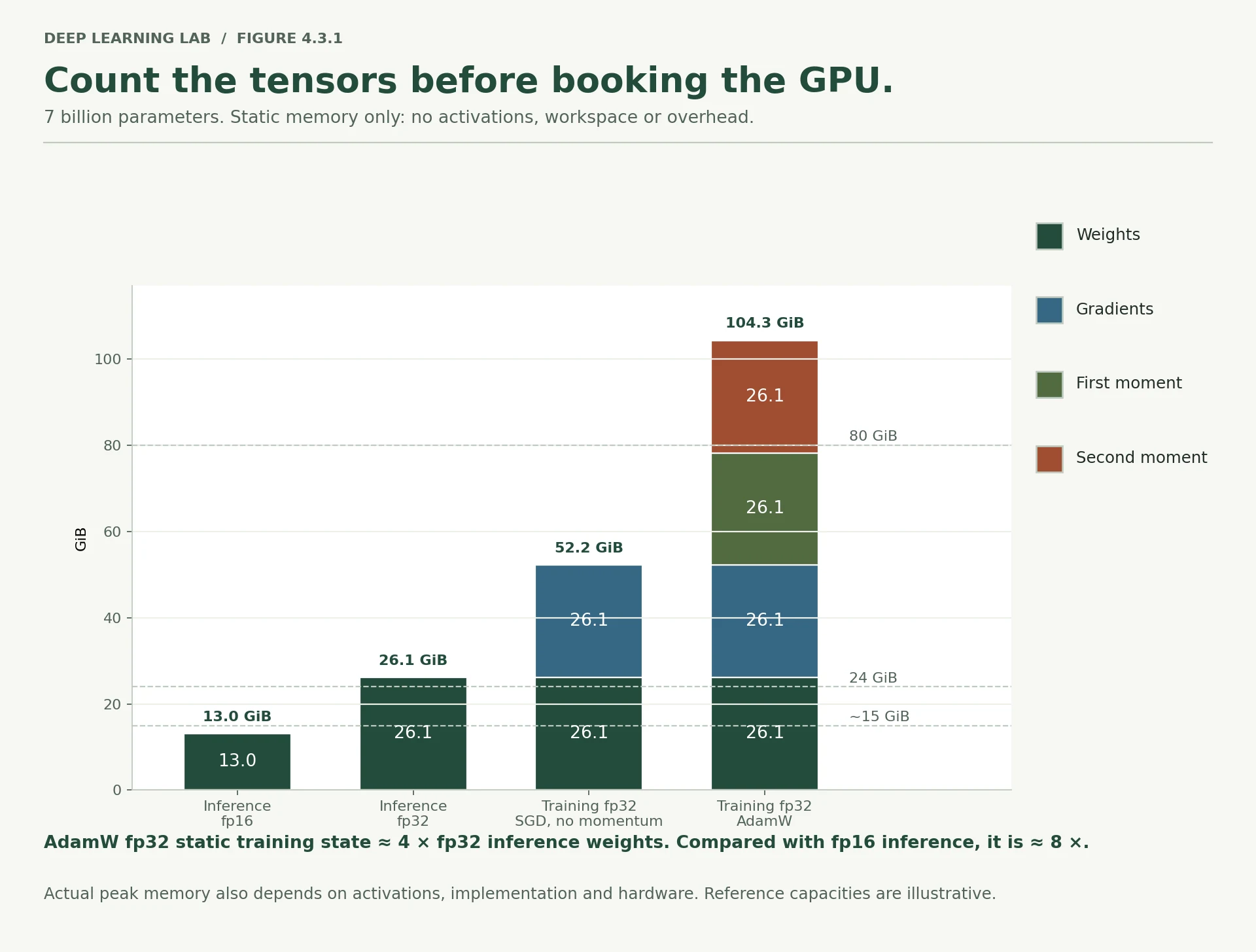
The four bars for one 7B model, from the lesson's function. Only fp16 inference fits under the free Colab line; full fp32 training with AdamW needs more than one 80 GB card before a single activation.
-
Using the same logic, estimate the memory needed to fully fine-tune BERT-base with AdamW in fp32.
110 million weights × (4 + 4 + 8) bytes = 1.76 billion bytes, about 1.64 GB, the value in the table's BERT-base row. That is before activations, and for BERT they dominate: by the standard estimate one 512-token sequence keeps roughly a third of a GB of activations in 16-bit, so a batch of 32 long sequences needs far more memory for activations than for the model. The memory planner above shows both terms.
-
In the LoRA row, why does the total barely fall if you make the adapters even smaller?
Because the adapters are not what fills the memory. Of the row's 13.12 GB, 13.04 GB is the frozen model itself, which needs no gradient and no optimizer state but still has to sit in memory. The adapters' gradients and AdamW state are 0.08 GB, so halving the adapters saves at most 0.04 GB. The only way down is to store the frozen weights in fewer bits, which is QLoRA (4 bits: about 3.3 GB for 7B). One simplification: the function treats the adapters as a share of the existing weights, while real LoRA adds new ones, usually kept in fp32. At this size that is still well under 0.3 GB.
Will it fit? Estimate before you run
Return the memory (in GiB, \(2^{30}\) bytes) for weights, gradients and optimizer state. Every parameter needs a weight; only the trainable share needs a gradient and optimizer state. Activations are left out, as in §2.
A model has 1 million weights. Roughly how much memory do weights, gradients and AdamW state take in fp32?
1M × 4 bytes = 4 MB per copy; four copies ≈ 16 MB, before activations.
Why can you run a 7B model on a free Colab GPU but not fully fine-tune it?
LoRA trains ~0.2% of parameters, so gradients and optimizer state almost vanish; what's left is the frozen model.
In the LoRA row, why does the total barely fall if you make the adapters even smaller?
- With LoRA almost all memory is the frozen base model's weights (≈13 GB in fp16); the adapters' weights, gradients and optimizer state are already tiny.
- Shrinking them further saves almost nothing; to go lower you must shrink the frozen weights themselves (quantisation, i.e. QLoRA).
fp32, fp16 and bf16
Halving the bytes per number halves three of the four memory terms at once, so the number format is a memory decision before it is a speed decision.
Every one of these formats spends its bits on two different jobs:
- range — how big and how small a number it can hold at all;
- precision — how finely it can tell nearby numbers apart.
torch.finfo reports both.
Each format splits its bits between an exponent (range) and a fraction (precision). bf16 keeps fp32's eight exponent bits, so it keeps fp32's range.
for number_type in [torch.float32, torch.float16, torch.bfloat16]: info = torch.finfo(number_type) print(f"{str(number_type):<16} bytes {info.bits // 8} largest {info.max:>12.3e} " f"smallest normal {info.tiny:.3e} step near 1.0 {info.eps:.1e}")torch.float32 bytes 4 largest 3.403e+38 smallest normal 1.175e-38 step near 1.0 1.2e-07 torch.float16 bytes 2 largest 6.550e+04 smallest normal 6.104e-05 step near 1.0 9.8e-04 torch.bfloat16 bytes 2 largest 3.390e+38 smallest normal 1.175e-38 step near 1.0 7.8e-03
In words:
- fp32 (float32) — 4 bytes. Big range, fine precision. The default everywhere.
- fp16 (half) — 2 bytes. Precision is decent, but the range is narrow: nothing above 65,504, and nothing usefully small below about 0.00006.
- bf16 (bfloat16) — 2 bytes. The same range as fp32, bought by giving up precision.
Watch both failures happen.
In Loss scaling with fp16, find a loss scale at which no gradient becomes 0 and none overflows.
print("too big for fp16:")print(" 70000 in fp32 :", torch.tensor(70000.0).item())print(" 70000 in fp16 :", torch.tensor(70000.0, dtype=torch.float16).item())print(" 70000 in bf16 :", torch.tensor(70000.0, dtype=torch.bfloat16).item())print()print("too small for fp16:")print(" 0.00000001 in fp16 :", torch.tensor(1e-8, dtype=torch.float16).item())print(" 0.00000001 in bf16 :", torch.tensor(1e-8, dtype=torch.bfloat16).item())print()print("precision, telling 1.0001 from 1:")print(" 1.0001 in fp32 :", torch.tensor(1.0001).item())print(" 1.0001 in fp16 :", torch.tensor(1.0001, dtype=torch.float16).item())print(" 1.0001 in bf16 :", torch.tensor(1.0001, dtype=torch.bfloat16).item())too big for fp16: 70000 in fp32 : 70000.0 70000 in fp16 : inf 70000 in bf16 : 70144.0 too small for fp16: 0.00000001 in fp16 : 0.0 0.00000001 in bf16 : 1.0011717677116394e-08 precision, telling 1.0001 from 1: 1.0001 in fp32 : 1.000100016593933 1.0001 in fp16 : 1.0 1.0001 in bf16 : 1.0
inf means the number was too big to represent, so it became infinity. 0.0 means it was too small and vanished. And bf16 cannot tell 1.0001 from 1 at all.
Now the consequence that matters for training. Gradients are small numbers. In fp16 many of them fall below that floor and become exactly zero, and a weight whose gradient is zero stops learning. Nothing crashes; the model just quietly trains worse.
The fix is loss scaling: multiply the loss by a big constant before the backward pass, so every gradient is multiplied by that constant too and lands inside fp16's range; then divide the gradients by the same constant before the optimizer uses them. torch.amp.GradScaler does this and adjusts the constant automatically.
tiny_gradient = 1e-8scale = 65536.0print(f"gradient {tiny_gradient} in fp16 :", torch.tensor(tiny_gradient, dtype=torch.float16).item())print(f"multiplied by {scale:,.0f} first, in fp16 :", torch.tensor(tiny_gradient * scale, dtype=torch.float16).item())print("...then divided back down afterwards:", torch.tensor(tiny_gradient * scale, dtype=torch.float16).item() / scale)gradient 1e-08 in fp16 : 0.0 multiplied by 65,536 first, in fp16 : 0.0006551742553710938 ...then divided back down afterwards: 9.997165761888027e-09
Survived. bf16 needs no scaler, because its range is fp32's range; that is exactly what it bought with its precision. This is why bf16 is preferred on hardware that supports it.
Which you get depends on the chip. A free Colab T4 has fast fp16 but no hardware bf16. A100, H100 and recent Apple Silicon support bf16. Section 8 checks at runtime instead of assuming.
-
Why does fp16 need a loss scaler when bf16 does not?
Because the scaler fixes a range problem, and only fp16 has one. fp16 spends 5 bits on the exponent, so its smallest normal number is about 0.00006 (a few coarser "subnormal" values reach 0.00000006), and many gradients are smaller than that: they become exactly zero. Multiplying the loss by 65,536 moves them into range. bf16 spends 8 bits on the exponent, like fp32, so it reaches down to about 1e-38. Small gradients survive, only less precisely, and there is nothing to scale.
-
bf16 cannot tell 1.0001 from 1.0. Why is that usually harmless while training?
Because the weights are not stored in bf16.
autocastkeeps the weights, and AdamW keeps its averages, in fp32; bf16 is only used for the matrix multiplications inside the forward pass. There, a rounding error of about 0.4% per number is small next to the noise of a mini-batch gradient, and it averages out across thousands of products. It would not be harmless if the weights themselves were bf16:1.0 + 0.001in bf16 is still 1.0, and0.05 + 0.00002(a typical fine-tuning step) is still 0.05. Updates that small would vanish, which is why a full-precision master copy exists.
Why does fp16 training need a loss scaler while bf16 does not?
Loss scaling multiplies the loss (and so every gradient) into fp16's range, then divides back before the optimizer step.
70,000 stored in fp16 becomes…
fp16's largest value is 65,504. bf16 stores it (as 70,144) because it has fp32's range with less precision.
Explain the trade between range and precision for fp16 and bf16 in two sentences.
- fp16 spends its bits on precision (finer steps near 1.0) but has a narrow range: overflow above 65,504, tiny values vanish.
- bf16 keeps fp32's huge range and gives up precision (it can't tell 1.0001 from 1.0), which is usually harmless for training and needs no scaler.
Activations and batch size
Parameters, gradients and optimizer state do not care about batch size. Activations do, and that is what makes batch size a memory control.
An activation is any intermediate result the forward pass produces and the backward pass will need. Every layer's output is one.
To measure them we use a forward hook: a small function PyTorch calls every time a layer produces an output. Ours just adds up the bytes.
def activation_bytes(model, batch_size, n_inputs=50): """Measure the bytes of every layer output in one forward pass. Registers a forward hook on each layer, runs one random batch under ``torch.no_grad()``, then removes the hooks. The count covers every layer's output, which is an upper bound on what autograd keeps for the backward pass. Args: model: An ``nn.Sequential`` (its layers are hooked one by one). batch_size: Rows in the random batch. n_inputs: Features per row. Returns: The total bytes of all layer outputs for that batch. """ running_total = [] def record(module, module_input, module_output): """Forward hook: add the size of one layer's output to the running total. Args: module: The layer that just ran (unused). module_input: The layer's inputs (unused). module_output: The layer's output tensor, whose bytes are recorded. """ running_total.append(module_output.numel() * module_output.element_size()) handles = [layer.register_forward_hook(record) for layer in model] with torch.no_grad(): model(torch.randn(batch_size, n_inputs)) for handle in handles: handle.remove() # always remove hooks, or they fire forever return sum(running_total)small_model = build_mlp()print("activations for one row through the Day 3 network:", activation_bytes(small_model, 1), "bytes")print("for 256 rows :", activation_bytes(small_model, 256), "bytes")- 1
Called after each layer's forward pass with its input and output; only the output's size is recorded.
- 2
Iterating an
nn.Sequentialgives its layers in order. Each registration returns a handle for removing it later. - 3
Only the sizes are needed, so no graph is built. The count covers every layer output, more than autograd keeps.
- 4
A forgotten hook runs on every later forward pass and keeps growing
running_totalthrough its closure.
activations for one row through the Day 3 network: 772 bytes
for 256 rows                                     : 197632 bytes
Exactly 256 times as much. Activation memory is linear in batch size: each row costs the same, and you choose how many rows.
On the tiny Module 3 network nobody notices. Use a wider one, where each row costs more, and the picture changes.
The wide network's weights take 4.2 MB. At batch 16,384, its activations are about…
61 times the weights (256 MB). At batch 32 they are a rounding error. Model memory is fixed; activation memory is yours to set.
wide_model = build_mlp(hidden=(1024, 1024))wide_parameters = sum(p.numel() for p in wide_model.parameters())rows = []for batch_size in [32, 256, 2048, 16384]: measured = activation_bytes(wide_model, batch_size) rows.append({"batch size": batch_size, "activations (MB)": round(measured / MB, 2), "bytes per row": measured // batch_size, "times the model's weights": round(measured / (wide_parameters * 4), 2)})print(f"wide network: {wide_parameters:,} parameters = {wide_parameters * 4 / MB:.2f} MB of weights")print(pd.DataFrame(rows).to_string(index=False))wide network: 1,102,849 parameters = 4.21 MB of weights
batch size activations (MB) bytes per row times the model's weights
32 0.50 16388 0.12
256 4.00 16388 0.95
2048 32.01 16388 7.61
16384 256.06 16388 60.87
At batch 32 the activations are a rounding error next to the weights. At batch 16,384 they are 61 times the weights.
That is the trade in one table. Model memory is fixed once you choose an architecture. Activation memory is yours to set, one batch at a time, which is why "halve the batch size" is the first thing to try when a run will not fit.
Two things this simple counting leaves out:
- Real architectures store more per row. Attention in a Transformer keeps intermediate results that grow with the square of the sequence length, which is why Module 6's talk of context windows is also a conversation about memory.
- Gradient checkpointing trades this memory for time: throw activations away during the forward pass and recompute them during the backward pass. It typically saves a large share of activation memory for roughly 30% more compute.
Deep diveWhat the hook counts, and what autograd actually keeps
The hook adds up every layer's output: for the wide network, 1,024 + 1,024 + 1,024 + 1,024 + 1 numbers per row, which is
the 16,388 bytes in the table. Autograd keeps less. Each Linear saves its input and each ReLU saves its output, and
those are the same tensor, while the Linear outputs before each ReLU are freed as soon as the ReLU has used them. Counting
what autograd saves, with torch.autograd.graph.saved_tensors_hooks, gives:
| wide network, per row | fp32 | under bf16 autocast |
|---|---|---|
| the hook's count | 16,388 bytes | |
| kept for the backward pass | 8,400 bytes (the 50 inputs, two ReLU outputs, the logit and the label) | about 4,200 bytes |
| 16-bit copies of the weights kept for the backward pass | none | about 2.1 MB, whatever the batch |
Three consequences. The hook's figure is an upper bound on what is stored, here about twice the truth, though the freed tensors still count briefly toward the peak. The rule that matters survives: stored activations are still exactly linear in batch size. And autocast's saving is not free: at batch 256 its weight copies (2.1 MB) outweigh the activations it saved (1.1 MB), so for this network mixed precision only saves memory above a batch of roughly 500.
-
Your model fits at batch 64 and fails at batch 128. Which memory term changed, and which did not?
The activations doubled, because they are linear in batch size. The weights, gradients and optimizer state did not change: they depend on the model and the optimizer, not on how many rows go through. So the fix is on the activation side: batch 64 with two accumulation steps, mixed precision, or gradient checkpointing.
-
In a Transformer, sequence length behaves like batch size for activation memory, only worse. Why?
Because in a Transformer every token is processed like a row: a batch of 8 sequences of 1,000 tokens stores activations for 8,000 positions, so doubling the length doubles that part, just like doubling the batch. On top of that, attention compares every token with every other: each head stores a sequence × sequence table of scores, which grows with the square of the length. By the standard estimate for a 7B-sized model, that quadratic part overtakes everything else at about 870 tokens. Memory-efficient attention (FlashAttention) avoids storing those tables, which is a large part of why long contexts became trainable.
A model fits at batch 64 and not at batch 128. Which memory term changed?
Activations are linear in batch size; the other three are fixed once the architecture is chosen.
Why is sequence length even worse than batch size for a Transformer's activation memory?
Doubling the sequence can roughly quadruple attention's intermediate storage. Context windows are a memory conversation.
Speed and batch size
If small batches save memory, why not always use them? Because every step carries fixed overhead — the Python loop, the optimizer update, the cost of launching work on the hardware — and a tiny batch pays that overhead for very little work.
Throughput means rows processed per second. The cell measures it at several batch sizes by running as many steps as fit in one second.
The three warm-up steps matter: the first steps of any timing include one-off costs, so they are run and discarded.
These numbers belong to the machine that runs the cell. The shape of the curve is what transfers, not the values.
def throughput(model, batch_size, n_inputs=50, seconds=1.0): """Measure training throughput, in rows per second, for one batch size on this machine. Runs three warm-up steps, then as many AdamW steps as fit in ``seconds`` on one fixed random batch. Creates a fresh optimizer but trains the model passed in, so its weights change. Args: model: The network to time; its first layer must take ``n_inputs`` features. batch_size: Rows per step. n_inputs: Features per row. seconds: How long to time for. Returns: Rows processed per second (the variable ``steps`` counts rows). """ optimizer = torch.optim.AdamW(model.parameters(), lr=1e-3) inputs = torch.randn(batch_size, n_inputs) targets = (torch.rand(batch_size, 1) > 0.5).float() def one_step(): """Take one full training step: zero the gradients, forward, backward, update.""" optimizer.zero_grad() loss_function(model(inputs), targets).backward() optimizer.step() for _ in range(3): one_step() # warm up, then discard steps, started = 0, time.perf_counter() while time.perf_counter() - started < seconds: one_step() steps += batch_size return steps / (time.perf_counter() - started)torch.manual_seed(0)bench_model = build_mlp(hidden=(1024, 1024))batch_sizes = [16, 64, 256, 1024, 4096]rates = [throughput(bench_model, size) for size in batch_sizes]print(f"{'batch':>6} {'rows/second':>13} {'versus batch 16':>16}")for size, rate in zip(batch_sizes, rates): print(f"{size:>6} {rate:>13,.0f} {rate / rates[0]:>15.1f}x")fig, ax = plt.subplots(figsize=(7.5, 3.6))ax.plot(batch_sizes, rates, "o-", color="#1b6ca8", lw=2)ax.set_xscale("log", base=2)ax.set_xlabel("batch size")ax.set_ylabel("rows per second")ax.set_title("Throughput rises with batch size, then flattens (this machine)")ax.grid(alpha=0.3)plt.tight_layout()plt.show()- 1
Warm-up: the first steps pay one-off costs (memory allocation, choosing kernels) and would drag the average down.
- 2
A fixed time budget rather than a fixed number of steps, so small and large batches are timed equally long.
- 3
Despite its name,
stepscounts rows: the function returns rows per second.
 batch    rows/second   versus batch 16
    16          2,802              1.0x
    64          8,832              3.2x
   256         16,154              5.8x
  1024         17,629              6.3x
  4096         18,729              6.7x
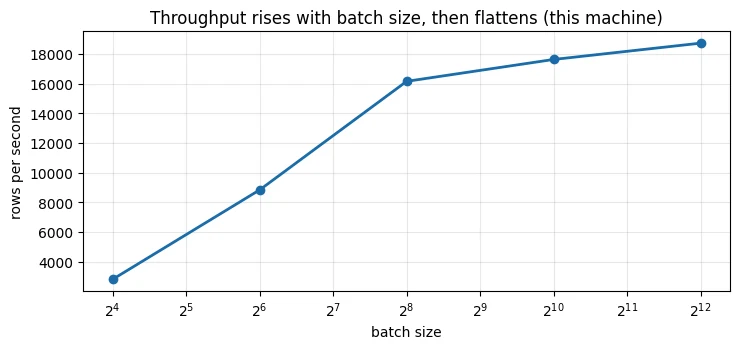
The curve climbs steeply and then flattens. Read your own output: on the machine that built this notebook, moving from batch 16 to batch 256 multiplied throughput several times over, moving from 256 to 1,024 added only a little more, and the largest batch was no faster than the one before it.
Past the flat part, a bigger batch buys no speed and costs memory in a straight line. That bend is the useful operating point, and it belongs to the machine rather than the model, so it is worth measuring once on the hardware you really use.
One warning. Batch size is not only an engineering knob. Module 3 showed it changes the training itself: bigger batches give a steadier gradient at each step and usually want a larger learning rate. Shrinking the batch to fit memory and leaving the learning rate alone is a common way to make a model worse for reasons that look mysterious afterwards.
-
Why does the curve flatten instead of rising forever?
Each step has two costs: a fixed part (the Python loop, launching the work, and an AdamW update over all 1.1 million weights, whatever the batch) and a per-row part (the matrix multiplications). At batch 16 the fixed part dominates, so doubling the batch nearly doubles throughput. Once the per-row work dominates, the arithmetic units are already busy, time per step grows in step with the batch, and rows per second level off at what the hardware can compute. This run used a single CPU thread, which fills up early; a GPU has thousands of parallel units and keeps improving to much larger batches. (Here the last step still gained about 6%: 17,629 to 18,729 rows per second.)
-
You halve the batch size to fit a GPU. What should you consider doing to the learning rate, and why?
A smaller batch gives a noisier gradient, so the same learning rate takes relatively bolder steps. Consider lowering it: the linear-scaling rule for SGD (Goyal et al., 2017) halves the rate with the batch, and for Adam a gentler square-root rule (about 0.7×) is a common starting point. The cleanest option is often to keep the effective batch with gradient accumulation (Section 6) and leave the learning rate alone. Either way these are heuristics: check the validation curve.
Why does throughput (rows per second) flatten at large batch sizes?
Past the bend, a bigger batch buys no speed and costs memory. The bend belongs to the machine, so measure it on your hardware.
You halve the batch size to fit a GPU. What should you consider doing to the learning rate, and why?
- Consider lowering it (or re-tuning it), because smaller batches give noisier gradient estimates and the best learning rate usually scales with batch size.
- Alternatively keep the effective batch the same with gradient accumulation, so the optimisation behaves as before.
Gradient accumulation
Sometimes the batch size you want will not fit at all. Gradient accumulation gets it anyway: run several small batches, add their gradients together, and take one optimizer step. Memory follows the small batch. The weight update follows the big one.
There is one subtlety, and it is the usual bug. The loss is an average over the rows in the batch, so each small batch's gradient has to be divided by the number of small batches before it is added, or the total comes out too large.
Prove the two are the same.
torch.manual_seed(1)one_big_batch = build_mlp()accumulated = build_mlp()accumulated.load_state_dict(one_big_batch.state_dict()) # identical starting weightsinputs = torch.randn(256, 50)targets = (torch.rand(256, 1) > 0.5).float()loss_function(one_big_batch(inputs), targets).backward() # one batch of 256for small_x, small_y in zip(inputs.chunk(4), targets.chunk(4)): # four batches of 64 (loss_function(accumulated(small_x), small_y) / 4).backward()biggest_difference = max((a.grad - b.grad).abs().max().item() for a, b in zip(one_big_batch.parameters(), accumulated.parameters()))print(f"largest difference between the two sets of gradients: {biggest_difference:.2e}")print()print("activation memory, batch 256:", f"{activation_bytes(build_mlp(), 256):,} bytes")print("activation memory, batch 64:", f"{activation_bytes(build_mlp(), 64):,} bytes")- 1
Two separate models with the same starting weights, so any gradient difference comes from the batching alone.
- 2
.backward()adds into.gradand nothing zeroes it between the four calls. Dividing by 4 turns four averages into one.
largest difference between the two sets of gradients: 7.45e-09

activation memory, batch 256: 197,632 bytes
activation memory, batch  64: 49,408 bytes
The gradients agree to about 7 in the ninth decimal place, which is ordinary float32 rounding, not a difference in behaviour. And the accumulated version held a quarter of the activations.
Where the equivalence breaks:
- BatchNorm. It computes statistics over whatever is in the current small batch, so four batches of 64 normalise differently from one batch of 256. LayerNorm, which Module 6's Transformer block uses, works one row at a time and is unaffected.
- Forgetting to divide. Gradients come out four times too big, which behaves exactly like a four-times learning rate. Lesson 3.4 Case 1 shows what that looks like.
- Anything else you average inside the loop, such as a logged metric.
in Module 8 this is a routine setting. Fine-tuning recipes commonly pair a batch of 1 or 2 with 8 to 16 accumulation steps, to get an effective batch of 16 or 32 on one consumer GPU.
-
You accumulate over 8 small batches and forget to divide. What does the loss curve do?
With SGD, the gradients are 8 times too large, so it behaves like an 8-times learning rate: a noisier curve, spikes, possibly divergence (Lesson 3.4, Case 1). With Adam or AdamW, almost nothing happens, because Adam normalises each gradient by its own running size and a constant factor cancels (see the note above). The curve you log also depends on what you log: add up the undivided small-batch losses and the reported loss is 8 times too big even though the training is fine.
-
Does gradient accumulation change training time? Memory? The final result?
Time: the same rows go through, but in smaller pieces, so each row costs more. On the machine that built the notebook, batch 64 ran at 8,832 rows per second against 16,154 for batch 256, so four accumulated batches of 64 take nearly twice as long as one of 256. Memory: activations follow the small batch (49,408 bytes instead of 197,632); weights, gradients and optimizer state are unchanged, since the gradients accumulate in the same
.gradtensors. Result: the same as the big batch, up to rounding (7.45e-09), except for BatchNorm and anything averaged per batch. It is not the same as training on small batches without accumulating, which takes four times as many, noisier steps.
You accumulate over 8 small batches with AdamW and forget to divide each loss by 8. What happens?
Each small batch's loss is already an average, so their gradients must be averaged too. (Adam's normalisation softens but doesn't remove the effect.)
Where does gradient accumulation stop being exactly equivalent to one big batch?
LayerNorm works one row at a time and is unaffected.
Mixed precision, and where to put it
Mixed precision means running some operations in a smaller number format while keeping the weights themselves in fp32. PyTorch does this with torch.autocast, which picks a sensible format per operation: matrix multiplications in bf16 or fp16, and precision-sensitive things like losses in fp32.
On CPU, autocast supports bf16. Time it — remembering that the speed is a property of this machine.
def timed_steps(use_autocast, seconds=2.0, batch_size=1024): """Measure training steps per second on the wide network, with or without bf16 autocast. Builds a fresh seeded ``(1024, 1024)`` network and puts ``torch.autocast`` around the forward pass only, which is the recommended placement. Args: use_autocast: Run the forward pass in bf16 under ``torch.autocast`` on the CPU. seconds: How long to time for, after three warm-up steps. batch_size: Rows per step. Returns: Steps per second on this machine. """ torch.manual_seed(0) model = build_mlp(hidden=(1024, 1024)) optimizer = torch.optim.AdamW(model.parameters(), lr=1e-3) inputs = torch.randn(batch_size, 50) targets = (torch.rand(batch_size, 1) > 0.5).float() def one_step(): """Take one training step, with the forward pass inside the (possibly disabled) autocast block.""" optimizer.zero_grad() with torch.autocast("cpu", dtype=torch.bfloat16, enabled=use_autocast): output = model(inputs) loss_function(output.float(), targets).backward() optimizer.step() for _ in range(3): one_step() steps, started = 0, time.perf_counter() while time.perf_counter() - started < seconds: one_step() steps += 1 return steps / (time.perf_counter() - started)fp32_rate = timed_steps(False)bf16_rate = timed_steps(True)print(f"fp32 : {fp32_rate:6.1f} steps per second")print(f"autocast bf16 : {bf16_rate:6.1f} steps per second ({bf16_rate / fp32_rate:.2f}x)")- 1
One code path for both runs:
enabled=Falsemakes the block do nothing. - 2
Loss and backward pass outside the block, as PyTorch recommends.
.float()brings the bf16 output back to fp32. - 3
Here
stepsreally counts steps, so the result is steps per second at a fixed batch of 1,024.
fp32           :   20.0 steps per second
autocast bf16  :   68.2 steps per second   (3.41x)
demo = build_mlp(hidden=(1024, 1024))with torch.autocast("cpu", dtype=torch.bfloat16): output = demo(torch.randn(8, 50))print("inside autocast, the layer output is:", output.dtype)print("but the weights are still :", next(demo.parameters()).dtype)inside autocast, the layer output is: torch.bfloat16 but the weights are still : torch.float32
Note what autocast does not do. The weights stay fp32. Only the operations run in the smaller format, and the results come back smaller. So the memory saving is in the activations, not in the model.
On the machine that built this notebook, bf16 ran roughly three times as many steps per second. On yours it may be slower, especially on a CPU without bf16 instructions. Speed from mixed precision is a hardware property, not a free gift. Measure it on the device you will really train on. The memory saving, by contrast, is arithmetic, and is always there.
Does it change the answer?
Check against a result you already know: the Bank Marketing model from Lessons 4.1 and 4.2. First the data, in three compressed cells.
BANK_URL = "https://archive.ics.uci.edu/static/public/222/bank+marketing.zip"BANK_CSV = "data/bank-full.csv"def load_bank_marketing(path=BANK_CSV): """Download Bank Marketing if needed and return its inputs and label. ``duration`` is dropped because a call's length is only known after the call. Args: path: Where the CSV is (or will be) stored. Returns: A tuple ``(X, y)``: the 15-column input DataFrame and a float32 label array (1 = subscribed). Raises: urllib.error.URLError: If the file is missing and UCI cannot be reached. """ if not os.path.exists(path): raw_bytes = urllib.request.urlopen(BANK_URL, timeout=120).read() outer = zipfile.ZipFile(io.BytesIO(raw_bytes)) inner = zipfile.ZipFile(io.BytesIO(outer.read("bank.zip"))) os.makedirs(os.path.dirname(path), exist_ok=True) with open(path, "wb") as f: f.write(inner.read("bank-full.csv")) df = pd.read_csv(path, sep=";") y = (df["y"] == "yes").astype(np.float32).to_numpy() return df.drop(columns=["y", "duration"]), yfrom sklearn.compose import ColumnTransformerfrom sklearn.metrics import roc_auc_scorefrom sklearn.model_selection import train_test_splitfrom sklearn.preprocessing import OneHotEncoder, StandardScalerX, y = load_bank_marketing()rows = np.arange(len(y))train_rows, rest = train_test_split(rows, train_size=0.8, random_state=42, stratify=y)val_rows, test_rows = train_test_split(rest, test_size=0.5, random_state=42, stratify=y[rest])numeric = X.select_dtypes(include="number").columns.tolist()categorical = [c for c in X.columns if c not in numeric]preprocessor = ColumnTransformer([ ("scale", StandardScaler(), numeric), ("one_hot", OneHotEncoder(handle_unknown="ignore", sparse_output=False), categorical),]).fit(X.iloc[train_rows])train_inputs = torch.tensor(preprocessor.transform(X.iloc[train_rows]).astype(np.float32))train_targets = torch.tensor(y[train_rows]).unsqueeze(1)val_inputs = torch.tensor(preprocessor.transform(X.iloc[val_rows]).astype(np.float32))val_targets = y[val_rows]print("training rows:", train_inputs.shape, "| validation rows:", val_inputs.shape)training rows: torch.Size([36168, 50]) | validation rows: torch.Size([4521, 50])
Now one training function with three settings, so we can put autocast in different places and compare:
"fp32"— no autocast at all;"forward"— autocast around the forward pass only, which is how it is meant to be used;"whole"— autocast wrapped around the entire training loop, which looks tidier and is the mistake.
Best validation AUC is 0.7847 in fp32 and with autocast around the forward pass. With autocast around the whole training loop it is…
0.7584, and with cache_enabled=False it comes back to 0.7848, so this is a caching problem, not a precision problem.
def train_bank(mode="fp32", epochs=10, cache_enabled=True, seed=42): """Train the Module 3 network on Bank Marketing with autocast in one of three places. Uses the global ``train_inputs``, ``train_targets``, ``val_inputs`` and ``val_targets``, AdamW at 1e-3 and shuffled batches of 256. Args: mode: ``"fp32"`` (no autocast), ``"forward"`` (bf16 autocast around each forward pass, the recommended placement) or ``"whole"`` (one autocast block around the whole loop, the mistake). In ``"whole"`` mode the training forward pass runs in fp32 and only the validation scoring runs under autocast. epochs: Passes over the training rows. cache_enabled: Autocast's weight cache, used by ``"whole"`` mode only. seed: Seeds the weights and the shuffling. Returns: The best validation ROC-AUC seen after any epoch. """ torch.manual_seed(seed) model = build_mlp(n_inputs=train_inputs.shape[1]) optimizer = torch.optim.AdamW(model.parameters(), lr=1e-3) generator = torch.Generator().manual_seed(seed) loader = torch.utils.data.DataLoader( torch.utils.data.TensorDataset(train_inputs, train_targets), batch_size=256, shuffle=True, generator=generator) def one_epoch(): """Train for one pass over the training rows.""" model.train() for batch_x, batch_y in loader: optimizer.zero_grad() with torch.autocast("cpu", dtype=torch.bfloat16, enabled=(mode == "forward")): output = model(batch_x) loss_function(output.float(), batch_y).backward() optimizer.step() def validation_auc(): """Score the current model on the validation rows. Returns: Validation ROC-AUC, computed from fp32 probabilities. """ model.eval() with torch.no_grad(): probabilities = torch.sigmoid(model(val_inputs).float()).numpy().ravel() return roc_auc_score(val_targets, probabilities) best = 0.0 if mode == "whole": with torch.autocast("cpu", dtype=torch.bfloat16, cache_enabled=cache_enabled): for _ in range(epochs): one_epoch() best = max(best, validation_auc()) else: for _ in range(epochs): one_epoch() best = max(best, validation_auc()) return bestprint(f"fp32, no autocast : best validation AUC {train_bank('fp32'):.4f}")print(f"autocast around the forward pass : best validation AUC {train_bank('forward'):.4f}")print(f"autocast around the whole training loop : best validation AUC {train_bank('whole'):.4f}")print(f"the same, with cache_enabled=False : best validation AUC {train_bank('whole', cache_enabled=False):.4f}")- 1
In
"whole"mode this isenabled=False, which switches autocast off here even inside the outer block: training runs in fp32. - 2
In
"whole"mode, the only forward pass under autocast: the first call fills the weight cache and every later call reuses it. - 3
Everything inside shares one weight cache, emptied only when the block exits after the last epoch.
fp32, no autocast                        : best validation AUC 0.7847
autocast around the forward pass         : best validation AUC 0.7847
autocast around the whole training loop  : best validation AUC 0.7584
the same, with cache_enabled=False       : best validation AUC 0.7848
Read those four lines carefully, because the third one is the lesson.
The first two are identical to four decimal places: 0.7847. Running the forward pass in bf16 cost this model nothing.
The third dropped to 0.7584. The fourth, differing only by cache_enabled=False, came back to 0.7848.
So this is not a precision problem at all. It is a caching problem. Inside an autocast block, PyTorch caches the reduced-precision copies it makes of your fp32 weights, so that a weight used by several operations is converted once rather than repeatedly. That cache is designed for a block covering one forward pass. Stretch the block across many optimizer steps and the model keeps reusing copies made from older weights, so part of the network is training on stale values. Nothing errors. The loss curve looks plausible.
Put autocast around the forward pass, not around the loop. In an earlier draft of this lesson the block wrapped an entire 30-epoch run including the scoring, and validation AUC fell to 0.4079 — worse than guessing, a collapse that looks exactly like Lesson 3.4 Case 1 but has a completely different cause.
One more consequence, following from Lesson 4.2: mixed precision costs you bit-for-bit repeatability, because the arithmetic itself has changed. The run is still reproducible at Level 2, as long as the record says which precision was used. Make it a setting in your config rather than a switch you flip by hand.
-
Autocast leaves the weights in fp32. Which of the four memory terms does it actually reduce?
The activations: the tensors kept for the backward pass are bf16, half the bytes. Measured on the wide network, about 4,200 bytes per row instead of 8,400. Weights, gradients and the optimizer state stay fp32. One addition people forget: autocast also keeps 16-bit copies of the weights for the backward pass (about 2.1 MB for the wide network), so at small batches it can use more memory than fp32. Its saving grows with the batch and, for text, with the sequence length.
-
Why should you not expect a bf16 run to reproduce an fp32 run to the last decimal?
Because the arithmetic is different. bf16 keeps only 2 to 3 significant digits, so every matrix multiplication rounds differently, the gradients differ slightly, and the differences compound over thousands of steps into a different path. Different kernels also add numbers in a different order. The two runs are not Level 1 repeats of each other (Lesson 4.2); each is repeatable on its own, and the difference is explained by the record, as long as precision is one of the settings. Judge the gap against the noise floor: here fp32 and forward-only bf16 agreed to four decimals (0.7847), which is luck at this size, not a guarantee.
Autocast leaves the weights in fp32. Which memory term does it actually reduce?
Operations run in the smaller format and return smaller results, so activations shrink. Speed-up is a hardware property; this saving is arithmetic.
Wrapping autocast around the whole training loop dropped validation AUC from 0.7847 to 0.7584. Why?
With cache_enabled=False it recovered to 0.7848. Put autocast around the forward pass, not the loop.
On an NVIDIA GPU: VRAM, running out, and recovering
Everything so far was arithmetic that holds anywhere. Three things are specific to an NVIDIA GPU, and these cells run only if one is present: reading how much GPU memory is actually in use, meeting a real out-of-memory error, and training in fp16 with a loss scaler.
VRAM is the GPU's own memory, separate from your computer's RAM. It is usually much smaller: 15 GB on a free Colab T4, against 16 GB or more of ordinary RAM on a laptop.
If you are on a laptop, run this section on a free Colab or Kaggle GPU. It is the same code; the cells below detect the machine and skip. Module 8's QLoRA work and Module 9's serving work need an NVIDIA GPU too, so it is worth doing once now, while the code is short enough to read.
Start with the recovery ladder, which is not GPU-specific logic at all and so can be tested anywhere: try the batch size you want; if it fails with an out-of-memory error, clean up and halve it.
OUT_OF_MEMORY = (torch.OutOfMemoryError, torch.cuda.OutOfMemoryError)def largest_batch_that_fits(attempt, start, smallest=1, errors=OUT_OF_MEMORY): """Find the largest batch that runs without an out-of-memory error, halving from ``start``. After each failure it collects garbage and, on an NVIDIA GPU, empties PyTorch's cache before retrying. Args: attempt: A function taking a batch size; it raises one of ``errors`` when the batch does not fit. start: The first (largest) batch size to try. smallest: Give up below this size. errors: The exception types that mean "out of memory". Anything else propagates. Returns: A tuple ``(size, log)``: the first size that fitted (or ``None``) and a list of ``(size, outcome)`` pairs, one per attempt. """ size, log = start, [] while size >= smallest: try: attempt(size) log.append((size, "fits")) return size, log except errors: log.append((size, "out of memory")) gc.collect() # let Python release the tensors if torch.cuda.is_available(): torch.cuda.empty_cache() # hand the memory back to the driver size //= 2 return None, logclass PretendOutOfMemory(Exception): """Stands in for a real out-of-memory error, so the ladder can be tested without a GPU.""" passdef pretend_gpu(batch_size, limit=512): """Pretend to run a training step on a GPU that fits ``limit`` rows. Args: batch_size: The batch size being attempted. limit: The largest batch this pretend GPU can hold. Raises: PretendOutOfMemory: If ``batch_size`` is larger than ``limit``. """ if batch_size > limit: raise PretendOutOfMemory(f"pretend out of memory at batch {batch_size}")found, log = largest_batch_that_fits(pretend_gpu, start=4096, errors=(PretendOutOfMemory,))for size, outcome in log: print(f" batch {size:>5} -> {outcome}")print(f"largest batch that fits: {found}")- 1
In current PyTorch these two names are the same class; listing both does no harm.
- 2
Any other exception still propagates: only running out of memory is worth a smaller batch.
- 3
Runs while the traceback is still alive; see the note above for moving it outside the handler.
- 4
Halve and retry: step 5 of the playbook in Section 10.
  batch  4096 -> out of memory
  batch  2048 -> out of memory
  batch  1024 -> out of memory
  batch   512 -> fits
largest batch that fits: 512
On a GPU you pass the real training step and the real error type instead of the pretend ones. That is what the next cells do.
if DEVICE.type != "cuda": print("No NVIDIA GPU here, so this cell is skipped.") print("Run this notebook on Colab or Kaggle with a GPU runtime to see the numbers.")else: properties = torch.cuda.get_device_properties(0) free, total = torch.cuda.mem_get_info() print(f"GPU : {properties.name}") print(f"total VRAM : {total / GB:.2f} GB") print(f"free right now : {free / GB:.2f} GB") print(f"bf16 supported in hardware : {torch.cuda.is_bf16_supported()}") print(f"currently held by torch : {torch.cuda.memory_allocated() / MB:.1f} MB")No NVIDIA GPU here, so this cell is skipped. Run this notebook on Colab or Kaggle with a GPU runtime to see the numbers.
if DEVICE.type != "cuda": print("Skipped: needs an NVIDIA GPU.")else: gpu_model = build_mlp(hidden=(4096, 4096)).cuda() gpu_optimizer = torch.optim.AdamW(gpu_model.parameters(), lr=1e-3) def one_gpu_step(batch_size): """Take one AdamW step on the GPU model with a random batch of the given size. Args: batch_size: Rows in the random batch. Raises: torch.OutOfMemoryError: If the step does not fit in GPU memory. """ inputs = torch.randn(batch_size, 50, device="cuda") targets = (torch.rand(batch_size, 1, device="cuda") > 0.5).float() gpu_optimizer.zero_grad() loss_function(gpu_model(inputs), targets).backward() gpu_optimizer.step() rows = [] for batch_size in [256, 1024, 4096, 16384]: torch.cuda.reset_peak_memory_stats() # start the high-water mark again try: one_gpu_step(batch_size) rows.append({"batch size": batch_size, "peak VRAM (MB)": round(torch.cuda.max_memory_allocated() / MB, 1), "result": "fits"}) except OUT_OF_MEMORY: rows.append({"batch size": batch_size, "peak VRAM (MB)": None, "result": "out of memory"}) gc.collect() torch.cuda.empty_cache() print(pd.DataFrame(rows).to_string(index=False)) print("\nthe weights alone:", round(sum(p.numel() for p in gpu_model.parameters()) * 4 / MB, 1), "MB")Skipped: needs an NVIDIA GPU.
if DEVICE.type != "cuda": print("Skipped: needs an NVIDIA GPU. On a GPU this fills the memory on purpose and recovers.")else: blocks = [] free_at_start, _ = torch.cuda.mem_get_info() try: while True: # grab 512 MB at a time until it fails blocks.append(torch.empty(int(512 * MB // 4), dtype=torch.float32, device="cuda")) except OUT_OF_MEMORY as error: print("caught:", str(error).split("\n")[0][:110]) print(f"blocks allocated before it failed : {len(blocks)} ({len(blocks) * 512 / 1024:.1f} GB)") print(f"free VRAM now : {torch.cuda.mem_get_info()[0] / MB:.0f} MB") del blocks # the recovery, in order gc.collect() torch.cuda.empty_cache() print(f"free VRAM after cleaning up : {torch.cuda.mem_get_info()[0] / MB:.0f} MB " f"(it started at {free_at_start / MB:.0f} MB)")- 1
512 MB of float32 is 512 × 2²⁰ / 4 numbers.
torch.emptyreserves memory without writing to it. - 2
Outside the
except, so nothing else still refers to the blocks:del, collect, then hand the cache back.
Skipped: needs an NVIDIA GPU. On a GPU this fills the memory on purpose and recovers.
Three details in that recovery are worth remembering.
del on its own is not enough. Python releases the tensor, but PyTorch keeps the memory in its own pool to reuse later, so a tool like nvidia-smi still shows it as used. torch.cuda.empty_cache() gives it back to the driver. That matters when another process needs it; inside your own process the pool is a feature, not a leak.
A caught error can keep your memory alive. An exception carries a traceback, and the traceback holds every local variable in every function it passed through — including the huge tensors that caused the failure. In a notebook the variables from the failed cell survive too. Restarting the kernel after a bad out-of-memory error is not superstition.
nvidia-smi and torch.cuda.memory_allocated() measure different things. The first shows what the process has reserved from the driver; the second shows what your tensors are actually using. A large gap between them is the pool, not a leak.
Finally, fp16 training with the loss scaler from Section 3.
if DEVICE.type != "cuda": print("Skipped: needs an NVIDIA GPU. The pattern below is the one to reuse on Colab or Kaggle.")else: amp_model = build_mlp(hidden=(1024, 1024)).cuda() amp_optimizer = torch.optim.AdamW(amp_model.parameters(), lr=1e-3) scaler = torch.amp.GradScaler("cuda") inputs = torch.randn(4096, 50, device="cuda") targets = (torch.rand(4096, 1, device="cuda") > 0.5).float() for step in range(5): amp_optimizer.zero_grad() with torch.autocast("cuda", dtype=torch.float16): # forward pass only loss = loss_function(amp_model(inputs), targets) scaler.scale(loss).backward() # multiply the loss up, then go backward scaler.step(amp_optimizer) # divide the gradients back down, then step scaler.update() # adjust the multiplier for next time print(f"five fp16 steps done. final loss {loss.item():.4f}, " f"loss multiplier now {scaler.get_scale():,.0f}") print("on bf16-capable hardware the same loop with dtype=torch.bfloat16 needs no scaler")- 1
The backward pass runs outside the autocast block, on the scaled loss.
- 2
Unscales the gradients and skips the step if any is
inforNaN. - 3
Halves the scale after an overflow and slowly raises it again after a run of clean steps.
Skipped: needs an NVIDIA GPU. The pattern below is the one to reuse on Colab or Kaggle.
scaler.step() sometimes skips the optimizer step entirely. That happens when a gradient overflowed to infinity, in which case the step would be meaningless, so it is thrown away and the multiplier is lowered. Skipping a step occasionally is the correct behaviour, not a bug.
-
Why does
nvidia-smistill show memory in use afterdel tensor?Because PyTorch did not give the memory back to the driver. When a tensor dies, its block returns to PyTorch's own cache, ready for the next tensor, and
nvidia-smireports what the process has reserved (plus a few hundred MB for the CUDA context), not what tensors are using.torch.cuda.empty_cache()releases the unused cached blocks. And if anything else still refers to the tensor (another variable, a list, a traceback, or a notebook's output history such as_orOut[12]),delremoved only one name and the tensor has not been freed at all. -
You get an out-of-memory error at batch 64 that did not happen yesterday with the same code. Name three things that could have changed.
Any three of these:
- another process is holding GPU memory: a second notebook kernel, an earlier run that never exited, another user (check
nvidia-smi); - your own process holds more than yesterday: tensors from earlier cells, a caught out-of-memory traceback, losses appended with their graphs (restart the kernel);
- the inputs got bigger: a data change, longer sequences or images, padding to the longest item in a batch when one very long example arrives;
- the hardware changed: Colab gave you a different GPU, with less memory;
- the software changed: a library update with different kernels or workspace sizes, or
cudnn.benchmarkchoosing a hungrier algorithm; long runs can also fragment the cache.
- another process is holding GPU memory: a second notebook kernel, an earlier run that never exited, another user (check
del big_tensor runs, but nvidia-smi still shows the memory in use. Most likely?
nvidia-smi shows what the process reserved; memory_allocated() shows what tensors use. A caught OOM's traceback can also keep tensors alive.
You hit an out-of-memory error at batch 64 that didn't happen yesterday with the same code. Name three things that could have changed.
- Another process (or a leftover notebook kernel) is using GPU memory; or tensors/graphs are being kept alive (e.g. appending
lossinstead ofloss.item(), a traceback from a caught OOM). - The inputs grew (longer sequences, larger images), a different GPU/runtime was assigned, or a library/precision setting changed.
On an Apple Silicon Mac
MPS is PyTorch's backend for the graphics processor built into Apple Silicon chips (M1 through M5). Two differences from an NVIDIA GPU matter here.
Memory is unified. The graphics processor shares the machine's RAM rather than having its own separate VRAM. So there is no separate memory figure to read, and no clean wall to hit. An oversized job tends to push the whole machine into swapping and slow everything down, rather than raising a tidy error. That is why this lesson does not include a deliberate out-of-memory demonstration for MPS. Raise batch sizes gradually and watch memory pressure in Activity Monitor.
Coverage is good but not complete. An operation with no MPS implementation raises an error, unless you set PYTORCH_ENABLE_MPS_FALLBACK=1, which quietly runs it on the CPU instead. That is correct but sometimes much slower than staying on the CPU for the whole job.
Worth planning around: bitsandbytes, vLLM and flash-attention are NVIDIA-only. Module 8's QLoRA work and Module 9's serving work go to Colab or Kaggle. Module 8 has a LoRA-only path that does run on a Mac.
if DEVICE.type != "mps": print("No Apple Silicon GPU here, so this cell is skipped.") print("On a Mac it reports unified memory use and checks which autocast types work.")else: print(f"memory torch is allowed to use : {torch.mps.recommended_max_memory() / GB:.2f} GB") print(f"currently held by torch : {torch.mps.current_allocated_memory() / MB:.1f} MB") print(f"reserved from the system : {torch.mps.driver_allocated_memory() / MB:.1f} MB") mps_model = build_mlp(hidden=(1024, 1024)).to("mps") mps_optimizer = torch.optim.AdamW(mps_model.parameters(), lr=1e-3) inputs = torch.randn(4096, 50, device="mps") targets = (torch.rand(4096, 1, device="mps") > 0.5).float() for _ in range(3): mps_optimizer.zero_grad() loss_function(mps_model(inputs), targets).backward() mps_optimizer.step() torch.mps.synchronize() # wait for the GPU to actually finish print(f"after three steps, held by torch: {torch.mps.current_allocated_memory() / MB:.1f} MB") for number_type in (torch.float16, torch.bfloat16): try: with torch.autocast("mps", dtype=number_type): output = mps_model(inputs[:8]) print(f"autocast {str(number_type):<18}: works, output {output.dtype}") except (RuntimeError, TypeError) as error: print(f"autocast {str(number_type):<18}: not supported here ({str(error)[:60]})") torch.mps.empty_cache()- 1
MPS work is queued asynchronously: without waiting, memory figures and timings describe work not yet done.
No Apple Silicon GPU here, so this cell is skipped.
On a Mac it reports unified memory use and checks which autocast types work.
On an Apple Silicon Mac, why doesn't the lesson demonstrate a deliberate out-of-memory error?
Raise batch sizes gradually and watch memory pressure. CUDA-only libraries (bitsandbytes, vLLM, flash-attn) go to Colab/Kaggle.
The out-of-memory playbook
Lesson 3.4 ordered its checks by cost, cheapest first. The same discipline applies here, because these fixes differ enormously in what they cost you.
Tier 0 — free, and changes nothing about the model
- Restart the kernel or the process. Clears dead tensors held alive by tracebacks and by old notebook state.
- Check you are not keeping tensors alive by accident. Appending
lossto a list instead ofloss.item()keeps the entire computation graph for that batch, epoch after epoch. It looks like a slow leak and it is the commonest cause. - Wrap scoring in
torch.no_grad(). Without it, evaluation stores activations for a backward pass that never comes. - Free what you no longer need:
del, thengc.collect(), thenempty_cache().
Tier 1 — cheap, changes the run but not the model
- Halve the batch size, and use the ladder from Section 8 to find the largest that fits.
- Add gradient accumulation to get the effective batch back, as in Section 6.
- Turn on mixed precision. Halves the activations, and may help speed if the hardware supports it.
- Shorten the sequence length if you are working with text. The cost grows faster than linearly.
Tier 2 — changes the computation or the model
- Gradient checkpointing: recompute activations instead of storing them, at roughly 30% more time.
- Freeze most of the model, training only a head or small adapters. This is where LoRA belongs, and it removes gradients and optimizer state for everything frozen (Module 8).
- Quantise the frozen weights, which is QLoRA in Module 8, or quantise for serving in Module 9.
- A smaller model, or a bigger GPU. Last, not first, because both cost money or accuracy.
Work down the list. Most people start at 12, or at 5 with a guess. The first four cost nothing and fix a surprising share of real failures.
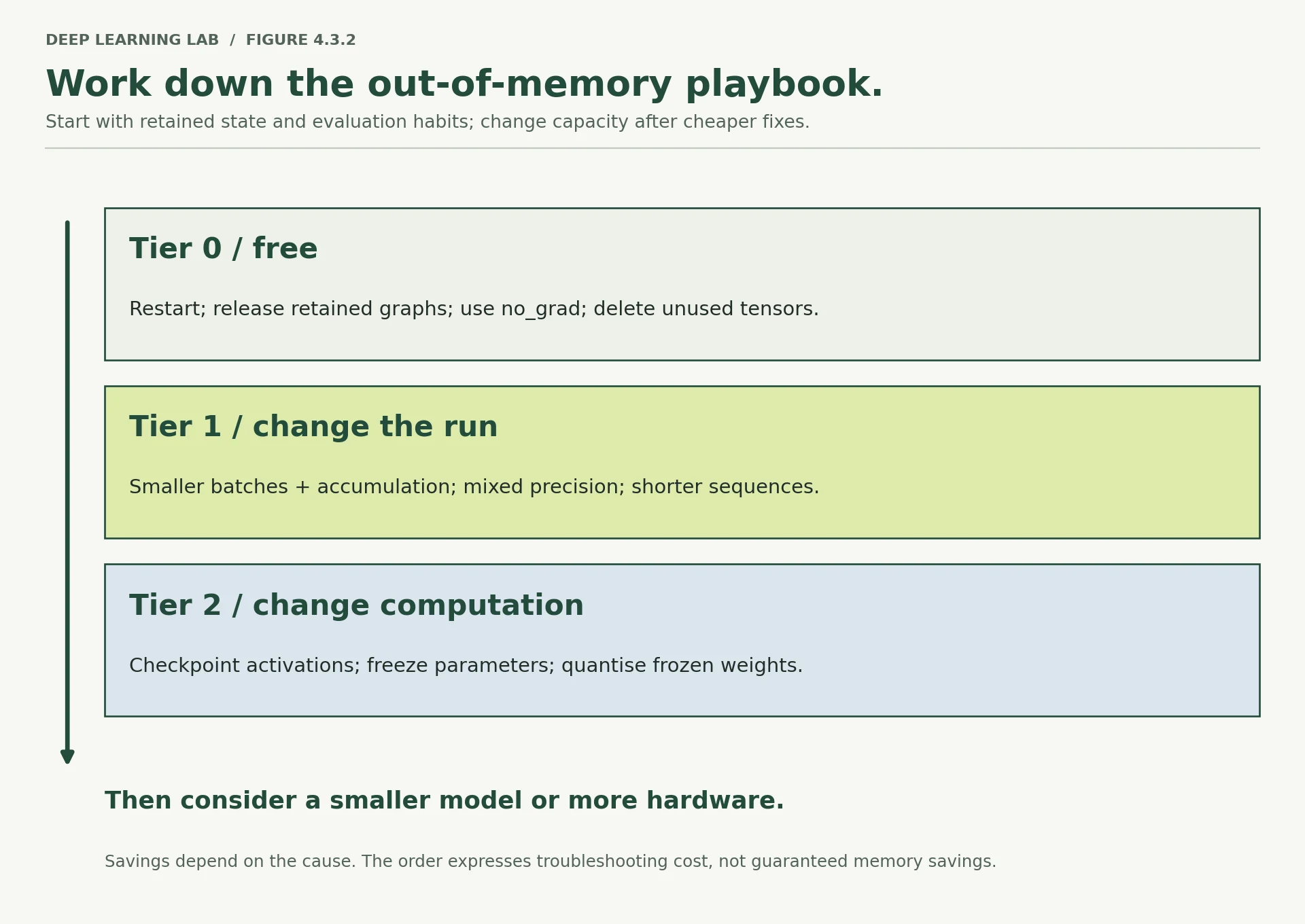
Stop at the first rung that works. The four free fixes solve more real failures than their position suggests.
What to take away
Training with AdamW needs about four times the model's own memory, before a single activation: weights, gradients, and two running averages. That factor is the reason Module 8 exists.
You can predict memory before running anything. Parameter count, times bytes per number, times the optimizer's copies. The 7B rows in Section 2 show why running such a model and training it sit on opposite sides of a hardware boundary.
Precision is a trade between range and fineness. bf16 keeps fp32's range and needs no loss scaler; fp16 keeps more fineness but its narrow range means gradients vanish without one.
Activations are the batch-dependent term, linear in batch size and constant per row. So batch size is the fastest memory control you have, and gradient accumulation gives back the effective batch you gave up.
Speed from mixed precision is a hardware property; the memory saving is arithmetic. Measure the first, count on the second.
Put autocast around the forward pass. Wrapping the whole loop cost 0.026 AUC here, silently, because of a weight cache that was never meant to live that long.
An out-of-memory error has a playbook. Restart, look for retained graphs, use no_grad, then batch size and accumulation, then checkpointing and freezing. Hardware last.
Transition to Lesson 4.4
You now have three of the four pieces of a defensible experiment: data you can trust (4.1), a run that records itself and can be repeated (4.2), and a clear idea of what a run costs in memory (4.3).
Lesson 4.4 spends them. A gradient-boosting model and the Module 3 neural network compete on Bank Marketing, on identical splits, with the tuning budget written down in advance and every claim checked against the noise you measured in 4.2. The blueprint's instruction for that contest is explicit: the conclusion is not allowed to be "neural networks win". It has to be a decision you could defend to somebody who disagrees with you.
According to the playbook, what should you try first after an out-of-memory error?
Tier 0 is free and changes nothing about the model. Then batch size and accumulation, mixed precision; then checkpointing and freezing; hardware last.
Wrap-up
- Training with AdamW needs about four times the model's memory before activations: weights, gradients and two running averages, 16 bytes per weight in fp32.
- Estimate before running: parameters × bytes per number × copies. Running a 7B model (13 GB in fp16) and training it (104 GB) sit on opposite sides of a hardware line.
- Mixed precision keeps an fp32 master copy, so it does not shrink weights, gradients or optimizer state. It shrinks activations, and on the right hardware it is faster.
- Precision trades range against fineness. bf16 keeps fp32's range and needs no loss scaler; fp16's narrow range makes small gradients vanish without one.
- Activations are the batch-dependent term, linear in batch size. Halve the batch first, and use gradient accumulation (dividing each loss) to get the effective batch back.
- Put autocast around the forward pass only. Around the whole loop, its weight cache froze every validation score at epoch 1 while the model kept training, and nothing warned.
- Work an out-of-memory error from the cheap end: restart, stop keeping graphs alive,
no_gradfor scoring, then batch size and accumulation, then checkpointing and freezing. Clean up outside theexcept.
Quick check
A model has 1 million weights. Roughly how much memory do weights, gradients and AdamW state take in fp32?
4 bytes × (1 weight + 1 gradient + 2 averages) = 16 bytes per weight.
You switch a 7B AdamW fine-tune from fp32 to standard mixed precision. What happens to weights + gradients + optimizer state?
2 + 2 + 4 + 8 = 16 bytes per weight, the same as fp32. The saving is in the activations.
Why does fp16 training need a loss scaler while bf16 does not?
The scaler is a range fix: it lifts small gradients above fp16's floor, then divides them back.
A model fits at batch 64 and not at batch 128. Which memory term changed?
The other three depend only on the model and the optimizer.
You accumulate over 8 small batches with AdamW and forget to divide each loss by 8. What happens?
With SGD it would act like an 8× learning rate. Divide anyway: clipping or a switch of optimizer brings the bug back.
In the lesson's "whole" mode, every validation score after epoch 1 was identical. Why?
The model trained in fp32 throughout; only its measurement was frozen. Keep autocast around the forward pass.
del big_tensor runs, but nvidia-smi still shows the memory in use. Most likely?
Inside your process the cache is a feature. Also check nothing else still refers to the tensor.
Questions and discussion
Ask about this lesson, share what you found in a lab, or help someone else. Posts are public on the course's GitHub Discussions: anyone can read them, and you need a GitHub account to post.
Opening it loads giscus from giscus.app.