Data You Can Trust
- Time
- ~108 min
- Sections
- 11
- Code cells
- 46
- Labs
- 3
- Figures
- 4
Before you start
How do you know your validation score is telling the truth? This lesson checks the trust you have placed in every split since
Module 2. You audit Bank Marketing for problems isna() cannot see (sentinels, placeholders, near-constant columns), write a
split function with four rules and checks that stop the run, fit preprocessing on training rows only, and then find three real
failures in the same file: a hidden clock (the yes rate goes from 5% to 52% down the file, so a chronological split scores
0.61 where a random one scores 0.78), group leakage through the calling day (about 0.08 AUC), and class imbalance, where
re-weighting moves the threshold but not the ranking.
- Goal
Learn to inspect a dataset and a data split before training anything, so that the number you report at the end means what you think it means.
The shape of the work:
raw file ↓ look at it (audit) ↓ split it (train / validation / test) ↓ fit the preprocessing on train only ↓ transform every part with that same fitted object ↓ now a score is meaningful- Outcome
by the end of this lesson, you should be able to:
- find the problems in a dataset that
isna()cannot see; - split a dataset four different ways and say what question each split answers;
- measure leakage instead of arguing about it;
- explain why a model that scores 0.78 on one split scores 0.61 on another, using the same rows;
- report a score for an imbalanced problem without fooling yourself.
- find the problems in a dataset that
- You will be able to
- explain what a train, validation and test set are for, in your own words;
- spot a sentinel value: a number that is secretly a flag, like
-1meaning "never happened"; - write a small audit function and read its table;
- write a split function that supports four different splitting rules;
- write checks that stop the run when a split is broken;
- fit a scaler and an encoder on training rows only, and explain what goes wrong when you do not;
- discover that a file is in date order when it has no date column;
- measure how much a model's score drops when it is tested on a later time period;
- tell label shift from covariate shift;
- detect group leakage, where rows that belong together end up on both sides of a split;
- choose a decision threshold from a business limit instead of using 0.5.
- Runtime
Section Approximate time Downloading the data (first run only) 20–60 s Sections 1–5 under 20 s combined Section 7 — two logistic regressions ~5 s Section 8 — adversarial validation ~25 s Section 9 — twelve logistic regressions ~35 s Section 10 ~5 s Total is about two minutes after the download. Everything runs on CPU. No GPU is needed anywhere in this lesson.
How to read this lesson
This lesson answers one question:
How do I know that my validation score is telling me the truth?
in Module 3 you trained a model and read its score. That score came from a set of rows called the validation set. The whole time, you were trusting one thing without checking it: that those rows are a fair stand-in for the data the model will meet after you ship it.
This lesson checks that trust. It uses the same Bank Marketing file you have used since Module 2, and it finds three ways the trust can break.
Everything is built in front of you. Every function is written in the notebook, run, and its output shown. Nothing is imported from a file you cannot see.
Setup — imports, versions and device detection used by the notebook (2 cells)
The next cell imports everything the note uses and prints the versions. If you want to install the exact versions, uncomment the pip line.
# pip install torch==2.14.0 scikit-learn==1.8.0 numpy==2.4.4 pandas==3.0.2 matplotlib==3.10.8import ioimport osimport urllib.requestimport zipfileimport matplotlib.pyplot as pltimport numpy as npimport pandas as pdimport torchpd.set_option("display.width", 140)pd.set_option("display.max_columns", 20)SEED = 42 # one number that makes every random choice in this lesson repeatableprint("numpy ", np.__version__)print("pandas ", pd.__version__)print("torch ", torch.__version__)numpy 2.4.4 pandas 3.0.2 torch 2.14.0+cpu
Every notebook in this course starts by asking what hardware it is running on. A GPU makes big models faster. This lesson trains nothing big, so it does not need one, but the check stays because it is a habit worth having and because Lesson 4.3 depends on it.
torch.cuda.is_available()isTrueon a machine with an NVIDIA GPU, which is what Colab and Kaggle give you.torch.backends.mps.is_available()isTrueon an Apple Silicon Mac (M1 to M5). MPS is Apple's name for its GPU backend.- If neither is true, you are on CPU, which is fine here.
if torch.cuda.is_available(): DEVICE = torch.device("cuda") ACCELERATOR = torch.cuda.get_device_name(0)elif torch.backends.mps.is_available(): DEVICE = torch.device("mps") ACCELERATOR = "Apple Silicon GPU (MPS)"else: DEVICE = torch.device("cpu") ACCELERATOR = "none"print(f"accelerator found : {ACCELERATOR}")print(f"device : {DEVICE}")print("this note runs entirely on CPU, so the device above does not change any number here")accelerator found : none device : cpu this note runs entirely on CPU, so the device above does not change any number here
What a split is pretending to be
Before any code, get one idea clear, because the rest of the note depends on it.
When you split a dataset, you cut the rows into groups and give each group a job:
- training set — the rows the model learns from;
- validation set — rows the model never learns from, used while you are still making choices (which learning rate, how many epochs, which model);
- test set — rows nobody touches until the very end, used once, to report a final number.
Now the important part. The test set has a part to play. It is pretending to be the future: the data your model will meet after you put it to work.
the rows you have                        what they pretend to be

 ┌──────────────┐                         ┌──────────────┐
 │  training    │ ──────────────────────► │  the past    │
 └──────────────┘                         └──────────────┘
 ┌──────────────┐                         ┌──────────────┐
 │  test        │ ──────────────────────► │  the future  │
 └──────────────┘                         └──────────────┘
A split is good exactly as far as that pretending is convincing.
So the question to ask about any split is: who, and when, will this model be used on? For Bank Marketing the honest answer is: customers the bank has not phoned yet, on days that have not happened yet. Hold on to that sentence. Every section below tests one part of it.
You have already seen two ways this pretending fails, in Module 3:
- Lesson 3.4, Case 4 put copies of training rows into the validation set. The validation score went to a perfect 1.0000. The split was pretending the future is the past.
- Lesson 3.4, Case 6 kept a column called
duration, the length of the phone call. You only know how long a call lasted after it has finished, so the model was reading something from the future. The score jumped to 0.9262 and meant nothing.
Both of those were deliberately obvious. Real ones are quieter, which is why this lesson measures rather than argues.
Let us make a split with ten rows, so you can see exactly what the words mean before we use 45,211 of them.
The tool is train_test_split from scikit-learn. It takes a list of things and cuts it in two. Its arguments:
- the first argument is what to cut, here the row numbers
0..9; train_size=0.6means 60% goes to the first output, the rest to the second;random_state=SEEDfixes the randomness, so you and I get the same cut;shuffle=True(the default) means it picks rows at random rather than cutting in the middle.
from sklearn.model_selection import train_test_splittoy_rows = np.arange(10) # pretend row numbers 0 to 9toy_train, toy_rest = train_test_split(toy_rows, train_size=0.6, random_state=SEED)print("all rows :", toy_rows)print("train rows :", np.sort(toy_train))print("remaining rows:", np.sort(toy_rest))all rows : [0 1 2 3 4 5 6 7 8 9] train rows : [2 3 4 6 7 9] remaining rows: [0 1 5 8]
Two things to notice, because both come back later.
First, the function gave back row numbers, not the data itself. That is deliberate and we will keep doing it: if you carry row numbers around, you can apply the same split to the features, to the labels and to anything else you calculate later, and they will always line up.
Second, the rows are picked at random, not in order. Rows 0, 1, 2 did not go together. That is the normal choice, and Section 7 shows where it goes wrong.
Now cut the remaining rows in two, to get the third group:
toy_val, toy_test = train_test_split(toy_rest, test_size=0.5, random_state=SEED)print("train :", np.sort(toy_train), f" {len(toy_train)} rows")print("validation :", np.sort(toy_val), f" {len(toy_val)} rows")print("test :", np.sort(toy_test), f" {len(toy_test)} rows")print()print("every row used once?", sorted(np.concatenate([toy_train, toy_val, toy_test])) == list(range(10)))train : [2 3 4 6 7 9] 6 rows validation : [5 8] 2 rows test : [0 1] 2 rows every row used once? True
That is the whole idea: cut once to get training, cut the leftovers again to get validation and test. Sixty percent, twenty, twenty. We will do exactly this to the real data in Section 4, with the same two calls.
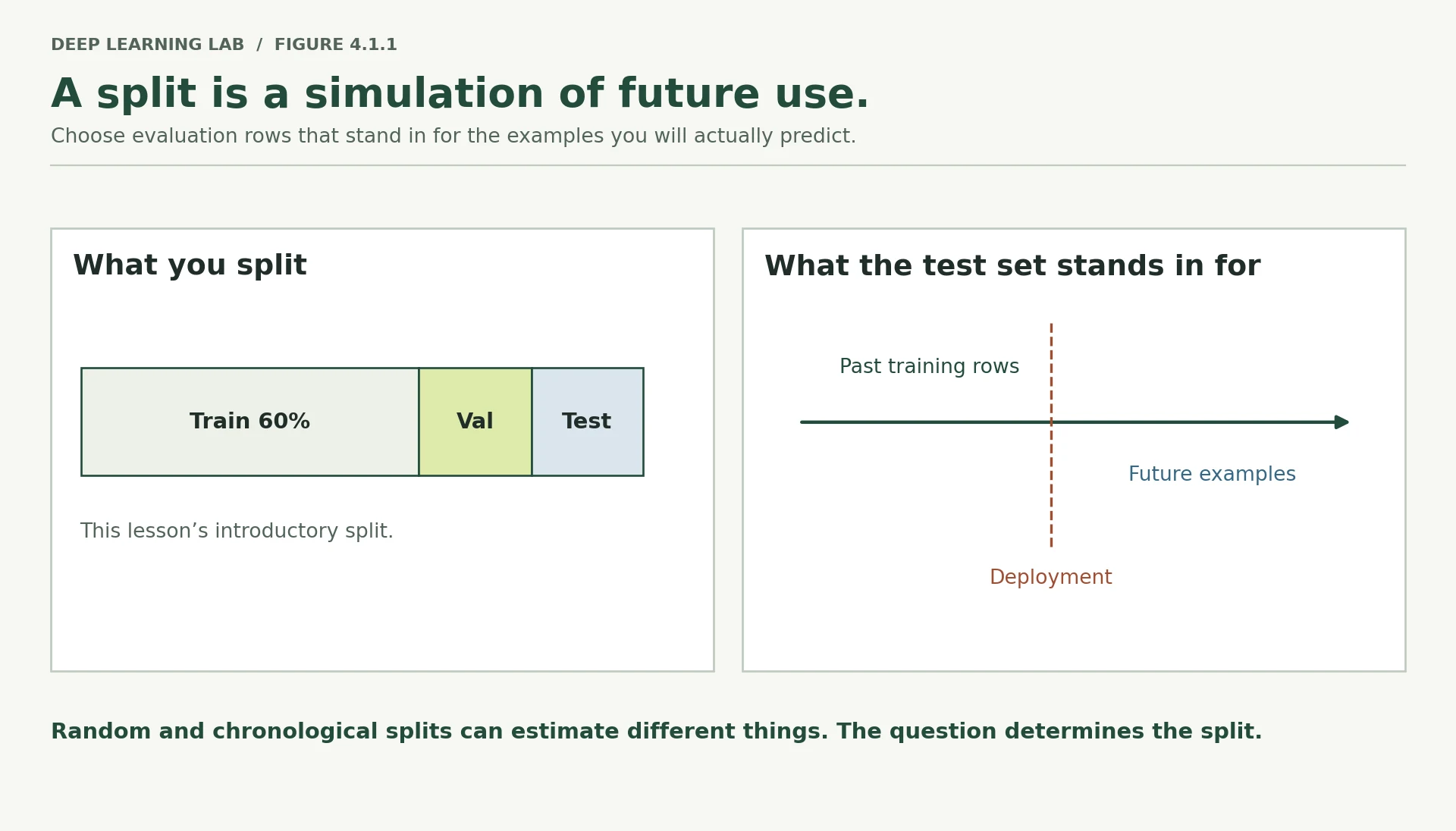
A split is only as good as that stand-in is convincing. Every later section tests one part of it.
-
In your own words, what is the test set standing in for?
The future the model will actually work in: customers it has never seen, on days after it was deployed. The test score is an estimate of performance there, and it is only as good as the test rows are a convincing stand-in for that future.
-
In Lesson 3.4 Case 4, no training diagnostic complained at all. Why can a broken split stay invisible to the loss curve?
Because the loss curve only describes how the model fits the rows it is shown. When validation rows are copies of training rows, training is perfectly healthy and the validation curve faithfully reports that the model fits those rows. Nothing in the optimisation is wrong. Whether validation rows are genuinely unseen is a property of how rows were assigned, which no loss, gradient or metric can see; only a check on the split itself (overlap, provenance) can.
-
Before reading on: is a random split a convincing stand-in for "customers not phoned yet, on days that have not happened yet"? What would have to be true about the file for it to be?
Only if the rows are exchangeable: if it does not matter when a customer was called or who else was called that day, so a random handful of past rows looks just like future rows. That needs no trend over time, no change in who is being called, and no groups of rows that share an outcome. This file breaks all three (Sections 6 to 9), so a random split is not a convincing stand-in here.
What is the test set standing in for?
A split is only as good as that pretence. Ask who, and when, the model will be used on.
Why could the broken split in Lesson 3.4 Case 4 stay invisible to every training diagnostic?
- The loss curve and gradients only describe optimisation on the data you gave the model; they cannot know that validation rows are copies of training rows.
- A split failure is a problem with what the evaluation represents, so you catch it by checking the split itself (overlaps, groups, time), not the training curves.
Getting the data and looking at it
The next cell downloads the file if it is not already on disk. Reading it, line by line:
os.path.exists(path)asks whether we already have the file, so a second run does not download again;urllib.request.urlopen(url).read()fetches the bytes from UCI;- the download is a zip file with another zip inside it, so we open the outer one, pull
bank.zipout of it, and open that to reachbank-full.csv; io.BytesIOletszipfiletreat those bytes as if they were a file on disk;pd.read_csv(path, sep=";")reads the CSV. Thesep=";"matters: this file separates columns with semicolons, not commas. Without it you get one wide useless column.
BANK_URL = "https://archive.ics.uci.edu/static/public/222/bank+marketing.zip"BANK_CSV = "data/bank-full.csv"def download_bank_marketing(path=BANK_CSV): """Download ``bank-full.csv`` from UCI unless it is already on disk. The UCI archive contains a second zip (``bank.zip``), which holds the CSV; both are read in memory and only the CSV is written. Args: path: Where to save the CSV. Returns: The path of the CSV. Raises: urllib.error.URLError: If the file is missing and UCI cannot be reached. """ if os.path.exists(path): print(f"already here: {path}") return path print("downloading from UCI ...") raw_bytes = urllib.request.urlopen(BANK_URL, timeout=120).read() outer_zip = zipfile.ZipFile(io.BytesIO(raw_bytes)) inner_zip = zipfile.ZipFile(io.BytesIO(outer_zip.read("bank.zip"))) os.makedirs(os.path.dirname(path), exist_ok=True) with open(path, "wb") as f: f.write(inner_zip.read("bank-full.csv")) print(f"saved: {path}") return pathdownload_bank_marketing()raw = pd.read_csv(BANK_CSV, sep=";")print("rows and columns:", raw.shape)already here: data/bank-full.csv rows and columns: (45211, 17)
raw.head()| age | job | marital | education | default | balance | housing | loan | contact | day | month | duration | campaign | pdays | previous | poutcome | y | |
|---|---|---|---|---|---|---|---|---|---|---|---|---|---|---|---|---|---|
| 0 | 58 | management | married | tertiary | no | 2143 | yes | no | unknown | 5 | may | 261 | 1 | -1 | 0 | unknown | no |
| 1 | 44 | technician | single | secondary | no | 29 | yes | no | unknown | 5 | may | 151 | 1 | -1 | 0 | unknown | no |
| 2 | 33 | entrepreneur | married | secondary | no | 2 | yes | yes | unknown | 5 | may | 76 | 1 | -1 | 0 | unknown | no |
| 3 | 47 | blue-collar | married | unknown | no | 1506 | yes | no | unknown | 5 | may | 92 | 1 | -1 | 0 | unknown | no |
| 4 | 33 | unknown | single | unknown | no | 1 | no | no | unknown | 5 | may | 198 | 1 | -1 | 0 | unknown | no |
The last column, y, is the label: "yes" if the customer subscribed to the term deposit, "no" otherwise. Everything else is an input.
Two words used throughout the course, in plain terms:
- a numeric column holds numbers you can do arithmetic with, like
ageorbalance; - a categorical column holds labels from a fixed set, like
jobormonth. The numbers in them, if any, mean nothing arithmetically.
Let us see which is which, and how often each label says yes.
numeric_columns = raw.drop(columns="y").select_dtypes(include="number").columns.tolist()categorical_columns = [c for c in raw.drop(columns="y").columns if c not in numeric_columns]print("numeric :", numeric_columns)print("categorical :", categorical_columns)print()print(raw["y"].value_counts())print()print(f"share who said yes: {(raw['y'] == 'yes').mean():.4f}")numeric : ['age', 'balance', 'day', 'duration', 'campaign', 'pdays', 'previous'] categorical : ['job', 'marital', 'education', 'default', 'housing', 'loan', 'contact', 'month', 'poutcome'] y no 39922 yes 5289 Name: count, dtype: int64 share who said yes: 0.1170
11.7% said yes. Write that number down; Section 10 is entirely about what it does to every score you report.
One column has to go first
duration is the length of the phone call in seconds. Think about when you know it. You know it after the call has ended, which is also when you know the answer. A model using it is being told something that does not exist at the moment you would actually want a prediction.
This is called target leakage: an input column that carries information about the answer, information you would not have in real use.
Lesson 3.4 Case 6 measured it: keeping duration took validation AUC from 0.7853 to 0.9262. A jump like that looks like success and is worthless. Here is the reason it happens, in one line.
mean_duration_yes = raw.loc[raw["y"] == "yes", "duration"].mean()mean_duration_no = raw.loc[raw["y"] == "no", "duration"].mean()print(f"average call length when the answer was yes : {mean_duration_yes:6.1f} seconds")print(f"average call length when the answer was no : {mean_duration_no:6.1f} seconds")print(f"ratio : {mean_duration_yes / mean_duration_no:.1f}x")print()print("A long call means the customer was listening, which means they were likely to say yes.")print("You cannot know the call length before the call, so the column has to go.")average call length when the answer was yes : 537.3 seconds average call length when the answer was no : 221.2 seconds ratio : 2.4x A long call means the customer was listening, which means they were likely to say yes. You cannot know the call length before the call, so the column has to go.
data = raw.drop(columns="duration")print("columns kept:", data.shape[1], "(15 inputs plus the label)")columns kept: 16 (15 inputs plus the label)
-
pdaysis the number of days since the customer was last contacted in a previous campaign. Is that target leakage? Why or why not?No, by timing.
pdayscounts days since the customer was contacted in a previous campaign, so it exists before the current call is made and cannot be influenced by this call's outcome. Two caveats: its-1is a sentinel, not a number of days (Section 3), and you would still confirm when the value was recorded, to be sure "previous" really means a campaign that ended before the prediction. -
A colleague adds a column
number_of_calls_made_to_this_customer_in_total. What would you ask before allowing it?When is the total counted? If it includes calls made during or after the current campaign, and especially if the bank keeps calling interested customers until they sign, then the count grows because of the outcome, and it is target leakage like
duration. Ask for the definition and the timestamp at which it is recorded, and allow it only as "calls made before the moment of prediction".
Why drop duration (call length) before modelling?
Calls with a 'yes' average 537 s, against 221 s for a 'no'. It predicts well and is useless when deciding whom to call.
The problems isna() cannot see
The usual first check on a dataset is to count missing values. Run it here and the file looks perfect.
print("missing values per column:")print(data.isna().sum().to_string())missing values per column: age 0 job 0 marital 0 education 0 default 0 balance 0 housing 0 loan 0 contact 0 day 0 month 0 campaign 0 pdays 0 previous 0 poutcome 0 y 0
Zero everywhere. That is not the same as clean.
Missing information often arrives disguised as a valid value. Two disguises are extremely common:
- a sentinel value: a number chosen to mean "this did not happen".
-1,999and0are the usual suspects; - a placeholder string: a word like
"unknown","N/A"or"none"sitting in a text column.
Neither is missing as far as pandas is concerned. Both are missing as far as meaning is concerned. Look for them by hand first, then we will wrap the search into a function.
print(data["pdays"].value_counts().head())pdays -1 36954 182 167 92 147 91 126 183 126 Name: count, dtype: int64
The value -1 appears 36,954 times out of 45,211. pdays means "days since the customer was last contacted in a previous campaign", and -1 is how this file says never contacted before.
So a yes/no fact is hiding inside a number column. That matters for two reasons. A scaler will treat -1 as "one day before zero days ago", which is nonsense. And a model has to waste effort learning that this one value means something completely different from the others.
never_contacted = data["pdays"] == -1print(f"share of rows with pdays == -1 : {never_contacted.mean():.3f}")print()print(data["poutcome"].value_counts())share of rows with pdays == -1 : 0.817 poutcome unknown 36959 failure 4901 other 1840 success 1511 Name: count, dtype: int64
poutcome is the outcome of the previous campaign, and it says "unknown" on almost exactly the same share of rows. That is suspicious in a useful way: two columns may be recording the same fact. Check whether they are the same rows.
poutcome_unknown = data["poutcome"] == "unknown"print(f"pdays == -1 : {never_contacted.mean():.3f}")print(f"poutcome == 'unknown' : {poutcome_unknown.mean():.3f}")print(f"both at the same time : {(never_contacted & poutcome_unknown).mean():.3f}")print(f"poutcome unknown but pdays is set : {(poutcome_unknown & ~never_contacted).sum()} rows")pdays == -1 : 0.817 poutcome == 'unknown' : 0.817 both at the same time : 0.817 poutcome unknown but pdays is set : 5 rows
Same fact, written twice, apart from 5 rows. "We have never spoken to this person before."
Now the third column with a placeholder, contact, which records how the customer was reached. It says "unknown" on a lot of rows. Before deciding what to do with a placeholder, always check it against the label.
contact_summary = data.assign(subscribed=(data["y"] == "yes")).groupby("contact")["subscribed"].agg(["size", "mean"])contact_summary.columns = ["rows", "share who said yes"]print(contact_summary.round(4).to_string())rows share who said yes contact cellular 29285 0.1492 telephone 2906 0.1342 unknown 13020 0.0407
This is the reason you check. "unknown" is not noise here. Those customers said yes 4.1% of the time, against 14.9% for customers reached on a mobile. The word is telling us something about how the bank was running that part of the campaign, and it predicts the answer.
So the right treatment is to keep "unknown" as its own category, not to replace it with the most common value. Replacing it would throw away a real signal. (Section 8 finds another reason to care about this column.)
Wrapping the search into a function
We have now done the same few checks by hand three times. That is the moment to write a function. Ours takes a table and returns one row per column, with:
kind— numeric or categorical;n_unique— how many different values appear;missing— the share that pandas calls missing;unknown— the share equal to the string"unknown";sentinel— the share equal to a sentinel value we name ourselves;negative— the share below zero, for numeric columns;top_valueandtop_share— the commonest value and how much of the column it covers.
Two pieces of pandas used inside it:
pd.api.types.is_numeric_dtype(s)answers "is this column numeric?";s.value_counts(normalize=True)counts each value and, withnormalize=True, turns the counts into shares that add up to 1.
def audit(df, sentinels=None): """Describe what is actually in each column of a table, one row per column. Reports the kind of column, the number of distinct values, and the shares that are missing, equal to ``"unknown"``, equal to a named sentinel, or negative, plus the most common value and its share. It raises questions; it does not change the data. Args: df: The raw table to inspect (before any encoding). sentinels: Optional ``{column: value}`` of numbers you know to be flags, e.g. ``{"pdays": -1}``. Returns: A DataFrame indexed by column name with columns ``kind``, ``n_unique``, ``missing``, ``unknown``, ``sentinel``, ``negative``, ``top_value`` and ``top_share``. """ sentinels = sentinels or {} # e.g. {"pdays": -1} rows = [] for column in df.columns: values = df[column] is_numeric = pd.api.types.is_numeric_dtype(values) shares = values.value_counts(normalize=True) rows.append({ "column": column, "kind": "numeric" if is_numeric else "categorical", "n_unique": int(values.nunique()), "missing": float(values.isna().mean()), "unknown": 0.0 if is_numeric else float((values == "unknown").mean()), "sentinel": float((values == sentinels[column]).mean()) if column in sentinels else 0.0, "negative": float((values < 0).mean()) if is_numeric else 0.0, "top_value": shares.index[0], "top_share": float(shares.iloc[0]), }) return pd.DataFrame(rows).set_index("column")report = audit(data.drop(columns="y"), sentinels={"pdays": -1})print(report.round(3).to_string())- 1
Sentinels have to be named by a person: only you know that -1 means "never".
- 2
Each value's share of the column, most common first: the source of
top_valueandtop_share. - 3
The placeholder word this file uses; other datasets use "N/A", "none" or "?".
- 4
Negative values are not always wrong (an overdraft), but they are always worth a question.
                  kind  n_unique  missing  unknown  sentinel  negative    top_value  top_share
column
age            numeric        77      0.0    0.000     0.000     0.000           32      0.046
job        categorical        12      0.0    0.006     0.000     0.000  blue-collar      0.215
marital    categorical         3      0.0    0.000     0.000     0.000      married      0.602
education  categorical         4      0.0    0.041     0.000     0.000    secondary      0.513
default    categorical         2      0.0    0.000     0.000     0.000           no      0.982
balance        numeric      7168      0.0    0.000     0.000     0.083            0      0.078
housing    categorical         2      0.0    0.000     0.000     0.000          yes      0.556
loan       categorical         2      0.0    0.000     0.000     0.000           no      0.840
contact    categorical         3      0.0    0.288     0.000     0.000     cellular      0.648
day            numeric        31      0.0    0.000     0.000     0.000           20      0.061
month      categorical        12      0.0    0.000     0.000     0.000          may      0.304
campaign       numeric        48      0.0    0.000     0.000     0.000            1      0.388
pdays          numeric       559      0.0    0.000     0.817     0.817           -1      0.817
previous       numeric        41      0.0    0.000     0.000     0.000            0      0.817
poutcome   categorical         4      0.0    0.817     0.000     0.000      unknown      0.817
Read down the table and three more things appear that we had not looked for.
balanceis negative on 8.3% of rows. For a bank balance that is an overdraft, so it is valid data. An audit raises questions; it does not pass verdicts.defaultis one value on 98.2% of rows. A column that says the same thing about nearly everybody can carry almost no information.pdaysis 81.7% negative, which is the sentinel we already found, showing up from a second direction.
A table is easy to skim past, so it helps to turn it into sentences that demand an answer. The function below does that: it walks the audit table and prints a question for anything above a threshold.
def flag_issues(report, threshold=0.05): """Turn an audit table into a list of questions somebody has to answer. Args: report: The DataFrame returned by ``audit``. threshold: Smallest share of placeholders, sentinels or negatives worth asking about. Returns: A list of strings, one per issue: any missing values, frequent placeholders, sentinels or negatives, and columns where one value covers at least 95% of rows. """ questions = [] for column, row in report.iterrows(): if row["missing"] > 0: questions.append(f"{column}: {row['missing']:.1%} missing") if row["unknown"] >= threshold: questions.append(f"{column}: {row['unknown']:.1%} say 'unknown' - a category, or missing data?") if row["sentinel"] >= threshold: questions.append(f"{column}: {row['sentinel']:.1%} are the sentinel value - a number, or a flag?") if row["negative"] >= threshold: questions.append(f"{column}: {row['negative']:.1%} are negative - is that valid here?") if row["top_share"] >= 0.95: questions.append(f"{column}: one value covers {row['top_share']:.1%} of rows - nearly constant") return questionsfor question in flag_issues(report): print(" -", question)- default: one value covers 98.2% of rows - nearly constant - balance: 8.3% are negative - is that valid here? - contact: 28.8% say 'unknown' - a category, or missing data? - pdays: 81.7% are the sentinel value - a number, or a flag? - pdays: 81.7% are negative - is that valid here? - poutcome: 81.7% say 'unknown' - a category, or missing data?
Duplicates
One more check before we split. A duplicate is a row that appears more than once. Duplicates matter for a reason that will not be obvious until Section 9: if the same row sits in training and in test, the model can score well by remembering rather than by learning.
Worth checking twice over:
- whole rows that repeat, label included;
- rows whose inputs repeat while their labels disagree, which means the data is telling you two different answers for the same situation.
inputs_only = data.drop(columns="y")print("rows that repeat entirely :", int(data.duplicated().sum()))print("rows whose inputs repeat :", int(inputs_only.duplicated().sum()))rows that repeat entirely : 16 rows whose inputs repeat : 16
None at all, which is worth recording precisely because it is often not the case. Module 8 meets duplicates again in fine-tuning data, where they are common and cause real damage.
-
Why did we run the audit on the raw table instead of after encoding the columns into numbers?
Because encoding hides the evidence. After one-hot encoding,
"unknown"is just another 0/1 column; after scaling, the sentinel-1becomes an ordinary-looking number like −0.41; a near-constant column is spread across several indicator columns. The raw table keeps the names and values whose meaning the audit is checking, and the audit's findings are what should decide how to encode each column. -
contact = "unknown"predicts the label. Give one reason that could be a genuine signal, and one reason it could be a warning sign.A genuine signal: the contact method reflects how the bank ran that part of the campaign (which lists it called, which channel it used), an operational fact that also exists when a new prediction is made. A warning sign: it may be a proxy for time (Section 8: 35% unknown early in the file against 6% late, when success rates were very different), so it predicts partly because of drift and may stop working; or the contact type may have been filled in only for customers who engaged, which would make it depend on the outcome.
-
Pick a dataset from your own work. Which columns in it could contain a sentinel value, and what would the sentinel be?
Look for values that are valid numbers but impossible or oddly frequent. Common examples: an age of 0 or 999, a date of 1900-01-01 or 1970-01-01 (the Unix epoch), a postcode of 00000, an income or balance of exactly 0 for "not provided", a sensor reading pinned at 0 or at its maximum (65535), a tenure of −1, and strings such as
"N/A","none","?"or"-". A value count sorted by frequency usually exposes them.
-
Add a column
was_contacted_before = data["pdays"] != -1, re-runaudit, and then decide what you think should happen topdaysitself.The audit shows a new two-valued column:
False(never contacted) on 81.7% of rows. Now the flag carries the fact that-1was encoding, sopdaysno longer needs its sentinel. A sensible treatment is to keepwas_contacted_beforeand replace the-1inpdayswith a neutral value (for example 0, or the median of the contacted customers), so the scaler and the model readpdaysonly as "days since the last contact, for customers who had one". Leaving-1in place makes the scaler treat "never" as a day count sitting just below real values that run into the hundreds.
pdays is −1 on 81.7% of rows. What is it?
isna() sees nothing. A scaler would treat −1 as 'one day before zero days ago'. It matches poutcome == 'unknown' on nearly the same rows.
contact is 'unknown' on 28.8% of rows, and those customers said yes only 4.1% of the time. What should you do?
Always check a placeholder against the label before deciding its treatment.
Why run the data audit on the raw table rather than after encoding?
- Encoding hides the evidence: sentinels become ordinary scaled numbers and placeholder words become one indicator column among many.
- On the raw table you can see −1, 'unknown', near-constant columns and negative values for what they are.
Splitting on purpose
Now we split the real file, using the same two calls from Section 1. But this time we make the split a choice we can name, because there is more than one sensible way to do it.
Four rules, in plain words:
- stratified — pick rows at random, but keep the share of yes answers the same in every part;
- random — pick rows at random and let the shares fall where they may;
- chronological — the earliest rows for training, the middle for validation, the latest for test;
- group — decide which side a whole group of rows goes to, all together.
The first one is what Module 2 and Module 3 used. The rest arrive later in this lesson, each for a reason.
First, the target. We turn "yes"/"no" into 1.0/0.0 because every model in this course expects numbers.
X = data.drop(columns="y") # the inputsy = (data["y"] == "yes").astype(np.float32).to_numpy() # the label as 1.0 / 0.0print("inputs :", X.shape)print("labels :", y.shape, "| first ten:", y[:10])print("share of 1s:", round(float(y.mean()), 4))inputs : (45211, 15) labels : (45211,) | first ten: [0. 0. 0. 0. 0. 0. 0. 0. 0. 0.] share of 1s: 0.117
Stratified, by hand first
The word stratified means the split keeps the class balance. Our data is 11.7% yes. Without stratification, a random cut could hand the test set 10.4% and the training set 12.0% just by luck, and part of any difference you measure later would be that luck instead of your model.
train_test_split does it when you pass stratify=y. Watch it work on the real rows.
row_numbers = np.arange(len(y))train_idx, rest_idx = train_test_split(row_numbers, train_size=0.8, random_state=SEED, stratify=y)val_idx, test_idx = train_test_split(rest_idx, test_size=0.5, random_state=SEED, stratify=y[rest_idx])print(f"train : {len(train_idx):>6} rows | share yes {y[train_idx].mean():.4f}")print(f"validation : {len(val_idx):>6} rows | share yes {y[val_idx].mean():.4f}")print(f"test : {len(test_idx):>6} rows | share yes {y[test_idx].mean():.4f}")print(f"whole file : {len(y):>6} rows | share yes {y.mean():.4f}")train : 36168 rows | share yes 0.1170 validation : 4521 rows | share yes 0.1170 test : 4522 rows | share yes 0.1170 whole file : 45211 rows | share yes 0.1170
All four shares agree to three decimals. That is stratification doing its job.
Note the second call passes stratify=y[rest_idx], not stratify=y. It is splitting only the leftover rows, so it must be told the labels of those rows. Passing the whole label array there is a common and silent bug.
The same thing, as a function
Now we collect the four rules into one function. It returns a dictionary with three keys, "train", "val" and "test", each holding an array of row numbers.
The pieces inside:
fractions=(0.8, 0.1, 0.1)says how big each part should be;- for
"chronological"there is no randomness at all: we take the first 80% of rows in file order, then the next 10%, then the last 10%; - for
"group"we useGroupShuffleSplit, which keeps every row that shares a group label on the same side. Section 9 explains why that matters. Note that for this rule the fractions count groups, not rows; int(round(...))converts a fraction of the row count into a whole number of rows.
from sklearn.model_selection import GroupShuffleSplitdef make_split(y, policy="stratified", fractions=(0.8, 0.1, 0.1), seed=SEED, groups=None): """Split row numbers into training, validation and test sets using a named rule. ``"stratified"`` and ``"random"`` shuffle rows (the first keeps the class balance); ``"chronological"`` takes the first, middle and last parts of the file in order; ``"group"`` keeps every row of a group on one side, with ``fractions`` counting groups. Args: y: Labels, one per row (used for stratification and the row count). policy: ``"stratified"``, ``"random"``, ``"chronological"`` or ``"group"``. fractions: Shares for training, validation and test, summing to 1. seed: Seed for the random rules. groups: One group label per row; required for ``"group"``. Returns: A dict ``{"train", "val", "test"}`` of NumPy arrays of row numbers. """ f_train, f_val, f_test = fractions n = len(y) row_numbers = np.arange(n) test_share_of_rest = f_test / (f_val + f_test) # how much of the leftover is test if policy == "chronological": first_cut = int(round(f_train * n)) second_cut = int(round((f_train + f_val) * n)) return {"train": row_numbers[:first_cut], "val": row_numbers[first_cut:second_cut], "test": row_numbers[second_cut:]} if policy == "group": splitter = GroupShuffleSplit(n_splits=1, train_size=f_train, random_state=seed) train_pos, rest_pos = next(splitter.split(row_numbers, groups=groups)) splitter2 = GroupShuffleSplit(n_splits=1, test_size=test_share_of_rest, random_state=seed) val_pos, test_pos = next(splitter2.split(rest_pos, groups=np.asarray(groups)[rest_pos])) return {"train": train_pos, "val": rest_pos[val_pos], "test": rest_pos[test_pos]} stratify_on = y if policy == "stratified" else None train, rest = train_test_split(row_numbers, train_size=f_train, random_state=seed, stratify=stratify_on) stratify_rest = y[rest] if policy == "stratified" else None val, test = train_test_split(rest, test_size=test_share_of_rest, random_state=seed, stratify=stratify_rest) return {"train": train, "val": val, "test": test}split = make_split(y, "stratified", seed=SEED)for part, rows in split.items(): print(f"{part:<11} {len(rows):>6} rows | first five row numbers: {rows[:5]}")- 1
10% test out of the 20% left over is half of the leftover: 0.5.
- 2
Chronological: no randomness at all, just the file order.
- 3
GroupShuffleSplitkeeps every row of a group on one side; its fractions count groups, not rows. - 4
The second split works on positions within
rest_pos, so they are mapped back withrest_pos[...]below. - 5
The leftover rows' own labels, not the whole
y: the silent bug Section 4 warns about.
train        36168 rows | first five row numbers: [24001 43409 20669 18810 23130]
val           4521 rows | first five row numbers: [29912 11683 29502 11078 40417]
test          4522 rows | first five row numbers: [44443 35157 39341 30761 32422]
Those are the same numbers we produced by hand a moment ago, which is the point: the function is not doing anything new, it is just giving the choice a name.
Checks that stop the run
A split can be broken in ways that do not raise an error. Rows can land on two sides. Rows can vanish. A chronological split can quietly be out of order. So we write the checks down, and we use assert, which stops the notebook when the statement after it is false.
Each check in words:
- no row number appears in two parts (
&on two Python sets gives what they share); - the three parts add up to every row;
- for a chronological split, every training row comes before every validation row, which comes before every test row.
def check_split(split, y, policy="stratified"): """Stop the run if a split is broken, then summarise it. Asserts that no row is in two parts, that the parts add up to every row, and, for a chronological split, that training rows come before validation rows, which come before test rows. Args: split: A dict of row numbers from ``make_split``. y: The labels, to count rows and positive shares. policy: The rule used; ``"chronological"`` adds the ordering checks. Returns: A DataFrame with rows, share of the file and share of positives for each part. Raises: AssertionError: If any check fails, with a message naming it. """ train, val, test = split["train"], split["val"], split["test"] as_sets = [set(train), set(val), set(test)] assert not (as_sets[0] & as_sets[1]), "a row is in both train and validation" assert not (as_sets[0] & as_sets[2]), "a row is in both train and test" assert not (as_sets[1] & as_sets[2]), "a row is in both validation and test" assert len(train) + len(val) + len(test) == len(y), "rows were lost or duplicated" if policy == "chronological": assert train.max() < val.min(), "training rows are not all before validation rows" assert val.max() < test.min(), "validation rows are not all before test rows" return pd.DataFrame({part: {"rows": len(rows), "share of file": round(len(rows) / len(y), 4), "share who said yes": round(float(y[rows].mean()), 4)} for part, rows in split.items()}).Tprint(check_split(split, y, "stratified").to_string())- 1
&on two sets is their intersection: any shared row number fails the check. - 2
No overlap plus the right total means every row is used exactly once.
- 3
For a chronological split, time must only move forward from train to validation to test.
          rows  share of file  share who said yes
train  36168.0            0.8               0.117
val     4521.0            0.1               0.117
test    4522.0            0.1               0.117
Now break it on purpose, so you can see the check earn its place. We copy five training rows into the validation set, which is exactly the fault of Lesson 3.4 Case 4.
broken = {part: rows.copy() for part, rows in split.items()}broken["val"] = np.concatenate([broken["val"], broken["train"][:5]]) # five rows now on both sidestry: check_split(broken, y, "stratified")except AssertionError as error: print("the check stopped it:", error)the check stopped it: a row is in both train and validation
Five rows out of 45,211 is a leak far too small to notice in any score, and the check caught it instantly. That is the trade: a few lines that run in a second, against a result you cannot trust.
-
Why does
make_splithand back row numbers instead of three DataFrames?Row numbers index everything consistently: the inputs, the labels, and anything computed later (the calling-day column, the dates, predictions) all line up because they share the same row positions. They are tiny, easy to save and to check (set intersections find overlaps), and they keep the split separate from the data, so the same split can be applied to a new version of the features.
-
The group rule splits by groups, not rows. When would that give you a test set much bigger or smaller than the 10% you asked for?
When groups differ a lot in size.
GroupShuffleSplitcounts groups, not rows, so if a few enormous days (the largest has 825 calls; the median is 15) happen to land in test, the test set is far bigger than 10% of the rows, and far smaller if test gets mostly small days. Section 9 shows it: the group test sets hold 4,167, 3,131 and 4,026 rows against 4,522 for the stratified split. -
check_splitusesassertinstead of printing a warning. Why is stopping the better behaviour here?Because a broken split does not produce an error; it produces a plausible number. A printed warning scrolls past and the notebook goes on to report results nobody should trust.
assertmakes the failure impossible to ignore at the moment it is cheapest to fix, before anything is trained or written down.
In the second train_test_split call (splitting the leftover rows), what must stratify receive?
It is splitting only the leftover rows, so it needs those rows' labels. Passing the full y is a common silent bug.
Why does check_split use assert rather than printing a warning?
Five leaked rows out of 45,211 are too few to show in any score, and the check caught them instantly.
Preprocessing that belongs to the model
Preprocessing is everything done to the inputs between the raw table and the model: scaling numbers, turning categories into numbers, filling gaps. Two jobs in this lesson.
Scaling, in plain arithmetic
Numeric columns here live on wildly different scales. age holds tens. balance holds thousands. A model that adds up inputs will feel balance far more strongly than age, for no better reason than the units.
Look at the actual ranges first.
print(X[["age", "balance", "campaign"]].agg(["min", "max"]).to_string())age balance campaign min 18 -8019 1 max 95 102127 63
balance spans a range roughly ten thousand times wider than age. To a model that adds up its inputs, that difference alone makes balance shout and age whisper.
Standardising a column fixes that: subtract the column's average, then divide by its standard deviation. The result has average 0 and standard deviation 1. Do it by hand once, on five numbers.
small = np.array([10.0, 12.0, 14.0, 16.0, 18.0])mean = small.mean()std = small.std()print("numbers :", small)print("average (mean) :", mean)print("spread (std) :", std)print("standardised :", (small - mean) / std)print("new average :", round(float(((small - mean) / std).mean()), 6))print("new spread :", round(float(((small - mean) / std).std()), 6))numbers : [10. 12. 14. 16. 18.] average (mean) : 14.0 spread (std) : 2.8284271247461903 standardised : [-1.41421356 -0.70710678 0. 0.70710678 1.41421356] new average : 0.0 new spread : 1.0
StandardScaler from scikit-learn does exactly that, one column at a time. Like most scikit-learn objects it has two methods that matter:
.fit(data)— learn the numbers it needs, here each column's average and spread;.transform(data)— apply what it learned.
Keeping those two steps separate is the whole ballgame, as the rest of this section shows.
from sklearn.preprocessing import StandardScalerscaler_demo = StandardScaler()scaler_demo.fit(small.reshape(-1, 1)) # reshape because scikit-learn expects a 2-D tableprint("learned average:", scaler_demo.mean_[0])print("learned spread :", scaler_demo.scale_[0])print("transformed :", scaler_demo.transform(small.reshape(-1, 1)).ravel())learned average: 14.0 learned spread : 2.8284271247461903 transformed : [-1.41421356 -0.70710678 0. 0.70710678 1.41421356]
One-hot encoding, in plain arithmetic
A model cannot add up the word "student". Categories have to become numbers, and the obvious idea is the wrong one. If you write admin. = 0, blue-collar = 1, management = 2, you have told the model that management is twice blue-collar and that admin is the smallest. None of that is true.
One-hot encoding avoids inventing an order. Each category gets its own column, holding 1 when the row is that category and 0 otherwise.
from sklearn.preprocessing import OneHotEncoderjobs_demo = pd.DataFrame({"job": ["admin.", "blue-collar", "management", "admin."]})encoder_demo = OneHotEncoder(sparse_output=False)encoded_demo = encoder_demo.fit_transform(jobs_demo)print("original:")print(jobs_demo.to_string(index=False))print()print("one-hot columns:", list(encoder_demo.get_feature_names_out()))print(encoded_demo)original:
job
admin.
blue-collar
management
admin.
one-hot columns: ['job_admin.', 'job_blue-collar', 'job_management']
[[1. 0. 0.]
[0. 1. 0.]
[0. 0. 1.]
[1. 0. 0.]]
Four rows in, four rows out, but now three columns, and each row has exactly one 1. Row 1 and row 4 are both admin. and get identical rows of numbers, which is right.
One argument is worth knowing: handle_unknown="ignore". If a category shows up later that was not there when the encoder was fitted, the encoder writes all zeros instead of raising an error. Useful, because real data brings new categories after you ship.
Doing both at once with ColumnTransformer
Our table has both kinds of column, and they need different treatment. ColumnTransformer applies one tool to one list of columns and another tool to another list, then glues the outputs together side by side.
Reading its arguments: each entry is (nickname, tool, columns). Ours says "scale these numeric columns" and "one-hot these categorical columns".
from sklearn.compose import ColumnTransformerdef build_preprocessor(X): """Build an unfitted preprocessor: scale numeric columns, one-hot encode the rest. Categories unseen at fitting time are encoded as all zeros rather than raising an error. Args: X: The input table; used only to find which columns are numeric. Returns: An unfitted ``ColumnTransformer``. Fit it on training rows only. """ numeric = X.select_dtypes(include="number").columns.tolist() categorical = [c for c in X.columns if c not in numeric] return ColumnTransformer([ ("scale_numbers", StandardScaler(), numeric), ("one_hot_categories", OneHotEncoder(handle_unknown="ignore", sparse_output=False), categorical), ])preprocessor = build_preprocessor(X)preprocessor.fit(X.iloc[split["train"]]) # learn from training rows onlyexample = preprocessor.transform(X.iloc[split["train"][:2]])print("columns going in :", X.shape[1])print("columns coming out:", example.shape[1])print()print("the first two training rows, after preprocessing:")print(np.round(example, 3))columns going in : 15 columns coming out: 50 the first two training rows, after preprocessing: [[-0.46 -0.164 1.582 -0.246 -0.411 -0.242 0. 0. 0. 0. 0. 0. 0. 0. 0. 1. 0. 0. 1. 0. 0. 0. 1. 0. 0. 1. 0. 1. 0. 1. 0. 0. 1. 0. 0. 1. 0. 0. 0. 0. 0. 0. 0. 0. 0. 0. 0. 0. 0. 1. ] [-1.59 0.9 -1.298 0.398 1.446 2.665 0. 0. 0. 0. 0. 0. 0. 0. 1. 0. 0. 0. 0. 0. 1. 0. 1. 0. 0. 1. 0. 1. 0. 1. 0. 1. 0. 0. 1. 0. 0. 0. 0. 0. 0. 0. 0. 0. 0. 0. 1. 0. 0. 0. ]]
Fifteen columns went in and 50 came out, because each categorical column expanded into one column per category. Those 50 numbers are what a model actually sees, and it is the same 50 you have been training on since Module 2 without looking at them.
The rule, and what happens when you break it
The rule: fit the preprocessing on training rows only, then transform everything with that same fitted object.
The reason is that .fit() learns from data. If it learns from the test rows too, then something about the test rows has reached the model before test time, and your final number is a little bit rigged.
Lesson 3.4 Case 4 described this as a realistic version of a broken split. Let us measure it instead of describing it. Two runs, identical except for which rows the scaler learned from.
The model is logistic regression. In one line: it multiplies each input by a learned weight, adds them up, and squashes the result into a probability between 0 and 1. max_iter=3000 just gives it enough steps to settle.
The score is ROC-AUC, the same one from Module 3: the chance that a randomly chosen yes-customer gets a higher score than a randomly chosen no-customer. 0.5 is coin-flipping; 1.0 is perfect ordering.
Fit the scaler on all rows instead of the training rows only, then score the test rows. Test AUC changes by about…
+0.000093. A scaler learns an average and a spread; with 36,168 training rows, 4,522 more barely move them. The rule still stands, because a step that reads the labels (like §9's day-rate column) is a different story.
from sklearn.linear_model import LogisticRegressionfrom sklearn.metrics import roc_auc_scoretrain_rows, test_rows = split["train"], split["test"]# the correct way: the preprocessor never sees test rowscorrect_pre = build_preprocessor(X).fit(X.iloc[train_rows])correct_model = LogisticRegression(max_iter=3000).fit(correct_pre.transform(X.iloc[train_rows]), y[train_rows])correct_auc = roc_auc_score(y[test_rows], correct_model.predict_proba(correct_pre.transform(X.iloc[test_rows]))[:, 1])# the leaky way: the preprocessor is fitted on every row, test rows includedleaky_pre = build_preprocessor(X).fit(X)leaky_model = LogisticRegression(max_iter=3000).fit(leaky_pre.transform(X.iloc[train_rows]), y[train_rows])leaky_auc = roc_auc_score(y[test_rows], leaky_model.predict_proba(leaky_pre.transform(X.iloc[test_rows]))[:, 1])print(f"scaler fitted on training rows only : test AUC {correct_auc:.6f}")print(f"scaler fitted on ALL rows : test AUC {leaky_auc:.6f}")print(f"difference : {leaky_auc - correct_auc:+.6f}")scaler fitted on training rows only : test AUC 0.779608 scaler fitted on ALL rows : test AUC 0.779701 difference : +0.000093
The planned lesson here was "look how much the leak inflates the score". The measurement says otherwise, so here is the honest version.
The difference is +0.000093 AUC, far too small to matter. And the reason is easy to see: a scaler learns an average and a spread per column. With 36,168 training rows already in hand, adding 4,522 test rows barely moves either number.
So why keep the rule? Because the same mistake with a different preprocessing step is not small at all. The step does real damage when it reads the label, or when the dataset is small:
- target encoding — replacing a category with the average outcome for that category. Fitted on all rows, it copies test labels straight into training inputs. Section 9 measures a close relative of this and it costs about 0.08 AUC;
- choosing features by their correlation with the label, done before splitting, picks columns that happen to suit the test rows;
- filling missing values or scaling on a small dataset, where each test row visibly moves the statistics. German Credit's 250-row test set from Module 3 is a very different situation from 4,522 rows here;
- oversampling before splitting, which puts copies of the same row on both sides.
You follow the rule everywhere, not because every break is expensive, but because you cannot tell in advance which kind you have.
The fitted preprocessor is part of the model
One more consequence. The fitted preprocessor holds learned numbers — 6 averages, 6 spreads, and the list of categories. A model given raw inputs without them produces nonsense. So whatever you ship, you ship both.
joblib saves a fitted scikit-learn object to a file and loads it back.
import joblibos.makedirs("results", exist_ok=True)joblib.dump(correct_pre, "results/preprocessor.joblib")reloaded = joblib.load("results/preprocessor.joblib")one_customer = X.iloc[[0]]print("one raw customer row in:")print(one_customer.to_string(index=False))print()print("out of the reloaded preprocessor:", reloaded.transform(one_customer).shape[1], "numbers")print("identical to the original object:", np.array_equal(reloaded.transform(one_customer), correct_pre.transform(one_customer)))print()print("a few of the averages it memorised:")learned = reloaded.named_transformers_["scale_numbers"]for name, value in zip(learned.feature_names_in_[:3].tolist(), learned.mean_[:3].round(2).tolist()): print(f" {name}: {value}")one raw customer row in: age job marital education default balance housing loan contact day month campaign pdays previous poutcome 58 management married tertiary no 2143 yes no unknown 5 may 1 -1 0 unknown out of the reloaded preprocessor: 50 numbers identical to the original object: True a few of the averages it memorised: age: 40.89 balance: 1365.49 day: 15.82
-
The leak made no measurable difference. Why is "it made no difference" still not a reason to allow it?
"No difference here" is a fact about this dataset and this step: a large training set and a scaler that only reads means and spreads. The same habit with a step that reads the label, or with a small dataset, is expensive, and you cannot tell in advance which case you are in. A pipeline that is correct by construction also mirrors deployment, where the future rows do not exist yet, and is far easier to review than one that is "probably fine".
-
Which is more dangerous to fit before splitting: a scaler or a target encoder? Answer in terms of what each one reads.
The target encoder. A scaler reads only the inputs' average and spread, which a few thousand extra rows barely move. A target encoder reads the label: fitted before splitting, it writes an average of the test rows' own answers into the inputs, so the model is partly reading the result it is supposed to predict.
-
The fitted preprocessor remembers training averages. What goes wrong in production if you re-fit it on each new batch of customers instead?
Every customer's inputs would depend on who else is in the batch. A batch of wealthy customers shifts the balance average, so the same customer gets a different scaled balance on different days; a batch of one row has no spread at all. The inputs stop meaning what they meant in training, predictions become inconsistent and unreproducible, and genuine drift is silently standardised away. Ship the fitted preprocessor and reuse it; refit only when you retrain.
Fitting the scaler on all rows changed test AUC by only +0.000093. Why keep the train-only rule?
A scaler learns an average and spread that barely move with 4,522 extra rows. A target encoder copies test labels into the inputs.
Why must the fitted preprocessor be shipped with the model?
Save it (e.g. with joblib) and never re-fit it on each new production batch.
Which is more dangerous to fit before splitting, a scaler or a target encoder? Explain by what each one reads.
- A target encoder is far more dangerous: it reads the labels, so fitting it on all rows copies test answers into training inputs.
- A scaler reads only the input distribution (mean and spread), so with plenty of training rows the leak is tiny, though still wrong in principle.
The clock hidden in the file
Everything so far treated the rows as a bag: order did not matter. Now look at the order.
The file has a month column and a day column, but no year. The UCI documentation says the rows are stored in date order, from May 2008 to November 2010. If that is true, then reading down the file the months should climb, and then jump backwards each time a new year starts.
We can check that, and even recover the year, with a small trick. Turn each month name into its position in the calendar, then look at the change from one row to the next.
MONTHS = ["jan", "feb", "mar", "apr", "may", "jun", "jul", "aug", "sep", "oct", "nov", "dec"]toy_months = pd.Series(["nov", "nov", "dec", "jan", "feb"])toy_positions = toy_months.map(MONTHS.index).to_numpy()print("months :", toy_months.tolist())print("positions :", toy_positions)print("step to step :", np.diff(toy_positions))months : ['nov', 'nov', 'dec', 'jan', 'feb'] positions : [10 10 11 0 1] step to step : [ 0 1 -11 1]
Read the last line. Moving through the year gives small positive steps. The move from December (position 11) to January (position 0) gives −11: a big jump backwards. That is a new year starting.
So: count the big backward jumps, and you have counted the year boundaries. We use "backwards by more than 6" rather than "backwards at all", which tolerates a little shuffling inside a month.
np.cumsum adds up as it goes, so it turns a list of "is this a new year?" answers into "how many years have started so far", which is exactly the offset to add to 2008.
def infer_year(month_column, first_year=2008): """Recover each row's year from the order of the month column. The file is stored in date order without a year. Every backward jump of more than six months (December to January is −11) marks the start of a new year. Args: month_column: A Series of three-letter month names in file order. first_year: The year of the first row. Returns: A NumPy array with one year per row. Raises: ValueError: If a month name is not one of ``MONTHS``. """ positions = month_column.map(MONTHS.index).to_numpy() steps = np.diff(positions) is_new_year = steps < -6 years_so_far = np.concatenate([[0], np.cumsum(is_new_year)]) return first_year + years_so_farsteps = np.diff(data["month"].map(MONTHS.index).to_numpy())print("backward steps of any size :", int((steps < 0).sum()))print("backward steps bigger than 6 :", int((steps < -6).sum()))print("they happen at rows :", (np.where(steps < -6)[0] + 1).tolist())- 1
A big backward jump (December to January is −11) marks a new year; small wobbles would not count.
- 2
np.diffgives one fewer value than there are rows; the leading 0 puts the first row back in 2008.
backward steps of any size   : 2
backward steps bigger than 6 : 2
they happen at rows          : [27729, 42591]
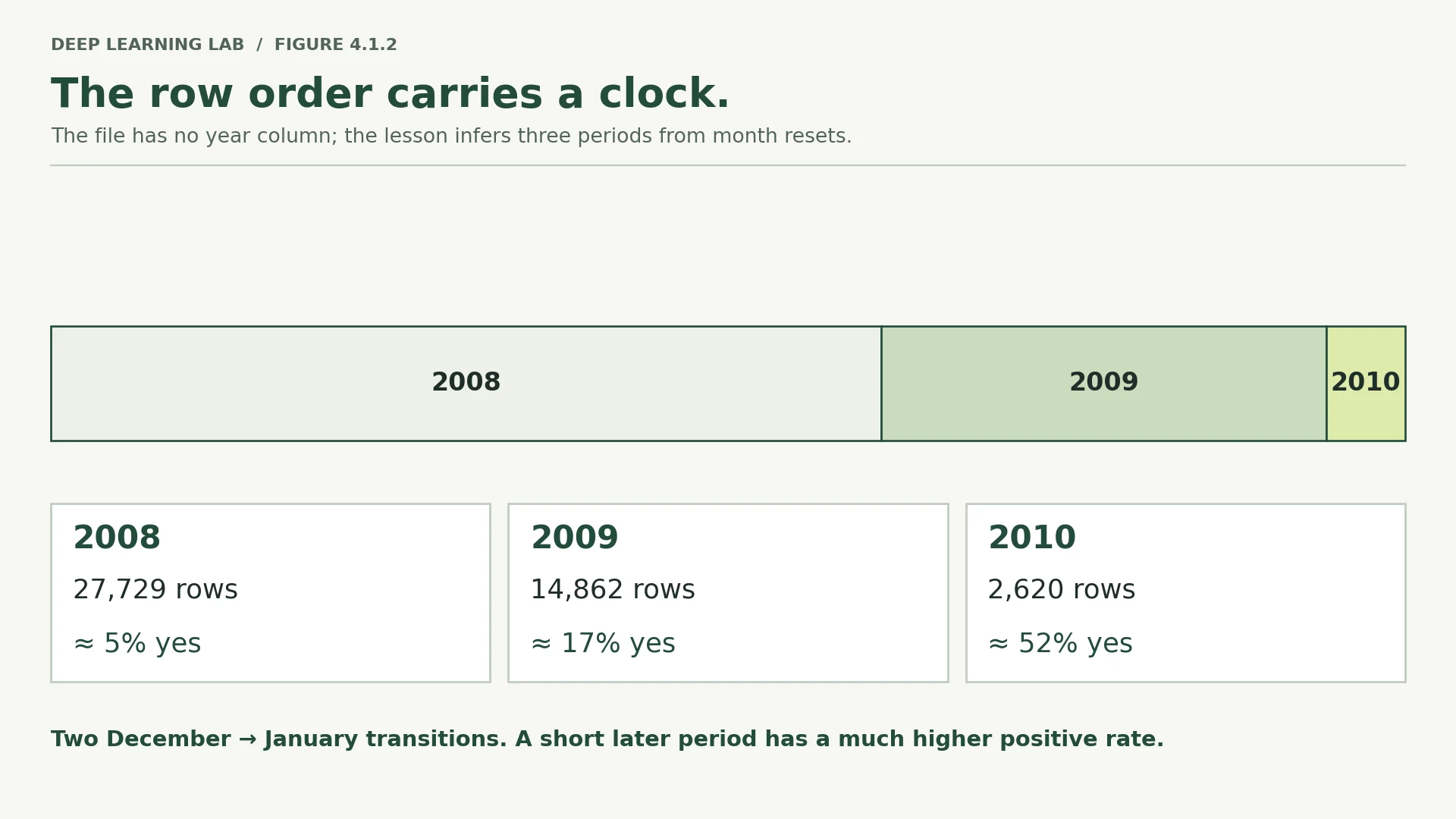
Only two backward steps in the entire file, and both are year boundaries. Inside a year the file never goes back even one month. So the rows really are in date order, and we now know where 2008 becomes 2009 and where 2009 becomes 2010.
Attach the year and look at the success rate per year. The year is not an input to any model here; it is information about the rows, which we use for splitting and checking.
data = data.assign(year=infer_year(data["month"]))by_year = data.assign(subscribed=(data["y"] == "yes")).groupby("year").agg( rows=("subscribed", "size"), share_who_said_yes=("subscribed", "mean"), first_month=("month", "first"), last_month=("month", "last"))print(by_year.round(4).to_string())rows share_who_said_yes first_month last_month year 2008 27729 0.0505 may dec 2009 14862 0.1706 jan dec 2010 2620 0.5160 jan nov
Three years, starting in May 2008 and ending in November 2010, exactly as documented.
Now look at the middle column, because it is the most important number in this lesson.
The share of customers saying yes goes from about 5% in 2008, to 17% in 2009, to 52% in 2010. Same bank, same product, same columns, and the success rate multiplies by ten.
The plot below makes it plain. It shows the share of yes answers in a sliding window of 1,000 rows as we read down the file. The dashed lines are the year boundaries we just found, and the shaded strip on the right is the last 10% of the file, which Section 7 will use as a test set.
rolling_rate = pd.Series((data["y"] == "yes").astype(float)).rolling(1000, center=True).mean()fig, ax = plt.subplots(figsize=(11, 3.6))ax.plot(rolling_rate.index, rolling_rate.values, color="#1b6ca8", lw=1.6)for boundary in (np.where(steps < -6)[0] + 1): ax.axvline(boundary, color="0.35", ls="--", lw=1)ax.axvspan(0.9 * len(data), len(data), color="#c1440e", alpha=0.12, label="last 10% of the file")for year, position in zip([2008, 2009, 2010], [9000, 33000, 43300]): ax.text(position, 0.62, str(year), fontsize=11, color="0.25")ax.set_xlabel("position in the file, which is also time")ax.set_ylabel("share saying yes\n(1,000-row window)")ax.set_ylim(0, 0.7)ax.grid(alpha=0.3)ax.legend(loc="upper left", fontsize=9)ax.set_title("The success rate climbs steadily through the file")plt.tight_layout()plt.show()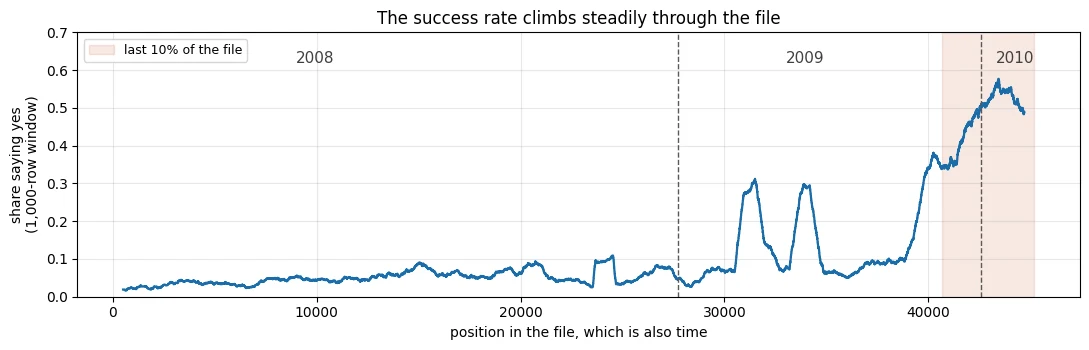
Widths are to scale: 2010 is the smallest year and by far the most successful. The file has no year column; the month order gives it away.
-
We counted backward steps of any size as well as big ones. Why was the small number worth printing?
Because it is the evidence behind the claim. Zero small backward steps means that within each year the file never goes back even one month: it is strictly in date order, not roughly. That is what makes the two big jumps trustworthy as year boundaries. Many small backward steps would have meant shuffling or merged files, and the inferred years would have been doubtful.
-
2010 has the fewest rows and by far the highest success rate. Give two business explanations, and say what extra data would tell them apart.
Who was called changed: Section 8 shows 59% of late-period customers had been contacted before, against 11% early on, so the bank moved from cold calls to calling back warm leads. The offer or the economy changed: 2008–2010 spans the financial crisis, when guaranteed deposits became attractive and interest rates moved, and a smaller, better-targeted 2010 campaign could reach mostly likely buyers. To tell them apart you would need the campaign logs (lead source, whether each call was a follow-up), the interest rate offered each month, call volumes, and economic indicators for the period.
The share of 'yes' goes from 5% (2008) to 17% (2009) to 52% (2010). Why is this the most important number in the lesson?
Same bank, same product, same columns, and the success rate multiplies by ten. Section 7 shows what that does to an honest test.
Two ways to split the same rows
Here is the consequence of Section 6, and it is the heart of the note.
A stratified split picks rows at random, so 2010 rows land in the training set and 2008 rows land in the test set, all mixed together. That answers a real question:
How well does this model score a random customer from somewhere in 2008 to 2010?
But the bank's question is different:
We trained on everything up to today. How well will this model do on next month's campaign?
The split that answers that question is the chronological one: earliest 80% of rows to train on, the next 10% to validate, the last 10% to test. Train on the past, test on the future, exactly as it will happen in use.
stratified split                 chronological split

 2008 2009 2010                  2008        2009   2010
 ▓░▓░▓▒░▓░▒▓░▒▓                  ▓▓▓▓▓▓▓▓▓▓▓▓▒▒▒▒▒▒ ░░░
 mixed everywhere                train ──────► val ─► test
Same file, same model, same preprocessing code. Only the choice of rows changes.
First, a small helper so the two runs are identical in every other way. It fits the preprocessor on the training rows, fits a logistic regression on them, and scores the test rows.
Same model, same columns, same code. Only the test rows change, from a random 10% to the last 10% of the file. Test AUC goes from 0.78 to…
0.6108, a drop of 0.17, larger than anything Module 3 gained by tuning. And PR-AUC rises at the same time, which the section explains.
from sklearn.metrics import average_precision_scoredef fit_and_score(X, y, split, extra_columns=None): """Fit a preprocessor and a logistic regression on the training rows, score the test rows. Args: X: The input table. y: The labels (1.0 = subscribed). split: A dict of row numbers from ``make_split``. extra_columns: Optional ``{"train": array, "test": array}`` of extra input columns appended after preprocessing (Section 9's day column). Returns: A tuple ``(summary, predictions)``: a dict with test ROC-AUC, test PR-AUC, the share of positives in training and test rows, and the average prediction; and the test rows' predicted probabilities. """ pre = build_preprocessor(X).fit(X.iloc[split["train"]]) train_inputs = pre.transform(X.iloc[split["train"]]) test_inputs = pre.transform(X.iloc[split["test"]]) if extra_columns is not None: # used in Section 9 train_inputs = np.hstack([train_inputs, extra_columns["train"]]) test_inputs = np.hstack([test_inputs, extra_columns["test"]]) model = LogisticRegression(max_iter=3000).fit(train_inputs, y[split["train"]]) predictions = model.predict_proba(test_inputs)[:, 1] y_test = y[split["test"]] return { "test AUC": roc_auc_score(y_test, predictions), "test PR-AUC": average_precision_score(y_test, predictions), "share who said yes, training rows": float(y[split["train"]].mean()), "share who said yes, test rows": float(y_test.mean()), "average prediction": float(predictions.mean()), }, predictionsstratified_split = make_split(y, "stratified", seed=SEED)chronological_split = make_split(y, "chronological")print(check_split(chronological_split, y, "chronological").to_string())rows share of file share who said yes train 36169.0 0.8 0.0673 val 4521.0 0.1 0.1608 test 4521.0 0.1 0.4709
Look at that table before running anything else. The chronological training rows are 6.7% yes and the chronological test rows are 47.1% yes. The model is about to be trained in one world and tested in another.
results = {}predictions = {}results["stratified"], predictions["stratified"] = fit_and_score(X, y, stratified_split)results["chronological"], predictions["chronological"] = fit_and_score(X, y, chronological_split)comparison = pd.DataFrame(results).Tprint(comparison.round(4).to_string())test AUC test PR-AUC share who said yes, training rows share who said yes, test rows average prediction stratified 0.7796 0.4331 0.1170 0.1170 0.1153 chronological 0.6108 0.5531 0.0673 0.4709 0.2434
Test AUC falls from 0.7796 to 0.6108. The same model, the same columns, the same code; only the choice of which rows to test on. That drop of about 0.17 is far larger than any improvement Module 3 found by tuning anything.
Two more lines in that table are traps, and both are worth knowing by name.
The PR-AUC trap
PR-AUC (average precision) is another way to score a ranking, and it is often recommended for imbalanced problems. Its weakness is that its floor moves. A model that guesses at random scores roughly the share of positives in the test set. So:
- on the stratified test set, 11.7% are yes, so random guessing already scores about 0.117;
- on the chronological test set, 47.1% are yes, so random guessing already scores about 0.471.
That is why PR-AUC went up, from 0.4331 to 0.5531, while the model actually got worse. Comparing PR-AUC across test sets with different positive rates compares the floors, not the models. Always print the share of positives next to it.
The calibration trap
Calibration asks a different question from AUC. AUC asks "does the model put the right customers at the top of the list?" Calibration asks "when the model says 30%, do 30% of those customers actually say yes?"
The chronological model's average prediction is 0.2434 while the true rate is 0.4709. It learnt from a world where 6.7% said yes, so its probabilities are anchored far too low. Any decision written as "phone everybody the model scores above 0.3" is quietly wrong, and AUC will never tell you.
Neither split is the correct one in general. They answer different questions, and the mistake is using the random split's number to answer the chronological question.
Which means being honest about Modules 2 and 3: every Bank Marketing number in this course so far came from a random split. They were fine for what those days were studying, which was how training behaves. They were never an estimate of how this model would do next month.
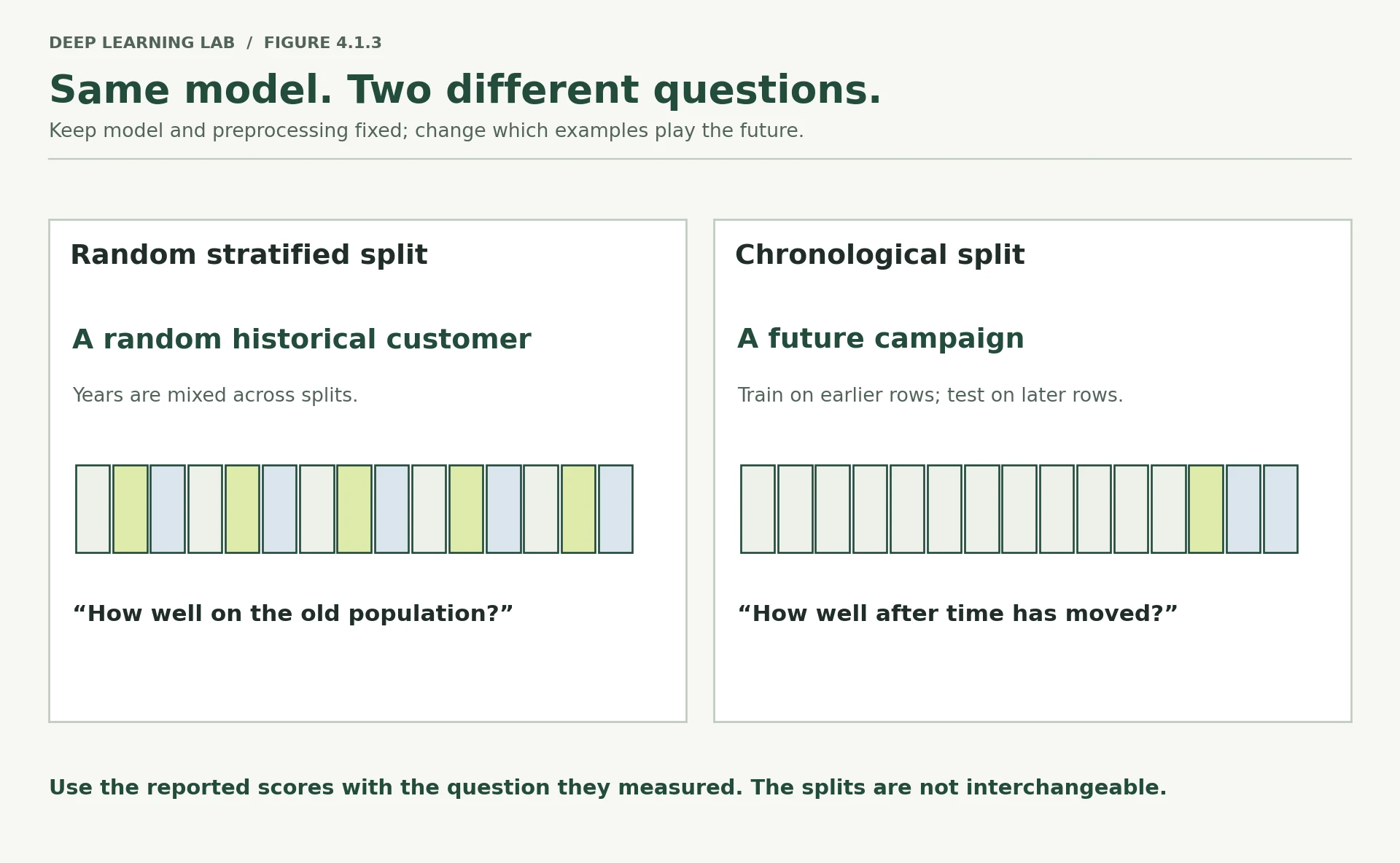
Same file, same model, same preprocessing code. The question the split answers is the only thing that changed.
-
Write one sentence for each split saying what question it answers.
Stratified: "How well does the model rank a random customer from 2008–2010, having seen other customers from the same period?" Chronological: "Trained on everything before a point in time, how well does the model rank the customers called after it?", which is the question a bank deploying the model is actually asking.
-
Why can PR-AUC rise while the model gets worse? What would you print beside it to stop the confusion?
PR-AUC's floor is the share of positives in the test set: random ranking scores about that much. The chronological test set is 47.1% yes, so the floor jumped from 0.117 to 0.471, and the model's PR-AUC rose by less than the floor did (0.433 → 0.553). Its lift above random fell from 0.32 to 0.08. Print the test set's share of positives beside PR-AUC, or report the lift above it.
-
The chronological model's probabilities are far too low. Would re-training on all three years fix that for 2011? Why or why not?
Probably not. Retraining on all three years anchors the probabilities to their average rate, 11.7%, and 2011 will have its own rate: higher if the trend continued, perhaps lower if the strategy changed. The problem is label shift, which more past data does not fix. What helps is recalibrating on the most recent data (the last months rather than three years), weighting recent rows more, adjusting the probabilities to a newly estimated base rate, and monitoring calibration once the model is live. The ranking tends to transfer better than the probabilities do.
On the chronological split, AUC fell from 0.78 to 0.61 while PR-AUC rose from 0.43 to 0.55. Why did PR-AUC rise?
Comparing PR-AUC across test sets with different positive rates compares their floors. Always print the positive rate beside it.
Write one sentence for each split saying what question it answers.
- Stratified/random: how well does the model score a random customer from somewhere in 2008–2010?
- Chronological: trained on the past, how well will it do on the next period's customers? (The bank's real question.)
What changed between the two periods
"The data changed" is not a diagnosis. Two different things can change, and they break a model in different ways, so they have names.
- Label shift — the answer becomes more or less common. Here the yes rate goes from 6.7% in the training rows to 47.1% in the test rows. This is what breaks calibration.
- Covariate shift — the inputs change. Different kinds of customer are being phoned. This breaks the model in places it has barely seen.
Take them one at a time. Label shift is already measured, so start with the inputs.
For each column we want a single number saying "how different are these two periods?". Numeric and categorical columns need different measures.
For a numeric column: how far apart are the two averages, measured in standard deviations? Dividing by the spread makes ages and balances comparable.
For a categorical column: what share of rows would have to change category to make the two periods look the same? Add up the differences in each category's share and halve it; the halving is because every row that leaves one category arrives in another, so each difference gets counted twice.
Both, on toy numbers first.
period_a = pd.Series(["cell", "cell", "cell", "phone"]) # 75% cellperiod_b = pd.Series(["cell", "phone", "phone", "phone"]) # 25% cellshares_a = period_a.value_counts(normalize=True)shares_b = period_b.value_counts(normalize=True)print("period A shares:", shares_a.to_dict())print("period B shares:", shares_b.to_dict())print("difference per category:", shares_a.sub(shares_b, fill_value=0).abs().to_dict())print("share of rows that moved:", 0.5 * shares_a.sub(shares_b, fill_value=0).abs().sum())period A shares: {'cell': 0.75, 'phone': 0.25}
period B shares: {'phone': 0.75, 'cell': 0.25}
difference per category: {'cell': 0.5, 'phone': 0.5}
share of rows that moved: 0.5
Half the rows would have to change to line those two up. Now the same measure on every column, comparing the chronological training rows with the chronological test rows.
early = X.iloc[chronological_split["train"]]late = X.iloc[chronological_split["test"]]rows = []for column in X.columns: if pd.api.types.is_numeric_dtype(X[column]): gap = abs(late[column].mean() - early[column].mean()) / X[column].std() rows.append((column, "numeric: gap in averages, in spreads", gap)) else: shares_early = early[column].value_counts(normalize=True) shares_late = late[column].value_counts(normalize=True) moved = 0.5 * shares_early.sub(shares_late, fill_value=0).abs().sum() rows.append((column, "categorical: share of rows that moved", moved))drift = pd.DataFrame(rows, columns=["column", "measure", "how much it changed"])print(drift.sort_values("how much it changed", ascending=False).round(3).to_string(index=False)) column measure how much it changed
pdays numeric: gap in averages, in spreads 0.899
previous numeric: gap in averages, in spreads 0.728
poutcome categorical: share of rows that moved 0.482
month categorical: share of rows that moved 0.454
housing categorical: share of rows that moved 0.366
campaign numeric: gap in averages, in spreads 0.354
age numeric: gap in averages, in spreads 0.330
contact categorical: share of rows that moved 0.297
job categorical: share of rows that moved 0.268
balance numeric: gap in averages, in spreads 0.243
day numeric: gap in averages, in spreads 0.143
education categorical: share of rows that moved 0.135
loan categorical: share of rows that moved 0.121
marital categorical: share of rows that moved 0.098
default categorical: share of rows that moved 0.020
The three biggest movers are pdays, previous and poutcome. All three describe the same thing: whether this customer had been contacted in an earlier campaign.
print(f"had been contacted before: early period {(early['pdays'] > -1).mean():.3f}" f" -> late period {(late['pdays'] > -1).mean():.3f}")print(f"contact type 'unknown' : early period {(early['contact'] == 'unknown').mean():.3f}" f" -> late period {(late['contact'] == 'unknown').mean():.3f}")print(f"average age : early period {early['age'].mean():.1f}" f" -> late period {late['age'].mean():.1f}")had been contacted before: early period 0.106 -> late period 0.589 contact type 'unknown' : early period 0.353 -> late period 0.056 average age : early period 40.8 -> late period 44.3
In the early period about one customer in ten had been phoned before. In the late period it is nearly six in ten. The bank stopped cold-calling strangers and started calling back people it already knew, who are much likelier to say yes. That single change explains both the label shift and most of the covariate shift.
Checking for shift without knowing where to look
The table above can only see one column at a time. Shift can also hide in combinations: each column looks normal, but the mixture is different.
There is a neat trick for that, called adversarial validation. The idea:
- forget the real label completely;
- label every early row
0and every late row1; - train a model to tell them apart;
- see how well it does.
If it cannot tell them apart, the two periods look alike and your split is safe. If it can, they are different, and the score tells you how different.
We need one more tool to do this honestly: cross-validation. Rather than a single split, cross_val_predict cuts the data into 5 parts, trains on 4 and predicts the 5th, five times over, so every row gets a prediction from a model that never saw it.
The last argument, class_weight="balanced", matters because the late period has far fewer rows than the early one; it tells the model to treat the two groups as equally important.
from sklearn.model_selection import StratifiedKFold, cross_val_predictfrom sklearn.pipeline import make_pipelinedef adversarial_auc(columns): """Measure how well a model can tell early rows from late rows (adversarial validation). Labels the global ``early`` rows 0 and ``late`` rows 1, ignores the real label, and scores five-fold cross-validated predictions of a balanced logistic regression. Args: columns: The input columns the detector may use. Returns: The ROC-AUC of telling the periods apart: about 0.5 means they look alike, near 1 means they are clearly different. """ both = pd.concat([early[columns], late[columns]]) is_late = np.concatenate([np.zeros(len(early)), np.ones(len(late))]) detector = make_pipeline(build_preprocessor(both), LogisticRegression(max_iter=3000, class_weight="balanced")) predicted = cross_val_predict(detector, both, is_late, method="predict_proba", cv=StratifiedKFold(5, shuffle=True, random_state=0))[:, 1] return roc_auc_score(is_late, predicted)all_columns = list(X.columns)without_calendar = [c for c in all_columns if c not in ("month", "day")]print(f"can a model tell the periods apart? AUC {adversarial_auc(all_columns):.4f}")print(f"same, with month and day removed : AUC {adversarial_auc(without_calendar):.4f}")- 1
The real label is ignored: the target is "which period does this row come from?".
- 2
The late period is eight times smaller, so both periods are weighted equally.
- 3
Every row is predicted by a model that never saw it, so the AUC is not an in-sample fit.
can a model tell the periods apart? AUC 0.9383
same, with month and day removed  : AUC 0.9030
Remember what AUC means here. 0.5 would mean the two periods are indistinguishable. We get 0.9383, so a simple model can nearly always tell which period a customer came from.
Removing month and day barely changes it (0.9030), which rules out the easy explanation that this is just seasonality. The customers themselves are different.
This check is worth running before you trust any split, and again in production against live traffic, where it becomes a drift alarm. Module 9 and the GenAI module return to monitoring.
-
Give one example each of label shift and covariate shift from work you have seen.
Label shift: the fraud rate on card payments rising sharply over the holiday season, or a disease's prevalence rising during an outbreak, while what each case looks like stays the same. Covariate shift: a new app bringing in much younger customers, a hospital replacing its scanner with a different model, or a camera upgrade changing the images a vision model receives.
-
An adversarial AUC of 0.5 between your training and test sets: good or bad? What if it is 0.5 between your training data and last week's live traffic?
Between training and test, 0.5 is good: the test set looks like the training data, so the test score is a like-for-like estimate. (It does not prove the test set looks like the future.) Between training data and last week's live traffic, 0.5 is great news: no detectable input drift since training. A high value there is the alarm that tells you to investigate and probably retrain.
-
The biggest movers all describe previous contact. What would you ask the marketing team?
Why and when the strategy changed: did the bank switch from cold calling to calling back people from earlier campaigns, and from which date? How were the lists chosen in each period? Will future campaigns look like the late period or the early one? And was "previous contact" recorded the same way throughout? The answers decide which period the test set should represent.
A model separates early rows from late rows with AUC 0.94. What does that tell you?
Adversarial validation: 0.5 means indistinguishable. Removing month and day barely changed it, so it isn't just seasonality.
The bank switched from cold calls to calling back known customers. Which kinds of shift did that cause?
Label shift breaks the size of the probabilities; covariate shift breaks the model where it has little experience.
What is label shift, what is covariate shift, and what does each one break?
- Label shift: the answer becomes more or less common (6.7% → 47.1% 'yes'); it breaks calibration, the size of the probabilities.
- Covariate shift: the inputs change (different customers being called); it breaks the model in regions it has barely seen.
Group leakage: the calendar day
Two kinds of leak so far: through a row (the same row on both sides) and through time (the future mixed into the past). The third is quieter.
A group is a set of rows that belong together and are more alike than two random rows would be. Several patients from one hospital. Several photos of one person. Several reviews by one author. Several sentences from one document.
Group leakage happens when rows from the same group land on both sides of a split. The model can then do well on test rows by recognising the group, which will not be there in real use.
Bank Marketing has a natural group that is easy to miss: the calendar day. Calls made on the same day share a team, a script, an offer and the mood of the market.
data["date_key"] = data["year"].astype(str) + "-" + data["month"] + "-" + data["day"].astype(str)dates = data["date_key"].to_numpy()per_day = pd.DataFrame({"date": dates, "said_yes": y}).groupby("date")["said_yes"].agg(["size", "mean"])print(f"number of distinct calling days : {len(per_day)}")print(f"calls per day : median {per_day['size'].median():.0f}, biggest {per_day['size'].max()}")print(f"success rate on a day : 10th percentile {per_day['mean'].quantile(.1):.3f}, " f"median {per_day['mean'].median():.3f}, 90th percentile {per_day['mean'].quantile(.9):.3f}")number of distinct calling days : 561 calls per day : median 15, biggest 825 success rate on a day : 10th percentile 0.000, median 0.348, 90th percentile 0.727
Some days nobody says yes. On other days nearly three quarters do. Knowing which day a call happened tells you a great deal about how it went.
A practitioner who notices that will be tempted to build a column out of it: the average success rate of that day. And they will be careful about it, computing the average from training rows only, which sounds exactly like the rule from Section 5.
Build that column and look at it.
def day_rate_feature(split, dates, y): """Build a column holding each row's calling-day success rate, from training rows only. Days never seen in training fall back to the overall training rate. The column is fair in form and still leaks across a row-level split, which is Section 9's point. Args: split: A dict of row numbers from ``make_split``. dates: One calling-day key per row. y: The labels. Returns: A dict ``{"train", "val", "test"}`` of float32 arrays shaped ``(rows, 1)``. """ train_rows = split["train"] rate_per_day = pd.Series(y[train_rows]).groupby(dates[train_rows]).mean() fallback = float(y[train_rows].mean()) # for a day we have never seen return {part: pd.Series(dates[rows]).map(rate_per_day).fillna(fallback) .to_numpy()[:, None].astype(np.float32) for part, rows in split.items()}demo_feature = day_rate_feature(stratified_split, dates, y)print("the new column, for the first five test rows:")print(np.round(demo_feature["test"][:5].ravel(), 3))print()print("their actual days:", dates[stratified_split['test'][:5]])- 1
Computed from training rows only, which looks correct, and still leaks through the group.
- 2
Under a group split every test day is unseen, so every test row gets this same value.
the new column, for the first five test rows:
[0.591 0.063 0.087 0.068 0.091]

their actual days: ['2010-aug-5' '2009-may-7' '2009-may-18' '2009-feb-6' '2009-apr-16']
Now the experiment. We train with and without that column, under two different splitting rules:
- stratified — random rows, so a test row's day is almost always a day that also appears in training;
- group — whole days are held out, so every test day is one the model has never seen.
Three different seeds each, because the group split varies more from run to run.
comparison_rows = []for seed in [0, 1, 2]: for policy in ["stratified", "group"]: this_split = make_split(y, policy, seed=seed, groups=dates) without, _ = fit_and_score(X, y, this_split) with_day, _ = fit_and_score(X, y, this_split, extra_columns=day_rate_feature(this_split, dates, y)) comparison_rows.append({"seed": seed, "split": policy, "test rows": len(this_split["test"]), "without day column": without["test AUC"], "with day column": with_day["test AUC"]})group_test = pd.DataFrame(comparison_rows)print(group_test.round(4).to_string(index=False))print()print(group_test.groupby("split")[["without day column", "with day column"]] .agg(["mean", "std"]).round(4).to_string()) seed split test rows without day column with day column
0 stratified 4522 0.7586 0.7984
0 group 4167 0.7914 0.7356
1 stratified 4522 0.7742 0.8226
1 group 3131 0.7970 0.7279
2 stratified 4522 0.7566 0.7997
2 group 4026 0.7499 0.7144
without day column with day column
mean std mean std
split
group 0.7794 0.0257 0.7259 0.0107
stratified 0.7631 0.0096 0.8069 0.0136
Read the averages slowly, because this is the whole point of the section.
Without the day column, the two splitting rules broadly agree: 0.7631 stratified against 0.7794 group. The group split bounces around more from seed to seed (standard deviation 0.0257 against 0.0096), and that gap is inside its own bouncing. So this model does not depend on sharing days.
With the day column, the stratified split reports 0.8069, a gain of about 0.04. It looks like a good new feature. The group split reports 0.7259, which is about 0.05 worse than having no day column at all. The distance between those two numbers, roughly 0.08 AUC, is the size of the leak.
Here is the mechanism, step by step:
- on a random split, a test call's day is nearly always a day that is also in the training set;
- the day's average success rate was computed from the other calls made that day — the test row's neighbours, whose answers we know;
- so the column hands each test row a summary of its own neighbours' answers;
- in real use, every day is a new day, the column falls back to the overall average for every row, and the model has learnt to lean on a column that is now the same everywhere.
No row was ever on both sides. The encoder was fitted on training rows only. The leak travelled through the group.
This pattern is everywhere once you look: several rows per customer, per patient, per household, per device, per session; several crops from one image; several chunks from one document. Module 8 meets it again in fine-tuning data.
-
The day column was built from training rows only, and it still leaked. Where exactly did the test information come from?
From the test row's neighbours. Its calling day also appears in training, and the day's rate was averaged from those training rows' answers. Calls on the same day share their conditions and, strongly, their outcomes, so that average carries information about the test row's own answer, even though the test label was never read.
-
Name the group you would split on for: hospital readmission; product reviews; a model trained on frames cut from videos.
Hospital readmission: the patient (and ideally the hospital or the admission period too). Product reviews: the author (and possibly the product). Frames cut from videos: the video, or the recording session or person if several videos share one.
-
Why is a group split's score noisier from seed to seed than a stratified split's?
Because whole groups move together. There are far fewer independent units (561 days instead of 45,211 rows), groups vary enormously in size and success rate, and one large unusual day landing in the test set can swing the score. The test set's size changes too (3,131 to 4,167 rows here), so each seed is a genuinely different test.
Target encoding from training rows only
Compute each day's success rate from the training rows, shrunk toward the overall training rate with prior_weight
pseudo-rows: \((\text{yes on that day} + \text{prior}\cdot w)/(\text{calls that day} + w)\). Days not seen in training get the prior.
A day-average success-rate column, computed from training rows only, still inflated a random split's score. How?
No row was on both sides, and the encoder was fitted on training only. The leak travelled through the group (the calling day), worth about 0.08 AUC.
Name the group you would split on for hospital readmission, for product reviews, and for frames cut from videos.
- Hospital readmission: the patient (possibly the hospital). Product reviews: the author (or product). Video frames: the source video.
- Rows in the same group are more alike than random rows, so they must all fall on one side of the split.
The 11.7% problem
Back to the stratified split for the last measurement. Only 11.7% of customers said yes, which makes this an imbalanced problem, and imbalance breaks the most natural score of all.
y_test = y[stratified_split["test"]]y_train = y[stratified_split["train"]]print(f"positive examples in the training rows: {int(y_train.sum()):,} out of {len(y_train):,}")print(f"share of test customers who said yes : {y_test.mean():.4f}")print(f"a model that always says 'no' scores : {1 - y_test.mean():.4f} accuracy")print(f"...and finds {0} of the {int(y_test.sum())} customers who would have said yes")positive examples in the training rows: 4,231 out of 36,168 share of test customers who said yes : 0.1170 a model that always says 'no' scores : 0.8830 accuracy ...and finds 0 of the 529 customers who would have said yes
88.3% accuracy for a model that has learnt nothing. This is why Module 3 always printed the majority-class rate beside accuracy.
The usual reflex is to "fix" the imbalance by making the rare class count for more. In scikit-learn that is class_weight="balanced", which weights each class by how rare it is. In PyTorch it is pos_weight inside BCEWithLogitsLoss. Same idea: mistakes on the rare class hurt more.
Before running it, let us be precise about the words used to judge these models. Suppose we phone everybody the model scores above some cut-off:
- precision — of the customers we phoned, what share said yes;
- recall — of all the customers who would have said yes, what share we managed to phone;
- threshold — the cut-off itself, 0.5 by default, which is a choice and not a law;
- Brier score — the average squared distance between the predicted probability and what happened. Lower is better, and unlike AUC it punishes probabilities that are the wrong size rather than in the wrong order.
Now measure what re-weighting actually changes.
class_weight="balanced" makes each yes count about 7.5 times as much in training. Test AUC goes from 0.7796 to…
0.7795. The ranking is essentially unchanged. What moves is the size of the probabilities (average 0.115 → 0.412), and with it the meaning of the 0.5 threshold.
from sklearn.metrics import brier_score_losspre = build_preprocessor(X).fit(X.iloc[stratified_split["train"]])train_inputs = pre.transform(X.iloc[stratified_split["train"]])test_inputs = pre.transform(X.iloc[stratified_split["test"]])scores = {}probabilities = {}for label, weighting in [("plain", None), ("balanced weights", "balanced")]: model = LogisticRegression(max_iter=3000, class_weight=weighting).fit( train_inputs, y[stratified_split["train"]]) p = model.predict_proba(test_inputs)[:, 1] probabilities[label] = p phoned = p > 0.5 scores[label] = { "test AUC": roc_auc_score(y_test, p), "average prediction": p.mean(), "share phoned at 0.5": phoned.mean(), "recall at 0.5": phoned[y_test == 1].mean(), "precision at 0.5": y_test[phoned].mean(), "Brier score": brier_score_loss(y_test, p), }print(pd.DataFrame(scores).round(4).to_string())plain balanced weights test AUC 0.7796 0.7795 average prediction 0.1153 0.4124 share phoned at 0.5 0.0299 0.2663 recall at 0.5 0.1815 0.6181 precision at 0.5 0.7111 0.2716 Brier score 0.0840 0.1801
Go line by line, because the result is easy to misread.
AUC barely moved: 0.7796 against 0.7795. The ordering of customers is essentially unchanged. Re-weighting was never going to make the model better at telling a yes from a no, and AUC is the measure of exactly that.
The size of the predictions changed completely: the average prediction went from 0.1153, which is close to the true rate of 0.1170, to 0.4124, which is nowhere near it.
So the 0.5 threshold now means something different. The weighted model phones 26.6% of customers instead of 3.0%. Recall rises from 0.18 to 0.62 and precision falls from 0.71 to 0.27. Those look like large changes, and they are, but they came from moving the cut-off, not from a better model.
The Brier score more than doubled, from 0.0840 to 0.1801, because the probabilities are now the wrong size.
The decision that matters is the threshold, and it should come from the business, not from 0.5. Suppose the call centre can phone 10% of the list.
budget = 0.10for label, p in probabilities.items(): cut_off = np.quantile(p, 1 - budget) phoned = p >= cut_off print(f"{label:<17} phone the top {budget:.0%}: " f"precision {y_test[phoned].mean():.4f}, recall {phoned[y_test == 1].mean():.4f}")plain phone the top 10%: precision 0.4923, recall 0.4216 balanced weights phone the top 10%: precision 0.4967, recall 0.4253
With a fixed calling budget the two models phone almost exactly the same customers and get almost the same results (precision 0.4923 against 0.4967). The re-weighting bought nothing.
Last, see the calibration damage directly. We sort customers into ten equal groups by predicted score — these are deciles — and compare what each model predicted with what actually happened.
deciles = pd.qcut(probabilities["plain"], 10, labels=False)calibration = pd.DataFrame({ "decile": deciles, "predicted, plain": probabilities["plain"], "predicted, balanced": probabilities["balanced weights"], "actually said yes": y_test,}).groupby("decile").mean()print(calibration.round(3).to_string())predicted, plain predicted, balanced actually said yes decile 0 0.020 0.143 0.026 1 0.031 0.207 0.029 2 0.047 0.274 0.035 3 0.062 0.329 0.062 4 0.075 0.373 0.073 5 0.089 0.415 0.077 6 0.105 0.461 0.091 7 0.125 0.508 0.117 8 0.166 0.588 0.166 9 0.433 0.826 0.492
The plain model tracks reality closely: its predictions and the real rate rise together, decile by decile. The balanced model is inflated everywhere, by roughly five times through the middle of the range — 0.415 predicted against 0.077 actual in decile 5.
So when is re-weighting worth it? When the positive class is so rare that the model barely sees it and fails to rank positives at all — a problem you detect with AUC and PR-AUC, not with accuracy. Here the training set contains 4,231 positive examples, which is plenty.
What to report for an imbalanced problem:
- AUC for the quality of the ranking;
- PR-AUC next to the share of positives, so the reader knows the floor;
- precision and recall at the threshold you will really use;
- a calibration check if anybody is going to read the probabilities as probabilities.
-
Balanced weights lifted recall at 0.5 from 0.18 to 0.62. Why is it misleading to call that an improvement?
Because the model did not get better at finding subscribers; its probabilities got bigger. The ranking is the same (AUC 0.7796 against 0.7795), so more customers simply cross the fixed 0.5 line: 26.6% are phoned instead of 3.0%, and precision falls from 0.71 to 0.27. The plain model reaches the same recall with a lower threshold, and at a fixed calling budget the two are indistinguishable (precision 0.49 against 0.50). It is a different operating point, bought with worse calibration (the Brier score doubled).
-
How would you pick a threshold if missing a subscriber costs ten times as much as a wasted phone call?
Minimise expected cost. With calibrated probabilities (the plain model), calling a customer with probability \(p\) is worth it when the expected cost of missing them exceeds the cost of a wasted call: \(10p > 1 - p\), so \(p > 1/11 \approx 0.09\). Check that on the validation set by computing the total cost at every threshold and taking the minimum, and respect the call centre's capacity if it binds first.
-
The chronological test set was 47% yes. Is it still imbalanced? What does that do to the idea of choosing one class-weight setting and keeping it?
At 47% yes it is no longer imbalanced. That exposes the flaw in fixing one class weight (or one threshold) and keeping it: the imbalance itself drifts. A weight derived from 11.7% positives makes a model over-predict wildly when positives become common. Keep the model calibrated, choose the threshold from current conditions (capacity, costs, the current base rate), and revisit both as the base rate moves.
class_weight='balanced' changed AUC from 0.7796 to 0.7795 and recall at 0.5 from 0.18 to 0.62. What really changed?
Average prediction rose from 0.115 to 0.412 (true rate 0.117) and the Brier score doubled. With a fixed 10% calling budget, both models performed the same.
A model that always says 'no' scores what accuracy here?
It finds none of the 529 test customers who would say yes. Report AUC, PR-AUC beside the positive rate, precision/recall at the real threshold, and calibration.
How would you choose a threshold if missing a subscriber costs ten times as much as a wasted phone call?
- Pick the threshold from the costs, not 0.5: phone a customer when the expected value is positive, roughly when \(p \times 10 > (1-p) \times 1\), i.e. \(p > 1/11 \approx 0.09\) (given calibrated probabilities).
- Or work from the real constraint (e.g. calling capacity) and choose the cut-off that fits it.
Writing the decision down
A split is a decision, and decisions get written down so that the next person — including you in three months — knows what was chosen and why.
First, the four rules side by side, so the differences are visible in one place.
summary = {}for policy in ["stratified", "random", "chronological", "group"]: this_split = make_split(y, policy, seed=SEED, groups=dates) summary[policy] = check_split(this_split, y, policy)["share who said yes"]print("share who said yes, by part and by rule:")print(pd.DataFrame(summary).T.to_string())share who said yes, by part and by rule:
train val test
stratified 0.1170 0.1170 0.1170
random 0.1161 0.1146 0.1267
chronological 0.0673 0.1608 0.4709
group 0.1270 0.0858 0.0976
The stratified and random rules give three nearly identical parts. The group rule gives parts that wobble, because whole days move together. The chronological rule gives three completely different worlds, which is the honest picture of what this data is.
A data card is a short note kept beside the dataset recording what is in it, what is wrong with it, and the decisions taken. Ours:
data_card = """# Data card: UCI Bank Marketing (bank-full.csv) - Day 4Rows 45,211 | 15 input columns after dropping `duration` | label: subscribed, 11.7% yesThe rows are in date order, May 2008 to November 2010. `year` is inferred from themonth sequence and is never used as a model input.## Known quirks- pdays = -1 means "never contacted before" (81.7% of rows); poutcome = "unknown" records the same fact on the same rows, apart from 5- contact = "unknown" (28.8%) predicts the label (4.1% yes against 14.9% on mobile): keep it as its own category, do not fill it in- balance is negative on 8.3% of rows: valid, it is an overdraft- default is one value on 98.2% of rows: nearly no information- no duplicate rows## Leakage risks- duration: known only once the call has ended. Dropped. (Note 3.4 Case 6)- calendar day: rows cluster by day, so any day-level summary column leaks across a row-level split. Measured here at about 0.08 AUC.- time: the yes rate rises about tenfold across the file, so a random split mixes the future into the training rows.## Split policy for Day 4- stratified 80/10/10, seed 42: keeps continuity with every Day 2 and Day 3 number. Answers "how well on a random customer from 2008-2010?"- chronological 80/10/10: the deployment check. Answers "how well on next month's campaign?"- report both whenever a model is being judged.## Reporting rules- always print the share of positives next to PR-AUC- choose the decision threshold from calling capacity, not from 0.5- check calibration before anybody reads a prediction as a probability"""with open("results/data_card_bank_marketing.md", "w") as f: f.write(data_card)print(data_card)# Data card: UCI Bank Marketing (bank-full.csv) - Day 4 Rows 45,211 | 15 input columns after dropping `duration` | label: subscribed, 11.7% yes The rows are in date order, May 2008 to November 2010. `year` is inferred from the month sequence and is never used as a model input. ## Known quirks - pdays = -1 means "never contacted before" (81.7% of rows); poutcome = "unknown" records the same fact on the same rows, apart from 5 - contact = "unknown" (28.8%) predicts the label (4.1% yes against 14.9% on mobile): keep it as its own category, do not fill it in - balance is negative on 8.3% of rows: valid, it is an overdraft - default is one value on 98.2% of rows: nearly no information - no duplicate rows ## Leakage risks - duration: known only once the call has ended. Dropped. (Note 3.4 Case 6) - calendar day: rows cluster by day, so any day-level summary column leaks across a row-level split. Measured here at about 0.08 AUC. - time: the yes rate rises about tenfold across the file, so a random split mixes the future into the training rows. ## Split policy for Day 4 - stratified 80/10/10, seed 42: keeps continuity with every Day 2 and Day 3 number. Answers "how well on a random customer from 2008-2010?" - chronological 80/10/10: the deployment check. Answers "how well on next month's campaign?" - report both whenever a model is being judged. ## Reporting rules - always print the share of positives next to PR-AUC - choose the decision threshold from calling capacity, not from 0.5 - check calibration before anybody reads a prediction as a probability
What to take away
A split is a claim about the future. Decide it by asking who and when the model will be used on, then check that the data can support the claim.
Audit before you model. Sentinel numbers, placeholder words and near-constant columns all sail past isna(). Run the audit on the raw table, because encoding hides the evidence.
Leaks come in three shapes, and this lesson measured all three.
through a row    same row in train and test        Note 3.4 Case 4: AUC went to 1.0000
through time     future mixed into the past        0.7796 on a random split, 0.6108 on a chronological one
through a group  same day in train and test        day column: 0.8069 random, 0.7259 by day
Not every leak is expensive, and you still close them all. The pre-split scaler was worth +0.000093 here. The same mistake with a label-reading step was worth about 0.08. You cannot tell in advance which kind you have.
"The data changed" needs a diagnosis. Label shift breaks the size of your probabilities. Covariate shift breaks the model where it has little experience. Adversarial validation finds both before you have trained anything.
Re-weighting moves the threshold, not the ranking. Pick the threshold from the real constraint, and report PR-AUC beside the positive rate that sets its floor.
The finished pipeline, which every later note in Module 4 assumes:
raw file
   ↓
drop columns you would not have at prediction time
   ↓
audit: sentinels, placeholders, duplicates
   ↓
choose a split rule, and say what question it answers
   ↓
check the split, and stop if it is broken
   ↓
fit preprocessing on training rows only
   ↓
transform every part with that same fitted object
   ↓
train, and score on rows nobody tuned against
Transition to Lesson 4.2
You can now trust the data going into an experiment, and the rows coming out of a split. What you cannot yet do is trust the record of an experiment.
In Lesson 4.2 you run the same model again and ask harder questions about it. Does running it twice give the same answer, to the last decimal? What has to be saved so that somebody else can reproduce your number six months from now? What exactly does a checkpoint need to hold so a run can be interrupted and resumed without changing the result? And how large is the difference between two runs that changed nothing at all — because until you know that number, you cannot say whether a change to your model helped.
What is a data card?
A split is a decision; decisions are written down for the next person, including you in three months.
Wrap-up
- A split is a claim about the future: ask who, and when, the model will be used on, then check the data supports it.
- Audit before you model. Sentinels (
pdays = -1), placeholder words ("unknown") and near-constant columns all passisna(); audit the raw table, because encoding hides them. - Return row numbers from a split, and
assertthat parts do not overlap, cover every row, and (for time) run forward. - Fit preprocessing on training rows only and ship the fitted object with the model. Label-reading steps (target encoding, feature selection) leak far more than scalers.
- Leaks come through a row (duplicates, copies), through time (future mixed into the past: 0.78 random against 0.61 chronological) and through a group (the calling day: about 0.08 AUC).
- Diagnose drift: label shift breaks the size of the probabilities; covariate shift breaks the model where it has little experience. Adversarial validation measures both before training.
- Report PR-AUC next to the share of positives, which is its floor.
- Re-weighting moves probabilities and the 0.5 threshold, not the ranking. Choose the threshold from capacity or costs, and check calibration.
Quick check
What is the test set standing in for?
A score is only as trustworthy as the test rows are a convincing stand-in for that future.
pdays is −1 on 81.7% of rows. What is it?
It sails past isna(), and a scaler would treat it as a day count.
Fitting the scaler on all rows changed test AUC by only +0.000093. Why keep the train-only rule?
The same habit with a target encoder or a small dataset is expensive.
On the chronological split, ROC-AUC fell from 0.78 to 0.61 while PR-AUC rose from 0.43 to 0.55. Why did PR-AUC rise?
Random ranking scores about the positive rate. Subtract it, and the lift fell from 0.32 to 0.08.
A model separates early rows from late rows with AUC 0.94. What does that tell you?
Adversarial validation: 0.5 would mean the periods are indistinguishable.
A day-average success-rate column, computed from training rows only, still inflated a random split's score. How?
Group leakage: nothing crossed the split row by row; the information travelled through the day.
class_weight="balanced" changed AUC from 0.7796 to 0.7795 and recall at 0.5 from 0.18 to 0.62. What really changed?
At a fixed calling budget the two models perform the same.
Questions and discussion
Ask about this lesson, share what you found in a lab, or help someone else. Posts are public on the course's GitHub Discussions: anyone can read them, and you need a GitHub account to post.
Opening it loads giscus from giscus.app.